02시간 툴팁 달린 시크 바
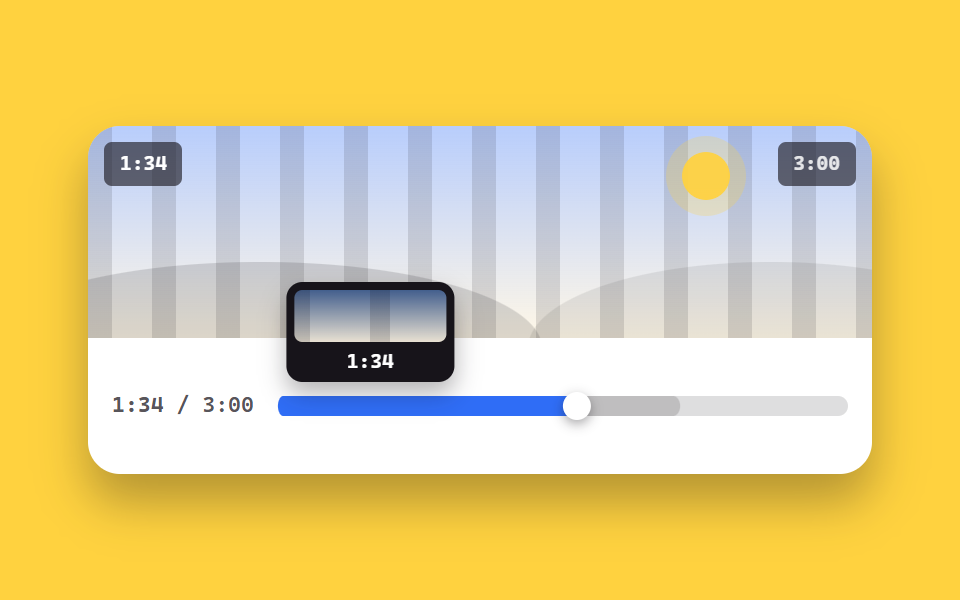
마우스를 올린 곳에 시간 툴팁이 따라다니고 재생한 구간은 채워지며, 읽어 온 버퍼 구간은 옅게 앞서 깔립니다. 툴팁 안의 장면 미리보기 칸은 호버 위치에 따라 무늬가 바뀝니다.
쓰임강의나 팟캐스트처럼 긴 영상을 두고 이 지점으로 건너뛰고 싶게 만드는 자리
role=slideraria-valuenowhover
<main class="stage">
  <figure class="pl is-demo" id="pl">
    <div class="pl__screen">
      <div class="pl__stripes" aria-hidden="true"></div>
      <div class="pl__world" aria-hidden="true"><span class="pl__sun"></span><span class="pl__hill pl__hill--a"></span><span class="pl__hill pl__hill--b"></span></div>
      <span class="pl__clock" id="clock">0:32</span>
      <span class="pl__badge">3:00</span>
    </div>
    <div class="sk__row">
      <span class="sk__t"><b id="t-now">0:32</b> / 3:00</span>
      <div class="sk is-hover" id="sk" role="slider" tabindex="0" aria-label="재생 위치" aria-valuemin="0" aria-valuemax="180" aria-valuenow="32" aria-valuetext="0:32 / 3:00">
        <span class="sk__track" aria-hidden="true">
          <span class="sk__buf" id="buf"></span>
          <span class="sk__fill"></span>
          <span class="sk__thumbwrap"><span class="sk__thumb"></span></span>
        </span>
        <span class="sk__tip" aria-hidden="true">
          <span class="sk__prev"><span class="sk__pat"></span></span>
          <b class="sk__tt" id="tt">0:32</b>
        </span>
      </div>
    </div>
  </figure>
</main>
@use "../../../../site/static/demo-tokens" as *;
// --p 는 등록된 사용자 지정 속성 — 키프레임에서 보간된다 (미등록이면 steps 처럼 튄다)
@property --p { syntax: "<number>"; inherits: true; initial-value: 0.18; }
$duration: $dur-quick;
$easing: $ease-spring;
$color: $subject-blue;
@include stage($stage-yellow);
.pl {
box-sizing: border-box;
width: min(392px, 92vw);
margin: 0;
border-radius: $r-card;
background: $stage-paper;
box-shadow: $shadow-raised;
overflow: hidden;
}
.pl__screen {
position: relative;
height: clamp(84px, 22vw, 116px);
overflow: hidden;
background: linear-gradient(180deg, rgba(47, 109, 246, .34), rgba(255, 247, 230, .96));
}
.pl__stripes {
position: absolute; inset: 0 -72px;
background: repeating-linear-gradient(90deg, rgba(23, 20, 26, .13) 0 12px, transparent 12px 32px);
animation-name: pl-pan;
animation-duration: $dur-loop;
animation-timing-function: linear;
animation-iteration-count: infinite;
}
@keyframes pl-pan { from { transform: translateX(0); } to { transform: translateX(-64px); } }
.pl__world { position: absolute; inset: 0; }
.pl__sun {
position: absolute; right: 18%; top: 12%;
width: 24px; height: 24px; border-radius: 50%;
background: rgba(255, 210, 63, .95);
box-shadow: 0 0 0 8px rgba(255, 210, 63, .25);
}
.pl__hill { position: absolute; bottom: -46%; height: 82%; border-radius: 50%; }
.pl__hill--a { left: -14%; width: 72%; background: rgba(23, 20, 26, .15); }
.pl__hill--b { right: -18%; width: 62%; background: rgba(23, 20, 26, .09); }
.pl__clock, .pl__badge {
position: absolute; top: $sp-2;
padding: $sp-1 $sp-2;
border-radius: $r-xs;
background: rgba(23, 20, 26, .62);
font-family: ui-monospace, "Cascadia Mono", Menlo, Consolas, monospace;
font-size: 10px; line-height: 14px; font-weight: 700;
}
.pl__clock { left: $sp-2; color: #fff; }
.pl__badge { right: $sp-2; color: rgba(255, 255, 255, .85); }
.sk__row {
display: flex; align-items: center; gap: $sp-3;
padding: $sp-3;
}
.sk__t {
flex: 0 0 auto;
color: rgba(23, 20, 26, .72);
font-family: ui-monospace, "Cascadia Mono", Menlo, Consolas, monospace;
font-size: 11px; line-height: 14px; font-weight: 600;
}
.sk {
--p: 0.18;
--h: 0.18;
position: relative;
flex: 1 1 auto;
height: 44px;
cursor: pointer;
touch-action: none;
}
.sk:focus-visible { outline: 2px solid $color; outline-offset: 2px; border-radius: $r-sm; }
.sk__track {
position: absolute; left: 0; right: 0; top: 50%;
height: 10px;
margin-top: -5px;
border-radius: $r-pill;
background: rgba(23, 20, 26, .14);
}
.sk__buf, .sk__fill {
position: absolute; inset: 0;
border-radius: $r-pill;
transform-origin: left center; // 규칙8: 좌변서 차오름
}
// 채움과 버퍼는 둘 다 --p 하나에서 나온다. 채움을 고정값(scaleX(.18))으로 두면 재생 머리만 가고
// 파란 구간은 제자리에 남는다 (실측 2026-09-12: 머리 54% · 채움 20%)
.sk__buf { background: rgba(23, 20, 26, .16); transform: scaleX(min(1, calc(var(--p) + .18))); }
.sk__fill { background: $color; transform: scaleX(var(--p)); }
.sk__thumbwrap {
position: absolute; left: 0; right: 0; top: 0; bottom: 0;
pointer-events: none;
transform: translateX(calc((100% - 14px) * var(--p)));
}
.sk__thumb {
position: absolute; left: 0; top: 50%;
width: 14px; height: 14px;
margin-top: -7px;
border-radius: 50%;
background: #fff;
box-shadow: 0 2px 6px rgba(23, 20, 26, .4);
}
.sk__tip {
position: absolute; bottom: 34px; left: 0;
width: 76px;
padding: $sp-1;
border-radius: $r-sm;
background: $subject-ink;
box-shadow: $shadow-press;
opacity: 0;
transform: translateX(calc((100% - 76px) * var(--h, var(--p))));
transition: opacity $duration $easing;
pointer-events: none;
}
.sk.is-hover .sk__tip, .sk:hover .sk__tip, .sk:focus-visible .sk__tip { opacity: 1; }
.sk__prev {
position: relative;
display: block;
height: 26px;
border-radius: $r-xs;
overflow: hidden;
background: linear-gradient(180deg, rgba(111, 169, 255, .5), rgba(255, 247, 230, .9));
}
.sk__pat {
position: absolute; inset: 0 -80px;
background: repeating-linear-gradient(90deg, rgba(23, 20, 26, .16) 0 10px, transparent 10px 40px);
transform: translateX(calc(-40px + var(--h, var(--p)) * -80px));
}
.sk__tt {
display: block;
padding-top: $sp-1;
color: #fff;
font-family: ui-monospace, "Cascadia Mono", Menlo, Consolas, monospace;
font-size: 10px; line-height: 12px; font-weight: 700;
text-align: center;
}
// ── 자동 루프: 툴팁이 바를 쓸며 시간을 재고 되돌아온다. --p 하나가 채움·엄지·툴팁·무늬를 함께 움직인다 ──
.pl.is-demo .sk {
--h: var(--p);
animation-name: sk-p;
animation-duration: $dur-loop;
animation-timing-function: ease-in-out;
animation-iteration-count: infinite;
}
@keyframes sk-p {
0% { --p: 0.18; }
78% { --p: 0.92; }
88% { --p: 0.92; }
100% { --p: 0.18; }
}
.pl.is-demo .sk__tip { opacity: 1; }
@media (prefers-reduced-motion: reduce) {
.pl.is-demo .sk, .pl__stripes { animation: none !important; }
.sk__tip { transition: none; }
}@property --p {
syntax: "<number>";
inherits: true;
initial-value: 0.18;
}
html, body {
margin: 0;
overflow: hidden;
}
.stage {
box-sizing: border-box;
min-height: 100vh;
display: grid;
place-items: center;
margin: 0;
background: #ffd23f;
font-family: -apple-system, "Segoe UI", "Noto Sans KR", sans-serif;
padding: clamp(8px, 4vw, 24px);
}
.pl {
box-sizing: border-box;
width: min(392px, 92vw);
margin: 0;
border-radius: 16px;
background: #ffffff;
box-shadow: 0 14px 24px rgba(23, 20, 26, 0.32);
overflow: hidden;
}
.pl__screen {
position: relative;
height: clamp(84px, 22vw, 116px);
overflow: hidden;
background: linear-gradient(180deg, rgba(47, 109, 246, 0.34), rgba(255, 247, 230, 0.96));
}
.pl__stripes {
position: absolute;
inset: 0 -72px;
background: repeating-linear-gradient(90deg, rgba(23, 20, 26, 0.13) 0 12px, transparent 12px 32px);
animation-name: pl-pan;
animation-duration: 2s;
animation-timing-function: linear;
animation-iteration-count: infinite;
}
@keyframes pl-pan {
from {
transform: translateX(0);
}
to {
transform: translateX(-64px);
}
}
.pl__world {
position: absolute;
inset: 0;
}
.pl__sun {
position: absolute;
right: 18%;
top: 12%;
width: 24px;
height: 24px;
border-radius: 50%;
background: rgba(255, 210, 63, 0.95);
box-shadow: 0 0 0 8px rgba(255, 210, 63, 0.25);
}
.pl__hill {
position: absolute;
bottom: -46%;
height: 82%;
border-radius: 50%;
}
.pl__hill--a {
left: -14%;
width: 72%;
background: rgba(23, 20, 26, 0.15);
}
.pl__hill--b {
right: -18%;
width: 62%;
background: rgba(23, 20, 26, 0.09);
}
.pl__clock, .pl__badge {
position: absolute;
top: 8px;
padding: 4px 8px;
border-radius: 4px;
background: rgba(23, 20, 26, 0.62);
font-family: ui-monospace, "Cascadia Mono", Menlo, Consolas, monospace;
font-size: 10px;
line-height: 14px;
font-weight: 700;
}
.pl__clock {
left: 8px;
color: #fff;
}
.pl__badge {
right: 8px;
color: rgba(255, 255, 255, 0.85);
}
.sk__row {
display: flex;
align-items: center;
gap: 12px;
padding: 12px;
}
.sk__t {
flex: 0 0 auto;
color: rgba(23, 20, 26, 0.72);
font-family: ui-monospace, "Cascadia Mono", Menlo, Consolas, monospace;
font-size: 11px;
line-height: 14px;
font-weight: 600;
}
.sk {
--p: 0.18;
--h: 0.18;
position: relative;
flex: 1 1 auto;
height: 44px;
cursor: pointer;
touch-action: none;
}
.sk:focus-visible {
outline: 2px solid #2f6df6;
outline-offset: 2px;
border-radius: 8px;
}
.sk__track {
position: absolute;
left: 0;
right: 0;
top: 50%;
height: 10px;
margin-top: -5px;
border-radius: 999px;
background: rgba(23, 20, 26, 0.14);
}
.sk__buf, .sk__fill {
position: absolute;
inset: 0;
border-radius: 999px;
transform-origin: left center;
}
.sk__buf {
background: rgba(23, 20, 26, 0.16);
transform: scaleX(min(1, var(--p) + 0.18));
}
.sk__fill {
background: #2f6df6;
transform: scaleX(var(--p));
}
.sk__thumbwrap {
position: absolute;
left: 0;
right: 0;
top: 0;
bottom: 0;
pointer-events: none;
transform: translateX(calc((100% - 14px) * var(--p)));
}
.sk__thumb {
position: absolute;
left: 0;
top: 50%;
width: 14px;
height: 14px;
margin-top: -7px;
border-radius: 50%;
background: #fff;
box-shadow: 0 2px 6px rgba(23, 20, 26, 0.4);
}
.sk__tip {
position: absolute;
bottom: 34px;
left: 0;
width: 76px;
padding: 4px;
border-radius: 8px;
background: #17141a;
box-shadow: 0 6px 12px rgba(23, 20, 26, 0.32);
opacity: 0;
transform: translateX(calc((100% - 76px) * var(--h, var(--p))));
transition: opacity 220ms cubic-bezier(0.2, 0.8, 0.2, 1);
pointer-events: none;
}
.sk.is-hover .sk__tip, .sk:hover .sk__tip, .sk:focus-visible .sk__tip {
opacity: 1;
}
.sk__prev {
position: relative;
display: block;
height: 26px;
border-radius: 4px;
overflow: hidden;
background: linear-gradient(180deg, rgba(111, 169, 255, 0.5), rgba(255, 247, 230, 0.9));
}
.sk__pat {
position: absolute;
inset: 0 -80px;
background: repeating-linear-gradient(90deg, rgba(23, 20, 26, 0.16) 0 10px, transparent 10px 40px);
transform: translateX(calc(-40px + var(--h, var(--p)) * -80px));
}
.sk__tt {
display: block;
padding-top: 4px;
color: #fff;
font-family: ui-monospace, "Cascadia Mono", Menlo, Consolas, monospace;
font-size: 10px;
line-height: 12px;
font-weight: 700;
text-align: center;
}
.pl.is-demo .sk {
--h: var(--p);
animation-name: sk-p;
animation-duration: 2s;
animation-timing-function: ease-in-out;
animation-iteration-count: infinite;
}
@keyframes sk-p {
0% {
--p: 0.18;
}
78% {
--p: 0.92;
}
88% {
--p: 0.92;
}
100% {
--p: 0.18;
}
}
.pl.is-demo .sk__tip {
opacity: 1;
}
@media (prefers-reduced-motion: reduce) {
.pl.is-demo .sk, .pl__stripes {
animation: none !important;
}
.sk__tip {
transition: none;
}
}// 실제 동작: 마우스를 올리면 그 지점 시간을 보여 주고, 누르거나 끌면 그곳으로 건너뛴다.
var root = document.getElementById('pl'),
sk = document.getElementById('sk'),
tt = document.getElementById('tt'),
now = document.getElementById('t-now'),
clock = document.getElementById('clock');
var DUR = 180, t = 32;
function fmt(s) { s = Math.floor(s); return Math.floor(s / 60) + ':' + ('0' + (s % 60)).slice(-2); }
function paint() {
var p = t / DUR;
sk.style.setProperty('--p', p.toFixed(4));
sk.setAttribute('aria-valuenow', Math.floor(t));
sk.setAttribute('aria-valuetext', fmt(t) + ' / 3:00');
now.textContent = fmt(t);
clock.textContent = fmt(t);
tt.textContent = fmt(p * DUR);
}
// 자동 루프 중엔 CSS 가 --p 를 움직이므로, 글자는 그리기 직전(rAF)에 그 값을 읽어 같은 프레임에 맞춘다.
// 따로 세면 시계와 재생 머리가 어긋난다 (실측 2026-09-12, 06 에서 같은 병)
var prev = 0;
requestAnimationFrame(function tick(ms) {
if (root.classList.contains('is-demo')) {
var v = parseFloat(getComputedStyle(sk).getPropertyValue('--p'));
if (v === v) {
t = v * DUR;
sk.setAttribute('aria-valuenow', Math.floor(t));
sk.setAttribute('aria-valuetext', fmt(t) + ' / 3:00');
now.textContent = fmt(t);
clock.textContent = fmt(t);
tt.textContent = fmt(t);
}
} else if (ms - prev > 500) {
prev = ms; t = (t + .5) % DUR; paint();
}
requestAnimationFrame(tick);
});
function pos(e) {
var r = sk.getBoundingClientRect();
return Math.max(0, Math.min(1, (e.clientX - r.left) / r.width));
}
sk.addEventListener('mousemove', function (e) {
root.classList.remove('is-demo');
var p = pos(e);
tt.textContent = fmt(p * DUR);
sk.style.setProperty('--h', p.toFixed(4));
});
sk.addEventListener('mouseleave', function () { sk.style.setProperty('--h', ''); });
function seek(e) { root.classList.remove('is-demo'); t = pos(e) * DUR; paint(); }
sk.addEventListener('pointerdown', function (e) { sk.setPointerCapture(e.pointerId); seek(e); });
sk.addEventListener('pointermove', function (e) { if (e.buttons) seek(e); });
sk.addEventListener('keydown', function (e) {
if (e.key === 'ArrowRight') { t = Math.min(DUR, t + 5); paint(); e.preventDefault(); }
else if (e.key === 'ArrowLeft') { t = Math.max(0, t - 5); paint(); e.preventDefault(); }
else if (e.key === 'Home') { t = 0; paint(); e.preventDefault(); }
else if (e.key === 'End') { t = DUR - 1; paint(); e.preventDefault(); }
});import { useEffect, useState } from "react";
import type { CSSProperties } from "react";
import styles from "./SeekBarTooltip.module.scss";
export type SeekBarTooltipProps = {
/** 더미 영상 길이(초) */
total?: number;
/** 시작 위치(초) */
start?: number;
duration?: number;
easing?: string;
color?: string;
};
type Vars = CSSProperties & { "--duration"?: string; "--easing"?: string; "--color"?: string };
type SeekVars = CSSProperties & { "--p"?: string; "--h"?: string };
// TS7006 방지 — 'react' 의 이벤트 제네릭 대신 필요한 필드만 로컬로 선언한다
type Rect = { left: number; width: number };
type MoveEvt = { clientX: number; currentTarget: { getBoundingClientRect: () => Rect } };
type PtrEvt = MoveEvt & {
buttons: number;
pointerId: number;
currentTarget: { getBoundingClientRect: () => Rect; setPointerCapture: (id: number) => void };
};
type KeyEvt = { key: string; preventDefault: () => void };
function fmt(s: number) {
const n = Math.floor(s);
return Math.floor(n / 60) + ":" + ("0" + (n % 60)).slice(-2);
}
function pos(e: MoveEvt) {
const r = e.currentTarget.getBoundingClientRect();
return Math.max(0, Math.min(1, (e.clientX - r.left) / r.width));
}
export default function SeekBarTooltip({
total = 180,
start = 32,
duration = 220,
easing = "cubic-bezier(.2,.8,.2,1)",
color = "#2f6df6",
}: SeekBarTooltipProps) {
const [t, setT] = useState(start);
const [hover, setHover] = useState(-1);
const vars: Vars = { "--duration": `${duration}ms`, "--easing": easing, "--color": color };
// 더미 재생 시계 — 바닐라의 setInterval(500ms, +0.5초) 을 그대로
useEffect(() => {
const id = setInterval(() => setT((p) => (p + 0.5) % total), 500);
return () => clearInterval(id);
}, [total]);
const p = t / total;
const h = hover >= 0 ? hover : p;
const seekVars: SeekVars = { "--p": p.toFixed(4), "--h": h.toFixed(4) };
function seek(e: MoveEvt) {
setT(pos(e) * total);
}
return (
<figure className={styles.player} style={vars}>
<div className={styles.screen}>
<div className={styles.stripes} aria-hidden="true" />
<div className={styles.world} aria-hidden="true">
<span className={styles.sun} />
<span className={`${styles.hill} ${styles.hillA}`} />
<span className={`${styles.hill} ${styles.hillB}`} />
</div>
<span className={styles.clock}>{fmt(t)}</span>
<span className={styles.badge}>{fmt(total)}</span>
</div>
<div className={styles.row}>
<span className={styles.rowTime}>
<b>{fmt(t)}</b> / {fmt(total)}
</span>
<div
className={`${styles.seek} ${hover >= 0 ? styles.isHover : ""}`}
style={seekVars}
role="slider"
tabIndex={0}
aria-label="재생 위치"
aria-valuemin={0}
aria-valuemax={total}
aria-valuenow={Math.floor(t)}
aria-valuetext={`${fmt(t)} / ${fmt(total)}`}
onMouseMove={(e: MoveEvt) => setHover(pos(e))}
onMouseLeave={() => setHover(-1)}
onPointerDown={(e: PtrEvt) => {
e.currentTarget.setPointerCapture(e.pointerId);
seek(e);
}}
onPointerMove={(e: PtrEvt) => {
if (e.buttons) seek(e);
}}
onKeyDown={(e: KeyEvt) => {
if (e.key === "ArrowRight") { setT((v) => Math.min(total, v + 5)); e.preventDefault(); }
else if (e.key === "ArrowLeft") { setT((v) => Math.max(0, v - 5)); e.preventDefault(); }
else if (e.key === "Home") { setT(0); e.preventDefault(); }
else if (e.key === "End") { setT(total - 1); e.preventDefault(); }
}}
>
<span className={styles.track} aria-hidden="true">
<span className={styles.buf} style={{ transform: `scaleX(${Math.min(1, p + 0.18).toFixed(4)})` }} />
<span className={styles.fill} style={{ transform: `scaleX(${p.toFixed(4)})` }} />
<span className={styles.thumbwrap}>
<span className={styles.thumb} />
</span>
</span>
<span className={styles.tip} aria-hidden="true">
<span className={styles.prev}>
<span className={styles.pat} />
</span>
<b className={styles.tt}>{fmt(h * total)}</b>
</span>
</div>
</div>
</figure>
);
}02 시간 툴팁 달린 시크 바 — 측정 누적면적 30.392% · 움직인 프레임 23/23GODRICH 원작 · zip 에 SCSS·React 포함 · 동영상 플레이어 만들기 9종 — 영상 파일 없이도 진짜로 돈다
이 데모가 속한 글
 동영상 플레이어 만들기 9종 — 영상 파일 없이도 진짜로 돈다동영상 플레이어 만들기는 브라우저가 기본으로 주는 밋밋한 재생 막대를 버리고 재생 버튼·시간 바·음량·자막을 직접 그려 붙이는 일입니다. 여기 아홉 개는 영상 파일을 하나도 쓰지 않고, 화면 속 풍경까지 CSS 로 이 글의 데모 전부 보기