01Trượt vào từ bên phải
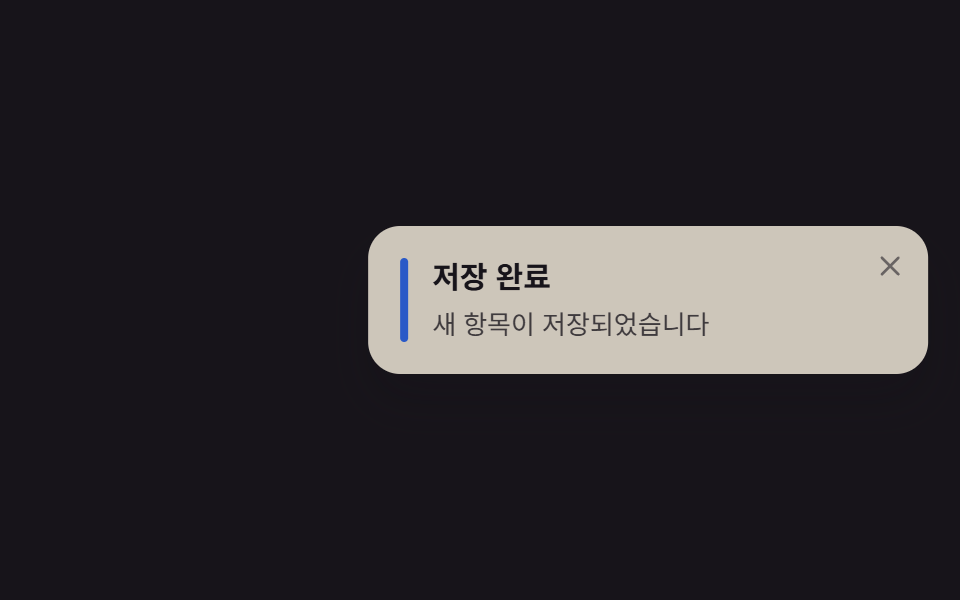
Card trượt vào từ ngoài mép phải bằng translateX, dừng lại một nhịp rồi thoát ra đúng hướng cũ.
Dùng choThông báo lưu, tải lên hoàn tất, toast góc màn hình của web app desktop
translateX0.6초코너 고정

<main class="stage">
  <div class="toast is-demo" role="status" aria-live="polite">
    <span class="toast__bar" aria-hidden="true"></span>
    <div class="toast__body">
      <p class="toast__title">Đã lưu</p>
      <p class="toast__text">Mục mới đã được lưu</p>
    </div>
    <button class="toast__close" type="button" aria-label="Đóng thông báo">
      <svg viewBox="0 0 24 24" width="14" height="14" aria-hidden="true">
        <line x1="5" y1="5" x2="19" y2="19" stroke="currentColor" stroke-width="2.4" stroke-linecap="round"/>
        <line x1="19" y1="5" x2="5" y2="19" stroke="currentColor" stroke-width="2.4" stroke-linecap="round"/>
      </svg>
    </button>
  </div>
</main>
@use "../../../../site/static/demo-tokens" as *;
// ── 변수 3개 ──────────────────────────────
$duration: $dur-enter; // 600ms — 오른쪽에서 미끄러져 들어오는 시간
$easing: $ease-spring;
$color: $subject-blue; // 왼쪽 강조 막대 색
// ── 데모 무대 ───────────────────────────────
@include stage($stage-ink);
// 실측 2026-09-10: 토스트가 오른쪽 밖(translateX 140%)에서 들어온다 — html/body 의 overflow:hidden 은
// 뷰포트로 전파돼 scrollWidth 를 못 줄인다(320px 넘침 재측정 실측). .stage 자체를 클리핑 컨테이너로 만든다.
.stage { overflow: hidden; }
.toast {
position: relative;
box-sizing: border-box;
display: flex; align-items: flex-start; gap: $sp-3;
width: min(280px, 86vw);
padding: $sp-4 $sp-10 $sp-4 $sp-4;
border-radius: $r-card;
background: $subject-cream;
box-shadow: $shadow-raised;
transform: translateX(140%);
opacity: 0;
}
.toast__bar {
align-self: stretch;
width: $sp-1;
border-radius: $r-xs;
background: $color;
flex: none;
}
.toast__title { margin: 0 0 $sp-1; font-weight: 700; font-size: 15px; line-height: 1.3; font-family: inherit; color: $subject-ink; }
.toast__text { margin: 0; font-weight: 400; font-size: 13px; line-height: 1.4; font-family: inherit; color: $subject-ink; opacity: .78; }
.toast__close {
position: absolute; top: $sp-2; right: $sp-2;
display: grid; place-items: center;
width: $sp-6; height: $sp-6;
border: 0; border-radius: $r-xs;
background: transparent; color: $subject-ink; opacity: .55;
cursor: pointer;
&:hover, &:focus-visible { opacity: 1; }
}
// 실측 2026-09-10: 오른쪽 밖에서 들어와 머물다 다시 나간다. 한 바퀴 = 전역 루프(2s)
.toast.is-demo { animation: slide-loop $dur-loop $easing infinite; }
@keyframes slide-loop {
0% { transform: translateX(140%); opacity: 0; }
18% { transform: translateX(0); opacity: 1; }
78% { transform: translateX(0); opacity: 1; }
100% { transform: translateX(140%); opacity: 0; }
}
// ── 접근성: 움직임 줄이기 설정이면 자리만, 슬라이드는 생략 ────────
@media (prefers-reduced-motion: reduce) {
.toast.is-demo { animation: none; transform: translateX(0); opacity: 1; }
}html, body {
margin: 0;
overflow: hidden;
}
.stage {
box-sizing: border-box;
min-height: 100vh;
display: grid;
place-items: center;
margin: 0;
background: #17141a;
font-family: -apple-system, "Segoe UI", "Noto Sans KR", sans-serif;
padding: clamp(8px, 4vw, 24px);
}
.stage {
overflow: hidden;
}
.toast {
position: relative;
box-sizing: border-box;
display: flex;
align-items: flex-start;
gap: 12px;
width: min(280px, 86vw);
padding: 16px 40px 16px 16px;
border-radius: 16px;
background: #fff7e6;
box-shadow: 0 14px 24px rgba(23, 20, 26, 0.32);
transform: translateX(140%);
opacity: 0;
}
.toast__bar {
align-self: stretch;
width: 4px;
border-radius: 4px;
background: #2f6df6;
flex: none;
}
.toast__title {
margin: 0 0 4px;
font-weight: 700;
font-size: 15px;
line-height: 1.3;
font-family: inherit;
color: #17141a;
}
.toast__text {
margin: 0;
font-weight: 400;
font-size: 13px;
line-height: 1.4;
font-family: inherit;
color: #17141a;
opacity: 0.78;
}
.toast__close {
position: absolute;
top: 8px;
right: 8px;
display: grid;
place-items: center;
width: 24px;
height: 24px;
border: 0;
border-radius: 4px;
background: transparent;
color: #17141a;
opacity: 0.55;
cursor: pointer;
}
.toast__close:hover, .toast__close:focus-visible {
opacity: 1;
}
.toast.is-demo {
animation: slide-loop 2s cubic-bezier(0.2, 0.8, 0.2, 1) infinite;
}
@keyframes slide-loop {
0% {
transform: translateX(140%);
opacity: 0;
}
18% {
transform: translateX(0);
opacity: 1;
}
78% {
transform: translateX(0);
opacity: 1;
}
100% {
transform: translateX(140%);
opacity: 0;
}
}
@media (prefers-reduced-motion: reduce) {
.toast.is-demo {
animation: none;
transform: translateX(0);
opacity: 1;
}
}import type { CSSProperties, ReactNode } from "react";
import styles from "./ToastSlideIn.module.scss";
export type ToastSlideInProps = {
visible: boolean;
title: string;
children: ReactNode;
onClose?: () => void;
/** 오른쪽에서 미끄러져 들어오는 시간 (기본 600ms) */
duration?: number;
easing?: string;
color?: string;
};
type Vars = CSSProperties & { "--duration"?: string; "--easing"?: string; "--color"?: string };
export default function ToastSlideIn({
visible,
title,
children,
onClose,
duration = 600,
easing = "cubic-bezier(.2,.8,.2,1)",
color = "#2f6df6",
}: ToastSlideInProps) {
const vars: Vars = { "--duration": `${duration}ms`, "--easing": easing, "--color": color };
return (
<div className={`${styles.toast} ${visible ? styles.isVisible : ""}`} style={vars} role="status" aria-live="polite">
<span className={styles.bar} aria-hidden="true" />
<div className={styles.body}>
<p className={styles.title}>{title}</p>
<p className={styles.text}>{children}</p>
</div>
<button className={styles.close} type="button" aria-label="알림 닫기" onClick={onClose}>
<svg viewBox="0 0 24 24" width={14} height={14} aria-hidden="true">
<line x1={5} y1={5} x2={19} y2={19} stroke="currentColor" strokeWidth={2.4} strokeLinecap="round" />
<line x1={19} y1={5} x2={5} y2={19} stroke="currentColor" strokeWidth={2.4} strokeLinecap="round" />
</svg>
</button>
</div>
);
}01 Trượt vào từ bên phải — Diện tích đo được 19.466% · khung hình chuyển động 9/23Nguyên tác GODRICH · SCSS và React nằm trong tệp zip · 9 CSS Toast Notification — không cần JS
Bài viết chứa demo này
 9 CSS Toast Notification — không cần JSCSS toast notification là thẻ thông báo nhỏ tự nổi lên một góc màn hình rồi tự đóng, dựng bằng CSS thuần, không cần JS. Xem tất cả demo trong bài này