04Ép bàn phím số trên mobile
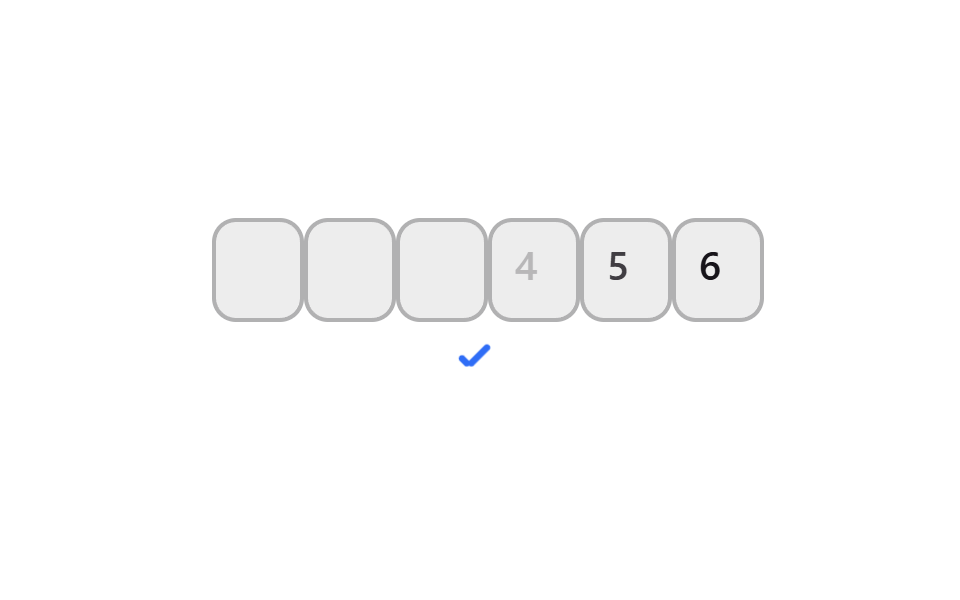
Trên mobile, bàn phím số hiện ra ngay thay cho bàn phím chữ đầy đủ.
Dùng choNhập mã xác minh trên điện thoại
inputmode numericpattern [0-9]*텐키
<main class="stage">
  <div class="pin is-demo" role="group" aria-label="Mã xác minh">
    <div class="pin__row">
      <span class="pin__box">
        <input class="pin__input" type="text" inputmode="numeric" pattern="[0-9]*" maxlength="1" autocomplete="one-time-code" aria-label="Mã xác minh, chữ số 1">
        <span class="pin__ghost" aria-hidden="true">1</span>
      </span>
      <span class="pin__box">
        <input class="pin__input" type="text" inputmode="numeric" pattern="[0-9]*" maxlength="1" autocomplete="one-time-code" aria-label="Mã xác minh, chữ số 2">
        <span class="pin__ghost" aria-hidden="true">2</span>
      </span>
      <span class="pin__box">
        <input class="pin__input" type="text" inputmode="numeric" pattern="[0-9]*" maxlength="1" autocomplete="one-time-code" aria-label="Mã xác minh, chữ số 3">
        <span class="pin__ghost" aria-hidden="true">3</span>
      </span>
      <span class="pin__box">
        <input class="pin__input" type="text" inputmode="numeric" pattern="[0-9]*" maxlength="1" autocomplete="one-time-code" aria-label="Mã xác minh, chữ số 4">
        <span class="pin__ghost" aria-hidden="true">4</span>
      </span>
      <span class="pin__box">
        <input class="pin__input" type="text" inputmode="numeric" pattern="[0-9]*" maxlength="1" autocomplete="one-time-code" aria-label="Mã xác minh, chữ số 5">
        <span class="pin__ghost" aria-hidden="true">5</span>
      </span>
      <span class="pin__box">
        <input class="pin__input" type="text" inputmode="numeric" pattern="[0-9]*" maxlength="1" autocomplete="one-time-code" aria-label="Mã xác minh, chữ số 6">
        <span class="pin__ghost" aria-hidden="true">6</span>
      </span>
      <span class="pin__caret" aria-hidden="true"></span>
    </div>
    <span class="pin__signal pin__signal--check" aria-hidden="true"></span>
  </div>
</main>@use "../../../../site/static/demo-tokens" as *;
$duration: $dur-quick;
$easing: $ease-spring;
$color: $subject-blue;
$fg: $subject-ink;
@include stage($stage-paper);
.pin {
display: flex;
flex-direction: column;
align-items: center;
gap: 14px;
font-family: -apple-system, "Segoe UI", "Noto Sans KR", sans-serif;
}
.pin__row {
position: relative;
display: flex;
gap: 8px;
}
.pin__box {
position: relative;
width: 38px;
height: 46px;
}
.pin__input {
position: absolute;
inset: 0;
width: 100%;
height: 100%;
border: 2px solid rgba($fg, .28);
border-radius: $r-control;
background: rgba($fg, .08);
color: $fg;
text-align: center;
font-weight: 600; font-size: 20px; line-height: 1;
outline: none;
transition: border-color $duration $easing;
-webkit-tap-highlight-color: transparent;
}
.pin__input:focus { border-color: $color; }
.pin__input.is-scrambling { color: rgba($fg, .55); }
.pin__input.is-settle { animation: pin-settle 180ms $easing; }
@keyframes pin-settle {
0% { transform: scale(1.15); }
100% { transform: scale(1); }
}
.pin__ghost {
position: absolute;
inset: 0;
display: grid;
place-items: center;
color: $fg;
font-weight: 600; font-size: 20px; line-height: 1;
opacity: 0;
pointer-events: none;
}
.pin__caret {
position: absolute;
left: 0;
top: -9px;
width: 38px;
height: 3px;
border-radius: $r-pill;
background: $color;
opacity: 0;
}
.pin__signal {
position: relative;
width: 22px;
height: 22px;
opacity: 0;
transform: scale(.6);
}
.pin__signal--check::before,
.pin__signal--check::after {
content: "";
position: absolute;
background: $color;
border-radius: 2px;
}
.pin__signal--check::before { left: 6px; top: 12px; width: 6px; height: 3px; transform: rotate(225deg); transform-origin: left center; } // 같은 꼭짓점(6,12)
.pin__signal--check::after { left: 6px; top: 12px; width: 13px; height: 3px; transform: rotate(-45deg); transform-origin: left center; }
.pin.is-demo .pin__ghost { animation: pin-ghost $dur-loop linear infinite; }
@for $i from 1 through 6 {
.pin.is-demo .pin__box:nth-child(#{$i}) .pin__ghost { animation-delay: #{($i - 1) * 90}ms; }
}
@keyframes pin-ghost {
0%, 100% { opacity: 0; }
7% { opacity: 1; }
68% { opacity: 1; }
76% { opacity: 0; }
}
.pin.is-demo .pin__caret {
animation: pin-caret $dur-loop steps(1) infinite;
}
@keyframes pin-caret {
0% { opacity: .9; transform: translateX(0); }
5% { opacity: .9; transform: translateX(46px); }
9% { opacity: .9; transform: translateX(92px); }
14% { opacity: .9; transform: translateX(138px); }
18% { opacity: .9; transform: translateX(184px); }
23% { opacity: .9; transform: translateX(230px); }
76% { opacity: .9; transform: translateX(230px); }
84%, 100% { opacity: 0; transform: translateX(230px); }
}
.pin.is-demo .pin__signal--check { animation: pin-signal $dur-loop linear infinite; }
@keyframes pin-signal {
0%, 78% { opacity: 0; transform: scale(.6); }
86% { opacity: 1; transform: scale(1.12); }
94%, 100% { opacity: 1; transform: scale(1); }
}
@media (prefers-reduced-motion: reduce) {
.pin__ghost, .pin__ghost--dot, .pin__ghost--digit, .pin__caret, .pin__signal,
.pin__row, .pin__timer-n, .pin__resend, .pin__input {
animation: none !important;
transition: none !important;
}
.pin.is-demo .pin__ghost,
.pin.is-demo .pin__ghost--digit { opacity: 1; }
.pin.is-demo .pin__ghost--dot { opacity: 0; }
.pin.is-demo .pin__caret { opacity: .9; transform: translateX(230px); }
.pin.is-demo .pin__signal { opacity: 1; transform: scale(1); }
.pin.is-demo .pin__signal--toggle::before { transform: translateX(16px); }
.pin.is-demo .pin__resend { opacity: 1; transform: scale(1); }
}html, body {
margin: 0;
overflow: hidden;
}
.stage {
box-sizing: border-box;
min-height: 100vh;
display: grid;
place-items: center;
margin: 0;
background: #ffffff;
font-family: -apple-system, "Segoe UI", "Noto Sans KR", sans-serif;
padding: clamp(8px, 4vw, 24px);
}
.pin {
display: flex;
flex-direction: column;
align-items: center;
gap: 14px;
font-family: -apple-system, "Segoe UI", "Noto Sans KR", sans-serif;
}
.pin__row {
position: relative;
display: flex;
gap: 8px;
}
.pin__box {
position: relative;
width: 38px;
height: 46px;
}
.pin__input {
position: absolute;
inset: 0;
width: 100%;
height: 100%;
border: 2px solid rgba(23, 20, 26, 0.28);
border-radius: 12px;
background: rgba(23, 20, 26, 0.08);
color: #17141a;
text-align: center;
font-weight: 600;
font-size: 20px;
line-height: 1;
outline: none;
transition: border-color 220ms cubic-bezier(0.2, 0.8, 0.2, 1);
-webkit-tap-highlight-color: transparent;
}
.pin__input:focus {
border-color: #2f6df6;
}
.pin__input.is-scrambling {
color: rgba(23, 20, 26, 0.55);
}
.pin__input.is-settle {
animation: pin-settle 180ms cubic-bezier(0.2, 0.8, 0.2, 1);
}
@keyframes pin-settle {
0% {
transform: scale(1.15);
}
100% {
transform: scale(1);
}
}
.pin__ghost {
position: absolute;
inset: 0;
display: grid;
place-items: center;
color: #17141a;
font-weight: 600;
font-size: 20px;
line-height: 1;
opacity: 0;
pointer-events: none;
}
.pin__caret {
position: absolute;
left: 0;
top: -9px;
width: 38px;
height: 3px;
border-radius: 999px;
background: #2f6df6;
opacity: 0;
}
.pin__signal {
position: relative;
width: 22px;
height: 22px;
opacity: 0;
transform: scale(0.6);
}
.pin__signal--check::before,
.pin__signal--check::after {
content: "";
position: absolute;
background: #2f6df6;
border-radius: 2px;
}
.pin__signal--check::before {
left: 6px;
top: 12px;
width: 6px;
height: 3px;
transform: rotate(225deg);
transform-origin: left center;
}
.pin__signal--check::after {
left: 6px;
top: 12px;
width: 13px;
height: 3px;
transform: rotate(-45deg);
transform-origin: left center;
}
.pin.is-demo .pin__ghost {
animation: pin-ghost 2s linear infinite;
}
.pin.is-demo .pin__box:nth-child(1) .pin__ghost {
animation-delay: 0ms;
}
.pin.is-demo .pin__box:nth-child(2) .pin__ghost {
animation-delay: 90ms;
}
.pin.is-demo .pin__box:nth-child(3) .pin__ghost {
animation-delay: 180ms;
}
.pin.is-demo .pin__box:nth-child(4) .pin__ghost {
animation-delay: 270ms;
}
.pin.is-demo .pin__box:nth-child(5) .pin__ghost {
animation-delay: 360ms;
}
.pin.is-demo .pin__box:nth-child(6) .pin__ghost {
animation-delay: 450ms;
}
@keyframes pin-ghost {
0%, 100% {
opacity: 0;
}
7% {
opacity: 1;
}
68% {
opacity: 1;
}
76% {
opacity: 0;
}
}
.pin.is-demo .pin__caret {
animation: pin-caret 2s steps(1) infinite;
}
@keyframes pin-caret {
0% {
opacity: 0.9;
transform: translateX(0);
}
5% {
opacity: 0.9;
transform: translateX(46px);
}
9% {
opacity: 0.9;
transform: translateX(92px);
}
14% {
opacity: 0.9;
transform: translateX(138px);
}
18% {
opacity: 0.9;
transform: translateX(184px);
}
23% {
opacity: 0.9;
transform: translateX(230px);
}
76% {
opacity: 0.9;
transform: translateX(230px);
}
84%, 100% {
opacity: 0;
transform: translateX(230px);
}
}
.pin.is-demo .pin__signal--check {
animation: pin-signal 2s linear infinite;
}
@keyframes pin-signal {
0%, 78% {
opacity: 0;
transform: scale(0.6);
}
86% {
opacity: 1;
transform: scale(1.12);
}
94%, 100% {
opacity: 1;
transform: scale(1);
}
}
@media (prefers-reduced-motion: reduce) {
.pin__ghost, .pin__ghost--dot, .pin__ghost--digit, .pin__caret, .pin__signal,
.pin__row, .pin__timer-n, .pin__resend, .pin__input {
animation: none !important;
transition: none !important;
}
.pin.is-demo .pin__ghost,
.pin.is-demo .pin__ghost--digit {
opacity: 1;
}
.pin.is-demo .pin__ghost--dot {
opacity: 0;
}
.pin.is-demo .pin__caret {
opacity: 0.9;
transform: translateX(230px);
}
.pin.is-demo .pin__signal {
opacity: 1;
transform: scale(1);
}
.pin.is-demo .pin__signal--toggle::before {
transform: translateX(16px);
}
.pin.is-demo .pin__resend {
opacity: 1;
transform: scale(1);
}
}(function () {
var pin = document.querySelector('.pin');
var boxes = [].slice.call(pin.querySelectorAll('.pin__input'));
var reduceMotion = window.matchMedia && window.matchMedia('(prefers-reduced-motion: reduce)').matches;
function wake() { pin.classList.remove('is-demo'); }
function scrambleToDigit(el, finalDigit, onSettle) {
if (reduceMotion) { el.value = finalDigit; if (onSettle) onSettle(); return; }
el.classList.add('is-scrambling');
var step = 0;
var steps = 7;
var delay = 22;
(function tick() {
if (step >= steps) {
el.value = finalDigit;
el.classList.remove('is-scrambling');
el.classList.add('is-settle');
setTimeout(function () { el.classList.remove('is-settle'); }, 200);
if (onSettle) onSettle();
return;
}
el.value = String(Math.floor(Math.random() * 10));
step++;
delay = Math.round(delay * 1.4);
setTimeout(tick, delay);
})();
}
boxes.forEach(function (b, i) {
b.addEventListener('focus', wake);
b.addEventListener('input', function () {
var digit = b.value.replace(/[^0-9]/g, '').slice(-1);
if (!digit) { b.value = ''; return; }
scrambleToDigit(b, digit, function () {
if (boxes[i + 1]) boxes[i + 1].focus({ preventScroll: true });
});
});
b.addEventListener('keydown', function (e) {
if (e.key === 'Backspace' && !b.value && boxes[i - 1]) boxes[i - 1].focus({ preventScroll: true });
});
b.addEventListener('paste', function (e) {
var t = (e.clipboardData || window.clipboardData).getData('text').replace(/[^0-9]/g, '');
if (!t) return;
e.preventDefault();
t.slice(0, 6).split('').forEach(function (ch, k) { if (boxes[k]) boxes[k].value = ch; });
(boxes[Math.min(t.length, 6) - 1] || boxes[0]).focus({ preventScroll: true });
});
});
})();import { useState, useRef, useEffect } from "react";
import type { CSSProperties } from "react";
import styles from "./PinMobileNumericKeypad.module.scss";
function siblings(el: any): HTMLInputElement[] {
var row = el.closest("[data-pin-row]");
return row ? Array.prototype.slice.call(row.querySelectorAll("input")) : [];
}
export type PinMobileNumericKeypadProps = {
/** 칸 수 (기본 6) */
length?: number;
/** 6칸이 다 채워지면 호출 */
onComplete?: (code: string) => void;
/** 강조 색 */
color?: string;
className?: string;
};
type Vars = CSSProperties & { "--color"?: string };
// useRef 는 T | null 을 돌려준다. 값이 항상 있는 상자는 이렇게 좁혀 쓴다 (077 관례)
type Box<T> = { current: T };
type TimerList = Array<ReturnType<typeof setTimeout> | undefined>;
// useState setter — 스텁 환경에 Dispatch/SetStateAction 이 없어 로컬로 같은 모양을 쓴다
type ListSetter<T> = (v: T[] | ((prev: T[]) => T[])) => void;
export default function PinMobileNumericKeypad({
length = 6,
onComplete,
color = "#2f6df6",
className = "",
}: PinMobileNumericKeypadProps) {
const [values, setValues] = useState<string[]>(Array(length).fill(""));
const [displayValues, setDisplayValues] = useState<string[]>(Array(length).fill(""));
const [animState, setAnimState] = useState<Array<"idle" | "scrambling" | "settle">>(Array(length).fill("idle"));
const vars: Vars = { "--color": color };
const reduceMotionRef = useRef(false) as Box<boolean>;
const timersRef = useRef<TimerList>([]) as Box<TimerList>;
useEffect(() => {
reduceMotionRef.current = typeof window !== "undefined" && !!window.matchMedia
? window.matchMedia("(prefers-reduced-motion: reduce)").matches
: false;
return () => { timersRef.current.forEach((t) => t && clearTimeout(t)); };
}, []);
function updateAt<T>(setter: ListSetter<T>, index: number, val: T) {
setter((prev) => {
const next = prev.slice();
next[index] = val;
return next;
});
}
function scrambleToDigit(index: number, finalDigit: string, onSettle: () => void) {
if (reduceMotionRef.current) {
updateAt(setDisplayValues, index, finalDigit);
onSettle();
return;
}
updateAt(setAnimState, index, "scrambling");
let step = 0;
const steps = 7;
let delay = 22;
const tick = () => {
if (step >= steps) {
updateAt(setDisplayValues, index, finalDigit);
updateAt(setAnimState, index, "settle");
timersRef.current[index] = setTimeout(() => {
updateAt(setAnimState, index, "idle");
}, 200);
onSettle();
return;
}
updateAt(setDisplayValues, index, String(Math.floor(Math.random() * 10)));
step++;
delay = Math.round(delay * 1.4);
timersRef.current[index] = setTimeout(tick, delay);
};
tick();
}
function handleChange(e: any, i: number) {
const el = e.currentTarget;
const v = String(el.value).replace(/[^0-9]/g, "").slice(-1);
if (!v) {
const next = values.slice();
next[i] = "";
setValues(next);
updateAt(setDisplayValues, i, "");
return;
}
const committed = values.slice();
committed[i] = v;
setValues(committed);
scrambleToDigit(i, v, () => {
const boxes = siblings(el);
if (boxes[i + 1]) boxes[i + 1].focus({ preventScroll: true });
if (committed.every(Boolean)) onComplete?.(committed.join(""));
});
}
function handleKeyDown(e: any, i: number) {
if (e.key === "Backspace" && !values[i]) {
const boxes = siblings(e.currentTarget);
if (boxes[i - 1]) boxes[i - 1].focus({ preventScroll: true });
}
}
function handlePaste(e: any) {
const text = String(e.clipboardData.getData("text")).replace(/[^0-9]/g, "").slice(0, length);
if (!text) return;
e.preventDefault();
const next = text.split("");
while (next.length < length) next.push("");
setValues(next);
setDisplayValues(next.slice());
if (text.length === length) onComplete?.(text);
}
return (
<div className={`${styles.pin} ${className}`} style={vars} data-pin-row>
{displayValues.map((v, i) => (
<input
key={i}
className={[
styles.box,
animState[i] === "scrambling" ? styles.scrambling : "",
animState[i] === "settle" ? styles.settle : "",
].join(" ").trim()}
type="text"
inputMode="numeric"
pattern="[0-9]*"
maxLength={1}
autoComplete="one-time-code"
aria-label={`인증번호 ${i + 1}번째 자리`}
value={v}
onChange={(e: any) => handleChange(e, i)}
onKeyDown={(e: any) => handleKeyDown(e, i)}
onPaste={(e: any) => handlePaste(e)}
/>
))}
</div>
);
}04 Ép bàn phím số trên mobile — Diện tích đo được 0.8% · khung hình chuyển động 14/23Nguyên tác GODRICH · SCSS và React nằm trong tệp zip · OTP Input UI: 9 tình huống kèm validation
Bài viết chứa demo này
 OTP Input UI: 9 tình huống kèm validationOTP input ui là phần form nhận sáu chữ số, mỗi số một ô, muốn mượt thì phải lo cả nhảy ô kế, dán nguyên mã lẫn xử lý lỗi Xem tất cả demo trong bài này
Nếu bạn thích hiệu ứng này - demo tương tự
 Giao diện đăng nhập · xác thực01 Thẻ đăng nhập kiểu kính mờ (glassmorphism)9 mẫu form đăng ký & đăng nhập copy-paste được
 Giao diện danh sách · bảng01 Vuốt để xóa (reveal)9 mẫu List UI: swipe to delete css và phân trang
 Giao diện lựa chọn01 Segmented control kiểu pill iOS9 Segmented Control UI — dán là chạy