02Lưới dự án
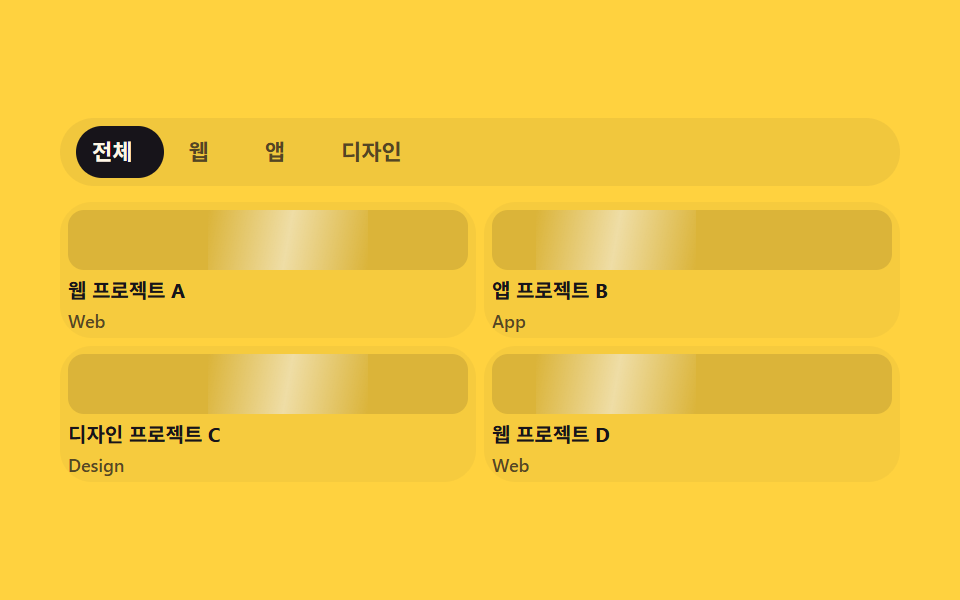
Bốn card dự án xếp thành lưới; bấm tab phân loại phía trên (Tất cả·Web·App·Thiết kế) thì indicator dịch đúng bằng độ rộng tab thật đo bằng getBoundingClientRect, các card ngoài phân loại mờ hẳn đi.
Dùng choSection danh sách dự án và lọc tác phẩm trên site portfolio
getBoundingClientRecttranslateXclick
<main class="stage">
  <section class="pg is-demo">
    <div class="pg__tabs" role="tablist" aria-label="Phân loại dự án">
      <span class="pg__indicator" aria-hidden="true"></span>
      <button class="pg__tab" type="button" role="tab" data-cat="all" aria-selected="true">Tất cả</button>
      <button class="pg__tab" type="button" role="tab" data-cat="web" aria-selected="false">Web</button>
      <button class="pg__tab" type="button" role="tab" data-cat="app" aria-selected="false">App</button>
      <button class="pg__tab" type="button" role="tab" data-cat="design" aria-selected="false">Thiết kế</button>
    </div>
    <div class="pg__grid">
      <article class="pg__card" data-cat="web"><span class="pg__thumb" aria-hidden="true"></span><p class="pg__title">Dự án Web A</p><p class="pg__tag">Web</p></article>
      <article class="pg__card" data-cat="app"><span class="pg__thumb" aria-hidden="true"></span><p class="pg__title">Dự án App B</p><p class="pg__tag">App</p></article>
      <article class="pg__card" data-cat="design"><span class="pg__thumb" aria-hidden="true"></span><p class="pg__title">Dự án Thiết kế C</p><p class="pg__tag">Design</p></article>
      <article class="pg__card" data-cat="web"><span class="pg__thumb" aria-hidden="true"></span><p class="pg__title">Dự án Web D</p><p class="pg__tag">Web</p></article>
    </div>
  </section>
</main>
@use "../../../../site/static/demo-tokens" as *;
// ── 변수 3개 ──────────────────────────────────────────
$duration: $dur-base; // 인디케이터·카드 필터 전환
$easing: $ease-spring;
$color: $subject-blue; // 인디케이터·활성 탭 색
@include stage($stage-yellow);
.pg { width: min(420px, 95vw); }
// ── 탭 + 인디케이터: 폭은 짐작하지 않고 클릭마다 getBoundingClientRect 로 실측(BD19) ──────────────
.pg__tabs {
position: relative;
display: flex;
gap: $sp-1;
margin: 0 0 $sp-2;
padding: $sp-1;
border-radius: $r-pill;
background: rgba(23, 20, 26, .06);
box-sizing: border-box;
}
.pg__indicator {
position: absolute;
left: $sp-1; top: $sp-1; bottom: $sp-1;
border-radius: $r-pill;
background: $subject-ink;
transition: transform $duration $easing, width $duration $easing;
}
.pg__tab {
position: relative;
flex: 0 0 auto;
padding: $sp-1 $sp-3;
border: 0;
background: none;
border-radius: $r-pill;
color: rgba($subject-ink, .72); // 옐로 면 위 5.70:1
font-weight: 700; font-size: 11px; line-height: 1.6; font-family: inherit;
cursor: pointer;
transition: color $duration $easing;
}
.pg__tab[aria-selected="true"] { color: $subject-cream; }
.pg__grid {
display: grid;
grid-template-columns: repeat(2, 1fr);
gap: $sp-1;
}
.pg__card {
overflow: hidden;
border-radius: $r-card;
background: rgba(23, 20, 26, .04);
padding: $sp-1;
box-sizing: border-box;
transition: opacity $duration $easing, transform $duration $easing;
}
.pg__card.is-hidden { opacity: .18; transform: scale(.94); }
.pg__thumb {
position: relative;
display: block;
overflow: hidden;
height: 30px;
border-radius: $r-sm;
margin: 0 0 $sp-1;
background: rgba(23, 20, 26, .12);
}
// ── 썸네일 위 대각선 하이라이트가 계속 스치는 장식(항상 재생) ──────────────
.pg__thumb::after {
content: "";
position: absolute;
top: 0; bottom: 0; left: -60%;
width: 40%;
background: linear-gradient(100deg, transparent, rgba(255, 255, 255, .55), transparent);
animation: pg-shimmer 2s linear infinite;
}
.pg__card:nth-child(2n) .pg__thumb::after { animation-delay: 400ms; }
@keyframes pg-shimmer {
0% { transform: translateX(0); }
100% { transform: translateX(300%); }
}
.pg__title { margin: 0; font-weight: 700; font-size: 10px; line-height: 1.3; font-family: inherit; color: $subject-ink; }
.pg__tag { margin: $sp-1 0 0; font-weight: 600; font-size: 9px; line-height: 1; font-family: inherit; color: rgba($subject-ink, .72); } // 카드 면 위 5.85:1
// ── 반응형(BD9) ──────────────────────────────────────────
@media (max-width: 340px), (max-height: 220px) {
.pg__tabs { margin-bottom: $sp-1; }
.pg__tab { padding: 4px $sp-2; font-size: 10px; line-height: 1.2; }
.pg__thumb { height: 26px; }
.pg__grid { gap: $sp-1; }
}
// ── 접근성 ──────────────────────────────────────────
@media (prefers-reduced-motion: reduce) {
.pg__indicator, .pg__tab, .pg__card { transition: none; }
.pg__thumb::after { animation: none !important; }
}html, body {
margin: 0;
overflow: hidden;
}
.stage {
box-sizing: border-box;
min-height: 100vh;
display: grid;
place-items: center;
margin: 0;
background: #ffd23f;
font-family: -apple-system, "Segoe UI", "Noto Sans KR", sans-serif;
padding: clamp(8px, 4vw, 24px);
}
.pg {
width: min(420px, 95vw);
}
.pg__tabs {
position: relative;
display: flex;
gap: 4px;
margin: 0 0 8px;
padding: 4px;
border-radius: 999px;
background: rgba(23, 20, 26, 0.06);
box-sizing: border-box;
}
.pg__indicator {
position: absolute;
left: 4px;
top: 4px;
bottom: 4px;
border-radius: 999px;
background: #17141a;
transition: transform 300ms cubic-bezier(0.2, 0.8, 0.2, 1), width 300ms cubic-bezier(0.2, 0.8, 0.2, 1);
}
.pg__tab {
position: relative;
flex: 0 0 auto;
padding: 4px 12px;
border: 0;
background: none;
border-radius: 999px;
color: rgba(23, 20, 26, 0.72);
font-weight: 700;
font-size: 11px;
line-height: 1.6;
font-family: inherit;
cursor: pointer;
transition: color 300ms cubic-bezier(0.2, 0.8, 0.2, 1);
}
.pg__tab[aria-selected=true] {
color: #fff7e6;
}
.pg__grid {
display: grid;
grid-template-columns: repeat(2, 1fr);
gap: 4px;
}
.pg__card {
overflow: hidden;
border-radius: 16px;
background: rgba(23, 20, 26, 0.04);
padding: 4px;
box-sizing: border-box;
transition: opacity 300ms cubic-bezier(0.2, 0.8, 0.2, 1), transform 300ms cubic-bezier(0.2, 0.8, 0.2, 1);
}
.pg__card.is-hidden {
opacity: 0.18;
transform: scale(0.94);
}
.pg__thumb {
position: relative;
display: block;
overflow: hidden;
height: 30px;
border-radius: 8px;
margin: 0 0 4px;
background: rgba(23, 20, 26, 0.12);
}
.pg__thumb::after {
content: "";
position: absolute;
top: 0;
bottom: 0;
left: -60%;
width: 40%;
background: linear-gradient(100deg, transparent, rgba(255, 255, 255, 0.55), transparent);
animation: pg-shimmer 2s linear infinite;
}
.pg__card:nth-child(2n) .pg__thumb::after {
animation-delay: 400ms;
}
@keyframes pg-shimmer {
0% {
transform: translateX(0);
}
100% {
transform: translateX(300%);
}
}
.pg__title {
margin: 0;
font-weight: 700;
font-size: 10px;
line-height: 1.3;
font-family: inherit;
color: #17141a;
}
.pg__tag {
margin: 4px 0 0;
font-weight: 600;
font-size: 9px;
line-height: 1;
font-family: inherit;
color: rgba(23, 20, 26, 0.72);
}
@media (max-width: 340px), (max-height: 220px) {
.pg__tabs {
margin-bottom: 4px;
}
.pg__tab {
padding: 4px 8px;
font-size: 10px;
line-height: 1.2;
}
.pg__thumb {
height: 26px;
}
.pg__grid {
gap: 4px;
}
}
@media (prefers-reduced-motion: reduce) {
.pg__indicator, .pg__tab, .pg__card {
transition: none;
}
.pg__thumb::after {
animation: none !important;
}
}// 실제 동작: 탭을 클릭하면 인디케이터가 실제 탭 폭·위치(getBoundingClientRect)로 이동하고, 그 분류가 아닌 카드는 실제로 흐려진다.
var root = document.querySelector('.pg');
var tabs = root.querySelectorAll('.pg__tab');
var indicator = root.querySelector('.pg__indicator');
var cards = root.querySelectorAll('.pg__card');
function moveIndicator(tab) {
var wrapBox = tab.parentElement.getBoundingClientRect();
var box = tab.getBoundingClientRect();
indicator.style.width = box.width + 'px';
indicator.style.transform = 'translateX(' + (box.left - wrapBox.left) + 'px)';
}
tabs.forEach(function (tab) {
tab.addEventListener('click', function () {
root.classList.remove('is-demo');
tabs.forEach(function (t) { t.setAttribute('aria-selected', 'false'); });
tab.setAttribute('aria-selected', 'true');
moveIndicator(tab);
var cat = tab.getAttribute('data-cat');
cards.forEach(function (card) {
var show = cat === 'all' || card.getAttribute('data-cat') === cat;
card.classList.toggle('is-hidden', !show);
});
});
});
moveIndicator(tabs[0]);
window.addEventListener('resize', function () {
var activeTab = root.querySelector('.pg__tab[aria-selected="true"]');
if (activeTab) moveIndicator(activeTab);
});import { useEffect, useRef, useState } from "react";
import type { CSSProperties } from "react";
import styles from "./ProjectGrid.module.scss";
export type ProjectGridProps = { duration?: number; easing?: string; color?: string };
type Vars = CSSProperties & { "--duration"?: string; "--easing"?: string; "--color"?: string };
const TABS = [
{ cat: "all", label: "전체" },
{ cat: "web", label: "웹" },
{ cat: "app", label: "앱" },
{ cat: "design", label: "디자인" },
];
const CARDS = [
{ cat: "web", title: "웹 프로젝트 A", tag: "Web" },
{ cat: "app", title: "앱 프로젝트 B", tag: "App" },
{ cat: "design", title: "디자인 프로젝트 C", tag: "Design" },
{ cat: "web", title: "웹 프로젝트 D", tag: "Web" },
];
export default function ProjectGrid({ duration = 300, easing = "cubic-bezier(.2,.8,.2,1)", color = "#2f6df6" }: ProjectGridProps) {
const [active, setActive] = useState("all");
const [indicator, setIndicator] = useState<{ left: number; width: number } | null>(null);
const wrapRef = useRef<HTMLDivElement>(null);
const vars: Vars = { "--duration": `${duration}ms`, "--easing": easing, "--color": color };
// 실제 동작: 탭을 클릭하면 인디케이터가 실제 탭 폭·위치(getBoundingClientRect)로 이동한다(BD19 — 값을 짐작하지 않는다).
function moveIndicator(el: HTMLButtonElement) {
const wrap = wrapRef.current;
if (!wrap) return;
const wrapBox = wrap.getBoundingClientRect();
const box = el.getBoundingClientRect();
setIndicator({ left: box.left - wrapBox.left, width: box.width });
}
useEffect(() => {
const first = wrapRef.current?.querySelector<HTMLButtonElement>('[aria-selected="true"]');
if (first) moveIndicator(first);
}, []);
return (
<section className={styles.pg} style={vars}>
<div className={styles.tabs} role="tablist" aria-label="프로젝트 분류" ref={wrapRef}>
{indicator && (
<span className={styles.indicator} style={{ transform: `translateX(${indicator.left}px)`, width: indicator.width }} aria-hidden="true" />
)}
{TABS.map((t) => (
<button
key={t.cat}
type="button"
role="tab"
className={styles.tab}
aria-selected={active === t.cat}
onClick={(e: any) => { setActive(t.cat); moveIndicator(e.currentTarget); }}
>
{t.label}
</button>
))}
</div>
<div className={styles.grid}>
{CARDS.map((c, i) => (
<article key={i} className={`${styles.card} ${active !== "all" && active !== c.cat ? styles.hidden : ""}`}>
<span className={styles.thumb} aria-hidden="true" />
<p className={styles.title}>{c.title}</p>
<p className={styles.tag}>{c.tag}</p>
</article>
))}
</div>
</section>
);
}02 Lưới dự án — Diện tích đo được 14.028% · khung hình chuyển động 23/23Nguyên tác GODRICH · SCSS và React nằm trong tệp zip · 9 mẫu portfolio grid css — dán vào landing
Bài viết chứa demo này
 9 mẫu portfolio grid css — dán vào landingPortfolio grid css là bộ code gom sẵn từng khối của trang portfolio cá nhân: lưới dự án, case study, kinh nghiệm, form l Xem tất cả demo trong bài này