02Gliding orb-dot nav
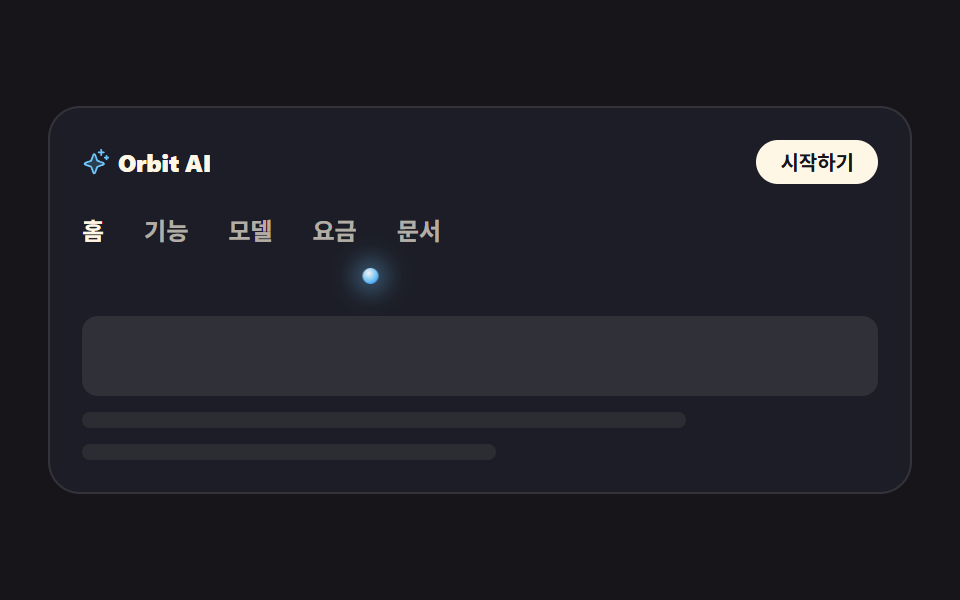
One glowing dot rides under the five menu items, sliding sideways with translateX to whichever item is active. The active item carries aria-current, so screen readers hear the position too.
Best forLanding top bars, docs tab switching
translateXtransitionaria-current
<main class="stage">
<div class="nv is-demo" id="nv">
  <div class="nv__top">
    <span class="nv__brand">
      <span class="nv__mark" aria-hidden="true"><svg xmlns="http://www.w3.org/2000/svg" viewBox="0 0 256 256" fill="currentColor"><path d="M194.82,151.43l-55.09,20.3-20.3,55.09a7.92,7.92,0,0,1-14.86,0l-20.3-55.09-55.09-20.3a7.92,7.92,0,0,1,0-14.86l55.09-20.3,20.3-55.09a7.92,7.92,0,0,1,14.86,0l20.3,55.09,55.09,20.3A7.92,7.92,0,0,1,194.82,151.43Z" opacity="0.2"/><path d="M197.58,129.06,146,110l-19-51.62a15.92,15.92,0,0,0-29.88,0L78,110l-51.62,19a15.92,15.92,0,0,0,0,29.88L78,178l19,51.62a15.92,15.92,0,0,0,29.88,0L146,178l51.62-19a15.92,15.92,0,0,0,0-29.88ZM137,164.22a8,8,0,0,0-4.74,4.74L112,223.85,91.78,169A8,8,0,0,0,87,164.22L32.15,144,87,123.78A8,8,0,0,0,91.78,119L112,64.15,132.22,119a8,8,0,0,0,4.74,4.74L191.85,144ZM144,40a8,8,0,0,1,8-8h16V16a8,8,0,0,1,16,0V32h16a8,8,0,0,1,0,16H184V64a8,8,0,0,1-16,0V48H152A8,8,0,0,1,144,40ZM248,88a8,8,0,0,1-8,8h-8v8a8,8,0,0,1-16,0V96h-8a8,8,0,0,1,0-16h8V72a8,8,0,0,1,16,0v8h8A8,8,0,0,1,248,88Z"/></svg></span>
      Orbit AI
    </span>
    <a class="nv__cta" href="#" role="button">Get started</a>
  </div>
  <nav class="nv__nav" aria-label="Main menu">
    <ul class="nv__tabs" id="tabs">
      <li class="nv__item"><a class="nv__tab is-on" href="#" aria-current="page">Home</a></li>
      <li class="nv__item"><a class="nv__tab" href="#">Features</a></li>
      <li class="nv__item"><a class="nv__tab" href="#">Models</a></li>
      <li class="nv__item"><a class="nv__tab" href="#">Pricing</a></li>
      <li class="nv__item"><a class="nv__tab" href="#">Docs</a></li>
    </ul>
    <span class="nv__dot" id="dot" aria-hidden="true"></span>
  </nav>
  <div class="nv__panel" aria-hidden="true">
    <span class="nv__block"></span>
    <span class="nv__line nv__line--a"></span>
    <span class="nv__line nv__line--b"></span>
  </div>
</div>
</main>@use "../../../../site/static/demo-tokens" as *;
// 변수 3개 — 변형은 이 셋만 바꾼다
$duration: $dur-base; // 실제 클릭에서 점이 옮겨가는 시간
$easing: $ease-spring; // 도착점에서 멎는 감속
$color: $subject-sky; // 발광 점의 빛 색
// 이 편 아홉 항목은 전부 잉크 무대다 — 빛나는 오브는 어두운 바탕에서만 빛으로 읽힌다
@include stage($stage-ink);
.nv {
box-sizing: border-box; width: min(100%, 432px); padding: $sp-4;
border: 1px solid rgba(255, 247, 230, .1); border-radius: $r-card;
background: rgba(110, 200, 255, .05);
}
// 대비 실측(WCAG 상대휘도 계산): 무대 $stage-ink 의 상대휘도 0.00757,
// 카드 바탕(잉크+하늘색 5%)은 0.0128 — 아래 값은 카드 바탕 기준이다
.nv__top { display: flex; align-items: center; justify-content: space-between; gap: $sp-3; }
.nv__brand {
display: inline-flex; align-items: center; gap: $sp-1;
font-weight: 800; font-size: 12px; line-height: 1; letter-spacing: -.01em;
color: $subject-cream; // $subject-cream 기준 15.7:1
}
.nv__mark { display: inline-flex; width: 14px; height: 14px; color: $color; }
.nv__mark svg { width: 100%; height: 100%; }
.nv__cta {
padding: $sp-1 $sp-3; border-radius: $r-pill; background: $subject-cream; color: $subject-ink;
font-weight: 700; font-size: 10px; line-height: 1.4; text-decoration: none; // 크림 위 잉크 = 17.11:1
}
// ── 탭 줄: 점이 고정 px 로 움직이므로 탭은 내용 폭이어야 한다 (BD19)
.nv__nav { position: relative; margin-top: $sp-4; padding-bottom: $sp-3; }
.nv__tabs { display: flex; gap: $sp-5; margin: 0; padding: 0 0 $sp-2; list-style: none; }
.nv__item { flex: 0 0 auto; }
.nv__tab {
flex: 0 0 auto; display: block; font-weight: 600; font-size: 12px; line-height: 1.2;
text-decoration: none; color: rgba(255, 247, 230, .66); // 카드 바탕 위 = 7.2:1
}
.nv__tab.is-on { font-weight: 700; color: $subject-cream; }
// 발광 점 — 활성 탭 중심에 서고, translateX 로 옆 탭으로 미끄러진다
.nv__dot {
// 다섯 자리는 짐작이 아니라 Playwright getBoundingClientRect 실측값 (480×300 렌더, 2026-09-12)
--p1: 1.5px; --p2: 38px; --p3: 80px; --p4: 122px; --p5: 164px;
position: absolute; left: 0; bottom: 0; width: 8px; height: 8px; border-radius: 50%;
background: radial-gradient(circle at 38% 32%, rgba(255, 255, 255, .95), rgba(110, 200, 255, .95) 58%, rgba(47, 109, 246, .9) 100%);
box-shadow: 0 0 12px 4px rgba(110, 200, 255, .45);
transform: translateX(var(--p1));
transition: transform $duration $easing; // 사람이 클릭했을 때의 이동
}
// 미리보기 루프: 2초 안에 1 → 3 → 5 → 1 세 자리를 돈다. 복귀는 86% 에 끝난다
// (라벨을 바꾸지 않고 점만 옮기므로 반투명 유령 프레임이 생기지 않는다)
.nv.is-demo .nv__dot {
animation-name: nvGlide; animation-duration: $dur-loop; animation-timing-function: $easing;
animation-iteration-count: infinite;
}
@keyframes nvGlide {
0%, 8% { transform: translateX(var(--p1)); }
24%, 34% { transform: translateX(var(--p3)); }
50%, 62% { transform: translateX(var(--p5)); }
86%, 100% { transform: translateX(var(--p1)); }
}
// ── 탭이 가리키는 화면 (정적 장식)
.nv__panel { display: grid; gap: $sp-2; margin-top: $sp-4; }
.nv__block { height: 40px; border-radius: $r-sm; background: rgba(255, 247, 230, .09); }
.nv__line { height: 8px; border-radius: $r-pill; background: rgba(255, 247, 230, .07); }
.nv__line--a { width: 76%; }
.nv__line--b { width: 52%; }
// ── 320×200 폰 실측 대비 압축 (BD9). 좁은 화면에서는 간격을 올리지 않는다
@media (max-width: 340px), (max-height: 220px) {
.nv { padding: $sp-2; }
.nv__brand { font-size: 11px; }
.nv__cta { font-size: 9px; padding: 0 $sp-2; }
.nv__nav { margin-top: $sp-2; padding-bottom: $sp-2; }
.nv__tabs { gap: $sp-3; padding-bottom: $sp-1; }
.nv__tab { font-size: 11px; }
.nv__dot { --p1: 1px; --p2: 28px; --p3: 60px; --p4: 93px; --p5: 125px; } // 320×200 실측값
.nv__panel { gap: $sp-1; margin-top: $sp-2; }
.nv__block { height: 28px; }
.nv__line { height: 6px; }
}
@media (prefers-reduced-motion: reduce) {
.nv__dot { transition: none !important; }
.nv.is-demo .nv__dot { animation: none !important; }
}html, body {
margin: 0;
overflow: hidden;
}
.stage {
box-sizing: border-box;
min-height: 100vh;
display: grid;
place-items: center;
margin: 0;
background: #17141a;
font-family: -apple-system, "Segoe UI", "Noto Sans KR", sans-serif;
padding: clamp(8px, 4vw, 24px);
}
.nv {
box-sizing: border-box;
width: min(100%, 432px);
padding: 16px;
border: 1px solid rgba(255, 247, 230, 0.1);
border-radius: 16px;
background: rgba(110, 200, 255, 0.05);
}
.nv__top {
display: flex;
align-items: center;
justify-content: space-between;
gap: 12px;
}
.nv__brand {
display: inline-flex;
align-items: center;
gap: 4px;
font-weight: 800;
font-size: 12px;
line-height: 1;
letter-spacing: -0.01em;
color: #fff7e6;
}
.nv__mark {
display: inline-flex;
width: 14px;
height: 14px;
color: #6ec8ff;
}
.nv__mark svg {
width: 100%;
height: 100%;
}
.nv__cta {
padding: 4px 12px;
border-radius: 999px;
background: #fff7e6;
color: #17141a;
font-weight: 700;
font-size: 10px;
line-height: 1.4;
text-decoration: none;
}
.nv__nav {
position: relative;
margin-top: 16px;
padding-bottom: 12px;
}
.nv__tabs {
display: flex;
gap: 20px;
margin: 0;
padding: 0 0 8px;
list-style: none;
}
.nv__item {
flex: 0 0 auto;
}
.nv__tab {
flex: 0 0 auto;
display: block;
font-weight: 600;
font-size: 12px;
line-height: 1.2;
text-decoration: none;
color: rgba(255, 247, 230, 0.66);
}
.nv__tab.is-on {
font-weight: 700;
color: #fff7e6;
}
.nv__dot {
--p1: 1.5px;
--p2: 38px;
--p3: 80px;
--p4: 122px;
--p5: 164px;
position: absolute;
left: 0;
bottom: 0;
width: 8px;
height: 8px;
border-radius: 50%;
background: radial-gradient(circle at 38% 32%, rgba(255, 255, 255, 0.95), rgba(110, 200, 255, 0.95) 58%, rgba(47, 109, 246, 0.9) 100%);
box-shadow: 0 0 12px 4px rgba(110, 200, 255, 0.45);
transform: translateX(var(--p1));
transition: transform 300ms cubic-bezier(0.2, 0.8, 0.2, 1);
}
.nv.is-demo .nv__dot {
animation-name: nvGlide;
animation-duration: 2s;
animation-timing-function: cubic-bezier(0.2, 0.8, 0.2, 1);
animation-iteration-count: infinite;
}
@keyframes nvGlide {
0%, 8% {
transform: translateX(var(--p1));
}
24%, 34% {
transform: translateX(var(--p3));
}
50%, 62% {
transform: translateX(var(--p5));
}
86%, 100% {
transform: translateX(var(--p1));
}
}
.nv__panel {
display: grid;
gap: 8px;
margin-top: 16px;
}
.nv__block {
height: 40px;
border-radius: 8px;
background: rgba(255, 247, 230, 0.09);
}
.nv__line {
height: 8px;
border-radius: 999px;
background: rgba(255, 247, 230, 0.07);
}
.nv__line--a {
width: 76%;
}
.nv__line--b {
width: 52%;
}
@media (max-width: 340px), (max-height: 220px) {
.nv {
padding: 8px;
}
.nv__brand {
font-size: 11px;
}
.nv__cta {
font-size: 9px;
padding: 0 8px;
}
.nv__nav {
margin-top: 8px;
padding-bottom: 8px;
}
.nv__tabs {
gap: 12px;
padding-bottom: 4px;
}
.nv__tab {
font-size: 11px;
}
.nv__dot {
--p1: 1px;
--p2: 28px;
--p3: 60px;
--p4: 93px;
--p5: 125px;
}
.nv__panel {
gap: 4px;
margin-top: 8px;
}
.nv__block {
height: 28px;
}
.nv__line {
height: 6px;
}
}
@media (prefers-reduced-motion: reduce) {
.nv__dot {
transition: none !important;
}
.nv.is-demo .nv__dot {
animation: none !important;
}
}var nav = document.getElementById('nv');
var dot = document.getElementById('dot');
var tabs = document.querySelectorAll('.nv__tab');
function dotLeft(tab) {
return tab.offsetLeft + tab.offsetWidth / 2 - dot.offsetWidth / 2;
}
function layoutDots() {
// --p1~--p5 의 기본값은 English 480×300 실측 px 이다. 라벨 폭은 언어마다 다르므로
// 실제 렌더 좌표로 한 번 덮어써 en·ja 에서도 점이 라벨 한가운데 선다
for (var k = 0; k < tabs.length; k++) {
dot.style.setProperty('--p' + (k + 1), dotLeft(tabs[k]) + 'px');
}
}
function moveDot(tab) {
// 클릭·키보드는 실제 렌더 좌표로 옮긴다 (미리보기 루프는 키프레임이 --p 값을 쓴다)
dot.style.transform = 'translateX(' + dotLeft(tab) + 'px)';
}
layoutDots();
window.addEventListener('resize', layoutDots);
for (var i = 0; i < tabs.length; i++) {
tabs[i].addEventListener('click', function (e) {
e.preventDefault();
nav.classList.remove('is-demo');
for (var j = 0; j < tabs.length; j++) {
tabs[j].classList.remove('is-on');
tabs[j].removeAttribute('aria-current');
}
this.classList.add('is-on');
this.setAttribute('aria-current', 'page');
moveDot(this);
});
}import { useEffect, useRef, useState } from "react";
import styles from "./NavOrb.module.scss";
export type NavOrbProps = { duration?: string; easing?: string; color?: string };
const TABS = ["홈", "기능", "모델", "요금", "문서"];
export default function NavOrb({ duration = "300ms", easing = "cubic-bezier(.2,.8,.2,1)", color = "#6ec8ff" }: NavOrbProps) {
// 변수 3개는 props 로 — 점이 옆 탭으로 옮겨가는 시간 · 그 이징 · 빛 색
const [demo, setDemo] = useState(true);
const [active, setActive] = useState(0);
const navRef = useRef<HTMLElement>(null);
// --p1~--p5 의 기본값은 한국어 480×300 실측 px 이다. 라벨 폭은 언어마다 다르므로
// 실제 렌더 좌표로 한 번 덮어써 en·ja 에서도 점이 라벨 한가운데 선다
useEffect(() => {
const root = navRef.current;
if (!root) return;
const dotEl = root.querySelector("[data-dot]") as HTMLElement | null;
if (!dotEl) return;
const tabEls = root.querySelectorAll("[data-tab]");
for (let i = 0; i < tabEls.length; i++) {
const t = tabEls[i] as HTMLElement;
dotEl.style.setProperty(`--p${i + 1}`, `${t.offsetLeft + t.offsetWidth / 2 - dotEl.offsetWidth / 2}px`);
}
}, []);
// 자리는 CSS 변수 --p1~--p5 (480×300·320×200 렌더 실측값). 클릭하면 그 자리로 미끄러진다
const dotStyle = demo
? { transitionDuration: duration, transitionTimingFunction: easing }
: { transform: `translateX(var(--p${active + 1}))`, transitionDuration: duration, transitionTimingFunction: easing };
return (
<main className={styles.stage}>
<div className={styles.nv}>
<div className={styles.top}>
<span className={styles.brand}>
<span className={styles.mark} aria-hidden="true" style={{ color }}>
<svg xmlns="http://www.w3.org/2000/svg" viewBox="0 0 256 256" fill="currentColor"><path d="M194.82,151.43l-55.09,20.3-20.3,55.09a7.92,7.92,0,0,1-14.86,0l-20.3-55.09-55.09-20.3a7.92,7.92,0,0,1,0-14.86l55.09-20.3,20.3-55.09a7.92,7.92,0,0,1,14.86,0l20.3,55.09,55.09,20.3A7.92,7.92,0,0,1,194.82,151.43Z" opacity="0.2"/><path d="M197.58,129.06,146,110l-19-51.62a15.92,15.92,0,0,0-29.88,0L78,110l-51.62,19a15.92,15.92,0,0,0,0,29.88L78,178l19,51.62a15.92,15.92,0,0,0,29.88,0L146,178l51.62-19a15.92,15.92,0,0,0,0-29.88ZM137,164.22a8,8,0,0,0-4.74,4.74L112,223.85,91.78,169A8,8,0,0,0,87,164.22L32.15,144,87,123.78A8,8,0,0,0,91.78,119L112,64.15,132.22,119a8,8,0,0,0,4.74,4.74L191.85,144ZM144,40a8,8,0,0,1,8-8h16V16a8,8,0,0,1,16,0V32h16a8,8,0,0,1,0,16H184V64a8,8,0,0,1-16,0V48H152A8,8,0,0,1,144,40ZM248,88a8,8,0,0,1-8,8h-8v8a8,8,0,0,1-16,0V96h-8a8,8,0,0,1,0-16h8V72a8,8,0,0,1,16,0v8h8A8,8,0,0,1,248,88Z"/></svg>
</span>
Orbit AI
</span>
<a className={styles.cta} href="#" role="button" onClick={(e: { preventDefault: () => void }) => { e.preventDefault(); }}>시작하기</a>
</div>
<nav className={styles.nav} aria-label="주요 메뉴" ref={navRef}>
<ul className={styles.tabs}>
{TABS.map((label, i) => (
<li className={styles.item} key={label}>
<a
className={`${styles.tab} ${active === i ? styles.isOn : ""}`}
href="#"
data-tab=""
aria-current={active === i ? "page" : undefined}
onClick={(e: { preventDefault: () => void }) => { e.preventDefault(); setDemo(false); setActive(i); }}
>
{label}
</a>
</li>
))}
</ul>
<span className={`${styles.dot} ${demo ? styles.isDemo : ""}`} aria-hidden="true" data-dot="" style={dotStyle} />
</nav>
<div className={styles.panel} aria-hidden="true">
<span className={styles.block} />
<span className={`${styles.line} ${styles.lineA}`} />
<span className={`${styles.line} ${styles.lineB}`} />
</div>
</div>
</main>
);
}02 Gliding orb-dot nav — Measured area 2.107% · moving frames 16/23Original by GODRICH · SCSS and React ship in the zip · AI Landing Page Design Kit: 9 Glowing Orb Sections
The post this demo lives in
 AI Landing Page Design Kit: 9 Glowing Orb SectionsAI landing page design has gone AI-native without painting a gradient background. The page stays one flat dark color, an See all demos in this post