01Auto-colored initial avatar
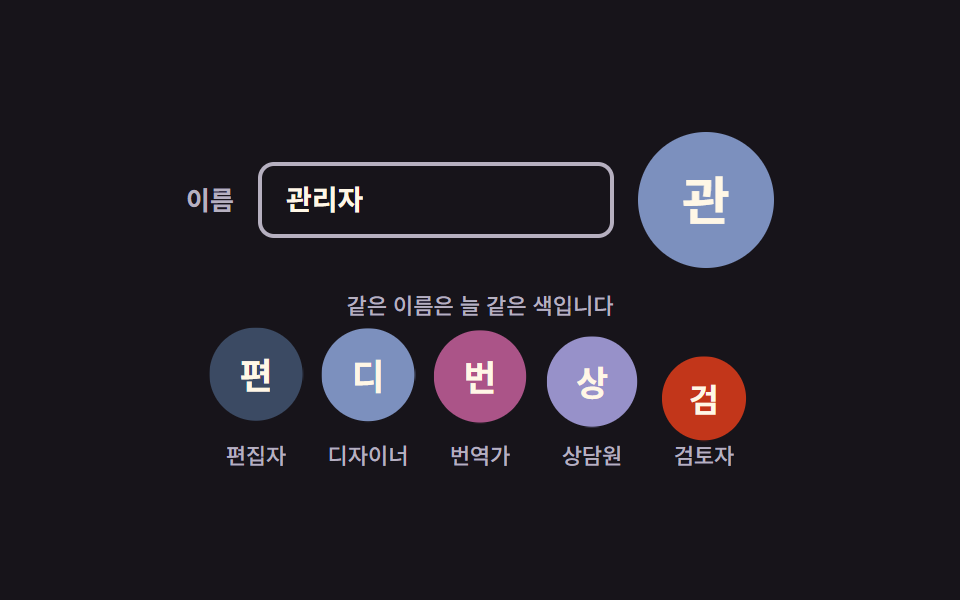
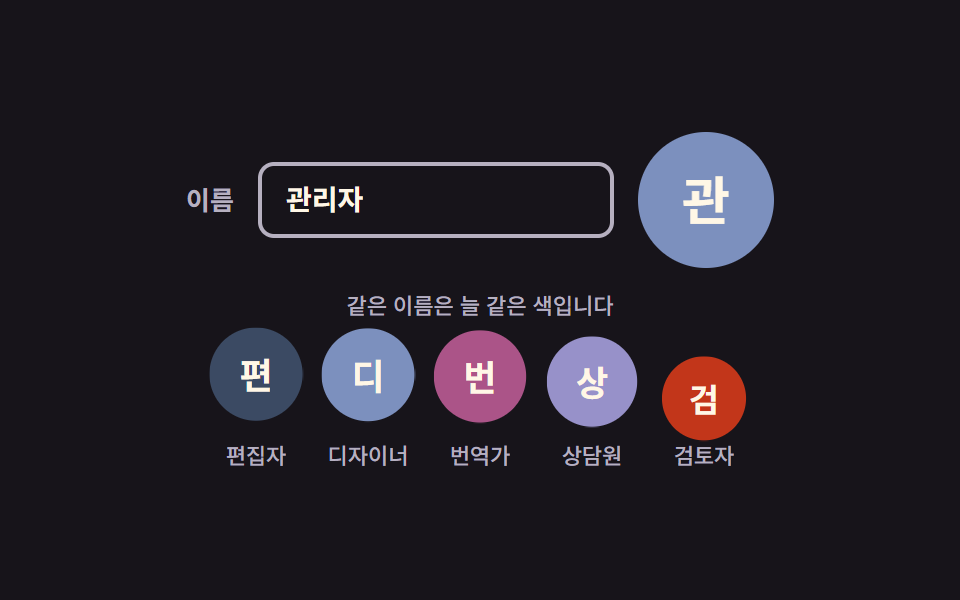
The name is folded into a number that picks one of six colors, so the same name always gets the same color, and typing in the field recolors the circle and its letter on the spot.
Best forLists and comments where most users never upload a photo
translateYanimation-fill-modeanimation-delay
<main class="stage">
  <section class="ai is-demo" aria-label="Auto-colored initial avatar">
    <div class="ai__field">
      <label class="ai__label" for="ai-name">Name</label>
      <input class="ai__input" id="ai-name" type="text" value="Admin" autocomplete="off" spellcheck="false" placeholder="Type a name">
      <!-- 이니셜 글자와 data-tone 은 JS 가 입력값에서 계산해 넣는다(하드코딩 금지 — 언어팩이 바뀌면 따라간다) -->
      <span class="ai__avatar" data-tone="0" aria-hidden="true"></span>
    </div>

    <p class="ai__hint">The same name always gets the same color</p>

    <ul class="ai__row">
      <li class="ai__item"><span class="ai__dot" data-tone="5" aria-hidden="true"></span><span class="ai__name">Editor</span></li>
      <li class="ai__item"><span class="ai__dot" data-tone="0" aria-hidden="true"></span><span class="ai__name">Designer</span></li>
      <li class="ai__item"><span class="ai__dot" data-tone="3" aria-hidden="true"></span><span class="ai__name">Translator</span></li>
      <li class="ai__item"><span class="ai__dot" data-tone="1" aria-hidden="true"></span><span class="ai__name">Counselor</span></li>
      <li class="ai__item"><span class="ai__dot" data-tone="4" aria-hidden="true"></span><span class="ai__name">Reviewer</span></li>
    </ul>
  </section>
</main>
@use "../../../../site/static/demo-tokens" as *;
// 279 아바타 팔레트 — 이니셜 글자는 언제나 $subject-cream. 괄호는 크림 글자 기준 실측 대비비
$av-blue: #7c90be; // 5.29:1
$av-violet: #9791c9; // 5.76:1
$av-teal: #479082; // 5.79:1
$av-plum: #ab5488; // 6.52:1
$av-brick: $error; // 오류 토큰 — 5.13:1. 리터럴 금지 (BD10)
$av-slate: #3b4a63; // 8.40:1
$av-mist: #b6b0c0; // 잉크 무대 보조 글자 8.65:1
$av-deep: #4a4452; // 옐로 무대 보조 글자 6.49:1 · 페이퍼 무대 9.38:1
// ── 변수 3개 ──────────────────────────────────────────
$duration: $dur-loop; // 아래 줄 아바타가 한 번 솟았다 앉는 주기
$easing: $ease-spring;
$color: $av-mist; // 라벨·안내 줄 색
@include stage($stage-ink);
.ai {
display: grid;
justify-items: center;
gap: $sp-3;
width: min(400px, 92vw);
}
.ai__field {
display: flex;
align-items: center;
gap: $sp-3;
}
.ai__label {
color: $color;
font-weight: 600;
font-size: 13px;
line-height: 1.2;
}
.ai__input {
width: 150px;
padding: $sp-2 $sp-3;
border: 2px solid $color;
border-radius: $r-sm;
background: transparent;
color: $subject-cream;
font-family: inherit;
font-weight: 600;
font-size: 14px;
line-height: 1.3;
}
.ai__input:focus-visible { outline: 2px solid $subject-cream; outline-offset: 2px; }
// 큰 아바타 — 색은 data-tone 번호가 고르고 scss 가 칠한다(JS 는 hex 를 모른다)
.ai__avatar {
display: grid;
place-items: center;
width: 68px;
height: 68px;
border-radius: 50%;
background: $av-slate;
color: $subject-cream; // 팔레트 여섯 색 위 크림 글자는 전부 4.5:1 이상 실측
font-weight: 700;
font-size: 26px;
line-height: 1;
}
.ai__avatar[data-tone="0"] { background: $av-blue; }
.ai__avatar[data-tone="1"] { background: $av-violet; }
.ai__avatar[data-tone="2"] { background: $av-teal; }
.ai__avatar[data-tone="3"] { background: $av-plum; }
.ai__avatar[data-tone="4"] { background: $av-brick; }
.ai__avatar[data-tone="5"] { background: $av-slate; }
.ai__hint {
margin: 0;
color: $color;
font-weight: 500;
font-size: 11px;
line-height: 1.3;
}
.ai__row {
display: flex;
gap: $sp-3;
margin: 0;
padding: 0;
list-style: none;
}
.ai__item { display: grid; justify-items: center; gap: $sp-1; }
.ai__dot {
display: grid;
place-items: center;
width: 44px;
height: 44px;
border-radius: 50%;
background: $av-slate;
color: $subject-cream;
font-weight: 700;
font-size: 17px;
line-height: 1;
}
.ai__dot[data-tone="0"] { background: $av-blue; }
.ai__dot[data-tone="1"] { background: $av-violet; }
.ai__dot[data-tone="2"] { background: $av-teal; }
.ai__dot[data-tone="3"] { background: $av-plum; }
.ai__dot[data-tone="4"] { background: $av-brick; }
.ai__dot[data-tone="5"] { background: $av-slate; }
.ai__name {
color: $color;
font-weight: 500;
font-size: 11px;
line-height: 1.2;
}
// ── 격자 미리보기 루프 ────────────────────────────────
// 아래 줄 아바타 다섯 개가 translateY + scale 로 차례로 솟았다 앉는다.
// animation 단축은 delay 를 0 으로 리셋하므로 낱개 속성으로만 쓴다
.ai.is-demo .ai__dot {
animation-name: aiRise;
animation-duration: $duration;
animation-timing-function: $easing;
animation-iteration-count: infinite;
animation-fill-mode: backwards; // 지연 구간에도 0% 자세(앉은 상태)가 찍힌다
}
.ai.is-demo .ai__item:nth-child(2) .ai__dot { animation-delay: 140ms; }
.ai.is-demo .ai__item:nth-child(3) .ai__dot { animation-delay: 280ms; }
.ai.is-demo .ai__item:nth-child(4) .ai__dot { animation-delay: 420ms; }
.ai.is-demo .ai__item:nth-child(5) .ai__dot { animation-delay: 560ms; }
// 한 바퀴를 78% 안에 끝낸 뒤 제자리에 머문다 — 마지막 장은 95.8% 지점이라 그 뒤는 안 찍힌다
@keyframes aiRise {
0% { transform: translateY(6px) scale(.94); }
36% { transform: translateY(-8px) scale(1.06); }
78% { transform: translateY(0) scale(1); }
100% { transform: translateY(0) scale(1); }
}
// 미리보기 루프 동안에는 자동완성 흔적 글자가 겹쳐 보이지 않게 한다
.ai.is-demo .ai__input::placeholder { color: transparent; }
// 좁은 화면 — 표시와 여백만 줄인다. 값을 올리지 않는다.
@media (max-width: 340px), (max-height: 220px) {
.ai { gap: $sp-2; }
.ai__field { gap: $sp-2; }
.ai__input { width: 120px; font-size: 13px; }
.ai__avatar { width: 56px; height: 56px; font-size: 22px; }
.ai__dot { width: 36px; height: 36px; font-size: 14px; }
.ai__row { gap: $sp-2; }
.ai__hint { font-size: 10px; }
.ai__name { font-size: 10px; }
}
@media (prefers-reduced-motion: reduce) {
// .ai.is-demo .ai__dot (0,3,0) 를 이기려면 !important 가 필요하다.
// 움직임만 끄고 아바타·글자는 그대로 남긴다
.ai__dot { animation: none !important; }
}html, body {
margin: 0;
overflow: hidden;
}
.stage {
box-sizing: border-box;
min-height: 100vh;
display: grid;
place-items: center;
margin: 0;
background: #17141a;
font-family: -apple-system, "Segoe UI", "Noto Sans KR", sans-serif;
padding: clamp(8px, 4vw, 24px);
}
.ai {
display: grid;
justify-items: center;
gap: 12px;
width: min(400px, 92vw);
}
.ai__field {
display: flex;
align-items: center;
gap: 12px;
}
.ai__label {
color: #b6b0c0;
font-weight: 600;
font-size: 13px;
line-height: 1.2;
}
.ai__input {
width: 150px;
padding: 8px 12px;
border: 2px solid #b6b0c0;
border-radius: 8px;
background: transparent;
color: #fff7e6;
font-family: inherit;
font-weight: 600;
font-size: 14px;
line-height: 1.3;
}
.ai__input:focus-visible {
outline: 2px solid #fff7e6;
outline-offset: 2px;
}
.ai__avatar {
display: grid;
place-items: center;
width: 68px;
height: 68px;
border-radius: 50%;
background: #3b4a63;
color: #fff7e6;
font-weight: 700;
font-size: 26px;
line-height: 1;
}
.ai__avatar[data-tone="0"] {
background: #7c90be;
}
.ai__avatar[data-tone="1"] {
background: #9791c9;
}
.ai__avatar[data-tone="2"] {
background: #479082;
}
.ai__avatar[data-tone="3"] {
background: #ab5488;
}
.ai__avatar[data-tone="4"] {
background: #c2361a;
}
.ai__avatar[data-tone="5"] {
background: #3b4a63;
}
.ai__hint {
margin: 0;
color: #b6b0c0;
font-weight: 500;
font-size: 11px;
line-height: 1.3;
}
.ai__row {
display: flex;
gap: 12px;
margin: 0;
padding: 0;
list-style: none;
}
.ai__item {
display: grid;
justify-items: center;
gap: 4px;
}
.ai__dot {
display: grid;
place-items: center;
width: 44px;
height: 44px;
border-radius: 50%;
background: #3b4a63;
color: #fff7e6;
font-weight: 700;
font-size: 17px;
line-height: 1;
}
.ai__dot[data-tone="0"] {
background: #7c90be;
}
.ai__dot[data-tone="1"] {
background: #9791c9;
}
.ai__dot[data-tone="2"] {
background: #479082;
}
.ai__dot[data-tone="3"] {
background: #ab5488;
}
.ai__dot[data-tone="4"] {
background: #c2361a;
}
.ai__dot[data-tone="5"] {
background: #3b4a63;
}
.ai__name {
color: #b6b0c0;
font-weight: 500;
font-size: 11px;
line-height: 1.2;
}
.ai.is-demo .ai__dot {
animation-name: aiRise;
animation-duration: 2s;
animation-timing-function: cubic-bezier(0.2, 0.8, 0.2, 1);
animation-iteration-count: infinite;
animation-fill-mode: backwards;
}
.ai.is-demo .ai__item:nth-child(2) .ai__dot {
animation-delay: 140ms;
}
.ai.is-demo .ai__item:nth-child(3) .ai__dot {
animation-delay: 280ms;
}
.ai.is-demo .ai__item:nth-child(4) .ai__dot {
animation-delay: 420ms;
}
.ai.is-demo .ai__item:nth-child(5) .ai__dot {
animation-delay: 560ms;
}
@keyframes aiRise {
0% {
transform: translateY(6px) scale(0.94);
}
36% {
transform: translateY(-8px) scale(1.06);
}
78% {
transform: translateY(0) scale(1);
}
100% {
transform: translateY(0) scale(1);
}
}
.ai.is-demo .ai__input::placeholder {
color: transparent;
}
@media (max-width: 340px), (max-height: 220px) {
.ai {
gap: 8px;
}
.ai__field {
gap: 8px;
}
.ai__input {
width: 120px;
font-size: 13px;
}
.ai__avatar {
width: 56px;
height: 56px;
font-size: 22px;
}
.ai__dot {
width: 36px;
height: 36px;
font-size: 14px;
}
.ai__row {
gap: 8px;
}
.ai__hint {
font-size: 10px;
}
.ai__name {
font-size: 10px;
}
}
@media (prefers-reduced-motion: reduce) {
.ai__dot {
animation: none !important;
}
}(function () {
var root = document.querySelector('.ai');
var input = root.querySelector('.ai__input');
var avatar = root.querySelector('.ai__avatar');
// 이름을 숫자로 접어 0~5 — 순수 함수라 같은 이름은 늘 같은 색을 고른다
function hashName(text) {
var h = 0;
for (var i = 0; i < text.length; i++) h = (h * 31 + text.charCodeAt(i)) >>> 0;
return h % 6;
}
// 한국어면 첫 글자 1자, 라틴이면 앞 두 단어의 머리글자
function initialsOf(text) {
var trimmed = text.trim();
if (!trimmed) return '';
if (/[가-힣]/.test(trimmed[0])) return trimmed[0];
var words = trimmed.split(/\s+/).filter(function (w) { return /[A-Za-z]/.test(w[0] || ''); });
return words.slice(0, 2).map(function (w) { return w[0].toUpperCase(); }).join('');
}
// JS 는 색을 모른다 — data-tone 번호만 바꾸고 scss 가 여섯 색을 칠한다
function applyName() {
avatar.dataset.tone = String(hashName(input.value));
avatar.textContent = initialsOf(input.value);
}
// 아래 줄 다섯 개도 Name 표시에서 이니셜과 색을 계산해 넣는다
var items = root.querySelectorAll('.ai__item');
Array.prototype.forEach.call(items, function (item) {
var name = item.querySelector('.ai__name').textContent;
var dot = item.querySelector('.ai__dot');
dot.dataset.tone = String(hashName(name));
dot.textContent = initialsOf(name);
});
input.addEventListener('input', applyName);
applyName();
// 사람이 손을 대면 미리보기 루프를 뗀다
function stopLoop() { root.classList.remove('is-demo'); }
root.addEventListener('pointerdown', stopLoop);
root.addEventListener('focusin', stopLoop);
})();import { useState } from "react";
import type { CSSProperties, ReactNode } from "react";
import styles from "./AvatarInitialAutoColor.module.scss";
export type AvatarInitialAutoColorProps = {
label?: string;
nameLabel?: string;
placeholder?: string;
hint?: string;
name?: string;
rowNames?: string[];
/** 아래 줄 아바타가 한 번 솟았다 앉는 주기(ms) */
duration?: number;
easing?: string;
/** 라벨·안내 줄 색 */
color?: string;
};
type Vars = CSSProperties & { "--duration"?: string; "--easing"?: string; "--color"?: string };
// ambient 타입에 React 이벤트 제네릭이 없어 로컬 타입을 쓴다
type InputEvt = { target: { value: string } };
// 이름을 숫자로 접어 0~5 — 순수 함수라 같은 이름은 늘 같은 색을 고른다
function hashName(text: string): number {
let h = 0;
for (let i = 0; i < text.length; i++) h = (h * 31 + text.charCodeAt(i)) >>> 0;
return h % 6;
}
// 한국어면 첫 글자 1자, 라틴이면 앞 두 단어의 머리글자
function initialsOf(text: string): string {
const trimmed = text.trim();
if (!trimmed) return "";
if (/[가-힣]/.test(trimmed[0])) return trimmed[0];
const words = trimmed.split(/\s+/).filter((w) => /[A-Za-z]/.test(w[0] || ""));
return words.slice(0, 2).map((w) => w[0].toUpperCase()).join("");
}
export default function AvatarInitialAutoColor({
label = "이니셜 자동 색 아바타",
nameLabel = "이름",
placeholder = "이름을 입력하세요",
hint = "같은 이름은 늘 같은 색입니다",
name = "관리자",
rowNames = ["편집자", "디자이너", "번역가", "상담원", "검토자"],
duration = 2000,
easing = "cubic-bezier(.2, .8, .2, 1)",
color = "#b6b0c0",
}: AvatarInitialAutoColorProps): ReactNode {
const [value, setValue] = useState<string>(name);
const [loop, setLoop] = useState<boolean>(true);
const vars: Vars = { "--duration": `${duration}ms`, "--easing": easing, "--color": color };
return (
<section
className={loop ? `${styles.ai} ${styles.isDemo}` : styles.ai}
style={vars}
aria-label={label}
onPointerDown={() => setLoop(false)}
onFocus={() => setLoop(false)}
>
<div className={styles.field}>
<label className={styles.label} htmlFor="ai-name">{nameLabel}</label>
<input
className={styles.input}
id="ai-name"
type="text"
value={value}
autoComplete="off"
spellCheck={false}
placeholder={placeholder}
onChange={(e: InputEvt) => setValue(e.target.value)}
/>
{/* 이니셜 글자와 data-tone 은 이름에서 계산해 넣는다 — JS 는 색을 모른다 */}
<span className={styles.avatar} data-tone={String(hashName(value))} aria-hidden="true">
{initialsOf(value)}
</span>
</div>
<p className={styles.hint}>{hint}</p>
<ul className={styles.row}>
{rowNames.map((rowName) => (
<li key={rowName} className={styles.item}>
<span className={styles.dot} data-tone={String(hashName(rowName))} aria-hidden="true">
{initialsOf(rowName)}
</span>
<span className={styles.name}>{rowName}</span>
</li>
))}
</ul>
</section>
);
}01 Auto-colored initial avatar — Measured area 6.244% · moving frames 23/23Original by GODRICH · SCSS and React ship in the zip · Avatar UI Design: 9 Parts, No Image Files
The post this demo lives in
 Avatar UI Design: 9 Parts, No Image FilesAvatar UI design is how one small circle makes a person recognizable. The nine parts draw it from a name alone — color, See all demos in this post
If you like this effect - similar demos
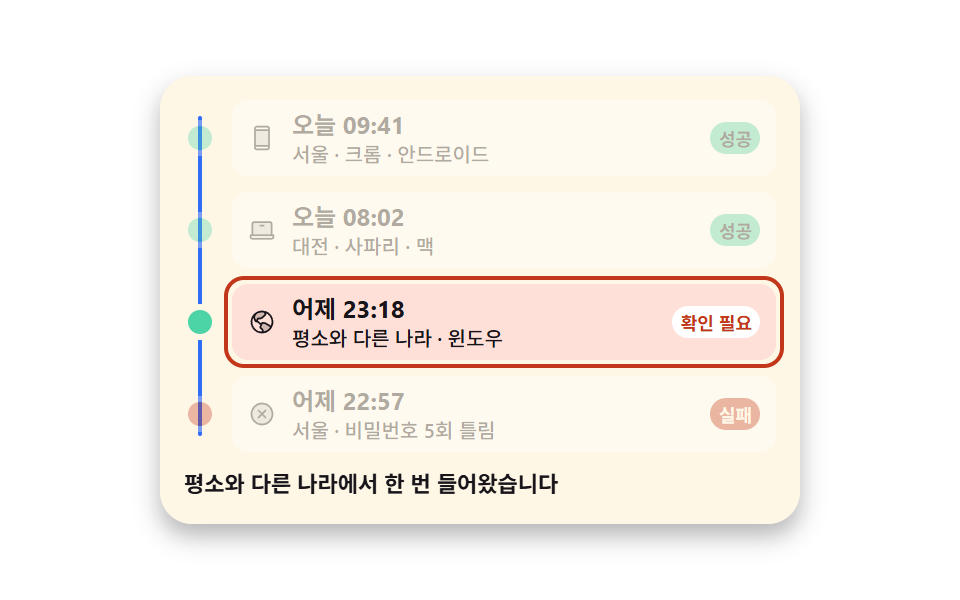 Auth UI08 Login history holding successes and failures together9 account security settings UI patterns
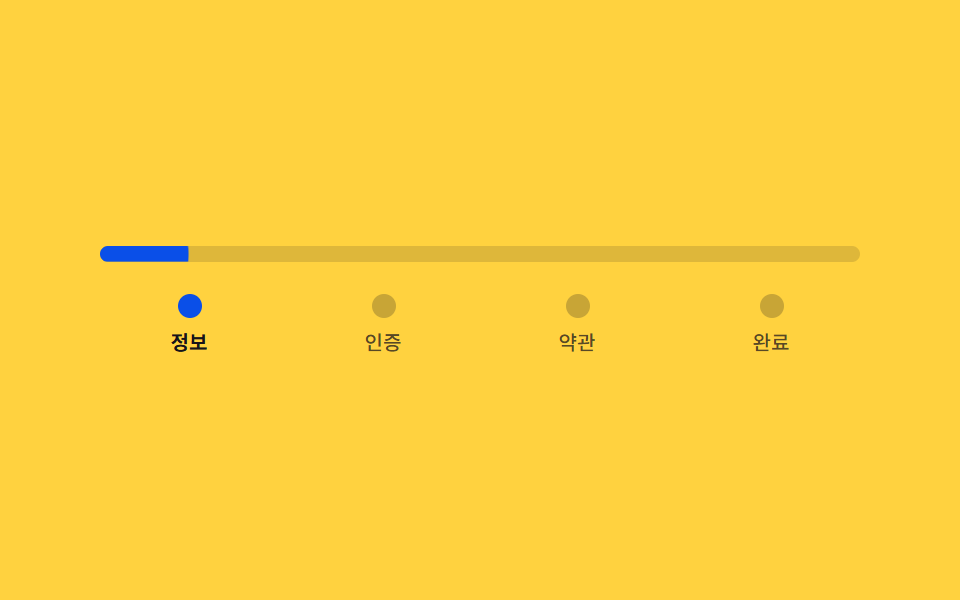 Auth UI02 Signup steps — a stepped form that divides its own progress ratio to set bar length and color9 Login UI Design Patterns (Copy-Paste)
 Auth UI01 Glassmorphic login card9 Login Form Design Patterns You Can Copy-Paste