04Like button with a rolling count
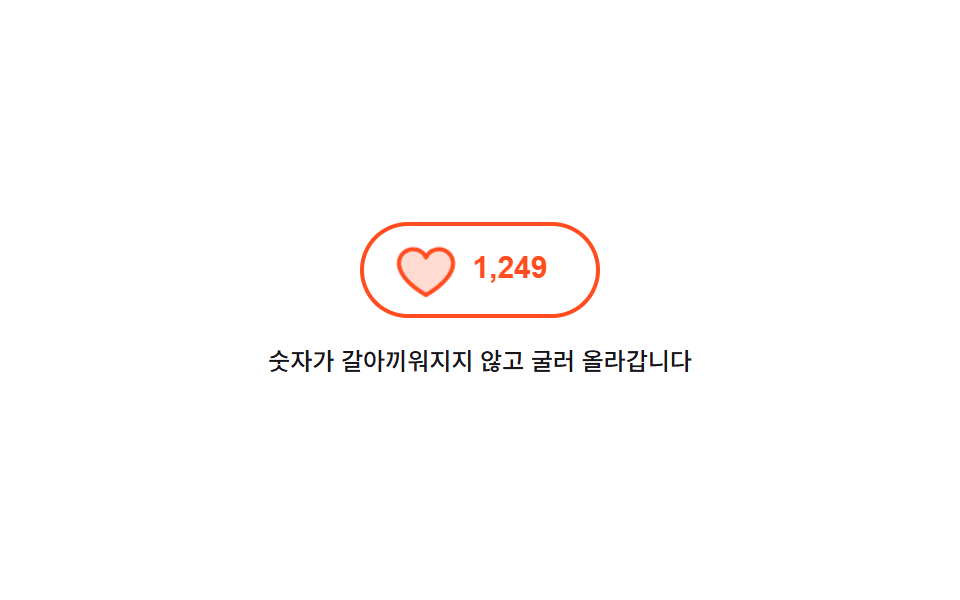
A press swells the heart once and settles it back while the number beside it changes by sliding the old value up and the new value in from below, so the count never teleports.
Best forLike and upvote buttons on posts and comments where the result stays as a number
aria-livetranslateYscale
<main class="stage">
  <div class="lk is-demo">
    <button class="lk__btn" id="lk-btn" type="button" aria-pressed="false" aria-label="Like this post">
      <span class="lk__heart" aria-hidden="true"><svg viewBox="0 0 256 256" width="22" height="22"><g fill="currentColor"><path d="M232 102c0 66-104 122-104 122S24 168 24 102a54 54 0 0 1 54-54c22.59 0 41.94 12.31 50 32c8.06-19.69 27.41-32 50-32a54 54 0 0 1 54 54" opacity=".2"/><path d="M178 40c-20.65 0-38.73 8.88-50 23.89C116.73 48.88 98.65 40 78 40a62.07 62.07 0 0 0-62 62c0 70 103.79 126.66 108.21 129a8 8 0 0 0 7.58 0C136.21 228.66 240 172 240 102a62.07 62.07 0 0 0-62-62m-50 174.8c-18.26-10.64-96-59.11-96-112.8a46.06 46.06 0 0 1 46-46c19.45 0 35.78 10.36 42.6 27a8 8 0 0 0 14.8 0c6.82-16.67 23.15-27 42.6-27a46.06 46.06 0 0 1 46 46c0 53.61-77.76 102.15-96 112.8"/></g></svg></span>
      <span class="lk__win" aria-live="polite">
        <span class="lk__roll">
          <span class="lk__n">1,248</span>
          <span class="lk__n">1,249</span>
        </span>
      </span>
    </button>
    <p class="lk__note">The count rolls instead of swapping</p>
  </div>
</main>
@use "../../../../site/static/demo-tokens" as *;
$duration: $dur-quick;
$easing: $ease-pop;
$color: $stage-orange;
@include stage($stage-paper);
.lk {
box-sizing: border-box;
display: flex;
flex-direction: column;
align-items: center;
gap: $sp-3;
font-family: -apple-system, "Segoe UI", "Noto Sans KR", sans-serif;
}
.lk__btn {
box-sizing: border-box;
margin: 0;
padding: $sp-2 $sp-5;
display: inline-flex;
align-items: center;
gap: $sp-2;
height: 48px;
border: 2px solid $subject-ink;
border-radius: $r-pill;
background-color: transparent;
color: $subject-ink;
cursor: pointer;
}
.lk__btn:focus-visible { outline: 3px solid $subject-blue; outline-offset: 3px; }
.lk__heart { display: inline-flex; flex: 0 0 auto; }
.lk__heart svg { display: block; }
// 숫자 창 — 높이를 한 줄로 못 박고 그 안에서 두 값이 세로로 오간다
.lk__win {
display: block;
overflow: hidden;
height: 22px;
width: 46px;
}
.lk__roll {
display: block;
transform: translateY(0);
}
.lk__n {
display: block;
height: 22px;
font-size: 15px;
line-height: 22px;
font-weight: 700;
font-variant-numeric: tabular-nums;
}
// 사람이 실제로 누른 경로
.lk:not(.is-demo) .lk__roll { transition: transform $duration $easing; }
.lk:not(.is-demo) .lk__btn[aria-pressed="true"] .lk__roll { transform: translateY(-22px); }
.lk:not(.is-demo) .lk__btn[aria-pressed="true"] { border-color: $color; color: $color; }
.lk__btn.is-beat .lk__heart {
animation-name: lk-beat;
animation-duration: $dur-base;
animation-timing-function: $easing;
animation-iteration-count: 1;
}
@keyframes lk-beat {
0% { transform: scale(1); }
35% { transform: scale(1.45); }
70% { transform: scale(.92); }
100% { transform: scale(1); }
}
.lk__note {
margin: 0;
max-width: 260px;
text-align: center;
font-size: 12px;
line-height: 18px;
font-weight: 500;
color: $subject-ink;
}
// ── 자동 루프: 35% 에 누르고 80% 에 다시 눌러 되돌린다. 굴림은 transform 이라 중간 프레임이 유령이 되지 않는다 ──
.lk.is-demo .lk__roll {
animation-name: lk-roll;
animation-duration: $dur-loop;
animation-timing-function: $easing;
animation-iteration-count: infinite;
}
@keyframes lk-roll {
0% { transform: translateY(0); }
32% { transform: translateY(0); }
44% { transform: translateY(-22px); }
78% { transform: translateY(-22px); }
88% { transform: translateY(0); }
100% { transform: translateY(0); }
}
.lk.is-demo .lk__heart {
animation-name: lk-beat-loop;
animation-duration: $dur-loop;
animation-timing-function: $easing;
animation-iteration-count: infinite;
}
@keyframes lk-beat-loop {
0% { transform: scale(1); }
32% { transform: scale(1); }
40% { transform: scale(1.5); }
50% { transform: scale(.94); }
58% { transform: scale(1); }
78% { transform: scale(1); }
84% { transform: scale(1.2); }
90% { transform: scale(1); }
100% { transform: scale(1); }
}
.lk.is-demo .lk__btn {
animation-name: lk-skin;
animation-duration: $dur-loop;
animation-timing-function: steps(1, end);
animation-iteration-count: infinite;
}
@keyframes lk-skin {
0% { border-color: $subject-ink; color: $subject-ink; }
36% { border-color: $color; color: $color; }
82% { border-color: $subject-ink; color: $subject-ink; }
100% { border-color: $subject-ink; color: $subject-ink; }
}
@media (max-width: 340px) {
.lk { gap: $sp-2; }
.lk__btn { height: 44px; padding: $sp-2 $sp-4; }
.lk__note { font-size: 11px; line-height: 16px; }
}
@media (prefers-reduced-motion: reduce) {
.lk.is-demo .lk__roll,
.lk.is-demo .lk__heart,
.lk.is-demo .lk__btn,
.lk__btn.is-beat .lk__heart { animation: none !important; }
.lk:not(.is-demo) .lk__roll { transition: none !important; }
}html, body {
margin: 0;
overflow: hidden;
}
.stage {
box-sizing: border-box;
min-height: 100vh;
display: grid;
place-items: center;
margin: 0;
background: #ffffff;
font-family: -apple-system, "Segoe UI", "Noto Sans KR", sans-serif;
padding: clamp(8px, 4vw, 24px);
}
.lk {
box-sizing: border-box;
display: flex;
flex-direction: column;
align-items: center;
gap: 12px;
font-family: -apple-system, "Segoe UI", "Noto Sans KR", sans-serif;
}
.lk__btn {
box-sizing: border-box;
margin: 0;
padding: 8px 20px;
display: inline-flex;
align-items: center;
gap: 8px;
height: 48px;
border: 2px solid #17141a;
border-radius: 999px;
background-color: transparent;
color: #17141a;
cursor: pointer;
}
.lk__btn:focus-visible {
outline: 3px solid #2f6df6;
outline-offset: 3px;
}
.lk__heart {
display: inline-flex;
flex: 0 0 auto;
}
.lk__heart svg {
display: block;
}
.lk__win {
display: block;
overflow: hidden;
height: 22px;
width: 46px;
}
.lk__roll {
display: block;
transform: translateY(0);
}
.lk__n {
display: block;
height: 22px;
font-size: 15px;
line-height: 22px;
font-weight: 700;
font-variant-numeric: tabular-nums;
}
.lk:not(.is-demo) .lk__roll {
transition: transform 220ms cubic-bezier(0.2, 1.4, 0.4, 1);
}
.lk:not(.is-demo) .lk__btn[aria-pressed=true] .lk__roll {
transform: translateY(-22px);
}
.lk:not(.is-demo) .lk__btn[aria-pressed=true] {
border-color: #ff4d1f;
color: #ff4d1f;
}
.lk__btn.is-beat .lk__heart {
animation-name: lk-beat;
animation-duration: 300ms;
animation-timing-function: cubic-bezier(0.2, 1.4, 0.4, 1);
animation-iteration-count: 1;
}
@keyframes lk-beat {
0% {
transform: scale(1);
}
35% {
transform: scale(1.45);
}
70% {
transform: scale(0.92);
}
100% {
transform: scale(1);
}
}
.lk__note {
margin: 0;
max-width: 260px;
text-align: center;
font-size: 12px;
line-height: 18px;
font-weight: 500;
color: #17141a;
}
.lk.is-demo .lk__roll {
animation-name: lk-roll;
animation-duration: 2s;
animation-timing-function: cubic-bezier(0.2, 1.4, 0.4, 1);
animation-iteration-count: infinite;
}
@keyframes lk-roll {
0% {
transform: translateY(0);
}
32% {
transform: translateY(0);
}
44% {
transform: translateY(-22px);
}
78% {
transform: translateY(-22px);
}
88% {
transform: translateY(0);
}
100% {
transform: translateY(0);
}
}
.lk.is-demo .lk__heart {
animation-name: lk-beat-loop;
animation-duration: 2s;
animation-timing-function: cubic-bezier(0.2, 1.4, 0.4, 1);
animation-iteration-count: infinite;
}
@keyframes lk-beat-loop {
0% {
transform: scale(1);
}
32% {
transform: scale(1);
}
40% {
transform: scale(1.5);
}
50% {
transform: scale(0.94);
}
58% {
transform: scale(1);
}
78% {
transform: scale(1);
}
84% {
transform: scale(1.2);
}
90% {
transform: scale(1);
}
100% {
transform: scale(1);
}
}
.lk.is-demo .lk__btn {
animation-name: lk-skin;
animation-duration: 2s;
animation-timing-function: steps(1, end);
animation-iteration-count: infinite;
}
@keyframes lk-skin {
0% {
border-color: #17141a;
color: #17141a;
}
36% {
border-color: #ff4d1f;
color: #ff4d1f;
}
82% {
border-color: #17141a;
color: #17141a;
}
100% {
border-color: #17141a;
color: #17141a;
}
}
@media (max-width: 340px) {
.lk {
gap: 8px;
}
.lk__btn {
height: 44px;
padding: 8px 16px;
}
.lk__note {
font-size: 11px;
line-height: 16px;
}
}
@media (prefers-reduced-motion: reduce) {
.lk.is-demo .lk__roll,
.lk.is-demo .lk__heart,
.lk.is-demo .lk__btn,
.lk__btn.is-beat .lk__heart {
animation: none !important;
}
.lk:not(.is-demo) .lk__roll {
transition: none !important;
}
}// 실제 동작: 누른 상태와 숫자를 따로 두지 않는다. aria-pressed 하나가 하트 색과 굴림 위치를 같이 정한다
var root = document.querySelector('.lk');
var btn = document.getElementById('lk-btn');
btn.addEventListener('click', function () {
root.classList.remove('is-demo');
var on = btn.getAttribute('aria-pressed') === 'true';
btn.setAttribute('aria-pressed', String(!on));
btn.classList.remove('is-beat');
void btn.offsetWidth; // 연달아 눌러도 하트 반동이 매번 돌게 리플로를 강제한다
btn.classList.add('is-beat');
});import { useState } from "react";
import type { CSSProperties } from "react";
import styles from "./LikeCountButton.module.scss";
export type LikeCountButtonProps = {
label?: string;
note?: string;
count?: number;
duration?: number;
easing?: string;
color?: string;
};
type Vars = CSSProperties & { "--duration"?: string; "--easing"?: string; "--color"?: string };
// 1248 → "1,248" — 세 자리마다 쉼표
function fmt(n: number): string {
const s = String(n);
let out = "";
for (let i = 0; i < s.length; i += 1) {
if (i > 0 && (s.length - i) % 3 === 0) out += ",";
out += s.charAt(i);
}
return out;
}
export default function LikeCountButton({
label = "Like this post",
note = "The number rolls up instead of being swapped",
count = 1248,
duration = 220,
easing = "cubic-bezier(.2,1.4,.4,1)",
color = "#ff4d1f",
}: LikeCountButtonProps) {
const [demo, setDemo] = useState(true);
const [on, setOn] = useState(false);
const [beat, setBeat] = useState(0);
const vars: Vars = { "--duration": `${duration}ms`, "--easing": easing, "--color": color };
// 누른 상태 하나가 하트 색과 굴림 위치를 같이 정한다
function press() {
setDemo(false);
setOn((v) => !v);
setBeat((v) => v + 1); // key 를 바꿔 연달아 눌러도 하트 반동이 매번 다시 돈다
}
return (
<div className={`${styles.lk} ${demo ? styles.isDemo : ""}`} style={vars}>
<button className={styles.btn} type="button" aria-pressed={on} aria-label={label} onClick={press}>
<span key={beat} className={`${styles.heart} ${demo ? "" : styles.isBeat}`} aria-hidden="true">
<svg viewBox="0 0 256 256" width="22" height="22">
<g fill="currentColor">
<path d="M232 102c0 66-104 122-104 122S24 168 24 102a54 54 0 0 1 54-54c22.59 0 41.94 12.31 50 32c8.06-19.69 27.41-32 50-32a54 54 0 0 1 54 54" opacity=".2" />
<path d="M178 40c-20.65 0-38.73 8.88-50 23.89C116.73 48.88 98.65 40 78 40a62.07 62.07 0 0 0-62 62c0 70 103.79 126.66 108.21 129a8 8 0 0 0 7.58 0C136.21 228.66 240 172 240 102a62.07 62.07 0 0 0-62-62m-50 174.8c-18.26-10.64-96-59.11-96-112.8a46.06 46.06 0 0 1 46-46c19.45 0 35.78 10.36 42.6 27a8 8 0 0 0 14.8 0c6.82-16.67 23.15-27 42.6-27a46.06 46.06 0 0 1 46 46c0 53.61-77.76 102.15-96 112.8" />
</g>
</svg>
</span>
<span className={styles.win} aria-live="polite">
<span className={styles.roll}>
<span className={styles.n}>{fmt(count)}</span>
<span className={styles.n}>{fmt(count + 1)}</span>
</span>
</span>
</button>
<p className={styles.note}>{note}</p>
</div>
);
}04 Like button with a rolling count — Measured area 1.325% · moving frames 11/23Original by GODRICH · SCSS and React ship in the zip · 9 button state css patterns, loading to done
The post this demo lives in
 9 button state css patterns, loading to doneA button state css pattern decides what a button looks like between the press and the result. All nine here actually loc See all demos in this post
If you like this effect - similar demos
 Buttons08 Help button that opens a chat launcher9 Icon Button CSS Patterns — Press, Drag, Expand
 Buttons01 Power button with LED ringCSS Toggle Switch: 9 Realistic Switches to Paste
 Buttons01 Long-shadow retro — a button whose trailing shadow length value extends and retracts with hover stateCTA Button Design: 9 Interaction Patterns