07Primary action with other routes attached
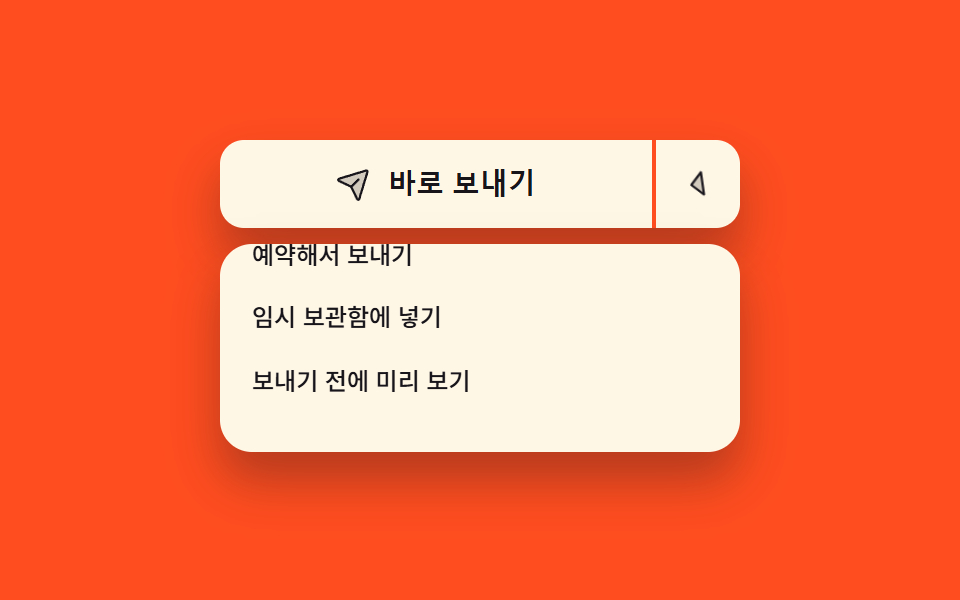
The wide left half runs the most common action at once while only the right arrow half opens the list, and the two share one outline yet stay separate buttons that each take focus.
Best forPlaces where one default action carries a few variants, like send and schedule send
aria-expandedaria-haspopuptranslateY
<main class="stage">
  <div class="sp is-demo">
    <div class="sp__wrap">
      <div class="sp__group" role="group" aria-label="Send options">
        <button class="sp__main" id="sp-main" type="button">
          <span class="sp__ic" aria-hidden="true"><svg viewBox="0 0 256 256" width="18" height="18"><g fill="currentColor"><path d="m223.69 42.18l-58.22 192a8 8 0 0 1-14.92 1.25L108 148l-87.42-42.55a8 8 0 0 1 1.25-14.92l192-58.22a8 8 0 0 1 9.86 9.87" opacity=".2"/><path d="M227.32 28.68a16 16 0 0 0-15.66-4.08h-.15L19.57 82.84a16 16 0 0 0-2.49 29.8L102 154l41.3 84.87a15.86 15.86 0 0 0 14.44 9.13q.69 0 1.38-.06a15.88 15.88 0 0 0 14-11.51l58.2-191.94v-.15a16 16 0 0 0-4-15.66m-69.49 203.17l-.05.14v-.07l-40.06-82.3l48-48a8 8 0 0 0-11.31-11.31l-48 48l-82.33-40.06h-.07h.14L216 40Z"/></g></svg></span>
          <span class="sp__t">Send now</span>
        </button>
        <button class="sp__more" id="sp-more" type="button" aria-haspopup="menu" aria-expanded="false" aria-controls="sp-menu" aria-label="More ways to send">
          <span class="sp__caret" aria-hidden="true"><svg viewBox="0 0 256 256" width="18" height="18"><g fill="currentColor"><path d="m208 96l-80 80l-80-80Z" opacity=".2"/><path d="M215.39 92.94A8 8 0 0 0 208 88H48a8 8 0 0 0-5.66 13.66l80 80a8 8 0 0 0 11.32 0l80-80a8 8 0 0 0 1.73-8.72M128 164.69L67.31 104h121.38Z"/></g></svg></span>
        </button>
      </div>
      <ul class="sp__menu" id="sp-menu" role="menu" aria-labelledby="sp-more">
        <li role="none"><button class="sp__item" type="button" role="menuitem">Schedule send</button></li>
        <li role="none"><button class="sp__item" type="button" role="menuitem">Save to drafts</button></li>
        <li role="none"><button class="sp__item" type="button" role="menuitem">Preview first</button></li>
      </ul>
    </div>
  </div>
</main>
@use "../../../../site/static/demo-tokens" as *;
$duration: $dur-quick;
$easing: $ease-spring;
$color: $subject-ink;
@include stage($stage-orange);
.sp {
box-sizing: border-box;
width: min(260px, 86vw);
font-family: -apple-system, "Segoe UI", "Noto Sans KR", sans-serif;
}
// 열린 목록은 절대 배치라 부모 높이에 안 잡힌다 — 목록 높이만큼 자리를 미리 비워 둔다
.sp__wrap {
position: relative;
padding-bottom: 116px;
}
.sp__group {
display: flex;
align-items: stretch;
height: 44px;
border-radius: $r-control;
background-color: $subject-cream;
box-shadow: $shadow-raised;
}
.sp__main {
box-sizing: border-box;
margin: 0;
padding: 0 $sp-3;
flex: 1 1 auto;
display: flex;
align-items: center;
justify-content: center;
gap: $sp-2;
border: 0;
border-radius: $r-control 0 0 $r-control;
background-color: transparent;
color: $color;
cursor: pointer;
}
.sp__main[data-sent="1"] { background-color: $subject-mint; }
.sp__more {
box-sizing: border-box;
margin: 0;
padding: 0 $sp-3;
flex: 0 0 auto;
display: flex;
align-items: center;
border: 0;
border-left: 2px solid $stage-orange; // 한 테두리 안에서 두 칸을 가르는 선
border-radius: 0 $r-control $r-control 0;
background-color: transparent;
color: $color;
cursor: pointer;
}
.sp__main:focus-visible,
.sp__more:focus-visible { outline: 3px solid $subject-cream; outline-offset: 2px; }
.sp__ic,
.sp__caret { display: inline-flex; flex: 0 0 auto; }
.sp__ic svg,
.sp__caret svg { display: block; }
.sp__t {
font-size: 14px;
line-height: 20px;
font-weight: 700;
white-space: nowrap;
}
.sp__menu {
position: absolute;
left: 0;
right: 0;
top: 52px;
margin: 0;
padding: $sp-1;
list-style: none;
border-radius: $r-card;
background-color: $subject-cream;
box-shadow: $shadow-raised;
opacity: 0;
}
.sp__item {
box-sizing: border-box;
margin: 0;
padding: 0 $sp-3;
display: block;
width: 100%;
height: 32px;
border: 0;
border-radius: $r-sm;
background-color: transparent;
color: $color;
text-align: left;
font-family: inherit;
font-size: 12px;
line-height: 18px;
font-weight: 500;
white-space: nowrap;
cursor: pointer;
transform: translateY(-16px);
}
.sp__item:hover { background-color: $stage-yellow; }
.sp__item:focus-visible { outline: 2px solid $color; outline-offset: -2px; }
// 사람이 실제로 연 경로
.sp:not(.is-demo)[data-open="1"] .sp__menu { opacity: 1; }
.sp:not(.is-demo)[data-open="1"] .sp__item { transform: translateY(0); transition: transform $duration $easing; }
.sp:not(.is-demo)[data-open="1"] .sp__caret { transform: rotate(180deg); }
.sp:not(.is-demo) .sp__caret { transition: transform $duration $easing; }
.sp__menu[aria-hidden],
.sp:not(.is-demo):not([data-open="1"]) .sp__menu { pointer-events: none; }
// ── 자동 루프: 8% 에 열고 **닫지 않는다**. 목록이 사라지는 프레임이 가장 크게 변해 대표 이미지가 빈 버튼이 됐다 ──
// 대신 열린 뒤에는 줄을 하나씩 훑어 움직임을 채운다.
.sp.is-demo .sp__menu {
animation-name: sp-open;
animation-duration: $dur-loop;
animation-timing-function: steps(1, end);
animation-iteration-count: infinite;
}
@keyframes sp-open {
0% { opacity: 0; }
8% { opacity: 1; }
100% { opacity: 1; }
}
.sp.is-demo .sp__item {
animation-name: sp-slide, sp-walk;
animation-duration: $dur-loop, $dur-loop;
animation-timing-function: $easing, steps(1, end);
animation-iteration-count: infinite, infinite;
animation-fill-mode: backwards, backwards;
}
.sp.is-demo li:nth-child(1) .sp__item { animation-delay: 0s, 0s; }
.sp.is-demo li:nth-child(2) .sp__item { animation-delay: 140ms, 360ms; }
.sp.is-demo li:nth-child(3) .sp__item { animation-delay: 280ms, 720ms; }
@keyframes sp-slide {
0% { transform: translateY(-16px); }
8% { transform: translateY(-16px); }
34% { transform: translateY(0); }
100% { transform: translateY(0); }
}
@keyframes sp-walk {
0% { background-color: transparent; }
40% { background-color: $stage-yellow; }
58% { background-color: transparent; }
100% { background-color: transparent; }
}
.sp.is-demo .sp__caret {
animation-name: sp-turn;
animation-duration: $dur-loop;
animation-timing-function: $easing;
animation-iteration-count: infinite;
}
@keyframes sp-turn {
0% { transform: rotate(0deg); }
6% { transform: rotate(0deg); }
26% { transform: rotate(180deg); }
100% { transform: rotate(180deg); }
}
@media (max-width: 340px) {
.sp__wrap { padding-bottom: 100px; }
.sp__group { height: 40px; }
.sp__t { font-size: 12px; line-height: 18px; }
.sp__menu { top: 44px; }
.sp__item { height: 28px; font-size: 11px; line-height: 16px; }
}
@media (prefers-reduced-motion: reduce) {
.sp.is-demo .sp__menu,
.sp.is-demo .sp__item,
.sp.is-demo .sp__caret { animation: none !important; }
.sp:not(.is-demo) .sp__item,
.sp:not(.is-demo) .sp__caret { transition: none !important; }
.sp.is-demo .sp__menu { opacity: 1; }
.sp.is-demo .sp__item { transform: translateY(0); }
}html, body {
margin: 0;
overflow: hidden;
}
.stage {
box-sizing: border-box;
min-height: 100vh;
display: grid;
place-items: center;
margin: 0;
background: #ff4d1f;
font-family: -apple-system, "Segoe UI", "Noto Sans KR", sans-serif;
padding: clamp(8px, 4vw, 24px);
}
.sp {
box-sizing: border-box;
width: min(260px, 86vw);
font-family: -apple-system, "Segoe UI", "Noto Sans KR", sans-serif;
}
.sp__wrap {
position: relative;
padding-bottom: 116px;
}
.sp__group {
display: flex;
align-items: stretch;
height: 44px;
border-radius: 12px;
background-color: #fff7e6;
box-shadow: 0 14px 24px rgba(23, 20, 26, 0.32);
}
.sp__main {
box-sizing: border-box;
margin: 0;
padding: 0 12px;
flex: 1 1 auto;
display: flex;
align-items: center;
justify-content: center;
gap: 8px;
border: 0;
border-radius: 12px 0 0 12px;
background-color: transparent;
color: #17141a;
cursor: pointer;
}
.sp__main[data-sent="1"] {
background-color: #4cd4a6;
}
.sp__more {
box-sizing: border-box;
margin: 0;
padding: 0 12px;
flex: 0 0 auto;
display: flex;
align-items: center;
border: 0;
border-left: 2px solid #ff4d1f;
border-radius: 0 12px 12px 0;
background-color: transparent;
color: #17141a;
cursor: pointer;
}
.sp__main:focus-visible,
.sp__more:focus-visible {
outline: 3px solid #fff7e6;
outline-offset: 2px;
}
.sp__ic,
.sp__caret {
display: inline-flex;
flex: 0 0 auto;
}
.sp__ic svg,
.sp__caret svg {
display: block;
}
.sp__t {
font-size: 14px;
line-height: 20px;
font-weight: 700;
white-space: nowrap;
}
.sp__menu {
position: absolute;
left: 0;
right: 0;
top: 52px;
margin: 0;
padding: 4px;
list-style: none;
border-radius: 16px;
background-color: #fff7e6;
box-shadow: 0 14px 24px rgba(23, 20, 26, 0.32);
opacity: 0;
}
.sp__item {
box-sizing: border-box;
margin: 0;
padding: 0 12px;
display: block;
width: 100%;
height: 32px;
border: 0;
border-radius: 8px;
background-color: transparent;
color: #17141a;
text-align: left;
font-family: inherit;
font-size: 12px;
line-height: 18px;
font-weight: 500;
white-space: nowrap;
cursor: pointer;
transform: translateY(-16px);
}
.sp__item:hover {
background-color: #ffd23f;
}
.sp__item:focus-visible {
outline: 2px solid #17141a;
outline-offset: -2px;
}
.sp:not(.is-demo)[data-open="1"] .sp__menu {
opacity: 1;
}
.sp:not(.is-demo)[data-open="1"] .sp__item {
transform: translateY(0);
transition: transform 220ms cubic-bezier(0.2, 0.8, 0.2, 1);
}
.sp:not(.is-demo)[data-open="1"] .sp__caret {
transform: rotate(180deg);
}
.sp:not(.is-demo) .sp__caret {
transition: transform 220ms cubic-bezier(0.2, 0.8, 0.2, 1);
}
.sp__menu[aria-hidden],
.sp:not(.is-demo):not([data-open="1"]) .sp__menu {
pointer-events: none;
}
.sp.is-demo .sp__menu {
animation-name: sp-open;
animation-duration: 2s;
animation-timing-function: steps(1, end);
animation-iteration-count: infinite;
}
@keyframes sp-open {
0% {
opacity: 0;
}
8% {
opacity: 1;
}
100% {
opacity: 1;
}
}
.sp.is-demo .sp__item {
animation-name: sp-slide, sp-walk;
animation-duration: 2s, 2s;
animation-timing-function: cubic-bezier(0.2, 0.8, 0.2, 1), steps(1, end);
animation-iteration-count: infinite, infinite;
animation-fill-mode: backwards, backwards;
}
.sp.is-demo li:nth-child(1) .sp__item {
animation-delay: 0s, 0s;
}
.sp.is-demo li:nth-child(2) .sp__item {
animation-delay: 140ms, 360ms;
}
.sp.is-demo li:nth-child(3) .sp__item {
animation-delay: 280ms, 720ms;
}
@keyframes sp-slide {
0% {
transform: translateY(-16px);
}
8% {
transform: translateY(-16px);
}
34% {
transform: translateY(0);
}
100% {
transform: translateY(0);
}
}
@keyframes sp-walk {
0% {
background-color: transparent;
}
40% {
background-color: #ffd23f;
}
58% {
background-color: transparent;
}
100% {
background-color: transparent;
}
}
.sp.is-demo .sp__caret {
animation-name: sp-turn;
animation-duration: 2s;
animation-timing-function: cubic-bezier(0.2, 0.8, 0.2, 1);
animation-iteration-count: infinite;
}
@keyframes sp-turn {
0% {
transform: rotate(0deg);
}
6% {
transform: rotate(0deg);
}
26% {
transform: rotate(180deg);
}
100% {
transform: rotate(180deg);
}
}
@media (max-width: 340px) {
.sp__wrap {
padding-bottom: 100px;
}
.sp__group {
height: 40px;
}
.sp__t {
font-size: 12px;
line-height: 18px;
}
.sp__menu {
top: 44px;
}
.sp__item {
height: 28px;
font-size: 11px;
line-height: 16px;
}
}
@media (prefers-reduced-motion: reduce) {
.sp.is-demo .sp__menu,
.sp.is-demo .sp__item,
.sp.is-demo .sp__caret {
animation: none !important;
}
.sp:not(.is-demo) .sp__item,
.sp:not(.is-demo) .sp__caret {
transition: none !important;
}
.sp.is-demo .sp__menu {
opacity: 1;
}
.sp.is-demo .sp__item {
transform: translateY(0);
}
}// 실제 동작: 왼쪽 칸은 목록을 열지 않는다. 오른쪽 화살표 칸만 aria-expanded 를 뒤집는다
var root = document.querySelector('.sp');
var more = document.getElementById('sp-more');
var main = document.getElementById('sp-main');
function setOpen(on) {
more.setAttribute('aria-expanded', String(on));
root.setAttribute('data-open', on ? '1' : '0');
}
more.addEventListener('click', function () {
root.classList.remove('is-demo');
setOpen(more.getAttribute('aria-expanded') !== 'true');
});
main.addEventListener('click', function () {
root.classList.remove('is-demo');
setOpen(false);
main.setAttribute('data-sent', '1');
});
root.addEventListener('keydown', function (e) {
if (e.key === 'Escape') { setOpen(false); more.focus({ preventScroll: true }); }
});import { useCallback, useRef, useState } from "react";
import type { CSSProperties } from "react";
import styles from "./SplitMenuButton.module.scss";
export type SplitMenuButtonProps = {
mainLabel?: string;
items?: string[];
groupLabel?: string;
moreLabel?: string;
id?: string;
duration?: number;
easing?: string;
};
type Vars = CSSProperties & { "--duration"?: string; "--easing"?: string };
// DOM 전역 타입을 react 에서 가져오지 않는다 — 쓰는 속성만 여기에 적는다
type KeyEvt = { key: string };
const SEND_ICON = (
<g fill="currentColor"><path d="m223.69 42.18l-58.22 192a8 8 0 0 1-14.92 1.25L108 148l-87.42-42.55a8 8 0 0 1 1.25-14.92l192-58.22a8 8 0 0 1 9.86 9.87" opacity=".2" /><path d="M227.32 28.68a16 16 0 0 0-15.66-4.08h-.15L19.57 82.84a16 16 0 0 0-2.49 29.8L102 154l41.3 84.87a15.86 15.86 0 0 0 14.44 9.13q.69 0 1.38-.06a15.88 15.88 0 0 0 14-11.51l58.2-191.94v-.15a16 16 0 0 0-4-15.66m-69.49 203.17l-.05.14v-.07l-40.06-82.3l48-48a8 8 0 0 0-11.31-11.31l-48 48l-82.33-40.06h-.07h.14L216 40Z" /></g>
);
const CARET_ICON = (
<g fill="currentColor"><path d="m208 96l-80 80l-80-80Z" opacity=".2" /><path d="M215.39 92.94A8 8 0 0 0 208 88H48a8 8 0 0 0-5.66 13.66l80 80a8 8 0 0 0 11.32 0l80-80a8 8 0 0 0 1.73-8.72M128 164.69L67.31 104h121.38Z" /></g>
);
export default function SplitMenuButton({
mainLabel = "Send now",
items = ["Schedule send", "Save to drafts", "Preview first"],
groupLabel = "Send options",
moreLabel = "More ways to send",
id = "sp",
duration = 220,
easing = "cubic-bezier(.2,.8,.2,1)",
}: SplitMenuButtonProps) {
const [demo, setDemo] = useState(true); // 처음엔 자동 루프, 사람이 건드리면 끈다
const [open, setOpen] = useState(false);
const [sent, setSent] = useState(false);
const moreRef = useRef<HTMLButtonElement | null>(null);
const vars: Vars = { "--duration": `${duration}ms`, "--easing": easing };
const menuId = `${id}-menu`;
const moreId = `${id}-more`;
// 왼쪽 칸은 목록을 열지 않는다. 오른쪽 화살표 칸만 aria-expanded 를 뒤집는다
const toggle = useCallback(() => {
setDemo(false);
setOpen((v) => !v);
}, []);
const send = useCallback(() => {
setDemo(false);
setOpen(false);
setSent(true);
}, []);
const onKeyDown = useCallback((e: KeyEvt) => {
if (e.key !== "Escape") return;
setOpen(false);
// preventScroll — iframe 안에서 부모 페이지가 끌려가지 않게
moreRef.current?.focus({ preventScroll: true });
}, []);
return (
<div
className={`${styles.sp} ${demo ? styles.isDemo : ""}`}
style={vars}
data-open={open ? "1" : "0"}
onKeyDown={onKeyDown}
>
<div className={styles.wrap}>
<div className={styles.group} role="group" aria-label={groupLabel}>
<button className={styles.main} type="button" data-sent={sent ? "1" : "0"} onClick={send}>
<span className={styles.ic} aria-hidden="true">
<svg viewBox="0 0 256 256" width="18" height="18">{SEND_ICON}</svg>
</span>
<span className={styles.t}>{mainLabel}</span>
</button>
<button
ref={moreRef}
className={styles.more}
id={moreId}
type="button"
aria-haspopup="menu"
aria-expanded={open}
aria-controls={menuId}
aria-label={moreLabel}
onClick={toggle}
>
<span className={styles.caret} aria-hidden="true">
<svg viewBox="0 0 256 256" width="18" height="18">{CARET_ICON}</svg>
</span>
</button>
</div>
<ul className={styles.menu} id={menuId} role="menu" aria-labelledby={moreId}>
{items.map((label) => (
<li key={label} role="none">
<button className={styles.item} type="button" role="menuitem">{label}</button>
</li>
))}
</ul>
</div>
</div>
);
}07 Primary action with other routes attached — Measured area 24.579% · moving frames 12/23Original by GODRICH · SCSS and React ship in the zip · 9 button state css patterns, loading to done
The post this demo lives in
 9 button state css patterns, loading to doneA button state css pattern decides what a button looks like between the press and the result. All nine here actually loc See all demos in this post
If you like this effect - similar demos
 Buttons08 Help button that opens a chat launcher9 Icon Button CSS Patterns — Press, Drag, Expand
 Buttons01 Power button with LED ringCSS Toggle Switch: 9 Realistic Switches to Paste
 Buttons01 Long-shadow retro — a button whose trailing shadow length value extends and retracts with hover stateCTA Button Design: 9 Interaction Patterns