09Inline code that explains a token on hover
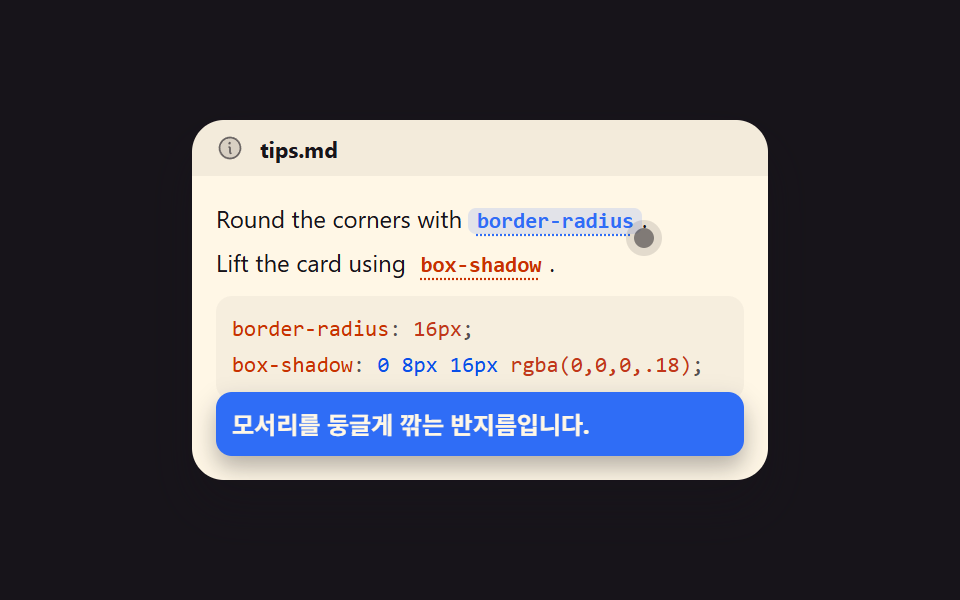
Inline code inside a sentence carries a dotted underline, and hovering or tabbing to it floats a note explaining what the token is. The note is absolutely positioned and never counts toward the parent height, so that much bottom padding is reserved up front.
Best forTechnical paragraphs full of unfamiliar property names
aria-describedbytext-decorationfocus-visible
<main class="stage">
  <div class="tp is-demo" id="tp">
    <div class="tp__head">
      <svg viewBox="0 0 256 256" width="14" height="14" aria-hidden="true"><g fill="currentColor"><path d="M224 128a96 96 0 1 1-96-96a96 96 0 0 1 96 96" opacity=".2"/><path d="M144 176a8 8 0 0 1-8 8a16 16 0 0 1-16-16v-40a8 8 0 0 1 0-16a16 16 0 0 1 16 16v40a8 8 0 0 1 8 8m88-48A104 104 0 1 1 128 24a104.11 104.11 0 0 1 104 104m-16 0a88 88 0 1 0-88 88a88.1 88.1 0 0 0 88-88m-92-32a12 12 0 1 0-12-12a12 12 0 0 0 12 12"/></g></svg>
      <span class="tp__label">tips.md</span>
    </div>
    <div class="tp__body" id="tp-body">
      <p class="tp__line">Round the corners with <button class="tok" id="tp-tok1" type="button" aria-describedby="tp-pop1" aria-label="Show description">border-radius</button>.</p>
      <p class="tp__line">Lift the card using <button class="tok" id="tp-tok2" type="button" aria-describedby="tp-pop2" aria-label="Show description">box-shadow</button>.</p>
      <pre class="tp__code"><code><span class="ln"><span class="k">border-radius</span><span class="c">:</span> <span class="n">16px</span><span class="c">;</span></span><span class="ln"><span class="k">box-shadow</span><span class="c">:</span> <span class="s">0 8px 16px</span> <span class="n">rgba(0,0,0,.18)</span><span class="c">;</span></span></code></pre>
      <span class="tp__ptr" id="tp-ptr" aria-hidden="true"></span>
      <div class="tp__pop" id="tp-pop1" role="tooltip">The radius that rounds off the corners.</div>
      <div class="tp__pop" id="tp-pop2" role="tooltip">The shadow that gives a floating feel.</div>
    </div>
  </div>
</main>
@use "../../../../site/static/demo-tokens" as *;
$duration: $dur-loop;
$easing: $ease-spring;
$color: $subject-blue;
@include stage($stage-ink);
// 구문 색 — 밝은 패널
$syn-key: $subject-orange-deep;
$syn-str: $subject-blue-deep;
$syn-num: $error;
$syn-dim: rgba($subject-ink, .72);
$syn-txt: $subject-ink;
.tp {
box-sizing: border-box;
width: 288px;
border-radius: $r-card;
overflow: hidden;
box-shadow: $shadow-raised;
background: $subject-cream;
color: $subject-ink;
}
.tp__head {
display: flex;
align-items: center;
gap: $sp-2;
height: 28px;
padding: 0 $sp-3;
color: rgba(23, 20, 26, .6);
background: rgba(23, 20, 26, .05);
}
.tp__label { font-size: 11px; font-weight: 700; color: $subject-ink; }
.tp__body {
position: relative;
box-sizing: border-box;
padding: $sp-3;
padding-bottom: $sp-10; // 함정 7 — 팝오버는 position:absolute 라 뿌리 높이에 안 잡힌다. 미리 확보
font-family: -apple-system, "Segoe UI", "Noto Sans KR", sans-serif;
font-size: 12px;
line-height: 18px;
}
.tp__line { margin: 0 0 $sp-1 0; }
.tp__line:last-of-type { margin-bottom: $sp-2; }
.tok {
display: inline;
padding: 0 $sp-1;
border: 0;
border-radius: $r-xs;
background: transparent;
color: $syn-key;
font-family: ui-monospace, "SFMono-Regular", Menlo, Consolas, monospace;
font-size: 11px;
font-weight: 700;
text-decoration: underline dotted;
text-underline-offset: 3px;
cursor: pointer;
}
.tok.is-on { background: rgba(47, 109, 246, .14); color: $subject-blue-deep; text-decoration: none; }
.tok:focus-visible { outline: 2px solid $subject-blue; outline-offset: 2px; }
.tp__code {
box-sizing: border-box;
margin: 0;
padding: $sp-2;
border-radius: $r-sm;
background: rgba(23, 20, 26, .04);
font-family: ui-monospace, "SFMono-Regular", Menlo, Consolas, monospace;
font-size: 11px;
line-height: 18px;
color: $syn-txt;
}
.tp__code .k { color: $syn-key; }
.tp__code .s { color: $syn-str; }
.tp__code .n { color: $syn-num; }
.tp__code .c { color: $syn-dim; }
.ln { display: block; }
.tp__ptr {
position: absolute;
top: 26px;
left: 221px;
width: 10px;
height: 10px;
border-radius: 50%;
background: rgba(23, 20, 26, .55);
box-shadow: 0 0 0 4px rgba(23, 20, 26, .12);
pointer-events: none;
}
.tp__pop {
box-sizing: border-box;
position: absolute;
left: $sp-3;
right: $sp-3;
bottom: $sp-3;
padding: $sp-2;
border-radius: $r-sm;
background: $subject-blue;
color: $subject-cream;
font-size: 12px;
line-height: 16px;
font-weight: 700;
box-shadow: $shadow-press;
opacity: 0;
visibility: hidden;
transform: translateY(6px) scale(.96);
}
// 정적 상태 — 사람이 눌러/짚어 열면 바로 보인다 (함정 10)
.tp__pop.is-open { opacity: 1; visibility: visible; transform: translateY(0) scale(1); }
// ── 자동 루프 (2s) ────────────────────────────────────
// 0~14% 포인터가 첫 tok · 16% 팝오버A 등장+tok1 켬 · 34~48% 포인터가 둘째 tok ·
// 50% 컷 A→B 교체(+tok2 켬, tok1 끔) · 52~64% B 정착 · 66~84% 포인터 복귀 + B 서서히 사라짐(tok2 끔) · 86~100% 정지
.tp.is-demo #tp-ptr {
animation-name: tp-ptr;
animation-duration: $duration;
animation-timing-function: linear;
animation-iteration-count: infinite;
}
.tp.is-demo #tp-tok1 {
animation-name: tp-tok1-on;
animation-duration: $duration;
animation-timing-function: linear;
animation-iteration-count: infinite;
}
.tp.is-demo #tp-tok2 {
animation-name: tp-tok2-on;
animation-duration: $duration;
animation-timing-function: linear;
animation-iteration-count: infinite;
}
.tp.is-demo #tp-pop1 {
animation-name: tp-pop1;
animation-duration: $duration;
animation-timing-function: linear;
animation-iteration-count: infinite;
}
.tp.is-demo #tp-pop2 {
animation-name: tp-pop2;
animation-duration: $duration;
animation-timing-function: linear;
animation-iteration-count: infinite;
}
@keyframes tp-ptr {
0% { transform: translate(0, 0); }
14% { transform: translate(0, 0); animation-timing-function: $easing; }
34% { transform: translate(0, 0); animation-timing-function: $easing; }
48% { transform: translate(-46px, 22px); animation-timing-function: $easing; }
66% { transform: translate(-46px, 22px); animation-timing-function: $easing; }
84% { transform: translate(0, 0); }
100% { transform: translate(0, 0); }
}
@keyframes tp-tok1-on {
0% { background: transparent; color: $syn-key; }
16% { background: transparent; color: $syn-key; animation-timing-function: steps(1, end); }
18% { background: rgba(47, 109, 246, .14); color: $subject-blue; animation-timing-function: steps(1, end); }
// 첫 낱말은 둘째 낱말이 켜지는 50% 에 **그 프레임에** 꺼진다.
// 66% 까지 남겨 두면 두 낱말이 동시에 켜져 무엇을 설명 중인지 흐려진다 (poster 육안 실측)
49% { background: rgba(47, 109, 246, .14); color: $subject-blue; animation-timing-function: steps(1, end); }
50% { background: transparent; color: $syn-key; animation-timing-function: steps(1, end); }
100% { background: transparent; color: $syn-key; }
}
@keyframes tp-tok2-on {
0% { background: transparent; color: $syn-key; }
49% { background: transparent; color: $syn-key; animation-timing-function: steps(1, end); }
50% { background: rgba(47, 109, 246, .14); color: $subject-blue; animation-timing-function: steps(1, end); }
83% { background: rgba(47, 109, 246, .14); color: $subject-blue; animation-timing-function: steps(1, end); }
84% { background: transparent; color: $syn-key; }
100% { background: transparent; color: $syn-key; }
}
// 쪽지 두 장은 **같은 자리**에 겹쳐 있다. A→B 교체는 글자만 바뀌므로 변화 면적이 작고,
// 등장(18%)과 퇴장이 훨씬 크다. 그래서 등장은 한 프레임 컷으로 크게 만들고,
// 퇴장은 76~88% 에 걸쳐 아래로 **미끄러져 잘려 나가게** 해 프레임당 변화를 잘게 쪼갠다.
// (opacity 로 빼면 반투명 유령 프레임이 생기고, 컷으로 빼면 그 한 장이 poster 가 된다)
@keyframes tp-pop1 {
0% { opacity: 0; visibility: hidden; transform: translateY(44px); animation-timing-function: steps(1, end); }
17% { opacity: 0; visibility: hidden; transform: translateY(44px); animation-timing-function: steps(1, end); }
18% { opacity: 1; visibility: visible; transform: translateY(0); animation-timing-function: steps(1, end); }
49% { opacity: 1; visibility: visible; transform: translateY(0); animation-timing-function: steps(1, end); }
50% { opacity: 0; visibility: hidden; transform: translateY(44px); animation-timing-function: steps(1, end); }
100% { opacity: 0; visibility: hidden; transform: translateY(44px); }
}
@keyframes tp-pop2 {
0% { opacity: 0; visibility: hidden; transform: translateY(44px); animation-timing-function: steps(1, end); }
49% { opacity: 0; visibility: hidden; transform: translateY(44px); animation-timing-function: steps(1, end); }
50% { opacity: 1; visibility: visible; transform: translateY(0); animation-timing-function: steps(1, end); }
76% { opacity: 1; visibility: visible; transform: translateY(0); animation-timing-function: $easing; }
88% { opacity: 1; visibility: visible; transform: translateY(44px); animation-timing-function: steps(1, end); }
100% { opacity: 0; visibility: hidden; transform: translateY(44px); }
}
@media (max-width: 340px) {
.tp { width: 100%; }
.tp__body { font-size: 11px; line-height: 16px; padding: $sp-2; padding-bottom: $sp-10; }
.tp__code { font-size: 10px; line-height: 16px; }
}
@media (prefers-reduced-motion: reduce) {
.tp.is-demo #tp-ptr,
.tp.is-demo #tp-tok1,
.tp.is-demo #tp-tok2,
.tp.is-demo #tp-pop1,
.tp.is-demo #tp-pop2 { animation: none !important; }
.tp.is-demo #tp-pop1,
.tp.is-demo #tp-pop2 { opacity: 0; visibility: hidden; }
}html, body {
margin: 0;
overflow: hidden;
}
.stage {
box-sizing: border-box;
min-height: 100vh;
display: grid;
place-items: center;
margin: 0;
background: #17141a;
font-family: -apple-system, "Segoe UI", "Noto Sans KR", sans-serif;
padding: clamp(8px, 4vw, 24px);
}
.tp {
box-sizing: border-box;
width: 288px;
border-radius: 16px;
overflow: hidden;
box-shadow: 0 14px 24px rgba(23, 20, 26, 0.32);
background: #fff7e6;
color: #17141a;
}
.tp__head {
display: flex;
align-items: center;
gap: 8px;
height: 28px;
padding: 0 12px;
color: rgba(23, 20, 26, 0.6);
background: rgba(23, 20, 26, 0.05);
}
.tp__label {
font-size: 11px;
font-weight: 700;
color: #17141a;
}
.tp__body {
position: relative;
box-sizing: border-box;
padding: 12px;
padding-bottom: 40px;
font-family: -apple-system, "Segoe UI", "Noto Sans KR", sans-serif;
font-size: 12px;
line-height: 18px;
}
.tp__line {
margin: 0 0 4px 0;
}
.tp__line:last-of-type {
margin-bottom: 8px;
}
.tok {
display: inline;
padding: 0 4px;
border: 0;
border-radius: 4px;
background: transparent;
color: #c93000;
font-family: ui-monospace, "SFMono-Regular", Menlo, Consolas, monospace;
font-size: 11px;
font-weight: 700;
text-decoration: underline dotted;
text-underline-offset: 3px;
cursor: pointer;
}
.tok.is-on {
background: rgba(47, 109, 246, 0.14);
color: #0a4fe8;
text-decoration: none;
}
.tok:focus-visible {
outline: 2px solid #2f6df6;
outline-offset: 2px;
}
.tp__code {
box-sizing: border-box;
margin: 0;
padding: 8px;
border-radius: 8px;
background: rgba(23, 20, 26, 0.04);
font-family: ui-monospace, "SFMono-Regular", Menlo, Consolas, monospace;
font-size: 11px;
line-height: 18px;
color: #17141a;
}
.tp__code .k {
color: #c93000;
}
.tp__code .s {
color: #0a4fe8;
}
.tp__code .n {
color: #c2361a;
}
.tp__code .c {
color: rgba(23, 20, 26, 0.72);
}
.ln {
display: block;
}
.tp__ptr {
position: absolute;
top: 26px;
left: 221px;
width: 10px;
height: 10px;
border-radius: 50%;
background: rgba(23, 20, 26, 0.55);
box-shadow: 0 0 0 4px rgba(23, 20, 26, 0.12);
pointer-events: none;
}
.tp__pop {
box-sizing: border-box;
position: absolute;
left: 12px;
right: 12px;
bottom: 12px;
padding: 8px;
border-radius: 8px;
background: #2f6df6;
color: #fff7e6;
font-size: 12px;
line-height: 16px;
font-weight: 700;
box-shadow: 0 6px 12px rgba(23, 20, 26, 0.32);
opacity: 0;
visibility: hidden;
transform: translateY(6px) scale(0.96);
}
.tp__pop.is-open {
opacity: 1;
visibility: visible;
transform: translateY(0) scale(1);
}
.tp.is-demo #tp-ptr {
animation-name: tp-ptr;
animation-duration: 2s;
animation-timing-function: linear;
animation-iteration-count: infinite;
}
.tp.is-demo #tp-tok1 {
animation-name: tp-tok1-on;
animation-duration: 2s;
animation-timing-function: linear;
animation-iteration-count: infinite;
}
.tp.is-demo #tp-tok2 {
animation-name: tp-tok2-on;
animation-duration: 2s;
animation-timing-function: linear;
animation-iteration-count: infinite;
}
.tp.is-demo #tp-pop1 {
animation-name: tp-pop1;
animation-duration: 2s;
animation-timing-function: linear;
animation-iteration-count: infinite;
}
.tp.is-demo #tp-pop2 {
animation-name: tp-pop2;
animation-duration: 2s;
animation-timing-function: linear;
animation-iteration-count: infinite;
}
@keyframes tp-ptr {
0% {
transform: translate(0, 0);
}
14% {
transform: translate(0, 0);
animation-timing-function: cubic-bezier(0.2, 0.8, 0.2, 1);
}
34% {
transform: translate(0, 0);
animation-timing-function: cubic-bezier(0.2, 0.8, 0.2, 1);
}
48% {
transform: translate(-46px, 22px);
animation-timing-function: cubic-bezier(0.2, 0.8, 0.2, 1);
}
66% {
transform: translate(-46px, 22px);
animation-timing-function: cubic-bezier(0.2, 0.8, 0.2, 1);
}
84% {
transform: translate(0, 0);
}
100% {
transform: translate(0, 0);
}
}
@keyframes tp-tok1-on {
0% {
background: transparent;
color: #c93000;
}
16% {
background: transparent;
color: #c93000;
animation-timing-function: steps(1, end);
}
18% {
background: rgba(47, 109, 246, 0.14);
color: #2f6df6;
animation-timing-function: steps(1, end);
}
49% {
background: rgba(47, 109, 246, 0.14);
color: #2f6df6;
animation-timing-function: steps(1, end);
}
50% {
background: transparent;
color: #c93000;
animation-timing-function: steps(1, end);
}
100% {
background: transparent;
color: #c93000;
}
}
@keyframes tp-tok2-on {
0% {
background: transparent;
color: #c93000;
}
49% {
background: transparent;
color: #c93000;
animation-timing-function: steps(1, end);
}
50% {
background: rgba(47, 109, 246, 0.14);
color: #2f6df6;
animation-timing-function: steps(1, end);
}
83% {
background: rgba(47, 109, 246, 0.14);
color: #2f6df6;
animation-timing-function: steps(1, end);
}
84% {
background: transparent;
color: #c93000;
}
100% {
background: transparent;
color: #c93000;
}
}
@keyframes tp-pop1 {
0% {
opacity: 0;
visibility: hidden;
transform: translateY(44px);
animation-timing-function: steps(1, end);
}
17% {
opacity: 0;
visibility: hidden;
transform: translateY(44px);
animation-timing-function: steps(1, end);
}
18% {
opacity: 1;
visibility: visible;
transform: translateY(0);
animation-timing-function: steps(1, end);
}
49% {
opacity: 1;
visibility: visible;
transform: translateY(0);
animation-timing-function: steps(1, end);
}
50% {
opacity: 0;
visibility: hidden;
transform: translateY(44px);
animation-timing-function: steps(1, end);
}
100% {
opacity: 0;
visibility: hidden;
transform: translateY(44px);
}
}
@keyframes tp-pop2 {
0% {
opacity: 0;
visibility: hidden;
transform: translateY(44px);
animation-timing-function: steps(1, end);
}
49% {
opacity: 0;
visibility: hidden;
transform: translateY(44px);
animation-timing-function: steps(1, end);
}
50% {
opacity: 1;
visibility: visible;
transform: translateY(0);
animation-timing-function: steps(1, end);
}
76% {
opacity: 1;
visibility: visible;
transform: translateY(0);
animation-timing-function: cubic-bezier(0.2, 0.8, 0.2, 1);
}
88% {
opacity: 1;
visibility: visible;
transform: translateY(44px);
animation-timing-function: steps(1, end);
}
100% {
opacity: 0;
visibility: hidden;
transform: translateY(44px);
}
}
@media (max-width: 340px) {
.tp {
width: 100%;
}
.tp__body {
font-size: 11px;
line-height: 16px;
padding: 8px;
padding-bottom: 40px;
}
.tp__code {
font-size: 10px;
line-height: 16px;
}
}
@media (prefers-reduced-motion: reduce) {
.tp.is-demo #tp-ptr,
.tp.is-demo #tp-tok1,
.tp.is-demo #tp-tok2,
.tp.is-demo #tp-pop1,
.tp.is-demo #tp-pop2 {
animation: none !important;
}
.tp.is-demo #tp-pop1,
.tp.is-demo #tp-pop2 {
opacity: 0;
visibility: hidden;
}
}// real JS: hover/focus/click shows the matching popover, Esc closes it
(function () {
var root = document.getElementById('tp');
var tok1 = document.getElementById('tp-tok1');
var tok2 = document.getElementById('tp-tok2');
var pop1 = document.getElementById('tp-pop1');
var pop2 = document.getElementById('tp-pop2');
function reset() {
root.classList.remove('is-demo');
tok1.classList.remove('is-on');
tok2.classList.remove('is-on');
pop1.classList.remove('is-open');
pop2.classList.remove('is-open');
}
function open(tok, pop) {
reset();
tok.classList.add('is-on');
pop.classList.add('is-open');
}
tok1.addEventListener('pointerenter', function () { open(tok1, pop1); });
tok1.addEventListener('focus', function () { open(tok1, pop1); });
tok1.addEventListener('click', function () { open(tok1, pop1); });
tok2.addEventListener('pointerenter', function () { open(tok2, pop2); });
tok2.addEventListener('focus', function () { open(tok2, pop2); });
tok2.addEventListener('click', function () { open(tok2, pop2); });
root.addEventListener('keydown', function (e) {
if (e.key === 'Escape') { reset(); }
});
})();import { useState } from "react";
import type { CSSProperties } from "react";
import styles from "./InlineTokenPopover.module.scss";
export type InlineTokenPopoverProps = {
fileName?: string;
describeLabel?: string;
pop1Text?: string;
pop2Text?: string;
/** 자동 재생 루프 (갤러리용). 사람이 누르면 꺼진다 */
demo?: boolean;
duration?: number;
easing?: string;
color?: string;
};
type Vars = CSSProperties & { "--duration"?: string; "--easing"?: string; "--color"?: string };
type KeyEvt = { key: string; preventDefault(): void };
function InfoIcon() {
return (
<svg viewBox="0 0 256 256" width="14" height="14" aria-hidden="true">
<g fill="currentColor">
<path d="M224 128a96 96 0 1 1-96-96a96 96 0 0 1 96 96" opacity=".2" />
<path d="M144 176a8 8 0 0 1-8 8a16 16 0 0 1-16-16v-40a8 8 0 0 1 0-16a16 16 0 0 1 16 16v40a8 8 0 0 1 8 8m88-48A104 104 0 1 1 128 24a104.11 104.11 0 0 1 104 104m-16 0a88 88 0 1 0-88 88a88.1 88.1 0 0 0 88-88m-92-32a12 12 0 1 0-12-12a12 12 0 0 0 12 12" />
</g>
</svg>
);
}
export default function InlineTokenPopover({
fileName = "tips.md",
describeLabel = "Show description",
pop1Text = "The radius that rounds off the corners.",
pop2Text = "The shadow that gives a floating feel.",
demo = true,
duration = 2000,
easing = "cubic-bezier(.2,.8,.2,1)",
color = "#2f6df6",
}: InlineTokenPopoverProps) {
const [live, setLive] = useState(demo);
const [openTok, setOpenTok] = useState<0 | 1 | 2>(0);
function open(i: 1 | 2) {
setLive(false);
setOpenTok(i);
}
function reset() {
setOpenTok(0);
}
const vars: Vars = { "--duration": `${duration}ms`, "--easing": easing, "--color": color };
const tok1Style: CSSProperties | undefined = live
? undefined
: openTok === 1
? { background: "rgba(47,109,246,.14)", color: "var(--color)" }
: undefined;
const tok2Style: CSSProperties | undefined = live
? undefined
: openTok === 2
? { background: "rgba(47,109,246,.14)", color: "var(--color)" }
: undefined;
const pop1Style: CSSProperties | undefined = live
? undefined
: { opacity: openTok === 1 ? 1 : 0, visibility: openTok === 1 ? "visible" : "hidden", transform: openTok === 1 ? "translateY(0) scale(1)" : "translateY(6px) scale(.96)" };
const pop2Style: CSSProperties | undefined = live
? undefined
: { opacity: openTok === 2 ? 1 : 0, visibility: openTok === 2 ? "visible" : "hidden", transform: openTok === 2 ? "translateY(0) scale(1)" : "translateY(6px) scale(.96)" };
return (
<div
className={[styles.tp, live ? styles.isDemo : ""].join(" ")}
style={vars}
onKeyDown={(e: KeyEvt) => {
if (e.key === "Escape") { e.preventDefault(); reset(); }
}}
>
<div className={styles.head}>
<InfoIcon />
<span className={styles.label}>{fileName}</span>
</div>
<div className={styles.body}>
<p className={styles.line}>
Round the corners with{" "}
<button
className={[styles.tok, styles.tok1, openTok === 1 ? styles.isOn : ""].join(" ")}
type="button"
aria-describedby="tp-pop1"
aria-label={describeLabel}
style={tok1Style}
onPointerEnter={() => open(1)}
onFocus={() => open(1)}
onClick={() => open(1)}
>
border-radius
</button>
.
</p>
<p className={styles.line}>
Lift the card using{" "}
<button
className={[styles.tok, styles.tok2, openTok === 2 ? styles.isOn : ""].join(" ")}
type="button"
aria-describedby="tp-pop2"
aria-label={describeLabel}
style={tok2Style}
onPointerEnter={() => open(2)}
onFocus={() => open(2)}
onClick={() => open(2)}
>
box-shadow
</button>
.
</p>
<pre className={styles.code}><code><span className={styles.ln}><span className={styles.k}>border-radius</span><span className={styles.c}>:</span> <span className={styles.n}>16px</span><span className={styles.c}>;</span></span><span className={styles.ln}><span className={styles.k}>box-shadow</span><span className={styles.c}>:</span> <span className={styles.s}>0 8px 16px</span> <span className={styles.n}>rgba(0,0,0,.18)</span><span className={styles.c}>;</span></span></code></pre>
<span className={styles.ptr} aria-hidden="true" />
<div id="tp-pop1" className={[styles.pop, styles.pop1, openTok === 1 ? styles.isOpen : ""].join(" ")} style={pop1Style} role="tooltip">
{pop1Text}
</div>
<div id="tp-pop2" className={[styles.pop, styles.pop2, openTok === 2 ? styles.isOpen : ""].join(" ")} style={pop2Style} role="tooltip">
{pop2Text}
</div>
</div>
</div>
);
}09 Inline code that explains a token on hover — Measured area 10.227% · moving frames 11/23Original by GODRICH · SCSS and React ship in the zip · 9 Code Block UI Patterns — No Highlighter Library
The post this demo lives in
 9 Code Block UI Patterns — No Highlighter LibraryA code block UI is the small frame built around a snippet — header, copy button, tabs — that tells a reader what they ar See all demos in this post