06Duotone wipe button
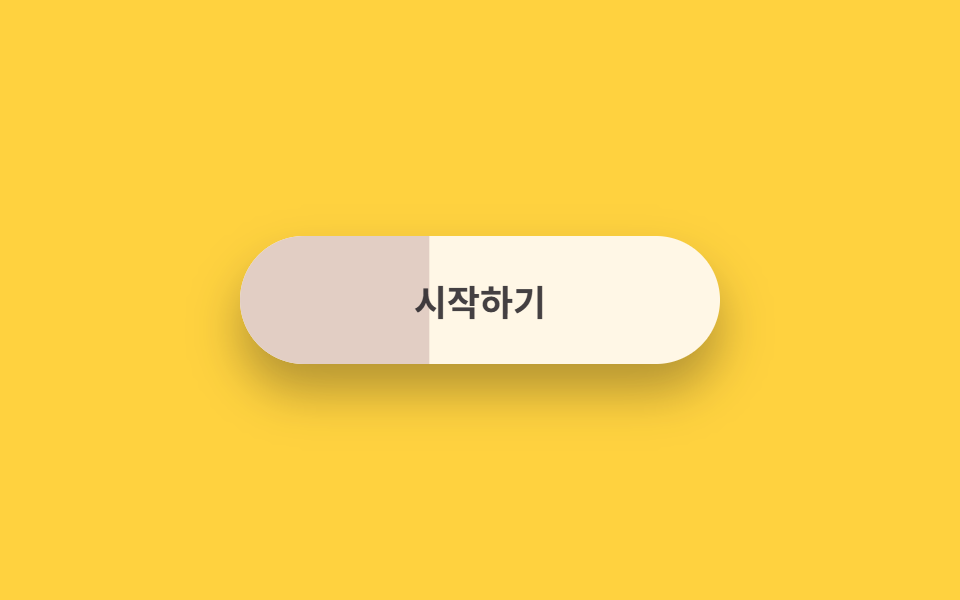
The button is split into cream and peach, and the lower layer unfolds from the left with scaleX, so the color flips end to end like paint spreading while the label color flips with it.
Best forA get-started button on pricing cards, an event entry button
scaleX 레이어 와이프transform-origin: leftcolor 전환
<main class="stage is-demo">
  <button class="btn" type="button">
    <span class="btn__wash" aria-hidden="true"></span>
    <span class="btn__labels">
      <span class="btn__t-on-dark">Get started</span>
      <span class="btn__t-on-light">Get started</span>
    </span>
  </button>
</main>
@use "../../../../site/static/demo-tokens" as *;
// ── 변수 3개 ──────────────────────────────────────────
$duration: $dur-loop; // 2s — 와이프 한 주기
$easing: $ease-spring;
$color: #e2cec4; // 피치 (아래에 깔리는 색)
@include stage($stage-yellow);
.btn {
box-sizing: border-box;
position: relative;
width: 240px;
height: 64px;
border: none;
border-radius: $r-pill;
background: $subject-cream; // 위에 보이는 색
font-family: -apple-system, "Segoe UI", "Noto Sans KR", sans-serif;
font-weight: 700;
font-size: 18px;
cursor: pointer;
overflow: hidden;
box-shadow: $shadow-raised;
}
// 아래 색 레이어 — scaleX 로 왼쪽에서 펼쳐진다
.btn__wash {
position: absolute;
inset: 0;
background: $color;
transform: scaleX(0);
transform-origin: left; // 규칙8: 듀오톤 와이프 좌측 전개
transition: transform $dur-base $easing;
}
// 글자 두 벌 — 바탕색에 따라 보이는 쪽이 바뀐다
.btn__labels {
position: absolute;
inset: 0;
display: grid;
place-items: center;
}
.btn__t-on-dark,
.btn__t-on-light {
grid-area: 1 / 1;
transition: opacity $dur-quick $easing;
}
.btn__t-on-dark { color: $subject-cream; opacity: 0; }
.btn__t-on-light { color: $subject-ink; }
// 실사용: 올리면 피치가 좌에서 우로 번지고 글자도 뒤집힌다
.btn:hover .btn__wash { transform: scaleX(1); }
.btn:hover .btn__t-on-dark { opacity: 1; }
.btn:hover .btn__t-on-light { opacity: 0; }
.btn:focus-visible { outline: 3px solid $subject-ink; outline-offset: 4px; }
// 격자 미리보기: 번짐 → 물러남 루프
.stage.is-demo .btn__wash { animation: wash $duration $easing infinite; }
.stage.is-demo .btn__t-on-dark { animation: swap-in $duration $easing infinite; }
.stage.is-demo .btn__t-on-light { animation: swap-out $duration $easing infinite; }
@keyframes wash {
0%, 12% { transform: scaleX(0); }
48%, 70% { transform: scaleX(1); }
100% { transform: scaleX(0); }
}
@keyframes swap-in {
0%, 18% { opacity: 0; }
48%, 70% { opacity: 1; }
88%,100% { opacity: 0; }
}
@keyframes swap-out {
0%, 18% { opacity: 1; }
48%, 70% { opacity: 0; }
88%,100% { opacity: 1; }
}
@media (prefers-reduced-motion: reduce) {
.stage.is-demo .btn__wash { animation: none; transform: scaleX(1); }
.stage.is-demo .btn__t-on-dark { animation: none; opacity: 1; }
.stage.is-demo .btn__t-on-light { animation: none; opacity: 0; }
}html, body {
margin: 0;
overflow: hidden;
}
.stage {
box-sizing: border-box;
min-height: 100vh;
display: grid;
place-items: center;
margin: 0;
background: #ffd23f;
font-family: -apple-system, "Segoe UI", "Noto Sans KR", sans-serif;
padding: clamp(8px, 4vw, 24px);
}
.btn {
box-sizing: border-box;
position: relative;
width: 240px;
height: 64px;
border: none;
border-radius: 999px;
background: #fff7e6;
font-family: -apple-system, "Segoe UI", "Noto Sans KR", sans-serif;
font-weight: 700;
font-size: 18px;
cursor: pointer;
overflow: hidden;
box-shadow: 0 14px 24px rgba(23, 20, 26, 0.32);
}
.btn__wash {
position: absolute;
inset: 0;
background: #e2cec4;
transform: scaleX(0);
transform-origin: left;
transition: transform 300ms cubic-bezier(0.2, 0.8, 0.2, 1);
}
.btn__labels {
position: absolute;
inset: 0;
display: grid;
place-items: center;
}
.btn__t-on-dark,
.btn__t-on-light {
grid-area: 1/1;
transition: opacity 220ms cubic-bezier(0.2, 0.8, 0.2, 1);
}
.btn__t-on-dark {
color: #fff7e6;
opacity: 0;
}
.btn__t-on-light {
color: #17141a;
}
.btn:hover .btn__wash {
transform: scaleX(1);
}
.btn:hover .btn__t-on-dark {
opacity: 1;
}
.btn:hover .btn__t-on-light {
opacity: 0;
}
.btn:focus-visible {
outline: 3px solid #17141a;
outline-offset: 4px;
}
.stage.is-demo .btn__wash {
animation: wash 2s cubic-bezier(0.2, 0.8, 0.2, 1) infinite;
}
.stage.is-demo .btn__t-on-dark {
animation: swap-in 2s cubic-bezier(0.2, 0.8, 0.2, 1) infinite;
}
.stage.is-demo .btn__t-on-light {
animation: swap-out 2s cubic-bezier(0.2, 0.8, 0.2, 1) infinite;
}
@keyframes wash {
0%, 12% {
transform: scaleX(0);
}
48%, 70% {
transform: scaleX(1);
}
100% {
transform: scaleX(0);
}
}
@keyframes swap-in {
0%, 18% {
opacity: 0;
}
48%, 70% {
opacity: 1;
}
88%, 100% {
opacity: 0;
}
}
@keyframes swap-out {
0%, 18% {
opacity: 1;
}
48%, 70% {
opacity: 0;
}
88%, 100% {
opacity: 1;
}
}
@media (prefers-reduced-motion: reduce) {
.stage.is-demo .btn__wash {
animation: none;
transform: scaleX(1);
}
.stage.is-demo .btn__t-on-dark {
animation: none;
opacity: 1;
}
.stage.is-demo .btn__t-on-light {
animation: none;
opacity: 0;
}
}import type { CSSProperties } from "react";
import styles from "./DuotoneWipeButton.module.scss";
export type DuotoneWipeButtonProps = {
duration?: number;
easing?: string;
color?: string;
label?: string;
};
export default function DuotoneWipeButton({
duration = 300,
easing = "cubic-bezier(.2, .8, .2, 1)",
color = "#ff9d6f",
label = "시작하기",
}: DuotoneWipeButtonProps) {
const vars: CSSProperties = { "--duration": `${duration}ms`, "--easing": easing, "--color": color } as CSSProperties;
return (
<button className={styles.btn} style={vars} type="button">
<span className={styles.wash} aria-hidden="true" />
<span className={styles.labels}>
<span className={styles.tOnDark}>{label}</span>
<span className={styles.tOnLight}>{label}</span>
</span>
</button>
);
}06 Duotone wipe button — Measured area 10.103% · moving frames 16/23Original by GODRICH · SCSS and React ship in the zip · 9 css button design ideas — candy, push, loading
The post this demo lives in
 9 css button design ideas — candy, push, loadingcss button design means deciding a button's colors, shape, and mouse reaction in a few lines of code. Want that candy-gr See all demos in this post
If you like this effect - similar demos
 Buttons09 Loading morph: button to spinner to check9 button hover effects css that award sites reuse
 Buttons02 Button that unlocks when the form is valid9 button state css patterns, loading to done
 Buttons05 Theme button where the sun and moon trade places9 Icon Button CSS Patterns — Press, Drag, Expand