01Custom cursor image
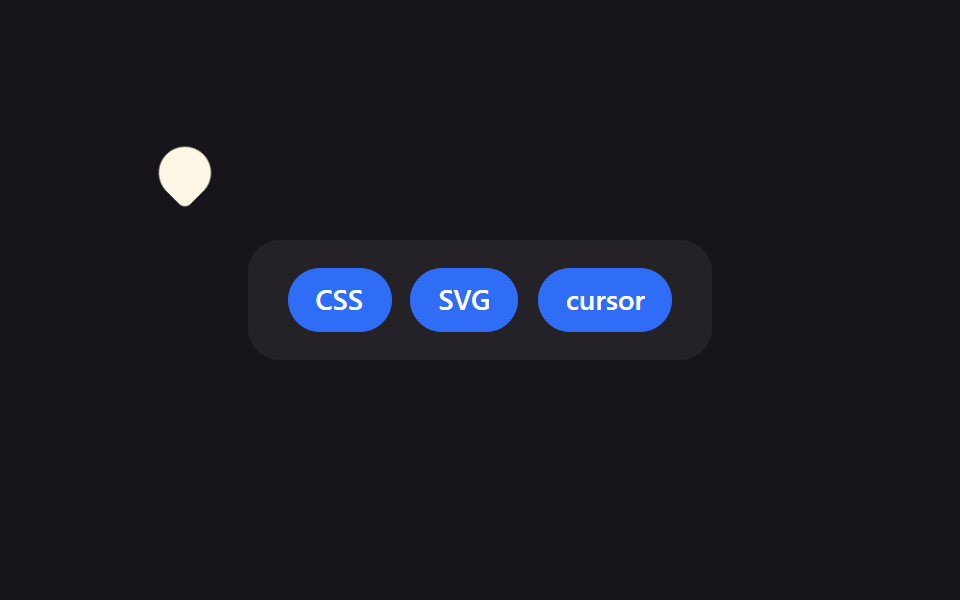
The stage sets cursor: none to erase the default arrow, and a DOM element drawn in the same pin shape follows the pointer coordinates instead.
Best forBranded campaign landing pages, game-like interactive sites
cursor: nonehotspot 좌표fallback 커서

<main class="stage">
  <div class="board">
    <span class="chip">CSS</span>
    <span class="chip">SVG</span>
    <span class="chip">cursor</span>
  </div>
  <div class="cursor is-demo" aria-hidden="true"></div>
</main>
@use "../../../../site/static/demo-tokens" as *;
$duration: $dur-loop; // 커서가 보드를 한 바퀴 도는 시간
$easing: $ease-spring;
$color: $subject-cream; // 커서 모양 색
@include stage($stage-ink);
.stage { position: relative; overflow: hidden; cursor: none; } // 기본 화살표를 지우고 커스텀 모양만 보인다
.board {
display: flex;
gap: clamp(6px, 2vw, 10px);
padding: clamp(10px, 3vw, 16px) clamp(14px, 4vw, 20px);
background: rgba(255, 255, 255, .06);
border-radius: $r-card;
}
.chip {
padding: clamp(6px, 2vw, 9px) clamp(10px, 3vw, 14px);
border-radius: $r-pill;
background: $subject-blue;
color: #fff;
font-weight: 600; font-size: clamp(11px, 3vw, 14px); line-height: 1; font-family: inherit;
}
// 실제 서비스에서는 이 모양을 SVG 로 그려 cursor: url("cursor.svg") 12 12, auto; 로 쓴다.
// 데모는 헤드리스 렌더에서 OS 커서가 안 보이므로 같은 모양을 DOM 요소로 재현해 움직인다.
.cursor {
position: absolute;
top: 0;
left: 0;
width: 26px;
height: 26px;
border-radius: 50% 50% 50% 4px; // 물방울(핀) 모양 — url() 커서 이미지를 흉내
background: $color;
box-shadow: $shadow-press;
transform: translate(var(--x, 60px), var(--y, 40px)) rotate(-45deg);
pointer-events: none;
&.is-demo { animation: cursor-path $duration $easing infinite; }
}
@keyframes cursor-path {
0% { transform: translate(40px, 30px) rotate(-45deg); }
35% { transform: translate(220px, 60px) rotate(-45deg); }
70% { transform: translate(140px, 140px) rotate(-45deg); }
100% { transform: translate(40px, 30px) rotate(-45deg); }
}
@media (pointer: coarse) {
.cursor { display: none; } // 터치 기기엔 커스텀 커서 개념이 없다
.stage { cursor: auto; }
}
@media (prefers-reduced-motion: reduce) {
.cursor.is-demo { animation: none; transform: translate(40px, 30px) rotate(-45deg); }
}html, body {
margin: 0;
overflow: hidden;
}
.stage {
box-sizing: border-box;
min-height: 100vh;
display: grid;
place-items: center;
margin: 0;
background: #17141a;
font-family: -apple-system, "Segoe UI", "Noto Sans KR", sans-serif;
padding: clamp(8px, 4vw, 24px);
}
.stage {
position: relative;
overflow: hidden;
cursor: none;
}
.board {
display: flex;
gap: clamp(6px, 2vw, 10px);
padding: clamp(10px, 3vw, 16px) clamp(14px, 4vw, 20px);
background: rgba(255, 255, 255, 0.06);
border-radius: 16px;
}
.chip {
padding: clamp(6px, 2vw, 9px) clamp(10px, 3vw, 14px);
border-radius: 999px;
background: #2f6df6;
color: #fff;
font-weight: 600;
font-size: clamp(11px, 3vw, 14px);
line-height: 1;
font-family: inherit;
}
.cursor {
position: absolute;
top: 0;
left: 0;
width: 26px;
height: 26px;
border-radius: 50% 50% 50% 4px;
background: #fff7e6;
box-shadow: 0 6px 12px rgba(23, 20, 26, 0.32);
transform: translate(var(--x, 60px), var(--y, 40px)) rotate(-45deg);
pointer-events: none;
}
.cursor.is-demo {
animation: cursor-path 2s cubic-bezier(0.2, 0.8, 0.2, 1) infinite;
}
@keyframes cursor-path {
0% {
transform: translate(40px, 30px) rotate(-45deg);
}
35% {
transform: translate(220px, 60px) rotate(-45deg);
}
70% {
transform: translate(140px, 140px) rotate(-45deg);
}
100% {
transform: translate(40px, 30px) rotate(-45deg);
}
}
@media (pointer: coarse) {
.cursor {
display: none;
}
.stage {
cursor: auto;
}
}
@media (prefers-reduced-motion: reduce) {
.cursor.is-demo {
animation: none;
transform: translate(40px, 30px) rotate(-45deg);
}
}// 실제 포인터가 움직이면 Custom 커서가 그 좌표를 따라간다. 터치 기기는 pointer:coarse 로 건너뛴다.
if (matchMedia('(pointer: fine)').matches) {
var stage = document.querySelector('.stage');
var cur = document.querySelector('.cursor');
stage.addEventListener('pointermove', function (e) {
var r = stage.getBoundingClientRect();
cur.classList.remove('is-demo');
cur.style.setProperty('--x', (e.clientX - r.left) + 'px');
cur.style.setProperty('--y', (e.clientY - r.top) + 'px');
});
}import { useState } from "react";
import type { CSSProperties, PointerEvent } from "react";
import styles from "./CustomCursorImage.module.scss";
export type CustomCursorImageProps = {
chips?: string[];
duration?: number;
easing?: string;
color?: string;
};
type Vars = CSSProperties & { "--duration"?: string; "--easing"?: string; "--color"?: string };
export default function CustomCursorImage({
chips = ["CSS", "SVG", "cursor"],
duration = 2000,
easing = "cubic-bezier(.2,.8,.2,1)",
color = "#fff7e6",
}: CustomCursorImageProps) {
const [demo, setDemo] = useState(true);
const [pos, setPos] = useState({ x: 60, y: 40 });
const move = (e: PointerEvent<HTMLDivElement>) => {
const r = e.currentTarget.getBoundingClientRect();
setDemo(false);
setPos({ x: e.clientX - r.left, y: e.clientY - r.top });
};
const vars: Vars = { "--duration": `${duration}ms`, "--easing": easing, "--color": color };
return (
<div className={styles.stage} style={vars} onPointerMove={move}>
<div className={styles.board}>
{chips.map((c) => (
<span key={c} className={styles.chip}>{c}</span>
))}
</div>
<div
className={demo ? `${styles.cursor} ${styles.isDemo}` : styles.cursor}
style={demo ? undefined : { transform: `translate(${pos.x}px,${pos.y}px) rotate(-45deg)` }}
aria-hidden="true"
/>
</div>
);
}01 Custom cursor image — Measured area 5.176% · moving frames 23/23Original by GODRICH · SCSS and React ship in the zip · 9 Custom Cursor CSS Effects — One Line, Copy-Paste
The post this demo lives in
 9 Custom Cursor CSS Effects — One Line, Copy-PasteA custom cursor css effect swaps the browser's plain arrow for a shape, ring, or trailing dot built from CSS transforms See all demos in this post