02Button glow on hover
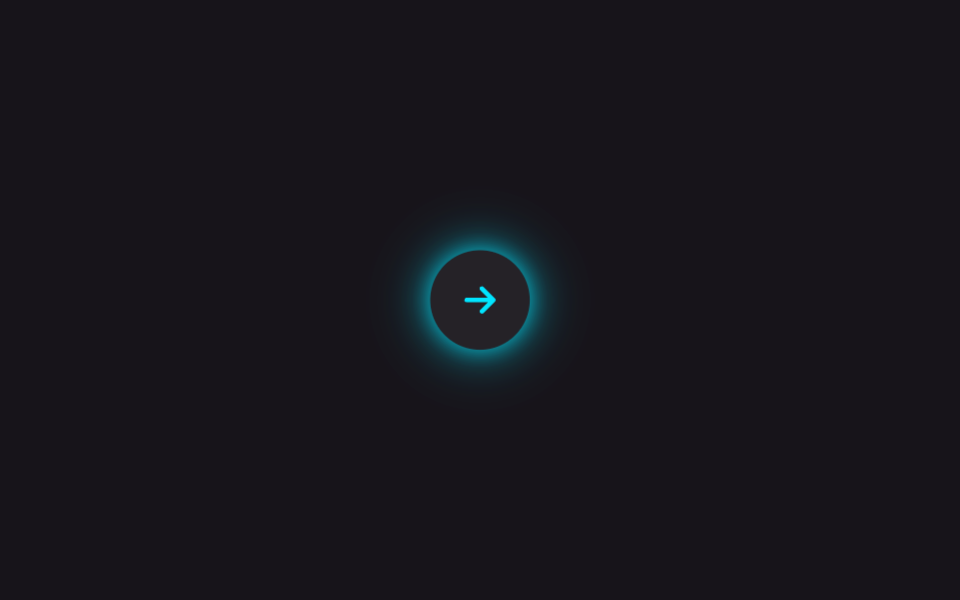
A soft box-shadow glow sits faintly behind the button at rest, then grows in radius and opacity on hover or focus, casting light onto the space around it.
Best forPrimary CTA buttons like checkout or subscribe, hero buttons on dark-mode landing pages
box-shadow:hover · :focus-visible@keyframes
<main class="stage is-demo">
  <button class="btn" type="button" aria-label="Next">
    <svg viewBox="0 0 24 24" width="22" height="22" fill="none" aria-hidden="true">
      <path d="M5 12h13M13 6l6 6-6 6" stroke="currentColor" stroke-width="2.4" stroke-linecap="round" stroke-linejoin="round"/>
    </svg>
  </button>
</main>
@use "../../../../site/static/demo-tokens" as *;
// ── 변수 3개 ──────────────────────────────────────────
$duration: $dur-loop; // 2s — 호버 루프 한 주기
$easing: $ease-out;
$color: #00e5ff; // 네온 시안
@include stage($stage-ink);
.btn {
display: grid; place-items: center;
width: $sp-12; height: $sp-12;
border: 0; border-radius: 50%;
background: rgba($stage-paper, .06);
color: $color;
cursor: pointer; -webkit-tap-highlight-color: transparent;
box-shadow: 0 0 $sp-2 rgba($color, .3), 0 0 $sp-4 rgba($color, .12);
transition: box-shadow $dur-base $easing, transform $dur-base $easing, background $dur-base $easing;
}
.btn:hover,
.btn:focus-visible {
background: rgba($stage-paper, .1);
box-shadow: 0 0 $sp-3 $color, 0 0 $sp-8 rgba($color, .65), 0 0 $sp-12 rgba($color, .3);
transform: scale(1.06);
outline: none;
}
// box-shadow·transform 만 바뀐다 — 레이아웃은 그대로
.stage.is-demo .btn {
animation: hover-loop $duration $easing infinite;
}
@keyframes hover-loop {
0%, 12%, 100% {
box-shadow: 0 0 $sp-2 rgba($color, .3), 0 0 $sp-4 rgba($color, .12);
transform: scale(1);
}
35%, 75% {
box-shadow: 0 0 $sp-3 $color, 0 0 $sp-8 rgba($color, .65), 0 0 $sp-12 rgba($color, .3);
transform: scale(1.06);
}
92% {
box-shadow: 0 0 $sp-2 rgba($color, .3), 0 0 $sp-4 rgba($color, .12);
transform: scale(1);
}
}
@media (prefers-reduced-motion: reduce) {
.stage.is-demo .btn { animation: none; }
.btn { transition-duration: 1ms; }
}html, body {
margin: 0;
overflow: hidden;
}
.stage {
box-sizing: border-box;
min-height: 100vh;
display: grid;
place-items: center;
margin: 0;
background: #17141a;
font-family: -apple-system, "Segoe UI", "Noto Sans KR", sans-serif;
padding: clamp(8px, 4vw, 24px);
}
.btn {
display: grid;
place-items: center;
width: 48px;
height: 48px;
border: 0;
border-radius: 50%;
background: rgba(255, 255, 255, 0.06);
color: #00e5ff;
cursor: pointer;
-webkit-tap-highlight-color: transparent;
box-shadow: 0 0 8px rgba(0, 229, 255, 0.3), 0 0 16px rgba(0, 229, 255, 0.12);
transition: box-shadow 300ms ease-out, transform 300ms ease-out, background 300ms ease-out;
}
.btn:hover,
.btn:focus-visible {
background: rgba(255, 255, 255, 0.1);
box-shadow: 0 0 12px #00e5ff, 0 0 32px rgba(0, 229, 255, 0.65), 0 0 48px rgba(0, 229, 255, 0.3);
transform: scale(1.06);
outline: none;
}
.stage.is-demo .btn {
animation: hover-loop 2s ease-out infinite;
}
@keyframes hover-loop {
0%, 12%, 100% {
box-shadow: 0 0 8px rgba(0, 229, 255, 0.3), 0 0 16px rgba(0, 229, 255, 0.12);
transform: scale(1);
}
35%, 75% {
box-shadow: 0 0 12px #00e5ff, 0 0 32px rgba(0, 229, 255, 0.65), 0 0 48px rgba(0, 229, 255, 0.3);
transform: scale(1.06);
}
92% {
box-shadow: 0 0 8px rgba(0, 229, 255, 0.3), 0 0 16px rgba(0, 229, 255, 0.12);
transform: scale(1);
}
}
@media (prefers-reduced-motion: reduce) {
.stage.is-demo .btn {
animation: none;
}
.btn {
transition-duration: 1ms;
}
}// 실제 사람이 누르면 강제 루프를 떼고 :hover · :focus-visible 에 맡긴다.
document.querySelector('.btn').addEventListener('pointerdown', function () {
document.querySelector('.stage').classList.remove('is-demo');
});import type { CSSProperties, MouseEvent } from "react";
import styles from "./ButtonGlowHover.module.scss";
export type ButtonGlowHoverProps = {
duration?: number;
easing?: string;
color?: string;
label?: string;
onClick?: (e: MouseEvent<HTMLButtonElement>) => void;
};
export default function ButtonGlowHover({
duration = 300,
easing = "ease-out",
color = "#00e5ff",
label = "다음",
onClick,
}: ButtonGlowHoverProps) {
const vars: CSSProperties = { "--duration": `${duration}ms`, "--easing": easing, "--color": color } as CSSProperties;
return (
<button className={styles.btn} type="button" style={vars} aria-label={label} onClick={onClick}>
<svg viewBox="0 0 24 24" width={22} height={22} fill="none" aria-hidden="true">
<path d="M5 12h13M13 6l6 6-6 6" stroke="currentColor" strokeWidth={2.4} strokeLinecap="round" strokeLinejoin="round" />
</svg>
</button>
);
}02 Button glow on hover — Measured area 4.303% · moving frames 11/23Original by GODRICH · SCSS and React ship in the zip · 9 CSS Glow Effect Animations — Neon, Copy-Paste
The post this demo lives in
 9 CSS Glow Effect Animations — Neon, Copy-PasteA glowing button or headline looks lit from the inside like a neon sign, the trick gaming sites, streamers, and portfoli See all demos in this post