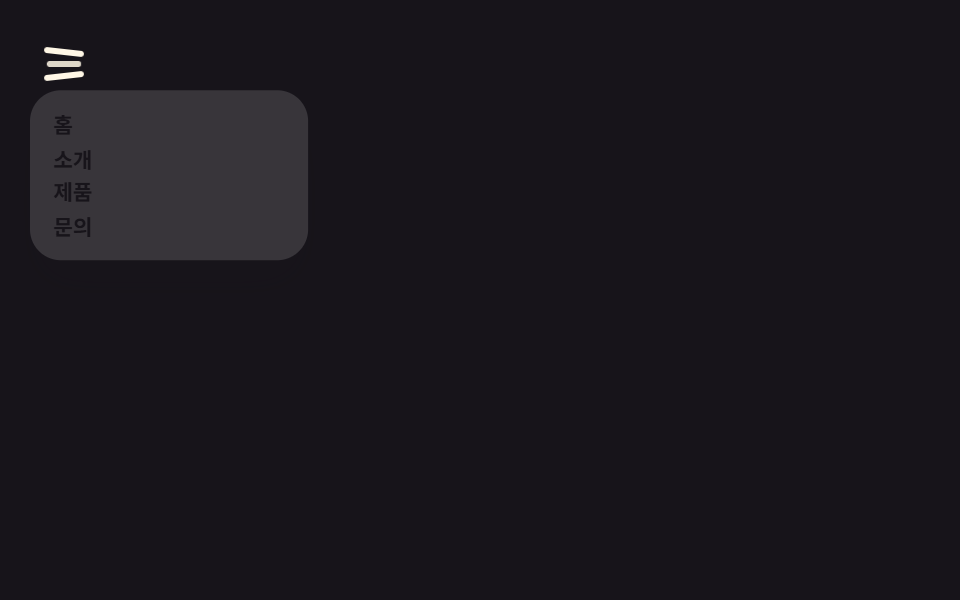
08Circle reveal from the icon
A circle grows from the icon's position to cover the screen and reveal the menu, with a single clip-path.
Best forIcon buttons next to a logo, landing pages that want impact
clip-path circle450ms오른쪽 위에서

<main class="stage is-demo">
  <button class="burger" type="button" aria-label="Open menu">
    <span class="bar bar1"></span>
    <span class="bar bar2"></span>
    <span class="bar bar3"></span>
  </button>
  <div class="reveal" aria-hidden="true">
    <nav class="reveal__links">
      <a class="reveal__link" href="#">Home</a>
      <a class="reveal__link" href="#">About</a>
      <a class="reveal__link" href="#">Products</a>
      <a class="reveal__link" href="#">Contact</a>
    </nav>
  </div>
</main>
@use "../../../../site/static/demo-tokens" as *;
// ── 변수 3개 ──────────────────────────────────────────
$duration: 450ms; // 원이 화면을 덮는 시간
$easing: $ease-spring;
$color: $subject-blue; // 줄·링크 글자 색 (paper 무대라 blue)
@include stage($stage-paper);
.stage { position: relative; overflow: hidden; }
.burger {
position: absolute; top: clamp(14px, 5vmin, 20px); right: clamp(14px, 5vmin, 20px);
z-index: 3; width: clamp(34px, 10vmin, 42px); height: clamp(34px, 10vmin, 42px);
border: 0; border-radius: $r-control; background: transparent;
padding: 0; cursor: pointer; -webkit-tap-highlight-color: transparent;
}
.bar {
position: absolute; left: 50%; top: 50%;
width: clamp(20px, 6.4vmin, 26px); height: 3px; border-radius: 2px;
background: $color;
transition: transform $dur-quick $easing, opacity $dur-quick $easing;
}
.bar1 { transform: translate(-50%, -50%) translateY(-7px) rotate(0deg); }
.bar2 { transform: translate(-50%, -50%) scaleX(1); opacity: 1; }
.bar3 { transform: translate(-50%, -50%) translateY(7px) rotate(0deg); }
// 아이콘 위치(오른쪽 위)를 원점으로 clip-path 원이 커지며 화면을 덮는다. 크기·위치는 그대로,
// clip-path 반지름만 바뀌므로 transform·opacity 규칙과 같은 값으로 취급한다 (레이아웃 재계산 없음)
.reveal {
position: absolute; inset: 0; z-index: 2;
display: grid; place-items: center;
background: $stage-ink;
clip-path: circle(0% at calc(100% - 30px) 30px);
transition: clip-path $duration $easing;
}
.reveal__links { display: grid; gap: clamp(8px, 3vmin, 14px); text-align: center; }
.reveal__link { font-weight: 700; font-size: clamp(15px, 5.2vmin, 20px); line-height: 1; font-family: inherit; color: $color; text-decoration: none; }
.stage.is-open .bar1 { transform: translate(-50%, -50%) translateY(0) rotate(45deg); }
.stage.is-open .bar2 { transform: translate(-50%, -50%) scaleX(0); opacity: 0; }
.stage.is-open .bar3 { transform: translate(-50%, -50%) translateY(0) rotate(-45deg); }
.stage.is-open .reveal { clip-path: circle(150% at calc(100% - 30px) 30px); }
.stage.is-demo .bar1 { animation: bar1-loop $dur-loop $easing infinite; }
.stage.is-demo .bar2 { animation: bar2-loop $dur-loop $easing infinite; }
.stage.is-demo .bar3 { animation: bar3-loop $dur-loop $easing infinite; }
.stage.is-demo .reveal { animation: reveal-loop $dur-loop $easing infinite; }
@keyframes bar1-loop {
0% { transform: translate(-50%, -50%) translateY(-7px) rotate(0deg); }
15% { transform: translate(-50%, -50%) translateY(0) rotate(45deg); }
70% { transform: translate(-50%, -50%) translateY(0) rotate(45deg); }
85% { transform: translate(-50%, -50%) translateY(-7px) rotate(0deg); }
100% { transform: translate(-50%, -50%) translateY(-7px) rotate(0deg); }
}
@keyframes bar2-loop {
0% { transform: translate(-50%, -50%) scaleX(1); opacity: 1; }
15% { transform: translate(-50%, -50%) scaleX(0); opacity: 0; }
70% { transform: translate(-50%, -50%) scaleX(0); opacity: 0; }
85% { transform: translate(-50%, -50%) scaleX(1); opacity: 1; }
100% { transform: translate(-50%, -50%) scaleX(1); opacity: 1; }
}
@keyframes bar3-loop {
0% { transform: translate(-50%, -50%) translateY(7px) rotate(0deg); }
15% { transform: translate(-50%, -50%) translateY(0) rotate(-45deg); }
70% { transform: translate(-50%, -50%) translateY(0) rotate(-45deg); }
85% { transform: translate(-50%, -50%) translateY(7px) rotate(0deg); }
100% { transform: translate(-50%, -50%) translateY(7px) rotate(0deg); }
}
@keyframes reveal-loop {
0% { clip-path: circle(0% at calc(100% - 30px) 30px); }
20% { clip-path: circle(150% at calc(100% - 30px) 30px); }
70% { clip-path: circle(150% at calc(100% - 30px) 30px); }
85% { clip-path: circle(0% at calc(100% - 30px) 30px); }
100% { clip-path: circle(0% at calc(100% - 30px) 30px); }
}
// ── 접근성 ─────────────────────────────────────────
@media (prefers-reduced-motion: reduce) {
.stage.is-demo .bar1, .stage.is-demo .bar2, .stage.is-demo .bar3, .stage.is-demo .reveal { animation: none; }
.bar, .reveal { transition-duration: 1ms; }
}html, body {
margin: 0;
overflow: hidden;
}
.stage {
box-sizing: border-box;
min-height: 100vh;
display: grid;
place-items: center;
margin: 0;
background: #ffffff;
font-family: -apple-system, "Segoe UI", "Noto Sans KR", sans-serif;
padding: clamp(8px, 4vw, 24px);
}
.stage {
position: relative;
overflow: hidden;
}
.burger {
position: absolute;
top: clamp(14px, 5vmin, 20px);
right: clamp(14px, 5vmin, 20px);
z-index: 3;
width: clamp(34px, 10vmin, 42px);
height: clamp(34px, 10vmin, 42px);
border: 0;
border-radius: 12px;
background: transparent;
padding: 0;
cursor: pointer;
-webkit-tap-highlight-color: transparent;
}
.bar {
position: absolute;
left: 50%;
top: 50%;
width: clamp(20px, 6.4vmin, 26px);
height: 3px;
border-radius: 2px;
background: #2f6df6;
transition: transform 220ms cubic-bezier(0.2, 0.8, 0.2, 1), opacity 220ms cubic-bezier(0.2, 0.8, 0.2, 1);
}
.bar1 {
transform: translate(-50%, -50%) translateY(-7px) rotate(0deg);
}
.bar2 {
transform: translate(-50%, -50%) scaleX(1);
opacity: 1;
}
.bar3 {
transform: translate(-50%, -50%) translateY(7px) rotate(0deg);
}
.reveal {
position: absolute;
inset: 0;
z-index: 2;
display: grid;
place-items: center;
background: #17141a;
clip-path: circle(0% at calc(100% - 30px) 30px);
transition: clip-path 450ms cubic-bezier(0.2, 0.8, 0.2, 1);
}
.reveal__links {
display: grid;
gap: clamp(8px, 3vmin, 14px);
text-align: center;
}
.reveal__link {
font-weight: 700;
font-size: clamp(15px, 5.2vmin, 20px);
line-height: 1;
font-family: inherit;
color: #2f6df6;
text-decoration: none;
}
.stage.is-open .bar1 {
transform: translate(-50%, -50%) translateY(0) rotate(45deg);
}
.stage.is-open .bar2 {
transform: translate(-50%, -50%) scaleX(0);
opacity: 0;
}
.stage.is-open .bar3 {
transform: translate(-50%, -50%) translateY(0) rotate(-45deg);
}
.stage.is-open .reveal {
clip-path: circle(150% at calc(100% - 30px) 30px);
}
.stage.is-demo .bar1 {
animation: bar1-loop 2s cubic-bezier(0.2, 0.8, 0.2, 1) infinite;
}
.stage.is-demo .bar2 {
animation: bar2-loop 2s cubic-bezier(0.2, 0.8, 0.2, 1) infinite;
}
.stage.is-demo .bar3 {
animation: bar3-loop 2s cubic-bezier(0.2, 0.8, 0.2, 1) infinite;
}
.stage.is-demo .reveal {
animation: reveal-loop 2s cubic-bezier(0.2, 0.8, 0.2, 1) infinite;
}
@keyframes bar1-loop {
0% {
transform: translate(-50%, -50%) translateY(-7px) rotate(0deg);
}
15% {
transform: translate(-50%, -50%) translateY(0) rotate(45deg);
}
70% {
transform: translate(-50%, -50%) translateY(0) rotate(45deg);
}
85% {
transform: translate(-50%, -50%) translateY(-7px) rotate(0deg);
}
100% {
transform: translate(-50%, -50%) translateY(-7px) rotate(0deg);
}
}
@keyframes bar2-loop {
0% {
transform: translate(-50%, -50%) scaleX(1);
opacity: 1;
}
15% {
transform: translate(-50%, -50%) scaleX(0);
opacity: 0;
}
70% {
transform: translate(-50%, -50%) scaleX(0);
opacity: 0;
}
85% {
transform: translate(-50%, -50%) scaleX(1);
opacity: 1;
}
100% {
transform: translate(-50%, -50%) scaleX(1);
opacity: 1;
}
}
@keyframes bar3-loop {
0% {
transform: translate(-50%, -50%) translateY(7px) rotate(0deg);
}
15% {
transform: translate(-50%, -50%) translateY(0) rotate(-45deg);
}
70% {
transform: translate(-50%, -50%) translateY(0) rotate(-45deg);
}
85% {
transform: translate(-50%, -50%) translateY(7px) rotate(0deg);
}
100% {
transform: translate(-50%, -50%) translateY(7px) rotate(0deg);
}
}
@keyframes reveal-loop {
0% {
clip-path: circle(0% at calc(100% - 30px) 30px);
}
20% {
clip-path: circle(150% at calc(100% - 30px) 30px);
}
70% {
clip-path: circle(150% at calc(100% - 30px) 30px);
}
85% {
clip-path: circle(0% at calc(100% - 30px) 30px);
}
100% {
clip-path: circle(0% at calc(100% - 30px) 30px);
}
}
@media (prefers-reduced-motion: reduce) {
.stage.is-demo .bar1, .stage.is-demo .bar2, .stage.is-demo .bar3, .stage.is-demo .reveal {
animation: none;
}
.bar, .reveal {
transition-duration: 1ms;
}
}(function () {
var stage = document.querySelector('.stage');
var burger = document.querySelector('.burger');
var open = false;
burger.addEventListener('click', function () {
stage.classList.remove('is-demo');
open = !open;
stage.classList.toggle('is-open', open);
burger.setAttribute('aria-label', open ? 'Close menu' : 'Open menu');
});
})();import { useState } from "react";
import type { CSSProperties } from "react";
import styles from "./CircleReveal.module.scss";
export type CircleRevealProps = {
links: string[];
openLabel: string;
closeLabel: string;
/** 원이 화면을 덮는 시간 (기본 450ms) */
duration?: number;
easing?: string;
color?: string;
};
type Vars = CSSProperties & { "--duration"?: string; "--easing"?: string; "--color"?: string };
export default function CircleReveal({
links,
openLabel,
closeLabel,
duration = 450,
easing = "cubic-bezier(.2,.8,.2,1)",
color = "#2f6df6",
}: CircleRevealProps) {
const [open, setOpen] = useState(false);
const vars: Vars = { "--duration": `${duration}ms`, "--easing": easing, "--color": color };
const cls = (base: string) => (open ? `${base} ${styles.isOpen}` : base);
return (
<div className={styles.stage} style={vars}>
<button
type="button"
className={cls(styles.burger)}
aria-label={open ? closeLabel : openLabel}
onClick={() => setOpen((v) => !v)}
>
<span className={`${styles.bar} ${styles.bar1}`} />
<span className={`${styles.bar} ${styles.bar2}`} />
<span className={`${styles.bar} ${styles.bar3}`} />
</button>
<div className={cls(styles.reveal)} aria-hidden={!open}>
<nav className={styles.revealLinks}>
{links.map((label) => (
<a key={label} className={styles.revealLink} href="#">
{label}
</a>
))}
</nav>
</div>
</div>
);
}08 Circle reveal from the icon — Measured area 99.997% · moving frames 8/23Original by GODRICH · SCSS and React ship in the zip · 9 CSS Hamburger Menu Animations, No Library
The post this demo lives in
 9 CSS Hamburger Menu Animations, No LibraryA css hamburger menu animation is the motion a three-bar icon plays as a menu opens, built from transform and opacity ra See all demos in this post
If you like this effect - similar demos
 Transitions04 Circle reveal from click point9 CSS Page Transitions — No Library, Pure CSS
 Transitions09 Long-press reveal — the menu appears once the pressed duration value passes a thresholdContext Menu UI: 9 Right-Click Menu Patterns
 Transitions03 Transition That Blooms in a Circle From the Clicked-Point ValueView Transitions API: 9 Patterns by One Value