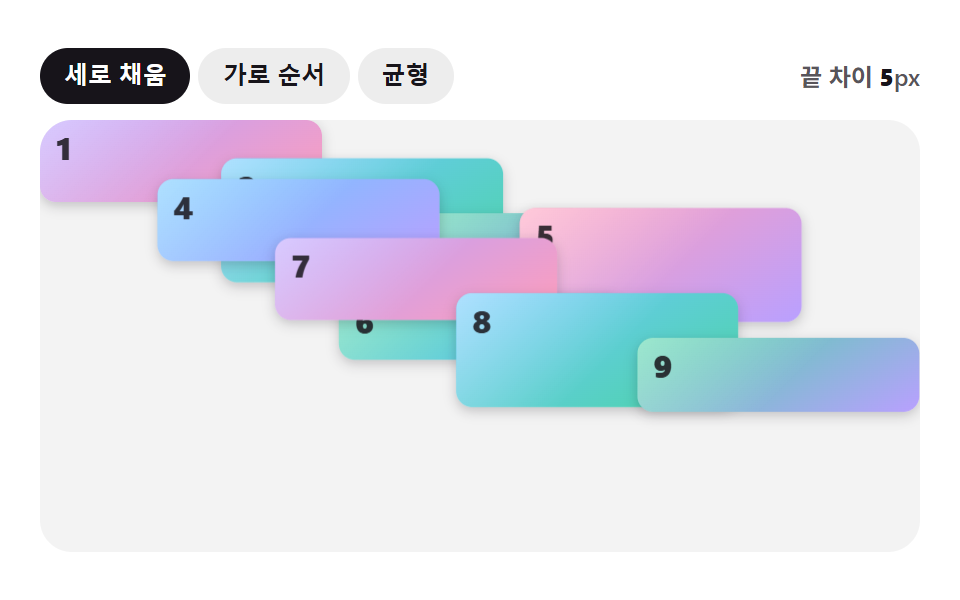
04Multi-column waterfall (columns)
Giving five photos just columns: 2 stacks photos of different heights into a gapless waterfall down each column with zero JavaScript, and break-inside: avoid stops a photo from being sliced in half across a column break.
Best forA Pinterest-style moodboard, a travel photo album mixing tall vertical shots
columns:2break-inside:avoidcolumn-gap

<main class="stage">
  <ul class="gallery is-demo" aria-label="Photo gallery">
    <li class="tile tile--a" tabindex="0"></li>
    <li class="tile tile--b" tabindex="0"></li>
    <li class="tile tile--c" tabindex="0"></li>
    <li class="tile tile--d" tabindex="0"></li>
    <li class="tile tile--e" tabindex="0"></li>
  </ul>
</main>
@use "../../../../site/static/demo-tokens" as *;
$duration: $dur-quick; // 타일이 나타나는 시간
$easing: $ease-out;
$color: $subject-blue; // 타일 그러데이션
@include stage($stage-paper);
.stage { padding: clamp(8px, 2.4vw, 16px); }
.gallery {
columns: 2;
column-gap: $sp-2;
list-style: none;
margin: 0;
padding: 0;
width: 176px;
max-width: 100%;
}
.tile {
break-inside: avoid;
margin: 0 0 $sp-2;
border-radius: $r-sm;
outline: none;
cursor: pointer;
box-shadow: $shadow-press;
opacity: 1;
transform: translateY(0);
transition: transform $duration $easing, box-shadow $duration $easing;
}
.tile--a { height: 40px; background: linear-gradient(150deg, $color 0%, $stage-ink 100%); }
.tile--b { height: 52px; background: linear-gradient(210deg, $subject-cream 0%, $color 100%); }
.tile--c { height: 34px; background: linear-gradient(60deg, $stage-ink 0%, $color 100%); }
.tile--d { height: 46px; background: linear-gradient(160deg, $color 0%, $subject-cream 100%); }
.tile--e { height: 38px; background: linear-gradient(320deg, $subject-cream 0%, $stage-ink 100%); }
.tile:hover, .tile:focus-visible, .tile:active {
transform: translateY(-3px);
box-shadow: $shadow-raised;
}
.gallery.is-demo .tile { animation: rise-loop $dur-loop $easing infinite; }
.gallery.is-demo .tile--b { animation-delay: -0.4s; }
.gallery.is-demo .tile--c { animation-delay: -0.8s; }
.gallery.is-demo .tile--d { animation-delay: -1.2s; }
.gallery.is-demo .tile--e { animation-delay: -1.6s; }
@keyframes rise-loop {
0%, 8% { transform: translateY(0); box-shadow: $shadow-press; }
24%, 40% { transform: translateY(-3px); box-shadow: $shadow-raised; }
56%, 100% { transform: translateY(0); box-shadow: $shadow-press; }
}
@media (hover: none) {
.tile:active { transform: translateY(-3px); box-shadow: $shadow-raised; }
}
@media (prefers-reduced-motion: reduce) {
.tile { transition: none; }
.gallery.is-demo .tile { animation: none; }
}html, body {
margin: 0;
overflow: hidden;
}
.stage {
box-sizing: border-box;
min-height: 100vh;
display: grid;
place-items: center;
margin: 0;
background: #ffffff;
font-family: -apple-system, "Segoe UI", "Noto Sans KR", sans-serif;
padding: clamp(8px, 4vw, 24px);
}
.stage {
padding: clamp(8px, 2.4vw, 16px);
}
.gallery {
columns: 2;
column-gap: 8px;
list-style: none;
margin: 0;
padding: 0;
width: 176px;
max-width: 100%;
}
.tile {
break-inside: avoid;
margin: 0 0 8px;
border-radius: 8px;
outline: none;
cursor: pointer;
box-shadow: 0 6px 12px rgba(23, 20, 26, 0.32);
opacity: 1;
transform: translateY(0);
transition: transform 220ms ease-out, box-shadow 220ms ease-out;
}
.tile--a {
height: 40px;
background: linear-gradient(150deg, #2f6df6 0%, #17141a 100%);
}
.tile--b {
height: 52px;
background: linear-gradient(210deg, #fff7e6 0%, #2f6df6 100%);
}
.tile--c {
height: 34px;
background: linear-gradient(60deg, #17141a 0%, #2f6df6 100%);
}
.tile--d {
height: 46px;
background: linear-gradient(160deg, #2f6df6 0%, #fff7e6 100%);
}
.tile--e {
height: 38px;
background: linear-gradient(320deg, #fff7e6 0%, #17141a 100%);
}
.tile:hover, .tile:focus-visible, .tile:active {
transform: translateY(-3px);
box-shadow: 0 14px 24px rgba(23, 20, 26, 0.32);
}
.gallery.is-demo .tile {
animation: rise-loop 2s ease-out infinite;
}
.gallery.is-demo .tile--b {
animation-delay: -0.4s;
}
.gallery.is-demo .tile--c {
animation-delay: -0.8s;
}
.gallery.is-demo .tile--d {
animation-delay: -1.2s;
}
.gallery.is-demo .tile--e {
animation-delay: -1.6s;
}
@keyframes rise-loop {
0%, 8% {
transform: translateY(0);
box-shadow: 0 6px 12px rgba(23, 20, 26, 0.32);
}
24%, 40% {
transform: translateY(-3px);
box-shadow: 0 14px 24px rgba(23, 20, 26, 0.32);
}
56%, 100% {
transform: translateY(0);
box-shadow: 0 6px 12px rgba(23, 20, 26, 0.32);
}
}
@media (hover: none) {
.tile:active {
transform: translateY(-3px);
box-shadow: 0 14px 24px rgba(23, 20, 26, 0.32);
}
}
@media (prefers-reduced-motion: reduce) {
.tile {
transition: none;
}
.gallery.is-demo .tile {
animation: none;
}
}import type { CSSProperties } from "react";
import styles from "./MasonryColumnsGallery.module.scss";
export type MasonryColumnsGalleryProps = {
/** 타일 높이(px) 배열 — 사진마다 다른 높이 */
heights?: number[];
/** 타일이 나타나는 시간 (기본 220ms) */
duration?: number;
easing?: string;
color?: string;
};
type Vars = CSSProperties & { "--duration"?: string; "--easing"?: string; "--color"?: string };
/** columns: 2 만으로 자바스크립트 없이 워터폴을 만든다. break-inside: avoid 로 사진이 반으로 잘리지 않는다 */
export default function MasonryColumnsGallery({
heights = [40, 52, 34, 46, 38],
duration = 220,
easing = "ease-out",
color = "#2f6df6",
}: MasonryColumnsGalleryProps) {
const vars: Vars = { "--duration": `${duration}ms`, "--easing": easing, "--color": color };
return (
<ul className={styles.gallery} style={vars} aria-label="Photo gallery">
{heights.map((h, i) => (
<li key={i} className={styles.tile} style={{ height: h }} tabIndex={0} />
))}
</ul>
);
}04 Multi-column waterfall (columns) — Measured area 3.547% · moving frames 23/23Original by GODRICH · SCSS and React ship in the zip · 9 CSS Image Gallery Grid Effects
The post this demo lives in
 9 CSS Image Gallery Grid EffectsCSS image gallery grid effects arrange photos into a grid or waterfall that reacts to hover and click, as pretty as the See all demos in this post