09Click-to-open lightbox, zero JS
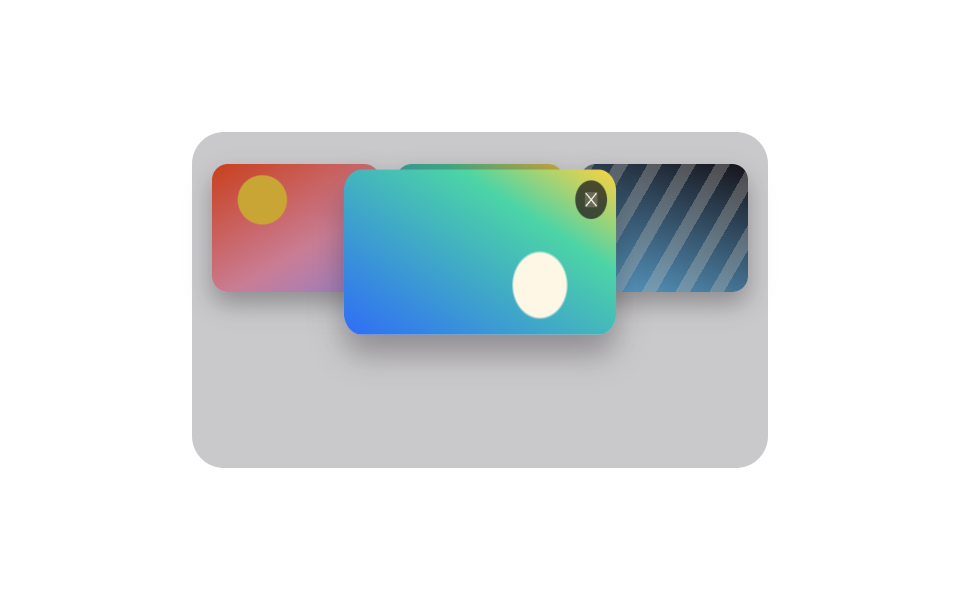
Clicking a tile opens a popover holding the full-size photo using nothing but a popovertarget attribute, ::backdrop dims the page behind it, and @starting-style makes the photo start small and transparent before growing into view — without a single line of JavaScript.
Best forA portfolio gallery where clicking should reveal the full-size photo, a product page that zooms into a photo on click
popovertarget::backdrop@starting-style

<main class="stage">
  <div class="lightbox-demo">
    <ul class="gallery is-demo" aria-label="Photo gallery">
      <li>
        <button class="thumb" type="button" popovertarget="lb-01" aria-label="View enlarged photo">
          <img class="thumb__img" alt="" src="data:image/svg+xml,%3Csvg xmlns='http://www.w3.org/2000/svg' width='200' height='200'%3E%3Crect width='200' height='200' fill='%232f6df6'/%3E%3C/svg%3E">
        </button>
      </li>
      <li>
        <button class="thumb" type="button" popovertarget="lb-02" aria-label="View enlarged photo">
          <img class="thumb__img" alt="" src="data:image/svg+xml,%3Csvg xmlns='http://www.w3.org/2000/svg' width='200' height='200'%3E%3Crect width='200' height='200' fill='%2317141a'/%3E%3C/svg%3E">
        </button>
      </li>
      <li>
        <button class="thumb" type="button" popovertarget="lb-03" aria-label="View enlarged photo">
          <img class="thumb__img" alt="" src="data:image/svg+xml,%3Csvg xmlns='http://www.w3.org/2000/svg' width='200' height='200'%3E%3Crect width='200' height='200' fill='%23fff7e6'/%3E%3C/svg%3E">
        </button>
      </li>
      <li>
        <button class="thumb" type="button" popovertarget="lb-04" aria-label="View enlarged photo">
          <img class="thumb__img" alt="" src="data:image/svg+xml,%3Csvg xmlns='http://www.w3.org/2000/svg' width='200' height='200'%3E%3Crect width='200' height='200' fill='%232f6df6'/%3E%3C/svg%3E">
        </button>
      </li>
    </ul>

    <div class="lightbox" id="lb-01" popover>
      <img class="lightbox__img" alt="" src="data:image/svg+xml,%3Csvg xmlns='http://www.w3.org/2000/svg' width='600' height='600'%3E%3Crect width='600' height='600' fill='%232f6df6'/%3E%3C/svg%3E">
      <button class="lightbox__close" type="button" popovertarget="lb-01" popovertargetaction="hide" aria-label="Close">×</button>
    </div>
    <div class="lightbox" id="lb-02" popover>
      <img class="lightbox__img" alt="" src="data:image/svg+xml,%3Csvg xmlns='http://www.w3.org/2000/svg' width='600' height='600'%3E%3Crect width='600' height='600' fill='%2317141a'/%3E%3C/svg%3E">
      <button class="lightbox__close" type="button" popovertarget="lb-02" popovertargetaction="hide" aria-label="Close">×</button>
    </div>
    <div class="lightbox" id="lb-03" popover>
      <img class="lightbox__img" alt="" src="data:image/svg+xml,%3Csvg xmlns='http://www.w3.org/2000/svg' width='600' height='600'%3E%3Crect width='600' height='600' fill='%23fff7e6'/%3E%3C/svg%3E">
      <button class="lightbox__close" type="button" popovertarget="lb-03" popovertargetaction="hide" aria-label="Close">×</button>
    </div>
    <div class="lightbox" id="lb-04" popover>
      <img class="lightbox__img" alt="" src="data:image/svg+xml,%3Csvg xmlns='http://www.w3.org/2000/svg' width='600' height='600'%3E%3Crect width='600' height='600' fill='%232f6df6'/%3E%3C/svg%3E">
      <button class="lightbox__close" type="button" popovertarget="lb-04" popovertargetaction="hide" aria-label="Close">×</button>
    </div>

    <div class="preview-backdrop" aria-hidden="true"></div>
    <img class="preview-panel" aria-hidden="true" alt="" src="data:image/svg+xml,%3Csvg xmlns='http://www.w3.org/2000/svg' width='200' height='200'%3E%3Crect width='200' height='200' fill='%232f6df6'/%3E%3C/svg%3E">
  </div>
</main>@use "../../../../site/static/demo-tokens" as *;
$duration: $dur-base; // 라이트박스가 커지며 나타나는 시간
$easing: $ease-out;
$color: $subject-cream; // 미리보기 배경
@include stage($stage-ink);
.stage { padding: clamp(8px, 2.4vw, 16px); }
.lightbox-demo { position: relative; }
.gallery {
display: grid;
grid-template-columns: repeat(2, 1fr);
gap: $sp-2;
list-style: none;
margin: 0;
padding: 0;
width: 148px;
max-width: 100%;
}
.thumb {
display: block;
width: 100%;
aspect-ratio: 1 / 1;
padding: 0;
border: 0;
border-radius: $r-sm;
overflow: hidden;
cursor: pointer;
box-shadow: $shadow-press;
background: none;
transition: transform $duration $easing;
}
.thumb__img { display: block; width: 100%; height: 100%; object-fit: cover; }
.thumb:hover, .thumb:focus-visible, .thumb:active { transform: scale(1.05); }
// 실제 라이트박스 — popovertarget 하나로 열고 닫는다, 자바스크립트 없음
.lightbox {
position: fixed;
inset: 0;
margin: auto;
width: min(180px, 60vw);
aspect-ratio: 1 / 1;
padding: 0;
border: 0;
border-radius: $r-card;
overflow: hidden;
box-shadow: $shadow-raised;
opacity: 0;
transform: scale(.8);
transition: opacity $duration $easing, transform $duration $easing, overlay $duration $easing allow-discrete, display $duration $easing allow-discrete;
@starting-style { opacity: 0; transform: scale(.8); }
}
.lightbox:popover-open {
opacity: 1;
transform: scale(1);
}
.lightbox::backdrop {
background: rgba($stage-ink, .7);
opacity: 0;
transition: opacity $duration $easing, overlay $duration $easing allow-discrete, display $duration $easing allow-discrete;
@starting-style { opacity: 0; }
}
.lightbox:popover-open::backdrop { opacity: 1; }
.lightbox__img { display: block; width: 100%; height: 100%; object-fit: cover; }
.lightbox__close {
position: absolute; top: $sp-2; right: $sp-2;
width: 22px; height: 22px;
border: 0; border-radius: $r-pill;
background: rgba($stage-ink, .6);
color: $stage-paper;
font-size: 14px; line-height: 1;
cursor: pointer;
}
// 자동 미리보기 루프 — 실제 팝오버는 클릭해야 열리므로, is-demo 동안엔 따로 겹쳐진 미리보기가 열림·닫힘을 흉내낸다
.preview-backdrop {
position: absolute; inset: 0;
border-radius: $r-card;
background: rgba($stage-ink, .7);
opacity: 0;
pointer-events: none;
}
.preview-panel {
position: absolute;
top: 50%; left: 50%;
width: 84px; height: 84px;
border-radius: $r-control;
object-fit: cover;
box-shadow: $shadow-raised;
opacity: 0;
pointer-events: none;
transform: translate(-50%, -50%) scale(.8);
}
.gallery.is-demo ~ .preview-backdrop { animation: backdrop-loop $dur-loop $easing infinite; }
.gallery.is-demo ~ .preview-panel { animation: panel-loop $dur-loop $easing infinite; }
@keyframes backdrop-loop {
0%, 35% { opacity: 0; }
50%, 80% { opacity: 1; }
100% { opacity: 0; }
}
@keyframes panel-loop {
0%, 35% { opacity: 0; transform: translate(-50%, -50%) scale(.8); }
50%, 80% { opacity: 1; transform: translate(-50%, -50%) scale(1); }
100% { opacity: 0; transform: translate(-50%, -50%) scale(.8); }
}
@media (prefers-reduced-motion: reduce) {
.lightbox, .lightbox::backdrop, .thumb { transition: none; }
.gallery.is-demo ~ .preview-backdrop, .gallery.is-demo ~ .preview-panel { animation: none; }
}html, body {
margin: 0;
overflow: hidden;
}
.stage {
box-sizing: border-box;
min-height: 100vh;
display: grid;
place-items: center;
margin: 0;
background: #17141a;
font-family: -apple-system, "Segoe UI", "Noto Sans KR", sans-serif;
padding: clamp(8px, 4vw, 24px);
}
.stage {
padding: clamp(8px, 2.4vw, 16px);
}
.lightbox-demo {
position: relative;
}
.gallery {
display: grid;
grid-template-columns: repeat(2, 1fr);
gap: 8px;
list-style: none;
margin: 0;
padding: 0;
width: 148px;
max-width: 100%;
}
.thumb {
display: block;
width: 100%;
aspect-ratio: 1/1;
padding: 0;
border: 0;
border-radius: 8px;
overflow: hidden;
cursor: pointer;
box-shadow: 0 6px 12px rgba(23, 20, 26, 0.32);
background: none;
transition: transform 300ms ease-out;
}
.thumb__img {
display: block;
width: 100%;
height: 100%;
object-fit: cover;
}
.thumb:hover, .thumb:focus-visible, .thumb:active {
transform: scale(1.05);
}
.lightbox {
position: fixed;
inset: 0;
margin: auto;
width: min(180px, 60vw);
aspect-ratio: 1/1;
padding: 0;
border: 0;
border-radius: 16px;
overflow: hidden;
box-shadow: 0 14px 24px rgba(23, 20, 26, 0.32);
opacity: 0;
transform: scale(0.8);
transition: opacity 300ms ease-out, transform 300ms ease-out, overlay 300ms ease-out allow-discrete, display 300ms ease-out allow-discrete;
}
@starting-style {
.lightbox {
opacity: 0;
transform: scale(0.8);
}
}
.lightbox:popover-open {
opacity: 1;
transform: scale(1);
}
.lightbox::backdrop {
background: rgba(23, 20, 26, 0.7);
opacity: 0;
transition: opacity 300ms ease-out, overlay 300ms ease-out allow-discrete, display 300ms ease-out allow-discrete;
}
@starting-style {
.lightbox::backdrop {
opacity: 0;
}
}
.lightbox:popover-open::backdrop {
opacity: 1;
}
.lightbox__img {
display: block;
width: 100%;
height: 100%;
object-fit: cover;
}
.lightbox__close {
position: absolute;
top: 8px;
right: 8px;
width: 22px;
height: 22px;
border: 0;
border-radius: 999px;
background: rgba(23, 20, 26, 0.6);
color: #ffffff;
font-size: 14px;
line-height: 1;
cursor: pointer;
}
.preview-backdrop {
position: absolute;
inset: 0;
border-radius: 16px;
background: rgba(23, 20, 26, 0.7);
opacity: 0;
pointer-events: none;
}
.preview-panel {
position: absolute;
top: 50%;
left: 50%;
width: 84px;
height: 84px;
border-radius: 12px;
object-fit: cover;
box-shadow: 0 14px 24px rgba(23, 20, 26, 0.32);
opacity: 0;
pointer-events: none;
transform: translate(-50%, -50%) scale(0.8);
}
.gallery.is-demo ~ .preview-backdrop {
animation: backdrop-loop 2s ease-out infinite;
}
.gallery.is-demo ~ .preview-panel {
animation: panel-loop 2s ease-out infinite;
}
@keyframes backdrop-loop {
0%, 35% {
opacity: 0;
}
50%, 80% {
opacity: 1;
}
100% {
opacity: 0;
}
}
@keyframes panel-loop {
0%, 35% {
opacity: 0;
transform: translate(-50%, -50%) scale(0.8);
}
50%, 80% {
opacity: 1;
transform: translate(-50%, -50%) scale(1);
}
100% {
opacity: 0;
transform: translate(-50%, -50%) scale(0.8);
}
}
@media (prefers-reduced-motion: reduce) {
.lightbox, .lightbox::backdrop, .thumb {
transition: none;
}
.gallery.is-demo ~ .preview-backdrop, .gallery.is-demo ~ .preview-panel {
animation: none;
}
}import type { CSSProperties } from "react";
import styles from "./LightboxGallery.module.scss";
export type Photo = { id: string; src: string; full: string };
export type LightboxGalleryProps = {
photos?: Photo[];
duration?: number;
easing?: string;
};
const swatch = (hex: string, size = 200) =>
`data:image/svg+xml,%3Csvg xmlns='http://www.w3.org/2000/svg' width='${size}' height='${size}'%3E%3Crect width='${size}' height='${size}' fill='%23${hex}'/%3E%3C/svg%3E`;
const DEFAULT_PHOTOS: Photo[] = ["2f6df6", "17141a", "fff7e6", "2f6df6"].map((hex, i) => ({
id: `lb-${i + 1}`,
src: swatch(hex, 200),
full: swatch(hex, 600),
}));
type Vars = CSSProperties & { "--duration"?: string; "--easing"?: string };
/**
* popovertarget 하나로 여는 라이트박스 — 자바스크립트 없음.
* ::backdrop 이 배경을 어둡게 덮고, @starting-style 이 작게·투명하게 시작해 커지며 나타난다.
*/
export default function LightboxGallery({
photos = DEFAULT_PHOTOS,
duration = 300,
easing = "ease-out",
}: LightboxGalleryProps) {
const vars: Vars = { "--duration": `${duration}ms`, "--easing": easing };
return (
<div className={styles.wrap} style={vars}>
<ul className={styles.gallery} aria-label="Photo gallery">
{photos.map((p) => (
<li key={p.id}>
<button className={styles.thumb} type="button" popoverTarget={p.id} aria-label="View enlarged photo">
<img className={styles.thumbImg} src={p.src} alt="" />
</button>
</li>
))}
</ul>
{photos.map((p) => (
<div key={p.id} className={styles.lightbox} id={p.id} popover="auto">
<img className={styles.lightboxImg} src={p.full} alt="" />
<button
className={styles.close}
type="button"
popoverTarget={p.id}
popoverTargetAction="hide"
aria-label="Close"
>
×
</button>
</div>
))}
</div>
);
}09 Click-to-open lightbox, zero JS — Measured area 11.947% · moving frames 8/23Original by GODRICH · SCSS and React ship in the zip · 9 CSS Image Gallery Grid Effects
The post this demo lives in
 9 CSS Image Gallery Grid EffectsCSS image gallery grid effects arrange photos into a grid or waterfall that reacts to hover and click, as pretty as the See all demos in this post