04Fade edges via mask
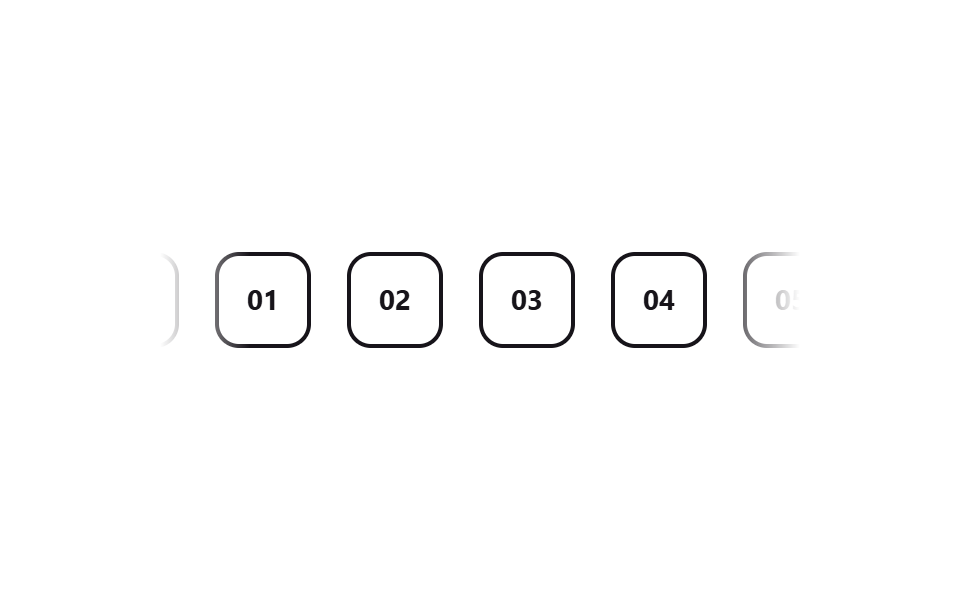
A linear-gradient mask-image on both edges lets items fade into the background instead of cutting off hard.
Best forHero-section logo strips, banners without a card container
mask-imagelinear-gradient-webkit-mask
<main class="stage">
  <div class="marquee">
    <div class="marquee__track">
      <span class="marquee__chip">01</span>
      <span class="marquee__chip">02</span>
      <span class="marquee__chip">03</span>
      <span class="marquee__chip">04</span>
      <span class="marquee__chip">05</span>
      <span class="marquee__chip" aria-hidden="true">01</span>
      <span class="marquee__chip" aria-hidden="true">02</span>
      <span class="marquee__chip" aria-hidden="true">03</span>
      <span class="marquee__chip" aria-hidden="true">04</span>
      <span class="marquee__chip" aria-hidden="true">05</span>
    </div>
  </div>
</main>
@use "../../../../site/static/demo-tokens" as *;
$duration: $dur-loop;
$easing: linear;
$color: $subject-ink;
@include stage($stage-paper);
.marquee {
width: min(320px, 84vw);
overflow: hidden;
mask-image: linear-gradient(to right, transparent, #000 14%, #000 86%, transparent);
-webkit-mask-image: linear-gradient(to right, transparent, #000 14%, #000 86%, transparent);
}
.marquee__track {
display: flex;
width: max-content;
animation: marquee-scroll $duration $easing infinite;
}
.marquee__chip {
margin-right: 18px; // 트랙의 gap 대신 — 세트 폭이 정확히 절반이 되어 -50% 이음새가 0px 이 된다
flex-shrink: 0;
display: grid;
place-items: center;
width: 44px;
height: 44px;
border-radius: $r-control;
border: 2px solid $color;
color: $color;
font-weight: 700; font-size: 14px; line-height: 1; font-family: inherit;
}
@keyframes marquee-scroll {
from { transform: translateX(0); }
to { transform: translateX(-50%); }
}
@media (prefers-reduced-motion: reduce) {
.marquee__track { animation: none; transform: translateX(0); }
}html, body {
margin: 0;
overflow: hidden;
}
.stage {
box-sizing: border-box;
min-height: 100vh;
display: grid;
place-items: center;
margin: 0;
background: #ffffff;
font-family: -apple-system, "Segoe UI", "Noto Sans KR", sans-serif;
padding: clamp(8px, 4vw, 24px);
}
.marquee {
width: min(320px, 84vw);
overflow: hidden;
mask-image: linear-gradient(to right, transparent, #000 14%, #000 86%, transparent);
-webkit-mask-image: linear-gradient(to right, transparent, #000 14%, #000 86%, transparent);
}
.marquee__track {
display: flex;
width: max-content;
animation: marquee-scroll 2s linear infinite;
}
.marquee__chip {
margin-right: 18px;
flex-shrink: 0;
display: grid;
place-items: center;
width: 44px;
height: 44px;
border-radius: 12px;
border: 2px solid #17141a;
color: #17141a;
font-weight: 700;
font-size: 14px;
line-height: 1;
font-family: inherit;
}
@keyframes marquee-scroll {
from {
transform: translateX(0);
}
to {
transform: translateX(-50%);
}
}
@media (prefers-reduced-motion: reduce) {
.marquee__track {
animation: none;
transform: translateX(0);
}
}import type { CSSProperties } from "react";
import styles from "./FadeEdgeMarquee.module.scss";
export type FadeEdgeMarqueeProps = {
items?: string[];
duration?: number;
easing?: string;
color?: string;
};
type Vars = CSSProperties & { "--duration"?: string; "--easing"?: string; "--color"?: string };
export default function FadeEdgeMarquee({
items = ["01", "02", "03", "04", "05"],
duration = 12000,
easing = "linear",
color = "#17141a",
}: FadeEdgeMarqueeProps) {
const vars: Vars = { "--duration": `${duration}ms`, "--easing": easing, "--color": color };
return (
<div className={styles.marquee} style={vars}>
<div className={styles.track}>
{items.map((it) => (
<span key={it} className={styles.chip}>{it}</span>
))}
{items.map((it) => (
<span key={"dup-" + it} className={styles.chip} aria-hidden="true">{it}</span>
))}
</div>
</div>
);
}04 Fade edges via mask — Measured area 10.501% · moving frames 23/23Original by GODRICH · SCSS and React ship in the zip · 9 CSS Marquee Infinite Loop — No JS, Scroll-Driven
The post this demo lives in
 9 CSS Marquee Infinite Loop — No JS, Scroll-DrivenA css marquee infinite loop is a row of duplicated content — logos, a price ticker, a headline — that slides on repeat u See all demos in this post