08Suspense skeleton swap
Put a CSS shimmer skeleton in React.Suspense's fallback slot, and once the lazy-loaded component is ready, the fallback exits while the real content fades in at the same spot instead of popping.
Best forCode-split route content, lazily loaded dashboard widgets
React.lazySuspense fallbackshimmer
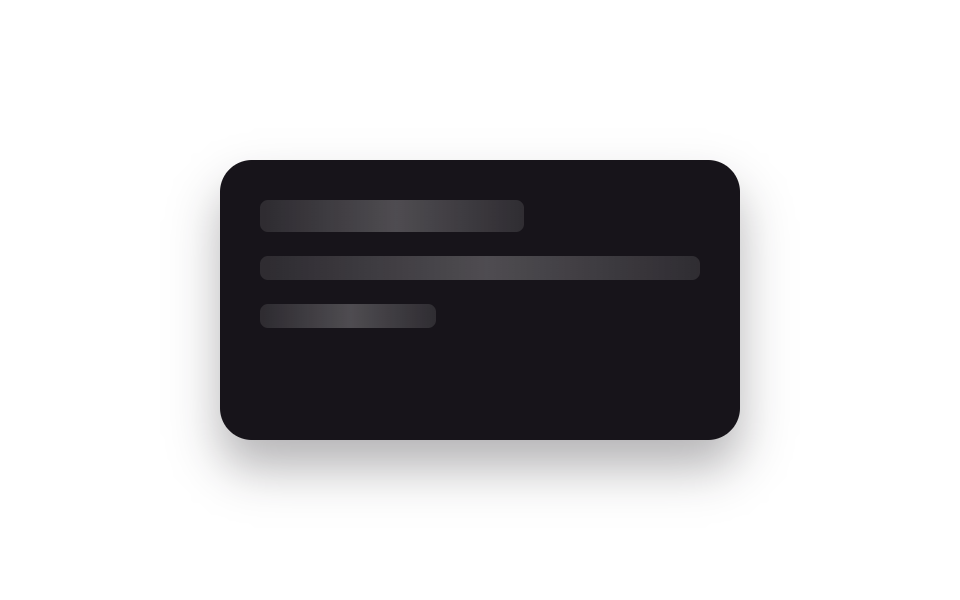
<main class="stage">
  <div class="sk-card is-demo">
    <div class="sk-skeleton">
      <span class="sk-bar sk-bar--title"></span>
      <span class="sk-bar sk-bar--line"></span>
      <span class="sk-bar sk-bar--line short"></span>
    </div>
    <div class="sk-content">
      <span class="sk-content__title">Widget loaded</span>
      <span class="sk-content__line">Lazy-loaded with React.lazy + Suspense</span>
    </div>
  </div>
</main>
@use "../../../../site/static/demo-tokens" as *;
// ── 변수 3개 ──────────────────────────────────────────
$duration: $dur-enter;
$easing: $ease-out;
$color: $subject-blue;
@include stage($stage-paper);
.sk-card {
position: relative;
width: min(260px, 84vw);
height: 140px;
box-sizing: border-box;
padding: $sp-5;
border-radius: $r-card;
background: $subject-ink;
box-shadow: $shadow-raised;
overflow: hidden;
}
.sk-skeleton, .sk-content {
position: absolute;
inset: $sp-5;
display: flex;
flex-direction: column;
gap: $sp-3;
}
.sk-bar {
height: $sp-3;
border-radius: $r-xs;
background: linear-gradient(90deg, rgba(255, 255, 255, .1) 25%, rgba(255, 255, 255, .24) 50%, rgba(255, 255, 255, .1) 75%);
background-size: 200% 100%;
animation: sk-shimmer 1.1s linear infinite;
}
.sk-bar--title { width: 60%; height: $sp-4; }
.sk-bar--line.short { width: 40%; }
@keyframes sk-shimmer { 0% { background-position: 200% 0; } 100% { background-position: -200% 0; } }
.sk-content { justify-content: center; color: $subject-cream; font-family: -apple-system, "Segoe UI", sans-serif; }
.sk-content__title { font-weight: 700; font-size: 15px; line-height: 1.3; font-family: inherit; }
.sk-content__line { font-weight: 400; font-size: 12px; line-height: 1.5; font-family: inherit; color: $color; }
// 실사용 원리: React.Suspense 의 fallback 자리를 CSS 셰머로 채워두고, 지연 로드된
// 컴포넌트가 준비되면 fallback 은 빠지고 실제 콘텐츠가 같은 자리에서 페이드로 들어온다.
.sk-content { opacity: 0; }
// 캡처용 루프: 스켈레톤(0~55%) → 콘텐츠(65~100%) 크로스페이드
@keyframes sk-out { 0%, 30% { opacity: 1; } 75%, 100% { opacity: 0; } }
@keyframes sk-in { 0%, 30% { opacity: 0; } 75%, 100% { opacity: 1; } }
.sk-card.is-demo .sk-skeleton { animation: sk-out $dur-loop $easing infinite; }
.sk-card.is-demo .sk-content { animation: sk-in $dur-loop $easing infinite; }
@media (prefers-reduced-motion: reduce) {
.sk-bar { animation: none !important; }
.sk-card.is-demo .sk-skeleton,
.sk-card.is-demo .sk-content { animation: none !important; }
.sk-skeleton { opacity: 0; }
.sk-content { opacity: 1; }
}html, body {
margin: 0;
overflow: hidden;
}
.stage {
box-sizing: border-box;
min-height: 100vh;
display: grid;
place-items: center;
margin: 0;
background: #ffffff;
font-family: -apple-system, "Segoe UI", "Noto Sans KR", sans-serif;
padding: clamp(8px, 4vw, 24px);
}
.sk-card {
position: relative;
width: min(260px, 84vw);
height: 140px;
box-sizing: border-box;
padding: 20px;
border-radius: 16px;
background: #17141a;
box-shadow: 0 14px 24px rgba(23, 20, 26, 0.32);
overflow: hidden;
}
.sk-skeleton, .sk-content {
position: absolute;
inset: 20px;
display: flex;
flex-direction: column;
gap: 12px;
}
.sk-bar {
height: 12px;
border-radius: 4px;
background: linear-gradient(90deg, rgba(255, 255, 255, 0.1) 25%, rgba(255, 255, 255, 0.24) 50%, rgba(255, 255, 255, 0.1) 75%);
background-size: 200% 100%;
animation: sk-shimmer 1.1s linear infinite;
}
.sk-bar--title {
width: 60%;
height: 16px;
}
.sk-bar--line.short {
width: 40%;
}
@keyframes sk-shimmer {
0% {
background-position: 200% 0;
}
100% {
background-position: -200% 0;
}
}
.sk-content {
justify-content: center;
color: #fff7e6;
font-family: -apple-system, "Segoe UI", sans-serif;
}
.sk-content__title {
font-weight: 700;
font-size: 15px;
line-height: 1.3;
font-family: inherit;
}
.sk-content__line {
font-weight: 400;
font-size: 12px;
line-height: 1.5;
font-family: inherit;
color: #2f6df6;
}
.sk-content {
opacity: 0;
}
@keyframes sk-out {
0%, 30% {
opacity: 1;
}
75%, 100% {
opacity: 0;
}
}
@keyframes sk-in {
0%, 30% {
opacity: 0;
}
75%, 100% {
opacity: 1;
}
}
.sk-card.is-demo .sk-skeleton {
animation: sk-out 2s ease-out infinite;
}
.sk-card.is-demo .sk-content {
animation: sk-in 2s ease-out infinite;
}
@media (prefers-reduced-motion: reduce) {
.sk-bar {
animation: none !important;
}
.sk-card.is-demo .sk-skeleton,
.sk-card.is-demo .sk-content {
animation: none !important;
}
.sk-skeleton {
opacity: 0;
}
.sk-content {
opacity: 1;
}
}import React, { CSSProperties } from "react";
import styles from "./SuspenseSkeletonSwap.module.scss";
function Skeleton() {
return (
<div className={styles.skeleton}>
<span className={`${styles.bar} ${styles.title}`} />
<span className={styles.bar} />
<span className={`${styles.bar} ${styles.short}`} />
</div>
);
}
// React.lazy simulates a code-split widget — in a real app this import() would be a
// separate chunk fetched over the network, which is exactly what Suspense's fallback
// (the shimmer skeleton above) is there to cover while it loads.
const Widget = React.lazy(
() =>
new Promise<{ default: () => any }>((resolve) => {
setTimeout(() => {
resolve({
default: () => (
<div className={styles.content}>
<span className={styles.contentTitle}>Widget loaded</span>
<span className={styles.contentLine}>Lazy-loaded with React.lazy + Suspense</span>
</div>
),
});
}, 900);
})
);
export interface SuspenseSkeletonSwapProps {
duration?: string;
easing?: string;
}
export default function SuspenseSkeletonSwap({
duration = "600ms",
easing = "ease-out",
}: SuspenseSkeletonSwapProps) {
const style: CSSProperties & { "--duration"?: string; "--easing"?: string } = {
"--duration": duration,
"--easing": easing,
};
return (
<div className={styles.card} style={style}>
<React.Suspense fallback={<Skeleton />}>
<Widget />
</React.Suspense>
</div>
);
}08 Suspense skeleton swap — Measured area 4.592% · moving frames 15/23Original by GODRICH · SCSS and React ship in the zip · 9 CSS Animations in React Without Framer Motion
The post this demo lives in
 9 CSS Animations in React Without Framer MotionA card fading in, a modal closing, a list item sliding away — usually that's CSS timed to when React mounts, unmounts, o See all demos in this post