09Route transition animation
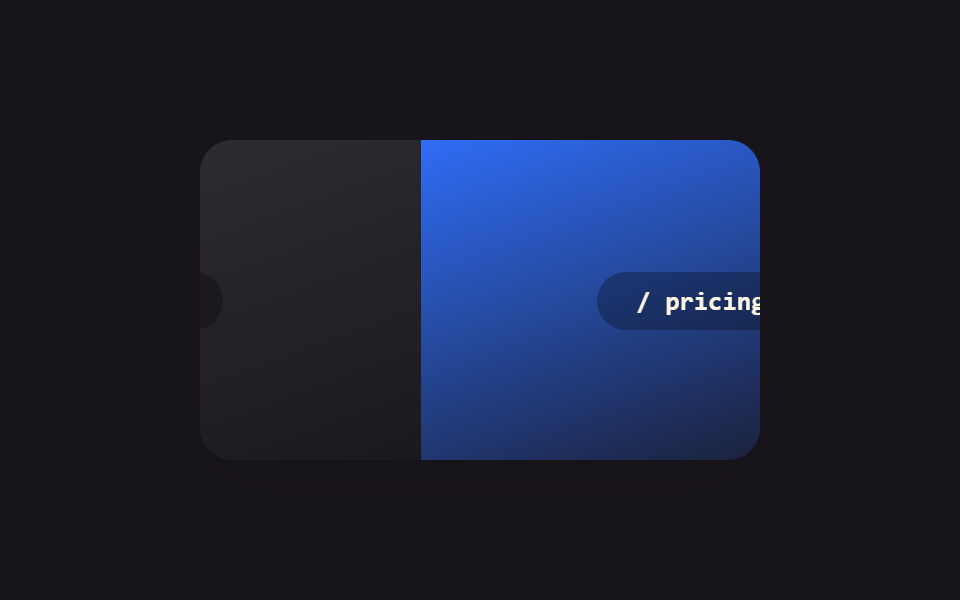
Using the URL param as the component's key, or wrapping the route swap in startViewTransition, makes the outgoing and incoming page connect with a CSS transition instead of an instant cut.
Best forSingle-page app route changes, tab-like pages sharing one layout
key by routestartViewTransitionexit/enter
<main class="stage">
  <div class="rt-frame is-demo">
    <div class="rt-page rt-page--out">
      <span class="rt-page__label">/ home</span>
    </div>
    <div class="rt-page rt-page--in">
      <span class="rt-page__label">/ pricing</span>
    </div>
  </div>
</main>
@use "../../../../site/static/demo-tokens" as *;
// ── 변수 3개 ──────────────────────────────────────────
$duration: $dur-base;
$easing: $ease-spring;
$color: $subject-blue;
@include stage($stage-ink);
.rt-frame {
position: relative;
width: min(280px, 88vw);
aspect-ratio: 280 / 160;
border-radius: $r-card;
overflow: hidden;
box-shadow: $shadow-raised;
}
.rt-page {
position: absolute;
inset: 0;
display: grid;
place-items: center;
}
.rt-page--out { background: linear-gradient(160deg, rgba(255, 255, 255, .12), rgba(255, 255, 255, .02)); }
.rt-page--in { background: linear-gradient(160deg, $color, rgba(23, 20, 26, .9)); }
.rt-page__label {
padding: $sp-2 $sp-5;
border-radius: $r-pill;
background: rgba(0, 0, 0, .28);
color: $subject-cream;
font: 700 13px/1 "SFMono-Regular", Consolas, monospace;
}
// 실사용 원리: URL 파라미터를 컴포넌트의 key 로 쓰거나 라우트 전환을 startViewTransition 으로
// 감싸면, 나가는 페이지와 들어오는 페이지가 순간 전환 대신 CSS 트랜지션으로 이어진다.
.rt-page--in { transform: translateX(100%); }
// 캡처용 루프: home 이 왼쪽으로 나가고 pricing 이 오른쪽에서 들어오는 전환을 2초 주기로 반복
@keyframes rt-out { 0%, 15% { transform: none; } 75%, 100% { transform: translateX(-100%); } }
@keyframes rt-in { 0%, 15% { transform: translateX(100%); } 75%, 100% { transform: none; } }
.rt-frame.is-demo .rt-page--out { animation: rt-out $dur-loop $easing infinite; }
.rt-frame.is-demo .rt-page--in { animation: rt-in $dur-loop $easing infinite; }
@media (prefers-reduced-motion: reduce) {
.rt-frame.is-demo .rt-page--out,
.rt-frame.is-demo .rt-page--in { animation: none !important; }
.rt-page--out { transform: none; }
.rt-page--in { transform: translateX(100%); }
}html, body {
margin: 0;
overflow: hidden;
}
.stage {
box-sizing: border-box;
min-height: 100vh;
display: grid;
place-items: center;
margin: 0;
background: #17141a;
font-family: -apple-system, "Segoe UI", "Noto Sans KR", sans-serif;
padding: clamp(8px, 4vw, 24px);
}
.rt-frame {
position: relative;
width: min(280px, 88vw);
aspect-ratio: 280/160;
border-radius: 16px;
overflow: hidden;
box-shadow: 0 14px 24px rgba(23, 20, 26, 0.32);
}
.rt-page {
position: absolute;
inset: 0;
display: grid;
place-items: center;
}
.rt-page--out {
background: linear-gradient(160deg, rgba(255, 255, 255, 0.12), rgba(255, 255, 255, 0.02));
}
.rt-page--in {
background: linear-gradient(160deg, #2f6df6, rgba(23, 20, 26, 0.9));
}
.rt-page__label {
padding: 8px 20px;
border-radius: 999px;
background: rgba(0, 0, 0, 0.28);
color: #fff7e6;
font: 700 13px/1 "SFMono-Regular", Consolas, monospace;
}
.rt-page--in {
transform: translateX(100%);
}
@keyframes rt-out {
0%, 15% {
transform: none;
}
75%, 100% {
transform: translateX(-100%);
}
}
@keyframes rt-in {
0%, 15% {
transform: translateX(100%);
}
75%, 100% {
transform: none;
}
}
.rt-frame.is-demo .rt-page--out {
animation: rt-out 2s cubic-bezier(0.2, 0.8, 0.2, 1) infinite;
}
.rt-frame.is-demo .rt-page--in {
animation: rt-in 2s cubic-bezier(0.2, 0.8, 0.2, 1) infinite;
}
@media (prefers-reduced-motion: reduce) {
.rt-frame.is-demo .rt-page--out,
.rt-frame.is-demo .rt-page--in {
animation: none !important;
}
.rt-page--out {
transform: none;
}
.rt-page--in {
transform: translateX(100%);
}
}import { CSSProperties, useState } from "react";
import styles from "./RouteTransition.module.scss";
const ROUTES = ["/ home", "/ pricing"];
function Page({ label }: { label: string; key?: string }) {
// key={label} on the caller side makes each route its own component instance —
// switching the key unmounts the outgoing page and mounts the incoming one,
// instead of patching one page's content in place.
return (
<div className={styles.page}>
<span className={styles.label}>{label}</span>
</div>
);
}
export interface RouteTransitionProps {
duration?: string;
easing?: string;
}
export default function RouteTransition({
duration = "300ms",
easing = "cubic-bezier(.2, .8, .2, 1)",
}: RouteTransitionProps) {
const [route, setRoute] = useState(0);
const navigate = () => {
const next = (route + 1) % ROUTES.length;
if (typeof document !== "undefined" && "startViewTransition" in document) {
(document as any).startViewTransition(() => setRoute(next));
} else {
setRoute(next);
}
};
const style: CSSProperties & { "--duration"?: string; "--easing"?: string } = {
"--duration": duration,
"--easing": easing,
};
return (
<button className={styles.frame} style={style} onClick={navigate}>
<Page key={ROUTES[route]} label={ROUTES[route]} />
</button>
);
}09 Route transition animation — Measured area 30.983% · moving frames 15/23Original by GODRICH · SCSS and React ship in the zip · 9 CSS Animations in React Without Framer Motion
The post this demo lives in
 9 CSS Animations in React Without Framer MotionA card fading in, a modal closing, a list item sliding away — usually that's CSS timed to when React mounts, unmounts, o See all demos in this post