08TOC highlight
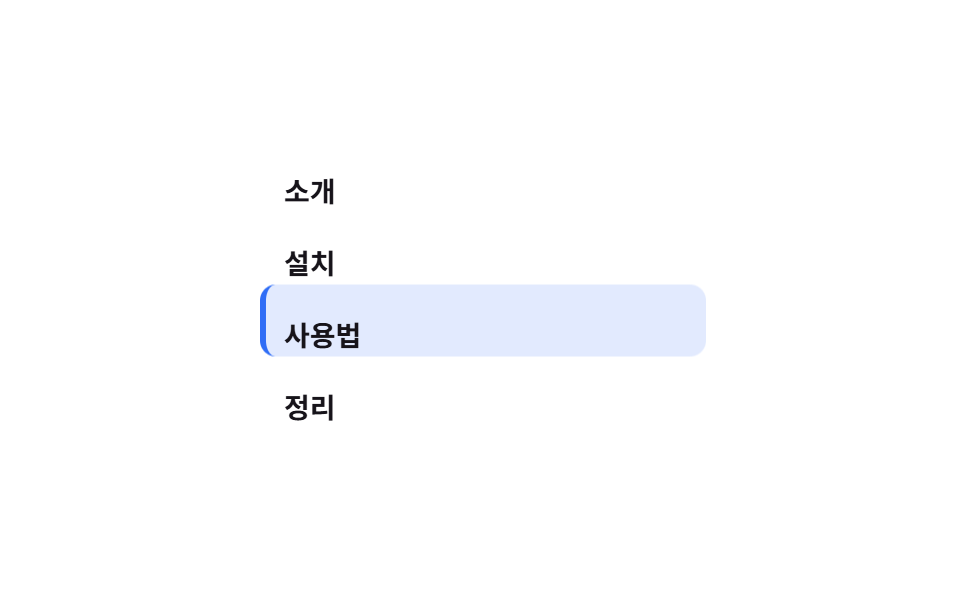
In a sidebar table of contents, a pill background slides to follow only the heading you're currently reading.
Best forDocs-site sidebar TOCs, scroll-spy for long guide posts
translateY 알약현재 항목만좌측 보더 3px
<main class="stage">
  <nav class="toc is-demo" aria-label="Contents">
    <span class="toc__pill" aria-hidden="true"></span>
    <a class="toc__item" href="#" tabindex="-1">Intro</a>
    <a class="toc__item" href="#" tabindex="-1">Install</a>
    <a class="toc__item" href="#" tabindex="-1">Usage</a>
    <a class="toc__item" href="#" tabindex="-1">Wrap-up</a>
  </nav>
</main>
@use "../../../../site/static/demo-tokens" as *;
// ── 변수 3개 ──────────────────────────────────────────
$duration: $dur-loop;
$color: $subject-blue; // 활성 알약 색
$row: 36px; // 목차 한 줄 높이 (알약 이동 간격)
@include stage($stage-paper);
.toc {
position: relative;
display: flex;
flex-direction: column;
width: min(220px, 80vw);
}
// 옅은 색 칩이라야 알약이 두 줄에 걸치는 전환 중에도 글자 대비가 안 깨진다 (진한 배경 + 어두운 글자는 전환 중 대비가 무너진다)
.toc__pill {
position: absolute;
left: 0; top: 0;
width: 100%; height: $row;
border-radius: $r-sm;
background: rgba(47, 109, 246, .14);
border-left: 3px solid $color;
z-index: 0;
transform: translateY(0);
}
.toc__item {
position: relative;
z-index: 1;
height: $row;
display: flex;
align-items: center;
padding: 0 $sp-3;
font-weight: 600;
font-size: 14px;
line-height: 1;
font-family: inherit;
color: $subject-ink;
text-decoration: none;
}
// ── 실제 사용: 흔히 IntersectionObserver 로 지금 보이는 제목을 찾아 --active 를 바꾼다.
// 구간 크기가 고르면 animation-timeline: scroll(root) 로도 같은 스텝 키프레임을 쓸 수 있다 ──
// ── 데모: 알약이 항목 네 개를 순서대로 미끄러지듯 오르내린다 ──
// (구간마다 바로 다음 값으로 점프하면 프레임 사이 변화가 한두 장뿐이다 — 구간의 절반을 이동에 쓴다)
.toc.is-demo .toc__pill { animation: move $duration ease-in-out infinite; }
@keyframes move {
0%, 10% { transform: translateY(0); }
25%, 35% { transform: translateY($row); }
50%, 60% { transform: translateY($row * 2); }
75%, 85% { transform: translateY($row * 3); }
100% { transform: translateY(0); }
}
@media (prefers-reduced-motion: reduce) {
.toc.is-demo .toc__pill { animation: none !important; }
}html, body {
margin: 0;
overflow: hidden;
}
.stage {
box-sizing: border-box;
min-height: 100vh;
display: grid;
place-items: center;
margin: 0;
background: #ffffff;
font-family: -apple-system, "Segoe UI", "Noto Sans KR", sans-serif;
padding: clamp(8px, 4vw, 24px);
}
.toc {
position: relative;
display: flex;
flex-direction: column;
width: min(220px, 80vw);
}
.toc__pill {
position: absolute;
left: 0;
top: 0;
width: 100%;
height: 36px;
border-radius: 8px;
background: rgba(47, 109, 246, 0.14);
border-left: 3px solid #2f6df6;
z-index: 0;
transform: translateY(0);
}
.toc__item {
position: relative;
z-index: 1;
height: 36px;
display: flex;
align-items: center;
padding: 0 12px;
font-weight: 600;
font-size: 14px;
line-height: 1;
font-family: inherit;
color: #17141a;
text-decoration: none;
}
.toc.is-demo .toc__pill {
animation: move 2s ease-in-out infinite;
}
@keyframes move {
0%, 10% {
transform: translateY(0);
}
25%, 35% {
transform: translateY(36px);
}
50%, 60% {
transform: translateY(72px);
}
75%, 85% {
transform: translateY(108px);
}
100% {
transform: translateY(0);
}
}
@media (prefers-reduced-motion: reduce) {
.toc.is-demo .toc__pill {
animation: none !important;
}
}import { useEffect, useState } from "react";
import styles from "./TocHighlight.module.scss";
export type TocItem = { id: string; label: string };
export type TocHighlightProps = {
items: TocItem[];
/** 알약 색 */
color?: string;
/** 한 줄 높이 (px) */
row?: number;
};
// 실제 쓰임: IntersectionObserver 로 지금 보이는 제목을 찾아 알약을 그 줄로 옮긴다.
export default function TocHighlight({ items, color = "#2f6df6", row = 36 }: TocHighlightProps) {
const [active, setActive] = useState(0);
useEffect(() => {
const els = items.map((it) => document.getElementById(it.id)).filter(Boolean) as HTMLElement[];
const io = new IntersectionObserver(
(entries) => {
const top = entries.filter((e) => e.isIntersecting).sort((a, b) => b.intersectionRatio - a.intersectionRatio)[0];
if (top) setActive(els.indexOf(top.target as HTMLElement));
},
{ threshold: [0.3, 0.6] }
);
els.forEach((el) => io.observe(el));
return () => io.disconnect();
}, [items]);
return (
<nav className={styles.toc} aria-label="Contents" style={{ width: 220 }}>
<span className={styles.pill} style={{ borderLeftColor: color, height: row, transform: `translateY(${active * row}px)` }} />
{items.map((it) => (
<a key={it.id} href={`#${it.id}`} className={styles.item} style={{ height: row }}>
{it.label}
</a>
))}
</nav>
);
}08 TOC highlight — Measured area 21.896% · moving frames 15/23Original by GODRICH · SCSS and React ship in the zip · 9 CSS Scroll Progress Bar Ideas, Copy-Paste
The post this demo lives in
 9 CSS Scroll Progress Bar Ideas, Copy-PasteA css scroll progress bar reads how far a reader has scrolled and turns that into a fill, a ring, a count, or a countdow See all demos in this post