02Grid wave stagger
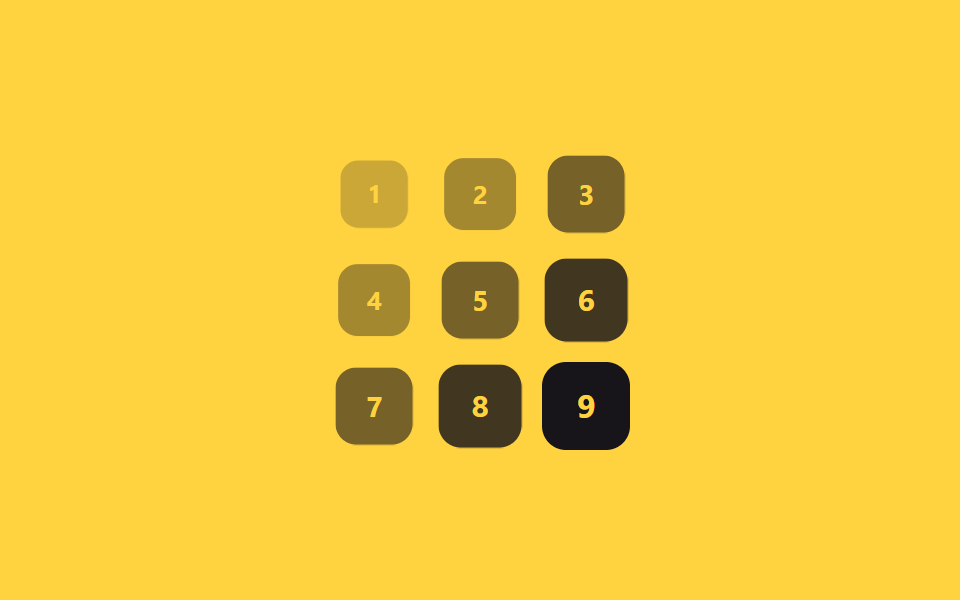
Each grid card's delay is set by adding its row index to its column index, so cards ripple in diagonally across the grid.
Best forDashboard card grids, gallery thumbnails
행+열 인덱스70ms 계수대각선 확산
<main class="stage">
  <div class="grid is-demo">
    <span class="cell">1</span><span class="cell">2</span><span class="cell">3</span>
    <span class="cell">4</span><span class="cell">5</span><span class="cell">6</span>
    <span class="cell">7</span><span class="cell">8</span><span class="cell">9</span>
  </div>
</main>
@use "sass:math";
@use "../../../../site/static/demo-tokens" as *;
$duration: $dur-base; // 칸 하나가 나타나는 시간
$easing: $ease-out; // 시작 빠르고 끝은 부드럽게
$wave: 70ms; // (행+열) 1당 시차 계수
@include stage($stage-yellow);
.grid {
display: grid;
grid-template-columns: repeat(3, 1fr);
gap: clamp(5px, 1.8vw, 10px);
width: min(150px, 50vw);
aspect-ratio: 1;
}
.cell {
display: grid;
place-items: center;
border-radius: $r-control;
background: $stage-ink;
color: $stage-yellow;
font-weight: 700; font-size: clamp(12px, 3.4vw, 16px); line-height: 1; font-family: inherit;
}
// 반복 재생은 데모 상태에서만 — 정지 상태의 칸은 불투명해야 글자가 읽힌다(옐로 글자 · 먹 면 12.63:1)
.grid.is-demo .cell { animation: wave-loop $dur-loop $easing infinite; }
$cols: 3;
@for $i from 1 through 9 {
$row: math.floor(math.div($i - 1, $cols));
$col: ($i - 1) % $cols;
.grid.is-demo .cell:nth-child(#{$i}) { animation-delay: ($row + $col) * $wave; }
}
@keyframes wave-loop {
0%, 6% { opacity: 0; transform: scale(.5); }
22%, 62% { opacity: 1; transform: scale(1); }
84%, 100% { opacity: 0; transform: scale(.7); }
}
@media (prefers-reduced-motion: reduce) {
.cell { animation: none; opacity: 1; transform: none; }
}html, body {
margin: 0;
overflow: hidden;
}
.stage {
box-sizing: border-box;
min-height: 100vh;
display: grid;
place-items: center;
margin: 0;
background: #ffd23f;
font-family: -apple-system, "Segoe UI", "Noto Sans KR", sans-serif;
padding: clamp(8px, 4vw, 24px);
}
.grid {
display: grid;
grid-template-columns: repeat(3, 1fr);
gap: clamp(5px, 1.8vw, 10px);
width: min(150px, 50vw);
aspect-ratio: 1;
}
.cell {
display: grid;
place-items: center;
border-radius: 12px;
background: #17141a;
color: #ffd23f;
font-weight: 700;
font-size: clamp(12px, 3.4vw, 16px);
line-height: 1;
font-family: inherit;
}
.grid.is-demo .cell {
animation: wave-loop 2s ease-out infinite;
}
.grid.is-demo .cell:nth-child(1) {
animation-delay: 0ms;
}
.grid.is-demo .cell:nth-child(2) {
animation-delay: 70ms;
}
.grid.is-demo .cell:nth-child(3) {
animation-delay: 140ms;
}
.grid.is-demo .cell:nth-child(4) {
animation-delay: 70ms;
}
.grid.is-demo .cell:nth-child(5) {
animation-delay: 140ms;
}
.grid.is-demo .cell:nth-child(6) {
animation-delay: 210ms;
}
.grid.is-demo .cell:nth-child(7) {
animation-delay: 140ms;
}
.grid.is-demo .cell:nth-child(8) {
animation-delay: 210ms;
}
.grid.is-demo .cell:nth-child(9) {
animation-delay: 280ms;
}
@keyframes wave-loop {
0%, 6% {
opacity: 0;
transform: scale(0.5);
}
22%, 62% {
opacity: 1;
transform: scale(1);
}
84%, 100% {
opacity: 0;
transform: scale(0.7);
}
}
@media (prefers-reduced-motion: reduce) {
.cell {
animation: none;
opacity: 1;
transform: none;
}
}import styles from "./GridWave.module.scss";
export type GridWaveProps = {
cells?: (string | number)[];
cols?: number;
/** (행+열) 1당 시차 ms (기본 70ms) */
wave?: number;
duration?: number;
easing?: string;
};
export default function GridWave({
cells = [1, 2, 3, 4, 5, 6, 7, 8, 9],
cols = 3,
wave = 70,
duration = 300,
easing = "ease-out",
}: GridWaveProps) {
return (
<div className={styles.grid}>
{cells.map((cell, i) => {
const row = Math.floor(i / cols);
const col = i % cols;
return (
<span
key={i}
className={styles.cell}
style={{
animationDelay: `${(row + col) * wave}ms`,
animationDuration: "2s",
transitionDuration: `${duration}ms`,
transitionTimingFunction: easing,
}}
>
{cell}
</span>
);
})}
</div>
);
}02 Grid wave stagger — Measured area 11.562% · moving frames 18/23Original by GODRICH · SCSS and React ship in the zip · 9 CSS Stagger Animation Demos You Can Copy-Paste
The post this demo lives in
 9 CSS Stagger Animation Demos You Can Copy-PasteA css stagger animation gives each item in a list or grid its own delay, so a group that starts together finishes appear See all demos in this post