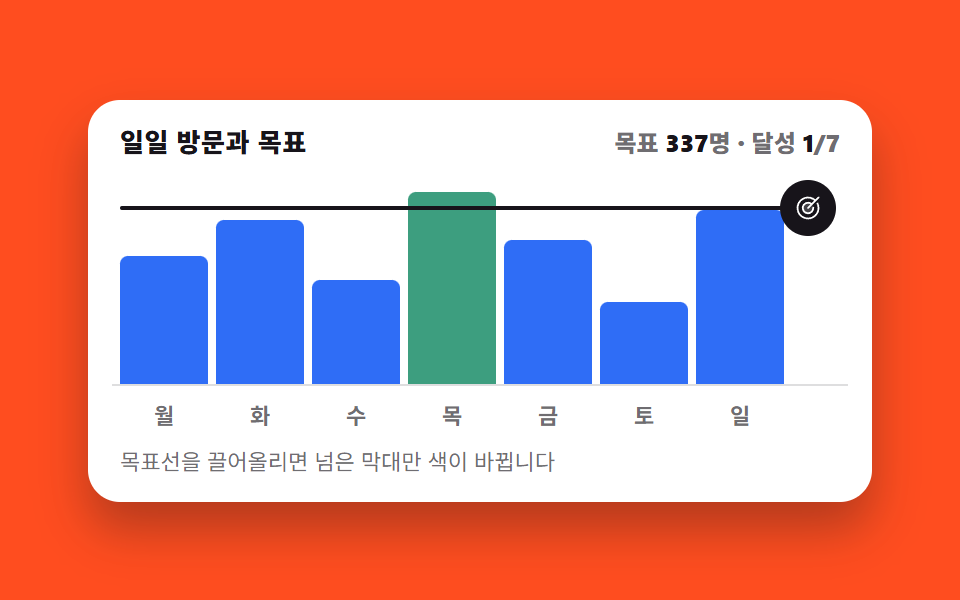
07Drag the goal line and only the bars above change color
Dragging the horizontal goal line up or down recolors only the bars that clear it, and the count beside it keeps up before you let go.
Best forKPI cards where the target moves and the hit count follows
setPointerCapture@propertyaria-valuenow
<main class="stage">
  <figure class="gl is-demo" id="gl">
    <figcaption class="gl__head">
      <span class="gl__title">Daily visits and goal</span>
      <span class="gl__stat" aria-hidden="true">Goal <b class="gl__n gl__n--v"></b>visits · met <b class="gl__n gl__n--c"></b>/7</span>
    </figcaption>

    <div class="gl__zone">
      <div class="gl__bars" role="img" aria-label="Visit bars for 7 days with a 300-visit goal line. Mon 245, Tue 312, Wed 198, Thu 368, Fri 276, Sat 154, Sun 332">
        <span class="gl__bar"></span>
        <span class="gl__bar" data-over="1"></span>
        <span class="gl__bar"></span>
        <span class="gl__bar" data-over="1"></span>
        <span class="gl__bar"></span>
        <span class="gl__bar"></span>
        <span class="gl__bar" data-over="1"></span>
      </div>
      <div class="gl__goal">
        <span class="gl__rail" aria-hidden="true"></span>
        <button class="gl__grab" type="button" role="slider" aria-orientation="vertical"
                aria-label="Drag the goal line" aria-valuemin="50" aria-valuemax="400"
                aria-valuenow="300" aria-valuetext="300 visits" id="gl-grab">
          <svg class="gl__ic" viewBox="0 0 256 256" aria-hidden="true"><g fill="currentColor"><path d="M176 128a48 48 0 1 1-48-48a48 48 0 0 1 48 48" opacity=".2"/><path d="M221.87 83.16A104.1 104.1 0 1 1 195.67 49l22.67-22.68a8 8 0 0 1 11.32 11.32l-96 96a8 8 0 0 1-11.32-11.32l27.72-27.72a40 40 0 1 0 17.87 31.09a8 8 0 1 1 16-.9a56 56 0 1 1-22.38-41.65l22.75-22.75a87.88 87.88 0 1 0 23.13 29.67a8 8 0 0 1 14.44-6.9"/></g></svg>
        </button>
      </div>
    </div>

    <div class="gl__days" aria-hidden="true">
      <span>Month</span><span>Tue</span><span>Wed</span><span>Thu</span><span>Fri</span><span>Sat</span><span> days</span>
    </div>

    <p class="gl__hint">Drag the goal line up and only the bars that clear it change color</p>

    <div class="sr">
      <span aria-live="polite" id="gl-live"></span>
      <table>
        <caption>Visitors by day of week</caption>
        <thead><tr><th>Day</th><th>Visits</th></tr></thead>
        <tbody>
          <tr><th>Month</th><td>245</td></tr><tr><th>Tue</th><td>312</td></tr><tr><th>Wed</th><td>198</td></tr>
          <tr><th>Thu</th><td>368</td></tr><tr><th>Fri</th><td>276</td></tr><tr><th>Sat</th><td>154</td></tr>
          <tr><th> days</th><td>332</td></tr>
        </tbody>
      </table>
    </div>
  </figure>
</main>@use "../../../../site/static/demo-tokens" as *;
// 목표선 위치(%). 등록해야 keyframes 가 값을 보간할 수 있고, 숫자 카운터도 굴러간다
@property --goal {
syntax: "<percentage>";
initial-value: 75%;
inherits: true;
}
@property --gv {
syntax: "<integer>";
initial-value: 300;
inherits: true;
}
@property --n {
syntax: "<integer>";
initial-value: 3;
inherits: true;
}
$duration: $dur-quick;
$easing: $ease-out;
$color: $subject-blue;
// 흰 카드 위의 막대는 $subject-mint 그대로는 흰 바탕과 1.86:1 이라
// WCAG 1.4.11(비텍스트 3:1)에 못 미친다. 토큰 두 개를 섞어 3.28:1 로 내린 판을 쓴다
$mint-bar: mix($subject-mint, $subject-ink, 72%);
// 요일별 방문(명). 높이 = 값/400 — 세로 축 상한 400명
$h: 61.25% 78% 49.5% 92% 69% 38.5% 83%;
@include stage($stage-orange);
.sr {
position: absolute;
width: 1px;
height: 1px;
overflow: hidden;
clip-path: inset(50%);
white-space: nowrap;
}
.gl {
box-sizing: border-box;
width: min(392px, 88vw);
display: flex;
flex-direction: column;
gap: $sp-2;
margin: 0;
padding: $sp-3;
border-radius: $r-card;
background: $stage-paper;
box-shadow: $shadow-raised;
color: $subject-ink;
font-family: -apple-system, "Segoe UI", "Noto Sans KR", sans-serif;
--goal: 75%;
--gv: 300;
--n: 3;
}
.gl__head {
display: flex;
align-items: baseline;
justify-content: space-between;
gap: $sp-2;
padding: 0 $sp-1;
}
.gl__title { font-size: 13px; line-height: 18px; font-weight: 800; letter-spacing: .02em; }
// 목표값·달성 개수는 글자가 아니라 카운터 — --gv·--n 이 바뀌면 그 정수가 그대로 글자가
// 된다. 손을 떼기 전에도(pointermove 중에도) 계속 따라온다
.gl__stat {
font-size: 12px;
line-height: 18px;
font-weight: 800;
font-variant-numeric: tabular-nums;
color: rgba(23, 20, 26, .62);
}
.gl__n { color: $subject-ink; }
.gl__n--v { counter-reset: gv var(--gv); }
.gl__n--v::after { content: counter(gv); }
.gl__n--c { counter-reset: n var(--n); }
.gl__n--c::after { content: counter(n); }
// ── 차트 구역: 막대 7칸 grid + 그 위에 목표선 오버레이 ──
// 주의: role="img" wrapper 안 span 은 grid 자식이 아니면 inline 이라 높이를 안 가진다 —
// wrapper 자체를 grid 로 만든다 (05 와 같은 실수를 여기서 피한 이유)
.gl__zone {
position: relative;
height: 104px;
padding: 0 $sp-8 0 $sp-1; // 오른쪽 32px 은 손잡이 자리
border-bottom: 1px solid rgba(23, 20, 26, .14);
}
.gl__bars {
display: grid;
grid-template-columns: repeat(7, 1fr);
align-items: end;
column-gap: $sp-1;
height: 100%;
}
.gl__bar {
height: var(--h);
border-radius: $r-xs $r-xs 0 0;
background: $color;
}
@for $i from 1 through 7 {
// nth() 는 #{} 로 감싸야 evaluate 된다 — 밖에 두면 그대로 CSS 로 새어나간다
.gl__bar:nth-child(#{$i}) { --h: #{nth($h, $i)}; }
}
// 넘김 판정은 JS 가 data-over 에만 적는다 — CSS 는 그 속성만 읽는다
.gl__bar[data-over="1"] { background: $mint-bar; }
// 목표선 한 덩어리(선+손잡이) — 칸 아닌, 등록된 --goal 하나로 통째로 움직인다
.gl__goal {
position: absolute;
left: $sp-1;
right: $sp-8;
bottom: var(--goal);
}
.gl__rail {
position: absolute;
left: 0;
right: 0;
top: -1px;
height: 2px;
border-radius: $r-pill;
background: $subject-ink;
}
.gl__grab {
position: absolute;
right: -26px;
top: 50%;
transform: translateY(-50%);
display: grid;
place-items: center;
width: 28px;
height: 28px;
margin: 0;
padding: 0;
border: 0;
border-radius: 50%;
background: $subject-ink;
color: $stage-paper;
cursor: ns-resize;
touch-action: none; // pointermove 를 브라우저 스크롤에게 뺏기지 않는다
}
.gl__grab:focus-visible { outline: 2px solid $subject-ink; outline-offset: 2px; }
.gl__ic { width: 14px; height: 14px; }
.gl__days {
display: grid;
grid-template-columns: repeat(7, 1fr);
column-gap: $sp-1;
padding: 0 $sp-8 0 $sp-1;
font-size: 11px;
line-height: 14px;
font-weight: 700;
text-align: center;
color: rgba(23, 20, 26, .62);
}
.gl__hint { margin: 0; padding: 0 $sp-1; font-size: 11px; line-height: 16px; color: rgba(23, 20, 26, .62); }
// ── 자동 루프(2초): 목표선이 300 → 140 → 380 → 140 → 300 명을 오간다(90% 안에 복귀) ──
// 선·숫자는 linear 로 **드래그처럼 등속** — 카운터가 선과 어긋나지 않는다.
// 달성 개수(--n)와 막대 색은 이산값이라 steps(1, end) 컷: 선이 그 막대 꼭대기를 지나는
// 바로 그 순간의 퍼센트에서 갈아입는다(아래 숫자들은 값/400 위치에서 계산한 교차시각)
.gl.is-demo {
animation-name: gl-goal, gl-gv, gl-n;
animation-duration: $dur-loop, $dur-loop, $dur-loop;
animation-timing-function: linear, linear, steps(1, end);
animation-iteration-count: infinite, infinite, infinite;
}
@keyframes gl-goal {
0% { --goal: 75%; }
8% { --goal: 35%; }
44% { --goal: 95%; }
80% { --goal: 35%; }
90%, 100% { --goal: 75%; }
}
@keyframes gl-gv {
0% { --gv: 300; }
8% { --gv: 140; }
44% { --gv: 380; }
80% { --gv: 140; }
90%, 100% { --gv: 300; }
}
// 달성 개수 — 선이 각 막대 꼭대기를 지나는 순간마다 ±1 (교차시각 계산값)
@keyframes gl-n {
0% { --n: 3; }
1.2% { --n: 4; }
2.8% { --n: 5; }
5.1% { --n: 6; }
7.3% { --n: 7; }
10.1% { --n: 6; }
16.7% { --n: 5; }
23.8% { --n: 4; }
28.4% { --n: 3; }
33.8% { --n: 2; }
36.8% { --n: 1; }
42.2% { --n: 0; }
45.8% { --n: 1; }
51.2% { --n: 2; }
54.2% { --n: 3; }
59.6% { --n: 4; }
64.3% { --n: 5; }
71.3% { --n: 6; }
77.9% { --n: 7; }
80.9% { --n: 6; }
83.6% { --n: 5; }
86.6% { --n: 4; }
88.5%, 100% { --n: 3; }
}
// 막대 색 컷 — 각 막대가 넘는 구간에만 민트. steps(1,end) 는 구간 시작값을
// 구간 끝까지 잡으므로 두 색이 겹쳐 반쯤 섞인 프레임이 생기지 않는다
@keyframes gl-c1 { 0%{background:$color;} 2.8%{background:$mint-bar;} 23.8%{background:$color;} 64.3%{background:$mint-bar;} 86.6%,100%{background:$color;} }
@keyframes gl-c2 { 0%{background:$mint-bar;} 33.8%{background:$color;} 54.2%,100%{background:$mint-bar;} }
@keyframes gl-c3 { 0%{background:$color;} 5.1%{background:$mint-bar;} 16.7%{background:$color;} 71.3%{background:$mint-bar;} 83.6%,100%{background:$color;} }
@keyframes gl-c4 { 0%{background:$mint-bar;} 42.2%{background:$color;} 45.8%,100%{background:$mint-bar;} }
@keyframes gl-c5 { 0%{background:$color;} 1.2%{background:$mint-bar;} 28.4%{background:$color;} 59.6%{background:$mint-bar;} 88.5%,100%{background:$color;} }
@keyframes gl-c6 { 0%{background:$color;} 7.3%{background:$mint-bar;} 10.1%{background:$color;} 77.9%{background:$mint-bar;} 80.9%,100%{background:$color;} }
@keyframes gl-c7 { 0%{background:$mint-bar;} 36.8%{background:$color;} 51.2%,100%{background:$mint-bar;} }
@for $i from 1 through 7 {
.gl.is-demo .gl__bar:nth-child(#{$i}) {
animation-name: gl-c#{$i};
animation-duration: $dur-loop;
animation-timing-function: steps(1, end);
animation-iteration-count: infinite;
}
}
@media (max-width: 340px) {
.gl { padding: $sp-2; gap: $sp-1; }
.gl__hint { display: none; }
.gl__title { font-size: 12px; line-height: 16px; }
.gl__stat { font-size: 11px; line-height: 16px; }
.gl__zone { height: 84px; }
.gl__grab { width: 24px; height: 24px; }
.gl__ic { width: 12px; height: 12px; }
}
@media (prefers-reduced-motion: reduce) {
.gl.is-demo,
.gl.is-demo .gl__bar { animation: none !important; }
}@property --goal {
syntax: "<percentage>";
initial-value: 75%;
inherits: true;
}
@property --gv {
syntax: "<integer>";
initial-value: 300;
inherits: true;
}
@property --n {
syntax: "<integer>";
initial-value: 3;
inherits: true;
}
html, body {
margin: 0;
overflow: hidden;
}
.stage {
box-sizing: border-box;
min-height: 100vh;
display: grid;
place-items: center;
margin: 0;
background: #ff4d1f;
font-family: -apple-system, "Segoe UI", "Noto Sans KR", sans-serif;
padding: clamp(8px, 4vw, 24px);
}
.sr {
position: absolute;
width: 1px;
height: 1px;
overflow: hidden;
clip-path: inset(50%);
white-space: nowrap;
}
.gl {
box-sizing: border-box;
width: min(392px, 88vw);
display: flex;
flex-direction: column;
gap: 8px;
margin: 0;
padding: 12px;
border-radius: 16px;
background: #ffffff;
box-shadow: 0 14px 24px rgba(23, 20, 26, 0.32);
color: #17141a;
font-family: -apple-system, "Segoe UI", "Noto Sans KR", sans-serif;
--goal: 75%;
--gv: 300;
--n: 3;
}
.gl__head {
display: flex;
align-items: baseline;
justify-content: space-between;
gap: 8px;
padding: 0 4px;
}
.gl__title {
font-size: 13px;
line-height: 18px;
font-weight: 800;
letter-spacing: 0.02em;
}
.gl__stat {
font-size: 12px;
line-height: 18px;
font-weight: 800;
font-variant-numeric: tabular-nums;
color: rgba(23, 20, 26, 0.62);
}
.gl__n {
color: #17141a;
}
.gl__n--v {
counter-reset: gv var(--gv);
}
.gl__n--v::after {
content: counter(gv);
}
.gl__n--c {
counter-reset: n var(--n);
}
.gl__n--c::after {
content: counter(n);
}
.gl__zone {
position: relative;
height: 104px;
padding: 0 32px 0 4px;
border-bottom: 1px solid rgba(23, 20, 26, 0.14);
}
.gl__bars {
display: grid;
grid-template-columns: repeat(7, 1fr);
align-items: end;
column-gap: 4px;
height: 100%;
}
.gl__bar {
height: var(--h);
border-radius: 4px 4px 0 0;
background: #2f6df6;
}
.gl__bar:nth-child(1) {
--h: 61.25%;
}
.gl__bar:nth-child(2) {
--h: 78%;
}
.gl__bar:nth-child(3) {
--h: 49.5%;
}
.gl__bar:nth-child(4) {
--h: 92%;
}
.gl__bar:nth-child(5) {
--h: 69%;
}
.gl__bar:nth-child(6) {
--h: 38.5%;
}
.gl__bar:nth-child(7) {
--h: 83%;
}
.gl__bar[data-over="1"] {
background: rgb(23.9843137255%, 62.0549019608%, 49.7254901961%);
}
.gl__goal {
position: absolute;
left: 4px;
right: 32px;
bottom: var(--goal);
}
.gl__rail {
position: absolute;
left: 0;
right: 0;
top: -1px;
height: 2px;
border-radius: 999px;
background: #17141a;
}
.gl__grab {
position: absolute;
right: -26px;
top: 50%;
transform: translateY(-50%);
display: grid;
place-items: center;
width: 28px;
height: 28px;
margin: 0;
padding: 0;
border: 0;
border-radius: 50%;
background: #17141a;
color: #ffffff;
cursor: ns-resize;
touch-action: none;
}
.gl__grab:focus-visible {
outline: 2px solid #17141a;
outline-offset: 2px;
}
.gl__ic {
width: 14px;
height: 14px;
}
.gl__days {
display: grid;
grid-template-columns: repeat(7, 1fr);
column-gap: 4px;
padding: 0 32px 0 4px;
font-size: 11px;
line-height: 14px;
font-weight: 700;
text-align: center;
color: rgba(23, 20, 26, 0.62);
}
.gl__hint {
margin: 0;
padding: 0 4px;
font-size: 11px;
line-height: 16px;
color: rgba(23, 20, 26, 0.62);
}
.gl.is-demo {
animation-name: gl-goal, gl-gv, gl-n;
animation-duration: 2s, 2s, 2s;
animation-timing-function: linear, linear, steps(1, end);
animation-iteration-count: infinite, infinite, infinite;
}
@keyframes gl-goal {
0% {
--goal: 75%;
}
8% {
--goal: 35%;
}
44% {
--goal: 95%;
}
80% {
--goal: 35%;
}
90%, 100% {
--goal: 75%;
}
}
@keyframes gl-gv {
0% {
--gv: 300;
}
8% {
--gv: 140;
}
44% {
--gv: 380;
}
80% {
--gv: 140;
}
90%, 100% {
--gv: 300;
}
}
@keyframes gl-n {
0% {
--n: 3;
}
1.2% {
--n: 4;
}
2.8% {
--n: 5;
}
5.1% {
--n: 6;
}
7.3% {
--n: 7;
}
10.1% {
--n: 6;
}
16.7% {
--n: 5;
}
23.8% {
--n: 4;
}
28.4% {
--n: 3;
}
33.8% {
--n: 2;
}
36.8% {
--n: 1;
}
42.2% {
--n: 0;
}
45.8% {
--n: 1;
}
51.2% {
--n: 2;
}
54.2% {
--n: 3;
}
59.6% {
--n: 4;
}
64.3% {
--n: 5;
}
71.3% {
--n: 6;
}
77.9% {
--n: 7;
}
80.9% {
--n: 6;
}
83.6% {
--n: 5;
}
86.6% {
--n: 4;
}
88.5%, 100% {
--n: 3;
}
}
@keyframes gl-c1 {
0% {
background: #2f6df6;
}
2.8% {
background: rgb(23.9843137255%, 62.0549019608%, 49.7254901961%);
}
23.8% {
background: #2f6df6;
}
64.3% {
background: rgb(23.9843137255%, 62.0549019608%, 49.7254901961%);
}
86.6%, 100% {
background: #2f6df6;
}
}
@keyframes gl-c2 {
0% {
background: rgb(23.9843137255%, 62.0549019608%, 49.7254901961%);
}
33.8% {
background: #2f6df6;
}
54.2%, 100% {
background: rgb(23.9843137255%, 62.0549019608%, 49.7254901961%);
}
}
@keyframes gl-c3 {
0% {
background: #2f6df6;
}
5.1% {
background: rgb(23.9843137255%, 62.0549019608%, 49.7254901961%);
}
16.7% {
background: #2f6df6;
}
71.3% {
background: rgb(23.9843137255%, 62.0549019608%, 49.7254901961%);
}
83.6%, 100% {
background: #2f6df6;
}
}
@keyframes gl-c4 {
0% {
background: rgb(23.9843137255%, 62.0549019608%, 49.7254901961%);
}
42.2% {
background: #2f6df6;
}
45.8%, 100% {
background: rgb(23.9843137255%, 62.0549019608%, 49.7254901961%);
}
}
@keyframes gl-c5 {
0% {
background: #2f6df6;
}
1.2% {
background: rgb(23.9843137255%, 62.0549019608%, 49.7254901961%);
}
28.4% {
background: #2f6df6;
}
59.6% {
background: rgb(23.9843137255%, 62.0549019608%, 49.7254901961%);
}
88.5%, 100% {
background: #2f6df6;
}
}
@keyframes gl-c6 {
0% {
background: #2f6df6;
}
7.3% {
background: rgb(23.9843137255%, 62.0549019608%, 49.7254901961%);
}
10.1% {
background: #2f6df6;
}
77.9% {
background: rgb(23.9843137255%, 62.0549019608%, 49.7254901961%);
}
80.9%, 100% {
background: #2f6df6;
}
}
@keyframes gl-c7 {
0% {
background: rgb(23.9843137255%, 62.0549019608%, 49.7254901961%);
}
36.8% {
background: #2f6df6;
}
51.2%, 100% {
background: rgb(23.9843137255%, 62.0549019608%, 49.7254901961%);
}
}
.gl.is-demo .gl__bar:nth-child(1) {
animation-name: gl-c1;
animation-duration: 2s;
animation-timing-function: steps(1, end);
animation-iteration-count: infinite;
}
.gl.is-demo .gl__bar:nth-child(2) {
animation-name: gl-c2;
animation-duration: 2s;
animation-timing-function: steps(1, end);
animation-iteration-count: infinite;
}
.gl.is-demo .gl__bar:nth-child(3) {
animation-name: gl-c3;
animation-duration: 2s;
animation-timing-function: steps(1, end);
animation-iteration-count: infinite;
}
.gl.is-demo .gl__bar:nth-child(4) {
animation-name: gl-c4;
animation-duration: 2s;
animation-timing-function: steps(1, end);
animation-iteration-count: infinite;
}
.gl.is-demo .gl__bar:nth-child(5) {
animation-name: gl-c5;
animation-duration: 2s;
animation-timing-function: steps(1, end);
animation-iteration-count: infinite;
}
.gl.is-demo .gl__bar:nth-child(6) {
animation-name: gl-c6;
animation-duration: 2s;
animation-timing-function: steps(1, end);
animation-iteration-count: infinite;
}
.gl.is-demo .gl__bar:nth-child(7) {
animation-name: gl-c7;
animation-duration: 2s;
animation-timing-function: steps(1, end);
animation-iteration-count: infinite;
}
@media (max-width: 340px) {
.gl {
padding: 8px;
gap: 4px;
}
.gl__hint {
display: none;
}
.gl__title {
font-size: 12px;
line-height: 16px;
}
.gl__stat {
font-size: 11px;
line-height: 16px;
}
.gl__zone {
height: 84px;
}
.gl__grab {
width: 24px;
height: 24px;
}
.gl__ic {
width: 12px;
height: 12px;
}
}
@media (prefers-reduced-motion: reduce) {
.gl.is-demo,
.gl.is-demo .gl__bar {
animation: none !important;
}
}// 실제 동작: 드래그(pointerdown → setPointerCapture → pointermove)로 목표값을 바꾸면
// JS 는 등록된 커스텀 속성 세 개(--goal 위치 · --gv 값 · --n 달성 개수)와 막대의
// data-over 만 고친다. 색·선·숫자는 전부 CSS 가 그 값들을 읽어 그린다.
var root = document.getElementById('gl');
var grab = document.getElementById('gl-grab');
var live = document.getElementById('gl-live');
var bars = [].slice.call(root.querySelectorAll('.gl__bar'));
var DATA = [245, 312, 198, 368, 276, 154, 332]; // 표와 같은 값
var MIN = 50, MAX = 400;
function setGoal(v) {
v = Math.max(MIN, Math.min(MAX, Math.round(v)));
var n = 0;
bars.forEach(function (b, i) {
var over = DATA[i] >= v ? '1' : '0';
b.dataset.over = over;
if (over === '1') { n += 1; }
});
root.style.setProperty('--goal', v / 4 + '%'); // 세로 축 상한 400 visits = 100%
root.style.setProperty('--gv', String(v));
root.style.setProperty('--n', String(n));
grab.setAttribute('aria-valuenow', String(v));
grab.setAttribute('aria-valuetext', v + ' visits');
live.textContent = 'Goal ' + v + ' visits, met ' + n + ' of 7';
}
function fromPointer(e) {
var r = root.querySelector('.gl__zone').getBoundingClientRect();
setGoal((1 - (e.clientY - r.top) / r.height) * MAX);
}
grab.addEventListener('pointerdown', function (e) {
root.classList.remove('is-demo');
grab.setPointerCapture(e.pointerId);
fromPointer(e);
});
grab.addEventListener('pointermove', function (e) {
if (grab.hasPointerCapture(e.pointerId)) { fromPointer(e); }
});
grab.addEventListener('keydown', function (e) {
var now = Number(grab.getAttribute('aria-valuenow'));
var v = null;
if (e.key === 'ArrowUp') { v = now + 10; }
if (e.key === 'ArrowDown') { v = now - 10; }
if (e.key === 'Home') { v = MIN; }
if (e.key === 'End') { v = MAX; }
if (v !== null) { e.preventDefault(); root.classList.remove('is-demo'); setGoal(v); }
});import { useRef, useState } from "react";
import type { CSSProperties } from "react";
import styles from "./GoalLineDrag.module.scss";
export type GoalLineDragProps = {
title?: string;
goalLabel?: string;
hitLabel?: string;
unit?: string;
sliderLabel?: string;
hint?: string;
chartLabel?: string;
tableCaption?: string;
headDay?: string;
headVisits?: string;
days?: string[];
values?: number[];
min?: number;
max?: number;
initialGoal?: number;
duration?: number;
easing?: string;
color?: string;
};
// ambient 타입이 빈약해 포인터 이벤트는 파일 안 로컬 타입으로만 다룬다
type PointerLike = {
clientY: number;
pointerId: number;
currentTarget: {
setPointerCapture(id: number): void;
hasPointerCapture(id: number): boolean;
getBoundingClientRect(): DOMRect;
};
};
type KeyEvt = { key: string; preventDefault(): void };
type Vars = CSSProperties & {
"--duration"?: string;
"--easing"?: string;
"--color"?: string;
"--goal"?: string;
"--gv"?: string;
"--n"?: string;
};
const DATA = [245, 312, 198, 368, 276, 154, 332]; // 표와 같은 값 — 월화수목금토일
export default function GoalLineDrag({
title = "일일 방문과 목표",
goalLabel = "목표",
hitLabel = "달성",
unit = "명",
sliderLabel = "목표선 끌기",
hint = "목표선을 끌어올리면 넘은 막대만 색이 바뀝니다",
chartLabel = "요일 7개 방문 막대와 목표선 300명. 월 245, 화 312, 수 198, 목 368, 금 276, 토 154, 일 332명",
tableCaption = "요일별 방문자 수",
headDay = "요일",
headVisits = "방문",
days = ["월", "화", "수", "목", "금", "토", "일"],
values = DATA,
min = 50,
max = 400,
initialGoal = 300,
duration = 220,
easing = "ease-out",
color = "#2f6df6",
}: GoalLineDragProps) {
const [demo, setDemo] = useState(true);
const [goal, setGoal] = useState(initialGoal);
// 목표값은 그래픽 좌표가 아니라 값으로 센다 — 손 위치는 차트 구역 rect 기준
const zoneRef = useRef<{ getBoundingClientRect(): DOMRect } | null>(null);
// 상태는 숫자 하나뿐 — 달성 개수·넘김 여부는 전부 여기서 파생한다
const over = values.map((v) => v >= goal);
const n = over.filter(Boolean).length;
const vars: Vars = {
"--duration": `${duration}ms`, "--easing": easing, "--color": color,
"--goal": `${goal / 4}%`, "--gv": String(goal), "--n": String(n),
};
function apply(v: number) {
setDemo(false);
setGoal(Math.max(min, Math.min(max, Math.round(v))));
}
function fromPointer(e: PointerLike) {
const z = zoneRef.current;
if (!z) { return; }
const r = z.getBoundingClientRect();
apply((1 - (e.clientY - r.top) / r.height) * max);
}
function onKey(e: KeyEvt) {
let v: number | null = null;
if (e.key === "ArrowUp") v = goal + 10;
if (e.key === "ArrowDown") v = goal - 10;
if (e.key === "Home") v = min;
if (e.key === "End") v = max;
if (v !== null) { e.preventDefault(); apply(v); }
}
return (
<div className={`${styles.gl} ${demo ? styles.isDemo : ""}`} style={vars}>
<div className={styles.head}>
<span className={styles.title}>{title}</span>
<span className={styles.stat} aria-hidden="true">
{goalLabel} <b className={styles.nV} />{unit} · {hitLabel} <b className={styles.nC} />/{values.length}
</span>
</div>
<div className={styles.zone} ref={zoneRef}>
<div className={styles.bars} role="img" aria-label={chartLabel}>
{values.map((v, i) => (
<span key={i} className={styles.bar} data-over={over[i] ? "1" : "0"} style={{ "--h": `${v / 4}%` } as CSSProperties} />
))}
</div>
<div className={styles.goal}>
<span className={styles.rail} aria-hidden="true" />
<button
type="button"
className={styles.grab}
role="slider"
aria-orientation="vertical"
aria-label={sliderLabel}
aria-valuemin={min}
aria-valuemax={max}
aria-valuenow={goal}
aria-valuetext={`${goal}${unit}`}
onPointerDown={(e: PointerLike) => { e.currentTarget.setPointerCapture(e.pointerId); fromPointer(e); }}
onPointerMove={(e: PointerLike) => { if (e.currentTarget.hasPointerCapture(e.pointerId)) fromPointer(e); }}
onKeyDown={onKey}
>
<svg className={styles.ic} viewBox="0 0 256 256" aria-hidden="true"><g fill="currentColor"><path d="M176 128a48 48 0 1 1-48-48a48 48 0 0 1 48 48" opacity=".2"/><path d="M221.87 83.16A104.1 104.1 0 1 1 195.67 49l22.67-22.68a8 8 0 0 1 11.32 11.32l-96 96a8 8 0 0 1-11.32-11.32l27.72-27.72a40 40 0 1 0 17.87 31.09a8 8 0 1 1 16-.9a56 56 0 1 1-22.38-41.65l22.75-22.75a87.88 87.88 0 1 0 23.13 29.67a8 8 0 0 1 14.44-6.9"/></g></svg>
</button>
</div>
</div>
<div className={styles.daysRow} aria-hidden="true">
{days.map((d) => <span key={d}>{d}</span>)}
</div>
<p className={styles.hint}>{hint}</p>
<div className={styles.sr}>
<span aria-live="polite">{goalLabel} {goal}{unit}, {hitLabel} {n}개 중 {values.length}개</span>
<table>
<caption>{tableCaption}</caption>
<thead><tr><th>{headDay}</th><th>{headVisits}</th></tr></thead>
<tbody>
{values.map((v, i) => <tr key={i}><th>{days[i]}</th><td>{v}</td></tr>)}
</tbody>
</table>
</div>
</div>
);
}07 Drag the goal line and only the bars above change color — Measured area 18.649% · moving frames 22/23Original by GODRICH · SCSS and React ship in the zip · Chart UI Design: 9 Interactions You Can Drag
The post this demo lives in
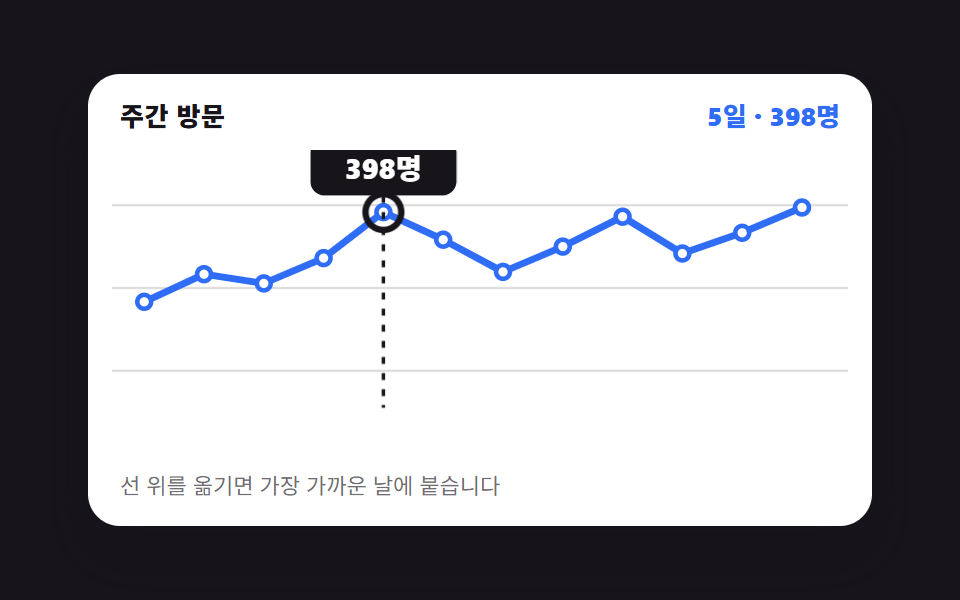 Chart UI Design: 9 Interactions You Can DragChart UI design earns its keep once a reader can put a hand on it. All nine run on CSS bars and inline SVG with no chart See all demos in this post
If you like this effect - similar demos
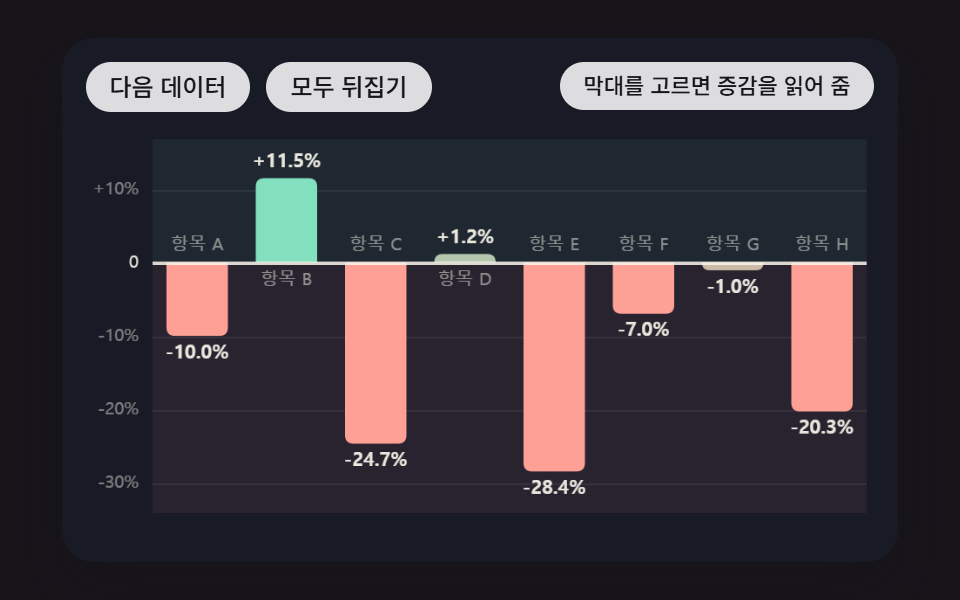 Dashboard UI09 Diverging Bars Split Up and Down From a Zero Line That Moves With the DataBar Chart Animation: 9 Demos From Spring to Race
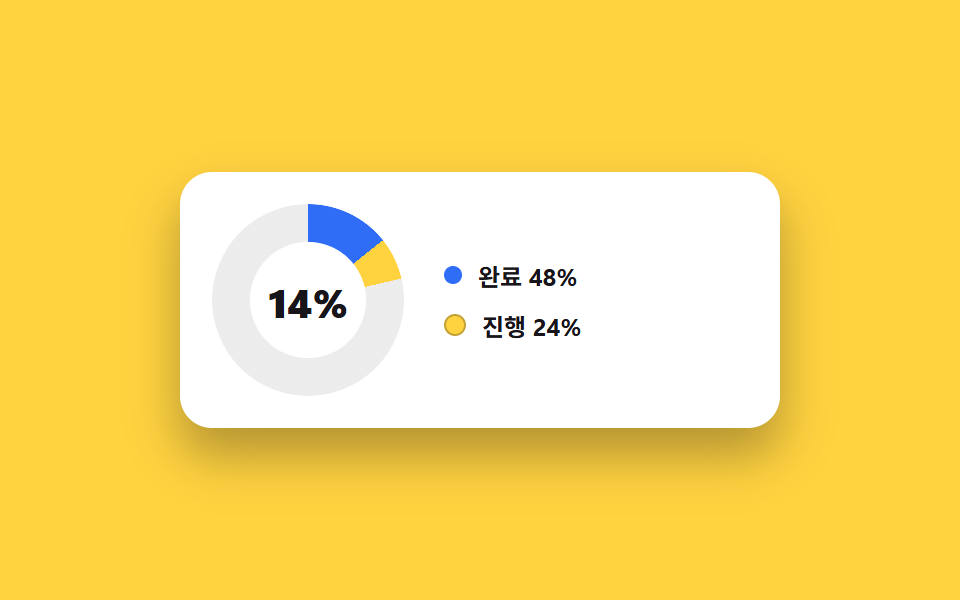 Dashboard UI04 Donut chart card with center counterDashboard Sidebar Design + 9 Widget UI Pieces
 Dashboard UI02 Goal ring with count-up number9 SVG Progress Ring Widgets, Math Included