05Product zoom hotspot hero
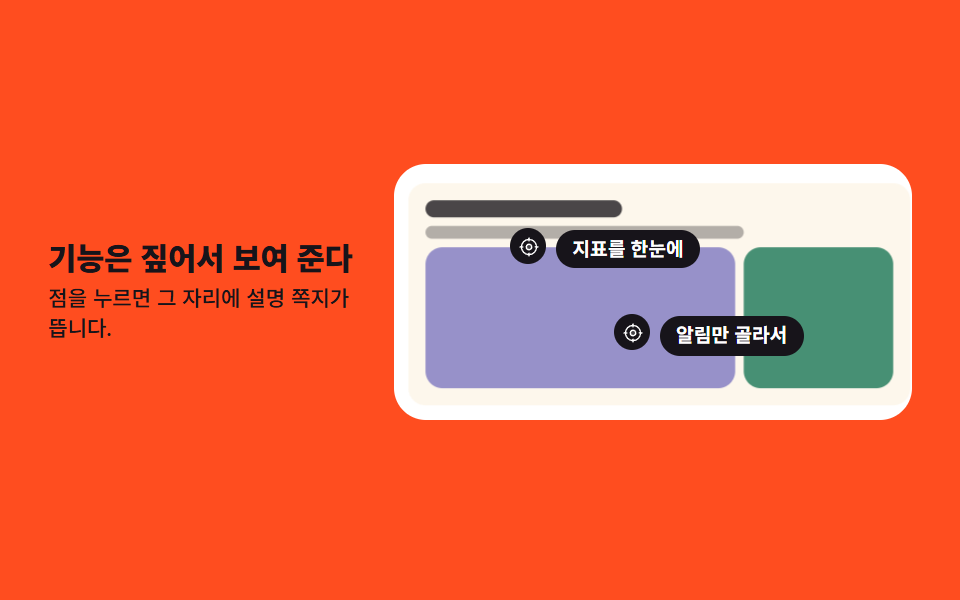
While the product art zooms slowly, two hotspots swell and burst, and a caption card cuts into place in a single frame where each burst lands.
Best forProduct detail first screens that point out features
scalesteps(1, end)transform-origin
<main class="stage">
  <section class="hz is-demo">
    <div class="hz__copy">
      <h1 class="hz__title">Point at the feature, then show it</h1>
      <p class="hz__sub">Tap a dot and a caption pops up right there.</p>
    </div>

    <div class="hz__frame">
      <!-- 제품 그림은 사진이 아니라 도형 조합 — transform-origin 을 호출점 쪽에 두고 천천히 확대된다 -->
      <div class="hz__art" aria-hidden="true">
        <span class="hz__screen">
          <i class="hz__bar hz__bar--head"></i>
          <i class="hz__bar hz__bar--a"></i>
          <span class="hz__row">
            <i class="hz__tile hz__tile--v"></i>
            <i class="hz__tile hz__tile--g"></i>
          </span>
        </span>
      </div>

      <div class="hz__spot hz__spot--1">
        <button class="hz__dot" type="button" aria-expanded="false" aria-controls="hz-note-1" aria-label="Open the metrics caption">
          <span class="hz__ring" aria-hidden="true"></span>
          <svg viewBox="0 0 256 256" width="11" height="11" aria-hidden="true" focusable="false" fill="currentColor"><path d="M160,128a32,32,0,1,1-32-32A32,32,0,0,1,160,128Z" opacity="0.2"/><path d="M232,120h-8.34A96.14,96.14,0,0,0,136,32.34V24a8,8,0,0,0-16,0v8.34A96.14,96.14,0,0,0,32.34,120H24a8,8,0,0,0,0,16h8.34A96.14,96.14,0,0,0,120,223.66V232a8,8,0,0,0,16,0v-8.34A96.14,96.14,0,0,0,223.66,136H232a8,8,0,0,0,0-16Zm-96,87.6V200a8,8,0,0,0-16,0v7.6A80.15,80.15,0,0,1,48.4,136H56a8,8,0,0,0,0-16H48.4A80.15,80.15,0,0,1,120,48.4V56a8,8,0,0,0,16,0V48.4A80.15,80.15,0,0,1,207.6,120H200a8,8,0,0,0,0,16h7.6A80.15,80.15,0,0,1,136,207.6ZM128,88a40,40,0,1,0,40,40A40,40,0,0,0,128,88Zm0,64a24,24,0,1,1,24-24A24,24,0,0,1,128,152Z"/></svg>
        </button>
        <p class="hz__note" id="hz-note-1">Metrics at a glance</p>
      </div>

      <div class="hz__spot hz__spot--2">
        <button class="hz__dot" type="button" aria-expanded="false" aria-controls="hz-note-2" aria-label="Open the alerts caption">
          <span class="hz__ring" aria-hidden="true"></span>
          <svg viewBox="0 0 256 256" width="11" height="11" aria-hidden="true" focusable="false" fill="currentColor"><path d="M160,128a32,32,0,1,1-32-32A32,32,0,0,1,160,128Z" opacity="0.2"/><path d="M232,120h-8.34A96.14,96.14,0,0,0,136,32.34V24a8,8,0,0,0-16,0v8.34A96.14,96.14,0,0,0,32.34,120H24a8,8,0,0,0,0,16h8.34A96.14,96.14,0,0,0,120,223.66V232a8,8,0,0,0,16,0v-8.34A96.14,96.14,0,0,0,223.66,136H232a8,8,0,0,0,0-16Zm-96,87.6V200a8,8,0,0,0-16,0v7.6A80.15,80.15,0,0,1,48.4,136H56a8,8,0,0,0,0-16H48.4A80.15,80.15,0,0,1,120,48.4V56a8,8,0,0,0,16,0V48.4A80.15,80.15,0,0,1,207.6,120H200a8,8,0,0,0,0,16h7.6A80.15,80.15,0,0,1,136,207.6ZM128,88a40,40,0,1,0,40,40A40,40,0,0,0,128,88Zm0,64a24,24,0,1,1,24-24A24,24,0,0,1,128,152Z"/></svg>
        </button>
        <p class="hz__note" id="hz-note-2">Only the alerts you pick</p>
      </div>
    </div>
  </section>
</main>@use "../../../../site/static/demo-tokens" as *;
// 275 히어로 팔레트 — 아홉 항목이 같은 값을 쓴다. 괄호 안은 실측 대비비
$hr-ink: $stage-ink; // 오렌지 무대 위 글자는 전부 잉크 (5.50:1)
$hr-paper: $stage-paper; // 액자 · 쪽지 글자
$hr-cream: #fdf7ec; // 제품 화면 바닥
$hr-orange: $stage-orange; // 무대
$hr-violet: #9791c9; // 제품 화면 타일 1
$hr-grass: #479074; // 제품 화면 타일 2
$duration: $dur-loop; // 확대 한 바퀴 · 호출점 둘이 차례로 터지는 한 바퀴
$easing: $ease-out; // 확대가 붙었다 풀리는 결
$color: $hr-violet; // 이 항목의 강조색
@include stage($hr-orange);
// 왼쪽 글 · 오른쪽 액자. 좁아져도 세로로 쌓지 않는다 (쌓으면 오히려 세로로 넘친다)
.hz {
box-sizing: border-box;
display: flex;
align-items: center;
gap: clamp(8px, 3vw, 16px);
width: clamp(272px, 94vw, 432px);
// 쪽지가 absolute 라 부모 높이에 안 들어간다 — scrollHeight 만큼 미리 자리를 확보한다
padding-bottom: $sp-2;
}
.hz__copy {
flex: 1 1 38%;
min-width: 0;
}
.hz__title {
margin: 0;
color: $hr-ink; // 잉크 on 오렌지 5.50:1
font-weight: 800; font-size: clamp(12px, 3.2vw, 18px); line-height: 1.2;
letter-spacing: -.01em;
word-break: keep-all; // 한국어는 낱말 단위로 줄을 바꾼다
}
.hz__sub {
margin: $sp-1 0 0;
color: $hr-ink;
font-weight: 500; font-size: clamp(9px, 2.2vw, 12px); line-height: 1.4;
}
// 흰 액자 — 확대된 그림은 여기서 잘린다
.hz__frame {
position: relative;
flex: 1 1 62%;
min-width: 0;
box-sizing: border-box;
padding: $sp-3;
border-radius: $r-card;
background: $hr-paper;
overflow: hidden;
}
// 제품 그림 — 도형 조합. 원점을 첫 호출점 쪽에 둔다
.hz__art {
transform-origin: 30% 34%; // 규칙8: 호출점 기준 카메라 확대
transform: scale(1);
}
.hz__screen {
box-sizing: border-box;
display: flex;
flex-direction: column;
gap: $sp-1;
height: clamp(72px, 24vw, 104px);
padding: $sp-2;
border-radius: $r-sm;
background: $hr-cream;
}
.hz__bar {
border-radius: $r-pill;
background: rgba(23, 20, 26, .78);
}
.hz__bar--head { width: 42%; height: 8px; }
.hz__bar--a { width: 68%; height: 6px; background: rgba(23, 20, 26, .32); }
.hz__row {
display: flex;
gap: $sp-1;
flex: 1 1 auto;
min-height: 0;
}
.hz__tile {
flex: 1 1 0;
border-radius: $r-sm;
}
.hz__tile--v { background: $color; }
.hz__tile--g { flex: 0 0 32%; background: $hr-grass; }
// 호출점 — 크기 0 의 닻. 점과 쪽지가 여기에 매달린다
.hz__spot {
position: absolute;
width: 0;
height: 0;
}
.hz__spot--1 { left: 26%; top: 32%; }
.hz__spot--2 { left: 46%; top: 66%; }
.hz__dot {
position: absolute;
left: -9px;
top: -9px;
display: grid;
place-items: center;
width: 18px;
height: 18px;
padding: 0;
border: 0;
border-radius: 50%;
background: $hr-ink;
color: $hr-paper; // 흰 아이콘 on 잉크 18.24:1
cursor: pointer;
}
.hz__dot:focus-visible {
outline: 2px solid $hr-ink;
outline-offset: 2px;
}
// 부풀었다 터지는 고리
.hz__ring {
position: absolute;
inset: 0;
border: 2px solid $hr-ink;
border-radius: 50%;
opacity: 0;
transform: scale(1);
}
// 쪽지 — 기본은 닫힘. 누르면 열리고, 미리보기에서는 컷으로 나타난다
.hz__note {
position: absolute;
left: 14px;
top: -8px;
margin: 0;
padding: $sp-1 $sp-2;
border-radius: $r-pill;
background: $hr-ink;
color: $hr-paper;
font-weight: 600; font-size: clamp(8px, 2vw, 11px); line-height: 1.2;
white-space: nowrap;
opacity: 0;
visibility: hidden;
transition: opacity $dur-quick $ease-out;
}
.hz__spot.is-open .hz__note {
opacity: 1;
visibility: visible;
}
// ── 자동 재생 ─────────────────────────────────────────────
// 그림은 루프 내내 천천히 커졌다 제자리로 돌아오고(90% 안), 그 위에서 호출점 둘이 차례로 터진다.
// animation 단축은 delay 를 0 으로 리셋하므로 낱개 속성으로 쓴다
.hz.is-demo .hz__art {
animation-name: hzZoom;
animation-duration: $duration;
animation-timing-function: $easing;
animation-iteration-count: infinite;
}
.hz.is-demo .hz__dot {
animation-duration: $duration;
animation-timing-function: $ease-spring;
animation-iteration-count: infinite;
}
.hz.is-demo .hz__spot--1 .hz__dot { animation-name: hzPulse1; }
.hz.is-demo .hz__spot--2 .hz__dot { animation-name: hzPulse2; }
.hz.is-demo .hz__ring {
animation-duration: $duration;
animation-timing-function: $ease-out;
animation-iteration-count: infinite;
}
.hz.is-demo .hz__spot--1 .hz__ring { animation-name: hzBurst1; }
.hz.is-demo .hz__spot--2 .hz__ring { animation-name: hzBurst2; }
// 쪽지는 반투명 유령을 만들지 않는다 — steps(1, end) 로 한 프레임에 컷
.hz.is-demo .hz__note {
visibility: visible;
animation-duration: $duration;
animation-timing-function: steps(1, end);
animation-iteration-count: infinite;
transition: none;
}
.hz.is-demo .hz__spot--1 .hz__note { animation-name: hzNote1; }
.hz.is-demo .hz__spot--2 .hz__note { animation-name: hzNote2; }
@keyframes hzZoom {
0% { transform: scale(1); }
52% { transform: scale(1.12); }
88%, 100% { transform: scale(1); }
}
// 점은 작은 transform 으로 계속 살아 있다 — 컷만 있으면 움직인 프레임이 모자란다
@keyframes hzPulse1 {
0% { transform: scale(1); }
8% { transform: scale(1.28); }
22%, 100% { transform: scale(1); }
}
@keyframes hzPulse2 {
0%, 40% { transform: scale(1); }
46% { transform: scale(1.28); }
58%, 100% { transform: scale(1); }
}
@keyframes hzBurst1 {
0%, 4% { transform: scale(1); opacity: .9; }
26% { transform: scale(2.8); opacity: 0; }
100% { transform: scale(2.8); opacity: 0; }
}
@keyframes hzBurst2 {
0%, 40% { transform: scale(1); opacity: 0; }
44% { transform: scale(1); opacity: .9; }
62%, 100% { transform: scale(2.8); opacity: 0; }
}
// 컷 — 터진 자리에 한 프레임에 나타나고, 루프 복귀는 90% 안에 끝낸다
@keyframes hzNote1 {
0% { opacity: 0; }
26% { opacity: 1; }
86% { opacity: 0; }
100% { opacity: 0; }
}
@keyframes hzNote2 {
0% { opacity: 0; }
62% { opacity: 1; }
86% { opacity: 0; }
100% { opacity: 0; }
}
// 좁은 화면 — 글자·여백만 줄이고 두 칸을 유지한다 (이 안에서는 간격을 올리지 않는다)
@media (max-width: 340px), (max-height: 220px) {
.hz { gap: $sp-2; width: 100%; padding-bottom: $sp-1; }
.hz__frame { padding: $sp-2; }
.hz__screen { padding: $sp-1; }
// 쪽지가 액자 밖으로 잘리지 않게 호출점을 왼쪽으로 당긴다 (실측: 320px 에서 오른쪽 끝이 잘렸다)
.hz__spot--1 { left: 18%; top: 30%; }
.hz__spot--2 { left: 24%; top: 66%; }
.hz__note { left: 12px; padding: 0 $sp-1; }
.hz__dot { width: 16px; height: 16px; left: -8px; top: -8px; }
}
@media (prefers-reduced-motion: reduce) {
// .hz.is-demo .hz__art (0,3,0) 를 이기려면 !important 가 필요하다 — 쪽지는 열린 상태를 그대로 남긴다
.hz__art, .hz__dot, .hz__ring, .hz__note { animation: none !important; transition: none !important; }
.hz.is-demo .hz__note { opacity: 1 !important; }
}html, body {
margin: 0;
overflow: hidden;
}
.stage {
box-sizing: border-box;
min-height: 100vh;
display: grid;
place-items: center;
margin: 0;
background: #ff4d1f;
font-family: -apple-system, "Segoe UI", "Noto Sans KR", sans-serif;
padding: clamp(8px, 4vw, 24px);
}
.hz {
box-sizing: border-box;
display: flex;
align-items: center;
gap: clamp(8px, 3vw, 16px);
width: clamp(272px, 94vw, 432px);
padding-bottom: 8px;
}
.hz__copy {
flex: 1 1 38%;
min-width: 0;
}
.hz__title {
margin: 0;
color: #17141a;
font-weight: 800;
font-size: clamp(12px, 3.2vw, 18px);
line-height: 1.2;
letter-spacing: -0.01em;
word-break: keep-all;
}
.hz__sub {
margin: 4px 0 0;
color: #17141a;
font-weight: 500;
font-size: clamp(9px, 2.2vw, 12px);
line-height: 1.4;
}
.hz__frame {
position: relative;
flex: 1 1 62%;
min-width: 0;
box-sizing: border-box;
padding: 12px;
border-radius: 16px;
background: #ffffff;
overflow: hidden;
}
.hz__art {
transform-origin: 30% 34%;
transform: scale(1);
}
.hz__screen {
box-sizing: border-box;
display: flex;
flex-direction: column;
gap: 4px;
height: clamp(72px, 24vw, 104px);
padding: 8px;
border-radius: 8px;
background: #fdf7ec;
}
.hz__bar {
border-radius: 999px;
background: rgba(23, 20, 26, 0.78);
}
.hz__bar--head {
width: 42%;
height: 8px;
}
.hz__bar--a {
width: 68%;
height: 6px;
background: rgba(23, 20, 26, 0.32);
}
.hz__row {
display: flex;
gap: 4px;
flex: 1 1 auto;
min-height: 0;
}
.hz__tile {
flex: 1 1 0;
border-radius: 8px;
}
.hz__tile--v {
background: #9791c9;
}
.hz__tile--g {
flex: 0 0 32%;
background: #479074;
}
.hz__spot {
position: absolute;
width: 0;
height: 0;
}
.hz__spot--1 {
left: 26%;
top: 32%;
}
.hz__spot--2 {
left: 46%;
top: 66%;
}
.hz__dot {
position: absolute;
left: -9px;
top: -9px;
display: grid;
place-items: center;
width: 18px;
height: 18px;
padding: 0;
border: 0;
border-radius: 50%;
background: #17141a;
color: #ffffff;
cursor: pointer;
}
.hz__dot:focus-visible {
outline: 2px solid #17141a;
outline-offset: 2px;
}
.hz__ring {
position: absolute;
inset: 0;
border: 2px solid #17141a;
border-radius: 50%;
opacity: 0;
transform: scale(1);
}
.hz__note {
position: absolute;
left: 14px;
top: -8px;
margin: 0;
padding: 4px 8px;
border-radius: 999px;
background: #17141a;
color: #ffffff;
font-weight: 600;
font-size: clamp(8px, 2vw, 11px);
line-height: 1.2;
white-space: nowrap;
opacity: 0;
visibility: hidden;
transition: opacity 220ms ease-out;
}
.hz__spot.is-open .hz__note {
opacity: 1;
visibility: visible;
}
.hz.is-demo .hz__art {
animation-name: hzZoom;
animation-duration: 2s;
animation-timing-function: ease-out;
animation-iteration-count: infinite;
}
.hz.is-demo .hz__dot {
animation-duration: 2s;
animation-timing-function: cubic-bezier(0.2, 0.8, 0.2, 1);
animation-iteration-count: infinite;
}
.hz.is-demo .hz__spot--1 .hz__dot {
animation-name: hzPulse1;
}
.hz.is-demo .hz__spot--2 .hz__dot {
animation-name: hzPulse2;
}
.hz.is-demo .hz__ring {
animation-duration: 2s;
animation-timing-function: ease-out;
animation-iteration-count: infinite;
}
.hz.is-demo .hz__spot--1 .hz__ring {
animation-name: hzBurst1;
}
.hz.is-demo .hz__spot--2 .hz__ring {
animation-name: hzBurst2;
}
.hz.is-demo .hz__note {
visibility: visible;
animation-duration: 2s;
animation-timing-function: steps(1, end);
animation-iteration-count: infinite;
transition: none;
}
.hz.is-demo .hz__spot--1 .hz__note {
animation-name: hzNote1;
}
.hz.is-demo .hz__spot--2 .hz__note {
animation-name: hzNote2;
}
@keyframes hzZoom {
0% {
transform: scale(1);
}
52% {
transform: scale(1.12);
}
88%, 100% {
transform: scale(1);
}
}
@keyframes hzPulse1 {
0% {
transform: scale(1);
}
8% {
transform: scale(1.28);
}
22%, 100% {
transform: scale(1);
}
}
@keyframes hzPulse2 {
0%, 40% {
transform: scale(1);
}
46% {
transform: scale(1.28);
}
58%, 100% {
transform: scale(1);
}
}
@keyframes hzBurst1 {
0%, 4% {
transform: scale(1);
opacity: 0.9;
}
26% {
transform: scale(2.8);
opacity: 0;
}
100% {
transform: scale(2.8);
opacity: 0;
}
}
@keyframes hzBurst2 {
0%, 40% {
transform: scale(1);
opacity: 0;
}
44% {
transform: scale(1);
opacity: 0.9;
}
62%, 100% {
transform: scale(2.8);
opacity: 0;
}
}
@keyframes hzNote1 {
0% {
opacity: 0;
}
26% {
opacity: 1;
}
86% {
opacity: 0;
}
100% {
opacity: 0;
}
}
@keyframes hzNote2 {
0% {
opacity: 0;
}
62% {
opacity: 1;
}
86% {
opacity: 0;
}
100% {
opacity: 0;
}
}
@media (max-width: 340px), (max-height: 220px) {
.hz {
gap: 8px;
width: 100%;
padding-bottom: 4px;
}
.hz__frame {
padding: 8px;
}
.hz__screen {
padding: 4px;
}
.hz__spot--1 {
left: 18%;
top: 30%;
}
.hz__spot--2 {
left: 24%;
top: 66%;
}
.hz__note {
left: 12px;
padding: 0 4px;
}
.hz__dot {
width: 16px;
height: 16px;
left: -8px;
top: -8px;
}
}
@media (prefers-reduced-motion: reduce) {
.hz__art, .hz__dot, .hz__ring, .hz__note {
animation: none !important;
transition: none !important;
}
.hz.is-demo .hz__note {
opacity: 1 !important;
}
}(function () {
var root = document.querySelector('.hz');
var spots = [].slice.call(root.querySelectorAll('.hz__spot'));
// 격자 미리보기용 자동 루프 — 사람이 손을 대면 뗀다
function stopLoop() { root.classList.remove('is-demo'); }
spots.forEach(function (spot) {
var dot = spot.querySelector('.hz__dot');
dot.addEventListener('click', function () {
stopLoop();
var isOpen = dot.getAttribute('aria-expanded') === 'true';
dot.setAttribute('aria-expanded', isOpen ? 'false' : 'true');
spot.classList.toggle('is-open', !isOpen);
});
});
root.addEventListener('pointerenter', stopLoop);
root.addEventListener('focusin', stopLoop);
})();import { useState } from "react";
import type { CSSProperties, ReactNode } from "react";
import styles from "./HeroZoomHotspot.module.scss";
export type Hotspot = {
/** 점의 이름 — 스크린 리더가 읽는다 */
label: string;
/** 터진 자리에 뜨는 쪽지 */
note: string;
};
export type HeroZoomHotspotProps = {
title?: string;
sub?: string;
spots?: [Hotspot, Hotspot];
/** 확대 한 바퀴 · 호출점 둘이 차례로 터지는 한 바퀴(ms) */
duration?: number;
easing?: string;
/** 제품 화면 타일의 강조색 */
color?: string;
};
type Vars = CSSProperties & { "--duration"?: string; "--easing"?: string; "--color"?: string };
const Crosshair = (): ReactNode => (
<svg viewBox="0 0 256 256" width="11" height="11" aria-hidden="true" focusable="false" fill="currentColor">
<path d="M160,128a32,32,0,1,1-32-32A32,32,0,0,1,160,128Z" opacity="0.2" />
<path d="M232,120h-8.34A96.14,96.14,0,0,0,136,32.34V24a8,8,0,0,0-16,0v8.34A96.14,96.14,0,0,0,32.34,120H24a8,8,0,0,0,0,16h8.34A96.14,96.14,0,0,0,120,223.66V232a8,8,0,0,0,16,0v-8.34A96.14,96.14,0,0,0,223.66,136H232a8,8,0,0,0,0-16Zm-96,87.6V200a8,8,0,0,0-16,0v7.6A80.15,80.15,0,0,1,48.4,136H56a8,8,0,0,0,0-16H48.4A80.15,80.15,0,0,1,120,48.4V56a8,8,0,0,0,16,0V48.4A80.15,80.15,0,0,1,207.6,120H200a8,8,0,0,0,0,16h7.6A80.15,80.15,0,0,1,136,207.6ZM128,88a40,40,0,1,0,40,40A40,40,0,0,0,128,88Zm0,64a24,24,0,1,1,24-24A24,24,0,0,1,128,152Z" />
</svg>
);
const DEFAULT_SPOTS: [Hotspot, Hotspot] = [
{ label: "지표 설명 열기", note: "지표를 한눈에" },
{ label: "알림 설명 열기", note: "알림만 골라서" },
];
export default function HeroZoomHotspot({
title = "기능은 짚어서 보여 준다",
sub = "점을 누르면 그 자리에 설명 쪽지가 뜹니다.",
spots = DEFAULT_SPOTS,
duration = 2000,
easing = "ease-out",
color = "#5b4bd6",
}: HeroZoomHotspotProps): ReactNode {
const [loop, setLoop] = useState<boolean>(true);
const [open, setOpen] = useState<boolean[]>([false, false]);
const vars: Vars = { "--duration": `${duration}ms`, "--easing": easing, "--color": color };
const place = [styles.spot1, styles.spot2];
/* 점을 누르면 그 쪽지만 열리고 닫힌다 — 미리보기 루프는 그 자리에서 뗀다 */
const toggle = (i: number): void => {
setLoop(false);
setOpen(open.map((v: boolean, k: number) => (k === i ? !v : v)));
};
return (
<section
className={loop ? `${styles.hz} ${styles.isDemo}` : styles.hz}
style={vars}
onPointerEnter={() => setLoop(false)}
onFocus={() => setLoop(false)}
>
<div className={styles.copy}>
<h1 className={styles.title}>{title}</h1>
<p className={styles.sub}>{sub}</p>
</div>
<div className={styles.frame}>
{/* 제품 그림은 사진이 아니라 도형 조합 — transform-origin 을 첫 호출점 쪽에 둔다 */}
<div className={styles.art} aria-hidden="true">
<span className={styles.screen}>
<i className={`${styles.bar} ${styles.barHead}`} />
<i className={`${styles.bar} ${styles.barA}`} />
<span className={styles.row}>
<i className={`${styles.tile} ${styles.tileV}`} />
<i className={`${styles.tile} ${styles.tileG}`} />
</span>
</span>
</div>
{spots.map((s: Hotspot, i: number) => (
<div
className={`${styles.spot} ${place[i]} ${open[i] ? styles.isOpen : ""}`}
key={s.label}
>
<button
className={styles.dot}
type="button"
aria-expanded={open[i]}
aria-controls={`hz-note-${i + 1}`}
aria-label={s.label}
onClick={() => toggle(i)}
>
<span className={styles.ring} aria-hidden="true" />
<Crosshair />
</button>
<p className={styles.note} id={`hz-note-${i + 1}`}>{s.note}</p>
</div>
))}
</div>
</section>
);
}05 Product zoom hotspot hero — Measured area 10.767% · moving frames 21/23Original by GODRICH · SCSS and React ship in the zip · Hero Section Design: 9 Patterns, No JS Libraries
The post this demo lives in
 Hero Section Design: 9 Patterns, No JS LibrariesHero section design is the layout of the first screen a visitor lands on, and these nine patterns build that screen from See all demos in this post