07Scroll-folding hero
As you scroll, the hero stays pinned while it shrinks and rounds its corners, and the body card climbs over it to cover it.
Best forThe seam between the first screen and the body
scroll-timeline-nameanimation-timelineposition: sticky
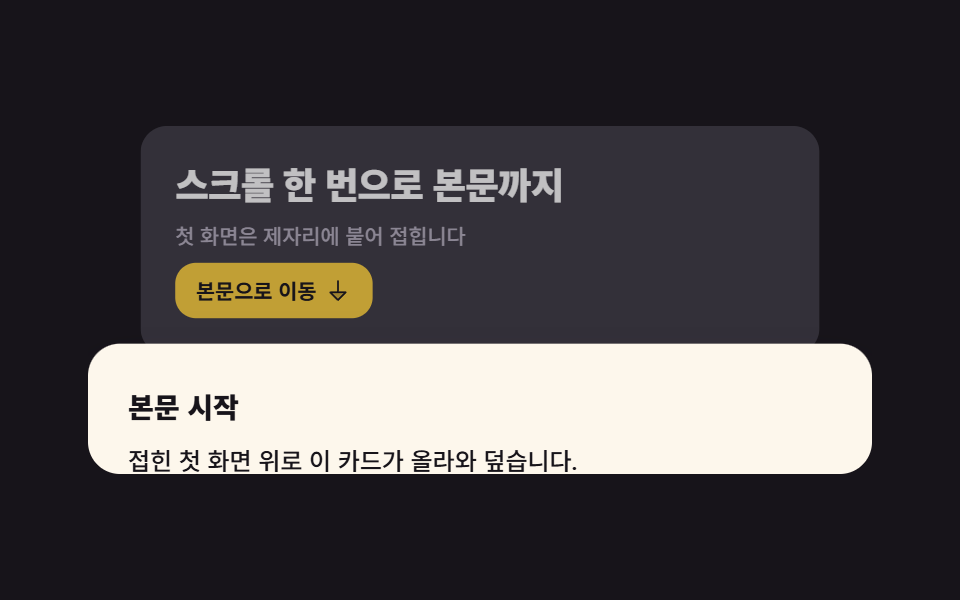
<main class="stage">
  <div class="hf">
    <!-- 자체 스크롤 상자. 이 상자가 스크롤포트이자 타임라인(--hfscroll)의 주인이다.
         html·body 는 절대 스크롤되지 않는다 -->
    <div class="hf__scroller" tabindex="0" role="region" aria-label="First-screen scroll box">
      <section class="hf__hero">
        <div class="hf__inner">
          <h1 class="hf__title">One scroll to the body</h1>
          <p class="hf__sub">The first screen pins in place and folds</p>
          <button class="hf__btn" type="button">
            Go to body
            <svg viewBox="0 0 256 256" width="16" height="16" aria-hidden="true" focusable="false" fill="currentColor"><path d="M200,144l-72,72L56,144Z" opacity="0.2"/><path d="M207.39,140.94A8,8,0,0,0,200,136H136V40a8,8,0,0,0-16,0v96H56a8,8,0,0,0-5.66,13.66l72,72a8,8,0,0,0,11.32,0l72-72A8,8,0,0,0,207.39,140.94ZM128,204.69,75.31,152H180.69Z"/></svg>
          </button>
        </div>
        <div class="hf__dim" aria-hidden="true"></div>
      </section>

      <article class="hf__doc">
        <h2 class="hf__h2">Body starts here</h2>
        <p class="hf__p">This card climbs over the folded first screen.</p>
        <p class="hf__p hf__p--soft">Arrow keys reach the same spot.</p>
      </article>
    </div>
  </div>
</main>@use "../../../../site/static/demo-tokens" as *;
// 275 히어로 팔레트 — 아홉 항목이 같은 값을 쓴다. 괄호 안은 실측 대비비
$hr-ink: $stage-ink; // 무대 · 히어로 바닥
$hr-paper: $stage-paper; // 제목 글자 on 잉크 18.24:1
$hr-cream: #fdf7ec; // 본문 카드 면 (잉크 글자 17.10:1)
$hr-stone: #56505e; // 크림 위 보조 글자 7.28:1
$hr-mist: #b6b0c0; // 잉크 위 보조 글자 8.65:1
$hr-yellow: $stage-yellow; // 버튼 면 (잉크 글자 12.63:1)
$hr-lilac: #d8d6eb; // 잉크 위 강조 6.99:1
// ── 변수 3개 ──────────────────────────────────────────
$duration: $dur-quick; // 버튼·포커스 같은 손맛. 접히는 동작의 길이는 스크롤 양이 정한다
$easing: linear; // 스크롤 구동은 등속이라야 스크롤 양과 화면이 1:1 로 맞는다
$color: $hr-lilac; // 이 항목의 강조색
@include stage($hr-ink);
.hf { width: min(392px, 90vw); }
// ⚠ 타임라인에 **이름**을 붙인다. `scroll(nearest)` 는 `overflow: hidden` 인 조상도
// 스크롤포트로 잡아, 진행률이 영원히 0 인 타임라인에 묶이는 일이 있다 (260 02·03·04 실측).
// position: relative 는 본문 카드의 offsetTop 기준을 이 상자로 못 박기 위한 것
.hf__scroller {
--h: clamp(148px, 58vh, 176px);
position: relative;
height: var(--h);
overflow-y: auto;
overscroll-behavior: contain;
border-radius: $r-card;
background: $hr-ink;
scroll-timeline-name: --hfscroll;
scroll-timeline-axis: y;
scrollbar-width: none;
&::-webkit-scrollbar { display: none; }
&:focus-visible { outline: 2px solid $color; outline-offset: 2px; }
}
// ── 실제 동작 ① 히어로 판은 제자리에 붙는다 ─────────────
// sticky 의 여유는 **부모의 콘텐츠 박스**가 정한다 — 부모에 padding-bottom 을 줘 봐야
// sticky 범위 밖이라 안 먹는다 (260 03·06·07·08 실측). 여기서는 본문 카드의 height 가 그 여유다
.hf__hero {
position: sticky;
top: 0;
z-index: 0;
display: grid;
align-content: center;
height: calc(var(--h) * .76);
padding: 0 $sp-5;
overflow: hidden;
background: rgba($hr-lilac, .2);
transform-origin: top center; // 규칙8: 윗변 경첩 접힘 축소
// ── 실제 동작 ② 스크롤 진행이 곧 접힘. 한 방향 키프레임 + fill-mode both 라
// 더 내려도 되돌아가거나 스냅백하지 않는다 (260-05 실측)
animation-name: hfFold;
animation-duration: 1s;
animation-timing-function: $easing;
animation-fill-mode: both;
animation-timeline: --hfscroll;
}
.hf__inner { display: grid; gap: $sp-2; justify-items: start; }
.hf__title {
margin: 0;
color: $hr-paper;
font-weight: 800;
font-size: clamp(17px, 4.6vw, 21px);
line-height: 1.2;
letter-spacing: -.02em;
}
.hf__sub {
margin: 0;
color: $hr-mist;
font-weight: 500;
font-size: 12px;
line-height: 1.35;
}
.hf__btn {
display: inline-flex;
align-items: center;
gap: $sp-1;
margin: 0;
padding: $sp-2 $sp-3;
border: 0;
border-radius: $r-control;
background: $hr-yellow;
color: $hr-ink;
font-family: inherit;
font-weight: 700;
font-size: 12px;
line-height: 1;
cursor: pointer;
transition: transform $duration $ease-spring;
}
.hf__btn:hover { transform: translateY(-2px); }
.hf__btn:focus-visible { outline: 2px solid $hr-paper; outline-offset: 2px; }
// 접히면서 살짝 어두워진다 — 여기 얹는 잉크는 얇게(.28). 두껍게 덮으면 제목이 읽히지 않는다
.hf__dim {
position: absolute;
inset: 0;
pointer-events: none; // 안 주면 히어로 전체를 덮은 이 막이 버튼 클릭을 가로챈다 (Playwright 실측)
background: $hr-ink;
opacity: 0;
animation-name: hfDim;
animation-duration: 1s;
animation-timing-function: $easing;
animation-fill-mode: both;
animation-timeline: --hfscroll;
}
// ── 실제 동작 ③ 본문 카드가 히어로 위로 올라와 덮는다 ───
// 음수 margin-top 으로 늘 히어로 아랫단을 물고 있으므로, 히어로가 작아져도 둘 사이가 벌어지지 않는다.
// 카드 높이를 상자 높이(--h)와 같게 두면 **스크롤 여유 = 카드의 시작 위치** 가 되어,
// 다 내렸을 때 카드가 히어로를 정확히 덮는다. 더 길게 두면 절반쯤에서 이미 다 덮여 접힘이 안 보인다
.hf__doc {
position: relative;
z-index: 1;
box-sizing: border-box; // 전역 리셋이 없다 — 안 주면 min-height 에 padding 이 더해져 카드가 40px 더 길어진다
min-height: calc(var(--h) - #{$sp-5});
margin-top: -$sp-6;
// 위 여백을 24px 로 둬야 스크롤 0 에서 보이는 카드 조각이 제목 뒤 **빈 줄**에서 끊긴다
// (16px 이면 둘째 줄 글자가 상자 밑변에 반쯤 걸려 잘린 것처럼 보인다)
padding: $sp-6 $sp-5;
border-radius: $r-card $r-card 0 0;
background: $hr-cream;
color: $hr-ink;
box-shadow: $shadow-raised;
animation-name: hfRise;
animation-duration: 1s;
animation-timing-function: $easing;
animation-fill-mode: both;
animation-timeline: --hfscroll;
}
.hf__h2 {
margin: 0 0 $sp-2;
font-weight: 800;
font-size: 14px;
line-height: 1.2;
}
.hf__p {
margin: 0 0 $sp-2;
font-weight: 500;
font-size: 12px;
line-height: 1.5;
}
.hf__p--soft { margin-bottom: 0; color: $hr-stone; }
@keyframes hfFold {
from { transform: scale(1); border-radius: 0; }
to { transform: scale(.86); border-radius: $r-card; }
}
@keyframes hfDim {
from { opacity: 0; }
to { opacity: .28; }
}
// 카드는 스크롤보다 조금 늦게 따라온다(시차) — 끝에서 transform 이 0 이라 아래가 비지 않는다
@keyframes hfRise {
from { transform: translateY(20px); }
to { transform: translateY(0); }
}
// 좁은 화면 — 글자와 여백만 줄인다. 값을 올리지 않는다 (올리면 174px 여유를 넘긴다)
@media (max-width: 340px), (max-height: 220px) {
.hf__hero { padding: 0 $sp-4; }
.hf__sub { font-size: 11px; }
.hf__doc { padding: $sp-3 $sp-4 $sp-4; }
.hf__p { font-size: 11px; }
}
// 스크롤 구동 애니메이션(scroll-timeline-name·animation-timeline)은 caniuse 실측 2026-09-12 기준
// Chrome·Edge 115+ · Safari 26.0 · iOS Safari 26.0 지원, 전역 87.22%. 안정판에서 아직 못 쓰는 건
// Firefox 뿐이다(155, 플래그 뒤) — 거기서는 접힘 없이 히어로가 그대로 서 있고 카드가 위로 지나간다.
// 정적 상태를 먼저 쓴 이유가 이것이다
@media (prefers-reduced-motion: reduce) {
// .hf__hero (0,1,0) 와 같은 특이도라도 뒤에 오는 이 블록이 이기지만, 안전하게 !important
.hf__hero, .hf__dim, .hf__doc { animation: none !important; }
.hf__hero { border-radius: $r-card $r-card 0 0; }
.hf__doc { transform: none !important; }
.hf__btn { transition: none !important; }
}html, body {
margin: 0;
overflow: hidden;
}
.stage {
box-sizing: border-box;
min-height: 100vh;
display: grid;
place-items: center;
margin: 0;
background: #17141a;
font-family: -apple-system, "Segoe UI", "Noto Sans KR", sans-serif;
padding: clamp(8px, 4vw, 24px);
}
.hf {
width: min(392px, 90vw);
}
.hf__scroller {
--h: clamp(148px, 58vh, 176px);
position: relative;
height: var(--h);
overflow-y: auto;
overscroll-behavior: contain;
border-radius: 16px;
background: #17141a;
scroll-timeline-name: --hfscroll;
scroll-timeline-axis: y;
scrollbar-width: none;
}
.hf__scroller::-webkit-scrollbar {
display: none;
}
.hf__scroller:focus-visible {
outline: 2px solid #d8d6eb;
outline-offset: 2px;
}
.hf__hero {
position: sticky;
top: 0;
z-index: 0;
display: grid;
align-content: center;
height: calc(var(--h) * 0.76);
padding: 0 20px;
overflow: hidden;
background: rgba(216, 214, 235, 0.2);
transform-origin: top center;
animation-name: hfFold;
animation-duration: 1s;
animation-timing-function: linear;
animation-fill-mode: both;
animation-timeline: --hfscroll;
}
.hf__inner {
display: grid;
gap: 8px;
justify-items: start;
}
.hf__title {
margin: 0;
color: #ffffff;
font-weight: 800;
font-size: clamp(17px, 4.6vw, 21px);
line-height: 1.2;
letter-spacing: -0.02em;
}
.hf__sub {
margin: 0;
color: #b6b0c0;
font-weight: 500;
font-size: 12px;
line-height: 1.35;
}
.hf__btn {
display: inline-flex;
align-items: center;
gap: 4px;
margin: 0;
padding: 8px 12px;
border: 0;
border-radius: 12px;
background: #ffd23f;
color: #17141a;
font-family: inherit;
font-weight: 700;
font-size: 12px;
line-height: 1;
cursor: pointer;
transition: transform 220ms cubic-bezier(0.2, 0.8, 0.2, 1);
}
.hf__btn:hover {
transform: translateY(-2px);
}
.hf__btn:focus-visible {
outline: 2px solid #ffffff;
outline-offset: 2px;
}
.hf__dim {
position: absolute;
inset: 0;
pointer-events: none;
background: #17141a;
opacity: 0;
animation-name: hfDim;
animation-duration: 1s;
animation-timing-function: linear;
animation-fill-mode: both;
animation-timeline: --hfscroll;
}
.hf__doc {
position: relative;
z-index: 1;
box-sizing: border-box;
min-height: calc(var(--h) - 20px);
margin-top: -24px;
padding: 24px 20px;
border-radius: 16px 16px 0 0;
background: #fdf7ec;
color: #17141a;
box-shadow: 0 14px 24px rgba(23, 20, 26, 0.32);
animation-name: hfRise;
animation-duration: 1s;
animation-timing-function: linear;
animation-fill-mode: both;
animation-timeline: --hfscroll;
}
.hf__h2 {
margin: 0 0 8px;
font-weight: 800;
font-size: 14px;
line-height: 1.2;
}
.hf__p {
margin: 0 0 8px;
font-weight: 500;
font-size: 12px;
line-height: 1.5;
}
.hf__p--soft {
margin-bottom: 0;
color: #56505e;
}
@keyframes hfFold {
from {
transform: scale(1);
border-radius: 0;
}
to {
transform: scale(0.86);
border-radius: 16px;
}
}
@keyframes hfDim {
from {
opacity: 0;
}
to {
opacity: 0.28;
}
}
@keyframes hfRise {
from {
transform: translateY(20px);
}
to {
transform: translateY(0);
}
}
@media (max-width: 340px), (max-height: 220px) {
.hf__hero {
padding: 0 16px;
}
.hf__sub {
font-size: 11px;
}
.hf__doc {
padding: 12px 16px 16px;
}
.hf__p {
font-size: 11px;
}
}
@media (prefers-reduced-motion: reduce) {
.hf__hero, .hf__dim, .hf__doc {
animation: none !important;
}
.hf__hero {
border-radius: 16px 16px 0 0;
}
.hf__doc {
transform: none !important;
}
.hf__btn {
transition: none !important;
}
}(function () {
var box = document.querySelector('.hf__scroller');
var doc = document.querySelector('.hf__doc');
var btn = document.querySelector('.hf__btn');
// 접근성: 움직임을 줄이겠다고 한 사람에게는 부드러운 스크롤 대신 즉시 이동
function prefersInstant() {
return !!(window.matchMedia && window.matchMedia('(prefers-reduced-motion: reduce)').matches);
}
// 상자 안 본문 카드 자리로 옮긴다. offsetTop 은 position: relative 인 상자 기준이고
// 스크롤 양과 무관한 값이라 누를 때마다 같은 자리로 간다
btn.addEventListener('click', function () {
box.scrollTo({ top: doc.offsetTop, behavior: prefersInstant() ? 'auto' : 'smooth' });
});
// 상자가 tabindex="0" 이라 Tab 으로 잡히고, 잡힌 뒤엔 방향키·PageDown 으로 브라우저가 스크롤한다.
// Home·End 만 따로 받아 양 끝으로 보낸다
box.addEventListener('keydown', function (e) {
if (e.key !== 'Home' && e.key !== 'End') { return; }
e.preventDefault();
box.scrollTo({ top: e.key === 'Home' ? 0 : box.scrollHeight, behavior: prefersInstant() ? 'auto' : 'smooth' });
});
})();import { useRef } from "react";
import type { CSSProperties, ReactNode } from "react";
import styles from "./HeroScrollFold.module.scss";
/* ambient 에 KeyboardEvent 가 없어 파일 안에 필요한 만큼만 선언한다 */
type KeyEvt = { key: string; preventDefault(): void };
export type HeroScrollFoldProps = {
title?: string;
sub?: string;
cta?: string;
docTitle?: string;
docBody?: string;
docNote?: string;
/** 스크롤 상자를 읽어 줄 이름 */
regionLabel?: string;
/** 버튼·포커스 같은 손맛(ms). 접히는 길이는 스크롤 양이 정한다 */
duration?: number;
easing?: string;
/** 강조색 — 히어로 바닥의 엷은 막과 포커스 테두리 */
color?: string;
};
type Vars = CSSProperties & { "--duration"?: string; "--easing"?: string; "--color"?: string };
const ArrowDownIcon = (): ReactNode => (
<svg viewBox="0 0 256 256" width="16" height="16" aria-hidden="true" focusable="false" fill="currentColor">
<path d="M200,144l-72,72L56,144Z" opacity="0.2" />
<path d="M207.39,140.94A8,8,0,0,0,200,136H136V40a8,8,0,0,0-16,0v96H56a8,8,0,0,0-5.66,13.66l72,72a8,8,0,0,0,11.32,0l72-72A8,8,0,0,0,207.39,140.94ZM128,204.69,75.31,152H180.69Z" />
</svg>
);
export default function HeroScrollFold({
title = "스크롤 한 번으로 본문까지",
sub = "첫 화면은 제자리에 붙어 접힙니다",
cta = "본문으로 이동",
docTitle = "본문 시작",
docBody = "접힌 첫 화면 위로 이 카드가 올라와 덮습니다.",
docNote = "방향키로도 같은 자리를 지납니다.",
regionLabel = "첫 화면 스크롤 상자",
duration = 220,
easing = "linear",
color = "#9d93ff",
}: HeroScrollFoldProps): ReactNode {
const boxRef = useRef<HTMLDivElement>(null);
const docRef = useRef<HTMLElement>(null);
const vars: Vars = { "--duration": `${duration}ms`, "--easing": easing, "--color": color };
/* 접근성: 움직임을 줄이겠다고 한 사람에게는 부드러운 스크롤 대신 즉시 이동 */
const prefersInstant = (): boolean =>
!!(typeof window !== "undefined" && window.matchMedia && window.matchMedia("(prefers-reduced-motion: reduce)").matches);
/* offsetTop 은 position: relative 인 상자 기준이고 스크롤 양과 무관하다 */
const goToBody = (): void => {
const box = boxRef.current;
const doc = docRef.current;
if (!box || !doc) { return; }
box.scrollTo({ top: doc.offsetTop, behavior: prefersInstant() ? "auto" : "smooth" });
};
const onKey = (e: KeyEvt): void => {
const box = boxRef.current;
if (!box || (e.key !== "Home" && e.key !== "End")) { return; }
e.preventDefault();
box.scrollTo({ top: e.key === "Home" ? 0 : box.scrollHeight, behavior: prefersInstant() ? "auto" : "smooth" });
};
return (
<div className={styles.hf} style={vars}>
{/* 자체 스크롤 상자 = 스크롤포트이자 타임라인(--hfscroll)의 주인 */}
<div
className={styles.scroller}
ref={boxRef}
tabIndex={0}
role="region"
aria-label={regionLabel}
onKeyDown={(e: KeyEvt) => onKey(e)}
>
<section className={styles.hero}>
<div className={styles.inner}>
<h1 className={styles.title}>{title}</h1>
<p className={styles.sub}>{sub}</p>
<button className={styles.btn} type="button" onClick={goToBody}>
{cta}
<ArrowDownIcon />
</button>
</div>
<div className={styles.dim} aria-hidden="true" />
</section>
<article className={styles.doc} ref={docRef}>
<h2 className={styles.h2}>{docTitle}</h2>
<p className={styles.p}>{docBody}</p>
<p className={`${styles.p} ${styles.pSoft}`}>{docNote}</p>
</article>
</div>
</div>
);
}07 Scroll-folding hero — Measured area 19.888% · moving frames 23/23Original by GODRICH · SCSS and React ship in the zip · Hero Section Design: 9 Patterns, No JS Libraries
The post this demo lives in
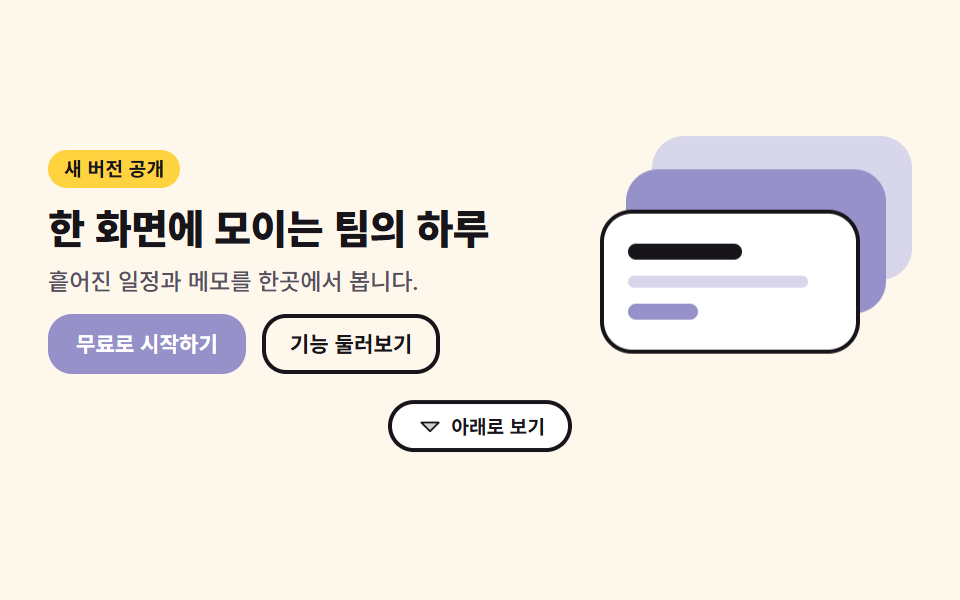 Hero Section Design: 9 Patterns, No JS LibrariesHero section design is the layout of the first screen a visitor lands on, and these nine patterns build that screen from See all demos in this post