08Split slider hero
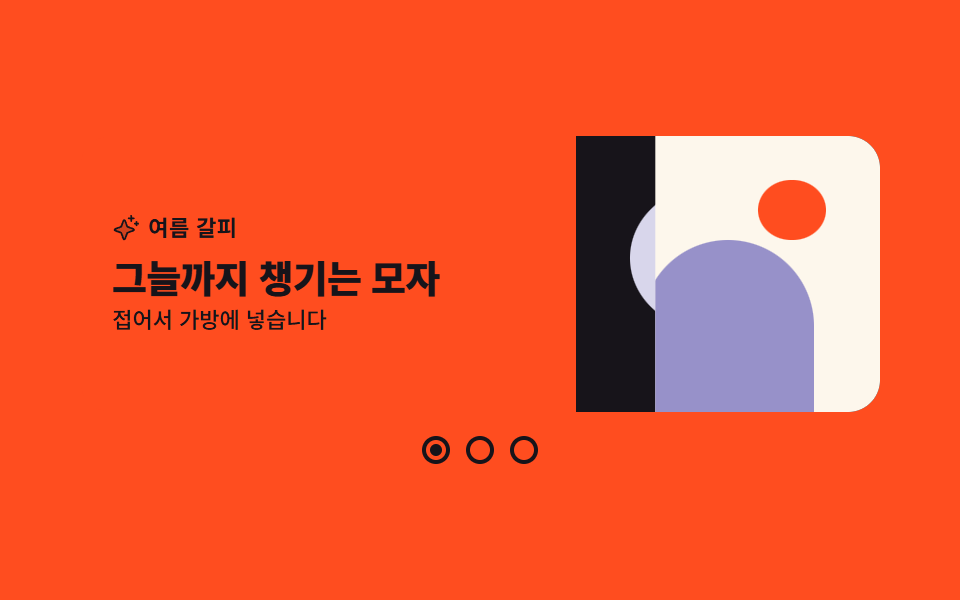
Three slides sit stacked in one cell, and the text half and the picture half wipe in from opposite directions to hand over to the next slide.
Best forFirst screens that alternate products or seasons
clip-pathgrid-areaaria-current
<main class="stage">
  <section class="hl is-demo" aria-label="Product slides">
    <!-- 세 장이 같은 격자 칸(grid-area: 1 / 1)에 포개진다. 복제본 없이 z 순서와 위프만으로 순환한다 -->
    <div class="hl__deck">
      <article class="hl__slide hl__slide--1 is-on">
        <div class="hl__pane hl__pane--copy">
          <p class="hl__kicker">
            <svg viewBox="0 0 256 256" width="14" height="14" aria-hidden="true" focusable="false" fill="currentColor"><path d="M194.82,151.43l-55.09,20.3-20.3,55.09a7.92,7.92,0,0,1-14.86,0l-20.3-55.09-55.09-20.3a7.92,7.92,0,0,1,0-14.86l55.09-20.3,20.3-55.09a7.92,7.92,0,0,1,14.86,0l20.3,55.09,55.09,20.3A7.92,7.92,0,0,1,194.82,151.43Z" opacity="0.2"/><path d="M197.58,129.06,146,110l-19-51.62a15.92,15.92,0,0,0-29.88,0L78,110l-51.62,19a15.92,15.92,0,0,0,0,29.88L78,178l19,51.62a15.92,15.92,0,0,0,29.88,0L146,178l51.62-19a15.92,15.92,0,0,0,0-29.88ZM137,164.22a8,8,0,0,0-4.74,4.74L112,223.85,91.78,169A8,8,0,0,0,87,164.22L32.15,144,87,123.78A8,8,0,0,0,91.78,119L112,64.15,132.22,119a8,8,0,0,0,4.74,4.74L191.85,144ZM144,40a8,8,0,0,1,8-8h16V16a8,8,0,0,1,16,0V32h16a8,8,0,0,1,0,16H184V64a8,8,0,0,1-16,0V48H152A8,8,0,0,1,144,40ZM248,88a8,8,0,0,1-8,8h-8v8a8,8,0,0,1-16,0V96h-8a8,8,0,0,1,0-16h8V72a8,8,0,0,1,16,0v8h8A8,8,0,0,1,248,88Z"/></svg>
            Spring pick
          </p>
          <h2 class="hl__title">One light jacket</h2>
          <p class="hl__sub">A windbreaker for dawn and dusk</p>
        </div>
        <div class="hl__pane hl__pane--art hl__pane--art1" aria-hidden="true">
          <span class="hl__shape hl__shape--disc"></span>
          <span class="hl__shape hl__shape--bar"></span>
        </div>
      </article>

      <article class="hl__slide hl__slide--2">
        <div class="hl__pane hl__pane--copy">
          <p class="hl__kicker">
            <svg viewBox="0 0 256 256" width="14" height="14" aria-hidden="true" focusable="false" fill="currentColor"><path d="M194.82,151.43l-55.09,20.3-20.3,55.09a7.92,7.92,0,0,1-14.86,0l-20.3-55.09-55.09-20.3a7.92,7.92,0,0,1,0-14.86l55.09-20.3,20.3-55.09a7.92,7.92,0,0,1,14.86,0l20.3,55.09,55.09,20.3A7.92,7.92,0,0,1,194.82,151.43Z" opacity="0.2"/><path d="M197.58,129.06,146,110l-19-51.62a15.92,15.92,0,0,0-29.88,0L78,110l-51.62,19a15.92,15.92,0,0,0,0,29.88L78,178l19,51.62a15.92,15.92,0,0,0,29.88,0L146,178l51.62-19a15.92,15.92,0,0,0,0-29.88ZM137,164.22a8,8,0,0,0-4.74,4.74L112,223.85,91.78,169A8,8,0,0,0,87,164.22L32.15,144,87,123.78A8,8,0,0,0,91.78,119L112,64.15,132.22,119a8,8,0,0,0,4.74,4.74L191.85,144ZM144,40a8,8,0,0,1,8-8h16V16a8,8,0,0,1,16,0V32h16a8,8,0,0,1,0,16H184V64a8,8,0,0,1-16,0V48H152A8,8,0,0,1,144,40ZM248,88a8,8,0,0,1-8,8h-8v8a8,8,0,0,1-16,0V96h-8a8,8,0,0,1,0-16h8V72a8,8,0,0,1,16,0v8h8A8,8,0,0,1,248,88Z"/></svg>
            Summer pick
          </p>
          <h2 class="hl__title">A hat that packs its own shade</h2>
          <p class="hl__sub">Folds into your bag</p>
        </div>
        <div class="hl__pane hl__pane--art hl__pane--art2" aria-hidden="true">
          <span class="hl__shape hl__shape--arch"></span>
          <span class="hl__shape hl__shape--dot"></span>
        </div>
      </article>

      <article class="hl__slide hl__slide--3">
        <div class="hl__pane hl__pane--copy">
          <p class="hl__kicker">
            <svg viewBox="0 0 256 256" width="14" height="14" aria-hidden="true" focusable="false" fill="currentColor"><path d="M194.82,151.43l-55.09,20.3-20.3,55.09a7.92,7.92,0,0,1-14.86,0l-20.3-55.09-55.09-20.3a7.92,7.92,0,0,1,0-14.86l55.09-20.3,20.3-55.09a7.92,7.92,0,0,1,14.86,0l20.3,55.09,55.09,20.3A7.92,7.92,0,0,1,194.82,151.43Z" opacity="0.2"/><path d="M197.58,129.06,146,110l-19-51.62a15.92,15.92,0,0,0-29.88,0L78,110l-51.62,19a15.92,15.92,0,0,0,0,29.88L78,178l19,51.62a15.92,15.92,0,0,0,29.88,0L146,178l51.62-19a15.92,15.92,0,0,0,0-29.88ZM137,164.22a8,8,0,0,0-4.74,4.74L112,223.85,91.78,169A8,8,0,0,0,87,164.22L32.15,144,87,123.78A8,8,0,0,0,91.78,119L112,64.15,132.22,119a8,8,0,0,0,4.74,4.74L191.85,144ZM144,40a8,8,0,0,1,8-8h16V16a8,8,0,0,1,16,0V32h16a8,8,0,0,1,0,16H184V64a8,8,0,0,1-16,0V48H152A8,8,0,0,1,144,40ZM248,88a8,8,0,0,1-8,8h-8v8a8,8,0,0,1-16,0V96h-8a8,8,0,0,1,0-16h8V72a8,8,0,0,1,16,0v8h8A8,8,0,0,1,248,88Z"/></svg>
            Autumn pick
          </p>
          <h2 class="hl__title">A blanket woven in two layers</h2>
          <p class="hl__sub">Sized right for your lap</p>
        </div>
        <div class="hl__pane hl__pane--art hl__pane--art3" aria-hidden="true">
          <span class="hl__shape hl__shape--wedge"></span>
          <span class="hl__shape hl__shape--ring"></span>
        </div>
      </article>
    </div>

    <div class="hl__dots" role="group" aria-label="Choose a slide">
      <button class="hl__dot hl__dot--1" type="button" aria-current="true" aria-label="Go to slide one"><span class="hl__fill"></span></button>
      <button class="hl__dot hl__dot--2" type="button" aria-label="Go to slide two"><span class="hl__fill"></span></button>
      <button class="hl__dot hl__dot--3" type="button" aria-label="Go to slide three"><span class="hl__fill"></span></button>
    </div>
  </section>
</main>@use "../../../../site/static/demo-tokens" as *;
// 275 히어로 팔레트 — 아홉 항목이 같은 값을 쓴다. 괄호 안은 실측 대비비
$hr-ink: $stage-ink; // 오렌지 위 글자 5.50:1 · 그림 면 바닥
$hr-cream: #fdf7ec; // 그림 면 바닥 (잉크 도형 17.10:1)
$hr-orange: $stage-orange; // 무대 · 글자 면 바닥
$hr-yellow: $stage-yellow; // 그림 면 바닥 (잉크 도형 12.63:1)
$hr-violet: #9791c9; // 브랜드 강조 (크림 위 5.75:1)
$hr-lilac: #d8d6eb; // 잉크 위 강조 6.99:1
// ── 변수 3개 ──────────────────────────────────────────
$duration: $dur-loop; // 세 장이 한 바퀴 도는 시간
$easing: $ease-spring; // 닦이듯 드러나는 위프
$color: $hr-violet; // 이 항목의 강조색
@include stage($hr-orange);
.hl {
display: grid;
gap: $sp-3;
width: min(400px, 90vw);
}
// 세 장을 **같은 격자 칸**에 포갠다 — 복제본 없이 z 순서와 위프만으로 순환한다
.hl__deck {
display: grid;
height: clamp(120px, 46vh, 148px);
overflow: hidden;
border-radius: $r-card;
}
.hl__slide {
grid-area: 1 / 1;
z-index: 1;
display: grid;
grid-template-columns: 1fr 38%;
}
// ── 실제 동작 ① 위프 — 왼쪽 면은 왼쪽에서, 오른쪽 면은 오른쪽에서 반대로 닦인다 ──
// opacity 크로스페이드는 쓰지 않는다: 교차 구간 프레임이 전부 반투명 유령이 된다 (237·266 실측)
.hl__pane {
box-sizing: border-box;
transition: clip-path $dur-enter $easing;
}
.hl__pane--copy { clip-path: inset(0 100% 0 0); }
.hl__pane--art { clip-path: inset(0 0 0 100%); }
// 정적 상태(루프 밖) — 지금 장은 맨 위에서 다 보이고, 직전 장은 그 아래에 그대로 남는다.
// 직전 장을 남겨 둬야 새 장이 덮는 동안 바닥이 비지 않는다
.hl__slide.is-prev { z-index: 2; }
.hl__slide.is-on { z-index: 3; }
.hl__slide.is-prev .hl__pane,
.hl__slide.is-on .hl__pane { clip-path: inset(0 0 0 0); }
.hl__pane--copy {
display: grid;
align-content: center;
gap: $sp-1;
padding: $sp-4;
background: $hr-orange;
color: $hr-ink;
}
.hl__kicker {
display: inline-flex;
align-items: center;
gap: $sp-1;
margin: 0;
font-weight: 700;
font-size: 11px;
line-height: 1.2;
letter-spacing: .02em;
}
.hl__title {
margin: 0;
font-weight: 800;
font-size: clamp(15px, 4.2vw, 19px);
line-height: 1.25;
letter-spacing: -.02em;
}
.hl__sub {
margin: 0;
font-weight: 500;
font-size: 11px;
line-height: 1.3;
}
// 그림 면 — 도형 조합만. 외부 이미지는 쓰지 않는다
.hl__pane--art {
position: relative;
overflow: hidden;
}
.hl__pane--art1 { background: $hr-ink; }
.hl__pane--art2 { background: $hr-cream; }
.hl__pane--art3 { background: $hr-yellow; }
.hl__shape { position: absolute; display: block; }
.hl__shape--disc {
top: 18%; left: 18%;
width: 52%; height: 52%;
border-radius: 50%;
background: $hr-lilac;
}
.hl__shape--bar {
right: 14%; bottom: 16%;
width: 22%; height: 44%;
border-radius: $r-pill;
background: $hr-yellow;
}
.hl__shape--arch {
left: 22%; bottom: 0;
width: 56%; height: 62%;
border-radius: $r-pill $r-pill 0 0;
background: $hr-violet;
}
.hl__shape--dot {
top: 16%; right: 18%;
width: 22%; height: 22%;
border-radius: 50%;
background: $hr-orange;
}
.hl__shape--wedge {
top: 20%; left: 16%;
width: 46%; height: 60%;
background: $hr-ink;
clip-path: polygon(0 100%, 50% 0, 100% 100%);
}
.hl__shape--ring {
right: 12%; bottom: 18%;
width: 30%; height: 30%;
border: 4px solid $hr-violet;
border-radius: 50%;
}
// ── 점 인디케이터 ─────────────────────────────────────
.hl__dots {
display: flex;
justify-content: center;
gap: $sp-2;
}
.hl__dot {
display: grid;
place-items: center;
width: 14px;
height: 14px;
padding: 0;
border: 2px solid $hr-ink;
border-radius: 50%;
background: transparent;
cursor: pointer;
}
.hl__dot:focus-visible { outline: 2px solid $hr-ink; outline-offset: 3px; }
.hl__fill {
width: 6px;
height: 6px;
border-radius: 50%;
background: $hr-ink;
transform: scale(0);
}
// 채움은 보간하지 않는다 — 반쯤 찬 중간 프레임을 만들지 않기 위해 컷으로 바꾼다
.hl__dot[aria-current="true"] .hl__fill { transform: scale(1); }
// ── 격자 미리보기 루프 ────────────────────────────────
// 시차는 --d 하나로 준다 (슬라이드에 걸면 그 안의 면·제목이 물려받는다).
// animation 단축은 delay 를 0 으로 리셋하므로 낱개 속성으로만 쓴다
.hl.is-demo .hl__slide--1, .hl.is-demo .hl__dot--1 { --d: -.6667s; }
.hl.is-demo .hl__slide--2, .hl.is-demo .hl__dot--2 { --d: 0s; }
.hl.is-demo .hl__slide--3, .hl.is-demo .hl__dot--3 { --d: -1.3333s; }
.hl.is-demo .hl__slide {
animation-name: hlZ;
animation-duration: $duration;
animation-timing-function: steps(1, end); // z 순서는 컷으로만 바뀐다
animation-iteration-count: infinite;
animation-fill-mode: both;
animation-delay: var(--d, 0s);
}
// ⚠ steps() 키프레임 안에서는 clip-path 가 보간되지 않는다 — 위프는 이징 애니메이션으로 따로 둔다
.hl.is-demo .hl__pane--copy,
.hl.is-demo .hl__pane--art,
.hl.is-demo .hl__title {
animation-duration: $duration;
animation-timing-function: $easing;
animation-iteration-count: infinite;
animation-fill-mode: both;
animation-delay: var(--d, 0s);
transition: none;
}
.hl.is-demo .hl__pane--copy { animation-name: hlWipeL; }
.hl.is-demo .hl__pane--art { animation-name: hlWipeR; }
.hl.is-demo .hl__title { animation-name: hlPop; }
.hl.is-demo .hl__fill {
animation-name: hlFill;
animation-duration: $duration;
animation-timing-function: steps(1, end);
animation-iteration-count: infinite;
animation-fill-mode: both;
animation-delay: var(--d, 0s);
}
// 맨 위(3) → 바로 아래(2) → 바닥(1). 바닥일 때만 숨은 상태로 되돌린다 — 위 두 장이 덮고 있어 안 보인다
@keyframes hlZ {
0%, 33.32% { z-index: 3; }
33.33%, 66.65% { z-index: 2; }
66.66%, 100% { z-index: 1; }
}
@keyframes hlWipeL {
0% { clip-path: inset(0 100% 0 0); }
18%, 66.65% { clip-path: inset(0 0 0 0); }
66.66%, 100% { clip-path: inset(0 100% 0 0); }
}
@keyframes hlWipeR {
0% { clip-path: inset(0 0 0 100%); }
18%, 66.65% { clip-path: inset(0 0 0 0); }
66.66%, 100% { clip-path: inset(0 0 0 100%); }
}
// 컷만 있으면 움직인 프레임이 모자란다 — 위프와 함께 제목이 살짝 올라오게 둔다
@keyframes hlPop {
0% { transform: translateY(10px); }
18%, 66.65% { transform: translateY(0); }
66.66%, 100% { transform: translateY(10px); }
}
// 점 채움은 위프가 **끝나는** 18% 에 바뀐다 — 0% 에 바꾸면 아직 앞 장이 보이는데 점만 먼저 옮겨간다.
// 24프레임은 4.1667% 간격이라 18%·51.33% 는 프레임 사이에 떨어져 반쯤 찬 장이 안 생긴다
@keyframes hlFill {
0%, 17.99% { transform: scale(0); }
18%, 51.32% { transform: scale(1); }
51.33%, 100% { transform: scale(0); }
}
// 좁은 화면 — 글자와 여백만 줄인다. 값을 올리지 않는다
@media (max-width: 340px), (max-height: 220px) {
.hl { gap: $sp-2; }
.hl__pane--copy { padding: $sp-3; }
.hl__kicker { font-size: 10px; }
.hl__sub { font-size: 10px; }
.hl__dot { width: 12px; height: 12px; }
}
@media (prefers-reduced-motion: reduce) {
// .hl.is-demo .hl__pane--copy (0,3,0) 를 이기려면 !important 가 필요하다
.hl__slide, .hl__pane, .hl__title, .hl__fill {
animation: none !important;
transition: none !important;
}
// 움직임만 끄고 상태는 남긴다 — 지금 장은 그대로 다 보인다
.hl__slide.is-on .hl__pane { clip-path: inset(0 0 0 0) !important; }
.hl__title { transform: none !important; }
.hl__dot[aria-current="true"] .hl__fill { transform: scale(1) !important; }
}html, body {
margin: 0;
overflow: hidden;
}
.stage {
box-sizing: border-box;
min-height: 100vh;
display: grid;
place-items: center;
margin: 0;
background: #ff4d1f;
font-family: -apple-system, "Segoe UI", "Noto Sans KR", sans-serif;
padding: clamp(8px, 4vw, 24px);
}
.hl {
display: grid;
gap: 12px;
width: min(400px, 90vw);
}
.hl__deck {
display: grid;
height: clamp(120px, 46vh, 148px);
overflow: hidden;
border-radius: 16px;
}
.hl__slide {
grid-area: 1/1;
z-index: 1;
display: grid;
grid-template-columns: 1fr 38%;
}
.hl__pane {
box-sizing: border-box;
transition: clip-path 600ms cubic-bezier(0.2, 0.8, 0.2, 1);
}
.hl__pane--copy {
clip-path: inset(0 100% 0 0);
}
.hl__pane--art {
clip-path: inset(0 0 0 100%);
}
.hl__slide.is-prev {
z-index: 2;
}
.hl__slide.is-on {
z-index: 3;
}
.hl__slide.is-prev .hl__pane,
.hl__slide.is-on .hl__pane {
clip-path: inset(0 0 0 0);
}
.hl__pane--copy {
display: grid;
align-content: center;
gap: 4px;
padding: 16px;
background: #ff4d1f;
color: #17141a;
}
.hl__kicker {
display: inline-flex;
align-items: center;
gap: 4px;
margin: 0;
font-weight: 700;
font-size: 11px;
line-height: 1.2;
letter-spacing: 0.02em;
}
.hl__title {
margin: 0;
font-weight: 800;
font-size: clamp(15px, 4.2vw, 19px);
line-height: 1.25;
letter-spacing: -0.02em;
}
.hl__sub {
margin: 0;
font-weight: 500;
font-size: 11px;
line-height: 1.3;
}
.hl__pane--art {
position: relative;
overflow: hidden;
}
.hl__pane--art1 {
background: #17141a;
}
.hl__pane--art2 {
background: #fdf7ec;
}
.hl__pane--art3 {
background: #ffd23f;
}
.hl__shape {
position: absolute;
display: block;
}
.hl__shape--disc {
top: 18%;
left: 18%;
width: 52%;
height: 52%;
border-radius: 50%;
background: #d8d6eb;
}
.hl__shape--bar {
right: 14%;
bottom: 16%;
width: 22%;
height: 44%;
border-radius: 999px;
background: #ffd23f;
}
.hl__shape--arch {
left: 22%;
bottom: 0;
width: 56%;
height: 62%;
border-radius: 999px 999px 0 0;
background: #9791c9;
}
.hl__shape--dot {
top: 16%;
right: 18%;
width: 22%;
height: 22%;
border-radius: 50%;
background: #ff4d1f;
}
.hl__shape--wedge {
top: 20%;
left: 16%;
width: 46%;
height: 60%;
background: #17141a;
clip-path: polygon(0 100%, 50% 0, 100% 100%);
}
.hl__shape--ring {
right: 12%;
bottom: 18%;
width: 30%;
height: 30%;
border: 4px solid #9791c9;
border-radius: 50%;
}
.hl__dots {
display: flex;
justify-content: center;
gap: 8px;
}
.hl__dot {
display: grid;
place-items: center;
width: 14px;
height: 14px;
padding: 0;
border: 2px solid #17141a;
border-radius: 50%;
background: transparent;
cursor: pointer;
}
.hl__dot:focus-visible {
outline: 2px solid #17141a;
outline-offset: 3px;
}
.hl__fill {
width: 6px;
height: 6px;
border-radius: 50%;
background: #17141a;
transform: scale(0);
}
.hl__dot[aria-current=true] .hl__fill {
transform: scale(1);
}
.hl.is-demo .hl__slide--1, .hl.is-demo .hl__dot--1 {
--d: -.6667s;
}
.hl.is-demo .hl__slide--2, .hl.is-demo .hl__dot--2 {
--d: 0s;
}
.hl.is-demo .hl__slide--3, .hl.is-demo .hl__dot--3 {
--d: -1.3333s;
}
.hl.is-demo .hl__slide {
animation-name: hlZ;
animation-duration: 2s;
animation-timing-function: steps(1, end);
animation-iteration-count: infinite;
animation-fill-mode: both;
animation-delay: var(--d, 0s);
}
.hl.is-demo .hl__pane--copy,
.hl.is-demo .hl__pane--art,
.hl.is-demo .hl__title {
animation-duration: 2s;
animation-timing-function: cubic-bezier(0.2, 0.8, 0.2, 1);
animation-iteration-count: infinite;
animation-fill-mode: both;
animation-delay: var(--d, 0s);
transition: none;
}
.hl.is-demo .hl__pane--copy {
animation-name: hlWipeL;
}
.hl.is-demo .hl__pane--art {
animation-name: hlWipeR;
}
.hl.is-demo .hl__title {
animation-name: hlPop;
}
.hl.is-demo .hl__fill {
animation-name: hlFill;
animation-duration: 2s;
animation-timing-function: steps(1, end);
animation-iteration-count: infinite;
animation-fill-mode: both;
animation-delay: var(--d, 0s);
}
@keyframes hlZ {
0%, 33.32% {
z-index: 3;
}
33.33%, 66.65% {
z-index: 2;
}
66.66%, 100% {
z-index: 1;
}
}
@keyframes hlWipeL {
0% {
clip-path: inset(0 100% 0 0);
}
18%, 66.65% {
clip-path: inset(0 0 0 0);
}
66.66%, 100% {
clip-path: inset(0 100% 0 0);
}
}
@keyframes hlWipeR {
0% {
clip-path: inset(0 0 0 100%);
}
18%, 66.65% {
clip-path: inset(0 0 0 0);
}
66.66%, 100% {
clip-path: inset(0 0 0 100%);
}
}
@keyframes hlPop {
0% {
transform: translateY(10px);
}
18%, 66.65% {
transform: translateY(0);
}
66.66%, 100% {
transform: translateY(10px);
}
}
@keyframes hlFill {
0%, 17.99% {
transform: scale(0);
}
18%, 51.32% {
transform: scale(1);
}
51.33%, 100% {
transform: scale(0);
}
}
@media (max-width: 340px), (max-height: 220px) {
.hl {
gap: 8px;
}
.hl__pane--copy {
padding: 12px;
}
.hl__kicker {
font-size: 10px;
}
.hl__sub {
font-size: 10px;
}
.hl__dot {
width: 12px;
height: 12px;
}
}
@media (prefers-reduced-motion: reduce) {
.hl__slide, .hl__pane, .hl__title, .hl__fill {
animation: none !important;
transition: none !important;
}
.hl__slide.is-on .hl__pane {
clip-path: inset(0 0 0 0) !important;
}
.hl__title {
transform: none !important;
}
.hl__dot[aria-current=true] .hl__fill {
transform: scale(1) !important;
}
}(function () {
var root = document.querySelector('.hl');
var slides = [].slice.call(root.querySelectorAll('.hl__slide'));
var dots = [].slice.call(root.querySelectorAll('.hl__dot'));
var cur = 0;
// 점을 누르면 CSS 루프를 끄고 그 장으로 간다. 이때부터는 transition 위프가 맡는다.
// 직전 장은 is-prev 로 한 층 아래에 남겨 둔다 — 새 장이 덮는 동안 바닥이 비지 않게
function showSlide(i) {
root.classList.remove('is-demo');
var prev = cur;
cur = (i + slides.length) % slides.length;
slides.forEach(function (s, n) {
s.classList.toggle('is-prev', n === prev && n !== cur);
s.classList.toggle('is-on', n === cur);
});
dots.forEach(function (d, n) {
if (n === cur) { d.setAttribute('aria-current', 'true'); } else { d.removeAttribute('aria-current'); }
});
}
dots.forEach(function (d, i) {
d.addEventListener('click', function () { showSlide(i); });
// 좌우 화살표로도 옮겨 다닌다 — iframe 안에서 부모가 끌려가지 않게 preventScroll
d.addEventListener('keydown', function (e) {
var to = null;
if (e.key === 'ArrowRight') { to = i + 1; }
if (e.key === 'ArrowLeft') { to = i - 1; }
if (e.key === 'Home') { to = 0; }
if (e.key === 'End') { to = dots.length - 1; }
if (to === null) { return; }
e.preventDefault();
showSlide(to);
dots[cur].focus({ preventScroll: true });
});
});
root.addEventListener('pointerdown', function () { root.classList.remove('is-demo'); });
})();import { useRef, useState } from "react";
import type { CSSProperties, ReactNode } from "react";
import styles from "./HeroSplitSlider.module.scss";
/* ambient 에 KeyboardEvent 가 없어 파일 안에 필요한 만큼만 선언한다 */
type KeyEvt = { key: string; preventDefault(): void };
export type Slide = {
kicker: string;
title: string;
sub: string;
/** 점을 읽어 줄 이름 */
dotLabel: string;
};
export type HeroSplitSliderProps = {
slides?: Slide[];
label?: string;
dotsLabel?: string;
/** 세 장이 한 바퀴 도는 시간(ms) */
duration?: number;
easing?: string;
/** 강조색 — 그림 면의 아치·고리 */
color?: string;
};
type Vars = CSSProperties & { "--duration"?: string; "--easing"?: string; "--color"?: string };
type Delay = CSSProperties & { "--d"?: string };
const SparkleIcon = (): ReactNode => (
<svg viewBox="0 0 256 256" width="14" height="14" aria-hidden="true" focusable="false" fill="currentColor">
<path d="M194.82,151.43l-55.09,20.3-20.3,55.09a7.92,7.92,0,0,1-14.86,0l-20.3-55.09-55.09-20.3a7.92,7.92,0,0,1,0-14.86l55.09-20.3,20.3-55.09a7.92,7.92,0,0,1,14.86,0l20.3,55.09,55.09,20.3A7.92,7.92,0,0,1,194.82,151.43Z" opacity="0.2" />
<path d="M197.58,129.06,146,110l-19-51.62a15.92,15.92,0,0,0-29.88,0L78,110l-51.62,19a15.92,15.92,0,0,0,0,29.88L78,178l19,51.62a15.92,15.92,0,0,0,29.88,0L146,178l51.62-19a15.92,15.92,0,0,0,0-29.88ZM137,164.22a8,8,0,0,0-4.74,4.74L112,223.85,91.78,169A8,8,0,0,0,87,164.22L32.15,144,87,123.78A8,8,0,0,0,91.78,119L112,64.15,132.22,119a8,8,0,0,0,4.74,4.74L191.85,144ZM144,40a8,8,0,0,1,8-8h16V16a8,8,0,0,1,16,0V32h16a8,8,0,0,1,0,16H184V64a8,8,0,0,1-16,0V48H152A8,8,0,0,1,144,40ZM248,88a8,8,0,0,1-8,8h-8v8a8,8,0,0,1-16,0V96h-8a8,8,0,0,1,0-16h8V72a8,8,0,0,1,16,0v8h8A8,8,0,0,1,248,88Z" />
</svg>
);
const DEFAULT_SLIDES: Slide[] = [
{ kicker: "봄 갈피", title: "가벼운 겉옷 한 벌", sub: "아침저녁 바람막이로", dotLabel: "첫째 장으로" },
{ kicker: "여름 갈피", title: "그늘까지 챙기는 모자", sub: "접어서 가방에 넣습니다", dotLabel: "둘째 장으로" },
{ kicker: "가을 갈피", title: "두 겹으로 짠 담요", sub: "무릎 위에 딱 맞는 크기", dotLabel: "셋째 장으로" },
];
/* 시차는 --d 하나로 준다 — 슬라이드에 걸면 그 안의 면·제목이 물려받는다 */
const DELAYS = ["-.6667s", "0s", "-1.3333s"];
const ART = [styles.art1, styles.art2, styles.art3];
export default function HeroSplitSlider({
slides = DEFAULT_SLIDES,
label = "제품 소개 슬라이드",
dotsLabel = "슬라이드 고르기",
duration = 2000,
easing = "cubic-bezier(.2,.8,.2,1)",
color = "#5b4bd6",
}: HeroSplitSliderProps): ReactNode {
const [loop, setLoop] = useState<boolean>(true);
const [cur, setCur] = useState<number>(0);
const [prev, setPrev] = useState<number>(-1);
const dots = useRef<Array<HTMLButtonElement | null>>([]);
const vars: Vars = { "--duration": `${duration}ms`, "--easing": easing, "--color": color };
/* 점을 누르면 CSS 루프를 끄고 그 장으로 간다. 직전 장은 한 층 아래에 남겨 둔다 */
const showSlide = (i: number): void => {
const to = (i + slides.length) % slides.length;
setLoop(false);
setPrev(cur === to ? -1 : cur);
setCur(to);
const el = dots.current ? dots.current[to] : null;
if (el) { el.focus({ preventScroll: true }); }
};
const onKey = (e: KeyEvt, i: number): void => {
let to = -1;
if (e.key === "ArrowRight") { to = i + 1; }
else if (e.key === "ArrowLeft") { to = i - 1 + slides.length; }
else if (e.key === "Home") { to = 0; }
else if (e.key === "End") { to = slides.length - 1; }
if (to < 0) { return; }
e.preventDefault();
showSlide(to);
};
/* is-on 은 루프 중에도 붙여 둔다 — reduced-motion 으로 애니메이션이 꺼져도 한 장은 보여야 한다 */
const slideClass = (i: number): string => {
const c = [styles.slide];
if (i === cur) { c.push(styles.isOn); }
if (!loop && i === prev) { c.push(styles.isPrev); }
return c.join(" ");
};
return (
<section
className={loop ? `${styles.hl} ${styles.isDemo}` : styles.hl}
style={vars}
aria-label={label}
onPointerDown={() => setLoop(false)}
>
{/* 세 장이 같은 격자 칸(grid-area: 1 / 1)에 포개진다 — 복제본 없이 z 순서와 위프만으로 순환한다 */}
<div className={styles.deck}>
{slides.map((s: Slide, i: number) => (
<article className={slideClass(i)} key={s.title} style={{ "--d": DELAYS[i % DELAYS.length] } as Delay}>
<div className={`${styles.pane} ${styles.copy}`}>
<p className={styles.kicker}><SparkleIcon />{s.kicker}</p>
<h2 className={styles.title}>{s.title}</h2>
<p className={styles.sub}>{s.sub}</p>
</div>
<div className={`${styles.pane} ${styles.art} ${ART[i % ART.length]}`} aria-hidden="true">
<span className={`${styles.shape} ${styles.s1}`} />
<span className={`${styles.shape} ${styles.s2}`} />
</div>
</article>
))}
</div>
<div className={styles.dots} role="group" aria-label={dotsLabel}>
{slides.map((s: Slide, i: number) => (
<button
className={styles.dot}
type="button"
key={s.dotLabel}
style={{ "--d": DELAYS[i % DELAYS.length] } as Delay}
aria-label={s.dotLabel}
aria-current={!loop && i === cur ? "true" : undefined}
ref={(el: HTMLButtonElement | null) => { if (dots.current) { dots.current[i] = el; } }}
onClick={() => showSlide(i)}
onKeyDown={(e: KeyEvt) => onKey(e, i)}
>
<span className={styles.fill} />
</button>
))}
</div>
</section>
);
}08 Split slider hero — Measured area 17.644% · moving frames 17/23Original by GODRICH · SCSS and React ship in the zip · Hero Section Design: 9 Patterns, No JS Libraries
The post this demo lives in
 Hero Section Design: 9 Patterns, No JS LibrariesHero section design is the layout of the first screen a visitor lands on, and these nine patterns build that screen from See all demos in this post