03Stacking cards
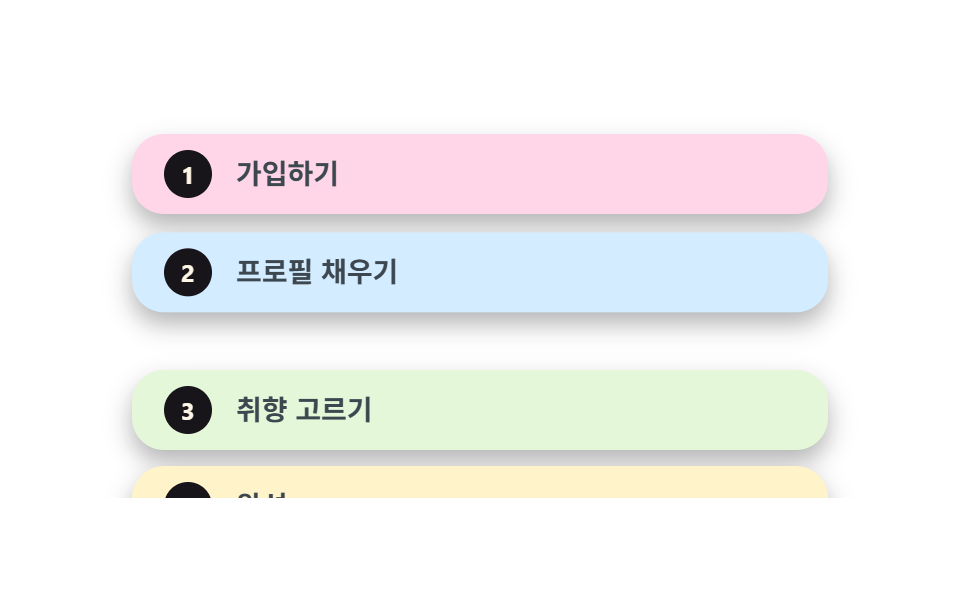
Every card is sticky, so each new one slides up and covers the last while earlier cards stay stacked in place.
Best forService intro steps, pricing comparison cards
position: stickytop 간격JS 0줄
<main class="stage">
  <div class="sk">
    <div class="sk__scroller">
      <div class="sk__card sk__card--1 is-demo"><span class="sk__step">1</span><span class="sk__label">Sign up</span></div>
      <div class="sk__card sk__card--2 is-demo"><span class="sk__step">2</span><span class="sk__label">Fill your profile</span></div>
      <div class="sk__card sk__card--3 is-demo"><span class="sk__step">3</span><span class="sk__label">Pick your taste</span></div>
      <div class="sk__card sk__card--4 is-demo"><span class="sk__step">4</span><span class="sk__label">Done</span></div>
    </div>
  </div>
</main>
@use "../../../../site/static/demo-tokens" as *;
// ── 변수 3개 ──────────────────────────────────────────
$duration: $dur-loop;
$easing: $ease-pop;
$color: $subject-blue;
@include stage($stage-paper);
.sk { width: min(380px, 88vw); }
.sk__scroller {
height: clamp(160px, 66vh, 232px);
overflow-y: auto;
padding: $sp-2 $sp-4 $sp-3;
box-sizing: border-box;
scrollbar-width: none;
&::-webkit-scrollbar { display: none; }
}
// ── 실제 동작: 카드마다 sticky. top 이 한 칸씩 깊어져 다음 카드가 위에 포개진다 ──
.sk__card {
position: sticky;
display: flex;
align-items: center;
gap: $sp-3;
min-height: 40px;
margin-bottom: $sp-2;
padding: $sp-2 $sp-4;
border-radius: $r-card;
box-shadow: $shadow-press;
box-sizing: border-box;
&:last-child { margin-bottom: 0; }
}
.sk__card--1 { top: $sp-2; background: #ffd6e8; }
.sk__card--2 { top: calc($sp-2 + 8px); background: #d3ecff; }
.sk__card--3 { top: calc($sp-2 + 16px); background: #e4f7d9; }
.sk__card--4 { top: calc($sp-2 + 24px); background: #fff3c9; }
.sk__step {
display: grid;
place-items: center;
width: 24px;
height: 24px;
border-radius: 50%;
background: $subject-ink;
color: $subject-cream;
font: 700 12px/1 -apple-system, "Segoe UI", "Noto Sans KR", sans-serif;
}
.sk__label {
color: #3c4750;
font: 700 14px/1.4 -apple-system, "Segoe UI", "Noto Sans KR", sans-serif;
}
// 데모 루프: 다음 카드가 올라와 앞 카드 위에 포개지는 걸 순서대로 흉내(캡처용)
.sk__card--2.is-demo { animation: sk-in-2 $duration $easing infinite; }
.sk__card--3.is-demo { animation: sk-in-3 $duration $easing infinite; }
.sk__card--4.is-demo { animation: sk-in-4 $duration $easing infinite; }
@keyframes sk-in-2 {
0%, 10% { transform: translateY(30px); }
28%, 100% { transform: translateY(0); }
}
@keyframes sk-in-3 {
0%, 36% { transform: translateY(30px); }
54%, 100% { transform: translateY(0); }
}
@keyframes sk-in-4 {
0%, 62% { transform: translateY(30px); }
80%, 100% { transform: translateY(0); }
}
@media (prefers-reduced-motion: reduce) {
.sk__card.is-demo { animation: none !important; transform: none !important; }
.sk__scroller { scroll-behavior: auto; }
}html, body {
margin: 0;
overflow: hidden;
}
.stage {
box-sizing: border-box;
min-height: 100vh;
display: grid;
place-items: center;
margin: 0;
background: #ffffff;
font-family: -apple-system, "Segoe UI", "Noto Sans KR", sans-serif;
padding: clamp(8px, 4vw, 24px);
}
.sk {
width: min(380px, 88vw);
}
.sk__scroller {
height: clamp(160px, 66vh, 232px);
overflow-y: auto;
padding: 8px 16px 12px;
box-sizing: border-box;
scrollbar-width: none;
}
.sk__scroller::-webkit-scrollbar {
display: none;
}
.sk__card {
position: sticky;
display: flex;
align-items: center;
gap: 12px;
min-height: 40px;
margin-bottom: 8px;
padding: 8px 16px;
border-radius: 16px;
box-shadow: 0 6px 12px rgba(23, 20, 26, 0.32);
box-sizing: border-box;
}
.sk__card:last-child {
margin-bottom: 0;
}
.sk__card--1 {
top: 8px;
background: #ffd6e8;
}
.sk__card--2 {
top: 16px;
background: #d3ecff;
}
.sk__card--3 {
top: 24px;
background: #e4f7d9;
}
.sk__card--4 {
top: 32px;
background: #fff3c9;
}
.sk__step {
display: grid;
place-items: center;
width: 24px;
height: 24px;
border-radius: 50%;
background: #17141a;
color: #fff7e6;
font: 700 12px/1 -apple-system, "Segoe UI", "Noto Sans KR", sans-serif;
}
.sk__label {
color: #3c4750;
font: 700 14px/1.4 -apple-system, "Segoe UI", "Noto Sans KR", sans-serif;
}
.sk__card--2.is-demo {
animation: sk-in-2 2s cubic-bezier(0.2, 1.4, 0.4, 1) infinite;
}
.sk__card--3.is-demo {
animation: sk-in-3 2s cubic-bezier(0.2, 1.4, 0.4, 1) infinite;
}
.sk__card--4.is-demo {
animation: sk-in-4 2s cubic-bezier(0.2, 1.4, 0.4, 1) infinite;
}
@keyframes sk-in-2 {
0%, 10% {
transform: translateY(30px);
}
28%, 100% {
transform: translateY(0);
}
}
@keyframes sk-in-3 {
0%, 36% {
transform: translateY(30px);
}
54%, 100% {
transform: translateY(0);
}
}
@keyframes sk-in-4 {
0%, 62% {
transform: translateY(30px);
}
80%, 100% {
transform: translateY(0);
}
}
@media (prefers-reduced-motion: reduce) {
.sk__card.is-demo {
animation: none !important;
transform: none !important;
}
.sk__scroller {
scroll-behavior: auto;
}
}// 실제 동작은 position: sticky(top 간격)만으로 끝난다(0줄). is-demo 클래스는
// 캡처용 미리보기 루프일 뿐 — 스크롤과 상관없이 사용자가 그대로 스크롤해도 쌓인다.import type { CSSProperties } from "react";
import styles from "./StackingCards.module.scss";
export type StackingCardsProps = {
duration?: number;
easing?: string;
color?: string;
};
type Vars = CSSProperties & { "--duration"?: string; "--easing"?: string; "--color"?: string };
const STEPS = [
{ n: 1, label: "가입하기" },
{ n: 2, label: "프로필 채우기" },
{ n: 3, label: "취향 고르기" },
{ n: 4, label: "완성" },
];
export default function StackingCards({ duration = 300, easing = "cubic-bezier(.2,1.4,.4,1)", color = "#2f6df6" }: StackingCardsProps) {
const vars: Vars = { "--duration": `${duration}ms`, "--easing": easing, "--color": color };
return (
<div className={styles.sk} style={vars}>
{/* 카드마다 position: sticky — top 이 한 칸씩 깊어져 다음 카드가 위에 포개진다 */}
<div className={styles.scroller}>
{STEPS.map((s) => (
<div key={s.n} className={`${styles.card} ${styles["card" + s.n]}`}>
<span className={styles.step}>{s.n}</span>
<span className={styles.label}>{s.label}</span>
</div>
))}
</div>
</div>
);
}03 Stacking cards — Measured area 30.731% · moving frames 15/23Original by GODRICH · SCSS and React ship in the zip · 9 Website Scroll Effects — Apple-Style, CSS Only
The post this demo lives in
 9 Website Scroll Effects — Apple-Style, CSS OnlyWebsite scroll effects, done with no scroll library at all, feel the way Apple's product pages do. Nine of them are here See all demos in this post