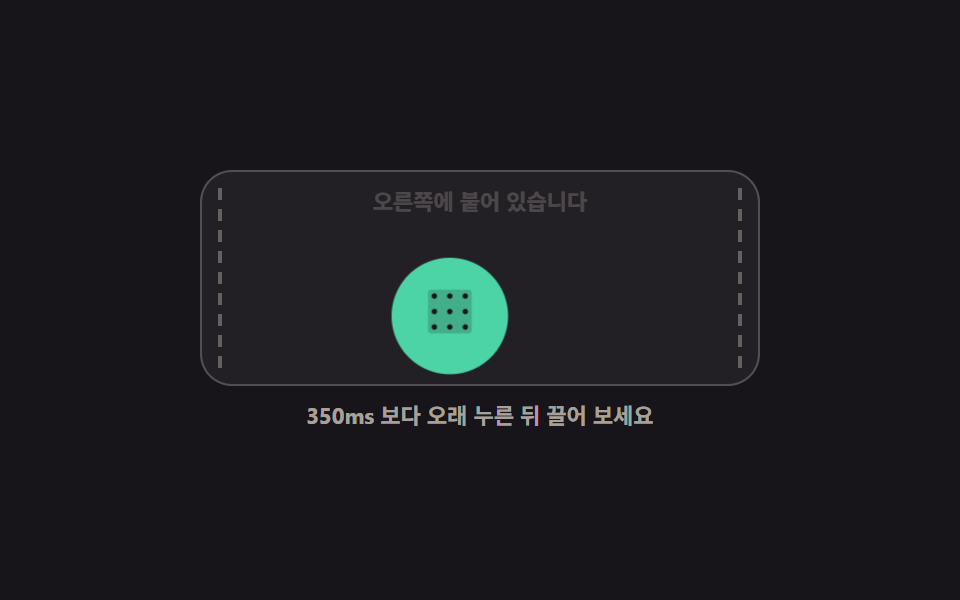
09FAB that follows your long-press drag
Holding longer than 350ms turns it grabbable, the button itself moves along the finger through translate, and releasing snaps it to the nearer edge.
Best forA contact button you want out of the way while reading, floating tools that change seats
pointerdowntranslateXaria-label
<main class="stage">
  <section class="dg is-demo" id="dg" aria-label="A FAB that moves when you long-press and drag">
    <div class="dg__screen" id="dg-screen">
      <span class="dg__guide dg__guide--l" aria-hidden="true"></span>
      <span class="dg__guide dg__guide--r" aria-hidden="true"></span>
      <p class="dg__read" id="dg-read">Snapped to the right</p>
      <button class="dg__fab" type="button" id="dg-fab" aria-label="Move the help button">
        <span aria-hidden="true"><svg viewBox="0 0 256 256" width="1em" height="1em" fill="currentColor"><path d="M224,48V208a16,16,0,0,1-16,16H48a16,16,0,0,1-16-16V48A16,16,0,0,1,48,32H208A16,16,0,0,1,224,48Z" opacity=".2"/><path d="M72,60A12,12,0,1,1,60,48,12,12,0,0,1,72,60Zm56-12a12,12,0,1,0,12,12A12,12,0,0,0,128,48Zm68,24a12,12,0,1,0-12-12A12,12,0,0,0,196,72ZM60,116a12,12,0,1,0,12,12A12,12,0,0,0,60,116Zm68,0a12,12,0,1,0,12,12A12,12,0,0,0,128,116Zm68,0a12,12,0,1,0,12,12A12,12,0,0,0,196,116ZM60,184a12,12,0,1,0,12,12A12,12,0,0,0,60,184Zm68,0a12,12,0,1,0,12,12A12,12,0,0,0,128,184Zm68,0a12,12,0,1,0,12,12A12,12,0,0,0,196,184Z"/></svg></span>
      </button>
    </div>
    <p class="dg__hint" id="dg-hint">Hold longer than 350ms, then drag</p>
  </section>
</main>
@use "../../../../site/static/demo-tokens" as *;
// 길게 눌러 끌면 따라오는 FAB — 버튼 자체가 translate 로 움직이고 놓으면 가장자리로 스냅
$duration: $dur-base;
$easing: $ease-spring;
$color: $subject-mint;
@include stage($stage-ink);
.dg {
display: grid;
justify-items: center;
gap: $sp-2;
font-family: -apple-system, "Segoe UI", "Noto Sans KR", sans-serif;
}
.dg__screen {
position: relative;
box-sizing: border-box;
width: min(280px, 92vw);
height: 108px;
border: 1px solid rgba(255, 247, 230, .22);
border-radius: $r-card;
background: rgba(255, 247, 230, .05);
overflow: hidden;
}
// 스냅 가이드: 붙잡는 동안에만 살아난다
.dg__guide {
position: absolute;
top: $sp-2;
bottom: $sp-2;
width: 0;
border-left: 2px dashed rgba(255, 247, 230, .3);
opacity: 0;
transition: opacity $dur-instant linear;
}
.dg__guide--l { left: $sp-2; }
.dg__guide--r { right: $sp-2; }
.dg__read {
position: absolute;
left: 0;
right: 0;
top: $sp-2;
margin: 0;
color: rgba(255, 247, 230, .62);
font-size: 11px;
font-weight: 700;
line-height: 1.3;
text-align: center;
}
.dg__fab {
position: absolute;
left: $sp-2;
bottom: $sp-2;
display: inline-grid;
place-items: center;
width: 52px;
height: 52px;
margin: 0;
padding: 0;
border: 0;
border-radius: 50%;
background: $color;
color: $stage-ink;
font-size: 26px;
line-height: 1;
cursor: grab;
transform: translateX(212px);
transition: transform $duration $easing, box-shadow $dur-instant linear;
touch-action: none;
user-select: none;
}
.dg__fab:focus-visible { outline: 3px solid $subject-cream; outline-offset: 3px; }
// 붙잡기 상태 — 끌기 중에는 스냅 전환을 끊어 즉시 따라오게 한다
.dg__fab.is-grab {
cursor: grabbing;
transition: box-shadow $dur-instant linear;
box-shadow: 0 0 0 4px rgba(76, 212, 166, .25), $shadow-raised;
}
.dg__screen.is-holding .dg__guide { opacity: 1; }
.dg__hint {
margin: 0;
color: rgba(255, 247, 230, .62);
font-size: 11px;
font-weight: 700;
line-height: 1.3;
text-align: center;
}
// ── 격자 미리보기 전용 2초 루프: 오른쪽 → 붙잡음 → 왼쪽 → 놓음 → 오른쪽 ──
@keyframes dg-loop-move {
0%, 8% { transform: translateX(212px); }
12% { transform: translateX(212px) scale(1.12); }
42% { transform: translateX(0px) scale(1.12); }
46%, 52% { transform: translateX(0px) scale(1); }
58% { transform: translateX(0px) scale(1.12); }
86% { transform: translateX(212px) scale(1.12); }
90%, 100% { transform: translateX(212px) scale(1); }
}
@keyframes dg-loop-guide-l {
0%, 11% { opacity: 0; }
12%, 44% { opacity: 1; }
46%, 100% { opacity: 0; }
}
@keyframes dg-loop-guide-r {
0%, 11% { opacity: 0; }
12%, 88% { opacity: 1; }
90%, 100% { opacity: 0; }
}
@keyframes dg-loop-read {
0%, 11% { opacity: 1; }
12%, 43% { opacity: .3; }
44%, 57% { opacity: 1; }
58%, 87% { opacity: .3; }
88%, 100% { opacity: 1; }
}
.dg.is-demo {
.dg__fab {
animation-name: dg-loop-move;
animation-duration: $dur-loop;
animation-timing-function: $easing;
animation-iteration-count: infinite;
}
.dg__guide--l {
animation-name: dg-loop-guide-l;
animation-duration: $dur-loop;
animation-timing-function: steps(1, end);
animation-iteration-count: infinite;
}
.dg__guide--r {
animation-name: dg-loop-guide-r;
animation-duration: $dur-loop;
animation-timing-function: steps(1, end);
animation-iteration-count: infinite;
}
.dg__read {
animation-name: dg-loop-read;
animation-duration: $dur-loop;
animation-timing-function: steps(1, end);
animation-iteration-count: infinite;
}
}
@media (max-width: 340px) {
.dg__screen { height: 96px; }
.dg__fab { width: 44px; height: 44px; font-size: 22px; }
.dg__read { font-size: 10px; }
}
@media (prefers-reduced-motion: reduce) {
.dg.is-demo .dg__fab,
.dg.is-demo .dg__guide--l,
.dg.is-demo .dg__guide--r,
.dg.is-demo .dg__read { animation: none !important; transform: none !important; }
// 붙잡힌 순간의 결과만 남긴다 — 큰 상태로 왼쪽에 멈춘다
.dg.is-demo .dg__fab { transform: translateX(0px) scale(1.12) !important; }
.dg.is-demo .dg__guide--l { opacity: 1 !important; }
.dg.is-demo .dg__guide--r { opacity: 0 !important; }
.dg.is-demo .dg__read { opacity: 1 !important; }
}html, body {
margin: 0;
overflow: hidden;
}
.stage {
box-sizing: border-box;
min-height: 100vh;
display: grid;
place-items: center;
margin: 0;
background: #17141a;
font-family: -apple-system, "Segoe UI", "Noto Sans KR", sans-serif;
padding: clamp(8px, 4vw, 24px);
}
.dg {
display: grid;
justify-items: center;
gap: 8px;
font-family: -apple-system, "Segoe UI", "Noto Sans KR", sans-serif;
}
.dg__screen {
position: relative;
box-sizing: border-box;
width: min(280px, 92vw);
height: 108px;
border: 1px solid rgba(255, 247, 230, 0.22);
border-radius: 16px;
background: rgba(255, 247, 230, 0.05);
overflow: hidden;
}
.dg__guide {
position: absolute;
top: 8px;
bottom: 8px;
width: 0;
border-left: 2px dashed rgba(255, 247, 230, 0.3);
opacity: 0;
transition: opacity 140ms linear;
}
.dg__guide--l {
left: 8px;
}
.dg__guide--r {
right: 8px;
}
.dg__read {
position: absolute;
left: 0;
right: 0;
top: 8px;
margin: 0;
color: rgba(255, 247, 230, 0.62);
font-size: 11px;
font-weight: 700;
line-height: 1.3;
text-align: center;
}
.dg__fab {
position: absolute;
left: 8px;
bottom: 8px;
display: inline-grid;
place-items: center;
width: 52px;
height: 52px;
margin: 0;
padding: 0;
border: 0;
border-radius: 50%;
background: #4cd4a6;
color: #17141a;
font-size: 26px;
line-height: 1;
cursor: grab;
transform: translateX(212px);
transition: transform 300ms cubic-bezier(0.2, 0.8, 0.2, 1), box-shadow 140ms linear;
touch-action: none;
user-select: none;
}
.dg__fab:focus-visible {
outline: 3px solid #fff7e6;
outline-offset: 3px;
}
.dg__fab.is-grab {
cursor: grabbing;
transition: box-shadow 140ms linear;
box-shadow: 0 0 0 4px rgba(76, 212, 166, 0.25), 0 14px 24px rgba(23, 20, 26, 0.32);
}
.dg__screen.is-holding .dg__guide {
opacity: 1;
}
.dg__hint {
margin: 0;
color: rgba(255, 247, 230, 0.62);
font-size: 11px;
font-weight: 700;
line-height: 1.3;
text-align: center;
}
@keyframes dg-loop-move {
0%, 8% {
transform: translateX(212px);
}
12% {
transform: translateX(212px) scale(1.12);
}
42% {
transform: translateX(0px) scale(1.12);
}
46%, 52% {
transform: translateX(0px) scale(1);
}
58% {
transform: translateX(0px) scale(1.12);
}
86% {
transform: translateX(212px) scale(1.12);
}
90%, 100% {
transform: translateX(212px) scale(1);
}
}
@keyframes dg-loop-guide-l {
0%, 11% {
opacity: 0;
}
12%, 44% {
opacity: 1;
}
46%, 100% {
opacity: 0;
}
}
@keyframes dg-loop-guide-r {
0%, 11% {
opacity: 0;
}
12%, 88% {
opacity: 1;
}
90%, 100% {
opacity: 0;
}
}
@keyframes dg-loop-read {
0%, 11% {
opacity: 1;
}
12%, 43% {
opacity: 0.3;
}
44%, 57% {
opacity: 1;
}
58%, 87% {
opacity: 0.3;
}
88%, 100% {
opacity: 1;
}
}
.dg.is-demo .dg__fab {
animation-name: dg-loop-move;
animation-duration: 2s;
animation-timing-function: cubic-bezier(0.2, 0.8, 0.2, 1);
animation-iteration-count: infinite;
}
.dg.is-demo .dg__guide--l {
animation-name: dg-loop-guide-l;
animation-duration: 2s;
animation-timing-function: steps(1, end);
animation-iteration-count: infinite;
}
.dg.is-demo .dg__guide--r {
animation-name: dg-loop-guide-r;
animation-duration: 2s;
animation-timing-function: steps(1, end);
animation-iteration-count: infinite;
}
.dg.is-demo .dg__read {
animation-name: dg-loop-read;
animation-duration: 2s;
animation-timing-function: steps(1, end);
animation-iteration-count: infinite;
}
@media (max-width: 340px) {
.dg__screen {
height: 96px;
}
.dg__fab {
width: 44px;
height: 44px;
font-size: 22px;
}
.dg__read {
font-size: 10px;
}
}
@media (prefers-reduced-motion: reduce) {
.dg.is-demo .dg__fab,
.dg.is-demo .dg__guide--l,
.dg.is-demo .dg__guide--r,
.dg.is-demo .dg__read {
animation: none !important;
transform: none !important;
}
.dg.is-demo .dg__fab {
transform: translateX(0px) scale(1.12) !important;
}
.dg.is-demo .dg__guide--l {
opacity: 1 !important;
}
.dg.is-demo .dg__guide--r {
opacity: 0 !important;
}
.dg.is-demo .dg__read {
opacity: 1 !important;
}
}// 제스처 FAB: 길게 누르면 붙잡고, 끌면 버튼 자체가 움직이며, 놓으면 가까운 가장자리로 스냅된다
var dg = document.getElementById('dg');
var dgFab = document.getElementById('dg-fab');
var dgScreen = document.getElementById('dg-screen');
var dgRead = document.getElementById('dg-read');
var dgHold = null; // 길게 누름 타이머
var dgGrab = false; // 붙잡기 상태
function dgSide(x) {
var box = dgScreen.getBoundingClientRect();
return x < box.left + box.width / 2 ? 'left' : 'right';
}
function dgSnap(x) {
var side = dgSide(x);
var box = dgScreen.getBoundingClientRect();
var maxX = box.width - dgFab.offsetWidth - 8;
dgFab.style.transform = 'translateX(' + (side === 'left' ? 0 : maxX) + 'px)';
dgRead.textContent = side === 'left' ? 'Snapped to the left' : 'Snapped to the right';
}
function dgClearHold() {
window.clearTimeout(dgHold);
dgHold = null;
}
dgFab.addEventListener('pointerdown', function (e) {
dg.classList.remove('is-demo');
dgHold = window.setTimeout(function () {
dgGrab = true;
dgFab.classList.add('is-grab');
dgScreen.classList.add('is-holding');
try { dgFab.setPointerCapture(e.pointerId); } catch (err) { }
dgRead.textContent = 'Held · release to snap';
}, 350);
});
dgFab.addEventListener('pointermove', function (e) {
if (!dgGrab) return;
var box = dgScreen.getBoundingClientRect();
var maxX = box.width - dgFab.offsetWidth - 8;
var x = Math.min(Math.max(e.clientX - box.left - dgFab.offsetWidth / 2, 0), maxX);
dgFab.style.transform = 'translateX(' + x + 'px)';
});
dgFab.addEventListener('pointerup', function (e) {
dgClearHold();
dgScreen.classList.remove('is-holding');
if (!dgGrab) return;
dgGrab = false;
dgFab.classList.remove('is-grab');
dgSnap(e.clientX);
});
dgFab.addEventListener('keydown', function (e) {
dg.classList.remove('is-demo');
var box = dgScreen.getBoundingClientRect();
var maxX = box.width - dgFab.offsetWidth - 8;
if (e.key === 'ArrowLeft') dgFab.style.transform = 'translateX(0px)';
if (e.key === 'ArrowRight') dgFab.style.transform = 'translateX(' + maxX + 'px)';
});import { useEffect, useRef, useState } from "react";
import type { CSSProperties, PointerEvent } from "react";
import styles from "./DragMoveFab.module.scss";
export type DragMoveFabProps = {
fabLabel?: string;
leftRead?: string;
rightRead?: string;
grabbedRead?: string;
hint?: string;
groupLabel?: string;
/** 붙잡기로 넘어가는 길게 누름 시간(ms) */
holdMs?: number;
/** 격자 미리보기용 2초 자동 루프. 사람이 손대면 꺼진다 */
demo?: boolean;
duration?: number;
easing?: string;
color?: string;
};
type Vars = CSSProperties & { "--duration"?: string; "--easing"?: string; "--color"?: string };
// ambient 에 KeyboardEvent 가 없다 — 쓰는 필드만 로컬로 선언한다
type KeyEvt = { key: string; currentTarget: HTMLButtonElement };
type Box = { left: number; width: number; maxX: number };
/** 화면 안쪽 여백 — 스냅 자리는 양 끝에서 이만큼 떨어진다 */
const EDGE = 8;
function Dots() {
return (
<svg viewBox="0 0 256 256" width="1em" height="1em" fill="currentColor">
<path d="M224,48V208a16,16,0,0,1-16,16H48a16,16,0,0,1-16-16V48A16,16,0,0,1,48,32H208A16,16,0,0,1,224,48Z" opacity=".2" />
<path d="M72,60A12,12,0,1,1,60,48,12,12,0,0,1,72,60Zm56-12a12,12,0,1,0,12,12A12,12,0,0,0,128,48Zm68,24a12,12,0,1,0-12-12A12,12,0,0,0,196,72ZM60,116a12,12,0,1,0,12,12A12,12,0,0,0,60,116Zm68,0a12,12,0,1,0,12,12A12,12,0,0,0,128,116Zm68,0a12,12,0,1,0,12,12A12,12,0,0,0,196,116ZM60,184a12,12,0,1,0,12,12A12,12,0,0,0,60,184Zm68,0a12,12,0,1,0,12,12A12,12,0,0,0,128,184Zm68,0a12,12,0,1,0,12,12A12,12,0,0,0,196,184Z" />
</svg>
);
}
export default function DragMoveFab({
fabLabel = "Move the help button",
leftRead = "Docked on the left",
rightRead = "Docked on the right",
grabbedRead = "Grabbed · release to snap",
hint = "Press for longer than 350ms, then drag",
groupLabel = "FAB you press and hold to drag around",
holdMs = 350,
demo = true,
duration = 300,
easing = "cubic-bezier(.2,.8,.2,1)",
color = "#4cd4a6",
}: DragMoveFabProps) {
const [tx, setTx] = useState<number | null>(null); // null 이면 CSS 기본 자리(오른쪽)
const [grab, setGrab] = useState(false);
const [holding, setHolding] = useState(false);
const [live, setLive] = useState(demo);
const [read, setRead] = useState(rightRead);
const screenRef = useRef<HTMLDivElement>(null);
const holdT = useRef<number>(null);
useEffect(() => () => {
if (holdT.current !== null) window.clearTimeout(holdT.current);
}, []);
function clearHold() {
if (holdT.current !== null) {
window.clearTimeout(holdT.current);
holdT.current = null;
}
}
function bounds(fab: HTMLButtonElement): Box | null {
const screen = screenRef.current;
if (!screen) return null;
const box = screen.getBoundingClientRect();
return { left: box.left, width: box.width, maxX: box.width - fab.offsetWidth - EDGE };
}
// 길게 누름이 채워져야 붙잡기로 넘어간다 — 짧은 누름은 그냥 클릭이다
function down(e: PointerEvent<HTMLButtonElement>) {
setLive(false);
const fab = e.currentTarget;
const pid: number = e.pointerId;
clearHold();
holdT.current = window.setTimeout(() => {
setGrab(true);
setHolding(true);
try { fab.setPointerCapture(pid); } catch { /* 캡처를 못 해도 끌기는 된다 */ }
setRead(grabbedRead);
}, holdMs);
}
function move(e: PointerEvent<HTMLButtonElement>) {
if (!grab) return;
const fab = e.currentTarget;
const b = bounds(fab);
if (!b) return;
setTx(Math.min(Math.max(e.clientX - b.left - fab.offsetWidth / 2, 0), b.maxX));
}
// 놓으면 가까운 가장자리로 스냅된다
function up(e: PointerEvent<HTMLButtonElement>) {
clearHold();
setHolding(false);
if (!grab) return;
setGrab(false);
const b = bounds(e.currentTarget);
if (!b) return;
const left = e.clientX < b.left + b.width / 2;
setTx(left ? 0 : b.maxX);
setRead(left ? leftRead : rightRead);
}
// 키보드 경로 — vanilla 판은 transform 만 바꾸지만 읽어주는 문구도 같이 맞춘다
function key(e: KeyEvt) {
setLive(false);
const b = bounds(e.currentTarget);
if (!b) return;
if (e.key === "ArrowLeft") { setTx(0); setRead(leftRead); }
if (e.key === "ArrowRight") { setTx(b.maxX); setRead(rightRead); }
}
const vars: Vars = { "--duration": `${duration}ms`, "--easing": easing, "--color": color };
const fabStyle: CSSProperties = tx === null ? {} : { transform: `translateX(${tx}px)` };
const cls = [styles.dg, live ? styles.isDemo : ""].filter(Boolean).join(" ");
const screenCls = [styles.screen, holding ? styles.isHolding : ""].filter(Boolean).join(" ");
const fabCls = [styles.fab, grab ? styles.isGrab : ""].filter(Boolean).join(" ");
return (
<section className={cls} style={vars} aria-label={groupLabel}>
<div className={screenCls} ref={screenRef}>
<span className={[styles.guide, styles.guideL].join(" ")} aria-hidden="true" />
<span className={[styles.guide, styles.guideR].join(" ")} aria-hidden="true" />
<p className={styles.read} aria-live="polite">{read}</p>
<button
className={fabCls}
style={fabStyle}
type="button"
aria-label={fabLabel}
onPointerDown={down}
onPointerMove={move}
onPointerUp={up}
onKeyDown={key}
>
<span aria-hidden="true"><Dots /></span>
</button>
</div>
<p className={styles.hint}>{hint}</p>
</section>
);
}09 FAB that follows your long-press drag — Measured area 10.568% · moving frames 21/23Original by GODRICH · SCSS and React ship in the zip · 9 Icon Button CSS Patterns — Press, Drag, Expand
The post this demo lives in
 9 Icon Button CSS Patterns — Press, Drag, ExpandAn icon button css pattern trades the label for a picture, so the meaning has to survive for anyone who never sees it. A See all demos in this post