02Split-screen login
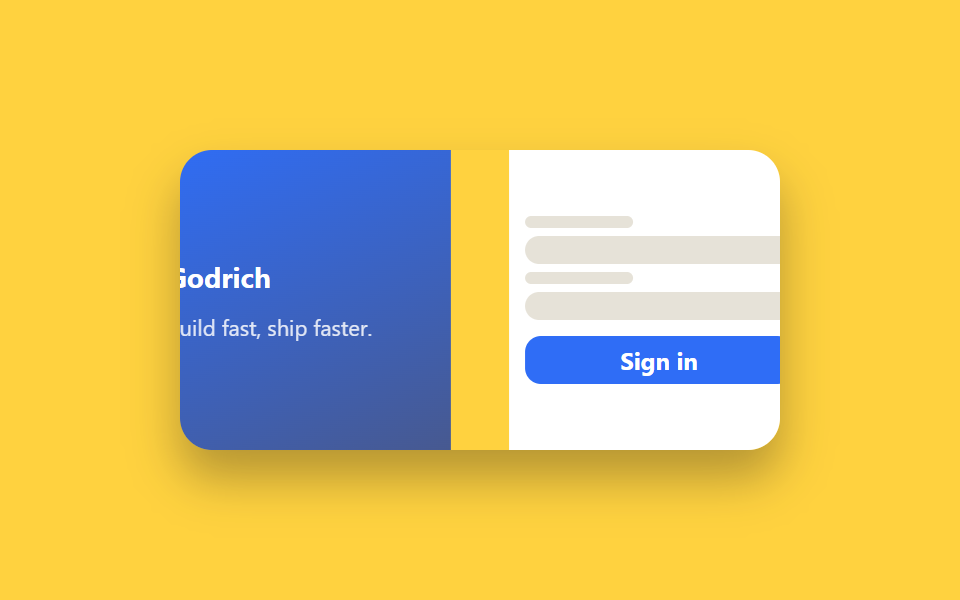
The screen splits in half — an image or tagline on one side, the form on the other — and both panels slide in from opposite edges when the page loads.
Best forLogin pages for brand-heavy products, auth screens that also promote an app download
display: flex 반반@keyframes enter-leftlinear-gradient 패널
<main class="stage">
  <div class="split is-demo">
    <div class="split__panel split__panel--image">
      <span class="split__brand">Godrich</span>
      <p class="split__tagline">Build fast, ship faster.</p>
    </div>
    <form class="split__panel split__panel--form" autocomplete="off">
      <span class="split__line split__line--label"></span>
      <span class="split__line split__line--input"></span>
      <span class="split__line split__line--label"></span>
      <span class="split__line split__line--input"></span>
      <button class="split__btn" type="button">Sign in</button>
    </form>
  </div>
</main>
@use "../../../../site/static/demo-tokens" as *;
$duration: $dur-enter; // 패널 진입 시간
$easing: $ease-spring;
$color: $subject-blue; // 이미지 패널 색
@include stage($stage-yellow);
.split {
width: min(300px, 86vw);
height: 150px;
display: flex;
overflow: hidden;
border-radius: $r-card;
box-shadow: $shadow-raised;
}
.split__panel {
width: 50%;
height: 100%;
box-sizing: border-box;
padding: $sp-3 $sp-2;
display: flex;
flex-direction: column;
justify-content: center;
gap: $sp-1;
}
.split__panel--image {
background: linear-gradient(155deg, $color, #475990);
color: $stage-paper;
gap: $sp-2;
}
.split__brand { font-weight: 700; font-size: 14px; font-family: inherit; }
.split__tagline { margin: 0; font-size: 11px; opacity: .85; font-family: inherit; }
.split__panel--form { background: $stage-paper; gap: $sp-1; }
.split__line {
display: block;
border-radius: $r-xs;
background: #e6e2d8;
}
.split__line--label { width: 40%; height: 6px; }
.split__line--input { width: 100%; height: 14px; border-radius: $r-sm; }
.split__btn {
margin-top: $sp-1;
padding: $sp-1 $sp-2;
border: none;
border-radius: $r-sm;
background: $color;
color: $stage-paper;
font-weight: 700;
font-size: 12px;
font-family: inherit;
cursor: pointer;
transition: transform $dur-instant $ease-out;
}
.split__btn:hover, .split__btn:focus-visible { transform: translateY(-1px); }
.split.is-demo .split__panel--image { animation: enter-left $dur-loop $easing infinite; }
.split.is-demo .split__panel--form { animation: enter-right $dur-loop $easing infinite; }
@keyframes enter-left {
0%, 100% { transform: translateX(-16%); }
35%, 90% { transform: translateX(0); }
}
@keyframes enter-right {
0%, 100% { transform: translateX(16%); }
35%, 90% { transform: translateX(0); }
}
@media (prefers-reduced-motion: reduce) {
.split.is-demo .split__panel--image,
.split.is-demo .split__panel--form { animation: none; transform: none; }
}html, body {
margin: 0;
overflow: hidden;
}
.stage {
box-sizing: border-box;
min-height: 100vh;
display: grid;
place-items: center;
margin: 0;
background: #ffd23f;
font-family: -apple-system, "Segoe UI", "Noto Sans KR", sans-serif;
padding: clamp(8px, 4vw, 24px);
}
.split {
width: min(300px, 86vw);
height: 150px;
display: flex;
overflow: hidden;
border-radius: 16px;
box-shadow: 0 14px 24px rgba(23, 20, 26, 0.32);
}
.split__panel {
width: 50%;
height: 100%;
box-sizing: border-box;
padding: 12px 8px;
display: flex;
flex-direction: column;
justify-content: center;
gap: 4px;
}
.split__panel--image {
background: linear-gradient(155deg, #2f6df6, #475990);
color: #ffffff;
gap: 8px;
}
.split__brand {
font-weight: 700;
font-size: 14px;
font-family: inherit;
}
.split__tagline {
margin: 0;
font-size: 11px;
opacity: 0.85;
font-family: inherit;
}
.split__panel--form {
background: #ffffff;
gap: 4px;
}
.split__line {
display: block;
border-radius: 4px;
background: #e6e2d8;
}
.split__line--label {
width: 40%;
height: 6px;
}
.split__line--input {
width: 100%;
height: 14px;
border-radius: 8px;
}
.split__btn {
margin-top: 4px;
padding: 4px 8px;
border: none;
border-radius: 8px;
background: #2f6df6;
color: #ffffff;
font-weight: 700;
font-size: 12px;
font-family: inherit;
cursor: pointer;
transition: transform 140ms ease-out;
}
.split__btn:hover, .split__btn:focus-visible {
transform: translateY(-1px);
}
.split.is-demo .split__panel--image {
animation: enter-left 2s cubic-bezier(0.2, 0.8, 0.2, 1) infinite;
}
.split.is-demo .split__panel--form {
animation: enter-right 2s cubic-bezier(0.2, 0.8, 0.2, 1) infinite;
}
@keyframes enter-left {
0%, 100% {
transform: translateX(-16%);
}
35%, 90% {
transform: translateX(0);
}
}
@keyframes enter-right {
0%, 100% {
transform: translateX(16%);
}
35%, 90% {
transform: translateX(0);
}
}
@media (prefers-reduced-motion: reduce) {
.split.is-demo .split__panel--image,
.split.is-demo .split__panel--form {
animation: none;
transform: none;
}
}import { useEffect, useState, type CSSProperties } from "react";
import styles from "./SplitScreenLogin.module.scss";
export type SplitScreenLoginProps = {
/** 패널이 밀려 들어오는 시간 (기본 600ms) */
duration?: number;
easing?: string;
/** 이미지 패널 색 */
color?: string;
};
/** 화면 진입 시 두 패널이 좌우에서 밀려 들어온다. 마운트 직후 한 번만 재생 */
export default function SplitScreenLogin({
duration = 600,
easing = "cubic-bezier(.2,.8,.2,1)",
color = "#2f6df6",
}: SplitScreenLoginProps) {
const [entered, setEntered] = useState(false);
useEffect(() => {
const id = requestAnimationFrame(() => setEntered(true));
return () => cancelAnimationFrame(id);
}, []);
const style = { "--duration": `${duration}ms`, "--easing": easing, "--color": color } as CSSProperties;
return (
<div className={styles.split} style={style}>
<div className={`${styles.panel} ${styles.image} ${entered ? styles.in : styles.outLeft}`}>
<span className={styles.brand}>Godrich</span>
<p className={styles.tagline}>Build fast, ship faster.</p>
</div>
<form
className={`${styles.panel} ${styles.form} ${entered ? styles.in : styles.outRight}`}
onSubmit={(e: { preventDefault(): void }) => e.preventDefault()}
>
<span className={`${styles.line} ${styles.label}`} />
<span className={`${styles.line} ${styles.field}`} />
<span className={`${styles.line} ${styles.label}`} />
<span className={`${styles.line} ${styles.field}`} />
<button className={styles.btn} type="submit">Sign in</button>
</form>
</div>
);
}02 Split-screen login — Measured area 7.366% · moving frames 10/23Original by GODRICH · SCSS and React ship in the zip · 9 Login Form Design Patterns You Can Copy-Paste
The post this demo lives in
 9 Login Form Design Patterns You Can Copy-PasteLogin form design is more than an email field and a button — it's card material, layout, step progress. One of these nin See all demos in this post
If you like this effect - similar demos
 Auth UI04 Security question card9 ID Verification Screen UI Patterns, Paste-Ready
 Auth UI01 Login card — a card that computes fill ratio to fill its own progress indicator9 Login UI Design Patterns (Copy-Paste)
 Auth UI01 Remaining-tries shake — the remaining-tries value drops and the number shakes briefly each time login failsToo Many Failed Login Attempts: 9 Patterns