03Floating-label signup input
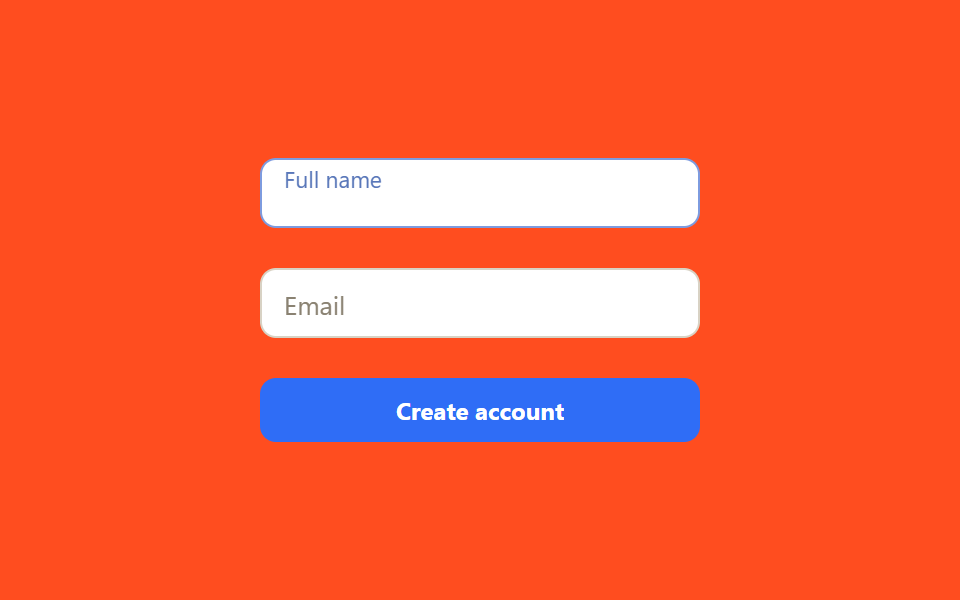
A label that sits inside the field lifts and shrinks the moment it's focused or filled, so the field stays labeled even after the placeholder disappears.
Best forSignup forms collecting email, name, or phone; mobile forms that need to save vertical space
:placeholder-showntransform: translateY + scale@keyframes ring-a
<main class="stage">
  <form class="float-form is-demo" autocomplete="off">
    <div class="float-field float-field--a">
      <input class="float-field__input" id="fname" placeholder=" ">
      <label class="float-field__label" for="fname">Full name</label>
    </div>
    <div class="float-field float-field--b">
      <input class="float-field__input" id="femail" placeholder=" ">
      <label class="float-field__label" for="femail">Email</label>
    </div>
    <button class="float-form__btn" type="button">Create account</button>
  </form>
</main>
@use "../../../../site/static/demo-tokens" as *;
$duration: $dur-quick; // 라벨이 뜨는 시간
$easing: $ease-out;
$color: $subject-blue; // 포커스 색
@include stage($stage-orange);
.float-form {
width: min(220px, 82vw);
display: flex;
flex-direction: column;
gap: $sp-5;
}
.float-field {
position: relative;
}
.float-field__input {
width: 100%;
box-sizing: border-box;
padding: $sp-3 $sp-3 $sp-1;
border: 1.5px solid #d8d2c4;
border-radius: $r-sm;
background: $stage-paper;
font-size: 13px;
font-family: inherit;
color: $stage-ink;
transition: border-color $duration $easing;
}
.float-field__label {
position: absolute;
left: $sp-3;
top: 50%;
transform: translateY(-50%);
font-size: 13px;
color: #8a8272;
font-family: inherit;
pointer-events: none;
transform-origin: left center; // 규칙8: 입력칸 왼쪽 안쪽선에 맞춰 줄어든다 — 중심이면 줄면서 오른쪽으로 밀린다
transition: transform $duration $easing, color $duration $easing;
}
.float-field__input:focus { outline: none; border-color: $color; }
.float-field__input:focus + .float-field__label,
.float-field__input:not(:placeholder-shown) + .float-field__label {
transform: translateY(-135%) scale(.78);
color: $color;
}
.float-form__btn {
padding: $sp-2;
border: none;
border-radius: $r-sm;
background: $color;
color: $stage-paper;
font-weight: 700;
font-size: 12px;
font-family: inherit;
cursor: pointer;
transition: transform $dur-instant $ease-out;
}
.float-form__btn:hover, .float-form__btn:focus-visible { transform: translateY(-1px); }
// 자동 재생 미리보기 — 실제 :focus 대신 같은 transform·color 값을 키프레임으로 직접 재생한다
.float-form.is-demo .float-field--a .float-field__input { animation: ring-a $dur-loop $easing infinite; }
.float-form.is-demo .float-field--a .float-field__label { animation: float-a $dur-loop $easing infinite; }
.float-form.is-demo .float-field--b .float-field__input { animation: ring-b $dur-loop $easing infinite; }
.float-form.is-demo .float-field--b .float-field__label { animation: float-b $dur-loop $easing infinite; }
@keyframes float-a {
0%, 8% { transform: translateY(-50%) scale(1); color: #8a8272; }
20%, 45% { transform: translateY(-135%) scale(.78); color: $color; }
55%, 100% { transform: translateY(-50%) scale(1); color: #8a8272; }
}
@keyframes ring-a {
0%, 8% { border-color: #d8d2c4; }
20%, 45% { border-color: $color; }
55%, 100% { border-color: #d8d2c4; }
}
@keyframes float-b {
0%, 55% { transform: translateY(-50%) scale(1); color: #8a8272; }
65%, 92% { transform: translateY(-135%) scale(.78); color: $color; }
100% { transform: translateY(-50%) scale(1); color: #8a8272; }
}
@keyframes ring-b {
0%, 55% { border-color: #d8d2c4; }
65%, 92% { border-color: $color; }
100% { border-color: #d8d2c4; }
}
@media (prefers-reduced-motion: reduce) {
.float-field__input, .float-field__label, .float-form__btn { transition: none; }
.float-form.is-demo .float-field--a .float-field__input,
.float-form.is-demo .float-field--a .float-field__label,
.float-form.is-demo .float-field--b .float-field__input,
.float-form.is-demo .float-field--b .float-field__label { animation: none; }
}html, body {
margin: 0;
overflow: hidden;
}
.stage {
box-sizing: border-box;
min-height: 100vh;
display: grid;
place-items: center;
margin: 0;
background: #ff4d1f;
font-family: -apple-system, "Segoe UI", "Noto Sans KR", sans-serif;
padding: clamp(8px, 4vw, 24px);
}
.float-form {
width: min(220px, 82vw);
display: flex;
flex-direction: column;
gap: 20px;
}
.float-field {
position: relative;
}
.float-field__input {
width: 100%;
box-sizing: border-box;
padding: 12px 12px 4px;
border: 1.5px solid #d8d2c4;
border-radius: 8px;
background: #ffffff;
font-size: 13px;
font-family: inherit;
color: #17141a;
transition: border-color 220ms ease-out;
}
.float-field__label {
position: absolute;
left: 12px;
top: 50%;
transform: translateY(-50%);
font-size: 13px;
color: #8a8272;
font-family: inherit;
pointer-events: none;
transform-origin: left center;
transition: transform 220ms ease-out, color 220ms ease-out;
}
.float-field__input:focus {
outline: none;
border-color: #2f6df6;
}
.float-field__input:focus + .float-field__label,
.float-field__input:not(:placeholder-shown) + .float-field__label {
transform: translateY(-135%) scale(0.78);
color: #2f6df6;
}
.float-form__btn {
padding: 8px;
border: none;
border-radius: 8px;
background: #2f6df6;
color: #ffffff;
font-weight: 700;
font-size: 12px;
font-family: inherit;
cursor: pointer;
transition: transform 140ms ease-out;
}
.float-form__btn:hover, .float-form__btn:focus-visible {
transform: translateY(-1px);
}
.float-form.is-demo .float-field--a .float-field__input {
animation: ring-a 2s ease-out infinite;
}
.float-form.is-demo .float-field--a .float-field__label {
animation: float-a 2s ease-out infinite;
}
.float-form.is-demo .float-field--b .float-field__input {
animation: ring-b 2s ease-out infinite;
}
.float-form.is-demo .float-field--b .float-field__label {
animation: float-b 2s ease-out infinite;
}
@keyframes float-a {
0%, 8% {
transform: translateY(-50%) scale(1);
color: #8a8272;
}
20%, 45% {
transform: translateY(-135%) scale(0.78);
color: #2f6df6;
}
55%, 100% {
transform: translateY(-50%) scale(1);
color: #8a8272;
}
}
@keyframes ring-a {
0%, 8% {
border-color: #d8d2c4;
}
20%, 45% {
border-color: #2f6df6;
}
55%, 100% {
border-color: #d8d2c4;
}
}
@keyframes float-b {
0%, 55% {
transform: translateY(-50%) scale(1);
color: #8a8272;
}
65%, 92% {
transform: translateY(-135%) scale(0.78);
color: #2f6df6;
}
100% {
transform: translateY(-50%) scale(1);
color: #8a8272;
}
}
@keyframes ring-b {
0%, 55% {
border-color: #d8d2c4;
}
65%, 92% {
border-color: #2f6df6;
}
100% {
border-color: #d8d2c4;
}
}
@media (prefers-reduced-motion: reduce) {
.float-field__input, .float-field__label, .float-form__btn {
transition: none;
}
.float-form.is-demo .float-field--a .float-field__input,
.float-form.is-demo .float-field--a .float-field__label,
.float-form.is-demo .float-field--b .float-field__input,
.float-form.is-demo .float-field--b .float-field__label {
animation: none;
}
}import type { CSSProperties } from "react";
import styles from "./FloatingLabelInput.module.scss";
export type FloatingLabelInputProps = {
id: string;
label: string;
type?: string;
/** 라벨이 뜨는 시간 (기본 220ms) */
duration?: number;
easing?: string;
color?: string;
};
/** :placeholder-shown 과 :focus 만으로 동작 — JS 없이 라벨이 뜬다 */
export default function FloatingLabelInput({
id,
label,
type = "text",
duration = 220,
easing = "ease-out",
color = "#2f6df6",
}: FloatingLabelInputProps) {
const style = { "--duration": `${duration}ms`, "--easing": easing, "--color": color } as CSSProperties;
return (
<div className={styles.field} style={style}>
<input className={styles.input} id={id} type={type} placeholder=" " />
<label className={styles.label} htmlFor={id}>{label}</label>
</div>
);
}03 Floating-label signup input — Measured area 1.618% · moving frames 11/23Original by GODRICH · SCSS and React ship in the zip · 9 Login Form Design Patterns You Can Copy-Paste
The post this demo lives in
 9 Login Form Design Patterns You Can Copy-PasteLogin form design is more than an email field and a button — it's card material, layout, step progress. One of these nin See all demos in this post