05Address autocomplete dropdown
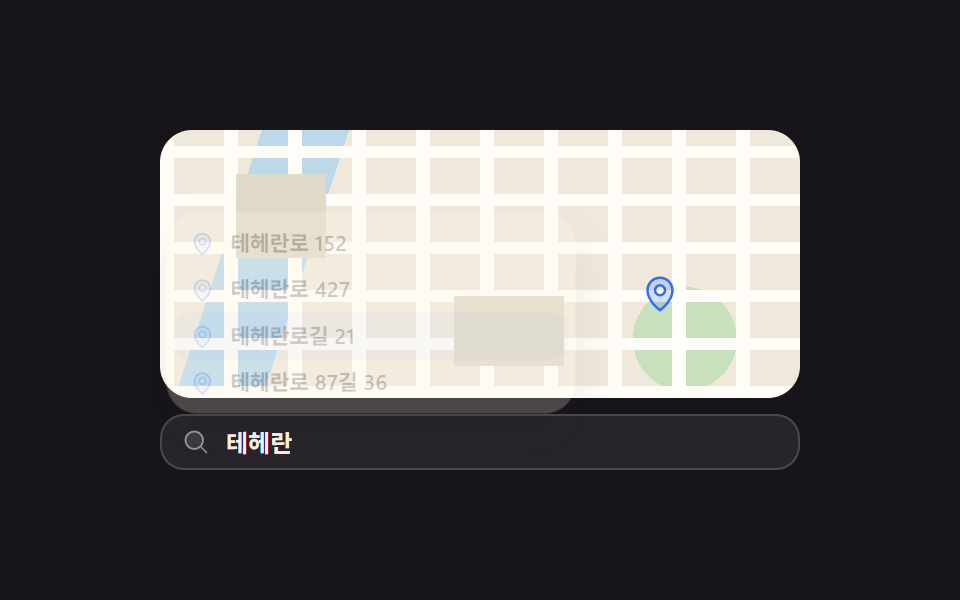
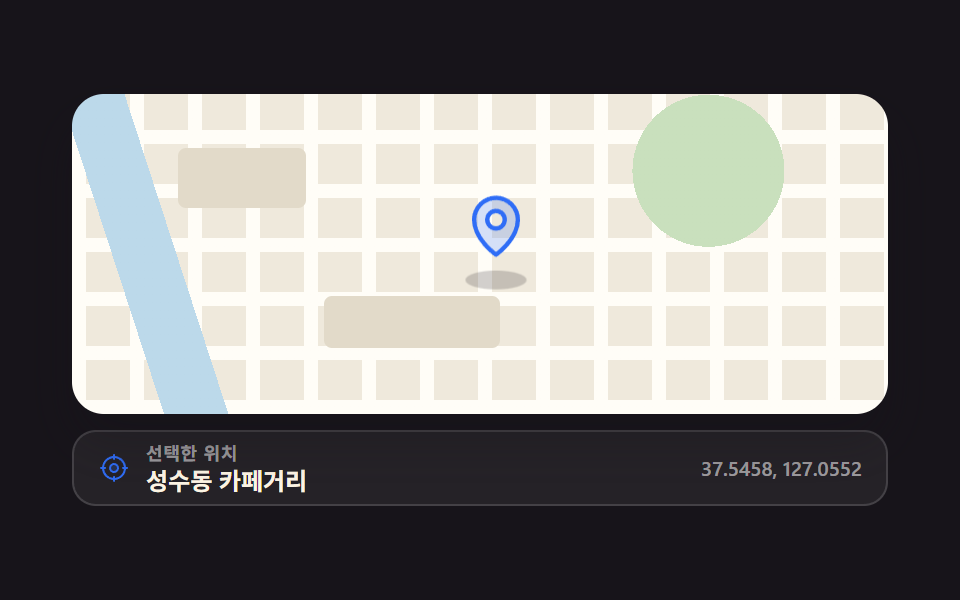
Letters typed into the field slide candidate addresses up from below, arrows walk them, and the picked one really recenters the map.
Best forWhen the destination is set by searching an address, not tapping
role=comboboxaria-activedescendanttyping keyframes
<main class="stage">
  <div class="ac is-demo">
    <div class="ac__map">
      <span class="ac__pin" id="ac-pin" aria-hidden="true"><svg viewBox="0 0 256 256" width="20" height="20"><g fill="currentColor"><path d="M128 24a80 80 0 0 0-80 80c0 72 80 128 80 128s80-56 80-128a80 80 0 0 0-80-80m0 112a32 32 0 1 1 32-32a32 32 0 0 1-32 32" opacity=".2"/><path d="M128 64a40 40 0 1 0 40 40a40 40 0 0 0-40-40m0 64a24 24 0 1 1 24-24a24 24 0 0 1-24 24m0-112a88.1 88.1 0 0 0-88 88c0 31.4 14.51 64.68 42 96.25a254.2 254.2 0 0 0 41.45 38.3a8 8 0 0 0 9.18 0a254.2 254.2 0 0 0 41.37-38.3c27.45-31.57 42-64.85 42-96.25a88.1 88.1 0 0 0-88-88m0 206c-16.53-13-72-60.75-72-118a72 72 0 0 1 144 0c0 57.23-55.47 105-72 118"/></g></svg></span>
    </div>
    <!-- 후보 목록은 입력칸 위로 열려 지도를 덮는다 — 절대배치라 뿌리 높이엔 안 잡히지만 뿌리 안쪽에 머문다 -->
    <ul class="ac__list" id="ac-list" role="listbox" aria-label="Address suggestions">
      <li class="ac__opt" id="ac-o0" role="option" aria-selected="false" data-x="88%" data-y="30%"><svg viewBox="0 0 256 256" width="13" height="13" aria-hidden="true"><g fill="currentColor"><path d="M128 24a80 80 0 0 0-80 80c0 72 80 128 80 128s80-56 80-128a80 80 0 0 0-80-80m0 112a32 32 0 1 1 32-32a32 32 0 0 1-32 32" opacity=".2"/><path d="M128 64a40 40 0 1 0 40 40a40 40 0 0 0-40-40m0 64a24 24 0 1 1 24-24a24 24 0 0 1-24 24m0-112a88.1 88.1 0 0 0-88 88c0 31.4 14.51 64.68 42 96.25a254.2 254.2 0 0 0 41.45 38.3a8 8 0 0 0 9.18 0a254.2 254.2 0 0 0 41.37-38.3c27.45-31.57 42-64.85 42-96.25a88.1 88.1 0 0 0-88-88m0 206c-16.53-13-72-60.75-72-118a72 72 0 0 1 144 0c0 57.23-55.47 105-72 118"/></g></svg><span>Teheran-ro 152</span></li>
      <li class="ac__opt" id="ac-o1" role="option" aria-selected="false" data-x="74%" data-y="58%"><svg viewBox="0 0 256 256" width="13" height="13" aria-hidden="true"><g fill="currentColor"><path d="M128 24a80 80 0 0 0-80 80c0 72 80 128 80 128s80-56 80-128a80 80 0 0 0-80-80m0 112a32 32 0 1 1 32-32a32 32 0 0 1-32 32" opacity=".2"/><path d="M128 64a40 40 0 1 0 40 40a40 40 0 0 0-40-40m0 64a24 24 0 1 1 24-24a24 24 0 0 1-24 24m0-112a88.1 88.1 0 0 0-88 88c0 31.4 14.51 64.68 42 96.25a254.2 254.2 0 0 0 41.45 38.3a8 8 0 0 0 9.18 0a254.2 254.2 0 0 0 41.37-38.3c27.45-31.57 42-64.85 42-96.25a88.1 88.1 0 0 0-88-88m0 206c-16.53-13-72-60.75-72-118a72 72 0 0 1 144 0c0 57.23-55.47 105-72 118"/></g></svg><span>Teheran-ro 427</span></li>
      <li class="ac__opt" id="ac-o2" role="option" aria-selected="false" data-x="78%" data-y="72%"><svg viewBox="0 0 256 256" width="13" height="13" aria-hidden="true"><g fill="currentColor"><path d="M128 24a80 80 0 0 0-80 80c0 72 80 128 80 128s80-56 80-128a80 80 0 0 0-80-80m0 112a32 32 0 1 1 32-32a32 32 0 0 1-32 32" opacity=".2"/><path d="M128 64a40 40 0 1 0 40 40a40 40 0 0 0-40-40m0 64a24 24 0 1 1 24-24a24 24 0 0 1-24 24m0-112a88.1 88.1 0 0 0-88 88c0 31.4 14.51 64.68 42 96.25a254.2 254.2 0 0 0 41.45 38.3a8 8 0 0 0 9.18 0a254.2 254.2 0 0 0 41.37-38.3c27.45-31.57 42-64.85 42-96.25a88.1 88.1 0 0 0-88-88m0 206c-16.53-13-72-60.75-72-118a72 72 0 0 1 144 0c0 57.23-55.47 105-72 118"/></g></svg><span>Teheran-ro-gil 21</span></li>
      <li class="ac__opt" id="ac-o3" role="option" aria-selected="false" data-x="92%" data-y="46%"><svg viewBox="0 0 256 256" width="13" height="13" aria-hidden="true"><g fill="currentColor"><path d="M128 24a80 80 0 0 0-80 80c0 72 80 128 80 128s80-56 80-128a80 80 0 0 0-80-80m0 112a32 32 0 1 1 32-32a32 32 0 0 1-32 32" opacity=".2"/><path d="M128 64a40 40 0 1 0 40 40a40 40 0 0 0-40-40m0 64a24 24 0 1 1 24-24a24 24 0 0 1-24 24m0-112a88.1 88.1 0 0 0-88 88c0 31.4 14.51 64.68 42 96.25a254.2 254.2 0 0 0 41.45 38.3a8 8 0 0 0 9.18 0a254.2 254.2 0 0 0 41.37-38.3c27.45-31.57 42-64.85 42-96.25a88.1 88.1 0 0 0-88-88m0 206c-16.53-13-72-60.75-72-118a72 72 0 0 1 144 0c0 57.23-55.47 105-72 118"/></g></svg><span>Teheran-ro 87-gil 36</span></li>
    </ul>
    <div class="ac__field">
      <span class="ac__ico" aria-hidden="true"><svg viewBox="0 0 256 256" width="14" height="14"><g fill="currentColor"><path d="M192 112a80 80 0 1 1-80-80a80 80 0 0 1 80 80" opacity=".2"/><path d="m229.66 218.34l-50.06-50.06a88.21 88.21 0 1 0-11.32 11.31l50.06 50.07a8 8 0 0 0 11.32-11.32M40 112a72 72 0 1 1 72 72a72.08 72.08 0 0 1-72-72"/></g></svg></span>
      <input class="ac__input" id="ac-input" type="text" role="combobox" aria-expanded="false" aria-controls="ac-list" aria-autocomplete="list" autocomplete="off" placeholder="Search an address">
      <span class="ac__ghost" aria-hidden="true">Teheran-ro</span>
    </div>
  </div>
</main>
@use "../../../../site/static/demo-tokens" as *;
$duration: $dur-quick;
$easing: $ease-pop;
$color: $subject-blue;
@include stage($stage-ink);
// 가짜 지도 캔버스 — 9개 데모가 같은 색으로 한 가족을 이룬다
$map-land: #efe9dc;
$map-road: #fffdf7;
$map-block: #e2dac9;
$map-park: #c9e0bd;
$map-water: #bcd9ea;
.ac {
position: relative;
box-sizing: border-box;
width: min(320px, 88vw);
display: flex;
flex-direction: column;
gap: $sp-2;
font-family: -apple-system, "Segoe UI", "Noto Sans KR", sans-serif;
// 목록은 입력칸 위(지도 쪽)로 열린다 — 뿌리 높이를 넘지 않으니 따로 비워 둘 아래 여백이 없다
padding-bottom: 0;
}
// ── 지도 ─────────────────────────────────────────────
.ac__map {
position: relative;
overflow: hidden;
border-radius: $r-card;
width: 100%;
aspect-ratio: 12 / 5;
background:
repeating-linear-gradient(90deg, $map-road 0 7px, transparent 7px 32px),
repeating-linear-gradient(0deg, $map-road 0 6px, transparent 6px 24px),
radial-gradient(circle at 82% 78%, $map-park 0 26px, transparent 26px),
linear-gradient(-72deg, transparent 0 74%, $map-water 74% 86%, transparent 86%),
$map-land;
}
.ac__map::before,
.ac__map::after {
content: "";
position: absolute;
z-index: 0;
background: $map-block;
}
.ac__map::before { left: 12%; top: 16%; width: 14%; height: 32%; }
.ac__map::after { left: 46%; top: 62%; width: 17%; height: 26%; }
// 핀은 지도 오른쪽 띠에 산다 — 목록이 왼쪽 2/3 을 덮어도 핀이 옮겨가는 게 보여야 한다
.ac__pin {
position: absolute;
z-index: 2;
left: 82%; top: 38%;
display: block;
color: $color;
transform: translate(-50%, -100%);
transition: left $dur-base $easing, top $dur-base $easing;
}
// ── 후보 목록 (입력칸 바로 위로 슬라이드해 올라온다) ────────
.ac__list {
position: absolute;
z-index: 3;
left: 0; right: 34%; bottom: 36px;
box-sizing: border-box;
margin: 0;
padding: $sp-1;
list-style: none;
background: $subject-cream;
border-radius: $r-card;
box-shadow: $shadow-raised;
transform-origin: bottom center; // 규칙8: 입력칸 위변에서 펼침
transform: translateY(10px) scale(.96);
opacity: 0;
pointer-events: none;
transition: transform $duration $easing, opacity $duration $easing;
}
.ac.is-open .ac__list {
transform: translateY(0) scale(1);
opacity: 1;
pointer-events: auto;
}
.ac__opt {
position: relative;
box-sizing: border-box;
height: 24px;
display: flex;
align-items: center;
gap: $sp-2;
padding: 0 $sp-2;
border-radius: $r-sm;
color: $subject-ink;
font-size: 11px; line-height: 14px; font-weight: 600;
cursor: pointer;
}
// 하이라이트 판(::before)이 절대배치라 글자보다 나중에 그려진다 — 글자도 positioned 로 올려 덮이지 않게 한다
.ac__opt > svg { position: relative; z-index: 1; flex: 0 0 auto; color: $color; }
.ac__opt > span { position: relative; z-index: 1; }
.ac__opt::before {
content: "";
position: absolute;
inset: 0;
border-radius: $r-sm;
background: rgba(47, 109, 246, .14);
opacity: 0;
}
.ac__opt.is-active::before { opacity: 1; }
// ── 검색 입력칸 ───────────────────────────────────────
.ac__field {
position: relative;
height: 28px;
flex: 0 0 auto;
}
.ac__ico {
position: absolute;
left: 11px; top: 50%;
display: inline-flex;
color: rgba(255, 255, 255, .5);
transform: translateY(-50%);
pointer-events: none;
}
.ac__input {
box-sizing: border-box;
width: 100%; height: 100%;
padding: 0 $sp-3 0 $sp-8;
border: 1px solid rgba(255, 255, 255, .16);
border-radius: $r-control;
background: rgba(255, 255, 255, .07);
color: $subject-cream;
font-family: inherit;
font-size: 12px; line-height: 26px; font-weight: 600;
}
.ac__input::placeholder { color: rgba(255, 255, 255, .38); }
.ac__input:focus-visible { outline: 2px solid $color; outline-offset: 2px; }
.ac.is-open .ac__input { border-color: $color; }
// 자동 루프 때만 보이는 "타이핑" 유령 글자. 진짜 placeholder 와 겹치지 않게 투명으로 지운다
.ac.is-demo .ac__input::placeholder { color: transparent; }
.ac__ghost {
position: absolute;
left: 33px; top: 0;
color: $subject-cream;
font-size: 12px; line-height: 28px; font-weight: 600;
white-space: nowrap;
pointer-events: none;
opacity: 0;
}
// ── 자동 루프 (2s) ────────────────────────────────────
// 0~30% 한 자씩 타이핑 → 32~40% 목록 열림 → 40·50·58% 하이라이트 이동 → 66% 선택(핀 이동)
// → 80~90% 지우기 · 82~90% 목록 닫힘 · 84~90% 핀 복귀. 90% 에 처음 상태로 돌아온다.
.ac.is-demo .ac__ghost {
opacity: 1;
animation-name: ac-type;
animation-duration: $dur-loop;
animation-timing-function: steps(4, end);
animation-iteration-count: infinite;
}
.ac.is-demo .ac__list {
transition: none;
animation-name: ac-list;
animation-duration: $dur-loop;
animation-timing-function: $easing;
animation-iteration-count: infinite;
}
.ac.is-demo .ac__opt::before {
animation-duration: $dur-loop;
animation-timing-function: steps(1, end);
animation-iteration-count: infinite;
}
.ac.is-demo .ac__opt:nth-child(1)::before { animation-name: ac-hl-0; }
.ac.is-demo .ac__opt:nth-child(2)::before { animation-name: ac-hl-1; }
.ac.is-demo .ac__opt:nth-child(3)::before { animation-name: ac-hl-2; }
.ac.is-demo .ac__pin {
transition: none;
animation-name: ac-pin;
animation-duration: $dur-loop;
animation-timing-function: $ease-spring;
animation-iteration-count: infinite;
}
@keyframes ac-type {
0% { clip-path: inset(0 100% 0 0); }
30% { clip-path: inset(0 0 0 0); }
80% { clip-path: inset(0 0 0 0); }
90% { clip-path: inset(0 100% 0 0); }
100% { clip-path: inset(0 100% 0 0); }
}
@keyframes ac-list {
0% { opacity: 0; transform: translateY(10px) scale(.96); }
32% { opacity: 0; transform: translateY(10px) scale(.96); }
40% { opacity: 1; transform: translateY(0) scale(1); }
82% { opacity: 1; transform: translateY(0) scale(1); }
90% { opacity: 0; transform: translateY(10px) scale(.96); }
100% { opacity: 0; transform: translateY(10px) scale(.96); }
}
@keyframes ac-hl-0 { 0% { opacity: 0; } 40% { opacity: 1; } 50% { opacity: 0; } 100% { opacity: 0; } }
@keyframes ac-hl-1 { 0% { opacity: 0; } 50% { opacity: 1; } 58% { opacity: 0; } 100% { opacity: 0; } }
@keyframes ac-hl-2 { 0% { opacity: 0; } 58% { opacity: 1; } 90% { opacity: 0; } 100% { opacity: 0; } }
@keyframes ac-pin {
0% { left: 82%; top: 38%; }
66% { left: 82%; top: 38%; }
74% { left: 78%; top: 72%; }
84% { left: 78%; top: 72%; }
90% { left: 82%; top: 38%; }
100% { left: 82%; top: 38%; }
}
// 320×200 — 무대 여백을 뺀 174px 안에 들어가도록 간격을 내린다(올리지 않는다)
@media (max-width: 360px) {
.ac { gap: $sp-1; }
.ac__list { bottom: 32px; }
}
@media (prefers-reduced-motion: reduce) {
.ac.is-demo .ac__ghost,
.ac.is-demo .ac__list,
.ac.is-demo .ac__opt::before,
.ac.is-demo .ac__pin { animation: none !important; }
.ac.is-demo .ac__ghost { opacity: 0; }
.ac__list, .ac__pin, .ac__input { transition: none; }
}html, body {
margin: 0;
overflow: hidden;
}
.stage {
box-sizing: border-box;
min-height: 100vh;
display: grid;
place-items: center;
margin: 0;
background: #17141a;
font-family: -apple-system, "Segoe UI", "Noto Sans KR", sans-serif;
padding: clamp(8px, 4vw, 24px);
}
.ac {
position: relative;
box-sizing: border-box;
width: min(320px, 88vw);
display: flex;
flex-direction: column;
gap: 8px;
font-family: -apple-system, "Segoe UI", "Noto Sans KR", sans-serif;
padding-bottom: 0;
}
.ac__map {
position: relative;
overflow: hidden;
border-radius: 16px;
width: 100%;
aspect-ratio: 12/5;
background: repeating-linear-gradient(90deg, #fffdf7 0 7px, transparent 7px 32px), repeating-linear-gradient(0deg, #fffdf7 0 6px, transparent 6px 24px), radial-gradient(circle at 82% 78%, #c9e0bd 0 26px, transparent 26px), linear-gradient(-72deg, transparent 0 74%, #bcd9ea 74% 86%, transparent 86%), #efe9dc;
}
.ac__map::before,
.ac__map::after {
content: "";
position: absolute;
z-index: 0;
background: #e2dac9;
}
.ac__map::before {
left: 12%;
top: 16%;
width: 14%;
height: 32%;
}
.ac__map::after {
left: 46%;
top: 62%;
width: 17%;
height: 26%;
}
.ac__pin {
position: absolute;
z-index: 2;
left: 82%;
top: 38%;
display: block;
color: #2f6df6;
transform: translate(-50%, -100%);
transition: left 300ms cubic-bezier(0.2, 1.4, 0.4, 1), top 300ms cubic-bezier(0.2, 1.4, 0.4, 1);
}
.ac__list {
position: absolute;
z-index: 3;
left: 0;
right: 34%;
bottom: 36px;
box-sizing: border-box;
margin: 0;
padding: 4px;
list-style: none;
background: #fff7e6;
border-radius: 16px;
box-shadow: 0 14px 24px rgba(23, 20, 26, 0.32);
transform-origin: bottom center;
transform: translateY(10px) scale(0.96);
opacity: 0;
pointer-events: none;
transition: transform 220ms cubic-bezier(0.2, 1.4, 0.4, 1), opacity 220ms cubic-bezier(0.2, 1.4, 0.4, 1);
}
.ac.is-open .ac__list {
transform: translateY(0) scale(1);
opacity: 1;
pointer-events: auto;
}
.ac__opt {
position: relative;
box-sizing: border-box;
height: 24px;
display: flex;
align-items: center;
gap: 8px;
padding: 0 8px;
border-radius: 8px;
color: #17141a;
font-size: 11px;
line-height: 14px;
font-weight: 600;
cursor: pointer;
}
.ac__opt > svg {
position: relative;
z-index: 1;
flex: 0 0 auto;
color: #2f6df6;
}
.ac__opt > span {
position: relative;
z-index: 1;
}
.ac__opt::before {
content: "";
position: absolute;
inset: 0;
border-radius: 8px;
background: rgba(47, 109, 246, 0.14);
opacity: 0;
}
.ac__opt.is-active::before {
opacity: 1;
}
.ac__field {
position: relative;
height: 28px;
flex: 0 0 auto;
}
.ac__ico {
position: absolute;
left: 11px;
top: 50%;
display: inline-flex;
color: rgba(255, 255, 255, 0.5);
transform: translateY(-50%);
pointer-events: none;
}
.ac__input {
box-sizing: border-box;
width: 100%;
height: 100%;
padding: 0 12px 0 32px;
border: 1px solid rgba(255, 255, 255, 0.16);
border-radius: 12px;
background: rgba(255, 255, 255, 0.07);
color: #fff7e6;
font-family: inherit;
font-size: 12px;
line-height: 26px;
font-weight: 600;
}
.ac__input::placeholder {
color: rgba(255, 255, 255, 0.38);
}
.ac__input:focus-visible {
outline: 2px solid #2f6df6;
outline-offset: 2px;
}
.ac.is-open .ac__input {
border-color: #2f6df6;
}
.ac.is-demo .ac__input::placeholder {
color: transparent;
}
.ac__ghost {
position: absolute;
left: 33px;
top: 0;
color: #fff7e6;
font-size: 12px;
line-height: 28px;
font-weight: 600;
white-space: nowrap;
pointer-events: none;
opacity: 0;
}
.ac.is-demo .ac__ghost {
opacity: 1;
animation-name: ac-type;
animation-duration: 2s;
animation-timing-function: steps(4, end);
animation-iteration-count: infinite;
}
.ac.is-demo .ac__list {
transition: none;
animation-name: ac-list;
animation-duration: 2s;
animation-timing-function: cubic-bezier(0.2, 1.4, 0.4, 1);
animation-iteration-count: infinite;
}
.ac.is-demo .ac__opt::before {
animation-duration: 2s;
animation-timing-function: steps(1, end);
animation-iteration-count: infinite;
}
.ac.is-demo .ac__opt:nth-child(1)::before {
animation-name: ac-hl-0;
}
.ac.is-demo .ac__opt:nth-child(2)::before {
animation-name: ac-hl-1;
}
.ac.is-demo .ac__opt:nth-child(3)::before {
animation-name: ac-hl-2;
}
.ac.is-demo .ac__pin {
transition: none;
animation-name: ac-pin;
animation-duration: 2s;
animation-timing-function: cubic-bezier(0.2, 0.8, 0.2, 1);
animation-iteration-count: infinite;
}
@keyframes ac-type {
0% {
clip-path: inset(0 100% 0 0);
}
30% {
clip-path: inset(0 0 0 0);
}
80% {
clip-path: inset(0 0 0 0);
}
90% {
clip-path: inset(0 100% 0 0);
}
100% {
clip-path: inset(0 100% 0 0);
}
}
@keyframes ac-list {
0% {
opacity: 0;
transform: translateY(10px) scale(0.96);
}
32% {
opacity: 0;
transform: translateY(10px) scale(0.96);
}
40% {
opacity: 1;
transform: translateY(0) scale(1);
}
82% {
opacity: 1;
transform: translateY(0) scale(1);
}
90% {
opacity: 0;
transform: translateY(10px) scale(0.96);
}
100% {
opacity: 0;
transform: translateY(10px) scale(0.96);
}
}
@keyframes ac-hl-0 {
0% {
opacity: 0;
}
40% {
opacity: 1;
}
50% {
opacity: 0;
}
100% {
opacity: 0;
}
}
@keyframes ac-hl-1 {
0% {
opacity: 0;
}
50% {
opacity: 1;
}
58% {
opacity: 0;
}
100% {
opacity: 0;
}
}
@keyframes ac-hl-2 {
0% {
opacity: 0;
}
58% {
opacity: 1;
}
90% {
opacity: 0;
}
100% {
opacity: 0;
}
}
@keyframes ac-pin {
0% {
left: 82%;
top: 38%;
}
66% {
left: 82%;
top: 38%;
}
74% {
left: 78%;
top: 72%;
}
84% {
left: 78%;
top: 72%;
}
90% {
left: 82%;
top: 38%;
}
100% {
left: 82%;
top: 38%;
}
}
@media (max-width: 360px) {
.ac {
gap: 4px;
}
.ac__list {
bottom: 32px;
}
}
@media (prefers-reduced-motion: reduce) {
.ac.is-demo .ac__ghost,
.ac.is-demo .ac__list,
.ac.is-demo .ac__opt::before,
.ac.is-demo .ac__pin {
animation: none !important;
}
.ac.is-demo .ac__ghost {
opacity: 0;
}
.ac__list, .ac__pin, .ac__input {
transition: none;
}
}// 실제 동작: 글자를 치면 후보가 열리고, ↑↓ 로 옮기고, Enter(또는 클릭)로 고르면 지도 핀이 그 좌표로 간다.
var acRoot = document.querySelector('.ac');
var acInput = document.getElementById('ac-input');
var acList = document.getElementById('ac-list');
var acPin = document.getElementById('ac-pin');
var acOpts = [].slice.call(acList.querySelectorAll('.ac__opt'));
var acActive = 0;
function acPaint() {
acOpts.forEach(function (o, i) { o.classList.toggle('is-active', i === acActive); });
acInput.setAttribute('aria-activedescendant', acOpts[acActive].id);
}
function acOpen(on) {
acRoot.classList.remove('is-demo'); // 사람이 치면 자동 루프를 멈춘다
acRoot.classList.toggle('is-open', on);
acInput.setAttribute('aria-expanded', String(on));
if (on) acPaint(); else acInput.removeAttribute('aria-activedescendant');
}
function acPick(i) {
var o = acOpts[i];
acOpts.forEach(function (x, k) { x.setAttribute('aria-selected', String(k === i)); });
acInput.value = o.lastElementChild.textContent;
acPin.style.left = o.getAttribute('data-x');
acPin.style.top = o.getAttribute('data-y');
acOpen(false);
acInput.focus({ preventScroll: true });
}
acInput.addEventListener('input', function () { acOpen(acInput.value.length > 0); });
acInput.addEventListener('focus', function () { acOpen(acInput.value.length > 0); });
acInput.addEventListener('keydown', function (e) {
if (e.key === 'ArrowDown') { acActive = Math.min(acActive + 1, acOpts.length - 1); acOpen(true); e.preventDefault(); }
else if (e.key === 'ArrowUp') { acActive = Math.max(acActive - 1, 0); acOpen(true); e.preventDefault(); }
else if (e.key === 'Enter') { acPick(acActive); e.preventDefault(); }
else if (e.key === 'Escape') { acOpen(false); }
});
acOpts.forEach(function (o, i) {
o.addEventListener('mousemove', function () { acActive = i; acPaint(); });
o.addEventListener('click', function () { acPick(i); });
});import { useEffect, useRef, useState } from "react";
import type { CSSProperties } from "react";
import styles from "./AddressAuto.module.scss";
export type AddressItem = {
text: string;
/** 지도 안 좌표 (예: "58%") */
x: string;
y: string;
};
export type AddressAutoProps = {
placeholder?: string;
listLabel?: string;
items?: AddressItem[];
duration?: number;
easing?: string;
color?: string;
};
type Vars = CSSProperties & { "--duration"?: string; "--easing"?: string; "--color"?: string };
type KeyEvt = { key: string; preventDefault: () => void };
type ChangeEvt = { target: { value: string } };
const DEFAULT_ITEMS: AddressItem[] = [
{ text: "Teheran-ro 152", x: "88%", y: "30%" },
{ text: "Teheran-ro 427", x: "74%", y: "58%" },
{ text: "Teheran-ro-gil 21", x: "78%", y: "72%" },
{ text: "Teheran-ro 87-gil 36", x: "92%", y: "46%" },
];
function PinIcon({ size }: { size: number }) {
return (
<svg viewBox="0 0 256 256" width={size} height={size} aria-hidden="true">
<g fill="currentColor">
<path d="M128 24a80 80 0 0 0-80 80c0 72 80 128 80 128s80-56 80-128a80 80 0 0 0-80-80m0 112a32 32 0 1 1 32-32a32 32 0 0 1-32 32" opacity=".2" />
<path d="M128 64a40 40 0 1 0 40 40a40 40 0 0 0-40-40m0 64a24 24 0 1 1 24-24a24 24 0 0 1-24 24m0-112a88.1 88.1 0 0 0-88 88c0 31.4 14.51 64.68 42 96.25a254.2 254.2 0 0 0 41.45 38.3a8 8 0 0 0 9.18 0a254.2 254.2 0 0 0 41.37-38.3c27.45-31.57 42-64.85 42-96.25a88.1 88.1 0 0 0-88-88m0 206c-16.53-13-72-60.75-72-118a72 72 0 0 1 144 0c0 57.23-55.47 105-72 118" />
</g>
</svg>
);
}
export default function AddressAuto({
placeholder = "Search an address",
listLabel = "Address suggestions",
items = DEFAULT_ITEMS,
duration = 220,
easing = "cubic-bezier(.2,1.4,.4,1)",
color = "#2f6df6",
}: AddressAutoProps) {
const [query, setQuery] = useState("");
const [open, setOpen] = useState(false);
const [active, setActive] = useState(0);
const [picked, setPicked] = useState(-1);
const [spot, setSpot] = useState({ left: "82%", top: "38%" });
const rootRef = useRef<HTMLDivElement>(null);
const inputRef = useRef<HTMLInputElement>(null);
const vars: Vars = { "--duration": `${duration}ms`, "--easing": easing, "--color": color };
useEffect(() => {
function onDocClick(e: MouseEvent) {
if (rootRef.current && !rootRef.current.contains(e.target as Node)) setOpen(false);
}
document.addEventListener("click", onDocClick);
return () => document.removeEventListener("click", onDocClick);
}, []);
function pick(i: number) {
const it = items[i];
setPicked(i);
setQuery(it.text);
setSpot({ left: it.x, top: it.y });
setOpen(false);
inputRef.current?.focus({ preventScroll: true });
}
return (
<div className={`${styles.ac} ${open ? styles.isOpen : ""}`} style={vars} ref={rootRef}>
<div className={styles.map}>
<span className={styles.pin} style={spot} aria-hidden="true"><PinIcon size={20} /></span>
</div>
<ul className={styles.list} id="ac-list" role="listbox" aria-label={listLabel}>
{items.map((it, i) => (
<li
key={it.text}
id={`ac-o${i}`}
className={`${styles.opt} ${i === active ? styles.isActive : ""}`}
role="option"
aria-selected={i === picked}
onMouseMove={() => setActive(i)}
onClick={() => pick(i)}
>
<PinIcon size={13} />
<span>{it.text}</span>
</li>
))}
</ul>
<div className={styles.field}>
<span className={styles.ico} aria-hidden="true">
<svg viewBox="0 0 256 256" width="14" height="14">
<g fill="currentColor">
<path d="M192 112a80 80 0 1 1-80-80a80 80 0 0 1 80 80" opacity=".2" />
<path d="m229.66 218.34l-50.06-50.06a88.21 88.21 0 1 0-11.32 11.31l50.06 50.07a8 8 0 0 0 11.32-11.32M40 112a72 72 0 1 1 72 72a72.08 72.08 0 0 1-72-72" />
</g>
</svg>
</span>
<input
ref={inputRef}
className={styles.input}
type="text"
role="combobox"
autoComplete="off"
placeholder={placeholder}
value={query}
aria-expanded={open}
aria-controls="ac-list"
aria-autocomplete="list"
aria-activedescendant={open ? `ac-o${active}` : undefined}
onChange={(e: ChangeEvt) => { setQuery(e.target.value); setOpen(e.target.value.length > 0); }}
onFocus={() => setOpen(query.length > 0)}
onKeyDown={(e: KeyEvt) => {
if (e.key === "ArrowDown") { setActive((a) => Math.min(a + 1, items.length - 1)); setOpen(true); e.preventDefault(); }
else if (e.key === "ArrowUp") { setActive((a) => Math.max(a - 1, 0)); setOpen(true); e.preventDefault(); }
else if (e.key === "Enter") { pick(active); e.preventDefault(); }
else if (e.key === "Escape") { setOpen(false); }
}}
/>
</div>
</div>
);
}05 Address autocomplete dropdown — Measured area 17.575% · moving frames 14/23Original by GODRICH · SCSS and React ship in the zip · 9 Map UI Design Patterns — Click-to-Drop Pickers
The post this demo lives in
 9 Map UI Design Patterns — Click-to-Drop PickersMap UI design is the layer that turns "where should this go?" into one point a person can hand back to you, and these ni See all demos in this post