02Curved wire between two ports
One cubic curve joins an output port to an input port, and the control handles stretch with the gap so the wire leaves each port sideways.
Best forWires in a workflow editor, relationship maps
stroke-dasharraystroke-dashoffsetstroke-linecap: round
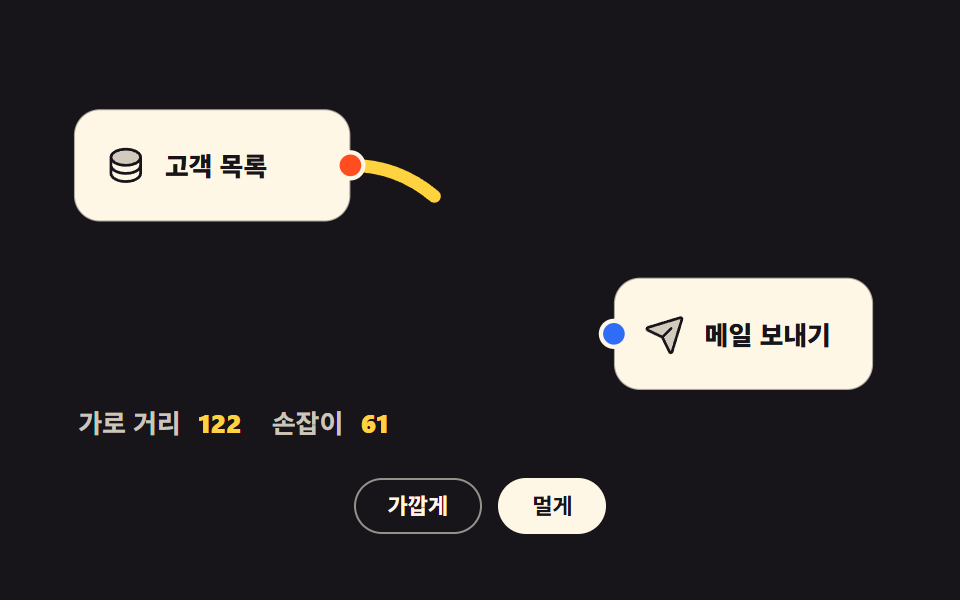
<main class="stage">
<div class="ng is-demo" id="ng">

  <svg class="ng__svg" id="ngSvg" viewBox="0 0 400 180" role="group" aria-label="One curve joining two nodes">

    <!-- 연결선 — 노드보다 먼저 그려 상자 뒤로 깔린다 -->
    <path class="ng__wire" id="ngWire" fill="none" d="M140,46 C201,46 201,124 262,124"/>

    <!-- 앞 노드 -->
    <g class="ng__node">
      <rect x="12" y="20" width="128" height="52" rx="12"/>
      <svg x="26" y="36" width="20" height="20" viewBox="0 0 256 256" fill="currentColor" class="ng__ico" aria-hidden="true"><path d="M216,80c0,26.51-39.4,48-88,48S40,106.51,40,80s39.4-48,88-48S216,53.49,216,80Z" opacity="0.2"/><path d="M128,24C74.17,24,32,48.6,32,80v96c0,31.4,42.17,56,96,56s96-24.6,96-56V80C224,48.6,181.83,24,128,24Zm80,104c0,9.62-7.88,19.43-21.61,26.92C170.93,163.35,150.19,168,128,168s-42.93-4.65-58.39-13.08C55.88,147.43,48,137.62,48,128V111.36c17.06,15,46.23,24.64,80,24.64s62.94-9.68,80-24.64ZM69.61,53.08C85.07,44.65,105.81,40,128,40s42.93,4.65,58.39,13.08C200.12,60.57,208,70.38,208,80s-7.88,19.43-21.61,26.92C170.93,115.35,150.19,120,128,120s-42.93-4.65-58.39-13.08C55.88,99.43,48,89.62,48,80S55.88,60.57,69.61,53.08ZM186.39,202.92C170.93,211.35,150.19,216,128,216s-42.93-4.65-58.39-13.08C55.88,195.43,48,185.62,48,176V159.36c17.06,15,46.23,24.64,80,24.64s62.94-9.68,80-24.64V176C208,185.62,200.12,195.43,186.39,202.92Z"/></svg>
      <text class="ng__nm" x="54" y="46">Customers</text>
      <circle class="ng__port ng__port--out" cx="140" cy="46" r="6"/>
    </g>

    <!-- 뒤 노드 — 통째로 밀어 두 점의 가로 거리를 바꾼다 -->
    <g class="ng__node" id="ngNodeB" transform="translate(66,0)">
      <rect x="196" y="98" width="120" height="52" rx="12"/>
      <svg x="210" y="114" width="20" height="20" viewBox="0 0 256 256" fill="currentColor" class="ng__ico" aria-hidden="true"><path d="M223.69,42.18l-58.22,192a8,8,0,0,1-14.92,1.25L108,148,20.58,105.45a8,8,0,0,1,1.25-14.92l192-58.22A8,8,0,0,1,223.69,42.18Z" opacity="0.2"/><path d="M227.32,28.68a16,16,0,0,0-15.66-4.08l-.15,0L19.57,82.84a16,16,0,0,0-2.49,29.8L102,154l41.3,84.87A15.86,15.86,0,0,0,157.74,248q.69,0,1.38-.06a15.88,15.88,0,0,0,14-11.51l58.2-191.94c0-.05,0-.1,0-.15A16,16,0,0,0,227.32,28.68ZM157.83,231.85l-.05.14,0-.07-40.06-82.3,48-48a8,8,0,0,0-11.31-11.31l-48,48L24.08,98.25l-.07,0,.14,0L216,40Z"/></svg>
      <text class="ng__nm" x="238" y="124">Send email</text>
      <circle class="ng__port ng__port--in" cx="196" cy="124" r="6"/>
    </g>

    <text class="ng__cap" x="14" y="170"><tspan class="ng__capk">Horizontal gap</tspan><tspan class="ng__capv" id="ngDx" dx="8">122</tspan><tspan class="ng__capk" dx="14">Handle</tspan><tspan class="ng__capv" id="ngH" dx="8">61</tspan></text>
  </svg>

  <div class="ng__bar">
    <button type="button" class="ng__btn" id="ngNear" aria-pressed="false">Closer</button>
    <button type="button" class="ng__btn is-on" id="ngFar" aria-pressed="true">Farther</button>
  </div>

</div>
</main>@use "../../../../site/static/demo-tokens" as *;
$duration: $dur-loop;
$easing: $ease-out;
$color: $stage-yellow;
@include stage($stage-ink);
.ng { box-sizing: border-box; width: min(100%, 432px); display: flex; flex-direction: column; gap: $sp-3; }
.ng__svg { display: block; width: 100%; height: auto; }
// 노드 상자 — 어두운 무대 위 크림 카드
.ng__node rect { fill: $subject-cream; stroke: rgba(23, 20, 26, .35); stroke-width: 1; }
.ng__node .ng__ico { color: $subject-ink; }
.ng__nm { font-weight: 800; font-size: 12px; fill: $subject-ink; dominant-baseline: central; }
.ng__port { stroke: $subject-cream; stroke-width: 2; }
.ng__port--out { fill: $stage-orange; }
.ng__port--in { fill: $subject-blue; }
// 연결선 — 끝을 둥글게 잘라 포트 원과 이가 맞는다
.ng__wire {
stroke: $color; stroke-width: 6; stroke-linecap: round;
// 점선 한 칸 = 선 전체 길이. JS 가 getTotalLength() 로 잰 값을 --len 에 넣는다
stroke-dasharray: var(--len);
stroke-dashoffset: 0;
}
.ng__cap { font-size: 12px; }
.ng__capk { font-weight: 600; fill: rgba(255, 247, 230, .78); }
.ng__capv { font-weight: 800; fill: $color; }
.ng__bar { display: flex; justify-content: center; gap: $sp-2; }
.ng__btn {
font-family: inherit; font-weight: 700; font-size: clamp(9px, 2.6vw, 11px); line-height: 1.6;
padding: $sp-1 $sp-4; border-radius: $r-pill; cursor: pointer;
background: none; border: 1px solid rgba(255, 247, 230, .55); color: $subject-cream;
transition: background $dur-quick $easing, color $dur-quick $easing;
}
.ng__btn.is-on { background: $subject-cream; border-color: $subject-cream; color: $subject-ink; }
// ── 미리보기 루프: 선이 왼쪽에서 오른쪽으로 그려졌다가 88% 에 도로 감긴다
// --len 은 JS 가 getTotalLength() 로 잰 실제 선 길이 (점선 한 칸 = 선 전체)
.ng.is-demo .ng__wire {
animation-name: ngWireDraw; animation-duration: $duration;
animation-timing-function: $easing; animation-iteration-count: infinite;
animation-fill-mode: backwards;
}
@keyframes ngWireDraw {
0% { stroke-dashoffset: var(--len); }
60% { stroke-dashoffset: 0; }
78% { stroke-dashoffset: 0; }
88% { stroke-dashoffset: var(--len); }
100% { stroke-dashoffset: var(--len); }
}
// ── 320×200 폰 (값은 내리기만 한다)
@media (max-width: 340px), (max-height: 220px) {
.ng { gap: $sp-1; }
.ng__btn { padding: 0 $sp-3; }
}
@media (prefers-reduced-motion: reduce) {
.ng.is-demo .ng__wire { animation-name: none !important; stroke-dashoffset: 0 !important; }
.ng__btn { transition: none !important; }
}html, body {
margin: 0;
overflow: hidden;
}
.stage {
box-sizing: border-box;
min-height: 100vh;
display: grid;
place-items: center;
margin: 0;
background: #17141a;
font-family: -apple-system, "Segoe UI", "Noto Sans KR", sans-serif;
padding: clamp(8px, 4vw, 24px);
}
.ng {
box-sizing: border-box;
width: min(100%, 432px);
display: flex;
flex-direction: column;
gap: 12px;
}
.ng__svg {
display: block;
width: 100%;
height: auto;
}
.ng__node rect {
fill: #fff7e6;
stroke: rgba(23, 20, 26, 0.35);
stroke-width: 1;
}
.ng__node .ng__ico {
color: #17141a;
}
.ng__nm {
font-weight: 800;
font-size: 12px;
fill: #17141a;
dominant-baseline: central;
}
.ng__port {
stroke: #fff7e6;
stroke-width: 2;
}
.ng__port--out {
fill: #ff4d1f;
}
.ng__port--in {
fill: #2f6df6;
}
.ng__wire {
stroke: #ffd23f;
stroke-width: 6;
stroke-linecap: round;
stroke-dasharray: var(--len);
stroke-dashoffset: 0;
}
.ng__cap {
font-size: 12px;
}
.ng__capk {
font-weight: 600;
fill: rgba(255, 247, 230, 0.78);
}
.ng__capv {
font-weight: 800;
fill: #ffd23f;
}
.ng__bar {
display: flex;
justify-content: center;
gap: 8px;
}
.ng__btn {
font-family: inherit;
font-weight: 700;
font-size: clamp(9px, 2.6vw, 11px);
line-height: 1.6;
padding: 4px 16px;
border-radius: 999px;
cursor: pointer;
background: none;
border: 1px solid rgba(255, 247, 230, 0.55);
color: #fff7e6;
transition: background 220ms ease-out, color 220ms ease-out;
}
.ng__btn.is-on {
background: #fff7e6;
border-color: #fff7e6;
color: #17141a;
}
.ng.is-demo .ng__wire {
animation-name: ngWireDraw;
animation-duration: 2s;
animation-timing-function: ease-out;
animation-iteration-count: infinite;
animation-fill-mode: backwards;
}
@keyframes ngWireDraw {
0% {
stroke-dashoffset: var(--len);
}
60% {
stroke-dashoffset: 0;
}
78% {
stroke-dashoffset: 0;
}
88% {
stroke-dashoffset: var(--len);
}
100% {
stroke-dashoffset: var(--len);
}
}
@media (max-width: 340px), (max-height: 220px) {
.ng {
gap: 4px;
}
.ng__btn {
padding: 0 12px;
}
}
@media (prefers-reduced-motion: reduce) {
.ng.is-demo .ng__wire {
animation-name: none !important;
stroke-dashoffset: 0 !important;
}
.ng__btn {
transition: none !important;
}
}var ng = document.getElementById('ng');
var wire = document.getElementById('ngWire');
var nodeB = document.getElementById('ngNodeB');
var dxOut = document.getElementById('ngDx');
var handleOut = document.getElementById('ngH');
var nearBtn = document.getElementById('ngNear');
var farBtn = document.getElementById('ngFar');
var OUT = { x: 140, y: 46 }; // Output port
var BASE_IN = { x: 196, y: 124 }; // 뒤 노드가 「Closer」 자리에 있을 때의 Input port
var SHIFT = { near: 0, far: 66 }; // 뒤 노드를 오른쪽으로 미는 거리
// 3차 베지어 — 손잡이는 두 점의 가로 거리의 절반, 최소 40.
// 손잡이가 두 점에서 수평으로 뻗으므로 선은 항상 포트 옆구리로 빠진다.
function wirePath(x1, y1, x2, y2) {
var h = Math.max(40, Math.abs(x2 - x1) * 0.5);
return { d: 'M' + x1 + ',' + y1 + ' C' + (x1 + h) + ',' + y1 + ' ' + (x2 - h) + ',' + y2 + ' ' + x2 + ',' + y2, handle: h };
}
function layout(shift) {
nodeB.setAttribute('transform', 'translate(' + shift + ',0)');
var inX = BASE_IN.x + shift;
var r = wirePath(OUT.x, OUT.y, inX, BASE_IN.y);
wire.setAttribute('d', r.d);
var len = wire.getTotalLength(); // 선 길이를 재서 점선 한 칸으로 만든다
wire.style.setProperty('--len', len); // 점선 칸 길이는 scss 가 var(--len) 으로 받는다
dxOut.textContent = String(inX - OUT.x);
handleOut.textContent = String(Math.round(r.handle));
}
function pick(kind) {
ng.classList.remove('is-demo');
layout(SHIFT[kind]);
nearBtn.classList.toggle('is-on', kind === 'near');
farBtn.classList.toggle('is-on', kind === 'far');
nearBtn.setAttribute('aria-pressed', String(kind === 'near'));
farBtn.setAttribute('aria-pressed', String(kind === 'far'));
}
nearBtn.addEventListener('click', function () { pick('near'); });
farBtn.addEventListener('click', function () { pick('far'); });
layout(SHIFT.far);import { useEffect, useRef, useState } from "react";
import styles from "./BezierWire.module.scss";
export type BezierWireProps = { duration?: number; easing?: string; color?: string };
const OUT = { x: 140, y: 46 }; // 보내는 점
const BASE_IN = { x: 196, y: 124 }; // 뒤 노드가 「가깝게」 자리에 있을 때의 받는 점
const SHIFT = { near: 0, far: 66 }; // 뒤 노드를 오른쪽으로 미는 거리
// 3차 베지어 — 손잡이는 두 점의 가로 거리의 절반, 최소 40.
// 손잡이가 두 점에서 수평으로 뻗으므로 선은 항상 포트 옆구리로 빠진다.
function wirePath(x1: number, y1: number, x2: number, y2: number): { d: string; handle: number } {
const h = Math.max(40, Math.abs(x2 - x1) * 0.5);
return { d: `M${x1},${y1} C${x1 + h},${y1} ${x2 - h},${y2} ${x2},${y2}`, handle: h };
}
export default function BezierWire({
duration = 2000,
easing = "ease-out",
color = "#ffd23f",
}: BezierWireProps) {
const [demo, setDemo] = useState(true);
const [kind, setKind] = useState("far");
const [len, setLen] = useState(0);
const wireRef = useRef<SVGPathElement>(null);
const shift = kind === "far" ? SHIFT.far : SHIFT.near;
const inX = BASE_IN.x + shift;
const wire = wirePath(OUT.x, OUT.y, inX, BASE_IN.y);
useEffect(() => {
const el = wireRef.current;
if (el) setLen(el.getTotalLength()); // 선 길이를 재서 점선 한 칸으로 만든다
}, [wire.d]);
const pick = (next: string) => { setDemo(false); setKind(next); };
return (
<main className={styles.stage}>
<div className={styles.ng}>
<svg className={styles.svg} viewBox="0 0 400 180" role="group" aria-label="두 노드를 잇는 곡선 한 줄">
<path
ref={wireRef}
className={styles.wire}
fill="none"
d={wire.d}
style={{
stroke: color,
"--len": len,
...(demo
? {
animationName: "ngWireDraw",
animationDuration: `${duration}ms`,
animationTimingFunction: easing,
animationIterationCount: "infinite",
animationFillMode: "backwards",
}
: {}),
}}
/>
<g className={styles.node}>
<rect x="12" y="20" width="128" height="52" rx="12"/>
<svg x="26" y="36" width="20" height="20" viewBox="0 0 256 256" fill="currentColor" className={styles.ico} aria-hidden="true"><path d="M216,80c0,26.51-39.4,48-88,48S40,106.51,40,80s39.4-48,88-48S216,53.49,216,80Z" opacity="0.2"/><path d="M128,24C74.17,24,32,48.6,32,80v96c0,31.4,42.17,56,96,56s96-24.6,96-56V80C224,48.6,181.83,24,128,24Zm80,104c0,9.62-7.88,19.43-21.61,26.92C170.93,163.35,150.19,168,128,168s-42.93-4.65-58.39-13.08C55.88,147.43,48,137.62,48,128V111.36c17.06,15,46.23,24.64,80,24.64s62.94-9.68,80-24.64ZM69.61,53.08C85.07,44.65,105.81,40,128,40s42.93,4.65,58.39,13.08C200.12,60.57,208,70.38,208,80s-7.88,19.43-21.61,26.92C170.93,115.35,150.19,120,128,120s-42.93-4.65-58.39-13.08C55.88,99.43,48,89.62,48,80S55.88,60.57,69.61,53.08ZM186.39,202.92C170.93,211.35,150.19,216,128,216s-42.93-4.65-58.39-13.08C55.88,195.43,48,185.62,48,176V159.36c17.06,15,46.23,24.64,80,24.64s62.94-9.68,80-24.64V176C208,185.62,200.12,195.43,186.39,202.92Z"/></svg>
<text className={styles.nm} x="54" y="46">고객 목록</text>
<circle className={styles.portOut} cx="140" cy="46" r="6"/>
</g>
<g className={styles.node} transform={`translate(${shift},0)`}>
<rect x="196" y="98" width="120" height="52" rx="12"/>
<svg x="210" y="114" width="20" height="20" viewBox="0 0 256 256" fill="currentColor" className={styles.ico} aria-hidden="true"><path d="M223.69,42.18l-58.22,192a8,8,0,0,1-14.92,1.25L108,148,20.58,105.45a8,8,0,0,1,1.25-14.92l192-58.22A8,8,0,0,1,223.69,42.18Z" opacity="0.2"/><path d="M227.32,28.68a16,16,0,0,0-15.66-4.08l-.15,0L19.57,82.84a16,16,0,0,0-2.49,29.8L102,154l41.3,84.87A15.86,15.86,0,0,0,157.74,248q.69,0,1.38-.06a15.88,15.88,0,0,0,14-11.51l58.2-191.94c0-.05,0-.1,0-.15A16,16,0,0,0,227.32,28.68ZM157.83,231.85l-.05.14,0-.07-40.06-82.3,48-48a8,8,0,0,0-11.31-11.31l-48,48L24.08,98.25l-.07,0,.14,0L216,40Z"/></svg>
<text className={styles.nm} x="238" y="124">메일 보내기</text>
<circle className={styles.portIn} cx="196" cy="124" r="6"/>
</g>
<text className={styles.cap} x="14" y="170">
<tspan className={styles.capk}>가로 거리</tspan>
<tspan className={styles.capv} dx="8">{inX - OUT.x}</tspan>
<tspan className={styles.capk} dx="14">손잡이</tspan>
<tspan className={styles.capv} dx="8">{Math.round(wire.handle)}</tspan>
</text>
</svg>
<div className={styles.bar}>
<button
type="button"
className={`${styles.btn} ${kind === "near" ? styles.isOn : ""}`}
aria-pressed={kind === "near"}
onClick={() => pick("near")}
>가깝게</button>
<button
type="button"
className={`${styles.btn} ${kind === "far" ? styles.isOn : ""}`}
aria-pressed={kind === "far"}
onClick={() => pick("far")}
>멀게</button>
</div>
</div>
</main>
);
}02 Curved wire between two ports — Measured area 0.802% · moving frames 18/23Original by GODRICH · SCSS and React ship in the zip · Node Based UI Design: 9 Patterns, No Library
The post this demo lives in
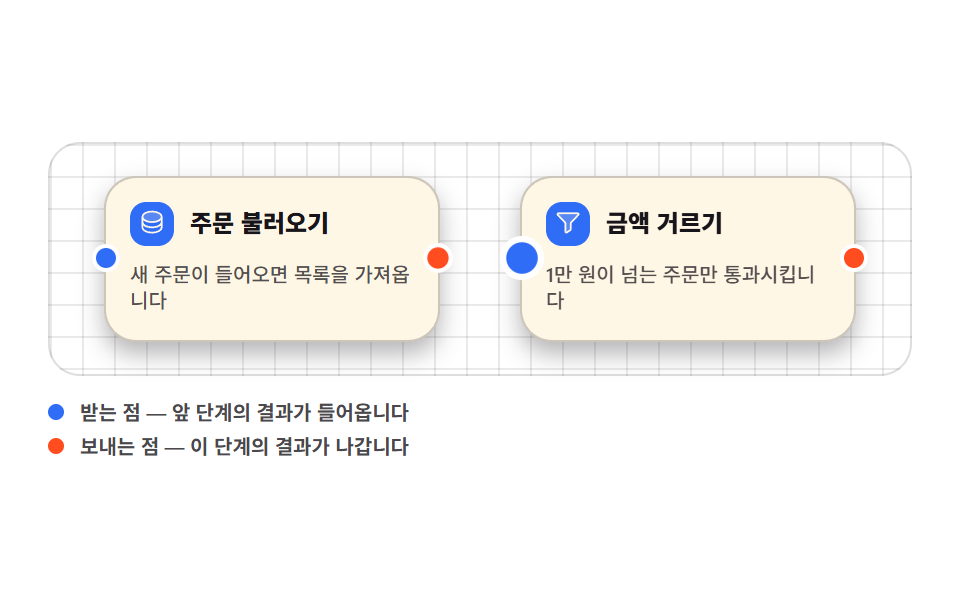 Node Based UI Design: 9 Patterns, No LibraryNode based ui design is the wiring screen — boxes dropped on a canvas and joined with lines, the way n8n, Figma, and Ble See all demos in this post