04Cutting a wire
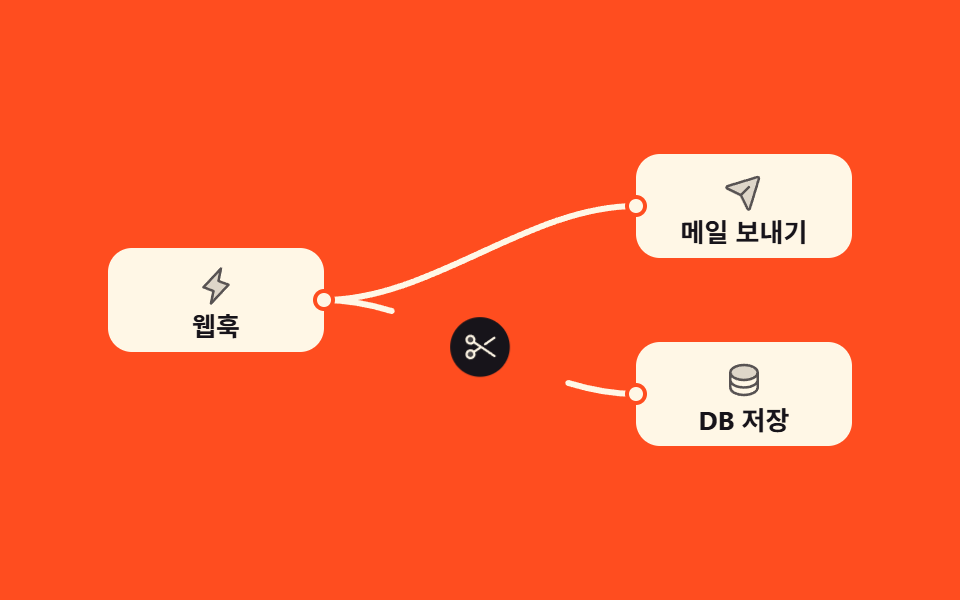
Hovering a wire raises a cut button at its midpoint, and pressing it splits the wire outward from the middle until it is gone.
Best forUndoing a wrong wire, cleaning up branches
stroke-dashoffsetpointer-events: strokearia-label
<main class="stage">
<div class="ng is-demo" id="ng">
<svg class="ng__canvas" viewBox="0 0 400 170" role="group" aria-label="Two wires joining three nodes">

  <!-- 위 연결선: 루프 내내 그대로 둔다 (끊겨도 화면이 비지 않게) -->
  <g class="ng__wirewrap ng__wirewrap--t">
    <path class="ng__wire" d="M122,85 C149,85 174.5,73.25 200,61.5"/>
    <path class="ng__wire" d="M278,38 C251,38 225.5,49.75 200,61.5"/>
    <path class="ng__hit" d="M122,85 C176,85 224,38 278,38"/>
    <g class="ng__cutpos" transform="translate(200 61.5)">
      <g class="ng__cut" role="button" tabindex="0" aria-pressed="false" aria-label="Cut wire">
        <circle class="ng__cutbg" r="15"/>
        <svg class="ng__cutico" x="-9" y="-9" width="18" height="18" viewBox="0 0 256 256" fill="currentColor" aria-hidden="true"><path d="M40.2,95.8a28,28,0,1,1,39.6,0A28,28,0,0,1,40.2,95.8Zm0,64.4a28,28,0,1,0,39.6,0A28,28,0,0,0,40.2,160.2Z" opacity="0.2"/><path d="M157.73,113.13A8,8,0,0,1,159.82,102L227.48,55.7a8,8,0,0,1,9,13.21l-67.67,46.3a7.92,7.92,0,0,1-4.51,1.4A8,8,0,0,1,157.73,113.13Zm80.87,85.09a8,8,0,0,1-11.12,2.08L136,137.7,93.49,166.78a36,36,0,1,1-9-13.19L121.83,128,84.44,102.41a35.86,35.86,0,1,1,9-13.19l143,97.87A8,8,0,0,1,238.6,198.22ZM80,180a20,20,0,1,0-5.86,14.14A19.85,19.85,0,0,0,80,180ZM74.14,90.13a20,20,0,1,0-28.28,0A19.85,19.85,0,0,0,74.14,90.13Z"/></svg>
      </g>
    </g>
  </g>

  <!-- 아래 연결선: 미리보기 루프에서 끊겼다 다시 이어진다 -->
  <g class="ng__wirewrap ng__wirewrap--b">
    <path class="ng__wire" d="M122,85 C149,85 174.5,96.75 200,108.5"/>
    <path class="ng__wire" d="M278,132 C251,132 225.5,120.25 200,108.5"/>
    <path class="ng__hit" d="M122,85 C176,85 224,132 278,132"/>
    <g class="ng__cutpos" transform="translate(200 108.5)">
      <g class="ng__cut" role="button" tabindex="0" aria-pressed="false" aria-label="Cut wire">
        <circle class="ng__cutbg" r="15"/>
        <svg class="ng__cutico" x="-9" y="-9" width="18" height="18" viewBox="0 0 256 256" fill="currentColor" aria-hidden="true"><path d="M40.2,95.8a28,28,0,1,1,39.6,0A28,28,0,0,1,40.2,95.8Zm0,64.4a28,28,0,1,0,39.6,0A28,28,0,0,0,40.2,160.2Z" opacity="0.2"/><path d="M157.73,113.13A8,8,0,0,1,159.82,102L227.48,55.7a8,8,0,0,1,9,13.21l-67.67,46.3a7.92,7.92,0,0,1-4.51,1.4A8,8,0,0,1,157.73,113.13Zm80.87,85.09a8,8,0,0,1-11.12,2.08L136,137.7,93.49,166.78a36,36,0,1,1-9-13.19L121.83,128,84.44,102.41a35.86,35.86,0,1,1,9-13.19l143,97.87A8,8,0,0,1,238.6,198.22ZM80,180a20,20,0,1,0-5.86,14.14A19.85,19.85,0,0,0,80,180ZM74.14,90.13a20,20,0,1,0-28.28,0A19.85,19.85,0,0,0,74.14,90.13Z"/></svg>
      </g>
    </g>
  </g>

  <g class="ng__node ng__node--a">
    <rect class="ng__box" x="14" y="59" width="108" height="52" rx="12"/>
    <svg class="ng__ico" x="58" y="68" width="20" height="20" viewBox="0 0 256 256" fill="currentColor" aria-hidden="true"><path d="M96,240l16-80L48,136,160,16,144,96l64,24Z" opacity="0.2"/><path d="M215.79,118.17a8,8,0,0,0-5-5.66L153.18,90.9l14.66-73.33a8,8,0,0,0-13.69-7l-112,120a8,8,0,0,0,3,13l57.63,21.61L88.16,238.43a8,8,0,0,0,13.69,7l112-120A8,8,0,0,0,215.79,118.17ZM109.37,214l10.47-52.38a8,8,0,0,0-5-9.06L62,132.71l84.62-90.66L136.16,94.43a8,8,0,0,0,5,9.06l52.8,19.8Z"/></svg>
    <text class="ng__label" x="68" y="103" text-anchor="middle">Webhook</text>
    <circle class="ng__port" cx="122" cy="85" r="4.5"/>
  </g>

  <g class="ng__node ng__node--t">
    <rect class="ng__box" x="278" y="12" width="108" height="52" rx="12"/>
    <svg class="ng__ico" x="322" y="21" width="20" height="20" viewBox="0 0 256 256" fill="currentColor" aria-hidden="true"><path d="M223.69,42.18l-58.22,192a8,8,0,0,1-14.92,1.25L108,148,20.58,105.45a8,8,0,0,1,1.25-14.92l192-58.22A8,8,0,0,1,223.69,42.18Z" opacity="0.2"/><path d="M227.32,28.68a16,16,0,0,0-15.66-4.08l-.15,0L19.57,82.84a16,16,0,0,0-2.49,29.8L102,154l41.3,84.87A15.86,15.86,0,0,0,157.74,248q.69,0,1.38-.06a15.88,15.88,0,0,0,14-11.51l58.2-191.94c0-.05,0-.1,0-.15A16,16,0,0,0,227.32,28.68ZM157.83,231.85l-.05.14,0-.07-40.06-82.3,48-48a8,8,0,0,0-11.31-11.31l-48,48L24.08,98.25l-.07,0,.14,0L216,40Z"/></svg>
    <text class="ng__label" x="332" y="56" text-anchor="middle">Send email</text>
    <circle class="ng__port" cx="278" cy="38" r="4.5"/>
  </g>

  <g class="ng__node ng__node--c">
    <rect class="ng__box" x="278" y="106" width="108" height="52" rx="12"/>
    <svg class="ng__ico" x="322" y="115" width="20" height="20" viewBox="0 0 256 256" fill="currentColor" aria-hidden="true"><path d="M216,80c0,26.51-39.4,48-88,48S40,106.51,40,80s39.4-48,88-48S216,53.49,216,80Z" opacity="0.2"/><path d="M128,24C74.17,24,32,48.6,32,80v96c0,31.4,42.17,56,96,56s96-24.6,96-56V80C224,48.6,181.83,24,128,24Zm80,104c0,9.62-7.88,19.43-21.61,26.92C170.93,163.35,150.19,168,128,168s-42.93-4.65-58.39-13.08C55.88,147.43,48,137.62,48,128V111.36c17.06,15,46.23,24.64,80,24.64s62.94-9.68,80-24.64ZM69.61,53.08C85.07,44.65,105.81,40,128,40s42.93,4.65,58.39,13.08C200.12,60.57,208,70.38,208,80s-7.88,19.43-21.61,26.92C170.93,115.35,150.19,120,128,120s-42.93-4.65-58.39-13.08C55.88,99.43,48,89.62,48,80S55.88,60.57,69.61,53.08ZM186.39,202.92C170.93,211.35,150.19,216,128,216s-42.93-4.65-58.39-13.08C55.88,195.43,48,185.62,48,176V159.36c17.06,15,46.23,24.64,80,24.64s62.94-9.68,80-24.64V176C208,185.62,200.12,195.43,186.39,202.92Z"/></svg>
    <text class="ng__label" x="332" y="150" text-anchor="middle">Save to DB</text>
    <circle class="ng__port" cx="278" cy="132" r="4.5"/>
  </g>
</svg>
</div>
</main>@use "../../../../site/static/demo-tokens" as *;
// 변형 3개는 이 셋만 바꾼다
$duration: $dur-base;
$easing: $ease-spring;
$color: $subject-cream;
@include stage($stage-orange);
// 반쪽 곡선 한 줄의 실제 길이는 82.14 (3차 베지에 수치적분) — 1 만 여유를 준 83 으로 잡는다.
// dasharray 를 길이보다 크게 잡으면 dashoffset 이 길이를 넘는 구간이 무동작이 되므로 딱 붙여 쓴다
$wire-len: 83;
.ng { width: min(100%, 400px); }
.ng__canvas { display: block; width: 100%; height: auto; }
// ── 노드
.ng__box { fill: $subject-cream; }
.ng__ico { color: $subject-ink; opacity: .72; }
.ng__label { font-weight: 700; font-size: 13px; fill: $subject-ink; }
.ng__port { fill: $subject-cream; stroke: $stage-orange; stroke-width: 2; }
// ── 연결선: 가운데(200,y)에서 각 노드 쪽으로 뻗는 반쪽 두 개.
// d 의 시작점이 노드, 끝점이 가운데라서 dashoffset 을 키우면 **가운데부터** 비어 간다
.ng__wire {
fill: none; stroke: $color; stroke-width: 3; stroke-linecap: round; pointer-events: none;
stroke-dasharray: $wire-len; stroke-dashoffset: 0;
transition: stroke-dashoffset $duration $easing, stroke-width $dur-quick $easing;
}
// 집는 영역만 굵게 — 칠(fill)이 아니라 **선 위에서만** 집힌다
.ng__hit { fill: none; stroke: transparent; stroke-width: 18; pointer-events: stroke; cursor: pointer; }
.ng__wirewrap:hover .ng__wire,
.ng__wirewrap:focus-within .ng__wire { stroke-width: 5; }
.ng__wirewrap.is-cut .ng__wire { stroke-dashoffset: $wire-len; }
// ── 가위 단추: 자기 중심에서 커진다 (transform-box: fill-box 가 있어야 50% 50% 가 제 bbox 중심)
.ng__cut {
transform-box: fill-box; transform-origin: 50% 50%;
opacity: 0; transform: scale(.6); pointer-events: none; cursor: pointer;
transition: opacity $dur-quick $easing, transform $dur-quick $ease-pop;
}
.ng__wirewrap:hover .ng__cut,
.ng__wirewrap:focus-within .ng__cut,
.ng__wirewrap.is-cut .ng__cut { opacity: 1; transform: scale(1); pointer-events: auto; }
.ng__cutbg { fill: $subject-ink; }
.ng__cutico { color: $subject-cream; }
// SVG <g role="button"> 는 마우스 클릭에도 UA 포커스 사각형이 뜬다 (285 Playwright 실측) — 링은 우리가 그린다
.ng__cut:focus { outline: none; }
.ng__cut:focus-visible .ng__cutbg { stroke: $subject-cream; stroke-width: 3; }
// ── 미리보기 루프 (2s): 아래 선만 가위가 떠올랐다 → 끊겼다 → 88% 안에 다시 이어진다.
// 위 선과 노드 세 장은 루프 내내 그대로라 대표 이미지가 절대 비지 않는다
.ng.is-demo .ng__wirewrap--b .ng__wire {
animation-name: ngCut; animation-duration: 2s; animation-timing-function: $easing; animation-iteration-count: infinite;
}
.ng.is-demo .ng__wirewrap--b .ng__cut {
animation-name: ngCutBtn; animation-duration: 2s; animation-timing-function: $easing; animation-iteration-count: infinite;
}
// 선이 끊긴 동안 받는 점만 비워 둔다. 카드째 어둡게 하면 poster 뽑기가 「끊는 장면」이 아니라
// 「되살아나는 장면」으로 넘어간다 — 면적이 같아 tie 가 나므로 대표 이미지가 흔들린다 (285 실측)
.ng.is-demo .ng__node--c .ng__port {
animation-name: ngPortOff; animation-duration: 2s; animation-timing-function: steps(1, end); animation-iteration-count: infinite;
}
@keyframes ngCut {
0%, 34% { stroke-dashoffset: 0; }
56%, 68% { stroke-dashoffset: $wire-len; }
88%, 100% { stroke-dashoffset: 0; }
}
@keyframes ngCutBtn {
0% { opacity: 0; transform: scale(.6) rotate(-18deg); }
14%, 30% { opacity: 1; transform: scale(1) rotate(0deg); }
34% { opacity: 1; transform: scale(.82) rotate(-8deg); }
40%, 60% { opacity: 1; transform: scale(1) rotate(0deg); }
// 단추는 선이 다시 이어지기(68%) 전에 사라진다 — 반투명 단추가 선 위에 겹친 유령 프레임을 막는다
68%, 100% { opacity: 0; transform: scale(.6) rotate(-18deg); }
}
// 상태 교체는 컷 — 크로스페이드 중간 장(반투명 유령)을 만들지 않는다
@keyframes ngPortOff {
0%, 55.9% { fill: $subject-cream; }
56%, 87.9% { fill: $stage-orange; }
88%, 100% { fill: $subject-cream; }
}
// ── 320×200 폰 (BD9): 글자만 줄인다. 여기서 간격을 올리면 세로가 넘친다
@media (max-width: 340px), (max-height: 220px) {
.ng__label { font-size: 14px; }
}
@media (prefers-reduced-motion: reduce) {
.ng__wire,
.ng__cut,
.ng__port { animation: none !important; transition: none !important; }
}html, body {
margin: 0;
overflow: hidden;
}
.stage {
box-sizing: border-box;
min-height: 100vh;
display: grid;
place-items: center;
margin: 0;
background: #ff4d1f;
font-family: -apple-system, "Segoe UI", "Noto Sans KR", sans-serif;
padding: clamp(8px, 4vw, 24px);
}
.ng {
width: min(100%, 400px);
}
.ng__canvas {
display: block;
width: 100%;
height: auto;
}
.ng__box {
fill: #fff7e6;
}
.ng__ico {
color: #17141a;
opacity: 0.72;
}
.ng__label {
font-weight: 700;
font-size: 13px;
fill: #17141a;
}
.ng__port {
fill: #fff7e6;
stroke: #ff4d1f;
stroke-width: 2;
}
.ng__wire {
fill: none;
stroke: #fff7e6;
stroke-width: 3;
stroke-linecap: round;
pointer-events: none;
stroke-dasharray: 83;
stroke-dashoffset: 0;
transition: stroke-dashoffset 300ms cubic-bezier(0.2, 0.8, 0.2, 1), stroke-width 220ms cubic-bezier(0.2, 0.8, 0.2, 1);
}
.ng__hit {
fill: none;
stroke: transparent;
stroke-width: 18;
pointer-events: stroke;
cursor: pointer;
}
.ng__wirewrap:hover .ng__wire,
.ng__wirewrap:focus-within .ng__wire {
stroke-width: 5;
}
.ng__wirewrap.is-cut .ng__wire {
stroke-dashoffset: 83;
}
.ng__cut {
transform-box: fill-box;
transform-origin: 50% 50%;
opacity: 0;
transform: scale(0.6);
pointer-events: none;
cursor: pointer;
transition: opacity 220ms cubic-bezier(0.2, 0.8, 0.2, 1), transform 220ms cubic-bezier(0.2, 1.4, 0.4, 1);
}
.ng__wirewrap:hover .ng__cut,
.ng__wirewrap:focus-within .ng__cut,
.ng__wirewrap.is-cut .ng__cut {
opacity: 1;
transform: scale(1);
pointer-events: auto;
}
.ng__cutbg {
fill: #17141a;
}
.ng__cutico {
color: #fff7e6;
}
.ng__cut:focus {
outline: none;
}
.ng__cut:focus-visible .ng__cutbg {
stroke: #fff7e6;
stroke-width: 3;
}
.ng.is-demo .ng__wirewrap--b .ng__wire {
animation-name: ngCut;
animation-duration: 2s;
animation-timing-function: cubic-bezier(0.2, 0.8, 0.2, 1);
animation-iteration-count: infinite;
}
.ng.is-demo .ng__wirewrap--b .ng__cut {
animation-name: ngCutBtn;
animation-duration: 2s;
animation-timing-function: cubic-bezier(0.2, 0.8, 0.2, 1);
animation-iteration-count: infinite;
}
.ng.is-demo .ng__node--c .ng__port {
animation-name: ngPortOff;
animation-duration: 2s;
animation-timing-function: steps(1, end);
animation-iteration-count: infinite;
}
@keyframes ngCut {
0%, 34% {
stroke-dashoffset: 0;
}
56%, 68% {
stroke-dashoffset: 83;
}
88%, 100% {
stroke-dashoffset: 0;
}
}
@keyframes ngCutBtn {
0% {
opacity: 0;
transform: scale(0.6) rotate(-18deg);
}
14%, 30% {
opacity: 1;
transform: scale(1) rotate(0deg);
}
34% {
opacity: 1;
transform: scale(0.82) rotate(-8deg);
}
40%, 60% {
opacity: 1;
transform: scale(1) rotate(0deg);
}
68%, 100% {
opacity: 0;
transform: scale(0.6) rotate(-18deg);
}
}
@keyframes ngPortOff {
0%, 55.9% {
fill: #fff7e6;
}
56%, 87.9% {
fill: #ff4d1f;
}
88%, 100% {
fill: #fff7e6;
}
}
@media (max-width: 340px), (max-height: 220px) {
.ng__label {
font-size: 14px;
}
}
@media (prefers-reduced-motion: reduce) {
.ng__wire,
.ng__cut,
.ng__port {
animation: none !important;
transition: none !important;
}
}var root = document.getElementById('ng');
var cutButtons = document.querySelectorAll('.ng__cut');
function toggleWire(button) {
root.classList.remove('is-demo');
var wrap = button.closest('.ng__wirewrap');
var isCut = wrap.classList.toggle('is-cut');
button.setAttribute('aria-pressed', String(isCut));
button.setAttribute('aria-label', isCut ? 'Reconnect' : 'Cut wire');
}
for (var i = 0; i < cutButtons.length; i++) {
cutButtons[i].addEventListener('click', function () { toggleWire(this); });
cutButtons[i].addEventListener('keydown', function (event) {
if (event.key === 'Enter' || event.key === ' ') { event.preventDefault(); toggleWire(this); }
});
}import { useState } from "react";
import styles from "./CutWire.module.scss";
export type CutWireProps = { duration?: number; easing?: string; color?: string };
/** ambient 에 React 이벤트 제네릭이 없다 — 파일 안에서 쓰는 만큼만 로컬 타입으로 선언한다 */
type KeyEvt = { key: string; preventDefault: () => void };
const SCISSORS = (
<svg className={styles.cutico} x="-9" y="-9" width="18" height="18" viewBox="0 0 256 256" fill="currentColor" aria-hidden="true">
<path d="M40.2,95.8a28,28,0,1,1,39.6,0A28,28,0,0,1,40.2,95.8Zm0,64.4a28,28,0,1,0,39.6,0A28,28,0,0,0,40.2,160.2Z" opacity="0.2" />
<path d="M157.73,113.13A8,8,0,0,1,159.82,102L227.48,55.7a8,8,0,0,1,9,13.21l-67.67,46.3a7.92,7.92,0,0,1-4.51,1.4A8,8,0,0,1,157.73,113.13Zm80.87,85.09a8,8,0,0,1-11.12,2.08L136,137.7,93.49,166.78a36,36,0,1,1-9-13.19L121.83,128,84.44,102.41a35.86,35.86,0,1,1,9-13.19l143,97.87A8,8,0,0,1,238.6,198.22ZM80,180a20,20,0,1,0-5.86,14.14A19.85,19.85,0,0,0,80,180ZM74.14,90.13a20,20,0,1,0-28.28,0A19.85,19.85,0,0,0,74.14,90.13Z" />
</svg>
);
/** 가운데(200, y)에서 노드 쪽으로 뻗는 반쪽 두 개 + 집는 영역이 되는 전체 곡선 */
const WIRES = [
{ id: "t", halfA: "M122,85 C149,85 174.5,73.25 200,61.5", halfB: "M278,38 C251,38 225.5,49.75 200,61.5", hit: "M122,85 C176,85 224,38 278,38", mid: "translate(200 61.5)" },
{ id: "b", halfA: "M122,85 C149,85 174.5,96.75 200,108.5", halfB: "M278,132 C251,132 225.5,120.25 200,108.5", hit: "M122,85 C176,85 224,132 278,132", mid: "translate(200 108.5)" },
];
export default function CutWire({ duration = 300, easing = "cubic-bezier(.2,.8,.2,1)", color = "#fff7e6" }: CutWireProps) {
const [demo, setDemo] = useState(true);
const [cut, setCut] = useState<string[]>([]);
const toggleWire = (id: string) => {
setDemo(false);
setCut((prev) => (prev.indexOf(id) >= 0 ? prev.filter((v) => v !== id) : prev.concat([id])));
};
return (
<main className={styles.stage}>
<div
className={`${styles.ng} ${demo ? styles.isDemo : ""}`}
style={{ "--ng-duration": `${duration}ms`, "--ng-easing": easing, "--ng-color": color }}
>
<svg className={styles.canvas} viewBox="0 0 400 170" role="group" aria-label="노드 세 개를 잇는 연결선 두 개">
{WIRES.map((w) => {
const isCut = cut.indexOf(w.id) >= 0;
return (
<g key={w.id} className={`${styles.wirewrap} ${w.id === "b" ? styles.wireB : ""} ${isCut ? styles.isCut : ""}`}>
<path className={styles.wire} d={w.halfA} />
<path className={styles.wire} d={w.halfB} />
<path className={styles.hit} d={w.hit} />
<g transform={w.mid}>
<g
className={styles.cut}
role="button"
tabIndex={0}
aria-pressed={isCut}
aria-label={isCut ? "다시 잇기" : "연결 끊기"}
onClick={() => toggleWire(w.id)}
onKeyDown={(e: KeyEvt) => { if (e.key === "Enter" || e.key === " ") { e.preventDefault(); toggleWire(w.id); } }}
>
<circle className={styles.cutbg} r="15" />
{SCISSORS}
</g>
</g>
</g>
);
})}
<g className={styles.node}>
<rect className={styles.box} x="14" y="59" width="108" height="52" rx="12" />
<svg className={styles.ico} x="58" y="68" width="20" height="20" viewBox="0 0 256 256" fill="currentColor" aria-hidden="true"><path d="M96,240l16-80L48,136,160,16,144,96l64,24Z" opacity="0.2" /><path d="M215.79,118.17a8,8,0,0,0-5-5.66L153.18,90.9l14.66-73.33a8,8,0,0,0-13.69-7l-112,120a8,8,0,0,0,3,13l57.63,21.61L88.16,238.43a8,8,0,0,0,13.69,7l112-120A8,8,0,0,0,215.79,118.17ZM109.37,214l10.47-52.38a8,8,0,0,0-5-9.06L62,132.71l84.62-90.66L136.16,94.43a8,8,0,0,0,5,9.06l52.8,19.8Z" /></svg>
<text className={styles.label} x="68" y="103" textAnchor="middle">웹훅</text>
<circle className={styles.port} cx="122" cy="85" r="4.5" />
</g>
<g className={styles.node}>
<rect className={styles.box} x="278" y="12" width="108" height="52" rx="12" />
<svg className={styles.ico} x="322" y="21" width="20" height="20" viewBox="0 0 256 256" fill="currentColor" aria-hidden="true"><path d="M223.69,42.18l-58.22,192a8,8,0,0,1-14.92,1.25L108,148,20.58,105.45a8,8,0,0,1,1.25-14.92l192-58.22A8,8,0,0,1,223.69,42.18Z" opacity="0.2" /><path d="M227.32,28.68a16,16,0,0,0-15.66-4.08l-.15,0L19.57,82.84a16,16,0,0,0-2.49,29.8L102,154l41.3,84.87A15.86,15.86,0,0,0,157.74,248q.69,0,1.38-.06a15.88,15.88,0,0,0,14-11.51l58.2-191.94c0-.05,0-.1,0-.15A16,16,0,0,0,227.32,28.68ZM157.83,231.85l-.05.14,0-.07-40.06-82.3,48-48a8,8,0,0,0-11.31-11.31l-48,48L24.08,98.25l-.07,0,.14,0L216,40Z" /></svg>
<text className={styles.label} x="332" y="56" textAnchor="middle">메일 보내기</text>
<circle className={styles.port} cx="278" cy="38" r="4.5" />
</g>
<g className={`${styles.node} ${styles.nodeC}`}>
<rect className={styles.box} x="278" y="106" width="108" height="52" rx="12" />
<svg className={styles.ico} x="322" y="115" width="20" height="20" viewBox="0 0 256 256" fill="currentColor" aria-hidden="true"><path d="M216,80c0,26.51-39.4,48-88,48S40,106.51,40,80s39.4-48,88-48S216,53.49,216,80Z" opacity="0.2" /><path d="M128,24C74.17,24,32,48.6,32,80v96c0,31.4,42.17,56,96,56s96-24.6,96-56V80C224,48.6,181.83,24,128,24Zm80,104c0,9.62-7.88,19.43-21.61,26.92C170.93,163.35,150.19,168,128,168s-42.93-4.65-58.39-13.08C55.88,147.43,48,137.62,48,128V111.36c17.06,15,46.23,24.64,80,24.64s62.94-9.68,80-24.64ZM69.61,53.08C85.07,44.65,105.81,40,128,40s42.93,4.65,58.39,13.08C200.12,60.57,208,70.38,208,80s-7.88,19.43-21.61,26.92C170.93,115.35,150.19,120,128,120s-42.93-4.65-58.39-13.08C55.88,99.43,48,89.62,48,80S55.88,60.57,69.61,53.08ZM186.39,202.92C170.93,211.35,150.19,216,128,216s-42.93-4.65-58.39-13.08C55.88,195.43,48,185.62,48,176V159.36c17.06,15,46.23,24.64,80,24.64s62.94-9.68,80-24.64V176C208,185.62,200.12,195.43,186.39,202.92Z" /></svg>
<text className={styles.label} x="332" y="150" textAnchor="middle">DB 저장</text>
<circle className={styles.port} cx="278" cy="132" r="4.5" />
</g>
</svg>
</div>
</main>
);
}04 Cutting a wire — Measured area 0.899% · moving frames 16/23Original by GODRICH · SCSS and React ship in the zip · Node Based UI Design: 9 Patterns, No Library
The post this demo lives in
 Node Based UI Design: 9 Patterns, No LibraryNode based ui design is the wiring screen — boxes dropped on a canvas and joined with lines, the way n8n, Figma, and Ble See all demos in this post