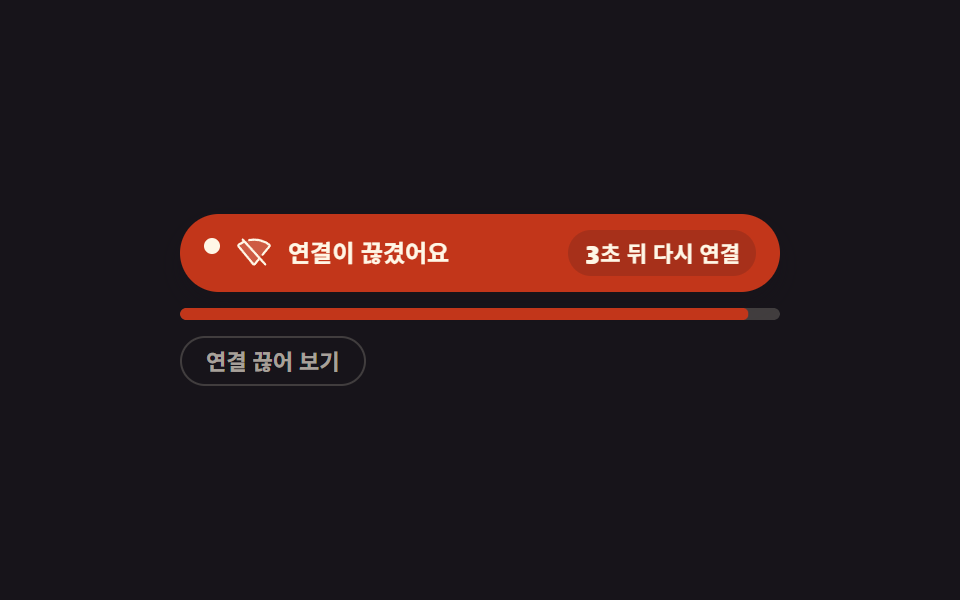
09Status bar that counts down and reconnects after a dropped link
When the link drops the bar turns to offline, the seconds left before a retry tick down one notch at a time with steps(1, end), and a role="status" region reads the changed wording.
Best forMobile web apps that keep losing the link in subways and elevators
role="status"steps(1, end)navigator.onLine
<main class="stage">
  <section class="of is-demo" id="of">
    <div class="of__bar" role="status" aria-live="polite">
      <span class="of__dot" aria-hidden="true"></span>
      <span class="of__ic" aria-hidden="true">
        <span class="of__ic-on"><svg viewBox="0 0 256 256" width="1em" height="1em" fill="currentColor"><g><path d="m238.2 87.69l-104 125.43a8 8 0 0 1-12.3 0L17.8 87.69a7.79 7.79 0 0 1 1.31-11.21a180.75 180.75 0 0 1 217.78 0a7.79 7.79 0 0 1 1.31 11.21" opacity=".2"/><path d="M247.89 80.91a15.93 15.93 0 0 0-6.17-10.81A186.67 186.67 0 0 0 128 32A186.67 186.67 0 0 0 14.28 70.1a15.93 15.93 0 0 0-6.17 10.81a15.65 15.65 0 0 0 3.54 11.89l104 125.43A15.93 15.93 0 0 0 128 224a15.93 15.93 0 0 0 12.31-5.77l104-125.43a15.65 15.65 0 0 0 3.58-11.89M128 208L24.09 82.74A170.76 170.76 0 0 1 128 48a170.76 170.76 0 0 1 103.91 34.74Z"/></g></svg></span>
        <span class="of__ic-off"><svg viewBox="0 0 256 256" width="1em" height="1em" fill="currentColor"><g><path d="m238.2 87.69l-104 125.43a8 8 0 0 1-12.3 0L17.8 87.69a7.79 7.79 0 0 1 1.31-11.21a180.75 180.75 0 0 1 217.78 0a7.79 7.79 0 0 1 1.31 11.21" opacity=".2"/><path d="M53.92 34.62a8 8 0 1 0-11.84 10.76l4.55 5A188 188 0 0 0 14.28 70.1a15.93 15.93 0 0 0-6.17 10.81a15.65 15.65 0 0 0 3.54 11.89l104 125.43A15.93 15.93 0 0 0 128 224a15.93 15.93 0 0 0 12.31-5.77l28.1-33.88l33.67 37a8 8 0 1 0 11.84-10.76ZM128 208L24.09 82.74a171.5 171.5 0 0 1 33.82-19.95l99.63 109.6ZM244.35 92.8l-49.42 59.58a8 8 0 0 1-12.32-10.21l49.3-59.43A170.76 170.76 0 0 0 128 48a175 175 0 0 0-32.39 3a8 8 0 1 1-3-15.72A190.6 190.6 0 0 1 128 32a186.67 186.67 0 0 1 113.72 38.1a15.93 15.93 0 0 1 6.17 10.81a15.65 15.65 0 0 1-3.54 11.89"/></g></svg></span>
      </span>
      <span class="of__msg">
        <span class="of__m of__m--on">Connected</span>
        <span class="of__m of__m--off">You are offline</span>
        <span class="of__m of__m--back">Back online</span>
      </span>
      <span class="of__side">
        <span class="of__pill of__pill--wait">
          <span class="of__num" aria-hidden="true">
            <span class="of__n" data-sec="3">3</span>
            <span class="of__n" data-sec="2">2</span>
            <span class="of__n" data-sec="1">1</span>
          </span>
          <span class="of__unit">s until retry</span>
        </span>
        <span class="of__pill of__pill--ok">Good signal</span>
      </span>
    </div>

    <div class="of__track" aria-hidden="true">
      <span class="of__rail"></span>
      <span class="of__fill" id="of-fill"></span>
    </div>

    <button class="of__btn" type="button" id="of-btn">Drop the connection</button>
  </section>
</main>@use "../../../../site/static/demo-tokens" as *;
// 오프라인·재연결 상태 띠 — 띠는 루프 내내 자리에 남고 안의 문구·색만 한 프레임에 컷으로 바뀐다.
// 컷만으로는 프레임이 모자라므로 남은 시간 막대(scaleX)와 상태 점(translateY)이 사이를 채운다.
$duration: $dur-quick;
$easing: $ease-spring;
$color: $error;
@include stage($stage-ink);
$tick: 1s; // 카운트다운 한 칸 = JS setInterval 과 같은 길이. 막대가 그 사이를 고르게 눕는다
$cream-soft: rgba(255, 247, 230, .62);
$cream-line: rgba(255, 247, 230, .18);
$ink-veil: rgba(23, 20, 26, .16);
.of {
box-sizing: border-box;
display: grid;
gap: $sp-2;
width: min(300px, 92vw);
color: $subject-cream;
}
.of * { box-sizing: border-box; }
// ── 상태 띠 ──
.of__bar {
display: grid;
grid-template-columns: auto auto 1fr auto;
align-items: center;
gap: $sp-2;
padding: $sp-2 $sp-3;
border-radius: $r-pill;
background: $subject-cream;
color: $subject-ink;
font-size: 12px;
font-weight: 700;
line-height: 1.2;
box-shadow: $shadow-press;
transition: background-color $duration $easing, color $duration $easing;
}
.of.is-off .of__bar { background: $color; color: $subject-cream; }
.of.is-back .of__bar { background: $subject-mint; color: $subject-ink; }
.of__dot {
width: 8px;
height: 8px;
border-radius: 50%;
background: currentColor;
}
// 아이콘 두 장을 같은 칸에 겹쳐 두고 컷으로 갈아 끼운다 — 반투명 겹침이 생기지 않는다
.of__ic {
display: inline-grid;
font-size: 18px;
line-height: 1;
}
.of__ic-on,
.of__ic-off {
grid-area: 1 / 1;
display: inline-flex;
}
.of__ic-off { opacity: 0; }
.of.is-off .of__ic-on { opacity: 0; }
.of.is-off .of__ic-off { opacity: 1; }
.of__msg { display: inline-grid; }
.of__m {
grid-area: 1 / 1;
justify-self: start;
white-space: nowrap;
}
.of__m--off,
.of__m--back { opacity: 0; }
.of.is-off .of__m--on { opacity: 0; }
.of.is-off .of__m--off { opacity: 1; }
.of.is-back .of__m--on { opacity: 0; }
.of.is-back .of__m--back { opacity: 1; }
// 오른쪽 칸: 두 알약을 같은 자리에 겹쳐 두고 컷으로 갈아 끼운다 — 칸 폭이 바뀌지 않는다
.of__side { display: inline-grid; }
.of__pill {
grid-area: 1 / 1;
justify-self: end;
display: inline-flex;
align-items: center;
gap: 0;
padding: $sp-1 $sp-2;
border-radius: $r-pill;
background: $ink-veil;
font-size: 11px;
font-weight: 700;
line-height: 1.2;
white-space: nowrap;
}
.of__pill--wait { opacity: 0; }
.of.is-off .of__pill--wait { opacity: 1; }
.of.is-off .of__pill--ok { opacity: 0; }
.of__num { display: inline-grid; }
.of__n {
grid-area: 1 / 1;
justify-self: center;
opacity: 0;
font-size: 13px;
font-weight: 800;
line-height: 1.2;
}
.of__n.is-now { opacity: 1; }
// ── 남은 시간 막대: 칸 하나에 바탕과 채움을 겹친다 (flex 1 1 0 + scaleX 조합을 쓰지 않는다) ──
.of__track {
display: grid;
height: 6px;
border-radius: $r-pill;
overflow: hidden;
}
.of__rail,
.of__fill {
grid-area: 1 / 1;
width: 100%;
height: 100%;
border-radius: $r-pill;
}
.of__rail { background: $cream-line; }
// 채움은 재시도까지 남은 시간이므로 끊긴 동안에만 보인다 — 띠와 레일은 계속 자리에 있다
.of__fill {
background: $color;
transform: scaleX(1);
transform-origin: left center; // 규칙8: 재시도 잔여 막대 좌측 기준
opacity: 0;
transition: transform $tick linear, opacity $duration $easing;
}
.of.is-off .of__fill { opacity: 1; }
.of__btn {
justify-self: start;
margin: 0;
padding: $sp-1 $sp-3;
border: 1px solid $cream-line;
border-radius: $r-pill;
background: transparent;
color: $cream-soft;
font-family: inherit;
font-size: 11px;
font-weight: 700;
line-height: 1.4;
cursor: pointer;
}
.of__btn:focus-visible { outline: 2px solid $subject-cream; outline-offset: 2px; }
// ── 격자 미리보기 전용 2초 루프 ──
// 연결됨 → 끊김(3·2·1) → 재연결됨 → 연결됨. 띠는 한 번도 사라지지 않는다.
@keyframes of-bar {
0% { background-color: $subject-cream; color: $subject-ink; }
18% { background-color: $color; color: $subject-cream; }
72% { background-color: $subject-mint; color: $subject-ink; }
88%, 100% { background-color: $subject-cream; color: $subject-ink; }
}
@keyframes of-m-on {
0% { opacity: 1; }
18% { opacity: 0; }
88%, 100% { opacity: 1; }
}
@keyframes of-m-off {
0% { opacity: 0; }
18% { opacity: 1; }
72%, 100% { opacity: 0; }
}
@keyframes of-m-back {
0% { opacity: 0; }
72% { opacity: 1; }
88%, 100% { opacity: 0; }
}
@keyframes of-ic-on {
0% { opacity: 1; }
18% { opacity: 0; }
72%, 100% { opacity: 1; }
}
@keyframes of-ic-off {
0% { opacity: 0; }
18% { opacity: 1; }
72%, 100% { opacity: 0; }
}
@keyframes of-pill-wait {
0% { opacity: 0; }
18% { opacity: 1; }
72%, 100% { opacity: 0; }
}
@keyframes of-pill-ok {
0% { opacity: 1; }
18% { opacity: 0; }
72%, 100% { opacity: 1; }
}
@keyframes of-n-3 {
0% { opacity: 0; }
18% { opacity: 1; }
40%, 100% { opacity: 0; }
}
@keyframes of-n-2 {
0% { opacity: 0; }
40% { opacity: 1; }
56%, 100% { opacity: 0; }
}
@keyframes of-n-1 {
0% { opacity: 0; }
56% { opacity: 1; }
72%, 100% { opacity: 0; }
}
// 컷 사이를 채우는 움직임 — 남은 시간이 줄어드는 만큼 막대가 눕는다
@keyframes of-fill {
0%, 17.99% { transform: scaleX(1); opacity: 0; }
18% { transform: scaleX(1); opacity: 1; }
72% { transform: scaleX(0); opacity: 1; }
72.01%, 100% { transform: scaleX(1); opacity: 0; }
}
@keyframes of-dot {
0%, 100% { transform: translateY(0); }
25% { transform: translateY(-3px); }
50% { transform: translateY(0); }
75% { transform: translateY(3px); }
}
.of.is-demo {
.of__bar { animation-name: of-bar; }
.of__m--on { animation-name: of-m-on; }
.of__m--off { animation-name: of-m-off; }
.of__m--back { animation-name: of-m-back; }
.of__ic-on { animation-name: of-ic-on; }
.of__ic-off { animation-name: of-ic-off; }
.of__pill--wait { animation-name: of-pill-wait; }
.of__pill--ok { animation-name: of-pill-ok; }
.of__n[data-sec="3"] { animation-name: of-n-3; }
.of__n[data-sec="2"] { animation-name: of-n-2; }
.of__n[data-sec="1"] { animation-name: of-n-1; }
.of__bar,
.of__m--on,
.of__m--off,
.of__m--back,
.of__ic-on,
.of__ic-off,
.of__pill,
.of__n {
animation-duration: $dur-loop;
animation-timing-function: steps(1, end);
animation-iteration-count: infinite;
animation-fill-mode: backwards;
}
.of__fill {
animation-name: of-fill;
animation-duration: $dur-loop;
animation-timing-function: linear;
animation-iteration-count: infinite;
animation-fill-mode: backwards;
}
.of__dot {
animation-name: of-dot;
animation-duration: $dur-loop;
animation-timing-function: $easing;
animation-iteration-count: infinite;
animation-fill-mode: backwards;
}
}
@media (max-width: 340px) {
.of { gap: $sp-1; width: min(292px, 96vw); }
.of__bar { gap: $sp-1; padding: $sp-1 $sp-2; font-size: 10px; }
.of__ic { font-size: 14px; }
.of__dot { width: 6px; height: 6px; }
.of__pill { padding: 0 $sp-1; font-size: 9px; }
.of__n { font-size: 11px; }
.of__btn { padding: 0 $sp-2; font-size: 10px; }
}
@media (prefers-reduced-motion: reduce) {
.of.is-demo .of__bar,
.of.is-demo .of__m--on,
.of.is-demo .of__m--off,
.of.is-demo .of__m--back,
.of.is-demo .of__ic-on,
.of.is-demo .of__ic-off,
.of.is-demo .of__pill,
.of.is-demo .of__n,
.of.is-demo .of__fill,
.of.is-demo .of__dot { animation: none !important; transition: none !important; }
// 움직임만 끄고 끊긴 상태의 결과는 읽히도록 남긴다
.of.is-demo .of__bar { background-color: $color !important; color: $subject-cream !important; }
.of.is-demo .of__m--on { opacity: 0 !important; }
.of.is-demo .of__m--off { opacity: 1 !important; }
.of.is-demo .of__ic-on { opacity: 0 !important; }
.of.is-demo .of__ic-off { opacity: 1 !important; }
.of.is-demo .of__pill--wait { opacity: 1 !important; }
.of.is-demo .of__pill--ok { opacity: 0 !important; }
.of.is-demo .of__n[data-sec="3"] { opacity: 1 !important; }
.of.is-demo .of__fill { transform: scaleX(1) !important; opacity: 1 !important; }
.of.is-demo .of__dot { transform: none !important; }
}html, body {
margin: 0;
overflow: hidden;
}
.stage {
box-sizing: border-box;
min-height: 100vh;
display: grid;
place-items: center;
margin: 0;
background: #17141a;
font-family: -apple-system, "Segoe UI", "Noto Sans KR", sans-serif;
padding: clamp(8px, 4vw, 24px);
}
.of {
box-sizing: border-box;
display: grid;
gap: 8px;
width: min(300px, 92vw);
color: #fff7e6;
}
.of * {
box-sizing: border-box;
}
.of__bar {
display: grid;
grid-template-columns: auto auto 1fr auto;
align-items: center;
gap: 8px;
padding: 8px 12px;
border-radius: 999px;
background: #fff7e6;
color: #17141a;
font-size: 12px;
font-weight: 700;
line-height: 1.2;
box-shadow: 0 6px 12px rgba(23, 20, 26, 0.32);
transition: background-color 220ms cubic-bezier(0.2, 0.8, 0.2, 1), color 220ms cubic-bezier(0.2, 0.8, 0.2, 1);
}
.of.is-off .of__bar {
background: #c2361a;
color: #fff7e6;
}
.of.is-back .of__bar {
background: #4cd4a6;
color: #17141a;
}
.of__dot {
width: 8px;
height: 8px;
border-radius: 50%;
background: currentColor;
}
.of__ic {
display: inline-grid;
font-size: 18px;
line-height: 1;
}
.of__ic-on,
.of__ic-off {
grid-area: 1/1;
display: inline-flex;
}
.of__ic-off {
opacity: 0;
}
.of.is-off .of__ic-on {
opacity: 0;
}
.of.is-off .of__ic-off {
opacity: 1;
}
.of__msg {
display: inline-grid;
}
.of__m {
grid-area: 1/1;
justify-self: start;
white-space: nowrap;
}
.of__m--off,
.of__m--back {
opacity: 0;
}
.of.is-off .of__m--on {
opacity: 0;
}
.of.is-off .of__m--off {
opacity: 1;
}
.of.is-back .of__m--on {
opacity: 0;
}
.of.is-back .of__m--back {
opacity: 1;
}
.of__side {
display: inline-grid;
}
.of__pill {
grid-area: 1/1;
justify-self: end;
display: inline-flex;
align-items: center;
gap: 0;
padding: 4px 8px;
border-radius: 999px;
background: rgba(23, 20, 26, 0.16);
font-size: 11px;
font-weight: 700;
line-height: 1.2;
white-space: nowrap;
}
.of__pill--wait {
opacity: 0;
}
.of.is-off .of__pill--wait {
opacity: 1;
}
.of.is-off .of__pill--ok {
opacity: 0;
}
.of__num {
display: inline-grid;
}
.of__n {
grid-area: 1/1;
justify-self: center;
opacity: 0;
font-size: 13px;
font-weight: 800;
line-height: 1.2;
}
.of__n.is-now {
opacity: 1;
}
.of__track {
display: grid;
height: 6px;
border-radius: 999px;
overflow: hidden;
}
.of__rail,
.of__fill {
grid-area: 1/1;
width: 100%;
height: 100%;
border-radius: 999px;
}
.of__rail {
background: rgba(255, 247, 230, 0.18);
}
.of__fill {
background: #c2361a;
transform: scaleX(1);
transform-origin: left center;
opacity: 0;
transition: transform 1s linear, opacity 220ms cubic-bezier(0.2, 0.8, 0.2, 1);
}
.of.is-off .of__fill {
opacity: 1;
}
.of__btn {
justify-self: start;
margin: 0;
padding: 4px 12px;
border: 1px solid rgba(255, 247, 230, 0.18);
border-radius: 999px;
background: transparent;
color: rgba(255, 247, 230, 0.62);
font-family: inherit;
font-size: 11px;
font-weight: 700;
line-height: 1.4;
cursor: pointer;
}
.of__btn:focus-visible {
outline: 2px solid #fff7e6;
outline-offset: 2px;
}
@keyframes of-bar {
0% {
background-color: #fff7e6;
color: #17141a;
}
18% {
background-color: #c2361a;
color: #fff7e6;
}
72% {
background-color: #4cd4a6;
color: #17141a;
}
88%, 100% {
background-color: #fff7e6;
color: #17141a;
}
}
@keyframes of-m-on {
0% {
opacity: 1;
}
18% {
opacity: 0;
}
88%, 100% {
opacity: 1;
}
}
@keyframes of-m-off {
0% {
opacity: 0;
}
18% {
opacity: 1;
}
72%, 100% {
opacity: 0;
}
}
@keyframes of-m-back {
0% {
opacity: 0;
}
72% {
opacity: 1;
}
88%, 100% {
opacity: 0;
}
}
@keyframes of-ic-on {
0% {
opacity: 1;
}
18% {
opacity: 0;
}
72%, 100% {
opacity: 1;
}
}
@keyframes of-ic-off {
0% {
opacity: 0;
}
18% {
opacity: 1;
}
72%, 100% {
opacity: 0;
}
}
@keyframes of-pill-wait {
0% {
opacity: 0;
}
18% {
opacity: 1;
}
72%, 100% {
opacity: 0;
}
}
@keyframes of-pill-ok {
0% {
opacity: 1;
}
18% {
opacity: 0;
}
72%, 100% {
opacity: 1;
}
}
@keyframes of-n-3 {
0% {
opacity: 0;
}
18% {
opacity: 1;
}
40%, 100% {
opacity: 0;
}
}
@keyframes of-n-2 {
0% {
opacity: 0;
}
40% {
opacity: 1;
}
56%, 100% {
opacity: 0;
}
}
@keyframes of-n-1 {
0% {
opacity: 0;
}
56% {
opacity: 1;
}
72%, 100% {
opacity: 0;
}
}
@keyframes of-fill {
0%, 17.99% {
transform: scaleX(1);
opacity: 0;
}
18% {
transform: scaleX(1);
opacity: 1;
}
72% {
transform: scaleX(0);
opacity: 1;
}
72.01%, 100% {
transform: scaleX(1);
opacity: 0;
}
}
@keyframes of-dot {
0%, 100% {
transform: translateY(0);
}
25% {
transform: translateY(-3px);
}
50% {
transform: translateY(0);
}
75% {
transform: translateY(3px);
}
}
.of.is-demo .of__bar {
animation-name: of-bar;
}
.of.is-demo .of__m--on {
animation-name: of-m-on;
}
.of.is-demo .of__m--off {
animation-name: of-m-off;
}
.of.is-demo .of__m--back {
animation-name: of-m-back;
}
.of.is-demo .of__ic-on {
animation-name: of-ic-on;
}
.of.is-demo .of__ic-off {
animation-name: of-ic-off;
}
.of.is-demo .of__pill--wait {
animation-name: of-pill-wait;
}
.of.is-demo .of__pill--ok {
animation-name: of-pill-ok;
}
.of.is-demo .of__n[data-sec="3"] {
animation-name: of-n-3;
}
.of.is-demo .of__n[data-sec="2"] {
animation-name: of-n-2;
}
.of.is-demo .of__n[data-sec="1"] {
animation-name: of-n-1;
}
.of.is-demo .of__bar,
.of.is-demo .of__m--on,
.of.is-demo .of__m--off,
.of.is-demo .of__m--back,
.of.is-demo .of__ic-on,
.of.is-demo .of__ic-off,
.of.is-demo .of__pill,
.of.is-demo .of__n {
animation-duration: 2s;
animation-timing-function: steps(1, end);
animation-iteration-count: infinite;
animation-fill-mode: backwards;
}
.of.is-demo .of__fill {
animation-name: of-fill;
animation-duration: 2s;
animation-timing-function: linear;
animation-iteration-count: infinite;
animation-fill-mode: backwards;
}
.of.is-demo .of__dot {
animation-name: of-dot;
animation-duration: 2s;
animation-timing-function: cubic-bezier(0.2, 0.8, 0.2, 1);
animation-iteration-count: infinite;
animation-fill-mode: backwards;
}
@media (max-width: 340px) {
.of {
gap: 4px;
width: min(292px, 96vw);
}
.of__bar {
gap: 4px;
padding: 4px 8px;
font-size: 10px;
}
.of__ic {
font-size: 14px;
}
.of__dot {
width: 6px;
height: 6px;
}
.of__pill {
padding: 0 4px;
font-size: 9px;
}
.of__n {
font-size: 11px;
}
.of__btn {
padding: 0 8px;
font-size: 10px;
}
}
@media (prefers-reduced-motion: reduce) {
.of.is-demo .of__bar,
.of.is-demo .of__m--on,
.of.is-demo .of__m--off,
.of.is-demo .of__m--back,
.of.is-demo .of__ic-on,
.of.is-demo .of__ic-off,
.of.is-demo .of__pill,
.of.is-demo .of__n,
.of.is-demo .of__fill,
.of.is-demo .of__dot {
animation: none !important;
transition: none !important;
}
.of.is-demo .of__bar {
background-color: #c2361a !important;
color: #fff7e6 !important;
}
.of.is-demo .of__m--on {
opacity: 0 !important;
}
.of.is-demo .of__m--off {
opacity: 1 !important;
}
.of.is-demo .of__ic-on {
opacity: 0 !important;
}
.of.is-demo .of__ic-off {
opacity: 1 !important;
}
.of.is-demo .of__pill--wait {
opacity: 1 !important;
}
.of.is-demo .of__pill--ok {
opacity: 0 !important;
}
.of.is-demo .of__n[data-sec="3"] {
opacity: 1 !important;
}
.of.is-demo .of__fill {
transform: scaleX(1) !important;
opacity: 1 !important;
}
.of.is-demo .of__dot {
transform: none !important;
}
}// 상태 띠는 사라지지 않는다 — 안의 문구와 색만 바뀐다. 진짜 연결 상태는 navigator.onLine 이 알려 준다.
var of = document.getElementById('of');
var ofBtn = document.getElementById('of-btn');
var ofFill = document.getElementById('of-fill');
var ofNums = [].slice.call(of.querySelectorAll('.of__n'));
var ofTimer = 0;
function ofSec(n) {
ofNums.forEach(function (s) { s.classList.toggle('is-now', Number(s.dataset.sec) === n); });
ofFill.style.transform = 'scaleX(' + (n / 3) + ')';
}
function ofState(s) {
of.classList.remove('is-demo');
of.classList.toggle('is-off', s === 'off');
of.classList.toggle('is-back', s === 'back');
ofBtn.textContent = s === 'off' ? 'Bring it back' : 'Drop the connection';
}
function ofDrop() {
ofState('off');
var n = 3;
ofSec(n);
clearInterval(ofTimer);
ofTimer = setInterval(function () {
n -= 1;
if (n > 0) { ofSec(n); return; }
clearInterval(ofTimer);
ofSec(0);
ofState('back');
}, 1000);
}
function ofUp() {
clearInterval(ofTimer);
ofSec(0);
ofState('back');
}
ofBtn.addEventListener('click', function () {
if (of.classList.contains('is-off')) ofUp(); else ofDrop();
});
if (!navigator.onLine) ofDrop();
window.addEventListener('offline', ofDrop);
window.addEventListener('online', ofUp);import { useState, useEffect } from "react";
import type { CSSProperties } from "react";
import styles from "./OfflineRetryBanner.module.scss";
export type OfflineRetryBannerProps = {
onlineText?: string;
offlineText?: string;
backText?: string;
/** 온라인일 때 오른쪽 알약에 들어가는 짧은 라벨 */
okLabel?: string;
/** 카운트다운 숫자 뒤에 붙는 말 */
unitLabel?: string;
dropLabel?: string;
restoreLabel?: string;
/** 재시도까지 세는 초 */
seconds?: number;
/** 격자 미리보기용 2초 자동 루프. 사람이 손대면 꺼진다 */
demo?: boolean;
duration?: number;
easing?: string;
color?: string;
};
type Vars = CSSProperties & { "--duration"?: string; "--easing"?: string; "--color"?: string };
type Status = "on" | "off" | "back";
// ambient 가 얇다 — 브라우저 전역 중 쓰는 것만 로컬 타입으로 좁혀 받는다
type Host = {
setInterval(fn: () => void, ms: number): number;
clearInterval(id: number): void;
addEventListener(type: string, fn: () => void): void;
removeEventListener(type: string, fn: () => void): void;
navigator: { onLine: boolean };
};
const host = globalThis as unknown as Host;
function WifiOnIcon() {
return (
<svg viewBox="0 0 256 256" width="1em" height="1em" fill="currentColor"><g><path d="m238.2 87.69l-104 125.43a8 8 0 0 1-12.3 0L17.8 87.69a7.79 7.79 0 0 1 1.31-11.21a180.75 180.75 0 0 1 217.78 0a7.79 7.79 0 0 1 1.31 11.21" opacity=".2"/><path d="M247.89 80.91a15.93 15.93 0 0 0-6.17-10.81A186.67 186.67 0 0 0 128 32A186.67 186.67 0 0 0 14.28 70.1a15.93 15.93 0 0 0-6.17 10.81a15.65 15.65 0 0 0 3.54 11.89l104 125.43A15.93 15.93 0 0 0 128 224a15.93 15.93 0 0 0 12.31-5.77l104-125.43a15.65 15.65 0 0 0 3.58-11.89M128 208L24.09 82.74A170.76 170.76 0 0 1 128 48a170.76 170.76 0 0 1 103.91 34.74Z"/></g></svg>
);
}
function WifiOffIcon() {
return (
<svg viewBox="0 0 256 256" width="1em" height="1em" fill="currentColor"><g><path d="m238.2 87.69l-104 125.43a8 8 0 0 1-12.3 0L17.8 87.69a7.79 7.79 0 0 1 1.31-11.21a180.75 180.75 0 0 1 217.78 0a7.79 7.79 0 0 1 1.31 11.21" opacity=".2"/><path d="M53.92 34.62a8 8 0 1 0-11.84 10.76l4.55 5A188 188 0 0 0 14.28 70.1a15.93 15.93 0 0 0-6.17 10.81a15.65 15.65 0 0 0 3.54 11.89l104 125.43A15.93 15.93 0 0 0 128 224a15.93 15.93 0 0 0 12.31-5.77l28.1-33.88l33.67 37a8 8 0 1 0 11.84-10.76ZM128 208L24.09 82.74a171.5 171.5 0 0 1 33.82-19.95l99.63 109.6ZM244.35 92.8l-49.42 59.58a8 8 0 0 1-12.32-10.21l49.3-59.43A170.76 170.76 0 0 0 128 48a175 175 0 0 0-32.39 3a8 8 0 1 1-3-15.72A190.6 190.6 0 0 1 128 32a186.67 186.67 0 0 1 113.72 38.1a15.93 15.93 0 0 1 6.17 10.81a15.65 15.65 0 0 1-3.54 11.89"/></g></svg>
);
}
export default function OfflineRetryBanner({
onlineText = "Connected",
offlineText = "You are offline",
backText = "Back online",
okLabel = "Good signal",
unitLabel = "s until retry",
dropLabel = "Drop the connection",
restoreLabel = "Bring it back",
seconds = 3,
demo = true,
duration = 220,
easing = "cubic-bezier(.2,.8,.2,1)",
color = "#c2361a",
}: OfflineRetryBannerProps) {
const [live, setLive] = useState(demo);
const [status, setStatus] = useState<Status>("on");
const [left, setLeft] = useState(0);
const vars: Vars = { "--duration": `${duration}ms`, "--easing": easing, "--color": color };
function drop() {
setLive(false);
setLeft(seconds);
setStatus("off");
}
function restore() {
setLive(false);
setLeft(0);
setStatus("back");
}
// 끊긴 동안에만 1초마다 한 칸씩 센다
useEffect(() => {
if (status !== "off") return;
const id = host.setInterval(() => setLeft((p: number) => (p > 0 ? p - 1 : 0)), 1000);
return () => host.clearInterval(id);
}, [status]);
useEffect(() => {
if (status === "off" && left <= 0) setStatus("back");
}, [status, left]);
// 진짜 연결 상태도 읽는다
useEffect(() => {
const goOff = () => drop();
const goOn = () => restore();
host.addEventListener("offline", goOff);
host.addEventListener("online", goOn);
if (host.navigator && host.navigator.onLine === false) goOff();
return () => {
host.removeEventListener("offline", goOff);
host.removeEventListener("online", goOn);
};
}, [seconds]);
const cls = [
styles.of,
live ? styles.isDemo : "",
status === "off" ? styles.isOff : "",
status === "back" ? styles.isBack : "",
]
.filter(Boolean)
.join(" ");
const ratio = seconds > 0 ? left / seconds : 0;
// 세 문구·두 알약을 같은 자리에 겹쳐 두고 컷으로 갈아 끼운다 — 반투명 겹침도 칸 폭 변화도 없다
const ticks: number[] = [];
for (let n = seconds; n > 0; n -= 1) ticks.push(n);
return (
<section className={cls} style={vars}>
{/* 띠는 사라지지 않는다 — 안의 문구와 색만 바뀐다 */}
<div className={styles.bar} role="status" aria-live="polite">
<span className={styles.dot} aria-hidden="true" />
<span className={styles.ic} aria-hidden="true">
<span className={styles.icOn}><WifiOnIcon /></span>
<span className={styles.icOff}><WifiOffIcon /></span>
</span>
<span className={styles.msg}>
<span className={[styles.m, styles.mOn].join(" ")}>{onlineText}</span>
<span className={[styles.m, styles.mOff].join(" ")}>{offlineText}</span>
<span className={[styles.m, styles.mBack].join(" ")}>{backText}</span>
</span>
<span className={styles.side}>
<span className={[styles.pill, styles.pillWait].join(" ")}>
<span className={styles.num} aria-hidden="true">
{ticks.map((n) => (
<span
key={n}
className={[styles.n, n === left ? styles.isNow : ""].filter(Boolean).join(" ")}
data-sec={n}
>
{n}
</span>
))}
</span>
<span className={styles.unit}>{unitLabel}</span>
</span>
<span className={[styles.pill, styles.pillOk].join(" ")}>{okLabel}</span>
</span>
</div>
<div className={styles.track} aria-hidden="true">
<span className={styles.rail} />
<span className={styles.fill} style={{ transform: `scaleX(${status === "off" ? ratio : 1})` }} />
</div>
<button className={styles.btn} type="button" onClick={status === "off" ? restore : drop}>
{status === "off" ? restoreLabel : dropLabel}
</button>
</section>
);
}09 Status bar that counts down and reconnects after a dropped link — Measured area 9.118% · moving frames 22/23Original by GODRICH · SCSS and React ship in the zip · Page Loading Animation CSS: 9 Route-Change Demos
The post this demo lives in
 Page Loading Animation CSS: 9 Route-Change DemosPage loading animation css is the feedback layer covering the moment one screen gives way to the next. The nine here are See all demos in this post
If you like this effect - similar demos
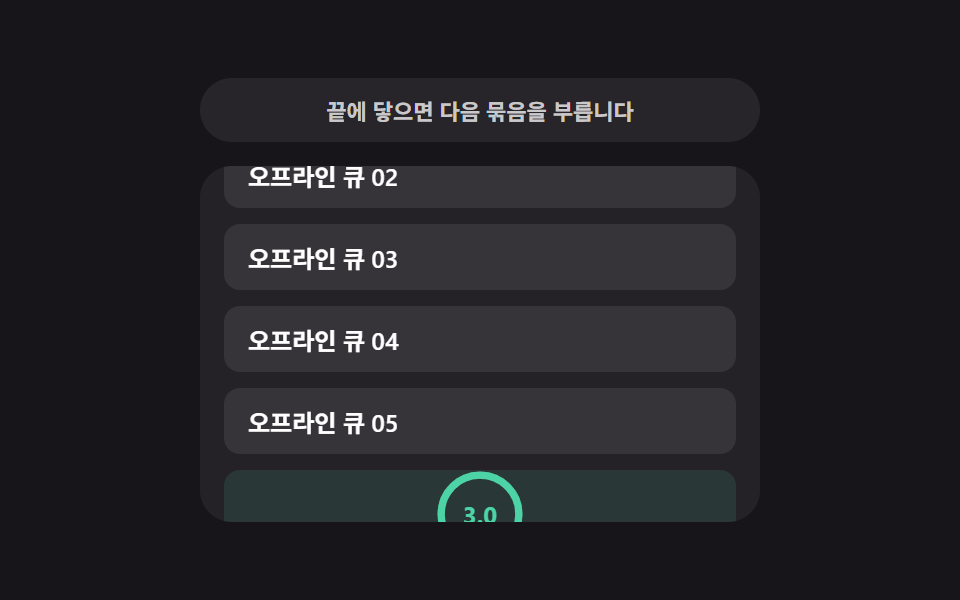 Loaders09 Retry countdown — a list re-attempting once its wait-time value counts downInfinite Scroll Loading: 9 Essential UI Patterns
 Loaders07 Error shake and retry that remembers where it brokeFile Upload Progress Bar Loader: 9 UI Demos
 Loaders05 Retry Icon That Shakes After Stall DetectionBuffering Animation CSS — 9 Loading Patterns