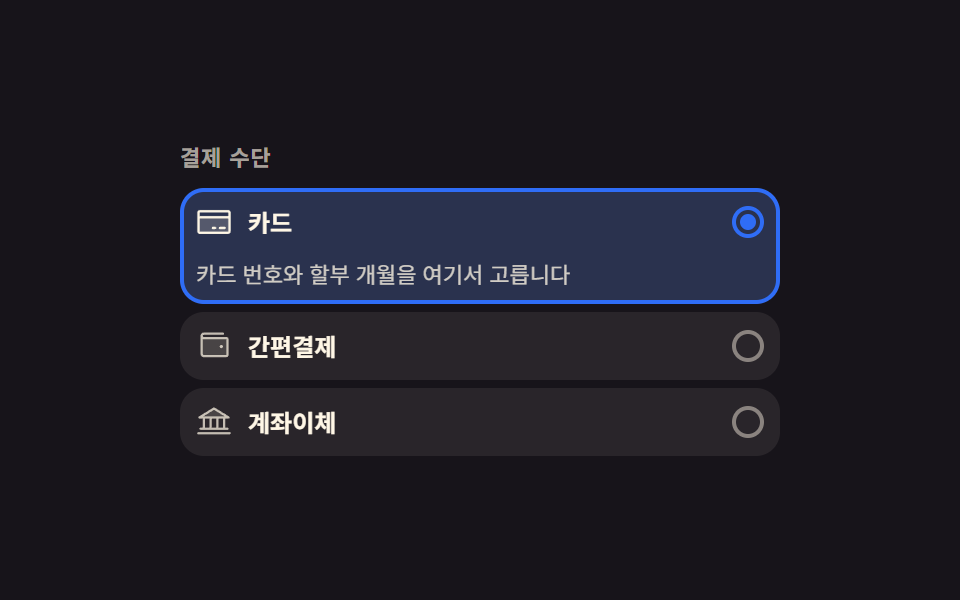
05Payment method card that opens only the option you picked
Picking one of three payment method cards unfolds only that card's detail panel from zero height while the previously open one closes over the same duration.
Best forCheckout screens choosing between card, wallet, and bank transfer
grid-template-rowsaria-expanded:checked
<main class="stage">
  <form class="pm is-demo" id="pm">
    <fieldset class="pm__set">
      <legend class="pm__legend">Payment method</legend>

      <div class="pm__item">
        <label class="pm__row" aria-expanded="true">
          <input class="pm__radio" type="radio" name="payMethod" value="card" checked>
          <span class="pm__ic" aria-hidden="true"><svg viewBox="0 0 256 256" fill="currentColor"><path d="M232,96v96a8,8,0,0,1-8,8H32a8,8,0,0,1-8-8V96Z" opacity="0.2"/><path d="M224,48H32A16,16,0,0,0,16,64V192a16,16,0,0,0,16,16H224a16,16,0,0,0,16-16V64A16,16,0,0,0,224,48Zm0,16V88H32V64Zm0,128H32V104H224v88Zm-16-24a8,8,0,0,1-8,8H168a8,8,0,0,1,0-16h32A8,8,0,0,1,208,168Zm-64,0a8,8,0,0,1-8,8H120a8,8,0,0,1,0-16h16A8,8,0,0,1,144,168Z"/></svg></span>
          <span class="pm__name">Card</span>
          <span class="pm__dot" aria-hidden="true"></span>
        </label>
        <div class="pm__fold">
          <p class="pm__detail"><span class="pm__dtext">Enter the card number and pick the installment plan here</span></p>
        </div>
      </div>

      <div class="pm__item">
        <label class="pm__row" aria-expanded="false">
          <input class="pm__radio" type="radio" name="payMethod" value="wallet">
          <span class="pm__ic" aria-hidden="true"><svg viewBox="0 0 256 256" fill="currentColor"><path d="M224,80V192a8,8,0,0,1-8,8H56a16,16,0,0,1-16-16V56A16,16,0,0,0,56,72H216A8,8,0,0,1,224,80Z" opacity="0.2"/><path d="M216,64H56a8,8,0,0,1,0-16H192a8,8,0,0,0,0-16H56A24,24,0,0,0,32,56V184a24,24,0,0,0,24,24H216a16,16,0,0,0,16-16V80A16,16,0,0,0,216,64Zm0,128H56a8,8,0,0,1-8-8V78.63A23.84,23.84,0,0,0,56,80H216Zm-48-60a12,12,0,1,1,12,12A12,12,0,0,1,168,132Z"/></svg></span>
          <span class="pm__name">Wallet</span>
          <span class="pm__dot" aria-hidden="true"></span>
        </label>
        <div class="pm__fold">
          <p class="pm__detail"><span class="pm__dtext">Confirm with a fingerprint in the app and you are done</span></p>
        </div>
      </div>

      <div class="pm__item">
        <label class="pm__row" aria-expanded="false">
          <input class="pm__radio" type="radio" name="payMethod" value="bank">
          <span class="pm__ic" aria-hidden="true"><svg viewBox="0 0 256 256" fill="currentColor"><path d="M232,96H24L128,32Z" opacity="0.2"/><path d="M24,104H48v64H32a8,8,0,0,0,0,16H224a8,8,0,0,0,0-16H208V104h24a8,8,0,0,0,4.19-14.81l-104-64a8,8,0,0,0-8.38,0l-104,64A8,8,0,0,0,24,104Zm40,0H96v64H64Zm80,0v64H112V104Zm48,64H160V104h32ZM128,41.39,203.74,88H52.26ZM248,208a8,8,0,0,1-8,8H16a8,8,0,0,1,0-16H240A8,8,0,0,1,248,208Z"/></svg></span>
          <span class="pm__name">Bank transfer</span>
          <span class="pm__dot" aria-hidden="true"></span>
        </label>
        <div class="pm__fold">
          <p class="pm__detail"><span class="pm__dtext">The account to pay into appears on the next screen</span></p>
        </div>
      </div>

    </fieldset>
  </form>
</main>@use "../../../../site/static/demo-tokens" as *;
// 고른 결제 수단만 아래로 펼쳐지는 카드 — 상세 칸은 grid-template-rows 0fr→1fr 로 문서 흐름 안에서 편다.
// 절대배치 패널로 띄우면 320px 에서 실제 높이가 화면을 넘긴다(BD9)
$duration: $dur-base;
$easing: $ease-spring;
$color: $subject-blue;
@include stage($stage-ink);
.pm {
box-sizing: border-box;
width: min(300px, 92vw);
color: $subject-cream;
font-family: -apple-system, "Segoe UI", "Noto Sans KR", sans-serif;
}
.pm * { box-sizing: border-box; }
.pm__set {
display: grid;
gap: $sp-1;
margin: 0;
padding: 0;
border: 0;
}
.pm__legend {
padding: 0;
margin-bottom: $sp-2;
font-size: 11px;
font-weight: 700;
line-height: 1.3;
letter-spacing: .04em;
color: rgba($subject-cream, .62);
}
.pm__item {
position: relative;
border-radius: $r-control;
background: rgba($subject-cream, .08);
}
// 고른 표시 — 테두리·바탕을 따로 그린 겹으로 두고 opacity 만 켠다.
// 그래야 미리보기 루프에서 컷으로 갈아 끼워도 두 카드가 반투명하게 겹치지 않는다
.pm__item::before {
content: "";
position: absolute;
inset: 0;
border: 2px solid $color;
border-radius: $r-control;
background: rgba($subject-blue, .18);
opacity: 0;
pointer-events: none;
transition: opacity $dur-quick linear;
}
.pm__item:has(.pm__radio:checked)::before { opacity: 1; }
.pm__row {
position: relative;
z-index: 1;
display: flex;
align-items: center;
gap: $sp-2;
padding: $sp-2;
cursor: pointer;
}
.pm__radio {
position: absolute;
width: 1px;
height: 1px;
margin: 0;
opacity: 0;
pointer-events: none;
}
.pm__ic {
flex: 0 0 auto;
display: inline-grid;
place-items: center;
width: 18px;
height: 18px;
color: rgba($subject-cream, .72);
}
.pm__ic svg { width: 18px; height: 18px; }
.pm__item:has(.pm__radio:checked) .pm__ic { color: $subject-cream; }
.pm__name {
flex: 1 1 auto;
font-size: 12px;
font-weight: 700;
line-height: 1.2;
}
.pm__dot {
position: relative;
flex: 0 0 auto;
width: 16px;
height: 16px;
border: 2px solid rgba($subject-cream, .45);
border-radius: 50%;
}
.pm__dot::after {
content: "";
position: absolute;
inset: 2px;
border-radius: 50%;
background: $color;
opacity: 0;
transform: scale(.4);
transition: opacity $dur-instant linear, transform $dur-quick $easing;
}
.pm__item:has(.pm__radio:checked) .pm__dot { border-color: $color; }
.pm__item:has(.pm__radio:checked) .pm__dot::after { opacity: 1; transform: scale(1); }
// 키보드로 옮겨 다닐 때도 어느 카드에 서 있는지 보인다
.pm__item:has(.pm__radio:focus-visible) { outline: 2px solid $subject-cream; outline-offset: 2px; }
// 상세 칸 — 닫힘 0fr, 열림 1fr. 높이를 px 로 짐작하지 않으니 글자가 길어져도 맞는다
.pm__fold {
position: relative;
z-index: 1;
display: grid;
grid-template-rows: 0fr;
transition: grid-template-rows $duration $easing;
}
.pm__item:has(.pm__radio:checked) .pm__fold { grid-template-rows: 1fr; }
.pm__detail {
min-height: 0;
margin: 0;
overflow: hidden;
}
.pm__dtext {
display: block;
padding: 0 $sp-2 $sp-2;
font-size: 11px;
line-height: 1.4;
color: rgba($subject-cream, .78);
}
// ── 격자 미리보기 루프: 1번 열림 → 2번 열림 → 1번 복귀. 상태 교체는 컷, 곁들이는 움직임은 transform ──
@keyframes pm-fold-1 {
0%, 42% { grid-template-rows: 1fr; }
46%, 84% { grid-template-rows: 0fr; }
88%, 100% { grid-template-rows: 1fr; }
}
@keyframes pm-fold-2 {
0%, 42% { grid-template-rows: 0fr; }
46%, 84% { grid-template-rows: 1fr; }
88%, 100% { grid-template-rows: 0fr; }
}
@keyframes pm-on-1 {
0%, 42% { opacity: 1; }
46%, 84% { opacity: 0; }
88%, 100% { opacity: 1; }
}
@keyframes pm-on-2 {
0%, 42% { opacity: 0; }
46%, 84% { opacity: 1; }
88%, 100% { opacity: 0; }
}
@keyframes pm-dot-1 {
0%, 42% { opacity: 1; transform: scale(1); }
46%, 84% { opacity: 0; transform: scale(.4); }
88%, 100% { opacity: 1; transform: scale(1); }
}
@keyframes pm-dot-2 {
0%, 42% { opacity: 0; transform: scale(.4); }
46%, 84% { opacity: 1; transform: scale(1); }
88%, 100% { opacity: 0; transform: scale(.4); }
}
// 컷만으로는 움직인 프레임이 두어 장뿐이라 측정이 안 찬다 — 펼쳐진 글이 한 번 올라서며 프레임을 채운다.
// 투명도가 아니라 transform 이라 중간 프레임이 유령이 되지 않는다
@keyframes pm-rise-1 {
0%, 87% { transform: translateY(0); }
88% { transform: translateY(10px); }
100% { transform: translateY(0); }
}
@keyframes pm-rise-2 {
0%, 45% { transform: translateY(0); }
46% { transform: translateY(10px); }
62%, 100% { transform: translateY(0); }
}
@keyframes pm-pop-1 {
0%, 87% { transform: scale(1); }
88% { transform: scale(1.35); }
100% { transform: scale(1); }
}
@keyframes pm-pop-2 {
0%, 45% { transform: scale(1); }
46% { transform: scale(1.35); }
62%, 100% { transform: scale(1); }
}
.pm.is-demo {
.pm__fold,
.pm__item::before,
.pm__dot::after {
animation-duration: $dur-loop;
animation-timing-function: steps(1, end);
animation-iteration-count: infinite;
animation-fill-mode: backwards;
}
.pm__dtext,
.pm__ic {
animation-duration: $dur-loop;
animation-timing-function: $easing;
animation-iteration-count: infinite;
animation-fill-mode: backwards;
}
.pm__item:nth-child(2) {
.pm__fold { animation-name: pm-fold-1; }
&::before { animation-name: pm-on-1; }
.pm__dot::after { animation-name: pm-dot-1; }
.pm__dtext { animation-name: pm-rise-1; }
.pm__ic { animation-name: pm-pop-1; }
}
.pm__item:nth-child(3) {
.pm__fold { animation-name: pm-fold-2; }
&::before { animation-name: pm-on-2; }
.pm__dot::after { animation-name: pm-dot-2; }
.pm__dtext { animation-name: pm-rise-2; }
.pm__ic { animation-name: pm-pop-2; }
}
}
@media (max-width: 340px) {
.pm__legend { margin-bottom: $sp-1; font-size: 10px; }
.pm__row { padding: $sp-1 $sp-2; }
.pm__name { font-size: 11px; }
.pm__dtext { padding: 0 $sp-2 $sp-1; font-size: 10px; }
}
@media (prefers-reduced-motion: reduce) {
// 정지 상태에서도 「1번이 골라져 펼쳐져 있다」 는 것은 보인다 — 움직임만 뺀다
.pm.is-demo .pm__fold,
.pm.is-demo .pm__item::before,
.pm.is-demo .pm__dot::after,
.pm.is-demo .pm__dtext,
.pm.is-demo .pm__ic { animation: none !important; }
.pm.is-demo .pm__dtext,
.pm.is-demo .pm__ic { transform: none !important; }
.pm__fold { transition: none !important; }
.pm__item::before { transition: none !important; }
.pm__dot::after { transition: none !important; }
}html, body {
margin: 0;
overflow: hidden;
}
.stage {
box-sizing: border-box;
min-height: 100vh;
display: grid;
place-items: center;
margin: 0;
background: #17141a;
font-family: -apple-system, "Segoe UI", "Noto Sans KR", sans-serif;
padding: clamp(8px, 4vw, 24px);
}
.pm {
box-sizing: border-box;
width: min(300px, 92vw);
color: #fff7e6;
font-family: -apple-system, "Segoe UI", "Noto Sans KR", sans-serif;
}
.pm * {
box-sizing: border-box;
}
.pm__set {
display: grid;
gap: 4px;
margin: 0;
padding: 0;
border: 0;
}
.pm__legend {
padding: 0;
margin-bottom: 8px;
font-size: 11px;
font-weight: 700;
line-height: 1.3;
letter-spacing: 0.04em;
color: rgba(255, 247, 230, 0.62);
}
.pm__item {
position: relative;
border-radius: 12px;
background: rgba(255, 247, 230, 0.08);
}
.pm__item::before {
content: "";
position: absolute;
inset: 0;
border: 2px solid #2f6df6;
border-radius: 12px;
background: rgba(47, 109, 246, 0.18);
opacity: 0;
pointer-events: none;
transition: opacity 220ms linear;
}
.pm__item:has(.pm__radio:checked)::before {
opacity: 1;
}
.pm__row {
position: relative;
z-index: 1;
display: flex;
align-items: center;
gap: 8px;
padding: 8px;
cursor: pointer;
}
.pm__radio {
position: absolute;
width: 1px;
height: 1px;
margin: 0;
opacity: 0;
pointer-events: none;
}
.pm__ic {
flex: 0 0 auto;
display: inline-grid;
place-items: center;
width: 18px;
height: 18px;
color: rgba(255, 247, 230, 0.72);
}
.pm__ic svg {
width: 18px;
height: 18px;
}
.pm__item:has(.pm__radio:checked) .pm__ic {
color: #fff7e6;
}
.pm__name {
flex: 1 1 auto;
font-size: 12px;
font-weight: 700;
line-height: 1.2;
}
.pm__dot {
position: relative;
flex: 0 0 auto;
width: 16px;
height: 16px;
border: 2px solid rgba(255, 247, 230, 0.45);
border-radius: 50%;
}
.pm__dot::after {
content: "";
position: absolute;
inset: 2px;
border-radius: 50%;
background: #2f6df6;
opacity: 0;
transform: scale(0.4);
transition: opacity 140ms linear, transform 220ms cubic-bezier(0.2, 0.8, 0.2, 1);
}
.pm__item:has(.pm__radio:checked) .pm__dot {
border-color: #2f6df6;
}
.pm__item:has(.pm__radio:checked) .pm__dot::after {
opacity: 1;
transform: scale(1);
}
.pm__item:has(.pm__radio:focus-visible) {
outline: 2px solid #fff7e6;
outline-offset: 2px;
}
.pm__fold {
position: relative;
z-index: 1;
display: grid;
grid-template-rows: 0fr;
transition: grid-template-rows 300ms cubic-bezier(0.2, 0.8, 0.2, 1);
}
.pm__item:has(.pm__radio:checked) .pm__fold {
grid-template-rows: 1fr;
}
.pm__detail {
min-height: 0;
margin: 0;
overflow: hidden;
}
.pm__dtext {
display: block;
padding: 0 8px 8px;
font-size: 11px;
line-height: 1.4;
color: rgba(255, 247, 230, 0.78);
}
@keyframes pm-fold-1 {
0%, 42% {
grid-template-rows: 1fr;
}
46%, 84% {
grid-template-rows: 0fr;
}
88%, 100% {
grid-template-rows: 1fr;
}
}
@keyframes pm-fold-2 {
0%, 42% {
grid-template-rows: 0fr;
}
46%, 84% {
grid-template-rows: 1fr;
}
88%, 100% {
grid-template-rows: 0fr;
}
}
@keyframes pm-on-1 {
0%, 42% {
opacity: 1;
}
46%, 84% {
opacity: 0;
}
88%, 100% {
opacity: 1;
}
}
@keyframes pm-on-2 {
0%, 42% {
opacity: 0;
}
46%, 84% {
opacity: 1;
}
88%, 100% {
opacity: 0;
}
}
@keyframes pm-dot-1 {
0%, 42% {
opacity: 1;
transform: scale(1);
}
46%, 84% {
opacity: 0;
transform: scale(0.4);
}
88%, 100% {
opacity: 1;
transform: scale(1);
}
}
@keyframes pm-dot-2 {
0%, 42% {
opacity: 0;
transform: scale(0.4);
}
46%, 84% {
opacity: 1;
transform: scale(1);
}
88%, 100% {
opacity: 0;
transform: scale(0.4);
}
}
@keyframes pm-rise-1 {
0%, 87% {
transform: translateY(0);
}
88% {
transform: translateY(10px);
}
100% {
transform: translateY(0);
}
}
@keyframes pm-rise-2 {
0%, 45% {
transform: translateY(0);
}
46% {
transform: translateY(10px);
}
62%, 100% {
transform: translateY(0);
}
}
@keyframes pm-pop-1 {
0%, 87% {
transform: scale(1);
}
88% {
transform: scale(1.35);
}
100% {
transform: scale(1);
}
}
@keyframes pm-pop-2 {
0%, 45% {
transform: scale(1);
}
46% {
transform: scale(1.35);
}
62%, 100% {
transform: scale(1);
}
}
.pm.is-demo .pm__fold,
.pm.is-demo .pm__item::before,
.pm.is-demo .pm__dot::after {
animation-duration: 2s;
animation-timing-function: steps(1, end);
animation-iteration-count: infinite;
animation-fill-mode: backwards;
}
.pm.is-demo .pm__dtext,
.pm.is-demo .pm__ic {
animation-duration: 2s;
animation-timing-function: cubic-bezier(0.2, 0.8, 0.2, 1);
animation-iteration-count: infinite;
animation-fill-mode: backwards;
}
.pm.is-demo .pm__item:nth-child(2) .pm__fold {
animation-name: pm-fold-1;
}
.pm.is-demo .pm__item:nth-child(2)::before {
animation-name: pm-on-1;
}
.pm.is-demo .pm__item:nth-child(2) .pm__dot::after {
animation-name: pm-dot-1;
}
.pm.is-demo .pm__item:nth-child(2) .pm__dtext {
animation-name: pm-rise-1;
}
.pm.is-demo .pm__item:nth-child(2) .pm__ic {
animation-name: pm-pop-1;
}
.pm.is-demo .pm__item:nth-child(3) .pm__fold {
animation-name: pm-fold-2;
}
.pm.is-demo .pm__item:nth-child(3)::before {
animation-name: pm-on-2;
}
.pm.is-demo .pm__item:nth-child(3) .pm__dot::after {
animation-name: pm-dot-2;
}
.pm.is-demo .pm__item:nth-child(3) .pm__dtext {
animation-name: pm-rise-2;
}
.pm.is-demo .pm__item:nth-child(3) .pm__ic {
animation-name: pm-pop-2;
}
@media (max-width: 340px) {
.pm__legend {
margin-bottom: 4px;
font-size: 10px;
}
.pm__row {
padding: 4px 8px;
}
.pm__name {
font-size: 11px;
}
.pm__dtext {
padding: 0 8px 4px;
font-size: 10px;
}
}
@media (prefers-reduced-motion: reduce) {
.pm.is-demo .pm__fold,
.pm.is-demo .pm__item::before,
.pm.is-demo .pm__dot::after,
.pm.is-demo .pm__dtext,
.pm.is-demo .pm__ic {
animation: none !important;
}
.pm.is-demo .pm__dtext,
.pm.is-demo .pm__ic {
transform: none !important;
}
.pm__fold {
transition: none !important;
}
.pm__item::before {
transition: none !important;
}
.pm__dot::after {
transition: none !important;
}
}// 고른 수단의 상세 칸만 편다 — 여닫는 힘은 :checked 가 내고, JS 는 aria-expanded 만 맞춘다
var pm = document.getElementById('pm');
var rows = pm.querySelectorAll('.pm__row');
function syncExpanded() {
for (var i = 0; i < rows.length; i++) {
var picked = rows[i].querySelector('.pm__radio').checked;
rows[i].setAttribute('aria-expanded', picked ? 'true' : 'false');
}
}
// 라디오는 키보드 화살표로도 옮겨 다닌다 — change 하나면 마우스·키보드가 같이 걸린다
pm.addEventListener('change', function () {
pm.classList.remove('is-demo');
syncExpanded();
});
syncExpanded();import { useState } from "react";
import type { CSSProperties, ReactNode } from "react";
import styles from "./PayMethodCardExpand.module.scss";
export type PayMethodCardExpandProps = {
legend?: string;
cardName?: string;
cardDetail?: string;
walletName?: string;
walletDetail?: string;
bankName?: string;
bankDetail?: string;
/** 격자 미리보기용 2초 자동 루프. 사람이 손대면 꺼진다 */
demo?: boolean;
duration?: number;
easing?: string;
color?: string;
};
type Vars = CSSProperties & { "--duration"?: string; "--easing"?: string; "--color"?: string };
// ambient 가 얇아 이벤트 타입을 못 쓴다 — 필요한 꼴만 로컬 타입으로 선언
type Method = { value: string; name: string; detail: string; icon: ReactNode };
function CardIcon() {
return (
<svg viewBox="0 0 256 256" fill="currentColor"><path d="M232,96v96a8,8,0,0,1-8,8H32a8,8,0,0,1-8-8V96Z" opacity="0.2"/><path d="M224,48H32A16,16,0,0,0,16,64V192a16,16,0,0,0,16,16H224a16,16,0,0,0,16-16V64A16,16,0,0,0,224,48Zm0,16V88H32V64Zm0,128H32V104H224v88Zm-16-24a8,8,0,0,1-8,8H168a8,8,0,0,1,0-16h32A8,8,0,0,1,208,168Zm-64,0a8,8,0,0,1-8,8H120a8,8,0,0,1,0-16h16A8,8,0,0,1,144,168Z"/></svg>
);
}
function WalletIcon() {
return (
<svg viewBox="0 0 256 256" fill="currentColor"><path d="M224,80V192a8,8,0,0,1-8,8H56a16,16,0,0,1-16-16V56A16,16,0,0,0,56,72H216A8,8,0,0,1,224,80Z" opacity="0.2"/><path d="M216,64H56a8,8,0,0,1,0-16H192a8,8,0,0,0,0-16H56A24,24,0,0,0,32,56V184a24,24,0,0,0,24,24H216a16,16,0,0,0,16-16V80A16,16,0,0,0,216,64Zm0,128H56a8,8,0,0,1-8-8V78.63A23.84,23.84,0,0,0,56,80H216Zm-48-60a12,12,0,1,1,12,12A12,12,0,0,1,168,132Z"/></svg>
);
}
function BankIcon() {
return (
<svg viewBox="0 0 256 256" fill="currentColor"><path d="M232,96H24L128,32Z" opacity="0.2"/><path d="M24,104H48v64H32a8,8,0,0,0,0,16H224a8,8,0,0,0,0-16H208V104h24a8,8,0,0,0,4.19-14.81l-104-64a8,8,0,0,0-8.38,0l-104,64A8,8,0,0,0,24,104Zm40,0H96v64H64Zm80,0v64H112V104Zm48,64H160V104h32ZM128,41.39,203.74,88H52.26ZM248,208a8,8,0,0,1-8,8H16a8,8,0,0,1,0-16H240A8,8,0,0,1,248,208Z"/></svg>
);
}
export default function PayMethodCardExpand({
legend = "결제 수단",
cardName = "카드",
cardDetail = "카드 번호와 할부 개월을 여기서 고릅니다",
walletName = "간편결제",
walletDetail = "앱에서 지문으로 확인하면 끝납니다",
bankName = "계좌이체",
bankDetail = "입금하실 계좌를 다음 화면에 띄웁니다",
demo = true,
duration = 300,
easing = "cubic-bezier(.2,.8,.2,1)",
color = "#2f6df6",
}: PayMethodCardExpandProps) {
const [picked, setPicked] = useState("card");
const [live, setLive] = useState(demo);
const vars: Vars = { "--duration": `${duration}ms`, "--easing": easing, "--color": color };
const methods: Method[] = [
{ value: "card", name: cardName, detail: cardDetail, icon: <CardIcon /> },
{ value: "wallet", name: walletName, detail: walletDetail, icon: <WalletIcon /> },
{ value: "bank", name: bankName, detail: bankDetail, icon: <BankIcon /> },
];
// 라디오는 키보드 화살표로도 옮겨 다닌다 — onChange 하나면 마우스·키보드가 같이 걸린다
function pick(value: string) {
setLive(false);
setPicked(value);
}
const loopClass = [styles.loopA, styles.loopB, ""];
return (
<form className={[styles.pm, live ? styles.isDemo : ""].filter(Boolean).join(" ")} style={vars}>
<fieldset className={styles.set}>
<legend className={styles.legend}>{legend}</legend>
{methods.map((m, i) => (
<div key={m.value} className={[styles.item, loopClass[i]].filter(Boolean).join(" ")}>
<label className={styles.row} aria-expanded={picked === m.value}>
<input
className={styles.radio}
type="radio"
name="payMethod"
value={m.value}
checked={picked === m.value}
onChange={() => pick(m.value)}
/>
<span className={styles.ic} aria-hidden="true">{m.icon}</span>
<span className={styles.name}>{m.name}</span>
<span className={styles.dot} aria-hidden="true"></span>
</label>
{/* 상세 칸 — 닫힘 0fr, 열림 1fr. 높이를 px 로 짐작하지 않으니 글자가 길어져도 맞는다 */}
<div className={styles.fold}>
<p className={styles.detail}><span className={styles.dtext}>{m.detail}</span></p>
</div>
</div>
))}
</fieldset>
</form>
);
}05 Payment method card that opens only the option you picked — Measured area 17.7% · moving frames 8/23Original by GODRICH · SCSS and React ship in the zip · Checkout Page Design — 9 Cart Patterns, No Library
The post this demo lives in
 Checkout Page Design — 9 Cart Patterns, No LibraryCheckout page design covers every screen between "I want this" and the pay button. These nine patterns are plain HTML, S See all demos in this post
If you like this effect - similar demos
 Inputs06 Vertical wizard that folds finished steps into one line9 Multi Step Form UI Patterns — Branch and Resume
 Inputs01 Match highlight — locating the typed letters inside each suggestion and bolding that spanAutocomplete Input: 9 Search Dropdowns
 Inputs09 Focus ring that walks you to the first error9 Form Validation UI Patterns — As You Type