02Command run and output lines
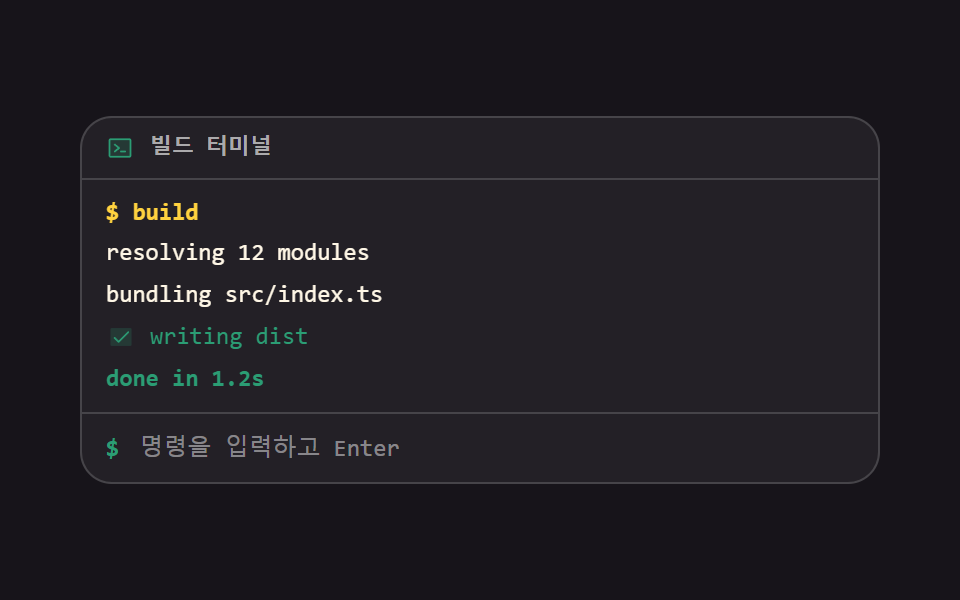
Type a command, press Enter, and the output lines stack up one after another while a spinner turns and then flips to a done mark. The stagger comes from animation-delay, paired with animation-fill-mode backwards so nothing flashes on the first frame.
Best forA what-it-does preview on a dev-tool landing page, docs that show what the install prints
animation-delayanimation-fill-modearia-live
<main class="stage">
<div class="rn is-demo" id="rn">
  <p class="rn__bar">
    <span class="rn__ico" aria-hidden="true"><svg xmlns="http://www.w3.org/2000/svg" width="1em" height="1em" viewBox="0 0 256 256"><g fill="currentColor"><path d="M224 56v144a8 8 0 0 1-8 8H40a8 8 0 0 1-8-8V56a8 8 0 0 1 8-8h176a8 8 0 0 1 8 8" opacity=".2"/><path d="M128 128a8 8 0 0 1-3 6.25l-40 32a8 8 0 1 1-10-12.5L107.19 128L75 102.25a8 8 0 1 1 10-12.5l40 32a8 8 0 0 1 3 6.25m48 24h-40a8 8 0 0 0 0 16h40a8 8 0 0 0 0-16m56-96v144a16 16 0 0 1-16 16H40a16 16 0 0 1-16-16V56a16 16 0 0 1 16-16h176a16 16 0 0 1 16 16m-16 144V56H40v144z"/></g></svg></span>
    <span class="rn__name">Build terminal</span>
  </p>
  <div class="rn__out" id="out" role="log" aria-live="polite">
    <p class="rn__line rn__line--echo" style="--i: 0">$ build</p>
    <p class="rn__line" style="--i: 1">resolving 12 modules</p>
    <p class="rn__line" style="--i: 2">bundling src/index.ts</p>
    <p class="rn__line rn__line--work is-done" style="--i: 3" id="work">
      <span class="rn__mark" aria-hidden="true"><span class="rn__spin"></span>
      <span class="rn__tick"><svg xmlns="http://www.w3.org/2000/svg" width="1em" height="1em" viewBox="0 0 256 256"><g fill="currentColor"><path d="M232 56v144a16 16 0 0 1-16 16H40a16 16 0 0 1-16-16V56a16 16 0 0 1 16-16h176a16 16 0 0 1 16 16" opacity=".2"/><path d="m205.66 85.66l-96 96a8 8 0 0 1-11.32 0l-40-40a8 8 0 0 1 11.32-11.32L104 164.69l90.34-90.35a8 8 0 0 1 11.32 11.32"/></g></svg></span></span>
      <span class="rn__work-text">writing dist</span>
    </p>
    <p class="rn__line rn__line--sum" style="--i: 4">done in 1.2s</p>
  </div>
  <form class="rn__form" id="form">
    <span class="rn__sign" aria-hidden="true">$</span>
    <input class="rn__input" id="input" type="text" autocomplete="off" placeholder="Type a command, then Enter" aria-label="Command to run">
  </form>
</div>
</main>
@use "../../../../site/static/demo-tokens" as *;
// 명령 실행과 출력 줄 — 친 명령을 되울리고 출력 줄이 차례로 쌓인다.
// 시차는 animation-delay 로 주고 animation-fill-mode: backwards 를 함께 묶는다.
// backwards 가 없으면 지연 구간에 작성 상태(완성된 줄)가 0프레임에 한 번 번쩍인다 (252-08 실측).
// 스피너와 완료 표시는 같은 격자 칸에 겹쳐 두어 바뀌어도 줄 폭이 흔들리지 않는다.
$duration: $dur-enter;
$easing: $ease-spring;
$color: $chart-3;
$mono: ui-monospace, SFMono-Regular, "SF Mono", Consolas, "Liberation Mono", monospace;
$line: rgba(255, 255, 255, .16);
$dim: rgba(255, 255, 255, .62);
@include stage($stage-ink);
.rn {
display: flex; flex-direction: column;
box-sizing: border-box; width: min(100%, 400px);
border: 1px solid $line; border-radius: $r-card; overflow: hidden;
background: rgba(255, 255, 255, .05);
font-family: $mono;
}
.rn__bar {
display: flex; align-items: center; gap: $sp-2;
margin: 0; padding: $sp-2 $sp-3;
border-bottom: 1px solid $line; color: $dim;
font-weight: 700; font-size: clamp(10px, 2.8vw, 11px); line-height: 1;
}
.rn__ico { display: grid; place-items: center; font-size: 14px; color: $color; }
.rn__out {
display: flex; flex-direction: column; gap: $sp-1;
padding: $sp-2 $sp-3; min-height: 96px;
}
.rn__line {
display: flex; align-items: center; gap: $sp-2;
margin: 0; color: $subject-cream;
font-weight: 500; font-size: clamp(10px, 2.8vw, 12px); line-height: 1.4;
white-space: nowrap; overflow: hidden;
}
.rn__line--echo { color: $stage-yellow; font-weight: 700; }
.rn__line--bad { color: $error-soft; }
.rn__line--sum { color: $color; font-weight: 700; }
// 스피너와 완료 표시는 같은 격자 칸에 겹쳐 둔다 — 바뀌어도 줄 폭이 그대로다
.rn__mark { display: grid; place-items: center; flex: 0 0 auto; width: 14px; height: 14px; }
.rn__mark > * { grid-area: 1 / 1; }
// 스피너는 테두리 한 변만 색을 주고 제 중심에서 돈다 (blog-demo 규칙 8)
.rn__spin {
width: 10px; height: 10px; border-radius: 50%;
border: 2px solid rgba(255, 255, 255, .22); border-top-color: $color;
transform-origin: 50% 50%;
animation-name: rnSpin; animation-duration: 500ms; animation-timing-function: linear;
animation-iteration-count: infinite;
}
@keyframes rnSpin {
from { transform: rotate(0deg); }
to { transform: rotate(360deg); }
}
.rn__tick { display: grid; place-items: center; font-size: 13px; color: $color; visibility: hidden; }
.rn__line--work.is-done .rn__spin { visibility: hidden; }
.rn__line--work.is-done .rn__tick { visibility: visible; }
.rn__line--work.is-done .rn__work-text { color: $color; }
.rn__form { display: flex; align-items: center; gap: $sp-2; padding: $sp-2 $sp-3; border-top: 1px solid $line; }
.rn__sign { flex: 0 0 auto; color: $color; font-weight: 700; font-size: clamp(11px, 3vw, 12px); line-height: 1.4; }
.rn__input {
flex: 1 1 auto; min-width: 0; box-sizing: border-box;
border: 0; background: none; color: $subject-cream;
font-family: inherit; font-weight: 500; font-size: clamp(10px, 2.8vw, 12px); line-height: 1.4;
}
.rn__input::placeholder { color: rgba(255, 255, 255, .46); }
.rn__input:focus-visible { outline: 2px solid $subject-blue; outline-offset: 2px; border-radius: $r-xs; }
// ── 격자 미리보기 루프 (2초)
// 네 줄이 --i 만큼 늦게 떠오르고, 72% 에 스피너가 완료 표시로 컷 전환된다.
// 줄은 지우지 않는다 — 퇴장을 넣으면 빈 화면이 최대 변화 프레임이 되어 poster 로 뽑힌다 (255 실측)
.rn.is-demo .rn__line {
animation-name: rnRise; animation-duration: $dur-loop; animation-timing-function: steps(1, end);
animation-iteration-count: infinite; animation-fill-mode: backwards;
// 줄마다 --i 만큼 늦게 시작한다. 주기는 2초 그대로라 gif 한 바퀴와 어긋나지 않는다
animation-delay: calc(var(--i) * 80ms);
}
// 줄 등장은 페이드가 아니라 컷이다 — 반투명 중간 프레임이 생기면 그 장면이 poster 로 뽑힌다 (248 04·09 실측)
@keyframes rnRise {
0% { opacity: 0; }
6%, 100% { opacity: 1; }
}
// 요약 줄만 시차에서 빼고 작업이 끝나는 72% 에 컷으로 찍는다 — 실제 실행에서도 스피너가 멎은 뒤에 나온다.
// 단축이 아닌 낱개 속성이라 animation-delay 를 0s 로 되돌려야 앞 규칙의 calc 가 남지 않는다
.rn.is-demo .rn__line--sum {
animation-name: rnSum; animation-duration: $dur-loop; animation-timing-function: steps(1, end);
animation-iteration-count: infinite; animation-fill-mode: backwards; animation-delay: 0s;
}
@keyframes rnSum {
0%, 71% { opacity: 0; }
72%, 100% { opacity: 1; }
}
// 돌기(rnSpin)와 멈추기(rnSpinOff)를 한 요소에 함께 건다 — 이름을 하나만 적으면 앞 선언이 통째로 밀린다
.rn.is-demo .rn__spin {
animation-name: rnSpin, rnSpinOff;
animation-duration: 500ms, $dur-loop;
animation-timing-function: linear, steps(1, end);
animation-iteration-count: infinite, infinite;
animation-fill-mode: none, backwards;
}
@keyframes rnSpinOff {
0%, 71% { visibility: visible; }
72%, 100% { visibility: hidden; }
}
.rn.is-demo .rn__tick {
animation-name: rnTickOn; animation-duration: $dur-loop; animation-timing-function: steps(1, end);
animation-iteration-count: infinite; animation-fill-mode: backwards;
}
@keyframes rnTickOn {
0%, 71% { visibility: hidden; }
72%, 100% { visibility: visible; }
}
.rn.is-demo .rn__work-text {
animation-name: rnWorkText; animation-duration: $dur-loop; animation-timing-function: steps(1, end);
animation-iteration-count: infinite; animation-fill-mode: backwards;
}
@keyframes rnWorkText {
0%, 71% { color: $subject-cream; }
72%, 100% { color: $color; }
}
@media (max-width: 340px) {
.rn__bar, .rn__out, .rn__form { padding-left: $sp-2; padding-right: $sp-2; }
.rn__out { min-height: 76px; gap: 0; }
}
@media (prefers-reduced-motion: reduce) {
.rn__spin { animation: none !important; }
.rn.is-demo .rn__line,
.rn.is-demo .rn__line--sum,
.rn.is-demo .rn__spin,
.rn.is-demo .rn__tick,
.rn.is-demo .rn__work-text { animation: none !important; }
}html, body {
margin: 0;
overflow: hidden;
}
.stage {
box-sizing: border-box;
min-height: 100vh;
display: grid;
place-items: center;
margin: 0;
background: #17141a;
font-family: -apple-system, "Segoe UI", "Noto Sans KR", sans-serif;
padding: clamp(8px, 4vw, 24px);
}
.rn {
display: flex;
flex-direction: column;
box-sizing: border-box;
width: min(100%, 400px);
border: 1px solid rgba(255, 255, 255, 0.16);
border-radius: 16px;
overflow: hidden;
background: rgba(255, 255, 255, 0.05);
font-family: ui-monospace, SFMono-Regular, "SF Mono", Consolas, "Liberation Mono", monospace;
}
.rn__bar {
display: flex;
align-items: center;
gap: 8px;
margin: 0;
padding: 8px 12px;
border-bottom: 1px solid rgba(255, 255, 255, 0.16);
color: rgba(255, 255, 255, 0.62);
font-weight: 700;
font-size: clamp(10px, 2.8vw, 11px);
line-height: 1;
}
.rn__ico {
display: grid;
place-items: center;
font-size: 14px;
color: #2b9d74;
}
.rn__out {
display: flex;
flex-direction: column;
gap: 4px;
padding: 8px 12px;
min-height: 96px;
}
.rn__line {
display: flex;
align-items: center;
gap: 8px;
margin: 0;
color: #fff7e6;
font-weight: 500;
font-size: clamp(10px, 2.8vw, 12px);
line-height: 1.4;
white-space: nowrap;
overflow: hidden;
}
.rn__line--echo {
color: #ffd23f;
font-weight: 700;
}
.rn__line--bad {
color: #ffe0d8;
}
.rn__line--sum {
color: #2b9d74;
font-weight: 700;
}
.rn__mark {
display: grid;
place-items: center;
flex: 0 0 auto;
width: 14px;
height: 14px;
}
.rn__mark > * {
grid-area: 1/1;
}
.rn__spin {
width: 10px;
height: 10px;
border-radius: 50%;
border: 2px solid rgba(255, 255, 255, 0.22);
border-top-color: #2b9d74;
transform-origin: 50% 50%;
animation-name: rnSpin;
animation-duration: 500ms;
animation-timing-function: linear;
animation-iteration-count: infinite;
}
@keyframes rnSpin {
from {
transform: rotate(0deg);
}
to {
transform: rotate(360deg);
}
}
.rn__tick {
display: grid;
place-items: center;
font-size: 13px;
color: #2b9d74;
visibility: hidden;
}
.rn__line--work.is-done .rn__spin {
visibility: hidden;
}
.rn__line--work.is-done .rn__tick {
visibility: visible;
}
.rn__line--work.is-done .rn__work-text {
color: #2b9d74;
}
.rn__form {
display: flex;
align-items: center;
gap: 8px;
padding: 8px 12px;
border-top: 1px solid rgba(255, 255, 255, 0.16);
}
.rn__sign {
flex: 0 0 auto;
color: #2b9d74;
font-weight: 700;
font-size: clamp(11px, 3vw, 12px);
line-height: 1.4;
}
.rn__input {
flex: 1 1 auto;
min-width: 0;
box-sizing: border-box;
border: 0;
background: none;
color: #fff7e6;
font-family: inherit;
font-weight: 500;
font-size: clamp(10px, 2.8vw, 12px);
line-height: 1.4;
}
.rn__input::placeholder {
color: rgba(255, 255, 255, 0.46);
}
.rn__input:focus-visible {
outline: 2px solid #2f6df6;
outline-offset: 2px;
border-radius: 4px;
}
.rn.is-demo .rn__line {
animation-name: rnRise;
animation-duration: 2s;
animation-timing-function: steps(1, end);
animation-iteration-count: infinite;
animation-fill-mode: backwards;
animation-delay: calc(var(--i) * 80ms);
}
@keyframes rnRise {
0% {
opacity: 0;
}
6%, 100% {
opacity: 1;
}
}
.rn.is-demo .rn__line--sum {
animation-name: rnSum;
animation-duration: 2s;
animation-timing-function: steps(1, end);
animation-iteration-count: infinite;
animation-fill-mode: backwards;
animation-delay: 0s;
}
@keyframes rnSum {
0%, 71% {
opacity: 0;
}
72%, 100% {
opacity: 1;
}
}
.rn.is-demo .rn__spin {
animation-name: rnSpin, rnSpinOff;
animation-duration: 500ms, 2s;
animation-timing-function: linear, steps(1, end);
animation-iteration-count: infinite, infinite;
animation-fill-mode: none, backwards;
}
@keyframes rnSpinOff {
0%, 71% {
visibility: visible;
}
72%, 100% {
visibility: hidden;
}
}
.rn.is-demo .rn__tick {
animation-name: rnTickOn;
animation-duration: 2s;
animation-timing-function: steps(1, end);
animation-iteration-count: infinite;
animation-fill-mode: backwards;
}
@keyframes rnTickOn {
0%, 71% {
visibility: hidden;
}
72%, 100% {
visibility: visible;
}
}
.rn.is-demo .rn__work-text {
animation-name: rnWorkText;
animation-duration: 2s;
animation-timing-function: steps(1, end);
animation-iteration-count: infinite;
animation-fill-mode: backwards;
}
@keyframes rnWorkText {
0%, 71% {
color: #fff7e6;
}
72%, 100% {
color: #2b9d74;
}
}
@media (max-width: 340px) {
.rn__bar, .rn__out, .rn__form {
padding-left: 8px;
padding-right: 8px;
}
.rn__out {
min-height: 76px;
gap: 0;
}
}
@media (prefers-reduced-motion: reduce) {
.rn__spin {
animation: none !important;
}
.rn.is-demo .rn__line,
.rn.is-demo .rn__line--sum,
.rn.is-demo .rn__spin,
.rn.is-demo .rn__tick,
.rn.is-demo .rn__work-text {
animation: none !important;
}
}var rn = document.getElementById('rn');
var out = document.getElementById('out');
var form = document.getElementById('form');
var input = document.getElementById('input');
var SCRIPTS = {
build: ['resolving 12 modules', 'bundling src/index.ts', 'WORK:writing dist', 'SUM:done in 1.2s'],
ls: ['dist src package.json README.md'],
help: ['build bundle the project', 'ls list files', 'clear wipe the screen'],
clear: []
};
// 작업 줄은 스피너·완료 아이콘을 품고 있어 새로 짓지 않고 첫 줄을 본으로 복제한다
var WORK_TPL = document.getElementById('work').cloneNode(true);
function line(text, cls, index) {
var p = document.createElement('p');
p.className = 'rn__line' + (cls ? ' rn__line--' + cls : '');
p.style.setProperty('--i', String(index));
p.textContent = text;
out.appendChild(p);
return p;
}
function workLine(text, index) {
var p = WORK_TPL.cloneNode(true);
p.removeAttribute('id');
p.classList.remove('is-done');
p.style.setProperty('--i', String(index));
p.querySelector('.rn__work-text').textContent = text;
out.appendChild(p);
// 스피너가 한 바퀴 돌 시간을 주고 완료 표시로 바꾼다 — 실제 작업이라면 여기가 fetch 의 then 자리다
setTimeout(function () { p.classList.add('is-done'); }, 900);
}
function run(cmd) {
out.textContent = '';
if (cmd === 'clear') { return; }
var steps = SCRIPTS[cmd];
line('$ ' + cmd, 'echo', 0);
if (!steps) { line('command not found: ' + cmd, 'bad', 1); return; }
steps.forEach(function (text, i) {
if (text.indexOf('WORK:') === 0) { workLine(text.slice(5), i + 1); }
// 요약 줄은 작업이 끝난 뒤에 찍힌다 — 스피너가 도는 동안 먼저 나오면 거짓말이 된다
else if (text.indexOf('SUM:') === 0) { setTimeout(function () { line(text.slice(4), 'sum', i + 1); }, 900); }
else { line(text, '', i + 1); }
});
}
form.addEventListener('submit', function (e) {
e.preventDefault();
rn.classList.remove('is-demo');
var cmd = input.value.trim();
if (cmd) { run(cmd); }
input.value = '';
});// CommandRunOutput — vanilla 판(run/294/demo/02-terminal-command-run-output/index.html) 의 React 포트.
// 친 명령을 되울리고 출력 줄이 --i 만큼 시차를 두고 쌓인다. 작업 줄은 스피너가 한 바퀴 돈 뒤
// 완료 표시로 바뀌고, 요약 줄은 그 뒤에야 찍힌다 — 실제 실행에서도 스피너가 멎은 다음이다.
import { useEffect, useRef, useState } from "react";
import type { CSSProperties } from "react";
import styles from "./CommandRunOutput.module.scss";
export type CommandRunOutputProps = {
/** 격자 미리보기용 2초 자동 루프. 명령을 한 번 실행하면 꺼진다 */
demo?: boolean;
duration?: number;
easing?: string;
color?: string;
};
type Vars = CSSProperties & { "--duration"?: string; "--easing"?: string; "--color"?: string };
type LineVars = CSSProperties & { "--i"?: string };
/** React 이벤트 제네릭이 ambient 에 없어 쓰는 필드만 지역 타입으로 선언한다 */
type FormEvt = { preventDefault(): void };
type InputEvt = { target: { value: string } };
type Box<T> = { current: T };
type Line = { id: number; text: string; kind: string; index: number; done: boolean };
const SCRIPTS: { [k: string]: string[] } = {
build: ["resolving 12 modules", "bundling src/index.ts", "WORK:writing dist", "SUM:done in 1.2s"],
ls: ["dist src package.json README.md"],
help: ["build bundle the project", "ls list files", "clear wipe the screen"],
clear: [],
};
/** 작업이 끝나기까지 주는 시간 — 실제 작업이라면 여기가 fetch 의 then 자리다 */
const WORK_MS = 900;
const INITIAL: Line[] = [
{ id: 1, text: "$ build", kind: "echo", index: 0, done: false },
{ id: 2, text: "resolving 12 modules", kind: "", index: 1, done: false },
{ id: 3, text: "bundling src/index.ts", kind: "", index: 2, done: false },
{ id: 4, text: "writing dist", kind: "work", index: 3, done: false },
{ id: 5, text: "done in 1.2s", kind: "sum", index: 4, done: false },
];
function kindClass(kind: string) {
if (kind === "echo") { return styles.lineEcho; }
if (kind === "bad") { return styles.lineBad; }
if (kind === "sum") { return styles.lineSum; }
if (kind === "work") { return styles.lineWork; }
return "";
}
export default function CommandRunOutput({
demo = true,
duration = 600,
easing = "cubic-bezier(.2, .8, .2, 1)",
color = "#2b9d74",
}: CommandRunOutputProps) {
const [live, setLive] = useState(demo);
const [lines, setLines] = useState<Line[]>(INITIAL);
const [value, setValue] = useState("");
const timers = useRef<number[]>([]) as Box<number[]>;
const seq = useRef<number>(INITIAL.length) as Box<number>;
const vars: Vars = { "--duration": `${duration}ms`, "--easing": easing, "--color": color };
useEffect(() => {
return () => { clearTimers(); };
}, []);
function clearTimers() {
timers.current.forEach((id) => { window.clearTimeout(id); });
timers.current = [];
}
function nextId() {
seq.current += 1;
return seq.current;
}
function run(cmd: string) {
clearTimers();
if (cmd === "clear") { setLines([]); return; }
const steps = SCRIPTS[cmd];
const next: Line[] = [{ id: nextId(), text: `$ ${cmd}`, kind: "echo", index: 0, done: false }];
if (!steps) {
next.push({ id: nextId(), text: `command not found: ${cmd}`, kind: "bad", index: 1, done: false });
setLines(next);
return;
}
steps.forEach((text, i) => {
if (text.indexOf("WORK:") === 0) {
const id = nextId();
next.push({ id: id, text: text.slice(5), kind: "work", index: i + 1, done: false });
// 스피너가 한 바퀴 돌 시간을 주고 완료 표시로 바꾼다
timers.current.push(window.setTimeout(() => {
setLines((prev) => prev.map((l) => (l.id === id ? { ...l, done: true } : l)));
}, WORK_MS));
} else if (text.indexOf("SUM:") === 0) {
// 요약 줄은 작업이 끝난 뒤에 찍힌다 — 스피너가 도는 동안 먼저 나오면 거짓말이 된다
const sum: Line = { id: nextId(), text: text.slice(4), kind: "sum", index: i + 1, done: false };
timers.current.push(window.setTimeout(() => {
setLines((prev) => prev.concat([sum]));
}, WORK_MS));
} else {
next.push({ id: nextId(), text: text, kind: "", index: i + 1, done: false });
}
});
setLines(next);
}
function submit(e: FormEvt) {
e.preventDefault();
setLive(false);
const cmd = value.trim();
if (cmd) { run(cmd); }
setValue("");
}
const cls = [styles.root, live ? styles.isDemo : ""].filter(Boolean).join(" ");
return (
<main className={styles.stage} style={vars}>
<div className={cls}>
<p className={styles.bar}>
<span className={styles.ico} aria-hidden="true">
<svg xmlns="http://www.w3.org/2000/svg" width="1em" height="1em" viewBox="0 0 256 256"><g fill="currentColor"><path d="M224 56v144a8 8 0 0 1-8 8H40a8 8 0 0 1-8-8V56a8 8 0 0 1 8-8h176a8 8 0 0 1 8 8" opacity=".2" /><path d="M128 128a8 8 0 0 1-3 6.25l-40 32a8 8 0 1 1-10-12.5L107.19 128L75 102.25a8 8 0 1 1 10-12.5l40 32a8 8 0 0 1 3 6.25m48 24h-40a8 8 0 0 0 0 16h40a8 8 0 0 0 0-16m56-96v144a16 16 0 0 1-16 16H40a16 16 0 0 1-16-16V56a16 16 0 0 1 16-16h176a16 16 0 0 1 16 16m-16 144V56H40v144z" /></g></svg>
</span>
<span className={styles.name}>빌드 터미널</span>
</p>
<div className={styles.out} role="log" aria-live="polite">
{lines.map((l) => {
const lineVars: LineVars = { "--i": String(l.index) };
const lineCls = [styles.line, kindClass(l.kind), l.done ? styles.isDone : ""].filter(Boolean).join(" ");
if (l.kind === "work") {
return (
<p className={lineCls} key={l.id} style={lineVars}>
<span className={styles.mark} aria-hidden="true">
<span className={styles.spin} />
<span className={styles.tick}>
<svg xmlns="http://www.w3.org/2000/svg" width="1em" height="1em" viewBox="0 0 256 256"><g fill="currentColor"><path d="M232 56v144a16 16 0 0 1-16 16H40a16 16 0 0 1-16-16V56a16 16 0 0 1 16-16h176a16 16 0 0 1 16 16" opacity=".2" /><path d="m205.66 85.66l-96 96a8 8 0 0 1-11.32 0l-40-40a8 8 0 0 1 11.32-11.32L104 164.69l90.34-90.35a8 8 0 0 1 11.32 11.32" /></g></svg>
</span>
</span>
<span className={styles.workText}>{l.text}</span>
</p>
);
}
return <p className={lineCls} key={l.id} style={lineVars}>{l.text}</p>;
})}
</div>
<form className={styles.form} onSubmit={submit}>
<span className={styles.sign} aria-hidden="true">$</span>
<input
className={styles.input}
type="text"
autoComplete="off"
placeholder="명령을 입력하고 Enter"
aria-label="실행할 명령"
value={value}
onChange={(e: InputEvt) => setValue(e.target.value)}
/>
</form>
</div>
</main>
);
}02 Command run and output lines — Measured area 1.423% · moving frames 17/23Original by GODRICH · SCSS and React ship in the zip · Terminal UI Design: 9 Copy-Paste CLI Parts
The post this demo lives in
 Terminal UI Design: 9 Copy-Paste CLI PartsTerminal UI design is the craft of putting a command-line window inside a web page. These nine copy-paste CLI parts go f See all demos in this post
If you like this effect - similar demos
 Embeds07 Terminal that types the command itself9 Code Block UI Patterns — No Highlighter Library
 Embeds09 Clock widget whose sky and greeting follow the real hourWeather Widget Design — 9 Widgets, No Library
 Embeds01 Team activity stream where new work lands on top9 Activity Feed UI Widgets — Sidebar-Ready Lists