06Before-and-after flip card
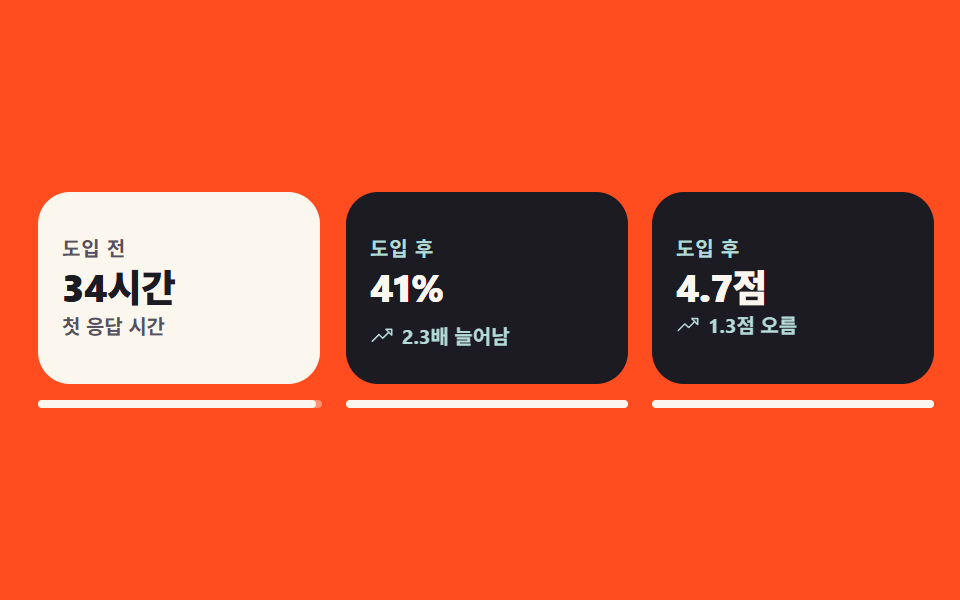
Press the card holding the before number and it turns to show the after number, while the preview loop cuts between the two faces in one frame with no edge-on view.
Best forCase-study sections that compare a metric before and after
rotateYbackface-visibilityaria-pressed
<main class="stage">
  <section class="ba is-demo" aria-label="Before-and-after numbers">
    <ul class="ba__list">
      <li class="ba__item ba__item--1">
        <button class="ba__card" type="button" aria-pressed="false">
          <span class="ba__inner">
            <span class="ba__face ba__face--front">
              <span class="ba__tag">BEFORE</span>
              <span class="ba__val">34 hrs</span>
              <span class="ba__cap">First reply time</span>
            </span>
            <span class="ba__face ba__face--back">
              <span class="ba__tag">AFTER</span>
              <span class="ba__val">2 hrs</span>
              <span class="ba__badge">
                <svg viewBox="0 0 256 256" width="12" height="12" fill="currentColor" aria-hidden="true" focusable="false"><path d="M216,128l-72,72V56Z" opacity="0.2"/><path d="M221.66,122.34l-72-72A8,8,0,0,0,136,56v64H40a8,8,0,0,0,0,16h96v64a8,8,0,0,0,13.66,5.66l72-72A8,8,0,0,0,221.66,122.34ZM152,180.69V75.31L204.69,128Z"/></svg>
                17x faster
              </span>
            </span>
          </span>
          <span class="ba__bar" aria-hidden="true"><span class="ba__bar-bg"></span><span class="ba__bar-fill"></span></span>
        </button>
      </li>

      <li class="ba__item ba__item--2">
        <button class="ba__card" type="button" aria-pressed="false">
          <span class="ba__inner">
            <span class="ba__face ba__face--front">
              <span class="ba__tag">BEFORE</span>
              <span class="ba__val">18%</span>
              <span class="ba__cap">Repeat purchase</span>
            </span>
            <span class="ba__face ba__face--back">
              <span class="ba__tag">AFTER</span>
              <span class="ba__val">41%</span>
              <span class="ba__badge">
                <svg viewBox="0 0 256 256" width="12" height="12" fill="currentColor" aria-hidden="true" focusable="false"><path d="M232,56v64L168,56Z" opacity="0.2"/><path d="M232,48H168a8,8,0,0,0-5.66,13.66L188.69,88,136,140.69l-34.34-34.35a8,8,0,0,0-11.32,0l-72,72a8,8,0,0,0,11.32,11.32L96,123.31l34.34,34.35a8,8,0,0,0,11.32,0L200,99.31l26.34,26.35A8,8,0,0,0,240,120V56A8,8,0,0,0,232,48Zm-8,52.69L187.31,64H224Z"/></svg>
                2.3x higher
              </span>
            </span>
          </span>
          <span class="ba__bar" aria-hidden="true"><span class="ba__bar-bg"></span><span class="ba__bar-fill"></span></span>
        </button>
      </li>

      <li class="ba__item ba__item--3">
        <button class="ba__card" type="button" aria-pressed="false">
          <span class="ba__inner">
            <span class="ba__face ba__face--front">
              <span class="ba__tag">BEFORE</span>
              <span class="ba__val">3.4</span>
              <span class="ba__cap">Average rating</span>
            </span>
            <span class="ba__face ba__face--back">
              <span class="ba__tag">AFTER</span>
              <span class="ba__val">4.7</span>
              <span class="ba__badge">
                <svg viewBox="0 0 256 256" width="12" height="12" fill="currentColor" aria-hidden="true" focusable="false"><path d="M232,56v64L168,56Z" opacity="0.2"/><path d="M232,48H168a8,8,0,0,0-5.66,13.66L188.69,88,136,140.69l-34.34-34.35a8,8,0,0,0-11.32,0l-72,72a8,8,0,0,0,11.32,11.32L96,123.31l34.34,34.35a8,8,0,0,0,11.32,0L200,99.31l26.34,26.35A8,8,0,0,0,240,120V56A8,8,0,0,0,232,48Zm-8,52.69L187.31,64H224Z"/></svg>
                Up 1.3 points
              </span>
            </span>
          </span>
          <span class="ba__bar" aria-hidden="true"><span class="ba__bar-bg"></span><span class="ba__bar-fill"></span></span>
        </button>
      </li>
    </ul>
  </section>
</main>@use "../../../../site/static/demo-tokens" as *;
// 276 공통 팔레트 — 아홉 항목이 같은 값을 쓴다. 괄호 안은 실측 대비비
$pf-ink: #1c1b22; // 뒷면 바탕
$pf-cream: #fbf7ef; // 앞면 바탕 · 잉크 위 글자 15.99:1
$pf-stone: #565062; // 크림 위 보조 글자 7.23:1
$pf-mint: #b3dad5; // 잉크 위 강조 11.45:1
$pf-flame: $stage-orange; // 무대 — 이 위에는 흰 글자를 얹지 않는다 (3.32:1)
$duration: $dur-loop; // 카드 석 장이 앞뒤로 갈리는 한 바퀴
$easing: $ease-spring; // 사람이 눌러 돌릴 때의 회전
$color: $pf-cream; // 앞면 카드 바탕
@include stage($pf-flame);
// 시각 요소 reset — 기본 margin 을 명시로 0
ul { margin: 0; }
.ba {
box-sizing: border-box;
width: clamp(288px, 96vw, 448px);
}
.ba__list {
display: grid;
grid-template-columns: repeat(3, 1fr);
gap: $sp-3;
padding: 0;
list-style: none;
}
.ba__item { perspective: 720px; }
.ba__item--2 { --d: -.2s; } // 카드마다 컷 시점을 어긋나게 해 프레임을 고루 채운다
.ba__item--3 { --d: -.4s; }
.ba__card {
display: grid;
gap: $sp-2;
width: 100%;
padding: 0;
border: 0;
border-radius: $r-card;
background: none;
font-family: inherit;
cursor: pointer;
}
.ba__card:focus-visible {
outline: 2px solid $pf-ink;
outline-offset: 4px;
}
// 사람이 실제로 누를 때는 이 transition 이 그대로 부드럽게 돈다
.ba__inner {
position: relative;
display: block;
height: 96px;
transform-style: preserve-3d;
transition: transform $dur-enter $easing;
}
.ba__card[aria-pressed="true"] .ba__inner { transform: rotateY(180deg); }
.ba__face {
position: absolute;
inset: 0;
box-sizing: border-box;
display: grid;
align-content: center;
justify-items: start;
gap: $sp-1;
padding: $sp-3;
border-radius: $r-card;
overflow: hidden;
backface-visibility: hidden;
text-align: left;
}
.ba__face--front { background: $pf-cream; color: $pf-ink; }
.ba__face--back { background: $pf-ink; color: $pf-cream; transform: rotateY(180deg); }
.ba__tag {
font-weight: 700; font-size: 10px; line-height: 1;
letter-spacing: .04em;
}
.ba__face--front .ba__tag { color: $pf-stone; }
.ba__face--back .ba__tag { color: $pf-mint; }
.ba__val {
font-weight: 800; font-size: clamp(15px, 4.4vw, 19px); line-height: 1.1;
letter-spacing: -.02em;
}
.ba__cap { color: $pf-stone; font-weight: 600; font-size: 10px; line-height: 1.2; }
.ba__badge {
display: inline-flex;
align-items: center;
gap: $sp-1;
color: $pf-mint;
font-weight: 700; font-size: 10px; line-height: 1;
transform: translateY(0);
}
.ba__badge svg { display: block; flex: 0 0 auto; }
// 카드 밑의 뒤집기 진행 막대 — 3D 면 밖이라 회전에 딸려가지 않는다
.ba__bar { display: grid; }
.ba__bar-bg, .ba__bar-fill {
grid-area: 1 / 1;
height: 4px;
border-radius: $r-pill;
}
.ba__bar-bg { background: rgba(251, 247, 239, .4); }
.ba__bar-fill {
background: $pf-cream;
transform: scaleX(0);
transform-origin: left center; // 규칙8: 진행 막대 왼쪽 채움
}
.ba__card[aria-pressed="true"] .ba__bar-fill {
transform: scaleX(1);
transition: transform $dur-enter $easing;
}
// ── 자동 재생 ────────────────────────────────────────────
// 3D 플립의 회전면 폭은 |cos θ| 라 프레임당 면적 변화율이 |sin θ| — 90° 부근이 언제나 최대다.
// 그대로 두면 poster 로 뽑히는 "가장 크게 달라진 장" 이 늘 모서리뷰(선 한 줄)가 된다.
// 그래서 미리보기 루프의 뒤집기만 steps(1, end) 컷으로 앞면 → 뒷면 → 앞면 을 갈아 끼우고,
// 사람이 누르는 실제 동작은 위의 transition: transform 그대로 부드럽게 둔다.
// 컷만 쓰면 움직인 프레임이 두세 장으로 떨어지므로 아래 막대(scaleX)와 배지(translateY) 가
// 중간 프레임을 채운다 — 둘 다 transform 이라 반투명 유령이 생기지 않는다.
// animation 단축은 delay 를 0 으로 리셋하므로 낱개 속성으로 쓴다
.ba.is-demo .ba__inner {
animation-name: baFlip;
animation-duration: $duration;
animation-timing-function: steps(1, end);
animation-iteration-count: infinite;
animation-delay: var(--d, 0s);
animation-fill-mode: backwards;
transition: none;
}
.ba.is-demo .ba__bar-fill {
animation-name: baBar;
animation-duration: $duration;
animation-timing-function: $easing;
animation-iteration-count: infinite;
animation-delay: var(--d, 0s);
animation-fill-mode: backwards;
transition: none;
}
.ba.is-demo .ba__badge {
animation-name: baPop;
animation-duration: $duration;
animation-timing-function: $ease-pop;
animation-iteration-count: infinite;
animation-delay: var(--d, 0s);
animation-fill-mode: backwards;
}
// 복귀는 80% 에 끝난다 — 24프레임의 마지막 장은 2초의 95.8% 지점이다
@keyframes baFlip {
0%, 29% { transform: rotateY(0deg); }
30%, 79% { transform: rotateY(180deg); }
80%, 100% { transform: rotateY(0deg); }
}
@keyframes baBar {
0% { transform: scaleX(0); }
30%, 72% { transform: scaleX(1); }
80%, 100% { transform: scaleX(0); }
}
@keyframes baPop {
0%, 29% { transform: translateY(12px); }
46%, 100% { transform: translateY(0); }
}
// 좁은 화면 — 석 장을 유지하고 글자·간격만 줄인다 (여기서는 값을 올리지 않는다)
@media (max-width: 340px), (max-height: 220px) {
.ba { width: 100%; }
.ba__list { gap: $sp-2; }
.ba__inner { height: 88px; }
.ba__face { gap: $sp-1; padding: $sp-2; }
.ba__val { font-size: 14px; }
.ba__tag, .ba__cap, .ba__badge { font-size: 9px; }
.ba__badge { gap: 0; }
}
@media (prefers-reduced-motion: reduce) {
// .ba.is-demo .ba__inner (0,3,0) 를 이기려면 !important 가 필요하다.
// 움직임만 끄고 누르면 뒤집히는 동작(상태)은 남긴다
.ba__inner, .ba__bar-fill, .ba__badge { animation: none !important; }
.ba__inner, .ba__bar-fill { transition: none !important; }
}html, body {
margin: 0;
overflow: hidden;
}
.stage {
box-sizing: border-box;
min-height: 100vh;
display: grid;
place-items: center;
margin: 0;
background: #ff4d1f;
font-family: -apple-system, "Segoe UI", "Noto Sans KR", sans-serif;
padding: clamp(8px, 4vw, 24px);
}
ul {
margin: 0;
}
.ba {
box-sizing: border-box;
width: clamp(288px, 96vw, 448px);
}
.ba__list {
display: grid;
grid-template-columns: repeat(3, 1fr);
gap: 12px;
padding: 0;
list-style: none;
}
.ba__item {
perspective: 720px;
}
.ba__item--2 {
--d: -.2s;
}
.ba__item--3 {
--d: -.4s;
}
.ba__card {
display: grid;
gap: 8px;
width: 100%;
padding: 0;
border: 0;
border-radius: 16px;
background: none;
font-family: inherit;
cursor: pointer;
}
.ba__card:focus-visible {
outline: 2px solid #1c1b22;
outline-offset: 4px;
}
.ba__inner {
position: relative;
display: block;
height: 96px;
transform-style: preserve-3d;
transition: transform 600ms cubic-bezier(0.2, 0.8, 0.2, 1);
}
.ba__card[aria-pressed=true] .ba__inner {
transform: rotateY(180deg);
}
.ba__face {
position: absolute;
inset: 0;
box-sizing: border-box;
display: grid;
align-content: center;
justify-items: start;
gap: 4px;
padding: 12px;
border-radius: 16px;
overflow: hidden;
backface-visibility: hidden;
text-align: left;
}
.ba__face--front {
background: #fbf7ef;
color: #1c1b22;
}
.ba__face--back {
background: #1c1b22;
color: #fbf7ef;
transform: rotateY(180deg);
}
.ba__tag {
font-weight: 700;
font-size: 10px;
line-height: 1;
letter-spacing: 0.04em;
}
.ba__face--front .ba__tag {
color: #565062;
}
.ba__face--back .ba__tag {
color: #b3dad5;
}
.ba__val {
font-weight: 800;
font-size: clamp(15px, 4.4vw, 19px);
line-height: 1.1;
letter-spacing: -0.02em;
}
.ba__cap {
color: #565062;
font-weight: 600;
font-size: 10px;
line-height: 1.2;
}
.ba__badge {
display: inline-flex;
align-items: center;
gap: 4px;
color: #b3dad5;
font-weight: 700;
font-size: 10px;
line-height: 1;
transform: translateY(0);
}
.ba__badge svg {
display: block;
flex: 0 0 auto;
}
.ba__bar {
display: grid;
}
.ba__bar-bg, .ba__bar-fill {
grid-area: 1/1;
height: 4px;
border-radius: 999px;
}
.ba__bar-bg {
background: rgba(251, 247, 239, 0.4);
}
.ba__bar-fill {
background: #fbf7ef;
transform: scaleX(0);
transform-origin: left center;
}
.ba__card[aria-pressed=true] .ba__bar-fill {
transform: scaleX(1);
transition: transform 600ms cubic-bezier(0.2, 0.8, 0.2, 1);
}
.ba.is-demo .ba__inner {
animation-name: baFlip;
animation-duration: 2s;
animation-timing-function: steps(1, end);
animation-iteration-count: infinite;
animation-delay: var(--d, 0s);
animation-fill-mode: backwards;
transition: none;
}
.ba.is-demo .ba__bar-fill {
animation-name: baBar;
animation-duration: 2s;
animation-timing-function: cubic-bezier(0.2, 0.8, 0.2, 1);
animation-iteration-count: infinite;
animation-delay: var(--d, 0s);
animation-fill-mode: backwards;
transition: none;
}
.ba.is-demo .ba__badge {
animation-name: baPop;
animation-duration: 2s;
animation-timing-function: cubic-bezier(0.2, 1.4, 0.4, 1);
animation-iteration-count: infinite;
animation-delay: var(--d, 0s);
animation-fill-mode: backwards;
}
@keyframes baFlip {
0%, 29% {
transform: rotateY(0deg);
}
30%, 79% {
transform: rotateY(180deg);
}
80%, 100% {
transform: rotateY(0deg);
}
}
@keyframes baBar {
0% {
transform: scaleX(0);
}
30%, 72% {
transform: scaleX(1);
}
80%, 100% {
transform: scaleX(0);
}
}
@keyframes baPop {
0%, 29% {
transform: translateY(12px);
}
46%, 100% {
transform: translateY(0);
}
}
@media (max-width: 340px), (max-height: 220px) {
.ba {
width: 100%;
}
.ba__list {
gap: 8px;
}
.ba__inner {
height: 88px;
}
.ba__face {
gap: 4px;
padding: 8px;
}
.ba__val {
font-size: 14px;
}
.ba__tag, .ba__cap, .ba__badge {
font-size: 9px;
}
.ba__badge {
gap: 0;
}
}
@media (prefers-reduced-motion: reduce) {
.ba__inner, .ba__bar-fill, .ba__badge {
animation: none !important;
}
.ba__inner, .ba__bar-fill {
transition: none !important;
}
}(function () {
var root = document.querySelector('.ba');
var cards = [].slice.call(root.querySelectorAll('.ba__card'));
// 사람이 손을 대면 미리보기 컷 루프를 끄고 앞면으로 돌려 둔다
function stopLoop() { root.classList.remove('is-demo'); }
// 진짜 <button> 이라 Enter·Space 는 브라우저가 click 으로 넘겨준다 (터치도 같은 경로)
cards.forEach(function (card) {
card.addEventListener('click', function () {
var was = card.getAttribute('aria-pressed') === 'true';
stopLoop();
card.setAttribute('aria-pressed', was ? 'false' : 'true');
});
});
root.addEventListener('pointerenter', stopLoop);
root.addEventListener('focusin', stopLoop);
})();import { useState } from "react";
import type { CSSProperties, ReactNode } from "react";
import styles from "./BeforeAfterFlip.module.scss";
/* ambient 에 React 이벤트 제네릭이 없어 파일 안에 필요한 만큼만 선언한다 */
type Vars = CSSProperties & { "--duration"?: string; "--easing"?: string; "--color"?: string };
type ItemVars = CSSProperties & { "--d"?: string };
export type FlipCard = {
/** 앞면 수치 */
before: string;
/** 뒷면 수치 */
after: string;
/** 앞면 설명 */
caption: string;
/** 뒷면 변화량 배지 */
badge: string;
/** 배지 옆 화살표 아이콘 */
icon: ReactNode;
};
export type BeforeAfterFlipProps = {
sectionLabel?: string;
beforeTag?: string;
afterTag?: string;
cards?: FlipCard[];
/** 카드 석 장이 앞뒤로 갈리는 한 바퀴(ms) */
duration?: number;
easing?: string;
/** 앞면 카드 바탕 */
color?: string;
};
const ArrowRight = (): ReactNode => (
<svg viewBox="0 0 256 256" width="12" height="12" fill="currentColor" aria-hidden="true" focusable="false">
<path d="M216,128l-72,72V56Z" opacity="0.2" />
<path d="M221.66,122.34l-72-72A8,8,0,0,0,136,56v64H40a8,8,0,0,0,0,16h96v64a8,8,0,0,0,13.66,5.66l72-72A8,8,0,0,0,221.66,122.34ZM152,180.69V75.31L204.69,128Z" />
</svg>
);
const TrendUp = (): ReactNode => (
<svg viewBox="0 0 256 256" width="12" height="12" fill="currentColor" aria-hidden="true" focusable="false">
<path d="M232,56v64L168,56Z" opacity="0.2" />
<path d="M232,48H168a8,8,0,0,0-5.66,13.66L188.69,88,136,140.69l-34.34-34.35a8,8,0,0,0-11.32,0l-72,72a8,8,0,0,0,11.32,11.32L96,123.31l34.34,34.35a8,8,0,0,0,11.32,0L200,99.31l26.34,26.35A8,8,0,0,0,240,120V56A8,8,0,0,0,232,48Zm-8,52.69L187.31,64H224Z" />
</svg>
);
const DEFAULT_CARDS: FlipCard[] = [
{ before: "34시간", after: "2시간", caption: "첫 응답 시간", badge: "17배 빨라짐", icon: <ArrowRight /> },
{ before: "18%", after: "41%", caption: "재구매율", badge: "2.3배 늘어남", icon: <TrendUp /> },
{ before: "3.4점", after: "4.7점", caption: "평균 별점", badge: "1.3점 오름", icon: <TrendUp /> },
];
/* 카드마다 컷 시점을 어긋나게 해 프레임을 고루 채운다 */
const LAG = ["0s", "-.2s", "-.4s"];
export default function BeforeAfterFlip({
sectionLabel = "도입 전후 수치 비교",
beforeTag = "도입 전",
afterTag = "도입 후",
cards = DEFAULT_CARDS,
duration = 2000,
easing = "cubic-bezier(.2,.8,.2,1)",
color = "#fbf7ef",
}: BeforeAfterFlipProps): ReactNode {
const [loop, setLoop] = useState<boolean>(true);
const [on, setOn] = useState<boolean[]>(cards.map(() => false));
const vars: Vars = { "--duration": `${duration}ms`, "--easing": easing, "--color": color };
/* 진짜 <button> 이라 Enter·Space 는 브라우저가 click 으로 넘겨준다 (터치도 같은 경로) */
const flip = (i: number): void => {
setLoop(false);
setOn(on.map((v: boolean, j: number) => (j === i ? !v : v)));
};
return (
<section
className={loop ? `${styles.ba} ${styles.isDemo}` : styles.ba}
style={vars}
aria-label={sectionLabel}
onPointerEnter={() => setLoop(false)}
onFocus={() => setLoop(false)}
>
<ul className={styles.list}>
{cards.map((c: FlipCard, i: number) => {
const itemVars: ItemVars = { "--d": LAG[i % LAG.length] };
return (
<li className={styles.item} style={itemVars} key={c.caption}>
<button
className={styles.card}
type="button"
aria-pressed={on[i] === true}
onClick={() => flip(i)}
>
<span className={styles.inner}>
<span className={`${styles.face} ${styles.front}`}>
<span className={styles.tag}>{beforeTag}</span>
<span className={styles.val}>{c.before}</span>
<span className={styles.cap}>{c.caption}</span>
</span>
<span className={`${styles.face} ${styles.back}`}>
<span className={styles.tag}>{afterTag}</span>
<span className={styles.val}>{c.after}</span>
<span className={styles.badge}>{c.icon}{c.badge}</span>
</span>
</span>
<span className={styles.bar} aria-hidden="true">
<span className={styles.barBg} />
<span className={styles.barFill} />
</span>
</button>
</li>
);
})}
</ul>
</section>
);
}06 Before-and-after flip card — Measured area 28.828% · moving frames 22/23Original by GODRICH · SCSS and React ship in the zip · Testimonial Section Design: 9 Social Proof Blocks
The post this demo lives in
 Testimonial Section Design: 9 Social Proof BlocksTestimonial section design is the band of a page that shows proof from real customers — quotes, star ratings, client mar See all demos in this post