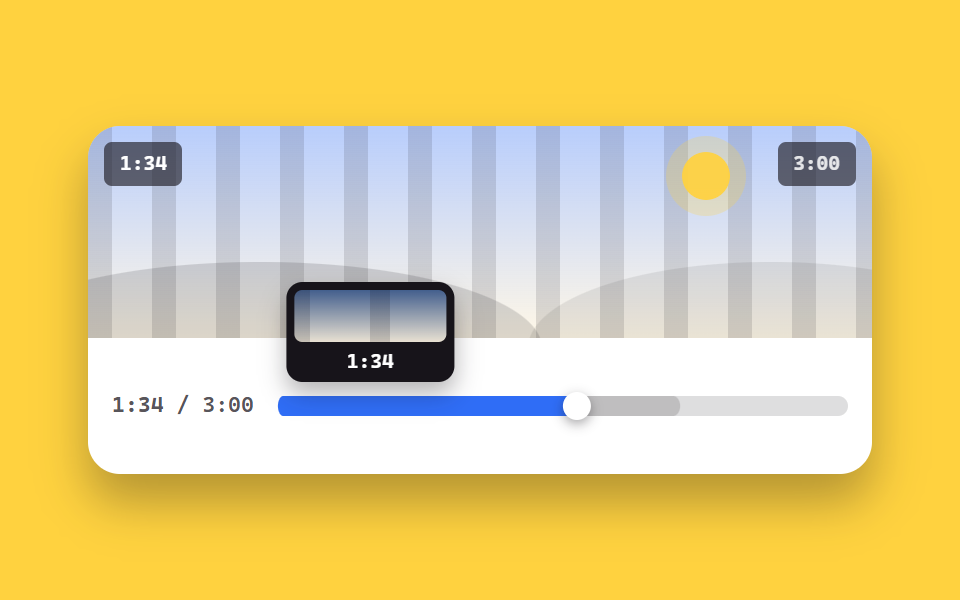
02Seek bar with time tooltip
A time tooltip follows the cursor along the bar, the played span fills in, and the buffered range lays down ahead in a lighter tint. The scene-preview tile inside the tooltip changes its pattern with the hover position.
Best forLong lectures and podcasts where users constantly want to jump to an exact moment
role=slideraria-valuenowhover
<main class="stage">
  <figure class="pl is-demo" id="pl">
    <div class="pl__screen">
      <div class="pl__stripes" aria-hidden="true"></div>
      <div class="pl__world" aria-hidden="true"><span class="pl__sun"></span><span class="pl__hill pl__hill--a"></span><span class="pl__hill pl__hill--b"></span></div>
      <span class="pl__clock" id="clock">0:32</span>
      <span class="pl__badge">3:00</span>
    </div>
    <div class="sk__row">
      <span class="sk__t"><b id="t-now">0:32</b> / 3:00</span>
      <div class="sk is-hover" id="sk" role="slider" tabindex="0" aria-label="Seek position" aria-valuemin="0" aria-valuemax="180" aria-valuenow="32" aria-valuetext="0:32 / 3:00">
        <span class="sk__track" aria-hidden="true">
          <span class="sk__buf" id="buf"></span>
          <span class="sk__fill"></span>
          <span class="sk__thumbwrap"><span class="sk__thumb"></span></span>
        </span>
        <span class="sk__tip" aria-hidden="true">
          <span class="sk__prev"><span class="sk__pat"></span></span>
          <b class="sk__tt" id="tt">0:32</b>
        </span>
      </div>
    </div>
  </figure>
</main>
@use "../../../../site/static/demo-tokens" as *;
// --p 는 등록된 사용자 지정 속성 — 키프레임에서 보간된다 (미등록이면 steps 처럼 튄다)
@property --p { syntax: "<number>"; inherits: true; initial-value: 0.18; }
$duration: $dur-quick;
$easing: $ease-spring;
$color: $subject-blue;
@include stage($stage-yellow);
.pl {
box-sizing: border-box;
width: min(392px, 92vw);
margin: 0;
border-radius: $r-card;
background: $stage-paper;
box-shadow: $shadow-raised;
overflow: hidden;
}
.pl__screen {
position: relative;
height: clamp(84px, 22vw, 116px);
overflow: hidden;
background: linear-gradient(180deg, rgba(47, 109, 246, .34), rgba(255, 247, 230, .96));
}
.pl__stripes {
position: absolute; inset: 0 -72px;
background: repeating-linear-gradient(90deg, rgba(23, 20, 26, .13) 0 12px, transparent 12px 32px);
animation-name: pl-pan;
animation-duration: $dur-loop;
animation-timing-function: linear;
animation-iteration-count: infinite;
}
@keyframes pl-pan { from { transform: translateX(0); } to { transform: translateX(-64px); } }
.pl__world { position: absolute; inset: 0; }
.pl__sun {
position: absolute; right: 18%; top: 12%;
width: 24px; height: 24px; border-radius: 50%;
background: rgba(255, 210, 63, .95);
box-shadow: 0 0 0 8px rgba(255, 210, 63, .25);
}
.pl__hill { position: absolute; bottom: -46%; height: 82%; border-radius: 50%; }
.pl__hill--a { left: -14%; width: 72%; background: rgba(23, 20, 26, .15); }
.pl__hill--b { right: -18%; width: 62%; background: rgba(23, 20, 26, .09); }
.pl__clock, .pl__badge {
position: absolute; top: $sp-2;
padding: $sp-1 $sp-2;
border-radius: $r-xs;
background: rgba(23, 20, 26, .62);
font-family: ui-monospace, "Cascadia Mono", Menlo, Consolas, monospace;
font-size: 10px; line-height: 14px; font-weight: 700;
}
.pl__clock { left: $sp-2; color: #fff; }
.pl__badge { right: $sp-2; color: rgba(255, 255, 255, .85); }
.sk__row {
display: flex; align-items: center; gap: $sp-3;
padding: $sp-3;
}
.sk__t {
flex: 0 0 auto;
color: rgba(23, 20, 26, .72);
font-family: ui-monospace, "Cascadia Mono", Menlo, Consolas, monospace;
font-size: 11px; line-height: 14px; font-weight: 600;
}
.sk {
--p: 0.18;
--h: 0.18;
position: relative;
flex: 1 1 auto;
height: 44px;
cursor: pointer;
touch-action: none;
}
.sk:focus-visible { outline: 2px solid $color; outline-offset: 2px; border-radius: $r-sm; }
.sk__track {
position: absolute; left: 0; right: 0; top: 50%;
height: 10px;
margin-top: -5px;
border-radius: $r-pill;
background: rgba(23, 20, 26, .14);
}
.sk__buf, .sk__fill {
position: absolute; inset: 0;
border-radius: $r-pill;
transform-origin: left center; // 규칙8: 좌변서 차오름
}
// 채움과 버퍼는 둘 다 --p 하나에서 나온다. 채움을 고정값(scaleX(.18))으로 두면 재생 머리만 가고
// 파란 구간은 제자리에 남는다 (실측 2026-09-12: 머리 54% · 채움 20%)
.sk__buf { background: rgba(23, 20, 26, .16); transform: scaleX(min(1, calc(var(--p) + .18))); }
.sk__fill { background: $color; transform: scaleX(var(--p)); }
.sk__thumbwrap {
position: absolute; left: 0; right: 0; top: 0; bottom: 0;
pointer-events: none;
transform: translateX(calc((100% - 14px) * var(--p)));
}
.sk__thumb {
position: absolute; left: 0; top: 50%;
width: 14px; height: 14px;
margin-top: -7px;
border-radius: 50%;
background: #fff;
box-shadow: 0 2px 6px rgba(23, 20, 26, .4);
}
.sk__tip {
position: absolute; bottom: 34px; left: 0;
width: 76px;
padding: $sp-1;
border-radius: $r-sm;
background: $subject-ink;
box-shadow: $shadow-press;
opacity: 0;
transform: translateX(calc((100% - 76px) * var(--h, var(--p))));
transition: opacity $duration $easing;
pointer-events: none;
}
.sk.is-hover .sk__tip, .sk:hover .sk__tip, .sk:focus-visible .sk__tip { opacity: 1; }
.sk__prev {
position: relative;
display: block;
height: 26px;
border-radius: $r-xs;
overflow: hidden;
background: linear-gradient(180deg, rgba(111, 169, 255, .5), rgba(255, 247, 230, .9));
}
.sk__pat {
position: absolute; inset: 0 -80px;
background: repeating-linear-gradient(90deg, rgba(23, 20, 26, .16) 0 10px, transparent 10px 40px);
transform: translateX(calc(-40px + var(--h, var(--p)) * -80px));
}
.sk__tt {
display: block;
padding-top: $sp-1;
color: #fff;
font-family: ui-monospace, "Cascadia Mono", Menlo, Consolas, monospace;
font-size: 10px; line-height: 12px; font-weight: 700;
text-align: center;
}
// ── 자동 루프: 툴팁이 바를 쓸며 시간을 재고 되돌아온다. --p 하나가 채움·엄지·툴팁·무늬를 함께 움직인다 ──
.pl.is-demo .sk {
--h: var(--p);
animation-name: sk-p;
animation-duration: $dur-loop;
animation-timing-function: ease-in-out;
animation-iteration-count: infinite;
}
@keyframes sk-p {
0% { --p: 0.18; }
78% { --p: 0.92; }
88% { --p: 0.92; }
100% { --p: 0.18; }
}
.pl.is-demo .sk__tip { opacity: 1; }
@media (prefers-reduced-motion: reduce) {
.pl.is-demo .sk, .pl__stripes { animation: none !important; }
.sk__tip { transition: none; }
}@property --p {
syntax: "<number>";
inherits: true;
initial-value: 0.18;
}
html, body {
margin: 0;
overflow: hidden;
}
.stage {
box-sizing: border-box;
min-height: 100vh;
display: grid;
place-items: center;
margin: 0;
background: #ffd23f;
font-family: -apple-system, "Segoe UI", "Noto Sans KR", sans-serif;
padding: clamp(8px, 4vw, 24px);
}
.pl {
box-sizing: border-box;
width: min(392px, 92vw);
margin: 0;
border-radius: 16px;
background: #ffffff;
box-shadow: 0 14px 24px rgba(23, 20, 26, 0.32);
overflow: hidden;
}
.pl__screen {
position: relative;
height: clamp(84px, 22vw, 116px);
overflow: hidden;
background: linear-gradient(180deg, rgba(47, 109, 246, 0.34), rgba(255, 247, 230, 0.96));
}
.pl__stripes {
position: absolute;
inset: 0 -72px;
background: repeating-linear-gradient(90deg, rgba(23, 20, 26, 0.13) 0 12px, transparent 12px 32px);
animation-name: pl-pan;
animation-duration: 2s;
animation-timing-function: linear;
animation-iteration-count: infinite;
}
@keyframes pl-pan {
from {
transform: translateX(0);
}
to {
transform: translateX(-64px);
}
}
.pl__world {
position: absolute;
inset: 0;
}
.pl__sun {
position: absolute;
right: 18%;
top: 12%;
width: 24px;
height: 24px;
border-radius: 50%;
background: rgba(255, 210, 63, 0.95);
box-shadow: 0 0 0 8px rgba(255, 210, 63, 0.25);
}
.pl__hill {
position: absolute;
bottom: -46%;
height: 82%;
border-radius: 50%;
}
.pl__hill--a {
left: -14%;
width: 72%;
background: rgba(23, 20, 26, 0.15);
}
.pl__hill--b {
right: -18%;
width: 62%;
background: rgba(23, 20, 26, 0.09);
}
.pl__clock, .pl__badge {
position: absolute;
top: 8px;
padding: 4px 8px;
border-radius: 4px;
background: rgba(23, 20, 26, 0.62);
font-family: ui-monospace, "Cascadia Mono", Menlo, Consolas, monospace;
font-size: 10px;
line-height: 14px;
font-weight: 700;
}
.pl__clock {
left: 8px;
color: #fff;
}
.pl__badge {
right: 8px;
color: rgba(255, 255, 255, 0.85);
}
.sk__row {
display: flex;
align-items: center;
gap: 12px;
padding: 12px;
}
.sk__t {
flex: 0 0 auto;
color: rgba(23, 20, 26, 0.72);
font-family: ui-monospace, "Cascadia Mono", Menlo, Consolas, monospace;
font-size: 11px;
line-height: 14px;
font-weight: 600;
}
.sk {
--p: 0.18;
--h: 0.18;
position: relative;
flex: 1 1 auto;
height: 44px;
cursor: pointer;
touch-action: none;
}
.sk:focus-visible {
outline: 2px solid #2f6df6;
outline-offset: 2px;
border-radius: 8px;
}
.sk__track {
position: absolute;
left: 0;
right: 0;
top: 50%;
height: 10px;
margin-top: -5px;
border-radius: 999px;
background: rgba(23, 20, 26, 0.14);
}
.sk__buf, .sk__fill {
position: absolute;
inset: 0;
border-radius: 999px;
transform-origin: left center;
}
.sk__buf {
background: rgba(23, 20, 26, 0.16);
transform: scaleX(min(1, var(--p) + 0.18));
}
.sk__fill {
background: #2f6df6;
transform: scaleX(var(--p));
}
.sk__thumbwrap {
position: absolute;
left: 0;
right: 0;
top: 0;
bottom: 0;
pointer-events: none;
transform: translateX(calc((100% - 14px) * var(--p)));
}
.sk__thumb {
position: absolute;
left: 0;
top: 50%;
width: 14px;
height: 14px;
margin-top: -7px;
border-radius: 50%;
background: #fff;
box-shadow: 0 2px 6px rgba(23, 20, 26, 0.4);
}
.sk__tip {
position: absolute;
bottom: 34px;
left: 0;
width: 76px;
padding: 4px;
border-radius: 8px;
background: #17141a;
box-shadow: 0 6px 12px rgba(23, 20, 26, 0.32);
opacity: 0;
transform: translateX(calc((100% - 76px) * var(--h, var(--p))));
transition: opacity 220ms cubic-bezier(0.2, 0.8, 0.2, 1);
pointer-events: none;
}
.sk.is-hover .sk__tip, .sk:hover .sk__tip, .sk:focus-visible .sk__tip {
opacity: 1;
}
.sk__prev {
position: relative;
display: block;
height: 26px;
border-radius: 4px;
overflow: hidden;
background: linear-gradient(180deg, rgba(111, 169, 255, 0.5), rgba(255, 247, 230, 0.9));
}
.sk__pat {
position: absolute;
inset: 0 -80px;
background: repeating-linear-gradient(90deg, rgba(23, 20, 26, 0.16) 0 10px, transparent 10px 40px);
transform: translateX(calc(-40px + var(--h, var(--p)) * -80px));
}
.sk__tt {
display: block;
padding-top: 4px;
color: #fff;
font-family: ui-monospace, "Cascadia Mono", Menlo, Consolas, monospace;
font-size: 10px;
line-height: 12px;
font-weight: 700;
text-align: center;
}
.pl.is-demo .sk {
--h: var(--p);
animation-name: sk-p;
animation-duration: 2s;
animation-timing-function: ease-in-out;
animation-iteration-count: infinite;
}
@keyframes sk-p {
0% {
--p: 0.18;
}
78% {
--p: 0.92;
}
88% {
--p: 0.92;
}
100% {
--p: 0.18;
}
}
.pl.is-demo .sk__tip {
opacity: 1;
}
@media (prefers-reduced-motion: reduce) {
.pl.is-demo .sk, .pl__stripes {
animation: none !important;
}
.sk__tip {
transition: none;
}
}// 실제 동작: 마우스를 올리면 그 지점 시간을 보여 주고, 누르거나 끌면 그곳으로 건너뛴다.
var root = document.getElementById('pl'),
sk = document.getElementById('sk'),
tt = document.getElementById('tt'),
now = document.getElementById('t-now'),
clock = document.getElementById('clock');
var DUR = 180, t = 32;
function fmt(s) { s = Math.floor(s); return Math.floor(s / 60) + ':' + ('0' + (s % 60)).slice(-2); }
function paint() {
var p = t / DUR;
sk.style.setProperty('--p', p.toFixed(4));
sk.setAttribute('aria-valuenow', Math.floor(t));
sk.setAttribute('aria-valuetext', fmt(t) + ' / 3:00');
now.textContent = fmt(t);
clock.textContent = fmt(t);
tt.textContent = fmt(p * DUR);
}
// 자동 루프 중엔 CSS 가 --p 를 움직이므로, 글자는 그리기 직전(rAF)에 그 값을 읽어 같은 프레임에 맞춘다.
// 따로 세면 시계와 Play 머리가 어긋난다 (실측 2026-09-12, 06 에서 같은 병)
var prev = 0;
requestAnimationFrame(function tick(ms) {
if (root.classList.contains('is-demo')) {
var v = parseFloat(getComputedStyle(sk).getPropertyValue('--p'));
if (v === v) {
t = v * DUR;
sk.setAttribute('aria-valuenow', Math.floor(t));
sk.setAttribute('aria-valuetext', fmt(t) + ' / 3:00');
now.textContent = fmt(t);
clock.textContent = fmt(t);
tt.textContent = fmt(t);
}
} else if (ms - prev > 500) {
prev = ms; t = (t + .5) % DUR; paint();
}
requestAnimationFrame(tick);
});
function pos(e) {
var r = sk.getBoundingClientRect();
return Math.max(0, Math.min(1, (e.clientX - r.left) / r.width));
}
sk.addEventListener('mousemove', function (e) {
root.classList.remove('is-demo');
var p = pos(e);
tt.textContent = fmt(p * DUR);
sk.style.setProperty('--h', p.toFixed(4));
});
sk.addEventListener('mouseleave', function () { sk.style.setProperty('--h', ''); });
function seek(e) { root.classList.remove('is-demo'); t = pos(e) * DUR; paint(); }
sk.addEventListener('pointerdown', function (e) { sk.setPointerCapture(e.pointerId); seek(e); });
sk.addEventListener('pointermove', function (e) { if (e.buttons) seek(e); });
sk.addEventListener('keydown', function (e) {
if (e.key === 'ArrowRight') { t = Math.min(DUR, t + 5); paint(); e.preventDefault(); }
else if (e.key === 'ArrowLeft') { t = Math.max(0, t - 5); paint(); e.preventDefault(); }
else if (e.key === 'Home') { t = 0; paint(); e.preventDefault(); }
else if (e.key === 'End') { t = DUR - 1; paint(); e.preventDefault(); }
});import { useEffect, useState } from "react";
import type { CSSProperties } from "react";
import styles from "./SeekBarTooltip.module.scss";
export type SeekBarTooltipProps = {
/** 더미 영상 길이(초) */
total?: number;
/** 시작 위치(초) */
start?: number;
duration?: number;
easing?: string;
color?: string;
};
type Vars = CSSProperties & { "--duration"?: string; "--easing"?: string; "--color"?: string };
type SeekVars = CSSProperties & { "--p"?: string; "--h"?: string };
// TS7006 방지 — 'react' 의 이벤트 제네릭 대신 필요한 필드만 로컬로 선언한다
type Rect = { left: number; width: number };
type MoveEvt = { clientX: number; currentTarget: { getBoundingClientRect: () => Rect } };
type PtrEvt = MoveEvt & {
buttons: number;
pointerId: number;
currentTarget: { getBoundingClientRect: () => Rect; setPointerCapture: (id: number) => void };
};
type KeyEvt = { key: string; preventDefault: () => void };
function fmt(s: number) {
const n = Math.floor(s);
return Math.floor(n / 60) + ":" + ("0" + (n % 60)).slice(-2);
}
function pos(e: MoveEvt) {
const r = e.currentTarget.getBoundingClientRect();
return Math.max(0, Math.min(1, (e.clientX - r.left) / r.width));
}
export default function SeekBarTooltip({
total = 180,
start = 32,
duration = 220,
easing = "cubic-bezier(.2,.8,.2,1)",
color = "#2f6df6",
}: SeekBarTooltipProps) {
const [t, setT] = useState(start);
const [hover, setHover] = useState(-1);
const vars: Vars = { "--duration": `${duration}ms`, "--easing": easing, "--color": color };
// 더미 재생 시계 — 바닐라의 setInterval(500ms, +0.5초) 을 그대로
useEffect(() => {
const id = setInterval(() => setT((p) => (p + 0.5) % total), 500);
return () => clearInterval(id);
}, [total]);
const p = t / total;
const h = hover >= 0 ? hover : p;
const seekVars: SeekVars = { "--p": p.toFixed(4), "--h": h.toFixed(4) };
function seek(e: MoveEvt) {
setT(pos(e) * total);
}
return (
<figure className={styles.player} style={vars}>
<div className={styles.screen}>
<div className={styles.stripes} aria-hidden="true" />
<div className={styles.world} aria-hidden="true">
<span className={styles.sun} />
<span className={`${styles.hill} ${styles.hillA}`} />
<span className={`${styles.hill} ${styles.hillB}`} />
</div>
<span className={styles.clock}>{fmt(t)}</span>
<span className={styles.badge}>{fmt(total)}</span>
</div>
<div className={styles.row}>
<span className={styles.rowTime}>
<b>{fmt(t)}</b> / {fmt(total)}
</span>
<div
className={`${styles.seek} ${hover >= 0 ? styles.isHover : ""}`}
style={seekVars}
role="slider"
tabIndex={0}
aria-label="재생 위치"
aria-valuemin={0}
aria-valuemax={total}
aria-valuenow={Math.floor(t)}
aria-valuetext={`${fmt(t)} / ${fmt(total)}`}
onMouseMove={(e: MoveEvt) => setHover(pos(e))}
onMouseLeave={() => setHover(-1)}
onPointerDown={(e: PtrEvt) => {
e.currentTarget.setPointerCapture(e.pointerId);
seek(e);
}}
onPointerMove={(e: PtrEvt) => {
if (e.buttons) seek(e);
}}
onKeyDown={(e: KeyEvt) => {
if (e.key === "ArrowRight") { setT((v) => Math.min(total, v + 5)); e.preventDefault(); }
else if (e.key === "ArrowLeft") { setT((v) => Math.max(0, v - 5)); e.preventDefault(); }
else if (e.key === "Home") { setT(0); e.preventDefault(); }
else if (e.key === "End") { setT(total - 1); e.preventDefault(); }
}}
>
<span className={styles.track} aria-hidden="true">
<span className={styles.buf} style={{ transform: `scaleX(${Math.min(1, p + 0.18).toFixed(4)})` }} />
<span className={styles.fill} style={{ transform: `scaleX(${p.toFixed(4)})` }} />
<span className={styles.thumbwrap}>
<span className={styles.thumb} />
</span>
</span>
<span className={styles.tip} aria-hidden="true">
<span className={styles.prev}>
<span className={styles.pat} />
</span>
<b className={styles.tt}>{fmt(h * total)}</b>
</span>
</div>
</div>
</figure>
);
}02 Seek bar with time tooltip — Measured area 30.392% · moving frames 23/23Original by GODRICH · SCSS and React ship in the zip · 9 Custom Video Player CSS Controls, No Video File
The post this demo lives in
 9 Custom Video Player CSS Controls, No Video FileA custom video player css setup replaces the browser's default control bar with your own markup and styles. All nine con See all demos in this post