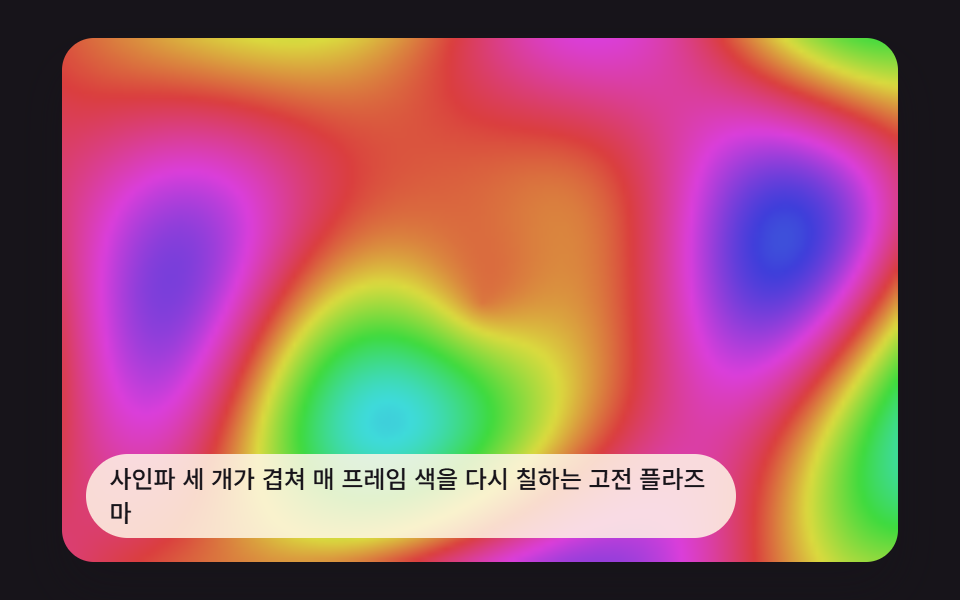
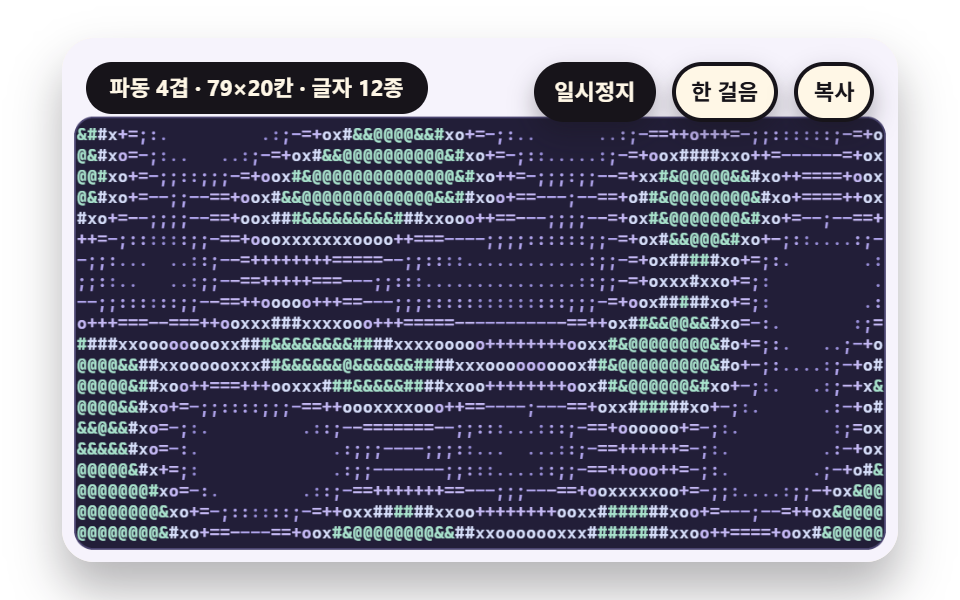
06動くプラズマをフレームごとに文字として読み直す文字盤
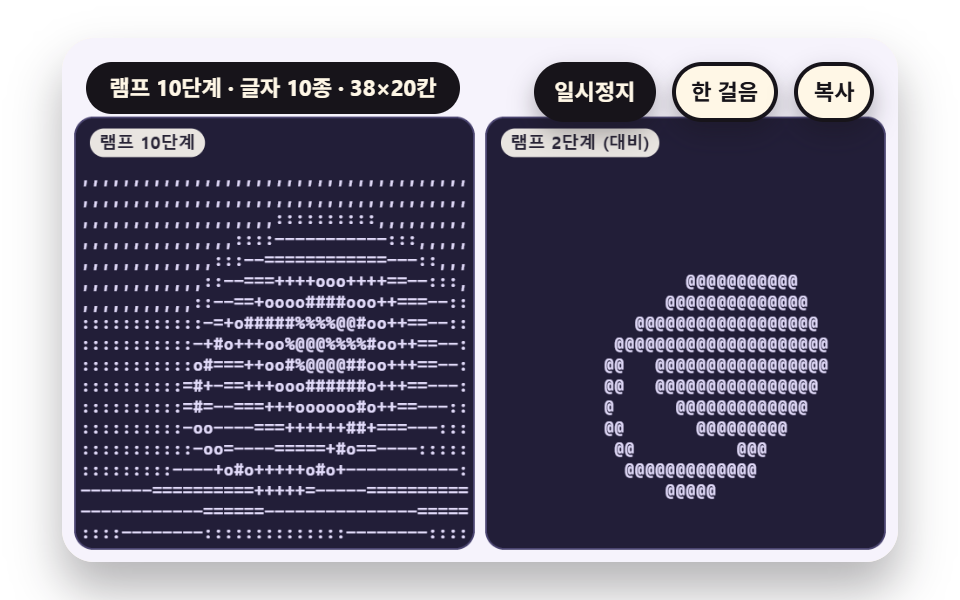
四つの正弦波を重ねて時間とともに流れる模様を作り、フレームごとにその値を画素として書き、セルごとの平均の明るさを読み直して段階表の文字で打ちます。位相がひと巡りすると最初の形に戻るよう周期を合わせてあり、文字盤は継ぎ目なくくり返されます。
使いどころターミナル風のランディング背景やローディング画面
sineSumSINE_TERMSFIELD_SS
<main class="stage">
<div class="vj is-demo" id="vj">
  <div class="vj__pad" data-role="pad" tabindex="0" role="application" aria-label="アスキーアートの舞台 — Enter か Space で一時停止、N で一歩、R でやり直し、C で文字盤をコピー">
    <canvas class="vj__canvas" data-role="canvas" width="480" height="300" role="img" aria-label="横・縦・斜めの波と動く中心から広がる輪の四つの正弦波を足したプラズマの場を、フレームごとに読み直して十二段階の文字で打ち、明るさの帯ごとに文字の色を上げた盤がひとつあります"></canvas>
  </div>
  <p class="vj__status" data-role="status" aria-live="off">アスキーアートのデモ</p>
  <div class="vj__ctrl">
    <button class="vj__pause" data-role="pause" type="button" aria-pressed="false">一時停止</button>
    <button class="vj__step" data-role="step" type="button">一歩進める</button>
    <button class="vj__copy" data-role="copy" type="button">コピー</button>
  </div>
  <p class="vj__done" data-role="done" role="status" aria-live="polite"></p>
</div>
</main>
@use "../../../../site/static/demo-tokens" as *;
@include stage($stage-paper);
.vj {
position: relative;
width: min(92vw, calc(160vh - 12.8vw));
aspect-ratio: 480 / 300;
margin: 0 auto;
border-radius: $r-card;
overflow: hidden;
box-shadow: $shadow-raised;
background: $subject-cream;
}
// 무대 상자 — 여기서 시작한 터치만 칸 누르기로 읽는다(touch-action: none 은 이 상자에만). 무대 밖 터치는 페이지 스크롤 그대로
.vj__pad {
position: absolute;
inset: 0;
border-radius: inherit;
outline: none;
touch-action: none;
cursor: pointer;
}
// 바깥 .vj 가 넘침을 자르므로 포커스 테두리는 안쪽으로 들인다
.vj__pad:focus-visible {
outline: 3px solid $subject-ink;
outline-offset: -3px;
}
.vj__canvas {
position: absolute;
inset: 0;
display: block;
width: 100%;
height: 100%;
}
.vj__ctrl {
position: absolute;
right: $sp-3;
top: $sp-3;
display: flex;
gap: $sp-2;
}
.vj__pause,
.vj__step,
.vj__copy {
padding: $sp-1 $sp-2;
border: 2px solid $subject-ink;
border-radius: $r-pill;
background: $subject-ink;
color: $subject-cream;
font-family: inherit;
font-weight: 700;
font-size: 11px;
line-height: 1.6;
cursor: pointer;
box-shadow: $shadow-press;
transition: transform $dur-quick $ease-spring;
}
.vj__step,
.vj__copy {
background: $subject-cream;
color: $subject-ink;
}
// 스크린리더에만 읽히는 완료 알림
.vj__done {
position: absolute;
width: 1px;
height: 1px;
margin: 0;
overflow: hidden;
clip-path: inset(50%);
white-space: nowrap;
}
// 눌린 상태(멈춤) — 바탕과 글자색을 뒤집어 aria-pressed 가 눈에도 보이게
.vj__pause[aria-pressed="true"] {
background: $subject-cream;
color: $subject-ink;
}
.vj__pause:hover,
.vj__step:hover,
.vj__copy:hover {
transform: translateY(-2px);
}
.vj__pause:active,
.vj__step:active,
.vj__copy:active {
transform: translateY(1px);
}
.vj__pause:focus-visible,
.vj__step:focus-visible,
.vj__copy:focus-visible {
outline: 3px solid $subject-ink;
outline-offset: 3px;
}
// 상태 줄 — 지금 장면의 수치를 글자로. 시연 중에는 aria-live off, 사람이 처음 손대면 polite
.vj__status {
position: absolute;
left: $sp-3;
top: $sp-3;
max-width: calc(100% - 214px);
margin: 0;
padding: $sp-1 $sp-3;
border-radius: $r-pill;
background: $subject-ink;
color: $subject-cream;
font-weight: 700;
font-size: 11px;
line-height: 1.6;
white-space: nowrap;
overflow: hidden;
text-overflow: ellipsis;
pointer-events: none;
}
@media (max-width: 340px) {
.vj__pause,
.vj__step,
.vj__copy,
.vj__status { font-size: 10px; padding: 0 $sp-2; }
}
// 움직임 줄이기 — 장면은 스크립트가 정지 장면 한 장으로 멈춘다. 버튼도 떠오르지 않게
@media (prefers-reduced-motion: reduce) {
.vj__pause,
.vj__step,
.vj__copy { transition: none !important; }
.vj__pause:hover,
.vj__pause:active,
.vj__step:hover,
.vj__step:active,
.vj__copy:hover,
.vj__copy:active { transform: none !important; }
}html, body {
margin: 0;
overflow: hidden;
}
.stage {
box-sizing: border-box;
min-height: 100vh;
display: grid;
place-items: center;
margin: 0;
background: #ffffff;
font-family: -apple-system, "Segoe UI", "Noto Sans KR", sans-serif;
padding: clamp(8px, 4vw, 24px);
}
.vj {
position: relative;
width: min(92vw, 160vh - 12.8vw);
aspect-ratio: 480/300;
margin: 0 auto;
border-radius: 16px;
overflow: hidden;
box-shadow: 0 14px 24px rgba(23, 20, 26, 0.32);
background: #fff7e6;
}
.vj__pad {
position: absolute;
inset: 0;
border-radius: inherit;
outline: none;
touch-action: none;
cursor: pointer;
}
.vj__pad:focus-visible {
outline: 3px solid #17141a;
outline-offset: -3px;
}
.vj__canvas {
position: absolute;
inset: 0;
display: block;
width: 100%;
height: 100%;
}
.vj__ctrl {
position: absolute;
right: 12px;
top: 12px;
display: flex;
gap: 8px;
}
.vj__pause,
.vj__step,
.vj__copy {
padding: 4px 8px;
border: 2px solid #17141a;
border-radius: 999px;
background: #17141a;
color: #fff7e6;
font-family: inherit;
font-weight: 700;
font-size: 11px;
line-height: 1.6;
cursor: pointer;
box-shadow: 0 6px 12px rgba(23, 20, 26, 0.32);
transition: transform 220ms cubic-bezier(0.2, 0.8, 0.2, 1);
}
.vj__step,
.vj__copy {
background: #fff7e6;
color: #17141a;
}
.vj__done {
position: absolute;
width: 1px;
height: 1px;
margin: 0;
overflow: hidden;
clip-path: inset(50%);
white-space: nowrap;
}
.vj__pause[aria-pressed=true] {
background: #fff7e6;
color: #17141a;
}
.vj__pause:hover,
.vj__step:hover,
.vj__copy:hover {
transform: translateY(-2px);
}
.vj__pause:active,
.vj__step:active,
.vj__copy:active {
transform: translateY(1px);
}
.vj__pause:focus-visible,
.vj__step:focus-visible,
.vj__copy:focus-visible {
outline: 3px solid #17141a;
outline-offset: 3px;
}
.vj__status {
position: absolute;
left: 12px;
top: 12px;
max-width: calc(100% - 214px);
margin: 0;
padding: 4px 12px;
border-radius: 999px;
background: #17141a;
color: #fff7e6;
font-weight: 700;
font-size: 11px;
line-height: 1.6;
white-space: nowrap;
overflow: hidden;
text-overflow: ellipsis;
pointer-events: none;
}
@media (max-width: 340px) {
.vj__pause,
.vj__step,
.vj__copy,
.vj__status {
font-size: 10px;
padding: 0 8px;
}
}
@media (prefers-reduced-motion: reduce) {
.vj__pause,
.vj__step,
.vj__copy {
transition: none !important;
}
.vj__pause:hover,
.vj__pause:active,
.vj__step:hover,
.vj__step:active,
.vj__copy:hover,
.vj__copy:active {
transform: none !important;
}
}(function () {
const root = document.getElementById("vj");
if (!root) return;
// 무대 좌표 — 캔버스 안 계산은 늘 480×300. 화면에 보이는 크기와 상관없다
const W = 480;
const H = 300;
const TAU = Math.PI * 2;
function clamp(v, lo, hi) { return v < lo ? lo : (v > hi ? hi : v); }
function lerp(a, b, k) { return a + (b - a) * k; }
function smooth(a, b, v) { const k = clamp((v - a) / (b - a), 0, 1); return k * k * (3 - 2 * k); }
// 파스텔 팔레트 — 글자 판은 짙은 남보라 바탕 위에 옅은 라벤더 글자(대비 12 이상), 바깥 무대는 크림 라벤더
const PAGE = [246, 243, 252];
const BOARD = [34, 30, 56];
const BOARD_EDGE = [74, 68, 112];
const GLYPH = [226, 219, 250];
const MINT = [168, 226, 204];
const ROSE = [248, 176, 198];
const BUTTER = [250, 226, 150];
const SKY = [170, 208, 248];
const LAV = [196, 184, 244];
const INK = [40, 36, 54];
const PAPER = [250, 246, 240];
function rgba(c, a) {
return 'rgba(' + Math.round(clamp(c[0], 0, 255)) + ',' + Math.round(clamp(c[1], 0, 255)) + ',' + Math.round(clamp(c[2], 0, 255)) + ',' + clamp(a, 0, 1).toFixed(3) + ')';
}
function grayStr(l, a) {
const v = Math.round(clamp(l, 0, 1) * 255);
return 'rgba(' + v + ',' + v + ',' + v + ',' + clamp(a, 0, 1).toFixed(3) + ')';
}
// 장면 시계(초) — 한 바퀴 LAP_S 초이고 장면의 모든 움직임은 위상 ph = sceneT / LAP_S 의 정수배라 바퀴 끝에서 이음매가 없다
let sceneT = 0;
let lap = 0;
// 외부 웹폰트는 부르지 않는다 — 기기에 있는 고정폭 글꼴 목록만
const MONO = 'ui-monospace, "Cascadia Mono", Consolas, Menlo, "DejaVu Sans Mono", "Courier New", monospace';
const FONT_STACK = 'system-ui, -apple-system, "Segoe UI", "Noto Sans KR", sans-serif';
// 글자 한 줄 높이 = 글자 크기의 1.2 배. 폭은 글꼴에서 잰 값(advRatio)을 쓴다
const LINE_K = 1.2;
let advRatio = 0.6;
// ── 원본 장면 캔버스 — 화면에 붙이지 않는 두 번째 캔버스. 장면은 여기 그리고 화소를 읽는다 ──
const srcCv = document.createElement('canvas');
const srcRaw = srcCv.getContext('2d', { willReadFrequently: true });
if (!srcRaw) {
return;
}
const sctx = srcRaw;
// ss = 원본 화소 / 판 화소. 1 이면 판 크기 그대로, 0.5 면 가로세로 절반 해상도로 계산해 읽는다
let srcSs = 1;
function setSrc(w, h, ss) {
const sw = Math.round(w * ss);
const sh = Math.round(h * ss);
if (srcCv.width !== sw || srcCv.height !== sh) {
srcCv.width = sw;
srcCv.height = sh;
}
srcSs = ss;
sctx.setTransform(ss, 0, 0, ss, 0, 0);
}
// cols×rows 칸을 왼쪽 위부터 읽는다. 칸 하나가 원본에서 덮는 영역은 가로 cw, 세로 sh (판 화소 단위)
function readGrid(cols, rows, cw, sh) {
const sw = srcCv.width;
const shp = srcCv.height;
const data = sctx.getImageData(0, 0, sw, shp).data;
const grid = { cols: cols, rows: rows, cw: cw, sh: sh, lum: [], r: [], g: [], b: [] };
for (let cy = 0; cy < rows; cy += 1) {
const y0 = Math.min(shp - 1, Math.floor(cy * sh * srcSs));
const y1 = Math.max(y0 + 1, Math.min(shp, Math.floor((cy + 1) * sh * srcSs)));
for (let cx = 0; cx < cols; cx += 1) {
const x0 = Math.min(sw - 1, Math.floor(cx * cw * srcSs));
const x1 = Math.max(x0 + 1, Math.min(sw, Math.floor((cx + 1) * cw * srcSs)));
let sr = 0;
let sg = 0;
let sb = 0;
let n = 0;
for (let y = y0; y < y1; y += 1) {
let p = (y * sw + x0) * 4;
for (let x = x0; x < x1; x += 1) {
sr += data[p];
sg += data[p + 1];
sb += data[p + 2];
n += 1;
p += 4;
}
}
const mr = sr / n;
const mg = sg / n;
const mb = sb / n;
grid.r.push(mr);
grid.g.push(mg);
grid.b.push(mb);
grid.lum.push((0.2126 * mr + 0.7152 * mg + 0.0722 * mb) / 255);
}
}
return grid;
}
// ── 글자 램프 — 성긴 글자에서 짙은 글자 순서 열여섯 개. n 단계 램프는 이 줄에서 고르게 n 개를 뽑는다 ──
const RAMP_FULL = ' .,:;-~=+*ox#%&@';
function rampOf(n) {
let s = '';
for (let i = 0; i < n; i += 1) {
s += RAMP_FULL.charAt(Math.round(i * (RAMP_FULL.length - 1) / (n - 1)));
}
return s;
}
// 밝기 v(0 에서 1)를 램프 번호로 — 단계 폭 1/n 으로 나눠 내림
function glyphIndex(v, n) { return Math.min(n - 1, Math.max(0, Math.floor(v * n))); }
// 칸 크기 — 글자 크기 fp 를 주면 폭은 글꼴에서 잰 글자 폭, 높이는 줄 높이
function cellW(fp) { return advRatio * fp; }
function cellH(fp) { return LINE_K * fp; }
function measureAdv() {
ctx.font = '100px ' + MONO;
const m = ctx.measureText('M').width / 100;
advRatio = m > 0.3 && m < 0.9 ? m : 0.6;
}
// ── 그리기 도구 ──
function box(x, y, w, h, r, c, a) {
if (w <= 0.2 || h <= 0.2 || a <= 0) {
return;
}
ctx.beginPath();
ctx.roundRect(x, y, w, h, Math.max(0, Math.min(r, w / 2, h / 2)));
ctx.fillStyle = rgba(c, a);
ctx.fill();
}
function text(s, x, y, c, a, px, weight, align) {
ctx.font = weight + ' ' + px + 'px ' + FONT_STACK;
ctx.textAlign = align;
ctx.textBaseline = 'middle';
ctx.fillStyle = rgba(c, a);
ctx.fillText(s, x, y);
}
// 글자 이름표 — 바탕 알약 위에 글자
function tag(s, x, y, bg, fg, px, align) {
ctx.font = '700 ' + px + 'px ' + FONT_STACK;
const w = ctx.measureText(s).width + px * 1.1;
const left = align === 'center' ? x - w / 2 : (align === 'right' ? x - w : x);
box(left, y - px * 0.82, w, px * 1.64, px * 0.82, bg, 0.92);
text(s, left + w / 2, y + 0.5, fg, 1, px, 700, 'center');
}
function paintPage() {
ctx.fillStyle = rgba(PAGE, 1);
ctx.fillRect(0, 0, W, H);
}
// 글자 판 바탕 — 짙은 남보라 둥근 사각형
function panel(x, y, w, h) {
box(x - 1, y - 1, w + 2, h + 2, 11, BOARD_EDGE, 1);
box(x, y, w, h, 10, BOARD, 1);
}
// 글자 판 그리기 — chars 는 칸마다 글자 하나(왼쪽 위부터 줄 순서). colorIdx 가 있으면 칸마다 팔레트 번호, 없으면 모두 pal[0].
// 같은 색이 이어지는 칸은 한 번에 찍어 한 판에 fillText 가 줄 수 × 색 조각 수만큼만 불린다
function drawGlyphs(x, y, fp, g, chars, colorIdx, pal) {
const cw = cellW(fp);
const ch = cellH(fp);
ctx.font = '600 ' + fp + 'px ' + MONO;
ctx.textAlign = 'left';
ctx.textBaseline = 'middle';
for (let r = 0; r < g.rows; r += 1) {
let c = 0;
while (c < g.cols) {
const ci = colorIdx ? colorIdx[r * g.cols + c] : 0;
let run = '';
let e = c;
while (e < g.cols && (colorIdx ? colorIdx[r * g.cols + e] : 0) === ci) {
run += chars[r * g.cols + e];
e += 1;
}
if (run.trim().length > 0) {
ctx.fillStyle = rgba(pal[ci], 1);
ctx.fillText(run, x + c * cw, y + (r + 0.5) * ch + 0.5);
}
c = e;
}
}
}
// 판의 글자를 줄바꿈으로 이은 텍스트 — コピー 단추가 이 글을 클립보드에 넣는다
function plainOf(g, chars) {
const lines = [];
for (let r = 0; r < g.rows; r += 1) {
lines.push(chars.slice(r * g.cols, (r + 1) * g.cols).join('').replace(/\s+$/, ''));
}
return lines.join('\n');
}
// 쓰인 서로 다른 글자 수(공백 포함)와 글자별 횟수
function usage(chars, ramp) {
const out = [];
for (let i = 0; i < ramp.length; i += 1) {
out.push(0);
}
for (const c of chars) {
const k = ramp.indexOf(c);
if (k >= 0) {
out[k] += 1;
}
}
return out;
}
function kinds(u) {
let n = 0;
for (const v of u) {
if (v > 0) {
n += 1;
}
}
return n;
}
// 글자별 사용 횟수 막대 — 판 아래 띠에 램프 순서대로
function usageBars(x, y, w, h, u, c) {
let mx = 1;
for (const v of u) {
if (v > mx) {
mx = v;
}
}
const bw = w / u.length;
for (let i = 0; i < u.length; i += 1) {
const bh = Math.max(u[i] > 0 ? 2 : 0, h * u[i] / mx);
box(x + i * bw + 1, y + h - bh, bw - 2, bh, 2, c, 0.95);
}
}
// 두 번째 캔버스에 쓰는 회색 장면 도구 — 중심에서 번지는 둥근 빛
function glow(x, y, r, l, a) {
const g = sctx.createRadialGradient(x, y, 0, x, y, r);
g.addColorStop(0, grayStr(l, a));
g.addColorStop(1, grayStr(l, 0));
sctx.fillStyle = g;
sctx.fillRect(x - r, y - r, r * 2, r * 2);
}
function vgrad(w, h, l0, l1) {
const g = sctx.createLinearGradient(0, 0, 0, h);
g.addColorStop(0, grayStr(l0, 1));
g.addColorStop(1, grayStr(l1, 1));
sctx.fillStyle = g;
sctx.fillRect(0, 0, w, h);
}
// 판 배치 — 위 46 은 상태 줄·단추 자리. 판 둘이면 가로 228, 하나면 464
const PY = 46;
const PH = 246;
const PW2 = 228;
const PW1 = 464;
const PX_L = 8;
const PX_R = 244;
// コピー 단추를 누른 뒤 상태 줄에 잠깐 뜨는 말
const COPY_OK = '文字盤をテキストでコピーしました';
const COPY_FAIL = 'コピーできませんでした — 文字盤を選んで手でコピーしてください';
const canvasEl = root.querySelector('[data-role="canvas"]');
const padEl = root.querySelector('[data-role="pad"]');
const pauseEl = root.querySelector('[data-role="pause"]');
const statusEl = root.querySelector('[data-role="status"]');
const stepEl = root.querySelector('[data-role="step"]');
const copyEl = root.querySelector('[data-role="copy"]');
const doneEl = root.querySelector('[data-role="done"]');
const ctxRaw = canvasEl ? canvasEl.getContext('2d') : null;
if (!canvasEl || !ctxRaw || !pauseEl || !padEl || !stepEl || !copyEl || !doneEl) {
return;
}
const cv = canvasEl;
const ctx = ctxRaw;
const pauseBtn = pauseEl;
const stepBtn = stepEl;
const copyBtn = copyEl;
const doneP = doneEl;
const pad = padEl;
let dpr = 1;
function fitCanvas() {
// 배율은 2 에서 자른다 — 배율 3 기기에서 화소가 2.25배로 늘지 않게
dpr = Math.min(window.devicePixelRatio || 1, 2);
cv.width = Math.round(W * dpr);
cv.height = Math.round(H * dpr);
ctx.setTransform(dpr, 0, 0, dpr, 0, 0);
measureAdv();
}
// 지금 화면에 찍힌 글자 판 — コピー 단추가 이 텍스트를 넣는다
let plainText = '';
let copyFlash = 0;
let shownStatus = '';
function pushStatus(s) {
if (!statusEl || s === shownStatus) {
return;
}
shownStatus = s;
statusEl.textContent = s;
}
let paused = false;
const reduceQuery = window.matchMedia('(prefers-reduced-motion: reduce)');
// 페이지를 연 채 움직임 줄이기 설정을 바꿔도 change 리스너가 다시 읽는다
let still = reduceQuery.matches;
// 자동 시연 표시 — 사람이 처음 손대면 떼고 상태 줄을 polite 로 켠다
let demo = root.classList.contains('is-demo');
const off = new AbortController();
function wake() {
if (!demo) {
return;
}
demo = false;
root.classList.remove('is-demo');
if (statusEl) {
statusEl.setAttribute('aria-live', 'polite');
}
}
// 한 판 시연이 끝났음을 스크린리더에 한 번만 알린다 — 판이 되풀이돼도 다시 읽지 않는다
let doneSaid = false;
function checkDone() {
if (!doneSaid && sceneT >= LAP_S - 0.6) {
doneSaid = true;
doneP.textContent = statusText();
}
}
function advance(dt) {
sceneT += dt;
if (copyFlash > 0) {
copyFlash = Math.max(0, copyFlash - dt);
}
if (sceneT >= LAP_S) {
sceneT -= LAP_S;
lap += 1;
}
}
const DT_MAX = 0.05;
const STEP_S = 0.4;
function showNow() {
draw();
pushStatus(copyFlash > 0 ? copyNote : statusText());
checkDone();
}
let copyNote = '';
let rafId = 0;
let lastTs = -1;
function frame(ts) {
if (still || paused) {
rafId = 0;
return;
}
if (lastTs < 0) {
lastTs = ts;
}
const dt = Math.min((ts - lastTs) / 1000, DT_MAX);
lastTs = ts;
if (dt > 0) {
advance(dt);
}
showNow();
rafId = window.requestAnimationFrame(frame);
}
function startLoop() {
if (rafId) {
return;
}
// 멈췄던 사이의 시간을 첫 프레임 dt 로 넘기지 않는다
lastTs = -1;
rafId = window.requestAnimationFrame(frame);
}
function stopLoop() {
if (rafId) {
window.cancelAnimationFrame(rafId);
rafId = 0;
}
}
// 움직임 줄이기 — 루프 없이 장면이 한창인 순간의 정지 장면 한 장
function showRest() {
stopLoop();
sceneT = REST_S;
showNow();
}
function togglePause() {
paused = !paused;
pauseBtn.setAttribute('aria-pressed', paused ? 'true' : 'false');
wake();
if (paused) {
stopLoop();
}
else if (!still) {
startLoop();
}
}
function restart() {
wake();
sceneT = START_S;
lap = 0;
doneSaid = false;
showNow();
}
// 一歩進める — 멈춘 채 장면 시계를 0.4 초 앞으로
function stepOnce() {
wake();
if (!paused) {
paused = true;
pauseBtn.setAttribute('aria-pressed', 'true');
stopLoop();
}
advance(STEP_S);
showNow();
}
// コピー — 화면에 있는 글자 판을 텍스트로 클립보드에. 임시 입력칸을 만들어 선택하고 コピー 명령을 부른다
function copyBoard() {
wake();
const ta = document.createElement('textarea');
ta.value = plainText;
ta.setAttribute('readonly', '');
ta.style.position = 'fixed';
ta.style.left = '-9999px';
ta.style.opacity = '0';
document.body.appendChild(ta);
ta.select();
let ok = false;
try {
ok = document.execCommand('copy');
}
catch (err) {
ok = false;
}
document.body.removeChild(ta);
copyNote = ok ? COPY_OK : COPY_FAIL;
copyFlash = 1.6;
pushStatus(copyNote);
}
pauseBtn.addEventListener('click', togglePause, { signal: off.signal });
stepBtn.addEventListener('click', stepOnce, { signal: off.signal });
copyBtn.addEventListener('click', copyBoard, { signal: off.signal });
// 키보드 — 무대에 포커스가 있을 때만. Enter·Space·P 는 一時停止, N 은 一歩進める, R 은 처음부터, C 는 글자 판 コピー
pad.addEventListener('keydown', function (e) {
if (e.altKey || e.ctrlKey || e.metaKey) {
return;
}
const k = e.key;
if (k === 'Enter' || k === ' ' || k === 'p' || k === 'P') {
e.preventDefault();
togglePause();
}
else if (k === 'n' || k === 'N') {
e.preventDefault();
stepOnce();
}
else if (k === 'r' || k === 'R') {
e.preventDefault();
restart();
}
else if (k === 'c' || k === 'C') {
e.preventDefault();
copyBoard();
}
}, { signal: off.signal });
// 마우스·터치 — 무대를 누르면 一時停止 토글
pad.addEventListener('click', function () { togglePause(); }, { signal: off.signal });
// 탭이 숨으면 멈추고, 돌아오면 시계를 다시 맞춰 시작 — 숨은 동안의 몇 초가 한 프레임에 몰리지 않게
document.addEventListener('visibilitychange', function () {
if (document.hidden) {
stopLoop();
}
else if (!paused && !still) {
startLoop();
}
}, { signal: off.signal });
// 설정이 바뀌면 — 켜지면 정지 장면 한 장, 꺼지면 다시 움직인다
reduceQuery.addEventListener('change', function () {
still = reduceQuery.matches;
if (still) {
showRest();
}
else {
sceneT = START_S;
showNow();
if (!paused) {
startLoop();
}
}
}, { signal: off.signal });
window.addEventListener('resize', function () {
fitCanvas();
showNow();
}, { signal: off.signal });
// ── 06 움직이는 플라즈마를 프레임마다 글자로 다시 읽는 파동 장 ───────────────
const LAP_S = 10;
const START_S = 0.6;
const REST_S = 3.6;
const FONT_PX = 10;
const RAMP_LEN = 12;
const RAMP = rampOf(RAMP_LEN);
// 원본 장면은 절반 해상도로 계산해 읽는다 — 화소 수가 4분의 1
const FIELD_SS = 0.5;
// 파동 겹 수 — sineSum 이 더하는 사인 항의 개수
const SINE_TERMS = 4;
// 색 단계 — 밝기를 다섯 구간으로 나눠 구간마다 글자 색을 올린다(어두운 구간도 판 바탕 대비 4.5 이상)
const SHADES = [[150, 140, 214], [176, 164, 236], [196, 184, 244], [214, 222, 250], [168, 226, 204]];
let img = null;
let lastCols = 0;
let lastRows = 0;
let lastKinds = 0;
// 판 좌표 (x, y) 와 위상 a 에서의 플라즈마 값 — 가로 물결·세로 물결·대각 물결·움직이는 중심에서 퍼지는 고리의 합, 0 에서 1
function sineSum(x, y, a) {
const s1 = Math.sin(x * 0.04 + a);
const s2 = Math.sin(y * 0.065 - a);
const s3 = Math.sin((x + y) * 0.028 + 2 * a);
const s4 = Math.sin(Math.hypot(x - 232 + 120 * Math.cos(a), y - 126 + 60 * Math.sin(a)) * 0.05 - 2 * a);
return clamp(((s1 + s2 + s3 + s4) / SINE_TERMS) * 0.5 * 1.7 + 0.5, 0, 1);
}
function draw() {
paintPage();
const a = sceneT / LAP_S * TAU;
setSrc(PW1, PH, FIELD_SS);
const sw = srcCv.width;
const sh = srcCv.height;
if (!img || img.width !== sw || img.height !== sh) {
img = sctx.createImageData(sw, sh);
}
const d = img.data;
for (let py = 0; py < sh; py += 1) {
for (let px = 0; px < sw; px += 1) {
const v = Math.round(sineSum(px / FIELD_SS, py / FIELD_SS, a) * 255);
const p = (py * sw + px) * 4;
d[p] = v;
d[p + 1] = v;
d[p + 2] = v;
d[p + 3] = 255;
}
}
sctx.putImageData(img, 0, 0);
const cw = cellW(FONT_PX);
const ch = cellH(FONT_PX);
const cols = Math.floor(PW1 / cw);
const rows = Math.floor(PH / ch);
const g = readGrid(cols, rows, cw, ch);
const cA = [];
const col = [];
for (let i = 0; i < g.lum.length; i += 1) {
cA.push(RAMP.charAt(glyphIndex(g.lum[i], RAMP_LEN)));
col.push(Math.min(SHADES.length - 1, Math.floor(g.lum[i] * SHADES.length)));
}
lastCols = cols;
lastRows = rows;
lastKinds = kinds(usage(cA, RAMP));
plainText = plainOf(g, cA);
panel(PX_L, PY, PW1, PH);
drawGlyphs(PX_L + (PW1 - cols * cw) / 2, PY + (PH - rows * ch) / 2, FONT_PX, g, cA, col, SHADES);
}
function statusText() {
return '波 {n}重・{c}×{r}セル・文字 {k}種'.replace('{n}', String(SINE_TERMS)).replace('{c}', String(lastCols)).replace('{r}', String(lastRows)).replace('{k}', String(lastKinds));
}
fitCanvas();
if (still) {
showRest();
}
else {
sceneT = START_S;
showNow();
startLoop();
}
return function () {
stopLoop();
off.abort();
};
})();// PlasmaWaveGlyphField - 같은 항목 vanilla index.html 의 React 판. 같은 계산을 useEffect 안에서 돌린다
import { useEffect, useRef } from "react";
import styles from "./PlasmaWaveGlyphField.module.scss";
const cx = (s: string): string => s.split(" ").map((n) => styles[n] ?? n).join(" ");
export default function PlasmaWaveGlyphField() {
const rootRef = useRef<HTMLDivElement | null>(null);
useEffect(() => {
const rootEl = rootRef.current;
if (!rootEl) return;
const root: HTMLElement = rootEl;
type RGB = [number, number, number];
// 무대 좌표 — 캔버스 안 계산은 늘 480×300. 화면에 보이는 크기와 상관없다
const W = 480;
const H = 300;
const TAU = Math.PI * 2;
function clamp(v: number, lo: number, hi: number): number { return v < lo ? lo : (v > hi ? hi : v); }
function lerp(a: number, b: number, k: number): number { return a + (b - a) * k; }
function smooth(a: number, b: number, v: number): number { const k = clamp((v - a) / (b - a), 0, 1); return k * k * (3 - 2 * k); }
// 파스텔 팔레트 — 글자 판은 짙은 남보라 바탕 위에 옅은 라벤더 글자(대비 12 이상), 바깥 무대는 크림 라벤더
const PAGE: RGB = [246, 243, 252];
const BOARD: RGB = [34, 30, 56];
const BOARD_EDGE: RGB = [74, 68, 112];
const GLYPH: RGB = [226, 219, 250];
const MINT: RGB = [168, 226, 204];
const ROSE: RGB = [248, 176, 198];
const BUTTER: RGB = [250, 226, 150];
const SKY: RGB = [170, 208, 248];
const LAV: RGB = [196, 184, 244];
const INK: RGB = [40, 36, 54];
const PAPER: RGB = [250, 246, 240];
function rgba(c: RGB, a: number): string {
return 'rgba(' + Math.round(clamp(c[0], 0, 255)) + ',' + Math.round(clamp(c[1], 0, 255)) + ',' + Math.round(clamp(c[2], 0, 255)) + ',' + clamp(a, 0, 1).toFixed(3) + ')';
}
function grayStr(l: number, a: number): string {
const v = Math.round(clamp(l, 0, 1) * 255);
return 'rgba(' + v + ',' + v + ',' + v + ',' + clamp(a, 0, 1).toFixed(3) + ')';
}
// 장면 시계(초) — 한 바퀴 LAP_S 초이고 장면의 모든 움직임은 위상 ph = sceneT / LAP_S 의 정수배라 바퀴 끝에서 이음매가 없다
let sceneT = 0;
let lap = 0;
// 외부 웹폰트는 부르지 않는다 — 기기에 있는 고정폭 글꼴 목록만
const MONO = 'ui-monospace, "Cascadia Mono", Consolas, Menlo, "DejaVu Sans Mono", "Courier New", monospace';
const FONT_STACK = 'system-ui, -apple-system, "Segoe UI", "Noto Sans KR", sans-serif';
// 글자 한 줄 높이 = 글자 크기의 1.2 배. 폭은 글꼴에서 잰 값(advRatio)을 쓴다
const LINE_K = 1.2;
let advRatio = 0.6;
// ── 원본 장면 캔버스 — 화면에 붙이지 않는 두 번째 캔버스. 장면은 여기 그리고 화소를 읽는다 ──
const srcCv: HTMLCanvasElement = document.createElement('canvas');
const srcRaw = srcCv.getContext('2d', { willReadFrequently: true });
if (!srcRaw) { return; }
const sctx: CanvasRenderingContext2D = srcRaw;
// ss = 원본 화소 / 판 화소. 1 이면 판 크기 그대로, 0.5 면 가로세로 절반 해상도로 계산해 읽는다
let srcSs = 1;
function setSrc(w: number, h: number, ss: number): void {
const sw = Math.round(w * ss);
const sh = Math.round(h * ss);
if (srcCv.width !== sw || srcCv.height !== sh) {
srcCv.width = sw;
srcCv.height = sh;
}
srcSs = ss;
sctx.setTransform(ss, 0, 0, ss, 0, 0);
}
// 칸 격자 — 칸마다 원본 화소의 평균 밝기(lum, 0 에서 1)와 평균 색을 담는다
type Grid = { cols: number; rows: number; cw: number; sh: number; lum: number[]; r: number[]; g: number[]; b: number[] };
// cols×rows 칸을 왼쪽 위부터 읽는다. 칸 하나가 원본에서 덮는 영역은 가로 cw, 세로 sh (판 화소 단위)
function readGrid(cols: number, rows: number, cw: number, sh: number): Grid {
const sw = srcCv.width;
const shp = srcCv.height;
const data = sctx.getImageData(0, 0, sw, shp).data;
const grid: Grid = { cols: cols, rows: rows, cw: cw, sh: sh, lum: [], r: [], g: [], b: [] };
for (let cy = 0; cy < rows; cy += 1) {
const y0 = Math.min(shp - 1, Math.floor(cy * sh * srcSs));
const y1 = Math.max(y0 + 1, Math.min(shp, Math.floor((cy + 1) * sh * srcSs)));
for (let cx = 0; cx < cols; cx += 1) {
const x0 = Math.min(sw - 1, Math.floor(cx * cw * srcSs));
const x1 = Math.max(x0 + 1, Math.min(sw, Math.floor((cx + 1) * cw * srcSs)));
let sr = 0;
let sg = 0;
let sb = 0;
let n = 0;
for (let y = y0; y < y1; y += 1) {
let p = (y * sw + x0) * 4;
for (let x = x0; x < x1; x += 1) {
sr += data[p];
sg += data[p + 1];
sb += data[p + 2];
n += 1;
p += 4;
}
}
const mr = sr / n;
const mg = sg / n;
const mb = sb / n;
grid.r.push(mr);
grid.g.push(mg);
grid.b.push(mb);
grid.lum.push((0.2126 * mr + 0.7152 * mg + 0.0722 * mb) / 255);
}
}
return grid;
}
// ── 글자 램프 — 성긴 글자에서 짙은 글자 순서 열여섯 개. n 단계 램프는 이 줄에서 고르게 n 개를 뽑는다 ──
const RAMP_FULL = ' .,:;-~=+*ox#%&@';
function rampOf(n: number): string {
let s = '';
for (let i = 0; i < n; i += 1) { s += RAMP_FULL.charAt(Math.round(i * (RAMP_FULL.length - 1) / (n - 1))); }
return s;
}
// 밝기 v(0 에서 1)를 램프 번호로 — 단계 폭 1/n 으로 나눠 내림
function glyphIndex(v: number, n: number): number { return Math.min(n - 1, Math.max(0, Math.floor(v * n))); }
// 칸 크기 — 글자 크기 fp 를 주면 폭은 글꼴에서 잰 글자 폭, 높이는 줄 높이
function cellW(fp: number): number { return advRatio * fp; }
function cellH(fp: number): number { return LINE_K * fp; }
function measureAdv(): void {
ctx.font = '100px ' + MONO;
const m = ctx.measureText('M').width / 100;
advRatio = m > 0.3 && m < 0.9 ? m : 0.6;
}
// ── 그리기 도구 ──
function box(x: number, y: number, w: number, h: number, r: number, c: RGB, a: number): void {
if (w <= 0.2 || h <= 0.2 || a <= 0) { return; }
ctx.beginPath();
ctx.roundRect(x, y, w, h, Math.max(0, Math.min(r, w / 2, h / 2)));
ctx.fillStyle = rgba(c, a);
ctx.fill();
}
function text(s: string, x: number, y: number, c: RGB, a: number, px: number, weight: number, align: CanvasTextAlign): void {
ctx.font = weight + ' ' + px + 'px ' + FONT_STACK;
ctx.textAlign = align;
ctx.textBaseline = 'middle';
ctx.fillStyle = rgba(c, a);
ctx.fillText(s, x, y);
}
// 글자 이름표 — 바탕 알약 위에 글자
function tag(s: string, x: number, y: number, bg: RGB, fg: RGB, px: number, align: CanvasTextAlign): void {
ctx.font = '700 ' + px + 'px ' + FONT_STACK;
const w = ctx.measureText(s).width + px * 1.1;
const left = align === 'center' ? x - w / 2 : (align === 'right' ? x - w : x);
box(left, y - px * 0.82, w, px * 1.64, px * 0.82, bg, 0.92);
text(s, left + w / 2, y + 0.5, fg, 1, px, 700, 'center');
}
function paintPage(): void {
ctx.fillStyle = rgba(PAGE, 1);
ctx.fillRect(0, 0, W, H);
}
// 글자 판 바탕 — 짙은 남보라 둥근 사각형
function panel(x: number, y: number, w: number, h: number): void {
box(x - 1, y - 1, w + 2, h + 2, 11, BOARD_EDGE, 1);
box(x, y, w, h, 10, BOARD, 1);
}
// 글자 판 그리기 — chars 는 칸마다 글자 하나(왼쪽 위부터 줄 순서). colorIdx 가 있으면 칸마다 팔레트 번호, 없으면 모두 pal[0].
// 같은 색이 이어지는 칸은 한 번에 찍어 한 판에 fillText 가 줄 수 × 색 조각 수만큼만 불린다
function drawGlyphs(x: number, y: number, fp: number, g: Grid, chars: string[], colorIdx: number[] | null, pal: RGB[]): void {
const cw = cellW(fp);
const ch = cellH(fp);
ctx.font = '600 ' + fp + 'px ' + MONO;
ctx.textAlign = 'left';
ctx.textBaseline = 'middle';
for (let r = 0; r < g.rows; r += 1) {
let c = 0;
while (c < g.cols) {
const ci = colorIdx ? colorIdx[r * g.cols + c] : 0;
let run = '';
let e = c;
while (e < g.cols && (colorIdx ? colorIdx[r * g.cols + e] : 0) === ci) { run += chars[r * g.cols + e]; e += 1; }
if (run.trim().length > 0) {
ctx.fillStyle = rgba(pal[ci], 1);
ctx.fillText(run, x + c * cw, y + (r + 0.5) * ch + 0.5);
}
c = e;
}
}
}
// 판의 글자를 줄바꿈으로 이은 텍스트 — 복사 단추가 이 글을 클립보드에 넣는다
function plainOf(g: Grid, chars: string[]): string {
const lines: string[] = [];
for (let r = 0; r < g.rows; r += 1) {
lines.push(chars.slice(r * g.cols, (r + 1) * g.cols).join('').replace(/\s+$/, ''));
}
return lines.join('\n');
}
// 쓰인 서로 다른 글자 수(공백 포함)와 글자별 횟수
function usage(chars: string[], ramp: string): number[] {
const out: number[] = [];
for (let i = 0; i < ramp.length; i += 1) { out.push(0); }
for (const c of chars) {
const k = ramp.indexOf(c);
if (k >= 0) { out[k] += 1; }
}
return out;
}
function kinds(u: number[]): number {
let n = 0;
for (const v of u) { if (v > 0) { n += 1; } }
return n;
}
// 글자별 사용 횟수 막대 — 판 아래 띠에 램프 순서대로
function usageBars(x: number, y: number, w: number, h: number, u: number[], c: RGB): void {
let mx = 1;
for (const v of u) { if (v > mx) { mx = v; } }
const bw = w / u.length;
for (let i = 0; i < u.length; i += 1) {
const bh = Math.max(u[i] > 0 ? 2 : 0, h * u[i] / mx);
box(x + i * bw + 1, y + h - bh, bw - 2, bh, 2, c, 0.95);
}
}
// 두 번째 캔버스에 쓰는 회색 장면 도구 — 중심에서 번지는 둥근 빛
function glow(x: number, y: number, r: number, l: number, a: number): void {
const g = sctx.createRadialGradient(x, y, 0, x, y, r);
g.addColorStop(0, grayStr(l, a));
g.addColorStop(1, grayStr(l, 0));
sctx.fillStyle = g;
sctx.fillRect(x - r, y - r, r * 2, r * 2);
}
function vgrad(w: number, h: number, l0: number, l1: number): void {
const g = sctx.createLinearGradient(0, 0, 0, h);
g.addColorStop(0, grayStr(l0, 1));
g.addColorStop(1, grayStr(l1, 1));
sctx.fillStyle = g;
sctx.fillRect(0, 0, w, h);
}
// 판 배치 — 위 46 은 상태 줄·단추 자리. 판 둘이면 가로 228, 하나면 464
const PY = 46;
const PH = 246;
const PW2 = 228;
const PW1 = 464;
const PX_L = 8;
const PX_R = 244;
// 복사 단추를 누른 뒤 상태 줄에 잠깐 뜨는 말
const COPY_OK = '글자 판을 텍스트로 복사했다';
const COPY_FAIL = '복사하지 못했다 — 글자 판을 직접 선택해 복사';
const canvasEl = root.querySelector('[data-role="canvas"]') as HTMLCanvasElement | null;
const padEl = root.querySelector('[data-role="pad"]') as HTMLElement | null;
const pauseEl = root.querySelector('[data-role="pause"]') as HTMLButtonElement | null;
const statusEl = root.querySelector('[data-role="status"]') as HTMLElement | null;
const stepEl = root.querySelector('[data-role="step"]') as HTMLButtonElement | null;
const copyEl = root.querySelector('[data-role="copy"]') as HTMLButtonElement | null;
const doneEl = root.querySelector('[data-role="done"]') as HTMLElement | null;
const ctxRaw = canvasEl ? canvasEl.getContext('2d') : null;
if (!canvasEl || !ctxRaw || !pauseEl || !padEl || !stepEl || !copyEl || !doneEl) { return; }
const cv: HTMLCanvasElement = canvasEl;
const ctx: CanvasRenderingContext2D = ctxRaw;
const pauseBtn: HTMLButtonElement = pauseEl;
const stepBtn: HTMLButtonElement = stepEl;
const copyBtn: HTMLButtonElement = copyEl;
const doneP: HTMLElement = doneEl;
const pad: HTMLElement = padEl;
let dpr = 1;
function fitCanvas(): void {
// 배율은 2 에서 자른다 — 배율 3 기기에서 화소가 2.25배로 늘지 않게
dpr = Math.min(window.devicePixelRatio || 1, 2);
cv.width = Math.round(W * dpr);
cv.height = Math.round(H * dpr);
ctx.setTransform(dpr, 0, 0, dpr, 0, 0);
measureAdv();
}
// 지금 화면에 찍힌 글자 판 — 복사 단추가 이 텍스트를 넣는다
let plainText = '';
let copyFlash = 0;
let shownStatus = '';
function pushStatus(s: string): void {
if (!statusEl || s === shownStatus) { return; }
shownStatus = s;
statusEl.textContent = s;
}
let paused = false;
const reduceQuery = window.matchMedia('(prefers-reduced-motion: reduce)');
// 페이지를 연 채 움직임 줄이기 설정을 바꿔도 change 리스너가 다시 읽는다
let still = reduceQuery.matches;
// 자동 시연 표시 — 사람이 처음 손대면 떼고 상태 줄을 polite 로 켠다
let demo = root.classList.contains('is-demo');
const off = new AbortController();
function wake(): void {
if (!demo) { return; }
demo = false;
root.classList.remove('is-demo');
if (statusEl) { statusEl.setAttribute('aria-live', 'polite'); }
}
// 한 판 시연이 끝났음을 스크린리더에 한 번만 알린다 — 판이 되풀이돼도 다시 읽지 않는다
let doneSaid = false;
function checkDone(): void {
if (!doneSaid && sceneT >= LAP_S - 0.6) {
doneSaid = true;
doneP.textContent = statusText();
}
}
function advance(dt: number): void {
sceneT += dt;
if (copyFlash > 0) { copyFlash = Math.max(0, copyFlash - dt); }
if (sceneT >= LAP_S) { sceneT -= LAP_S; lap += 1; }
}
const DT_MAX = 0.05;
const STEP_S = 0.4;
function showNow(): void {
draw();
pushStatus(copyFlash > 0 ? copyNote : statusText());
checkDone();
}
let copyNote = '';
let rafId = 0;
let lastTs = -1;
function frame(ts: number): void {
if (still || paused) { rafId = 0; return; }
if (lastTs < 0) { lastTs = ts; }
const dt = Math.min((ts - lastTs) / 1000, DT_MAX);
lastTs = ts;
if (dt > 0) { advance(dt); }
showNow();
rafId = window.requestAnimationFrame(frame);
}
function startLoop(): void {
if (rafId) { return; }
// 멈췄던 사이의 시간을 첫 프레임 dt 로 넘기지 않는다
lastTs = -1;
rafId = window.requestAnimationFrame(frame);
}
function stopLoop(): void {
if (rafId) { window.cancelAnimationFrame(rafId); rafId = 0; }
}
// 움직임 줄이기 — 루프 없이 장면이 한창인 순간의 정지 장면 한 장
function showRest(): void {
stopLoop();
sceneT = REST_S;
showNow();
}
function togglePause(): void {
paused = !paused;
pauseBtn.setAttribute('aria-pressed', paused ? 'true' : 'false');
wake();
if (paused) { stopLoop(); } else if (!still) { startLoop(); }
}
function restart(): void {
wake();
sceneT = START_S;
lap = 0;
doneSaid = false;
showNow();
}
// 한 걸음 — 멈춘 채 장면 시계를 0.4 초 앞으로
function stepOnce(): void {
wake();
if (!paused) {
paused = true;
pauseBtn.setAttribute('aria-pressed', 'true');
stopLoop();
}
advance(STEP_S);
showNow();
}
// 복사 — 화면에 있는 글자 판을 텍스트로 클립보드에. 임시 입력칸을 만들어 선택하고 복사 명령을 부른다
function copyBoard(): void {
wake();
const ta = document.createElement('textarea');
ta.value = plainText;
ta.setAttribute('readonly', '');
ta.style.position = 'fixed';
ta.style.left = '-9999px';
ta.style.opacity = '0';
document.body.appendChild(ta);
ta.select();
let ok = false;
try { ok = document.execCommand('copy'); } catch (err) { ok = false; }
document.body.removeChild(ta);
copyNote = ok ? COPY_OK : COPY_FAIL;
copyFlash = 1.6;
pushStatus(copyNote);
}
pauseBtn.addEventListener('click', togglePause, { signal: off.signal });
stepBtn.addEventListener('click', stepOnce, { signal: off.signal });
copyBtn.addEventListener('click', copyBoard, { signal: off.signal });
// 키보드 — 무대에 포커스가 있을 때만. Enter·Space·P 는 일시정지, N 은 한 걸음, R 은 처음부터, C 는 글자 판 복사
pad.addEventListener('keydown', function (e: KeyboardEvent): void {
if (e.altKey || e.ctrlKey || e.metaKey) { return; }
const k = e.key;
if (k === 'Enter' || k === ' ' || k === 'p' || k === 'P') {
e.preventDefault();
togglePause();
} else if (k === 'n' || k === 'N') {
e.preventDefault();
stepOnce();
} else if (k === 'r' || k === 'R') {
e.preventDefault();
restart();
} else if (k === 'c' || k === 'C') {
e.preventDefault();
copyBoard();
}
}, { signal: off.signal });
// 마우스·터치 — 무대를 누르면 일시정지 토글
pad.addEventListener('click', function (): void { togglePause(); }, { signal: off.signal });
// 탭이 숨으면 멈추고, 돌아오면 시계를 다시 맞춰 시작 — 숨은 동안의 몇 초가 한 프레임에 몰리지 않게
document.addEventListener('visibilitychange', function (): void {
if (document.hidden) { stopLoop(); } else if (!paused && !still) { startLoop(); }
}, { signal: off.signal });
// 설정이 바뀌면 — 켜지면 정지 장면 한 장, 꺼지면 다시 움직인다
reduceQuery.addEventListener('change', function (): void {
still = reduceQuery.matches;
if (still) { showRest(); } else { sceneT = START_S; showNow(); if (!paused) { startLoop(); } }
}, { signal: off.signal });
window.addEventListener('resize', function (): void {
fitCanvas();
showNow();
}, { signal: off.signal });
// ── 06 움직이는 플라즈마를 프레임마다 글자로 다시 읽는 파동 장 ───────────────
const LAP_S = 10;
const START_S = 0.6;
const REST_S = 3.6;
const FONT_PX = 10;
const RAMP_LEN = 12;
const RAMP = rampOf(RAMP_LEN);
// 원본 장면은 절반 해상도로 계산해 읽는다 — 화소 수가 4분의 1
const FIELD_SS = 0.5;
// 파동 겹 수 — sineSum 이 더하는 사인 항의 개수
const SINE_TERMS = 4;
// 색 단계 — 밝기를 다섯 구간으로 나눠 구간마다 글자 색을 올린다(어두운 구간도 판 바탕 대비 4.5 이상)
const SHADES: RGB[] = [[150, 140, 214], [176, 164, 236], [196, 184, 244], [214, 222, 250], [168, 226, 204]];
let img: ImageData | null = null;
let lastCols = 0;
let lastRows = 0;
let lastKinds = 0;
// 판 좌표 (x, y) 와 위상 a 에서의 플라즈마 값 — 가로 물결·세로 물결·대각 물결·움직이는 중심에서 퍼지는 고리의 합, 0 에서 1
function sineSum(x: number, y: number, a: number): number {
const s1 = Math.sin(x * 0.04 + a);
const s2 = Math.sin(y * 0.065 - a);
const s3 = Math.sin((x + y) * 0.028 + 2 * a);
const s4 = Math.sin(Math.hypot(x - 232 + 120 * Math.cos(a), y - 126 + 60 * Math.sin(a)) * 0.05 - 2 * a);
return clamp(((s1 + s2 + s3 + s4) / SINE_TERMS) * 0.5 * 1.7 + 0.5, 0, 1);
}
function draw(): void {
paintPage();
const a = sceneT / LAP_S * TAU;
setSrc(PW1, PH, FIELD_SS);
const sw = srcCv.width;
const sh = srcCv.height;
if (!img || img.width !== sw || img.height !== sh) { img = sctx.createImageData(sw, sh); }
const d = img.data;
for (let py = 0; py < sh; py += 1) {
for (let px = 0; px < sw; px += 1) {
const v = Math.round(sineSum(px / FIELD_SS, py / FIELD_SS, a) * 255);
const p = (py * sw + px) * 4;
d[p] = v;
d[p + 1] = v;
d[p + 2] = v;
d[p + 3] = 255;
}
}
sctx.putImageData(img, 0, 0);
const cw = cellW(FONT_PX);
const ch = cellH(FONT_PX);
const cols = Math.floor(PW1 / cw);
const rows = Math.floor(PH / ch);
const g = readGrid(cols, rows, cw, ch);
const cA: string[] = [];
const col: number[] = [];
for (let i = 0; i < g.lum.length; i += 1) {
cA.push(RAMP.charAt(glyphIndex(g.lum[i], RAMP_LEN)));
col.push(Math.min(SHADES.length - 1, Math.floor(g.lum[i] * SHADES.length)));
}
lastCols = cols;
lastRows = rows;
lastKinds = kinds(usage(cA, RAMP));
plainText = plainOf(g, cA);
panel(PX_L, PY, PW1, PH);
drawGlyphs(PX_L + (PW1 - cols * cw) / 2, PY + (PH - rows * ch) / 2, FONT_PX, g, cA, col, SHADES);
}
function statusText(): string {
return '파동 {n}겹 · {c}×{r}칸 · 글자 {k}종'.replace('{n}', String(SINE_TERMS)).replace('{c}', String(lastCols)).replace('{r}', String(lastRows)).replace('{k}', String(lastKinds));
}
fitCanvas();
if (still) { showRest(); } else { sceneT = START_S; showNow(); startLoop(); }
return function (): void {
stopLoop();
off.abort();
};
}, []);
return (
<div className={cx("vj") + " is-demo"} ref={rootRef}>
<div className={cx("vj__pad")} data-role="pad" tabIndex={0} role="application" aria-label={'아스키 아트 시연 무대 — Enter 나 Space 로 일시정지, N 으로 한 걸음, R 로 처음부터, C 로 글자 판 복사'}>
<canvas className={cx("vj__canvas")} data-role="canvas" width={480} height={300} role="img" aria-label={'가로, 세로, 대각 물결과 움직이는 중심에서 퍼지는 고리 네 겹의 사인을 더한 플라즈마 장을 프레임마다 다시 읽어 열두 단계 글자로 찍고 밝기 구간마다 글자 색을 올린 판 하나'}></canvas>
</div>
<p className={cx("vj__status")} data-role="status" aria-live="off">{'아스키 아트 시연'}</p>
<div className={cx("vj__ctrl")}>
<button className={cx("vj__pause")} data-role="pause" type="button" aria-pressed="false">{'일시정지'}</button>
<button className={cx("vj__step")} data-role="step" type="button">{'한 걸음'}</button>
<button className={cx("vj__copy")} data-role="copy" type="button">{'복사'}</button>
</div>
<p className={cx("vj__done")} data-role="done" role="status" aria-live="polite"></p>
</div>
);
}06 動くプラズマをフレームごとに文字として読み直す文字盤 — 計測 累積面積 39.769% · 動いたフレーム 23/23GODRICH オリジナル · SCSS と React は zip に同梱 · アスキーアート 9種 — 明るさを文字に置き換える段階表から輪郭の記号まで
このデモが属する記事
 アスキーアート 9種 — 明るさを文字に置き換える段階表から輪郭の記号までアスキーアートは絵をどうやって文字に変えるのでしょうか。01番はセルの平均の明るさから濃さの段階表で文字を選び、05番は明るさが変わる向きに合わせてスラッシュや縦線を選び、06番は動く模様をフレームごとに文字として読み直します。アスキーアー この記事のデモをすべて見る