01ログインカード — 入力の完成度を計算して進捗表示を満たすカード
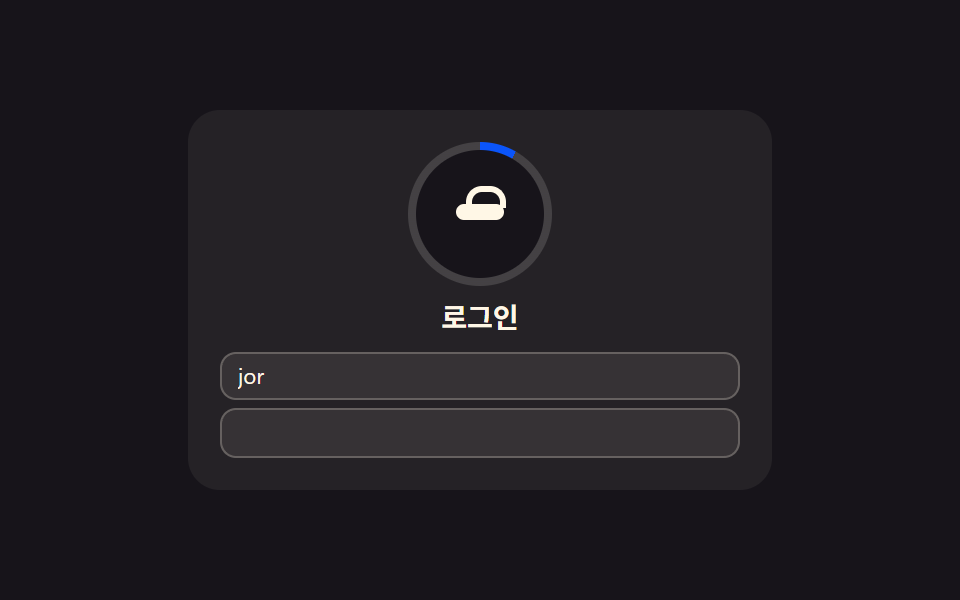
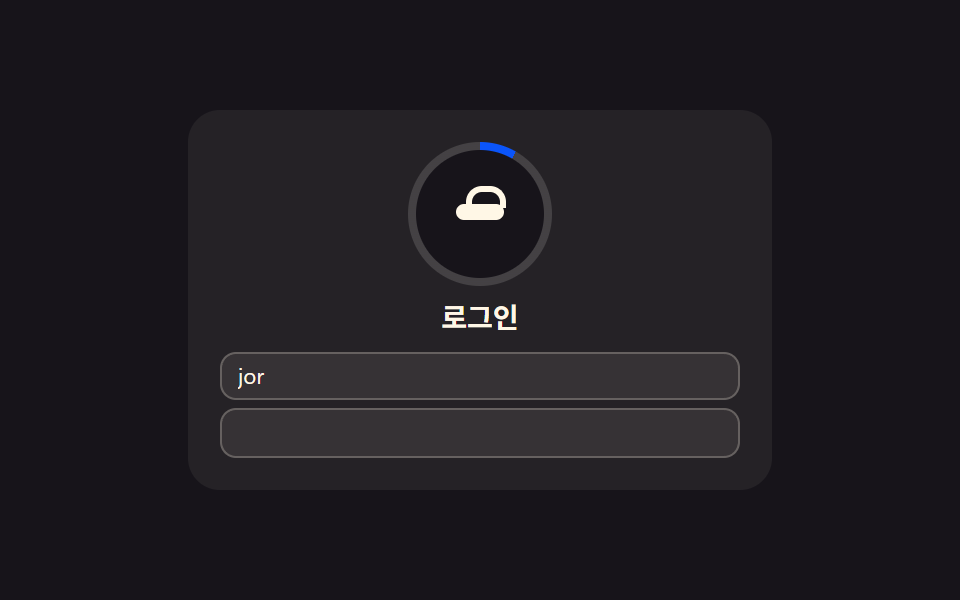
メールとパスワードの欄がどれだけ埋まっているかを数えて全体に対する完成比率を求め、その比率だけカード枠の進捗表示が満ちるログインカードです。
使いどころWebサービスのログイン画面、アプリのログインモーダル
conic-gradientsetPropertyautocomplete
<main class="stage">
<section class="card" id="card">
  <div class="ring" id="ring">
    <div class="ringHole"></div>
    <div class="avatar" aria-hidden="true">
      <span class="lockBody"></span>
      <span class="lockShackle"></span>
    </div>
  </div>
  <h2 class="title">ログイン</h2>
  <div class="fields">
    <label class="srOnly" for="loginEmail">メールアドレス</label>
    <input class="field" type="email" id="loginEmail" name="loginEmail" autocomplete="email" readonly value="" placeholder="[email protected]">
    <label class="srOnly" for="loginPw">パスワード</label>
    <input class="field" type="password" id="loginPw" name="loginPw" autocomplete="current-password" readonly value="">
  </div>
</section>
</main>
@use "../../../../site/static/demo-tokens" as *;
$duration: $dur-loop;
$easing: $ease-out;
$color: $subject-blue-deep;
@include stage($stage-ink);
.card {
position: relative;
width: 100%;
max-width: 260px;
display: flex;
flex-direction: column;
align-items: center;
gap: $sp-2;
padding: $sp-4;
border-radius: $r-card;
background: rgba($subject-cream, .06);
}
.ring {
--ratio: 0;
position: relative;
width: 72px;
height: 72px;
border-radius: $r-pill;
display: grid;
place-items: center;
}
.ring::before {
content: "";
position: absolute;
inset: 0;
border-radius: $r-pill;
background: conic-gradient($color calc(var(--ratio, 0) * 360deg), rgba($subject-cream, .14) 0);
animation: halo $duration $easing infinite;
}
.ringHole {
position: absolute;
inset: $sp-1;
border-radius: $r-pill;
background: $stage-ink;
}
.avatar {
position: relative;
z-index: 1;
width: 24px;
height: 18px;
}
.lockBody {
position: absolute;
left: 0;
top: $sp-1;
width: 24px;
height: $sp-2;
border-radius: $r-xs;
background: $subject-cream;
}
.lockShackle {
position: absolute;
left: calc(50% - 7px);
top: -5px;
width: 14px;
height: $sp-2;
border: 3px solid $subject-cream;
border-bottom: none;
border-radius: $r-sm $r-sm 0 0;
}
.title {
margin: 0;
color: $subject-cream;
font-family: -apple-system, "Segoe UI", "Noto Sans KR", sans-serif;
font-weight: 700;
font-size: 14px;
line-height: 1.2;
}
.fields {
width: 100%;
display: flex;
flex-direction: column;
gap: $sp-1;
}
// 시각적으로 숨기되 스크린리더·label-input 연결은 유지 (BD9 세로 높이 예산 확보)
.srOnly {
position: absolute;
width: 1px;
height: 1px;
margin: -1px;
padding: 0;
overflow: hidden;
clip: rect(0, 0, 0, 0);
white-space: nowrap;
border: 0;
}
.field {
width: 100%;
box-sizing: border-box;
padding: $sp-1 $sp-2;
border-radius: $r-sm;
border: 1px solid rgba($subject-cream, .24);
background: rgba($subject-cream, .08);
color: $subject-cream;
font-family: -apple-system, "Segoe UI", "Noto Sans KR", sans-serif;
font-weight: 400;
font-size: 11px;
line-height: 1.3;
}
.field::placeholder {
color: rgba($subject-cream, .72);
}
@keyframes halo {
0%, 100% { filter: brightness(1); }
50% { filter: brightness(1.16); }
}
@media (max-width: 340px) {
.card { max-width: 200px; padding: $sp-2; gap: $sp-1; }
.ring { width: 56px; height: 56px; }
.ringHole { inset: $sp-1; }
.avatar { width: 20px; height: 15px; }
.lockBody { width: 20px; }
.title { font-size: 12px; }
.field { font-size: 10px; padding: $sp-1; }
}
@media (prefers-reduced-motion: reduce) {
.ring::before { animation: none; }
}html, body {
margin: 0;
overflow: hidden;
}
.stage {
box-sizing: border-box;
min-height: 100vh;
display: grid;
place-items: center;
margin: 0;
background: #17141a;
font-family: -apple-system, "Segoe UI", "Noto Sans KR", sans-serif;
padding: clamp(8px, 4vw, 24px);
}
.card {
position: relative;
width: 100%;
max-width: 260px;
display: flex;
flex-direction: column;
align-items: center;
gap: 8px;
padding: 16px;
border-radius: 16px;
background: rgba(255, 247, 230, 0.06);
}
.ring {
--ratio: 0;
position: relative;
width: 72px;
height: 72px;
border-radius: 999px;
display: grid;
place-items: center;
}
.ring::before {
content: "";
position: absolute;
inset: 0;
border-radius: 999px;
background: conic-gradient(#0a4fe8 calc(var(--ratio, 0) * 360deg), rgba(255, 247, 230, 0.14) 0);
animation: halo 2s ease-out infinite;
}
.ringHole {
position: absolute;
inset: 4px;
border-radius: 999px;
background: #17141a;
}
.avatar {
position: relative;
z-index: 1;
width: 24px;
height: 18px;
}
.lockBody {
position: absolute;
left: 0;
top: 4px;
width: 24px;
height: 8px;
border-radius: 4px;
background: #fff7e6;
}
.lockShackle {
position: absolute;
left: calc(50% - 7px);
top: -5px;
width: 14px;
height: 8px;
border: 3px solid #fff7e6;
border-bottom: none;
border-radius: 8px 8px 0 0;
}
.title {
margin: 0;
color: #fff7e6;
font-family: -apple-system, "Segoe UI", "Noto Sans KR", sans-serif;
font-weight: 700;
font-size: 14px;
line-height: 1.2;
}
.fields {
width: 100%;
display: flex;
flex-direction: column;
gap: 4px;
}
.srOnly {
position: absolute;
width: 1px;
height: 1px;
margin: -1px;
padding: 0;
overflow: hidden;
clip: rect(0, 0, 0, 0);
white-space: nowrap;
border: 0;
}
.field {
width: 100%;
box-sizing: border-box;
padding: 4px 8px;
border-radius: 8px;
border: 1px solid rgba(255, 247, 230, 0.24);
background: rgba(255, 247, 230, 0.08);
color: #fff7e6;
font-family: -apple-system, "Segoe UI", "Noto Sans KR", sans-serif;
font-weight: 400;
font-size: 11px;
line-height: 1.3;
}
.field::placeholder {
color: rgba(255, 247, 230, 0.72);
}
@keyframes halo {
0%, 100% {
filter: brightness(1);
}
50% {
filter: brightness(1.16);
}
}
@media (max-width: 340px) {
.card {
max-width: 200px;
padding: 8px;
gap: 4px;
}
.ring {
width: 56px;
height: 56px;
}
.ringHole {
inset: 4px;
}
.avatar {
width: 20px;
height: 15px;
}
.lockBody {
width: 20px;
}
.title {
font-size: 12px;
}
.field {
font-size: 10px;
padding: 4px;
}
}
@media (prefers-reduced-motion: reduce) {
.ring::before {
animation: none;
}
}// ログイン 카드(01) — 가짜 メールアドレス·비밀번호를 시드 없이 고정 시나리오로 자동 타이핑하고,
// 채운 비율(メールアドレス 진행 + パスワード 진행의 평균)을 매 프레임 카드 진행 링(conic-gradient)에 반영한다.
// 실키·실서버 요청 없음 — 전부 클라이언트 시뮬레이션.
(function () {
var card = document.getElementById('card');
var ring = document.getElementById('ring');
var emailEl = document.getElementById('loginEmail');
var pwEl = document.getElementById('loginPw');
if (!card || !ring || !emailEl || !pwEl) return;
var reduce = window.matchMedia('(prefers-reduced-motion: reduce)').matches;
var SAMPLE_EMAIL = '[email protected]';
var EMAIL_LEN = SAMPLE_EMAIL.length;
var SAMPLE_PW_LEN = 10;
var PW_DOTS = '••••••••••';
var TYPE_MS = 70;
var CYCLE_MS = 2000;
function frameFor(t) {
var emailChars = Math.min(Math.max(Math.floor(t / TYPE_MS), 0), EMAIL_LEN);
var pwStart = EMAIL_LEN * TYPE_MS;
var pwChars = t > pwStart
? Math.min(Math.max(Math.floor((t - pwStart) / TYPE_MS), 0), SAMPLE_PW_LEN)
: 0;
return { emailChars: emailChars, pwChars: pwChars };
}
function apply(t) {
var f = frameFor(t);
emailEl.value = SAMPLE_EMAIL.slice(0, f.emailChars);
pwEl.value = PW_DOTS.slice(0, f.pwChars);
var ratio = ((f.emailChars / EMAIL_LEN) + (f.pwChars / SAMPLE_PW_LEN)) / 2;
ring.style.setProperty('--ratio', ratio.toFixed(4));
}
if (reduce) {
apply(CYCLE_MS);
return;
}
var start = null;
function loop(ts) {
if (start === null) start = ts;
var t = (ts - start) % CYCLE_MS;
apply(t);
requestAnimationFrame(loop);
}
requestAnimationFrame(loop);
})();import { useEffect, useRef } from "react";
import styles from "./LoginCard.module.scss";
// 로그인 카드 — 가짜 이메일·비밀번호를 고정 시나리오로 자동 타이핑하고
// 채운 비율을 카드 진행 링(conic-gradient)에 반영한다. 실키·실서버 요청 없음.
const SAMPLE_EMAIL = "[email protected]";
const EMAIL_LEN = SAMPLE_EMAIL.length;
const SAMPLE_PW_LEN = 10;
const PW_DOTS = "••••••••••";
const TYPE_MS = 70;
const CYCLE_MS = 2000;
export default function LoginCard() {
const ringRef = useRef<HTMLDivElement>(null);
const emailRef = useRef<HTMLInputElement>(null);
const pwRef = useRef<HTMLInputElement>(null);
useEffect(() => {
const ring = ringRef.current;
const emailEl = emailRef.current;
const pwEl = pwRef.current;
if (!ring || !emailEl || !pwEl) return;
const reduce = window.matchMedia("(prefers-reduced-motion: reduce)").matches;
function frameFor(t: number) {
const emailChars = Math.min(Math.max(Math.floor(t / TYPE_MS), 0), EMAIL_LEN);
const pwStart = EMAIL_LEN * TYPE_MS;
const pwChars = t > pwStart
? Math.min(Math.max(Math.floor((t - pwStart) / TYPE_MS), 0), SAMPLE_PW_LEN)
: 0;
return { emailChars, pwChars };
}
function apply(t: number) {
const f = frameFor(t);
emailEl!.value = SAMPLE_EMAIL.slice(0, f.emailChars);
pwEl!.value = PW_DOTS.slice(0, f.pwChars);
const ratio = (f.emailChars / EMAIL_LEN + f.pwChars / SAMPLE_PW_LEN) / 2;
ring!.style.setProperty("--ratio", ratio.toFixed(4));
}
if (reduce) {
apply(CYCLE_MS);
return;
}
let start: number | null = null;
let raf = 0;
function loop(ts: number) {
if (start === null) start = ts;
const t = (ts - start) % CYCLE_MS;
apply(t);
raf = requestAnimationFrame(loop);
}
raf = requestAnimationFrame(loop);
return () => cancelAnimationFrame(raf);
}, []);
return (
<div className={styles.stage}>
<section className={styles.card}>
<div className={styles.ring} ref={ringRef}>
<div className={styles.ringHole} />
<div className={styles.avatar} aria-hidden="true">
<span className={styles.lockBody} />
<span className={styles.lockShackle} />
</div>
</div>
<h2 className={styles.title}>로그인</h2>
<div className={styles.fields}>
<label className={styles.srOnly} htmlFor="loginEmail">이메일</label>
<input
className={styles.field}
type="email"
id="loginEmail"
name="loginEmail"
autoComplete="email"
readOnly
defaultValue=""
placeholder="[email protected]"
ref={emailRef}
/>
<label className={styles.srOnly} htmlFor="loginPw">비밀번호</label>
<input
className={styles.field}
type="password"
id="loginPw"
name="loginPw"
autoComplete="current-password"
readOnly
defaultValue=""
ref={pwRef}
/>
</div>
</section>
</div>
);
}01 ログインカード — 入力の完成度を計算して進捗表示を満たすカード — 計測 累積面積 0.824% · 動いたフレーム 19/23GODRICH オリジナル · SCSS と React は zip に同梱 · ログイン 画面 デザイン9選 — 会員登録からセッション切れまで
このデモが属する記事
 ログイン 画面 デザイン9選 — 会員登録からセッション切れまで「ログイン 画面 デザイン」を探すと出てくる多くの参考画像は、色や余白を真似るだけの静止した見本です。ここで扱う9つの画面はその手前に計算の層を1枚重ねます。入力の完成度で進捗表示が求め直され、残り有効時間が毎秒求め直されてリングの角度にな この記事のデモをすべて見る