03ソーシャルログイン — ボタン数から列数を求め直し常に均等に配置するグループ
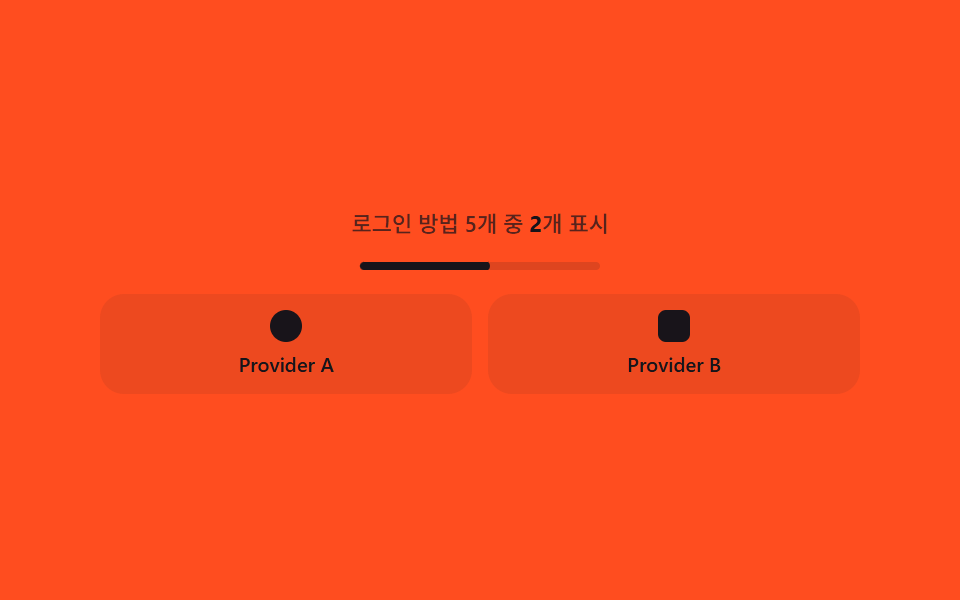
プロバイダーボタンの数を数えて一行に何個並べるか列数を求め、数が増減してもボタンの間隔と大きさが常に均等になるよう計算し直すソーシャルログインボタン群です。
使いどころソーシャルログインボタン一覧、簡単登録オプション欄
grid-template-columnsclip-pathclassList
<main class="stage">
<section class="wrap" id="wrap">
  <p class="hint" id="hint">ログイン方法5個中 <span id="hintCount">2</span>個を表示中</p>
  <div class="tick" id="tick" aria-hidden="true"><div class="tickBar" id="tickBar"></div></div>
  <div class="row" id="row" style="--cols:2">
    <button type="button" class="btn" id="btn0">
      <span class="icon iconCircle" aria-hidden="true"></span>
      <span class="label">Provider A</span>
    </button>
    <button type="button" class="btn" id="btn1">
      <span class="icon iconSquare" aria-hidden="true"></span>
      <span class="label">Provider B</span>
    </button>
    <button type="button" class="btn is-hidden" id="btn2">
      <span class="icon iconTriangle" aria-hidden="true"></span>
      <span class="label">Provider C</span>
    </button>
    <button type="button" class="btn is-hidden" id="btn3">
      <span class="icon iconDiamond" aria-hidden="true"></span>
      <span class="label">Provider D</span>
    </button>
    <button type="button" class="btn is-hidden" id="btn4">
      <span class="icon iconStar" aria-hidden="true"></span>
      <span class="label">Provider E</span>
    </button>
  </div>
</section>
</main>@use "../../../../site/static/demo-tokens" as *;
$duration: $dur-loop;
$easing: $ease-out;
$color: $subject-ink;
@include stage($stage-orange);
.wrap {
width: 100%;
max-width: 380px;
display: flex;
flex-direction: column;
align-items: center;
gap: $sp-3;
text-align: center;
}
.hint {
margin: 0;
color: rgba($subject-ink, .72);
font-family: -apple-system, "Segoe UI", "Noto Sans KR", sans-serif;
font-weight: 500;
font-size: 11px;
}
.hint span {
color: $subject-ink;
font-weight: 700;
}
.tick {
width: 100%;
max-width: 120px;
height: $sp-1;
border-radius: $r-pill;
background: rgba($subject-ink, .14);
overflow: hidden;
}
.tickBar {
--within: 0;
width: 100%;
height: 100%;
border-radius: $r-pill;
background: $subject-ink;
transform: scaleX(var(--within, 0));
transform-origin: left;
}
.row {
--cols: 2;
width: 100%;
display: grid;
grid-template-columns: repeat(var(--cols), 1fr);
gap: $sp-2;
}
.btn {
display: flex;
flex-direction: column;
align-items: center;
justify-content: center;
gap: $sp-1;
padding: $sp-2 $sp-1;
border: 0;
border-radius: $r-control;
background: rgba($subject-ink, .08);
cursor: default;
}
.btn.is-hidden {
display: none;
}
.icon {
width: $sp-4;
height: $sp-4;
animation: iconPulse $duration $easing infinite;
}
.iconCircle {
border-radius: $r-pill;
background: $subject-ink;
}
.iconSquare {
border-radius: $r-xs;
background: $subject-ink;
}
.iconTriangle {
width: 0;
height: 0;
border-left: $sp-2 solid transparent;
border-right: $sp-2 solid transparent;
border-bottom: $sp-4 solid $subject-ink;
}
.iconDiamond {
background: $subject-ink;
border-radius: $r-xs;
transform: rotate(45deg);
}
.iconStar {
background: $subject-ink;
clip-path: polygon(50% 0%, 61% 35%, 98% 35%, 68% 57%, 79% 91%, 50% 70%, 21% 91%, 32% 57%, 2% 35%, 39% 35%);
}
.label {
color: $subject-ink;
font-family: -apple-system, "Segoe UI", "Noto Sans KR", sans-serif;
font-weight: 500;
font-size: 10px;
}
@keyframes iconPulse {
0%, 100% { opacity: .82; }
50% { opacity: 1; }
}
@media (max-width: 340px) {
.wrap { max-width: 280px; }
.label { font-size: 9px; }
.btn { padding: $sp-1; }
}
@media (prefers-reduced-motion: reduce) {
.icon { animation: none; }
}html, body {
margin: 0;
overflow: hidden;
}
.stage {
box-sizing: border-box;
min-height: 100vh;
display: grid;
place-items: center;
margin: 0;
background: #ff4d1f;
font-family: -apple-system, "Segoe UI", "Noto Sans KR", sans-serif;
padding: clamp(8px, 4vw, 24px);
}
.wrap {
width: 100%;
max-width: 380px;
display: flex;
flex-direction: column;
align-items: center;
gap: 12px;
text-align: center;
}
.hint {
margin: 0;
color: rgba(23, 20, 26, 0.72);
font-family: -apple-system, "Segoe UI", "Noto Sans KR", sans-serif;
font-weight: 500;
font-size: 11px;
}
.hint span {
color: #17141a;
font-weight: 700;
}
.tick {
width: 100%;
max-width: 120px;
height: 4px;
border-radius: 999px;
background: rgba(23, 20, 26, 0.14);
overflow: hidden;
}
.tickBar {
--within: 0;
width: 100%;
height: 100%;
border-radius: 999px;
background: #17141a;
transform: scaleX(var(--within, 0));
transform-origin: left;
}
.row {
--cols: 2;
width: 100%;
display: grid;
grid-template-columns: repeat(var(--cols), 1fr);
gap: 8px;
}
.btn {
display: flex;
flex-direction: column;
align-items: center;
justify-content: center;
gap: 4px;
padding: 8px 4px;
border: 0;
border-radius: 12px;
background: rgba(23, 20, 26, 0.08);
cursor: default;
}
.btn.is-hidden {
display: none;
}
.icon {
width: 16px;
height: 16px;
animation: iconPulse 2s ease-out infinite;
}
.iconCircle {
border-radius: 999px;
background: #17141a;
}
.iconSquare {
border-radius: 4px;
background: #17141a;
}
.iconTriangle {
width: 0;
height: 0;
border-left: 8px solid transparent;
border-right: 8px solid transparent;
border-bottom: 16px solid #17141a;
}
.iconDiamond {
background: #17141a;
border-radius: 4px;
transform: rotate(45deg);
}
.iconStar {
background: #17141a;
clip-path: polygon(50% 0%, 61% 35%, 98% 35%, 68% 57%, 79% 91%, 50% 70%, 21% 91%, 32% 57%, 2% 35%, 39% 35%);
}
.label {
color: #17141a;
font-family: -apple-system, "Segoe UI", "Noto Sans KR", sans-serif;
font-weight: 500;
font-size: 10px;
}
@keyframes iconPulse {
0%, 100% {
opacity: 0.82;
}
50% {
opacity: 1;
}
}
@media (max-width: 340px) {
.wrap {
max-width: 280px;
}
.label {
font-size: 9px;
}
.btn {
padding: 4px;
}
}
@media (prefers-reduced-motion: reduce) {
.icon {
animation: none;
}
}// 소셜 ログイン(03) — 제공자 개수가 시나리오에 따라 바뀔 때 그리드 열 수를 재계산한다.
// 브랜드 로고·브랜드명 없이 순수 CSS 도형 아이콘 + 가상명("Provider A" 류)만 사용.
(function () {
var row = document.getElementById('row');
var hintCount = document.getElementById('hintCount');
var tickBar = document.getElementById('tickBar');
var btnIds = ['btn0', 'btn1', 'btn2', 'btn3', 'btn4'];
var btns = btnIds.map(function (id) { return document.getElementById(id); });
if (!row || !hintCount || !tickBar || btns.some(function (b) { return !b; })) return;
var reduce = window.matchMedia('(prefers-reduced-motion: reduce)').matches;
var COUNTS = [2, 3, 4, 5, 3];
var STEP_MS = 400;
var CYCLE_MS = COUNTS.length * STEP_MS;
function colsFor(n) {
return n <= 3 ? n : Math.ceil(n / 2);
}
function apply(t) {
var tt = t % CYCLE_MS;
var idx = Math.min(Math.max(Math.floor(tt / STEP_MS), 0), COUNTS.length - 1);
var n = COUNTS[idx];
var cols = colsFor(n);
row.style.setProperty('--cols', String(cols));
hintCount.textContent = String(n);
btns.forEach(function (btn, i) {
if (i < n) {
btn.classList.remove('is-hidden');
} else {
btn.classList.add('is-hidden');
}
});
// 다음 개수 전환까지 남은 구간을 매 프레임 다시 계산해 가는 줄(계산 한 겹) —
// 그리드 재배치가 갑자기 튀지 않고 다음 변화가 다가옴을 예고한다.
var within = (tt % STEP_MS) / STEP_MS;
tickBar.style.setProperty('--within', within.toFixed(4));
}
if (reduce) {
apply(0);
return;
}
var start = null;
function loop(ts) {
if (start === null) start = ts;
apply(ts - start);
requestAnimationFrame(loop);
}
requestAnimationFrame(loop);
})();import { useEffect, useRef } from "react";
import styles from "./SocialLogin.module.scss";
// 소셜 로그인 — 제공자 개수가 시나리오에 따라 바뀔 때 그리드 열 수를 재계산한다.
// 브랜드 로고·브랜드명 없이 순수 CSS 도형 아이콘 + 가상명("Provider A" 류)만 사용.
const COUNTS = [2, 3, 4, 5, 3];
const STEP_MS = 400;
const CYCLE_MS = COUNTS.length * STEP_MS;
const PROVIDERS = [
{ id: "btn0", icon: "iconCircle", label: "Provider A" },
{ id: "btn1", icon: "iconSquare", label: "Provider B" },
{ id: "btn2", icon: "iconTriangle", label: "Provider C" },
{ id: "btn3", icon: "iconDiamond", label: "Provider D" },
{ id: "btn4", icon: "iconStar", label: "Provider E" },
] as const;
function colsFor(n: number) {
return n <= 3 ? n : Math.ceil(n / 2);
}
export default function SocialLogin() {
const rowRef = useRef<HTMLDivElement>(null);
const hintCountRef = useRef<HTMLSpanElement>(null);
const tickBarRef = useRef<HTMLDivElement>(null);
const btnRefs = [
useRef<HTMLButtonElement>(null),
useRef<HTMLButtonElement>(null),
useRef<HTMLButtonElement>(null),
useRef<HTMLButtonElement>(null),
useRef<HTMLButtonElement>(null),
];
useEffect(() => {
const row = rowRef.current;
const hintCount = hintCountRef.current;
const tickBar = tickBarRef.current;
const btns = btnRefs.map((r) => r.current);
if (!row || !hintCount || !tickBar || btns.some((b) => !b)) return;
const reduce = window.matchMedia("(prefers-reduced-motion: reduce)").matches;
function apply(t: number) {
const tt = t % CYCLE_MS;
const idx = Math.min(Math.max(Math.floor(tt / STEP_MS), 0), COUNTS.length - 1);
const n = COUNTS[idx];
const cols = colsFor(n);
row!.style.setProperty("--cols", String(cols));
hintCount!.textContent = String(n);
btns.forEach((btn, i) => {
if (!btn) return;
if (i < n) {
btn.classList.remove(styles.isHidden);
} else {
btn.classList.add(styles.isHidden);
}
});
// 다음 개수 전환까지 남은 구간을 매 프레임 다시 계산해 가는 줄(계산 한 겹) —
// 그리드 재배치가 갑자기 튀지 않고 다음 변화가 다가옴을 예고한다.
const within = (tt % STEP_MS) / STEP_MS;
tickBar!.style.setProperty("--within", within.toFixed(4));
}
if (reduce) {
apply(0);
return;
}
let start: number | null = null;
let raf = 0;
function loop(ts: number) {
if (start === null) start = ts;
apply(ts - start);
raf = requestAnimationFrame(loop);
}
raf = requestAnimationFrame(loop);
return () => cancelAnimationFrame(raf);
// eslint-disable-next-line react-hooks/exhaustive-deps
}, []);
return (
<div className={styles.stage}>
<section className={styles.wrap}>
<p className={styles.hint}>
로그인 방법 5개 중 <span ref={hintCountRef}>2</span>개 표시
</p>
<div className={styles.tick} aria-hidden="true">
<div className={styles.tickBar} ref={tickBarRef} />
</div>
<div className={styles.row} ref={rowRef}>
{PROVIDERS.map((p, i) => (
<button
type="button"
className={i >= 2 ? `${styles.btn} ${styles.isHidden}` : styles.btn}
ref={btnRefs[i]}
key={p.id}
>
<span className={`${styles.icon} ${styles[p.icon]}`} aria-hidden="true" />
<span className={styles.label}>{p.label}</span>
</button>
))}
</div>
</section>
</div>
);
}03 ソーシャルログイン — ボタン数から列数を求め直し常に均等に配置するグループ — 計測 累積面積 23.165% · 動いたフレーム 23/23GODRICH オリジナル · SCSS と React は zip に同梱 · ログイン 画面 デザイン9選 — 会員登録からセッション切れまで
このデモが属する記事
 ログイン 画面 デザイン9選 — 会員登録からセッション切れまで「ログイン 画面 デザイン」を探すと出てくる多くの参考画像は、色や余白を真似るだけの静止した見本です。ここで扱う9つの画面はその手前に計算の層を1枚重ねます。入力の完成度で進捗表示が求め直され、残り有効時間が毎秒求め直されてリングの角度にな この記事のデモをすべて見る