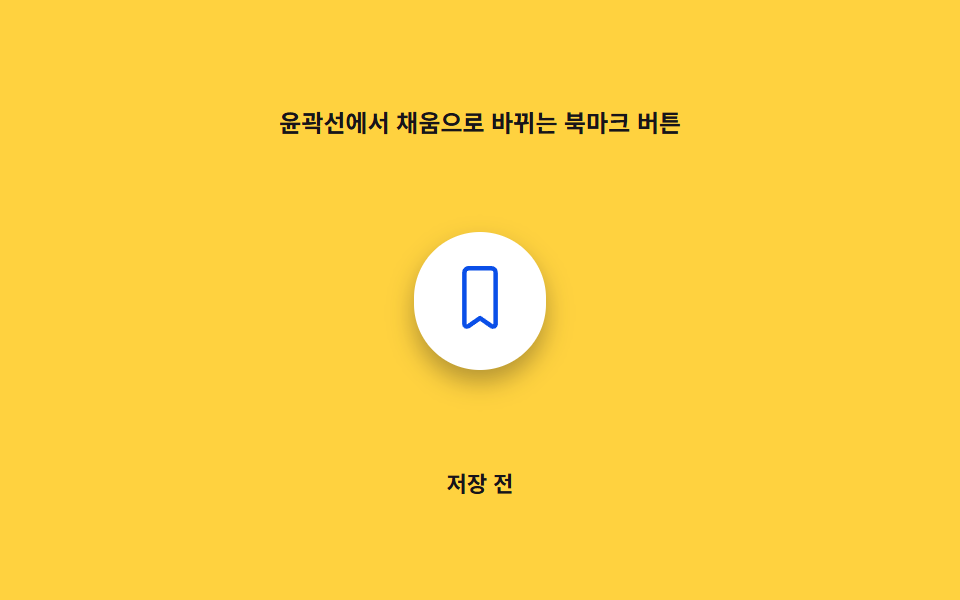
02輪郭から塗りつぶしに変わるブックマークボタン
保存前は線だけのリボンが、タップした瞬間に内側から色が満ちて塗りつぶし形に変わる。
使いどころ商品カードのウィッシュリストボタン
CYCLE_SrendersetSaved
<main class="stage">
<div class="ob is-demo" id="ob">
  <p class="ob__caption">輪郭線から塗りつぶしに変わるブックマークボタン</p>
  <div class="ob__scene" id="obScene">
    <div class="ob__panel" id="obPanel" aria-hidden="true"></div>
    <button class="ob__btn" id="obBtn" type="button" aria-pressed="false">
      <svg class="ob__icon" viewBox="0 0 24 24" width="34" height="34" aria-hidden="true" focusable="false">
        <defs>
          <clipPath id="obClip">
            <path d="M6.5 3A1.5 1.5 0 0 1 8 1.5h8A1.5 1.5 0 0 1 17.5 3v18.2a.9.9 0 0 1-1.38.76L12 19.1l-4.12 2.86A.9.9 0 0 1 6.5 21.2Z"/>
          </clipPath>
        </defs>
        <path class="ob__outline" d="M6.5 3A1.5 1.5 0 0 1 8 1.5h8A1.5 1.5 0 0 1 17.5 3v18.2a.9.9 0 0 1-1.38.76L12 19.1l-4.12 2.86A.9.9 0 0 1 6.5 21.2Z"/>
        <rect class="ob__fill" id="obFill" x="0" y="24" width="24" height="24" clip-path="url(#obClip)"/>
      </svg>
    </button>
  </div>
  <p class="ob__status" id="obStatus" aria-live="polite">未保存</p>
</div>
</main>
@use "../../../../site/static/demo-tokens" as *;
// 값 하나: fill 진행률(0~1) → SVG rect 의 y/height, clip-path 로 리본 모양 안에서만 차오른다.
$duration: $dur-base;
$easing: $ease-out;
$color: $subject-blue-deep;
@include stage($stage-yellow);
.ob {
display: grid;
gap: $sp-3;
justify-items: center;
}
.ob__caption {
margin: 0;
font-size: 12px;
font-weight: 600;
color: $subject-ink;
}
.ob__scene {
position: relative;
width: 200px;
height: 140px;
display: grid;
place-items: center;
}
.ob__panel {
position: absolute;
inset: 0;
margin: auto;
width: 200px;
height: 140px;
--fill-p: 0;
border-radius: $r-card;
background: radial-gradient(circle, rgba($subject-blue-deep, calc(var(--fill-p) * .62)) 0%, rgba($subject-blue-deep, calc(var(--fill-p) * .28)) 55%, transparent 90%);
pointer-events: none;
}
.ob__btn {
position: relative;
z-index: 1;
border: 0;
background: $stage-paper;
border-radius: $r-pill;
padding: $sp-4;
cursor: pointer;
box-shadow: $shadow-press;
transform-origin: center;
}
.ob__btn:focus-visible {
outline: 2px solid $subject-blue;
outline-offset: 3px;
}
.ob__outline {
fill: none;
stroke: $color;
stroke-width: 1.6;
stroke-linejoin: round;
}
.ob__fill {
fill: $color;
}
.ob__status {
margin: 0;
font-size: 11px;
color: $subject-ink;
font-weight: 600;
}
@media (max-width: 340px) {
.ob__scene { width: 150px; height: 96px; }
.ob__panel { width: 130px; height: 78px; }
}
@media (prefers-reduced-motion: reduce) {
.ob__btn { transition: none; }
}html, body {
margin: 0;
overflow: hidden;
}
.stage {
box-sizing: border-box;
min-height: 100vh;
display: grid;
place-items: center;
margin: 0;
background: #ffd23f;
font-family: -apple-system, "Segoe UI", "Noto Sans KR", sans-serif;
padding: clamp(8px, 4vw, 24px);
}
.ob {
display: grid;
gap: 12px;
justify-items: center;
}
.ob__caption {
margin: 0;
font-size: 12px;
font-weight: 600;
color: #17141a;
}
.ob__scene {
position: relative;
width: 200px;
height: 140px;
display: grid;
place-items: center;
}
.ob__panel {
position: absolute;
inset: 0;
margin: auto;
width: 200px;
height: 140px;
--fill-p: 0;
border-radius: 16px;
background: radial-gradient(circle, rgba(10, 79, 232, calc(var(--fill-p) * 0.62)) 0%, rgba(10, 79, 232, calc(var(--fill-p) * 0.28)) 55%, transparent 90%);
pointer-events: none;
}
.ob__btn {
position: relative;
z-index: 1;
border: 0;
background: #ffffff;
border-radius: 999px;
padding: 16px;
cursor: pointer;
box-shadow: 0 6px 12px rgba(23, 20, 26, 0.32);
transform-origin: center;
}
.ob__btn:focus-visible {
outline: 2px solid #2f6df6;
outline-offset: 3px;
}
.ob__outline {
fill: none;
stroke: #0a4fe8;
stroke-width: 1.6;
stroke-linejoin: round;
}
.ob__fill {
fill: #0a4fe8;
}
.ob__status {
margin: 0;
font-size: 11px;
color: #17141a;
font-weight: 600;
}
@media (max-width: 340px) {
.ob__scene {
width: 150px;
height: 96px;
}
.ob__panel {
width: 130px;
height: 78px;
}
}
@media (prefers-reduced-motion: reduce) {
.ob__btn {
transition: none;
}
}(function () {
"use strict";
var CYCLE_S = 2;
var root = document.getElementById("ob");
var scene = document.getElementById("obScene");
var panel = document.getElementById("obPanel");
var btn = document.getElementById("obBtn");
var fillRect = document.getElementById("obFill");
var status = document.getElementById("obStatus");
var reduce = window.matchMedia("(prefers-reduced-motion: reduce)").matches;
var saved = false;
var progress = 0;
var target = 0;
function render(p) {
// 값 하나: fill 진행률(p, 0~1) → SVG rect 의 y·height(=clip-path 로 잘려 채움 비율이 된다)
var y = 24 * (1 - p);
fillRect.setAttribute("y", y.toFixed(3));
fillRect.setAttribute("height", (24 - y).toFixed(3));
panel.style.setProperty("--fill-p", p.toFixed(3));
}
function setSaved(v) {
saved = v;
target = v ? 1 : 0;
btn.setAttribute("aria-pressed", String(v));
status.textContent = v ? "保存済み" : "未保存";
}
btn.addEventListener("click", function () {
root.classList.remove("is-demo");
setSaved(!saved);
});
var start = null;
var prevT = 0;
var toggledA = false;
var toggledB = false;
function loop(now) {
if (start === null) start = now;
var t = ((now - start) / 1000) % CYCLE_S;
if (t < prevT) { toggledA = false; toggledB = false; }
prevT = t;
if (!reduce && root.classList.contains("is-demo")) {
if (!toggledA && t > 0.3) { toggledA = true; setSaved(true); }
if (!toggledB && t > 1.3) { toggledB = true; setSaved(false); }
}
if (reduce) {
progress = target;
} else {
// 관성 lerp: 진행률이 목표를 향해 부드럽게 수렴한다 (속성 트윈이 아니라 매 프레임 계산)
progress += (target - progress) * 0.22;
}
render(progress);
requestAnimationFrame(loop);
}
requestAnimationFrame(loop);
})();// OutlineFillMorphBookmark — vanilla 판(run/416/demo/02-bookmark-btn-outline-fill-morph/index.html) 의 React 포트.
// 값 하나: fill 진행률(0~1, 관성 lerp) → SVG rect 의 y/height(clip-path 로 리본 모양 안에서만 차오른다) + 배경 패널 강도.
import { useEffect, useRef, useState } from "react";
import styles from "./OutlineFillMorphBookmark.module.scss";
type Box<T> = { current: T };
const CYCLE_S = 2;
const LERP_RATE = 0.22;
export default function OutlineFillMorphBookmark() {
const panelRef = useRef<HTMLDivElement | null>(null);
const fillRef = useRef<SVGRectElement | null>(null);
const progressRef = useRef<number>(0) as Box<number>;
const targetRef = useRef<number>(0) as Box<number>;
const frameRef = useRef<number>(0) as Box<number>;
const [saved, setSaved] = useState(false);
const [demo, setDemo] = useState(true);
const [reduce, setReduce] = useState(false);
function render(p: number): void {
const fill = fillRef.current;
const panel = panelRef.current;
if (!fill || !panel) return;
const y = 24 * (1 - p);
fill.setAttribute("y", y.toFixed(3));
fill.setAttribute("height", (24 - y).toFixed(3));
panel.style.setProperty("--fill-p", p.toFixed(3));
}
function toggle(v: boolean): void {
setSaved(v);
targetRef.current = v ? 1 : 0;
}
useEffect(() => {
setReduce(window.matchMedia("(prefers-reduced-motion: reduce)").matches);
}, []);
useEffect(() => {
let start = 0;
let prevT = 0;
let toggledA = false;
let toggledB = false;
function loop(now: number): void {
if (start === 0) start = now;
const t = ((now - start) / 1000) % CYCLE_S;
if (t < prevT) { toggledA = false; toggledB = false; }
prevT = t;
if (!reduce && demo) {
if (!toggledA && t > 0.3) { toggledA = true; toggle(true); }
if (!toggledB && t > 1.3) { toggledB = true; toggle(false); }
}
if (reduce) {
progressRef.current = targetRef.current;
} else {
progressRef.current += (targetRef.current - progressRef.current) * LERP_RATE;
}
render(progressRef.current);
frameRef.current = requestAnimationFrame(loop);
}
frameRef.current = requestAnimationFrame(loop);
return () => cancelAnimationFrame(frameRef.current);
}, [reduce, demo]);
function onClick(): void {
setDemo(false);
toggle(!saved);
}
return (
<main className={styles.stage}>
<div className={styles.ob}>
<p className={styles.caption}>윤곽선에서 채움으로 바뀌는 북마크 버튼</p>
<div className={styles.scene}>
<div className={styles.panel} aria-hidden="true" ref={panelRef} />
<button className={styles.btn} type="button" aria-pressed={saved} onClick={onClick}>
<svg className={styles.icon} viewBox="0 0 24 24" width={34} height={34} aria-hidden="true" focusable="false">
<defs>
<clipPath id="obClip">
<path d="M6.5 3A1.5 1.5 0 0 1 8 1.5h8A1.5 1.5 0 0 1 17.5 3v18.2a.9.9 0 0 1-1.38.76L12 19.1l-4.12 2.86A.9.9 0 0 1 6.5 21.2Z" />
</clipPath>
</defs>
<path className={styles.outline} d="M6.5 3A1.5 1.5 0 0 1 8 1.5h8A1.5 1.5 0 0 1 17.5 3v18.2a.9.9 0 0 1-1.38.76L12 19.1l-4.12 2.86A.9.9 0 0 1 6.5 21.2Z" />
<rect className={styles.fill} ref={fillRef} x={0} y={24} width={24} height={24} clipPath="url(#obClip)" />
</svg>
</button>
</div>
<p className={styles.status} aria-live="polite">{saved ? "저장됨" : "저장 전"}</p>
</div>
</main>
);
}02 輪郭から塗りつぶしに変わるブックマークボタン — 計測 累積面積 16.04% · 動いたフレーム 7/23GODRICH オリジナル · SCSS と React は zip に同梱 · ブックマーク ボタン html 実装 9パターン
このデモが属する記事
 ブックマーク ボタン html 実装 9パターンブックマーク ボタン htmlでは、保存。たった一言に九つの表情がある — 03番は押した瞬間にスプリング値が弾み、06番は保存数の値が一桁ずつ積み重なってバッジを押し上げ、09番はドラッグ距離の値が届くとリストにスッと引き寄せられる。 この記事のデモをすべて見る