04兄弟階層のプレビュー
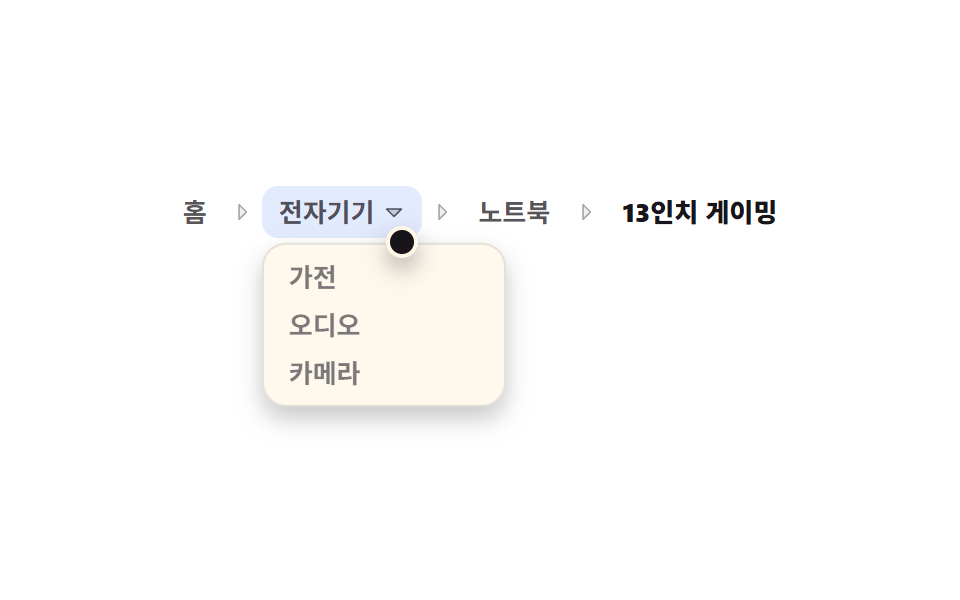
中間の階層にマウスを乗せるか下矢印キーを押すと同じ層の別カテゴリが一覧で先に現れ、その中も上下キーで移動できます。
使いどころ上に戻ってから降り直さずに、同じ層の隣のカテゴリへ直接移りたいとき
aria-haspopupArrowDownopacity
<main class="stage">
  <nav class="sp is-demo" aria-label="パンくずリスト">
    <ol class="sp__list">
      <li class="sp__item">
        <a class="sp__crumb" href="#">ホーム</a>
        <span class="sp__sep" aria-hidden="true"><svg viewBox="0 0 256 256" width="12" height="12" aria-hidden="true"><g fill="currentColor"><path d="m176 128l-80 80V48Z" opacity=".2"/><path d="m181.66 122.34l-80-80A8 8 0 0 0 88 48v160a8 8 0 0 0 13.66 5.66l80-80a8 8 0 0 0 0-11.32M104 188.69V67.31L164.69 128Z"/></g></svg></span>
      </li>
      <li class="sp__item sp__item--menu" id="sp-item">
        <button class="sp__crumb sp__crumb--btn" type="button" id="sp-btn" aria-haspopup="menu" aria-expanded="false" aria-controls="sp-menu">
          <span class="sp__txt" id="sp-txt">電子機器</span>
          <svg viewBox="0 0 256 256" width="12" height="12" aria-hidden="true"><g fill="currentColor"><path d="m208 96l-80 80l-80-80Z" opacity=".2"/><path d="M215.39 92.94A8 8 0 0 0 208 88H48a8 8 0 0 0-5.66 13.66l80 80a8 8 0 0 0 11.32 0l80-80a8 8 0 0 0 1.73-8.72M128 164.69L67.31 104h121.38Z"/></g></svg>
        </button>
        <ul class="sp__menu" role="menu" id="sp-menu" aria-label="電子機器の兄弟カテゴリ">
          <li class="sp__opt" role="none"><a class="sp__mlink" role="menuitem" tabindex="-1" href="#">家電</a></li>
          <li class="sp__opt" role="none"><a class="sp__mlink" role="menuitem" tabindex="-1" href="#">オーディオ</a></li>
          <li class="sp__opt" role="none"><a class="sp__mlink" role="menuitem" tabindex="-1" href="#">カメラ</a></li>
        </ul>
        <span class="sp__sep" aria-hidden="true"><svg viewBox="0 0 256 256" width="12" height="12" aria-hidden="true"><g fill="currentColor"><path d="m176 128l-80 80V48Z" opacity=".2"/><path d="m181.66 122.34l-80-80A8 8 0 0 0 88 48v160a8 8 0 0 0 13.66 5.66l80-80a8 8 0 0 0 0-11.32M104 188.69V67.31L164.69 128Z"/></g></svg></span>
      </li>
      <li class="sp__item">
        <a class="sp__crumb" href="#">ノートPC</a>
        <span class="sp__sep" aria-hidden="true"><svg viewBox="0 0 256 256" width="12" height="12" aria-hidden="true"><g fill="currentColor"><path d="m176 128l-80 80V48Z" opacity=".2"/><path d="m181.66 122.34l-80-80A8 8 0 0 0 88 48v160a8 8 0 0 0 13.66 5.66l80-80a8 8 0 0 0 0-11.32M104 188.69V67.31L164.69 128Z"/></g></svg></span>
      </li>
      <li class="sp__item">
        <span class="sp__crumb sp__crumb--now" aria-current="page">13インチ ゲーミング</span>
      </li>
    </ol>
    <span class="sp__cursor" aria-hidden="true"></span>
  </nav>
</main>@use "../../../../site/static/demo-tokens" as *;
$duration: $dur-quick;
$easing: $ease-spring;
$color: $subject-blue;
@include stage($stage-paper);
// 뿌리 — 절대배치 목록은 부모 높이에서 빠지지만 scrollHeight 엔 잡힌다.
// 그래서 열린 목록 높이(86px)만큼 padding-bottom 으로 미리 자리를 잡아 둔다 (BD9)
.sp {
position: relative;
padding-bottom: 88px;
color: $subject-ink;
font-size: clamp(11px, 3vw, 13px);
line-height: 18px;
user-select: none;
-webkit-user-select: none;
}
.sp__list {
display: flex;
align-items: center;
flex-wrap: nowrap;
margin: 0;
padding: 0;
list-style: none;
}
.sp__item {
display: flex;
align-items: center;
white-space: nowrap;
}
.sp__item--menu { position: relative; }
.sp__sep {
display: inline-flex;
margin: 0 $sp-1;
color: rgba($subject-ink, .38);
}
.sp__sep svg { display: block; }
.sp__crumb {
display: inline-flex;
align-items: center;
gap: $sp-1;
padding: $sp-1 $sp-2;
border: 0;
border-radius: $r-sm;
background: transparent;
color: rgba($subject-ink, .72);
font-family: inherit;
font-size: inherit;
line-height: 18px;
font-weight: 600;
text-decoration: none;
cursor: pointer;
transition: background $duration $easing, color $duration $easing;
}
.sp__crumb:hover { background: rgba($subject-blue, .12); color: $color; }
.sp__crumb:focus-visible { outline: 2px solid $color; outline-offset: 2px; }
.sp__crumb--btn { cursor: pointer; }
.sp__crumb--now {
color: $subject-ink;
font-weight: 800;
cursor: default;
}
.sp__crumb--now:hover { background: transparent; color: $subject-ink; }
.sp__crumb--btn svg {
display: block;
transition: transform $duration $easing;
}
.sp__item--menu.is-open .sp__crumb--btn { background: rgba($subject-blue, .12); color: $color; }
.sp__item--menu.is-open .sp__crumb--btn svg { transform: rotate(180deg); }
// 형제 목록 — 아래로 펼친다. 항목 높이 24px × 3 + 패딩 8 + 테두리 2 = 82px
.sp__menu {
position: absolute;
top: calc(100% + #{$sp-1});
left: 0;
z-index: 2;
min-width: 112px;
margin: 0;
padding: $sp-1;
list-style: none;
border: 1px solid rgba($subject-ink, .14);
border-radius: $r-control;
background: $subject-cream;
box-shadow: $shadow-press;
opacity: 0;
visibility: hidden;
transform: translateY(-6px);
transition: opacity $duration $easing, transform $duration $easing, visibility $duration $easing;
}
.sp__item--menu.is-open .sp__menu {
opacity: 1;
visibility: visible;
transform: translateY(0);
}
.sp__opt { display: block; }
.sp__mlink {
display: flex;
align-items: center;
height: 24px;
padding: 0 $sp-2;
border-radius: $r-xs;
color: rgba($subject-ink, .78);
font-weight: 600;
text-decoration: none;
white-space: nowrap;
}
.sp__mlink:hover,
.sp__mlink:focus-visible {
outline: none;
background: $color;
color: $subject-cream;
}
// 커서 점 — 자동 루프에서만 보인다
.sp__cursor {
position: absolute;
left: 0;
top: 0;
z-index: 3;
width: 12px;
height: 12px;
border: 2px solid $subject-cream;
border-radius: 50%;
background: $subject-ink;
box-shadow: $shadow-press;
opacity: 0;
pointer-events: none;
transform: translate(4px, 92px);
}
// ── 자동 루프(2초): 커서가 칸으로 이동 → 목록 펼침 → 두 번째 항목으로 → 닫히고 복귀(86%) ──
.sp.is-demo .sp__cursor {
opacity: 1;
animation-name: sp-cursor;
animation-duration: $dur-loop;
animation-timing-function: $easing;
animation-iteration-count: infinite;
}
@keyframes sp-cursor {
0%, 2% { transform: translate(4px, 92px); }
26%, 40% { transform: translate(110px, 20px); }
72% { transform: translate(112px, 58px); }
86%, 100% { transform: translate(4px, 92px); }
}
.sp.is-demo .sp__menu {
visibility: visible;
pointer-events: none;
transition: none;
animation-name: sp-open;
animation-duration: $dur-loop;
animation-timing-function: $easing;
animation-iteration-count: infinite;
}
@keyframes sp-open {
0%, 26% { opacity: 0; transform: translateY(-6px); }
40%, 72% { opacity: 1; transform: translateY(0); }
86%, 100% { opacity: 0; transform: translateY(-6px); }
}
.sp.is-demo .sp__crumb--btn {
animation-name: sp-btn;
animation-duration: $dur-loop;
animation-timing-function: steps(1, end);
animation-iteration-count: infinite;
}
@keyframes sp-btn {
0%, 24% { background-color: rgba($subject-blue, 0); }
26%, 84% { background-color: rgba($subject-blue, .14); }
86%, 100% { background-color: rgba($subject-blue, 0); }
}
// 두 번째 항목 강조 — 크로스페이드 금지, 한 프레임에 컷
.sp.is-demo .sp__opt:nth-child(2) .sp__mlink {
animation-name: sp-pick;
animation-duration: $dur-loop;
animation-timing-function: steps(1, end);
animation-iteration-count: infinite;
}
@keyframes sp-pick {
0%, 60% { background-color: rgba($subject-blue, 0); color: rgba($subject-ink, .78); }
62%, 78% { background-color: rgba($subject-blue, 1); color: $subject-cream; }
80%, 100% { background-color: rgba($subject-blue, 0); color: rgba($subject-ink, .78); }
}
@media (prefers-reduced-motion: reduce) {
.sp.is-demo .sp__cursor,
.sp.is-demo .sp__menu,
.sp.is-demo .sp__crumb--btn,
.sp.is-demo .sp__opt:nth-child(2) .sp__mlink { animation: none !important; }
.sp__menu, .sp__crumb, .sp__crumb--btn svg { transition: none; }
.sp.is-demo .sp__menu { opacity: 1; transform: translateY(0); }
}
@media (max-width: 340px) {
.sp { padding-bottom: 84px; }
.sp__crumb { padding: $sp-1; }
.sp__sep { margin: 0; }
.sp__menu { min-width: 96px; }
}html, body {
margin: 0;
overflow: hidden;
}
.stage {
box-sizing: border-box;
min-height: 100vh;
display: grid;
place-items: center;
margin: 0;
background: #ffffff;
font-family: -apple-system, "Segoe UI", "Noto Sans KR", sans-serif;
padding: clamp(8px, 4vw, 24px);
}
.sp {
position: relative;
padding-bottom: 88px;
color: #17141a;
font-size: clamp(11px, 3vw, 13px);
line-height: 18px;
user-select: none;
-webkit-user-select: none;
}
.sp__list {
display: flex;
align-items: center;
flex-wrap: nowrap;
margin: 0;
padding: 0;
list-style: none;
}
.sp__item {
display: flex;
align-items: center;
white-space: nowrap;
}
.sp__item--menu {
position: relative;
}
.sp__sep {
display: inline-flex;
margin: 0 4px;
color: rgba(23, 20, 26, 0.38);
}
.sp__sep svg {
display: block;
}
.sp__crumb {
display: inline-flex;
align-items: center;
gap: 4px;
padding: 4px 8px;
border: 0;
border-radius: 8px;
background: transparent;
color: rgba(23, 20, 26, 0.72);
font-family: inherit;
font-size: inherit;
line-height: 18px;
font-weight: 600;
text-decoration: none;
cursor: pointer;
transition: background 220ms cubic-bezier(0.2, 0.8, 0.2, 1), color 220ms cubic-bezier(0.2, 0.8, 0.2, 1);
}
.sp__crumb:hover {
background: rgba(47, 109, 246, 0.12);
color: #2f6df6;
}
.sp__crumb:focus-visible {
outline: 2px solid #2f6df6;
outline-offset: 2px;
}
.sp__crumb--btn {
cursor: pointer;
}
.sp__crumb--now {
color: #17141a;
font-weight: 800;
cursor: default;
}
.sp__crumb--now:hover {
background: transparent;
color: #17141a;
}
.sp__crumb--btn svg {
display: block;
transition: transform 220ms cubic-bezier(0.2, 0.8, 0.2, 1);
}
.sp__item--menu.is-open .sp__crumb--btn {
background: rgba(47, 109, 246, 0.12);
color: #2f6df6;
}
.sp__item--menu.is-open .sp__crumb--btn svg {
transform: rotate(180deg);
}
.sp__menu {
position: absolute;
top: calc(100% + 4px);
left: 0;
z-index: 2;
min-width: 112px;
margin: 0;
padding: 4px;
list-style: none;
border: 1px solid rgba(23, 20, 26, 0.14);
border-radius: 12px;
background: #fff7e6;
box-shadow: 0 6px 12px rgba(23, 20, 26, 0.32);
opacity: 0;
visibility: hidden;
transform: translateY(-6px);
transition: opacity 220ms cubic-bezier(0.2, 0.8, 0.2, 1), transform 220ms cubic-bezier(0.2, 0.8, 0.2, 1), visibility 220ms cubic-bezier(0.2, 0.8, 0.2, 1);
}
.sp__item--menu.is-open .sp__menu {
opacity: 1;
visibility: visible;
transform: translateY(0);
}
.sp__opt {
display: block;
}
.sp__mlink {
display: flex;
align-items: center;
height: 24px;
padding: 0 8px;
border-radius: 4px;
color: rgba(23, 20, 26, 0.78);
font-weight: 600;
text-decoration: none;
white-space: nowrap;
}
.sp__mlink:hover,
.sp__mlink:focus-visible {
outline: none;
background: #2f6df6;
color: #fff7e6;
}
.sp__cursor {
position: absolute;
left: 0;
top: 0;
z-index: 3;
width: 12px;
height: 12px;
border: 2px solid #fff7e6;
border-radius: 50%;
background: #17141a;
box-shadow: 0 6px 12px rgba(23, 20, 26, 0.32);
opacity: 0;
pointer-events: none;
transform: translate(4px, 92px);
}
.sp.is-demo .sp__cursor {
opacity: 1;
animation-name: sp-cursor;
animation-duration: 2s;
animation-timing-function: cubic-bezier(0.2, 0.8, 0.2, 1);
animation-iteration-count: infinite;
}
@keyframes sp-cursor {
0%, 2% {
transform: translate(4px, 92px);
}
26%, 40% {
transform: translate(110px, 20px);
}
72% {
transform: translate(112px, 58px);
}
86%, 100% {
transform: translate(4px, 92px);
}
}
.sp.is-demo .sp__menu {
visibility: visible;
pointer-events: none;
transition: none;
animation-name: sp-open;
animation-duration: 2s;
animation-timing-function: cubic-bezier(0.2, 0.8, 0.2, 1);
animation-iteration-count: infinite;
}
@keyframes sp-open {
0%, 26% {
opacity: 0;
transform: translateY(-6px);
}
40%, 72% {
opacity: 1;
transform: translateY(0);
}
86%, 100% {
opacity: 0;
transform: translateY(-6px);
}
}
.sp.is-demo .sp__crumb--btn {
animation-name: sp-btn;
animation-duration: 2s;
animation-timing-function: steps(1, end);
animation-iteration-count: infinite;
}
@keyframes sp-btn {
0%, 24% {
background-color: rgba(47, 109, 246, 0);
}
26%, 84% {
background-color: rgba(47, 109, 246, 0.14);
}
86%, 100% {
background-color: rgba(47, 109, 246, 0);
}
}
.sp.is-demo .sp__opt:nth-child(2) .sp__mlink {
animation-name: sp-pick;
animation-duration: 2s;
animation-timing-function: steps(1, end);
animation-iteration-count: infinite;
}
@keyframes sp-pick {
0%, 60% {
background-color: rgba(47, 109, 246, 0);
color: rgba(23, 20, 26, 0.78);
}
62%, 78% {
background-color: #2f6df6;
color: #fff7e6;
}
80%, 100% {
background-color: rgba(47, 109, 246, 0);
color: rgba(23, 20, 26, 0.78);
}
}
@media (prefers-reduced-motion: reduce) {
.sp.is-demo .sp__cursor,
.sp.is-demo .sp__menu,
.sp.is-demo .sp__crumb--btn,
.sp.is-demo .sp__opt:nth-child(2) .sp__mlink {
animation: none !important;
}
.sp__menu, .sp__crumb, .sp__crumb--btn svg {
transition: none;
}
.sp.is-demo .sp__menu {
opacity: 1;
transform: translateY(0);
}
}
@media (max-width: 340px) {
.sp {
padding-bottom: 84px;
}
.sp__crumb {
padding: 4px;
}
.sp__sep {
margin: 0;
}
.sp__menu {
min-width: 96px;
}
}// 실동작: 마우스로 열고 닫기 · ArrowDown 으로 열어 첫 항목 포커스 · 목록 안 위아래 이동 · Escape 로 닫고 복귀
var root = document.querySelector('.sp');
var item = document.getElementById('sp-item');
var btn = document.getElementById('sp-btn');
var txt = document.getElementById('sp-txt');
var menu = document.getElementById('sp-menu');
var opts = [].slice.call(menu.querySelectorAll('[role="menuitem"]'));
function live() { root.classList.remove('is-demo'); }
function open(first) {
live();
item.classList.add('is-open');
btn.setAttribute('aria-expanded', 'true');
if (first) opts[0].focus({ preventScroll: true });
}
function shut(back) {
item.classList.remove('is-open');
btn.setAttribute('aria-expanded', 'false');
if (back) btn.focus({ preventScroll: true });
}
item.addEventListener('pointerenter', function () { open(false); });
item.addEventListener('pointerleave', function () { shut(false); });
btn.addEventListener('click', function (e) {
e.preventDefault();
if (item.classList.contains('is-open')) shut(false); else open(true);
});
btn.addEventListener('keydown', function (e) {
if (e.key === 'ArrowDown') { e.preventDefault(); open(true); }
else if (e.key === 'Escape') { shut(false); }
});
menu.addEventListener('keydown', function (e) {
var i = opts.indexOf(document.activeElement);
if (e.key === 'ArrowDown') { e.preventDefault(); live(); opts[(i + 1) % opts.length].focus({ preventScroll: true }); }
else if (e.key === 'ArrowUp') { e.preventDefault(); live(); opts[(i - 1 + opts.length) % opts.length].focus({ preventScroll: true }); }
else if (e.key === 'Escape') { e.preventDefault(); shut(true); }
});
opts.forEach(function (o) {
o.addEventListener('click', function (e) { e.preventDefault(); txt.textContent = o.textContent; shut(true); });
});import { useRef, useState } from "react";
import type { CSSProperties } from "react";
import styles from "./SiblingPreview.module.scss";
export type SiblingPreviewProps = {
siblings?: string[];
duration?: number;
easing?: string;
color?: string;
};
type KeyEvt = { key: string; preventDefault(): void };
type ClickEvt = { preventDefault(): void };
type Vars = CSSProperties & { "--duration"?: string; "--easing"?: string; "--color"?: string };
const CaretRight = () => (
<span className={styles.sep} aria-hidden="true"><svg viewBox="0 0 256 256" width="12" height="12" aria-hidden="true"><g fill="currentColor"><path d="m176 128l-80 80V48Z" opacity=".2"/><path d="m181.66 122.34l-80-80A8 8 0 0 0 88 48v160a8 8 0 0 0 13.66 5.66l80-80a8 8 0 0 0 0-11.32M104 188.69V67.31L164.69 128Z"/></g></svg></span>
);
const CaretDown = () => (
<svg viewBox="0 0 256 256" width="12" height="12" aria-hidden="true"><g fill="currentColor"><path d="m208 96l-80 80l-80-80Z" opacity=".2"/><path d="M215.39 92.94A8 8 0 0 0 208 88H48a8 8 0 0 0-5.66 13.66l80 80a8 8 0 0 0 11.32 0l80-80a8 8 0 0 0 1.73-8.72M128 164.69L67.31 104h121.38Z"/></g></svg>
);
export default function SiblingPreview({
siblings = ["Appliances", "Audio", "Cameras"],
duration = 220,
easing = "cubic-bezier(.2,.8,.2,1)",
color = "#2f6df6",
}: SiblingPreviewProps) {
const [open, setOpen] = useState(false);
const [label, setLabel] = useState("Electronics");
const btnRef = useRef<HTMLButtonElement>(null);
const menuRef = useRef<HTMLUListElement>(null);
const vars: Vars = { "--duration": `${duration}ms`, "--easing": easing, "--color": color };
function links(): HTMLElement[] {
const m = menuRef.current;
if (!m) return [];
return Array.prototype.slice.call(m.querySelectorAll('[role="menuitem"]')) as HTMLElement[];
}
function focusAt(i: number): void {
const l = links();
if (!l.length) return;
l[((i % l.length) + l.length) % l.length].focus({ preventScroll: true });
}
function onBtnKey(e: KeyEvt): void {
if (e.key === "ArrowDown") {
e.preventDefault();
setOpen(true);
window.setTimeout(() => focusAt(0), 0);
} else if (e.key === "Escape") {
setOpen(false);
}
}
function onMenuKey(e: KeyEvt): void {
const l = links();
const i = l.indexOf(document.activeElement as HTMLElement);
if (e.key === "ArrowDown") { e.preventDefault(); focusAt(i + 1); }
else if (e.key === "ArrowUp") { e.preventDefault(); focusAt(i - 1); }
else if (e.key === "Escape") {
e.preventDefault();
setOpen(false);
if (btnRef.current) btnRef.current.focus({ preventScroll: true });
}
}
function pick(e: ClickEvt, name: string): void {
e.preventDefault();
setLabel(name);
setOpen(false);
if (btnRef.current) btnRef.current.focus({ preventScroll: true });
}
return (
<nav className={styles.sp} style={vars} aria-label="Breadcrumb">
<ol className={styles.list}>
<li className={styles.item}>
<a className={styles.crumb} href="#">Home</a>
<CaretRight />
</li>
<li
className={open ? `${styles.item} ${styles.hasMenu} ${styles.isOpen}` : `${styles.item} ${styles.hasMenu}`}
onPointerEnter={(): void => setOpen(true)}
onPointerLeave={(): void => setOpen(false)}
>
<button
ref={btnRef}
type="button"
className={`${styles.crumb} ${styles.crumbBtn}`}
aria-haspopup="menu"
aria-expanded={open}
onKeyDown={onBtnKey}
onClick={(): void => setOpen(!open)}
>
<span>{label}</span>
<CaretDown />
</button>
<ul
ref={menuRef}
className={styles.menu}
role="menu"
aria-label="Categories beside Electronics"
onKeyDown={onMenuKey}
>
{siblings.map((s: string) => (
<li className={styles.opt} role="none" key={s}>
<a className={styles.mlink} role="menuitem" tabIndex={-1} href="#" onClick={(e: ClickEvt): void => pick(e, s)}>{s}</a>
</li>
))}
</ul>
<CaretRight />
</li>
<li className={styles.item}>
<a className={styles.crumb} href="#">Laptops</a>
<CaretRight />
</li>
<li className={styles.item}>
<span className={`${styles.crumb} ${styles.now}`} aria-current="page">13-inch gaming</span>
</li>
</ol>
</nav>
);
}04 兄弟階層のプレビュー — 計測 累積面積 10.567% · 動いたフレーム 21/23GODRICH オリジナル · SCSS と React は zip に同梱 · パンくずリスト 9選 — 階層が深くても崩れない
このデモが属する記事
 パンくずリスト 9選 — 階層が深くても崩れないパンくずリストは、今開いているページがサイトのどこにあるかをホームから順に経路で示すナビゲーションです。階層が深くても崩れない9種を、実際に動くコードで配ります。9つのうち1つは画面の経路とは別に検索エンジン用の経路をもう一組持ち、もう1つ この記事のデモをすべて見る