09モバイルの戻るボタン型
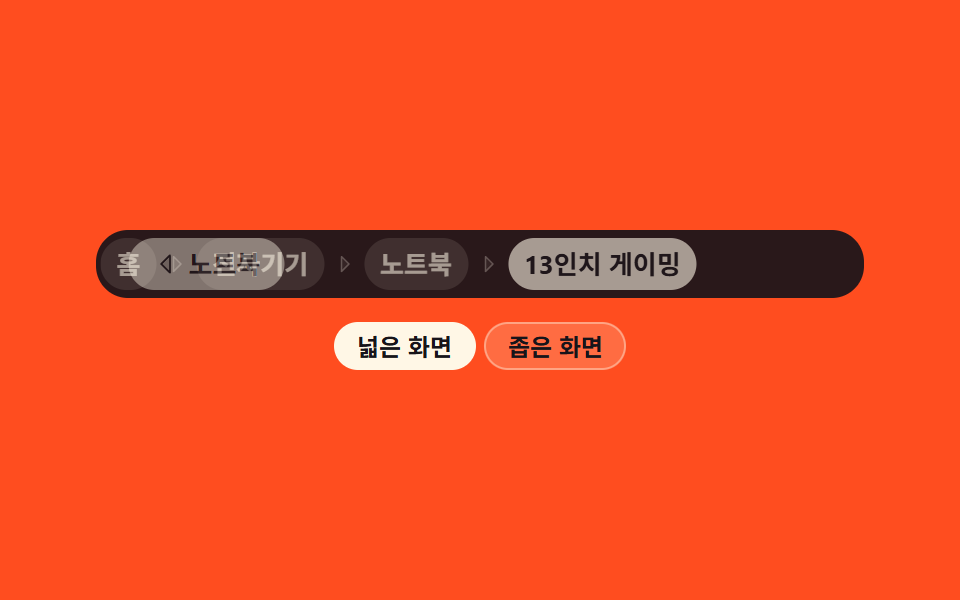
幅が狭くなると経路全体が1つ上の階層だけを示す戻る行にたたまれ、広がると再び全体が展開します。
使いどころ指1本で1つ上に戻れれば十分なモバイル詳細画面に上部の経路を付けるとき
matchMediatranslateXaria-label
<main class="stage">
  <div class="mb is-demo" id="mb">
    <div class="mb__viewport">
      <nav class="mb__nav" aria-label="パンくずリスト">
        <ol class="mb__wide" id="mb-wide">
          <li class="mb__li"><a class="mb__crumb" href="#">ホーム</a></li>
          <li class="mb__li"><span class="mb__sep" aria-hidden="true"><svg viewBox="0 0 256 256" width="12" height="12" aria-hidden="true"><g fill="currentColor"><path d="m176 128l-80 80V48Z" opacity=".2"/><path d="m181.66 122.34l-80-80A8 8 0 0 0 88 48v160a8 8 0 0 0 13.66 5.66l80-80a8 8 0 0 0 0-11.32M104 188.69V67.31L164.69 128Z"/></g></svg></span><a class="mb__crumb" href="#">電子機器</a></li>
          <li class="mb__li"><span class="mb__sep" aria-hidden="true"><svg viewBox="0 0 256 256" width="12" height="12" aria-hidden="true"><g fill="currentColor"><path d="m176 128l-80 80V48Z" opacity=".2"/><path d="m181.66 122.34l-80-80A8 8 0 0 0 88 48v160a8 8 0 0 0 13.66 5.66l80-80a8 8 0 0 0 0-11.32M104 188.69V67.31L164.69 128Z"/></g></svg></span><a class="mb__crumb" href="#">ノートPC</a></li>
          <li class="mb__li"><span class="mb__sep" aria-hidden="true"><svg viewBox="0 0 256 256" width="12" height="12" aria-hidden="true"><g fill="currentColor"><path d="m176 128l-80 80V48Z" opacity=".2"/><path d="m181.66 122.34l-80-80A8 8 0 0 0 88 48v160a8 8 0 0 0 13.66 5.66l80-80a8 8 0 0 0 0-11.32M104 188.69V67.31L164.69 128Z"/></g></svg></span><span class="mb__crumb mb__crumb--now" aria-current="page">13インチ ゲーミング</span></li>
        </ol>
        <ol class="mb__narrow">
          <li class="mb__li">
            <button class="mb__back" type="button" id="mb-back" aria-label="ノートPC へ戻る">
              <svg viewBox="0 0 256 256" width="14" height="14" aria-hidden="true"><g fill="currentColor"><path d="M160 48v160l-80-80Z" opacity=".2"/><path d="M163.06 40.61a8 8 0 0 0-8.72 1.73l-80 80a8 8 0 0 0 0 11.32l80 80A8 8 0 0 0 168 208V48a8 8 0 0 0-4.94-7.39M152 188.69L91.31 128L152 67.31Z"/></g></svg>ノートPC
            </button>
          </li>
        </ol>
      </nav>
    </div>
    <div class="mb__chips" role="group" aria-label="画面の幅">
      <button class="mb__chip" type="button" id="chip-wide" aria-pressed="true">広い画面</button>
      <button class="mb__chip" type="button" id="chip-narrow" aria-pressed="false">狭い画面</button>
    </div>
  </div>
</main>@use "../../../../site/static/demo-tokens" as *;
$duration: $dur-base;
$easing: $ease-spring;
$color: $subject-cream;
@include stage($stage-orange);
.mb {
display: flex;
flex-direction: column;
align-items: center;
gap: $sp-3;
width: 100%;
max-width: 384px;
}
.mb__viewport {
box-sizing: border-box;
width: 100%;
padding: $sp-1 $sp-2;
border-radius: $r-card;
background: rgba($subject-ink, .92);
overflow: hidden; // 미끄러져 나가는 줄이 문서 폭을 늘리지 않게
}
.mb__nav {
display: grid; // 두 줄을 한 칸에 겹친다 — 절대배치와 달리 부모 높이가 유지된다
}
.mb__wide,
.mb__narrow {
grid-area: 1 / 1;
display: flex;
align-items: center;
flex-wrap: nowrap;
gap: $sp-1;
margin: 0;
padding: 0;
list-style: none;
min-width: 0;
}
.mb__li { display: flex; align-items: center; gap: $sp-1; flex: 0 0 auto; }
.mb__sep { display: inline-flex; flex: none; color: rgba($subject-cream, .45); }
.mb__crumb {
padding: $sp-1 $sp-2;
border-radius: $r-pill;
background: rgba($subject-cream, .18);
color: $color;
font-size: 13px;
line-height: 18px;
font-weight: 600;
text-decoration: none;
white-space: nowrap;
}
a.mb__crumb { cursor: pointer; }
a.mb__crumb:hover { background: rgba($subject-cream, .34); }
a.mb__crumb:focus-visible { outline: 2px solid $subject-cream; outline-offset: 2px; }
.mb__crumb--now {
background: $subject-cream;
color: $subject-ink;
font-weight: 700;
}
.mb__narrow { opacity: 0; pointer-events: none; }
.mb__back {
display: inline-flex;
align-items: center;
gap: $sp-1;
padding: $sp-1 $sp-3;
border: 0;
border-radius: $r-pill;
background: $subject-cream;
color: $subject-ink;
font-family: inherit;
font-size: 13px;
line-height: 18px;
font-weight: 700;
cursor: pointer;
}
.mb__back svg { flex: none; }
.mb__back:focus-visible { outline: 2px solid $subject-cream; outline-offset: 2px; }
// 사람이 전환했을 때 (또는 matchMedia 가 좁은 폭을 알릴 때)
.mb.is-narrow .mb__wide { opacity: 0; pointer-events: none; transform: translateX(-14px); }
.mb.is-narrow .mb__narrow { opacity: 1; pointer-events: auto; transform: translateX(0); }
.mb__wide { transition: transform $duration $easing, opacity $duration $easing; }
.mb__narrow { transition: transform $duration $easing, opacity $duration $easing; }
.mb__chips { display: flex; gap: $sp-1; }
.mb__chip {
padding: 0 $sp-3;
border: 0;
border-radius: $r-pill;
background: rgba($subject-cream, .18);
color: $subject-ink; // 주황 칩 면 위 흐린 크림 2.06:1 → 잉크 6.48:1
box-shadow: inset 0 0 0 1px rgba($subject-cream, .4);
font-family: inherit;
font-size: 12px;
line-height: 24px;
font-weight: 700;
cursor: pointer;
}
.mb__chip[aria-pressed="true"] {
background: $subject-cream;
color: $subject-ink;
box-shadow: none;
}
.mb__chip:focus-visible { outline: 2px solid $subject-cream; outline-offset: 2px; }
// ── 격자 미리보기용 자동 루프 (2초) ──
// 넓은 줄이 왼쪽으로 빠지고 좁은 줄이 오른쪽에서 들어온다(10~34%), 유지(34~62%), 되돌아온다(62~86%)
@keyframes mb-wide {
0%, 10% { transform: translateX(0); opacity: 1; }
34%, 62% { transform: translateX(-14px); opacity: 0; }
86%, 100% { transform: translateX(0); opacity: 1; }
}
@keyframes mb-narrow {
0%, 10% { transform: translateX(14px); opacity: 0; }
34%, 62% { transform: translateX(0); opacity: 1; }
86%, 100% { transform: translateX(14px); opacity: 0; }
}
.mb.is-demo .mb__wide { animation-name: mb-wide; }
.mb.is-demo .mb__narrow { animation-name: mb-narrow; }
.mb.is-demo .mb__wide,
.mb.is-demo .mb__narrow {
animation-duration: $dur-loop;
animation-timing-function: $easing;
animation-iteration-count: infinite;
}
// 폭 표시 칩의 활성 교체는 한 프레임에 컷 — 반투명 겹침 방지
@keyframes mb-chip {
0%, 33.9% { background: $subject-cream; color: $subject-ink; box-shadow: none; }
34%, 85.9% { background: rgba($subject-cream, .18); color: $subject-ink; box-shadow: inset 0 0 0 1px rgba($subject-cream, .4); }
86%, 100% { background: $subject-cream; color: $subject-ink; box-shadow: none; }
}
@keyframes mb-chip-n {
0%, 33.9% { background: rgba($subject-cream, .18); color: $subject-ink; box-shadow: inset 0 0 0 1px rgba($subject-cream, .4); }
34%, 85.9% { background: $subject-cream; color: $subject-ink; box-shadow: none; }
86%, 100% { background: rgba($subject-cream, .18); color: $subject-ink; box-shadow: inset 0 0 0 1px rgba($subject-cream, .4); }
}
.mb.is-demo .mb__chip {
animation-name: mb-chip;
animation-duration: $dur-loop;
animation-timing-function: steps(1, end);
animation-iteration-count: infinite;
}
.mb.is-demo #chip-narrow { animation-name: mb-chip-n; }
@media (max-width: 340px) {
.mb { gap: $sp-2; }
.mb__viewport { padding: 0 $sp-1; border-radius: $r-control; }
.mb__wide, .mb__narrow { gap: 0; }
.mb__li { gap: 0; }
.mb__crumb { padding: 0 $sp-1; font-size: 11px; line-height: 16px; }
.mb__sep svg { width: 10px; height: 10px; }
.mb__back { padding: 0 $sp-2; font-size: 11px; line-height: 20px; }
.mb__back svg { width: 12px; height: 12px; }
.mb__chip { padding: 0 $sp-2; font-size: 11px; line-height: 20px; }
}
@media (prefers-reduced-motion: reduce) {
.mb.is-demo .mb__wide,
.mb.is-demo .mb__narrow,
.mb.is-demo .mb__chip { animation: none !important; }
.mb__wide, .mb__narrow { transition: none; }
}html, body {
margin: 0;
overflow: hidden;
}
.stage {
box-sizing: border-box;
min-height: 100vh;
display: grid;
place-items: center;
margin: 0;
background: #ff4d1f;
font-family: -apple-system, "Segoe UI", "Noto Sans KR", sans-serif;
padding: clamp(8px, 4vw, 24px);
}
.mb {
display: flex;
flex-direction: column;
align-items: center;
gap: 12px;
width: 100%;
max-width: 384px;
}
.mb__viewport {
box-sizing: border-box;
width: 100%;
padding: 4px 8px;
border-radius: 16px;
background: rgba(23, 20, 26, 0.92);
overflow: hidden;
}
.mb__nav {
display: grid;
}
.mb__wide,
.mb__narrow {
grid-area: 1/1;
display: flex;
align-items: center;
flex-wrap: nowrap;
gap: 4px;
margin: 0;
padding: 0;
list-style: none;
min-width: 0;
}
.mb__li {
display: flex;
align-items: center;
gap: 4px;
flex: 0 0 auto;
}
.mb__sep {
display: inline-flex;
flex: none;
color: rgba(255, 247, 230, 0.45);
}
.mb__crumb {
padding: 4px 8px;
border-radius: 999px;
background: rgba(255, 247, 230, 0.18);
color: #fff7e6;
font-size: 13px;
line-height: 18px;
font-weight: 600;
text-decoration: none;
white-space: nowrap;
}
a.mb__crumb {
cursor: pointer;
}
a.mb__crumb:hover {
background: rgba(255, 247, 230, 0.34);
}
a.mb__crumb:focus-visible {
outline: 2px solid #fff7e6;
outline-offset: 2px;
}
.mb__crumb--now {
background: #fff7e6;
color: #17141a;
font-weight: 700;
}
.mb__narrow {
opacity: 0;
pointer-events: none;
}
.mb__back {
display: inline-flex;
align-items: center;
gap: 4px;
padding: 4px 12px;
border: 0;
border-radius: 999px;
background: #fff7e6;
color: #17141a;
font-family: inherit;
font-size: 13px;
line-height: 18px;
font-weight: 700;
cursor: pointer;
}
.mb__back svg {
flex: none;
}
.mb__back:focus-visible {
outline: 2px solid #fff7e6;
outline-offset: 2px;
}
.mb.is-narrow .mb__wide {
opacity: 0;
pointer-events: none;
transform: translateX(-14px);
}
.mb.is-narrow .mb__narrow {
opacity: 1;
pointer-events: auto;
transform: translateX(0);
}
.mb__wide {
transition: transform 300ms cubic-bezier(0.2, 0.8, 0.2, 1), opacity 300ms cubic-bezier(0.2, 0.8, 0.2, 1);
}
.mb__narrow {
transition: transform 300ms cubic-bezier(0.2, 0.8, 0.2, 1), opacity 300ms cubic-bezier(0.2, 0.8, 0.2, 1);
}
.mb__chips {
display: flex;
gap: 4px;
}
.mb__chip {
padding: 0 12px;
border: 0;
border-radius: 999px;
background: rgba(255, 247, 230, 0.18);
color: #17141a;
box-shadow: inset 0 0 0 1px rgba(255, 247, 230, 0.4);
font-family: inherit;
font-size: 12px;
line-height: 24px;
font-weight: 700;
cursor: pointer;
}
.mb__chip[aria-pressed=true] {
background: #fff7e6;
color: #17141a;
box-shadow: none;
}
.mb__chip:focus-visible {
outline: 2px solid #fff7e6;
outline-offset: 2px;
}
@keyframes mb-wide {
0%, 10% {
transform: translateX(0);
opacity: 1;
}
34%, 62% {
transform: translateX(-14px);
opacity: 0;
}
86%, 100% {
transform: translateX(0);
opacity: 1;
}
}
@keyframes mb-narrow {
0%, 10% {
transform: translateX(14px);
opacity: 0;
}
34%, 62% {
transform: translateX(0);
opacity: 1;
}
86%, 100% {
transform: translateX(14px);
opacity: 0;
}
}
.mb.is-demo .mb__wide {
animation-name: mb-wide;
}
.mb.is-demo .mb__narrow {
animation-name: mb-narrow;
}
.mb.is-demo .mb__wide,
.mb.is-demo .mb__narrow {
animation-duration: 2s;
animation-timing-function: cubic-bezier(0.2, 0.8, 0.2, 1);
animation-iteration-count: infinite;
}
@keyframes mb-chip {
0%, 33.9% {
background: #fff7e6;
color: #17141a;
box-shadow: none;
}
34%, 85.9% {
background: rgba(255, 247, 230, 0.18);
color: #17141a;
box-shadow: inset 0 0 0 1px rgba(255, 247, 230, 0.4);
}
86%, 100% {
background: #fff7e6;
color: #17141a;
box-shadow: none;
}
}
@keyframes mb-chip-n {
0%, 33.9% {
background: rgba(255, 247, 230, 0.18);
color: #17141a;
box-shadow: inset 0 0 0 1px rgba(255, 247, 230, 0.4);
}
34%, 85.9% {
background: #fff7e6;
color: #17141a;
box-shadow: none;
}
86%, 100% {
background: rgba(255, 247, 230, 0.18);
color: #17141a;
box-shadow: inset 0 0 0 1px rgba(255, 247, 230, 0.4);
}
}
.mb.is-demo .mb__chip {
animation-name: mb-chip;
animation-duration: 2s;
animation-timing-function: steps(1, end);
animation-iteration-count: infinite;
}
.mb.is-demo #chip-narrow {
animation-name: mb-chip-n;
}
@media (max-width: 340px) {
.mb {
gap: 8px;
}
.mb__viewport {
padding: 0 4px;
border-radius: 12px;
}
.mb__wide, .mb__narrow {
gap: 0;
}
.mb__li {
gap: 0;
}
.mb__crumb {
padding: 0 4px;
font-size: 11px;
line-height: 16px;
}
.mb__sep svg {
width: 10px;
height: 10px;
}
.mb__back {
padding: 0 8px;
font-size: 11px;
line-height: 20px;
}
.mb__back svg {
width: 12px;
height: 12px;
}
.mb__chip {
padding: 0 8px;
font-size: 11px;
line-height: 20px;
}
}
@media (prefers-reduced-motion: reduce) {
.mb.is-demo .mb__wide,
.mb.is-demo .mb__narrow,
.mb.is-demo .mb__chip {
animation: none !important;
}
.mb__wide, .mb__narrow {
transition: none;
}
}// 실제 동작: matchMedia('(max-width: 420px)') 를 상시 구독해 실제 폭을 따르고,
// 폭 칩을 누르면 수동 모드로 덮어쓴다. 뒤로 가기 버튼은 aria-label 그대로 Enter 로도 동작.
var root = document.getElementById('mb');
var chips = { wide: document.getElementById('chip-wide'), narrow: document.getElementById('chip-narrow') };
var manual = null;
var mq = window.matchMedia('(max-width: 420px)');
function apply(narrow) {
root.classList.remove('is-demo');
root.classList.toggle('is-narrow', narrow);
chips.wide.setAttribute('aria-pressed', String(!narrow));
chips.narrow.setAttribute('aria-pressed', String(narrow));
}
function reflect() { apply(manual === null ? mq.matches : manual); }
if (mq.addEventListener) { mq.addEventListener('change', function () { manual = null; reflect(); }); }
chips.wide.addEventListener('click', function () { manual = false; reflect(); });
chips.narrow.addEventListener('click', function () { manual = true; reflect(); });
document.getElementById('mb-back').addEventListener('click', function () {
root.classList.remove('is-demo', 'is-narrow');
});import { useEffect, useState } from "react";
import type { CSSProperties } from "react";
import styles from "./MobileBackParent.module.scss";
export type BackCrumb = { name: string };
export type MobileBackParentProps = {
crumbs?: BackCrumb[];
duration?: number;
easing?: string;
color?: string;
};
// 도구/demo.py 의 ambient.d.ts 는 React 이벤트 제네릭을 안 준다 — 로컬 타입으로 TS7006 을 막는다
type Vars = CSSProperties & { "--duration"?: string; "--easing"?: string; "--color"?: string };
type Mq = { matches: boolean; addEventListener(t: string, fn: () => void): void; removeEventListener(t: string, fn: () => void): void };
const IconCaretRight = () => (
<svg viewBox="0 0 256 256" width="12" height="12" aria-hidden="true"><g fill="currentColor"><path d="m176 128l-80 80V48Z" opacity=".2"/><path d="m181.66 122.34l-80-80A8 8 0 0 0 88 48v160a8 8 0 0 0 13.66 5.66l80-80a8 8 0 0 0 0-11.32M104 188.69V67.31L164.69 128Z"/></g></svg>
);
const IconCaretLeft = () => (
<svg viewBox="0 0 256 256" width="14" height="14" aria-hidden="true"><g fill="currentColor"><path d="M160 48v160l-80-80Z" opacity=".2"/><path d="M163.06 40.61a8 8 0 0 0-8.72 1.73l-80 80a8 8 0 0 0 0 11.32l80 80A8 8 0 0 0 168 208V48a8 8 0 0 0-4.94-7.39M152 188.69L91.31 128L152 67.31Z"/></g></svg>
);
const DEFAULT_CRUMBS: BackCrumb[] = [
{ name: "Home" },
{ name: "Electronics" },
{ name: "Laptops" },
{ name: "13-inch gaming" },
];
export default function MobileBackParent({
crumbs = DEFAULT_CRUMBS,
duration = 300,
easing = "cubic-bezier(.2, .8, .2, 1)",
color = "#fff7e6",
}: MobileBackParentProps) {
const [narrow, setNarrow] = useState(false);
const [manual, setManual] = useState<boolean | null>(null); // null = 미디어 질의를 따른다
const [demo, setDemo] = useState(true); // 격자 미리보기용 자동 루프
const vars: Vars = { "--duration": `${duration}ms`, "--easing": easing, "--color": color };
useEffect(() => {
const mq = (window as { matchMedia(q: string): Mq }).matchMedia("(max-width: 420px)");
const onChange = (): void => { setManual(null); setNarrow(mq.matches); setDemo(false); };
if (mq.addEventListener) mq.addEventListener("change", onChange);
return () => { if (mq.removeEventListener) mq.removeEventListener("change", onChange); };
}, []);
function force(v: boolean) {
setManual(v);
setNarrow(v);
setDemo(false);
}
const parent = crumbs[crumbs.length - 2];
return (
<div className={`${styles.mb} ${demo ? styles.demo : ""} ${narrow ? styles.isNarrow : ""}`} style={vars}>
<div className={styles.viewport}>
<nav className={styles.nav} aria-label="Breadcrumb">
<ol className={styles.wide}>
{crumbs.map((c: BackCrumb, i: number) => (
<li key={c.name} className={styles.li}>
{i > 0 && <span className={styles.sep} aria-hidden="true"><IconCaretRight /></span>}
{i === crumbs.length - 1 ? (
<span className={`${styles.crumb} ${styles.now}`} aria-current="page">{c.name}</span>
) : (
<a className={styles.crumb} href="#">{c.name}</a>
)}
</li>
))}
</ol>
<ol className={styles.narrowOl}>
<li className={styles.li}>
<button
type="button"
className={styles.back}
aria-label={`Go back to ${parent ? parent.name : ""}`}
onClick={(): void => { setNarrow(false); setDemo(false); }}
>
<IconCaretLeft />{parent ? parent.name : ""}
</button>
</li>
</ol>
</nav>
</div>
<div className={styles.chips} role="group" aria-label="Screen width">
<button type="button" className={styles.chip} aria-pressed={!narrow} onClick={(): void => force(false)}>Wide screen</button>
<button type="button" className={styles.chip} aria-pressed={narrow} onClick={(): void => force(true)}>Narrow screen</button>
</div>
</div>
);
}09 モバイルの戻るボタン型 — 計測 累積面積 7.014% · 動いたフレーム 14/23GODRICH オリジナル · SCSS と React は zip に同梱 · パンくずリスト 9選 — 階層が深くても崩れない
このデモが属する記事
 パンくずリスト 9選 — 階層が深くても崩れないパンくずリストは、今開いているページがサイトのどこにあるかをホームから順に経路で示すナビゲーションです。階層が深くても崩れない9種を、実際に動くコードで配ります。9つのうち1つは画面の経路とは別に検索エンジン用の経路をもう一組持ち、もう1つ この記事のデモをすべて見る