08斜めの光の帯が色の上をなでる光沢
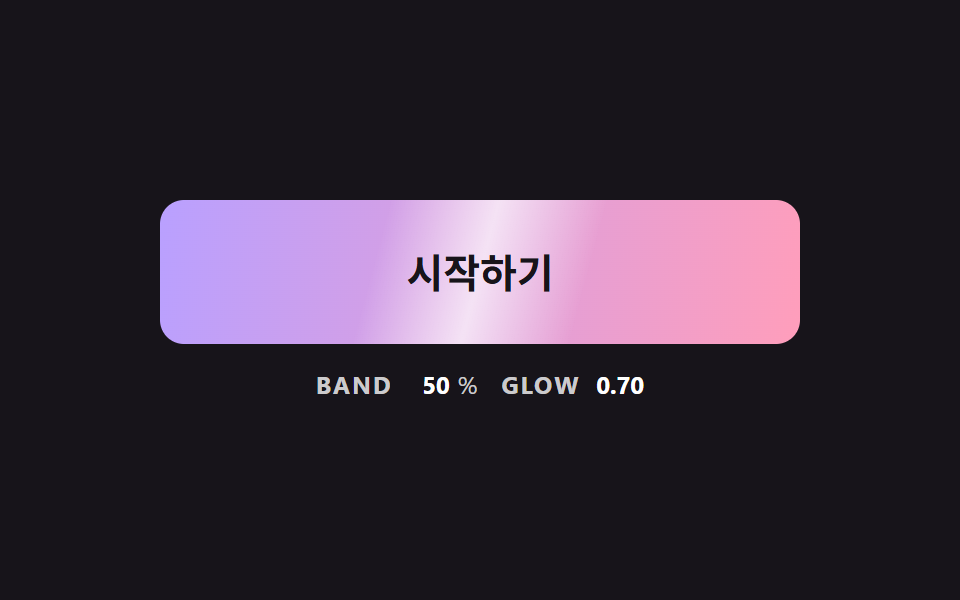
ホバーすると斜めの明るい帯がグラデーションの上を一度なで、帯が通る所だけ色が一瞬明るくなって戻る。
使いどころグラデーションボタンに金属やガラスの質感を足す一枚
SWEEP_MSBAND_FROMBAND_TOPEAK_GLOW
<main class="stage">
<div class="bc is-demo" id="bcRoot">
  <button class="bc__btn" id="bcBtn" type="button">始める</button>
  <p class="bc__meta"><span class="bc__tag">BAND</span> <b id="bcX">-30</b><span>%</span> <span class="bc__tag">GLOW</span> <b id="bcA">0.00</b></p>
</div>
</main>
@use "../../../../site/static/demo-tokens" as *;
// 핵심: 밝은 띠는 별도 요소가 아니라 같은 background 의 위 겹 그라데이션이다. 위치(--x)와 세기(--glow)는 JS 가 매 프레임 계산한다.
$sheen-a: $subject-lilac;
$sheen-b: $subject-pink;
$sheen-skew: 105deg;
$sheen-half: 16%;
@include stage($stage-ink);
.bc {
width: min(100%, 320px);
display: grid;
gap: $sp-3;
justify-items: center;
}
.bc__btn {
--x: -30;
--glow: 0;
box-sizing: border-box;
width: 100%;
height: 72px;
border: 0;
border-radius: $r-control;
background:
linear-gradient(
$sheen-skew,
rgba(255, 255, 255, 0) calc(var(--x) * 1% - #{$sheen-half}),
rgba(255, 255, 255, var(--glow)) calc(var(--x) * 1%),
rgba(255, 255, 255, 0) calc(var(--x) * 1% + #{$sheen-half})
),
linear-gradient(100deg, $sheen-a, $sheen-b);
color: $subject-ink;
font-family: inherit;
font-size: 20px;
font-weight: 700;
line-height: 24px;
cursor: pointer;
}
.bc__btn:focus-visible { outline: 3px solid $stage-paper; outline-offset: 3px; }
.bc__meta {
margin: 0;
display: flex;
align-items: baseline;
flex-wrap: wrap;
justify-content: center;
gap: $sp-1;
font-size: 12px;
line-height: 16px;
color: rgba($stage-paper, .78);
}
.bc__tag { margin: 0 $sp-1 0 $sp-2; font-weight: 700; letter-spacing: .08em; }
.bc__tag:first-child { margin-left: 0; }
.bc__meta b { min-width: 3ch; text-align: right; font-variant-numeric: tabular-nums; color: $stage-paper; }
@media (prefers-reduced-motion: reduce) {
.bc__btn { transition: none; }
}html, body {
margin: 0;
overflow: hidden;
}
.stage {
box-sizing: border-box;
min-height: 100vh;
display: grid;
place-items: center;
margin: 0;
background: #17141a;
font-family: -apple-system, "Segoe UI", "Noto Sans KR", sans-serif;
padding: clamp(8px, 4vw, 24px);
}
.bc {
width: min(100%, 320px);
display: grid;
gap: 12px;
justify-items: center;
}
.bc__btn {
--x: -30;
--glow: 0;
box-sizing: border-box;
width: 100%;
height: 72px;
border: 0;
border-radius: 12px;
background: linear-gradient(105deg, rgba(255, 255, 255, 0) calc(var(--x) * 1% - 16%), rgba(255, 255, 255, var(--glow)) calc(var(--x) * 1%), rgba(255, 255, 255, 0) calc(var(--x) * 1% + 16%)), linear-gradient(100deg, #b9a0ff, #ff9ebb);
color: #17141a;
font-family: inherit;
font-size: 20px;
font-weight: 700;
line-height: 24px;
cursor: pointer;
}
.bc__btn:focus-visible {
outline: 3px solid #ffffff;
outline-offset: 3px;
}
.bc__meta {
margin: 0;
display: flex;
align-items: baseline;
flex-wrap: wrap;
justify-content: center;
gap: 4px;
font-size: 12px;
line-height: 16px;
color: rgba(255, 255, 255, 0.78);
}
.bc__tag {
margin: 0 4px 0 8px;
font-weight: 700;
letter-spacing: 0.08em;
}
.bc__tag:first-child {
margin-left: 0;
}
.bc__meta b {
min-width: 3ch;
text-align: right;
font-variant-numeric: tabular-nums;
color: #ffffff;
}
@media (prefers-reduced-motion: reduce) {
.bc__btn {
transition: none;
}
}(function () {
// 기법: 기울어진 밝은 띠의 위치(--x)와 세기(--glow)를 JS 가 계산한다. hover 가 시작되면 SWEEP_MS 동안 띠가 한 번 지나간다.
// 위치는 smoothstep 곡선, 세기는 사인 반 주기라서 띠가 들어올 때 서서히 밝아지고 나갈 때 서서히 사라진다.
var SWEEP_MS = 700;
var BAND_FROM = -30;
var BAND_TO = 130;
var PEAK_GLOW = 0.7;
var START_MS = 200;
var ON_MS = 900;
var CYCLE_MS = 2000;
var root = document.getElementById('bcRoot');
var btn = document.getElementById('bcBtn');
var xEl = document.getElementById('bcX');
var aEl = document.getElementById('bcA');
var reduce = window.matchMedia('(prefers-reduced-motion: reduce)').matches;
var pointerIn = false;
var kbFocus = false;
var wasOn = false;
var sweepAt = -1;
var t0 = null;
function demoOn(now) {
return root.classList.contains('is-demo') && now >= START_MS && (now - START_MS) % CYCLE_MS < ON_MS;
}
function paint(x, glow) {
btn.style.setProperty('--x', x.toFixed(1));
btn.style.setProperty('--glow', glow.toFixed(3));
xEl.textContent = String(Math.round(x));
aEl.textContent = glow.toFixed(2);
}
function stopDemo() { root.classList.remove('is-demo'); }
function staticState() {
if (pointerIn || kbFocus) paint(50, 0.5); else paint(BAND_FROM, 0);
}
btn.addEventListener('pointerenter', function () { stopDemo(); pointerIn = true; if (reduce) staticState(); });
btn.addEventListener('pointerleave', function () { pointerIn = false; if (reduce) staticState(); });
btn.addEventListener('focus', function () { kbFocus = btn.matches(':focus-visible'); if (kbFocus) stopDemo(); if (reduce) staticState(); });
btn.addEventListener('blur', function () { kbFocus = false; if (reduce) staticState(); });
function tick(ts) {
if (t0 === null) t0 = ts;
var now = ts - t0;
var on = demoOn(now) || pointerIn || kbFocus;
if (on && !wasOn) sweepAt = now;
wasOn = on;
var p = sweepAt < 0 ? 1 : Math.min(1, (now - sweepAt) / SWEEP_MS);
var eased = p * p * (3 - 2 * p);
if (p >= 1) paint(BAND_FROM, 0);
else paint(BAND_FROM + (BAND_TO - BAND_FROM) * eased, PEAK_GLOW * Math.sin(Math.PI * p));
requestAnimationFrame(tick);
}
if (reduce) {
stopDemo();
staticState();
} else {
requestAnimationFrame(tick);
}
})();// SheenSweepButton — vanilla 판(08-btn-gradient-sheen-sweep-skew) 의 React 포트.
// hover 가 시작되면 기울어진 밝은 띠가 SWEEP_MS 동안 한 번 지나간다. 위치는 smoothstep, 세기는 사인 반 주기.
import { useEffect, useRef } from "react";
import styles from "./SheenSweepButton.module.scss";
type Box<T> = { current: T };
const SWEEP_MS = 700;
const BAND_FROM = -30;
const BAND_TO = 130;
const PEAK_GLOW = 0.7;
const START_MS = 200;
const ON_MS = 900;
const CYCLE_MS = 2000;
export default function SheenSweepButton() {
const btnRef = useRef<HTMLButtonElement | null>(null) as Box<HTMLButtonElement | null>;
const xRef = useRef<HTMLElement | null>(null) as Box<HTMLElement | null>;
const aRef = useRef<HTMLElement | null>(null) as Box<HTMLElement | null>;
useEffect(() => {
const btn = btnRef.current;
const xEl = xRef.current;
const aEl = aRef.current;
if (!btn || !xEl || !aEl) return;
const reduce = window.matchMedia("(prefers-reduced-motion: reduce)").matches;
let demo = !reduce;
let pointerIn = false;
let kbFocus = false;
let wasOn = false;
let sweepAt = -1;
let t0: number | null = null;
let raf = 0;
const demoOn = (now: number): boolean => demo && now >= START_MS && (now - START_MS) % CYCLE_MS < ON_MS;
const paint = (x: number, glow: number): void => {
btn.style.setProperty("--x", x.toFixed(1));
btn.style.setProperty("--glow", glow.toFixed(3));
xEl.textContent = String(Math.round(x));
aEl.textContent = glow.toFixed(2);
};
const stopDemo = (): void => { demo = false; };
const staticState = (): void => {
if (pointerIn || kbFocus) paint(50, 0.5);
else paint(BAND_FROM, 0);
};
const onEnter = (): void => { stopDemo(); pointerIn = true; if (reduce) staticState(); };
const onLeave = (): void => { pointerIn = false; if (reduce) staticState(); };
const onFocus = (): void => { kbFocus = btn.matches(":focus-visible"); if (kbFocus) stopDemo(); if (reduce) staticState(); };
const onBlur = (): void => { kbFocus = false; if (reduce) staticState(); };
btn.addEventListener("pointerenter", onEnter);
btn.addEventListener("pointerleave", onLeave);
btn.addEventListener("focus", onFocus);
btn.addEventListener("blur", onBlur);
function tick(ts: number): void {
if (t0 === null) t0 = ts;
const now = ts - t0;
const on = demoOn(now) || pointerIn || kbFocus;
if (on && !wasOn) sweepAt = now;
wasOn = on;
const p = sweepAt < 0 ? 1 : Math.min(1, (now - sweepAt) / SWEEP_MS);
const eased = p * p * (3 - 2 * p);
if (p >= 1) paint(BAND_FROM, 0);
else paint(BAND_FROM + (BAND_TO - BAND_FROM) * eased, PEAK_GLOW * Math.sin(Math.PI * p));
raf = requestAnimationFrame(tick);
}
if (reduce) staticState();
else raf = requestAnimationFrame(tick);
return () => {
cancelAnimationFrame(raf);
btn.removeEventListener("pointerenter", onEnter);
btn.removeEventListener("pointerleave", onLeave);
btn.removeEventListener("focus", onFocus);
btn.removeEventListener("blur", onBlur);
};
}, []);
return (
<main className={styles.stage}>
<div className={styles.bc}>
<button className={styles.bc__btn} type="button" ref={btnRef}>시작하기</button>
<p className={styles.bc__meta}>
<span className={styles.bc__tag}>BAND</span> <b ref={xRef}>-30</b><span>%</span> <span className={styles.bc__tag}>GLOW</span> <b ref={aRef}>0.00</b>
</p>
</div>
</main>
);
}08 斜めの光の帯が色の上をなでる光沢 — 計測 累積面積 13.553% · 動いたフレーム 12/23GODRICH オリジナル · SCSS と React は zip に同梱 · css ボタン 色 変更 9パターン — ホバー途中の色が濁らないよう計算した場面
このデモが属する記事
 css ボタン 色 変更 9パターン — ホバー途中の色が濁らないよう計算した場面ボタンの色をホバーで変えるのは一行で済むが、その一行は途中の色を濁らせ、グラデーションを動かせず、文字を途中で読めなくする — 02番・04番・07番がそれを一つずつ塞ぐ。css ボタン 色 変更は、ホバーや押下に合わせて背景色やグラデーシ この記事のデモをすべて見る