07投げ速度値減衰移動 — 離した瞬間の速度の値のまま動き続け、その値が徐々に小さくなって止まる方式
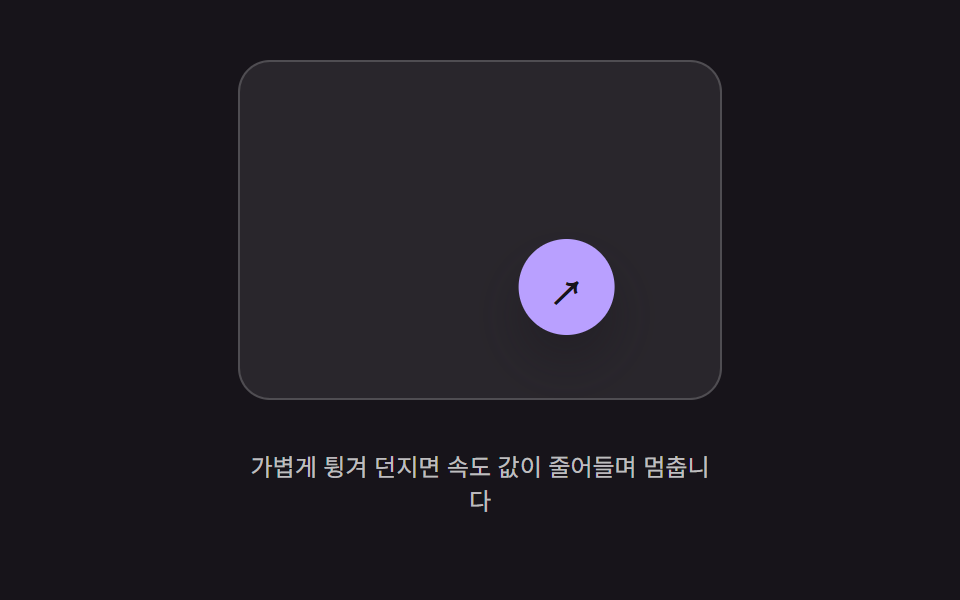
指を離した瞬間の速度の値を引き継いでその方向へ動き続け、時間とともに速度の値が小さくなって止まります。
使いどころ軽く弾いて投げるフローティングボタン、スワイプ後の慣性で滑るアクションボタン
FRICTIONSTOP_VELCHIP_R
<main class="stage">
<div class="bft is-demo" id="bft">
  <div class="bft__field" id="bftField">
    <button class="bft__chip" id="bftChip" type="button" aria-label="フローティングボタン">↗</button>
  </div>
  <p class="bft__hint">軽く弾いて投げると速度の値が減って止まります</p>
</div>
</main>
@use "../../../../site/static/demo-tokens" as *;
// 계산 겹(속도 감쇠 적분)은 JS 에 있다 — 여기는 정적 배치만.
@include stage($stage-ink);
.stage { position: relative; }
.bft {
display: flex;
flex-direction: column;
align-items: center;
gap: $sp-3;
}
.bft__field {
position: relative;
width: 240px;
height: 168px;
border-radius: $r-card;
background: rgba($stage-paper, .08);
border: 1px solid rgba($stage-paper, .18);
overflow: hidden;
}
.bft__chip {
position: absolute;
left: 0;
top: 0;
width: 48px;
height: 48px;
border: 0;
border-radius: $r-pill;
background: $subject-lilac;
color: $subject-ink;
font-size: 20px;
font-weight: 700;
cursor: grab;
touch-action: none;
box-shadow: $shadow-raised;
}
.bft__hint {
color: rgba($stage-paper, .72);
font-size: 12px;
text-align: center;
max-width: 240px;
}
@media (max-width: 340px) {
.bft__field { width: 170px; height: 100px; }
.bft__chip { width: 36px; height: 36px; font-size: 15px; }
}
@media (prefers-reduced-motion: reduce) {
.bft__chip { transition: none !important; }
}html, body {
margin: 0;
overflow: hidden;
}
.stage {
box-sizing: border-box;
min-height: 100vh;
display: grid;
place-items: center;
margin: 0;
background: #17141a;
font-family: -apple-system, "Segoe UI", "Noto Sans KR", sans-serif;
padding: clamp(8px, 4vw, 24px);
}
.stage {
position: relative;
}
.bft {
display: flex;
flex-direction: column;
align-items: center;
gap: 12px;
}
.bft__field {
position: relative;
width: 240px;
height: 168px;
border-radius: 16px;
background: rgba(255, 255, 255, 0.08);
border: 1px solid rgba(255, 255, 255, 0.18);
overflow: hidden;
}
.bft__chip {
position: absolute;
left: 0;
top: 0;
width: 48px;
height: 48px;
border: 0;
border-radius: 999px;
background: #b9a0ff;
color: #17141a;
font-size: 20px;
font-weight: 700;
cursor: grab;
touch-action: none;
box-shadow: 0 14px 24px rgba(23, 20, 26, 0.32);
}
.bft__hint {
color: rgba(255, 255, 255, 0.72);
font-size: 12px;
text-align: center;
max-width: 240px;
}
@media (max-width: 340px) {
.bft__field {
width: 170px;
height: 100px;
}
.bft__chip {
width: 36px;
height: 36px;
font-size: 15px;
}
}
@media (prefers-reduced-motion: reduce) {
.bft__chip {
transition: none !important;
}
}(function () {
var root = document.getElementById('bft');
var field = document.getElementById('bftField');
var chip = document.getElementById('bftChip');
var reduce = window.matchMedia('(prefers-reduced-motion: reduce)').matches;
// 계산 겹: 놓는 순간의 속도 값(vx, vy, px/s)을 물려받아 매 프레임 위치에 더하고,
// 그 속도 값 자체를 FRICTION 비율만큼 지수적으로 줄인다 — vel *= FRICTION**dt.
// 벽(WALL)에 닿으면 그 축의 속도만 0으로 죽여 멈춘 자리에서 정지한다.
var FRICTION = 0.05, STOP_VEL = 6, CHIP_R = 24;
var x = 100, y = 60, vx = 0, vy = 0, last = 0, raf = null;
var dragging = false, samples = [];
function bounds() { return { w: field.clientWidth, h: field.clientHeight }; }
function paint() { chip.style.transform = 'translate(' + (x - CHIP_R).toFixed(1) + 'px,' + (y - CHIP_R).toFixed(1) + 'px)'; }
function tick(now) {
var dt = Math.min((now - last) / 1000, 0.032);
last = now;
var decay = Math.pow(FRICTION, dt);
vx *= decay; vy *= decay;
x += vx * dt; y += vy * dt;
var b = bounds();
if (x < CHIP_R) { x = CHIP_R; vx = 0; }
if (x > b.w - CHIP_R) { x = b.w - CHIP_R; vx = 0; }
if (y < CHIP_R) { y = CHIP_R; vy = 0; }
if (y > b.h - CHIP_R) { y = b.h - CHIP_R; vy = 0; }
paint();
if (Math.abs(vx) < STOP_VEL && Math.abs(vy) < STOP_VEL) { vx = 0; vy = 0; raf = null; return; }
raf = requestAnimationFrame(tick);
}
function start() { if (raf === null) { last = performance.now(); raf = requestAnimationFrame(tick); } }
function throwWith(nvx, nvy) {
vx = nvx; vy = nvy;
if (reduce) { vx = 0; vy = 0; return; }
start();
}
function onDown(clientX, clientY) {
dragging = true; samples = [{ t: performance.now(), x: clientX, y: clientY }];
if (raf !== null) { cancelAnimationFrame(raf); raf = null; }
}
function onMove(clientX, clientY) {
if (!dragging) { return; }
var r = field.getBoundingClientRect();
var b = bounds();
x = Math.max(CHIP_R, Math.min(b.w - CHIP_R, clientX - r.left));
y = Math.max(CHIP_R, Math.min(b.h - CHIP_R, clientY - r.top));
paint();
samples.push({ t: performance.now(), x: clientX, y: clientY });
if (samples.length > 6) { samples.shift(); }
}
function onUp() {
if (!dragging) { return; }
dragging = false;
if (samples.length >= 2) {
var a = samples[0], b2 = samples[samples.length - 1];
var dt = Math.max(1, b2.t - a.t) / 1000;
throwWith((b2.x - a.x) / dt, (b2.y - a.y) / dt);
}
}
function wireReal() {
chip.addEventListener('pointerdown', function (e) { root.classList.remove('is-demo'); stopAutoplay(); onDown(e.clientX, e.clientY); });
window.addEventListener('pointermove', function (e) { onMove(e.clientX, e.clientY); });
window.addEventListener('pointerup', onUp);
}
wireReal();
paint();
// 자동 루프: 실제 드래그 대신 정해둔 속도 값으로 곧장 던져 같은 감쇠 경로를 반복 재현한다.
var autoTimer = null;
function autoTick() {
x = 30; y = 30;
throwWith(420, 260);
}
function stopAutoplay() { if (autoTimer) { clearInterval(autoTimer); autoTimer = null; } }
if (!reduce) { autoTick(); autoTimer = setInterval(autoTick, 1700); }
})();import { useEffect, useRef } from "react";
import styles from "./ButtonPhysicsFlickThrowDecay.module.scss";
export type ButtonPhysicsFlickThrowDecayProps = {
color?: string;
};
type Sample = { t: number; x: number; y: number };
export default function ButtonPhysicsFlickThrowDecay({
color = "#b9a0ff",
}: ButtonPhysicsFlickThrowDecayProps) {
const rootRef = useRef<HTMLDivElement | null>(null);
useEffect(() => {
const root = rootRef.current;
if (!root) return;
const field = root.querySelector<HTMLDivElement>(`.${styles.field}`);
const chip = root.querySelector<HTMLButtonElement>(`.${styles.chip}`);
if (!field || !chip) return;
const reduce = window.matchMedia("(prefers-reduced-motion: reduce)").matches;
// 계산 겹: 놓는 순간의 속도 값(vx, vy, px/s)을 물려받아 매 프레임 위치에 더하고,
// 그 속도 값 자체를 FRICTION 비율만큼 지수적으로 줄인다 — vel *= FRICTION**dt.
// 벽(WALL)에 닿으면 그 축의 속도만 0으로 죽여 멈춘 자리에서 정지한다.
const FRICTION = 0.05, STOP_VEL = 6, CHIP_R = 24;
let x = 100, y = 60, vx = 0, vy = 0, last = 0, raf: number | null = null;
let dragging = false, samples: Sample[] = [];
function bounds() { return { w: field!.clientWidth, h: field!.clientHeight }; }
function paint() { chip!.style.transform = "translate(" + (x - CHIP_R).toFixed(1) + "px," + (y - CHIP_R).toFixed(1) + "px)"; }
function tick(now: number) {
const dt = Math.min((now - last) / 1000, 0.032);
last = now;
const decay = Math.pow(FRICTION, dt);
vx *= decay; vy *= decay;
x += vx * dt; y += vy * dt;
const b = bounds();
if (x < CHIP_R) { x = CHIP_R; vx = 0; }
if (x > b.w - CHIP_R) { x = b.w - CHIP_R; vx = 0; }
if (y < CHIP_R) { y = CHIP_R; vy = 0; }
if (y > b.h - CHIP_R) { y = b.h - CHIP_R; vy = 0; }
paint();
if (Math.abs(vx) < STOP_VEL && Math.abs(vy) < STOP_VEL) { vx = 0; vy = 0; raf = null; return; }
raf = requestAnimationFrame(tick);
}
function start() { if (raf === null) { last = performance.now(); raf = requestAnimationFrame(tick); } }
function throwWith(nvx: number, nvy: number) {
vx = nvx; vy = nvy;
if (reduce) { vx = 0; vy = 0; return; }
start();
}
function onPointerDown(e: PointerEvent) {
stopAutoplay();
dragging = true; samples = [{ t: performance.now(), x: e.clientX, y: e.clientY }];
if (raf !== null) { cancelAnimationFrame(raf); raf = null; }
}
function onPointerMove(e: PointerEvent) {
if (!dragging) return;
const r = field!.getBoundingClientRect();
const b = bounds();
x = Math.max(CHIP_R, Math.min(b.w - CHIP_R, e.clientX - r.left));
y = Math.max(CHIP_R, Math.min(b.h - CHIP_R, e.clientY - r.top));
paint();
samples.push({ t: performance.now(), x: e.clientX, y: e.clientY });
if (samples.length > 6) { samples.shift(); }
}
function onPointerUp() {
if (!dragging) return;
dragging = false;
if (samples.length >= 2) {
const a = samples[0], b2 = samples[samples.length - 1];
const dt = Math.max(1, b2.t - a.t) / 1000;
throwWith((b2.x - a.x) / dt, (b2.y - a.y) / dt);
}
}
chip.addEventListener("pointerdown", onPointerDown);
window.addEventListener("pointermove", onPointerMove);
window.addEventListener("pointerup", onPointerUp);
paint();
let autoTimer: number | null = null;
function autoTick() {
x = 30; y = 30;
throwWith(420, 260);
}
function stopAutoplay() { if (autoTimer !== null) { window.clearInterval(autoTimer); autoTimer = null; } }
if (!reduce) { autoTick(); autoTimer = window.setInterval(autoTick, 1700); }
return () => {
stopAutoplay();
if (raf !== null) cancelAnimationFrame(raf);
chip.removeEventListener("pointerdown", onPointerDown);
window.removeEventListener("pointermove", onPointerMove);
window.removeEventListener("pointerup", onPointerUp);
};
}, []);
return (
<div ref={rootRef} className={styles.stage}>
<div className={styles.bft}>
<div className={styles.field}>
<button className={styles.chip} type="button" aria-label="플로팅 버튼" style={{ background: color }}>↗</button>
</div>
<p className={styles.hint}>가볍게 튕겨 던지면 속도 값이 줄어들며 멈춥니다</p>
</div>
</div>
);
}07 投げ速度値減衰移動 — 離した瞬間の速度の値のまま動き続け、その値が徐々に小さくなって止まる方式 — 計測 累積面積 5.038% · 動いたフレーム 21/23GODRICH オリジナル · SCSS と React は zip に同梱 · ボタン 押し込み UI 9選 — 押し込みの値が戻る計算の9通り
このデモが属する記事
 ボタン 押し込み UI 9選 — 押し込みの値が戻る計算の9通り9つのうち1つは押し込みの値が目標値を超えてから戻ることを繰り返して落ち着き、1つは落下した位置の値が床の値ではね返ることを繰り返して止まり、もう1つは離した位置の値が最も近い固定地点の値に引き寄せられて弾むように収まります。ボタン 押し込 この記事のデモをすべて見る