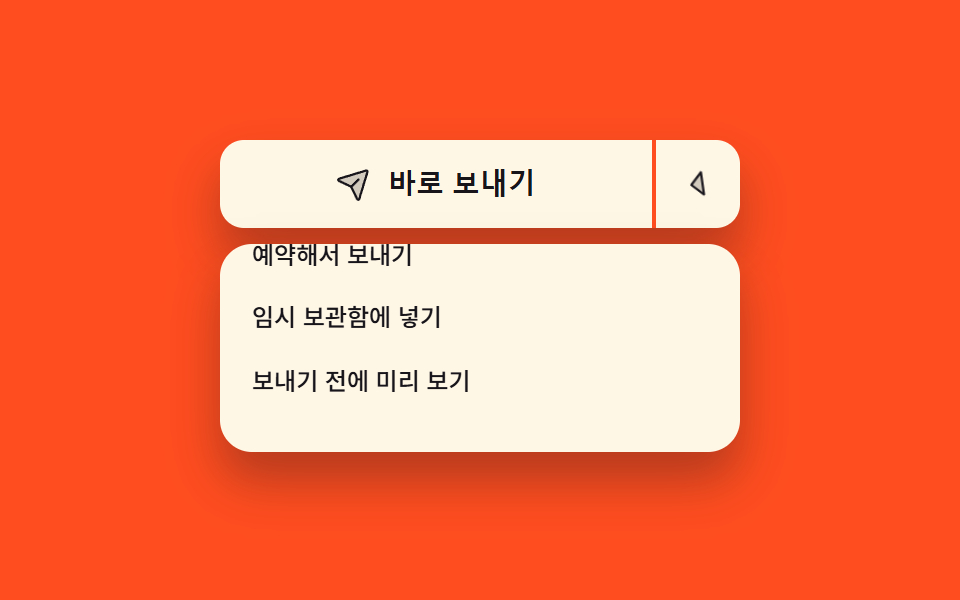
07主な操作と別の道が並ぶボタン
左の広い側は最も多い操作をすぐ実行し、右の矢印側だけが一覧を開きます。二つは一つの枠を分け合いながら、それぞれ別にフォーカスを受け取る独立したボタンです。
使いどころ送信と予約送信のように既定の操作一つに派生がいくつか付く場面
aria-expandedaria-haspopuptranslateY
<main class="stage">
  <div class="sp is-demo">
    <div class="sp__wrap">
      <div class="sp__group" role="group" aria-label="送信の選択">
        <button class="sp__main" id="sp-main" type="button">
          <span class="sp__ic" aria-hidden="true"><svg viewBox="0 0 256 256" width="18" height="18"><g fill="currentColor"><path d="m223.69 42.18l-58.22 192a8 8 0 0 1-14.92 1.25L108 148l-87.42-42.55a8 8 0 0 1 1.25-14.92l192-58.22a8 8 0 0 1 9.86 9.87" opacity=".2"/><path d="M227.32 28.68a16 16 0 0 0-15.66-4.08h-.15L19.57 82.84a16 16 0 0 0-2.49 29.8L102 154l41.3 84.87a15.86 15.86 0 0 0 14.44 9.13q.69 0 1.38-.06a15.88 15.88 0 0 0 14-11.51l58.2-191.94v-.15a16 16 0 0 0-4-15.66m-69.49 203.17l-.05.14v-.07l-40.06-82.3l48-48a8 8 0 0 0-11.31-11.31l-48 48l-82.33-40.06h-.07h.14L216 40Z"/></g></svg></span>
          <span class="sp__t">今すぐ送信</span>
        </button>
        <button class="sp__more" id="sp-more" type="button" aria-haspopup="menu" aria-expanded="false" aria-controls="sp-menu" aria-label="送信方法をもっと見る">
          <span class="sp__caret" aria-hidden="true"><svg viewBox="0 0 256 256" width="18" height="18"><g fill="currentColor"><path d="m208 96l-80 80l-80-80Z" opacity=".2"/><path d="M215.39 92.94A8 8 0 0 0 208 88H48a8 8 0 0 0-5.66 13.66l80 80a8 8 0 0 0 11.32 0l80-80a8 8 0 0 0 1.73-8.72M128 164.69L67.31 104h121.38Z"/></g></svg></span>
        </button>
      </div>
      <ul class="sp__menu" id="sp-menu" role="menu" aria-labelledby="sp-more">
        <li role="none"><button class="sp__item" type="button" role="menuitem">予約して送信</button></li>
        <li role="none"><button class="sp__item" type="button" role="menuitem">下書きに保存</button></li>
        <li role="none"><button class="sp__item" type="button" role="menuitem">送信前にプレビュー</button></li>
      </ul>
    </div>
  </div>
</main>
@use "../../../../site/static/demo-tokens" as *;
$duration: $dur-quick;
$easing: $ease-spring;
$color: $subject-ink;
@include stage($stage-orange);
.sp {
box-sizing: border-box;
width: min(260px, 86vw);
font-family: -apple-system, "Segoe UI", "Noto Sans KR", sans-serif;
}
// 열린 목록은 절대 배치라 부모 높이에 안 잡힌다 — 목록 높이만큼 자리를 미리 비워 둔다
.sp__wrap {
position: relative;
padding-bottom: 116px;
}
.sp__group {
display: flex;
align-items: stretch;
height: 44px;
border-radius: $r-control;
background-color: $subject-cream;
box-shadow: $shadow-raised;
}
.sp__main {
box-sizing: border-box;
margin: 0;
padding: 0 $sp-3;
flex: 1 1 auto;
display: flex;
align-items: center;
justify-content: center;
gap: $sp-2;
border: 0;
border-radius: $r-control 0 0 $r-control;
background-color: transparent;
color: $color;
cursor: pointer;
}
.sp__main[data-sent="1"] { background-color: $subject-mint; }
.sp__more {
box-sizing: border-box;
margin: 0;
padding: 0 $sp-3;
flex: 0 0 auto;
display: flex;
align-items: center;
border: 0;
border-left: 2px solid $stage-orange; // 한 테두리 안에서 두 칸을 가르는 선
border-radius: 0 $r-control $r-control 0;
background-color: transparent;
color: $color;
cursor: pointer;
}
.sp__main:focus-visible,
.sp__more:focus-visible { outline: 3px solid $subject-cream; outline-offset: 2px; }
.sp__ic,
.sp__caret { display: inline-flex; flex: 0 0 auto; }
.sp__ic svg,
.sp__caret svg { display: block; }
.sp__t {
font-size: 14px;
line-height: 20px;
font-weight: 700;
white-space: nowrap;
}
.sp__menu {
position: absolute;
left: 0;
right: 0;
top: 52px;
margin: 0;
padding: $sp-1;
list-style: none;
border-radius: $r-card;
background-color: $subject-cream;
box-shadow: $shadow-raised;
opacity: 0;
}
.sp__item {
box-sizing: border-box;
margin: 0;
padding: 0 $sp-3;
display: block;
width: 100%;
height: 32px;
border: 0;
border-radius: $r-sm;
background-color: transparent;
color: $color;
text-align: left;
font-family: inherit;
font-size: 12px;
line-height: 18px;
font-weight: 500;
white-space: nowrap;
cursor: pointer;
transform: translateY(-16px);
}
.sp__item:hover { background-color: $stage-yellow; }
.sp__item:focus-visible { outline: 2px solid $color; outline-offset: -2px; }
// 사람이 실제로 연 경로
.sp:not(.is-demo)[data-open="1"] .sp__menu { opacity: 1; }
.sp:not(.is-demo)[data-open="1"] .sp__item { transform: translateY(0); transition: transform $duration $easing; }
.sp:not(.is-demo)[data-open="1"] .sp__caret { transform: rotate(180deg); }
.sp:not(.is-demo) .sp__caret { transition: transform $duration $easing; }
.sp__menu[aria-hidden],
.sp:not(.is-demo):not([data-open="1"]) .sp__menu { pointer-events: none; }
// ── 자동 루프: 8% 에 열고 **닫지 않는다**. 목록이 사라지는 프레임이 가장 크게 변해 대표 이미지가 빈 버튼이 됐다 ──
// 대신 열린 뒤에는 줄을 하나씩 훑어 움직임을 채운다.
.sp.is-demo .sp__menu {
animation-name: sp-open;
animation-duration: $dur-loop;
animation-timing-function: steps(1, end);
animation-iteration-count: infinite;
}
@keyframes sp-open {
0% { opacity: 0; }
8% { opacity: 1; }
100% { opacity: 1; }
}
.sp.is-demo .sp__item {
animation-name: sp-slide, sp-walk;
animation-duration: $dur-loop, $dur-loop;
animation-timing-function: $easing, steps(1, end);
animation-iteration-count: infinite, infinite;
animation-fill-mode: backwards, backwards;
}
.sp.is-demo li:nth-child(1) .sp__item { animation-delay: 0s, 0s; }
.sp.is-demo li:nth-child(2) .sp__item { animation-delay: 140ms, 360ms; }
.sp.is-demo li:nth-child(3) .sp__item { animation-delay: 280ms, 720ms; }
@keyframes sp-slide {
0% { transform: translateY(-16px); }
8% { transform: translateY(-16px); }
34% { transform: translateY(0); }
100% { transform: translateY(0); }
}
@keyframes sp-walk {
0% { background-color: transparent; }
40% { background-color: $stage-yellow; }
58% { background-color: transparent; }
100% { background-color: transparent; }
}
.sp.is-demo .sp__caret {
animation-name: sp-turn;
animation-duration: $dur-loop;
animation-timing-function: $easing;
animation-iteration-count: infinite;
}
@keyframes sp-turn {
0% { transform: rotate(0deg); }
6% { transform: rotate(0deg); }
26% { transform: rotate(180deg); }
100% { transform: rotate(180deg); }
}
@media (max-width: 340px) {
.sp__wrap { padding-bottom: 100px; }
.sp__group { height: 40px; }
.sp__t { font-size: 12px; line-height: 18px; }
.sp__menu { top: 44px; }
.sp__item { height: 28px; font-size: 11px; line-height: 16px; }
}
@media (prefers-reduced-motion: reduce) {
.sp.is-demo .sp__menu,
.sp.is-demo .sp__item,
.sp.is-demo .sp__caret { animation: none !important; }
.sp:not(.is-demo) .sp__item,
.sp:not(.is-demo) .sp__caret { transition: none !important; }
.sp.is-demo .sp__menu { opacity: 1; }
.sp.is-demo .sp__item { transform: translateY(0); }
}html, body {
margin: 0;
overflow: hidden;
}
.stage {
box-sizing: border-box;
min-height: 100vh;
display: grid;
place-items: center;
margin: 0;
background: #ff4d1f;
font-family: -apple-system, "Segoe UI", "Noto Sans KR", sans-serif;
padding: clamp(8px, 4vw, 24px);
}
.sp {
box-sizing: border-box;
width: min(260px, 86vw);
font-family: -apple-system, "Segoe UI", "Noto Sans KR", sans-serif;
}
.sp__wrap {
position: relative;
padding-bottom: 116px;
}
.sp__group {
display: flex;
align-items: stretch;
height: 44px;
border-radius: 12px;
background-color: #fff7e6;
box-shadow: 0 14px 24px rgba(23, 20, 26, 0.32);
}
.sp__main {
box-sizing: border-box;
margin: 0;
padding: 0 12px;
flex: 1 1 auto;
display: flex;
align-items: center;
justify-content: center;
gap: 8px;
border: 0;
border-radius: 12px 0 0 12px;
background-color: transparent;
color: #17141a;
cursor: pointer;
}
.sp__main[data-sent="1"] {
background-color: #4cd4a6;
}
.sp__more {
box-sizing: border-box;
margin: 0;
padding: 0 12px;
flex: 0 0 auto;
display: flex;
align-items: center;
border: 0;
border-left: 2px solid #ff4d1f;
border-radius: 0 12px 12px 0;
background-color: transparent;
color: #17141a;
cursor: pointer;
}
.sp__main:focus-visible,
.sp__more:focus-visible {
outline: 3px solid #fff7e6;
outline-offset: 2px;
}
.sp__ic,
.sp__caret {
display: inline-flex;
flex: 0 0 auto;
}
.sp__ic svg,
.sp__caret svg {
display: block;
}
.sp__t {
font-size: 14px;
line-height: 20px;
font-weight: 700;
white-space: nowrap;
}
.sp__menu {
position: absolute;
left: 0;
right: 0;
top: 52px;
margin: 0;
padding: 4px;
list-style: none;
border-radius: 16px;
background-color: #fff7e6;
box-shadow: 0 14px 24px rgba(23, 20, 26, 0.32);
opacity: 0;
}
.sp__item {
box-sizing: border-box;
margin: 0;
padding: 0 12px;
display: block;
width: 100%;
height: 32px;
border: 0;
border-radius: 8px;
background-color: transparent;
color: #17141a;
text-align: left;
font-family: inherit;
font-size: 12px;
line-height: 18px;
font-weight: 500;
white-space: nowrap;
cursor: pointer;
transform: translateY(-16px);
}
.sp__item:hover {
background-color: #ffd23f;
}
.sp__item:focus-visible {
outline: 2px solid #17141a;
outline-offset: -2px;
}
.sp:not(.is-demo)[data-open="1"] .sp__menu {
opacity: 1;
}
.sp:not(.is-demo)[data-open="1"] .sp__item {
transform: translateY(0);
transition: transform 220ms cubic-bezier(0.2, 0.8, 0.2, 1);
}
.sp:not(.is-demo)[data-open="1"] .sp__caret {
transform: rotate(180deg);
}
.sp:not(.is-demo) .sp__caret {
transition: transform 220ms cubic-bezier(0.2, 0.8, 0.2, 1);
}
.sp__menu[aria-hidden],
.sp:not(.is-demo):not([data-open="1"]) .sp__menu {
pointer-events: none;
}
.sp.is-demo .sp__menu {
animation-name: sp-open;
animation-duration: 2s;
animation-timing-function: steps(1, end);
animation-iteration-count: infinite;
}
@keyframes sp-open {
0% {
opacity: 0;
}
8% {
opacity: 1;
}
100% {
opacity: 1;
}
}
.sp.is-demo .sp__item {
animation-name: sp-slide, sp-walk;
animation-duration: 2s, 2s;
animation-timing-function: cubic-bezier(0.2, 0.8, 0.2, 1), steps(1, end);
animation-iteration-count: infinite, infinite;
animation-fill-mode: backwards, backwards;
}
.sp.is-demo li:nth-child(1) .sp__item {
animation-delay: 0s, 0s;
}
.sp.is-demo li:nth-child(2) .sp__item {
animation-delay: 140ms, 360ms;
}
.sp.is-demo li:nth-child(3) .sp__item {
animation-delay: 280ms, 720ms;
}
@keyframes sp-slide {
0% {
transform: translateY(-16px);
}
8% {
transform: translateY(-16px);
}
34% {
transform: translateY(0);
}
100% {
transform: translateY(0);
}
}
@keyframes sp-walk {
0% {
background-color: transparent;
}
40% {
background-color: #ffd23f;
}
58% {
background-color: transparent;
}
100% {
background-color: transparent;
}
}
.sp.is-demo .sp__caret {
animation-name: sp-turn;
animation-duration: 2s;
animation-timing-function: cubic-bezier(0.2, 0.8, 0.2, 1);
animation-iteration-count: infinite;
}
@keyframes sp-turn {
0% {
transform: rotate(0deg);
}
6% {
transform: rotate(0deg);
}
26% {
transform: rotate(180deg);
}
100% {
transform: rotate(180deg);
}
}
@media (max-width: 340px) {
.sp__wrap {
padding-bottom: 100px;
}
.sp__group {
height: 40px;
}
.sp__t {
font-size: 12px;
line-height: 18px;
}
.sp__menu {
top: 44px;
}
.sp__item {
height: 28px;
font-size: 11px;
line-height: 16px;
}
}
@media (prefers-reduced-motion: reduce) {
.sp.is-demo .sp__menu,
.sp.is-demo .sp__item,
.sp.is-demo .sp__caret {
animation: none !important;
}
.sp:not(.is-demo) .sp__item,
.sp:not(.is-demo) .sp__caret {
transition: none !important;
}
.sp.is-demo .sp__menu {
opacity: 1;
}
.sp.is-demo .sp__item {
transform: translateY(0);
}
}// 실제 동작: 왼쪽 칸은 목록을 열지 않는다. 오른쪽 화살표 칸만 aria-expanded 를 뒤집는다
var root = document.querySelector('.sp');
var more = document.getElementById('sp-more');
var main = document.getElementById('sp-main');
function setOpen(on) {
more.setAttribute('aria-expanded', String(on));
root.setAttribute('data-open', on ? '1' : '0');
}
more.addEventListener('click', function () {
root.classList.remove('is-demo');
setOpen(more.getAttribute('aria-expanded') !== 'true');
});
main.addEventListener('click', function () {
root.classList.remove('is-demo');
setOpen(false);
main.setAttribute('data-sent', '1');
});
root.addEventListener('keydown', function (e) {
if (e.key === 'Escape') { setOpen(false); more.focus({ preventScroll: true }); }
});import { useCallback, useRef, useState } from "react";
import type { CSSProperties } from "react";
import styles from "./SplitMenuButton.module.scss";
export type SplitMenuButtonProps = {
mainLabel?: string;
items?: string[];
groupLabel?: string;
moreLabel?: string;
id?: string;
duration?: number;
easing?: string;
};
type Vars = CSSProperties & { "--duration"?: string; "--easing"?: string };
// DOM 전역 타입을 react 에서 가져오지 않는다 — 쓰는 속성만 여기에 적는다
type KeyEvt = { key: string };
const SEND_ICON = (
<g fill="currentColor"><path d="m223.69 42.18l-58.22 192a8 8 0 0 1-14.92 1.25L108 148l-87.42-42.55a8 8 0 0 1 1.25-14.92l192-58.22a8 8 0 0 1 9.86 9.87" opacity=".2" /><path d="M227.32 28.68a16 16 0 0 0-15.66-4.08h-.15L19.57 82.84a16 16 0 0 0-2.49 29.8L102 154l41.3 84.87a15.86 15.86 0 0 0 14.44 9.13q.69 0 1.38-.06a15.88 15.88 0 0 0 14-11.51l58.2-191.94v-.15a16 16 0 0 0-4-15.66m-69.49 203.17l-.05.14v-.07l-40.06-82.3l48-48a8 8 0 0 0-11.31-11.31l-48 48l-82.33-40.06h-.07h.14L216 40Z" /></g>
);
const CARET_ICON = (
<g fill="currentColor"><path d="m208 96l-80 80l-80-80Z" opacity=".2" /><path d="M215.39 92.94A8 8 0 0 0 208 88H48a8 8 0 0 0-5.66 13.66l80 80a8 8 0 0 0 11.32 0l80-80a8 8 0 0 0 1.73-8.72M128 164.69L67.31 104h121.38Z" /></g>
);
export default function SplitMenuButton({
mainLabel = "Send now",
items = ["Schedule send", "Save to drafts", "Preview first"],
groupLabel = "Send options",
moreLabel = "More ways to send",
id = "sp",
duration = 220,
easing = "cubic-bezier(.2,.8,.2,1)",
}: SplitMenuButtonProps) {
const [demo, setDemo] = useState(true); // 처음엔 자동 루프, 사람이 건드리면 끈다
const [open, setOpen] = useState(false);
const [sent, setSent] = useState(false);
const moreRef = useRef<HTMLButtonElement | null>(null);
const vars: Vars = { "--duration": `${duration}ms`, "--easing": easing };
const menuId = `${id}-menu`;
const moreId = `${id}-more`;
// 왼쪽 칸은 목록을 열지 않는다. 오른쪽 화살표 칸만 aria-expanded 를 뒤집는다
const toggle = useCallback(() => {
setDemo(false);
setOpen((v) => !v);
}, []);
const send = useCallback(() => {
setDemo(false);
setOpen(false);
setSent(true);
}, []);
const onKeyDown = useCallback((e: KeyEvt) => {
if (e.key !== "Escape") return;
setOpen(false);
// preventScroll — iframe 안에서 부모 페이지가 끌려가지 않게
moreRef.current?.focus({ preventScroll: true });
}, []);
return (
<div
className={`${styles.sp} ${demo ? styles.isDemo : ""}`}
style={vars}
data-open={open ? "1" : "0"}
onKeyDown={onKeyDown}
>
<div className={styles.wrap}>
<div className={styles.group} role="group" aria-label={groupLabel}>
<button className={styles.main} type="button" data-sent={sent ? "1" : "0"} onClick={send}>
<span className={styles.ic} aria-hidden="true">
<svg viewBox="0 0 256 256" width="18" height="18">{SEND_ICON}</svg>
</span>
<span className={styles.t}>{mainLabel}</span>
</button>
<button
ref={moreRef}
className={styles.more}
id={moreId}
type="button"
aria-haspopup="menu"
aria-expanded={open}
aria-controls={menuId}
aria-label={moreLabel}
onClick={toggle}
>
<span className={styles.caret} aria-hidden="true">
<svg viewBox="0 0 256 256" width="18" height="18">{CARET_ICON}</svg>
</span>
</button>
</div>
<ul className={styles.menu} id={menuId} role="menu" aria-labelledby={moreId}>
{items.map((label) => (
<li key={label} role="none">
<button className={styles.item} type="button" role="menuitem">{label}</button>
</li>
))}
</ul>
</div>
</div>
);
}07 主な操作と別の道が並ぶボタン — 計測 累積面積 24.579% · 動いたフレーム 12/23GODRICH オリジナル · SCSS と React は zip に同梱 · css ボタン 押したら変わる 9選 — 状態遷移の実装
このデモが属する記事
 css ボタン 押したら変わる 9選 — 状態遷移の実装css ボタン 押したら変わる、つまり押した瞬間から結果が出るまでボタン自身が姿を変えて伝える作りを9つ集めました。押したあとが本番です。色だけ変える見せかけではなく、実際に固まり、回り、戻ります。 この記事のデモをすべて見る