01電源ボタンと LED リング
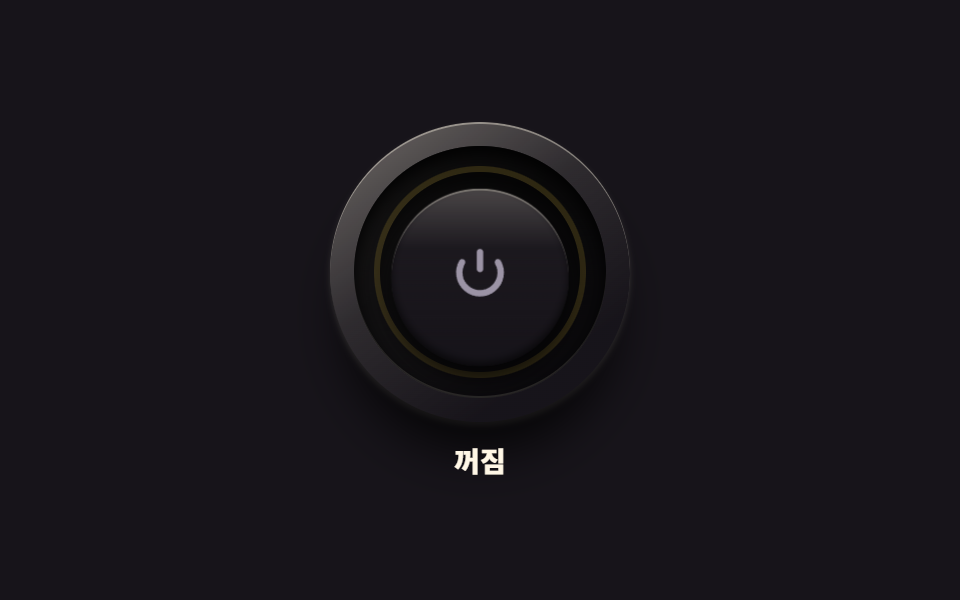
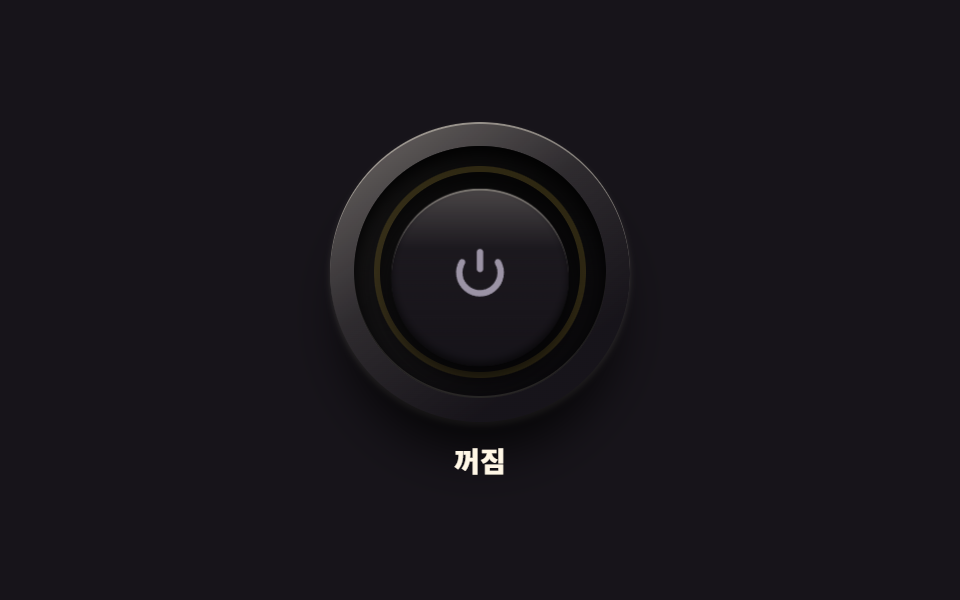
同心円のベベルを重ねた丸いボタンが押されると沈み、縁の電源記号リングに光がにじみます。離すと光だけ残り、キャップは元の高さに戻ります。
使いどころ機器コントロールパネルの主電源
box-shadowtranslateYaria-checked
<main class="stage">
<div class="pw is-demo" id="pw">
  <div class="pw__col">
  <div class="pw__assembly">
    <span class="pw__bezel" aria-hidden="true"></span>
    <span class="pw__groove" aria-hidden="true"></span>
    <button class="pw__cap" id="pwCap" type="button" role="switch" aria-checked="false" aria-label="電源">
      <svg class="pw__mark" viewBox="0 0 24 24" aria-hidden="true" focusable="false">
        <path d="M12 3v6" fill="none" stroke="currentColor" stroke-width="2.3" stroke-linecap="round"></path>
        <path d="M18.4 6.6a7.4 7.4 0 1 1-12.8 0" fill="none" stroke="currentColor" stroke-width="2.3" stroke-linecap="round"></path>
      </svg>
    </button>
    <span class="pw__led" aria-hidden="true"></span>
    <span class="pw__shade" aria-hidden="true"></span>
  </div>
  <p class="pw__state" role="status"><span class="pw__wordOn">オン</span><span class="pw__wordOff">オフ</span></p>
  </div>
</div>
</main>
@use "../../../../site/static/demo-tokens" as *;
// 전원 버튼과 LED 링 — 베벨 링·어두운 그루브·캡의 3중 동심원. 캡 중앙의 전원 기호(IEC 5009)는 음각.
// 누르면 캡이 안으로 들어가고 그루브 위쪽 그림자가 짙어진다. 놓으면 캡이 먼저 돌아오고($duration),
// LED 링은 그 뒤에 서서히 켜진다 — 비대칭 타이밍. 끌 때는 반대로 LED 가 먼저 꺼지고 캡이 돌아온다.
// 켜짐은 색만으로 말하지 않는다: 링의 빛·기호의 발색·상태 글자가 함께 바뀐다. role="switch" + aria-checked.
// 미리보기(.is-demo)는 눌림 → 복귀 → 점등 유지 → 재눌림 → 소등을 2초에 한 바퀴 돈다.
$duration: $dur-quick;
$easing: $ease-spring;
$color: $stage-yellow;
@include stage($stage-ink);
.pw { display: grid; place-items: center; width: 100%; }
.pw__col { display: flex; flex-direction: column; align-items: center; gap: $sp-3; }
// ── 버튼 어셈블리(베벨 링 · 그루브 · 캡 · LED 링) ────────────
.pw__assembly { position: relative; width: 150px; height: 150px; }
// 바깥 베벨 링 — 위에서 비치는 금속성 테두리와 6시 방향 소프트 드롭섀도
.pw__bezel {
position: absolute; inset: 0; border-radius: 50%; pointer-events: none;
background: linear-gradient(145deg, rgba($subject-cream, .38), rgba($subject-cream, .1) 42%, rgba($stage-ink, .9) 78%), $subject-ink;
box-shadow: 0 22px 26px -8px rgba(0, 0, 0, .8), 0 2px 3px rgba($subject-cream, .18), inset 0 1px 0 rgba($subject-cream, .4);
}
// 어두운 그루브 링 — 캡이 들어가는 홈, 그림자로 깊이를 만든다
.pw__groove {
position: absolute; inset: 12px; border-radius: 50%; pointer-events: none;
background: linear-gradient(180deg, rgba(0, 0, 0, .85), rgba(0, 0, 0, .55));
box-shadow: inset 0 4px 8px rgba(0, 0, 0, .9), inset 0 -1px 0 rgba($subject-cream, .14);
}
// 캡(지름 60%) — 실제 누르는 면. 전원 기호는 SVG 로 직접 그렸다(아이콘 세트에 없는 정밀 기호 예외)
.pw__cap {
position: absolute; inset: 30px; z-index: 5;
display: flex; align-items: center; justify-content: center;
margin: 0; padding: 0; border: 0; border-radius: 50%; cursor: pointer;
background: linear-gradient(180deg, rgba($subject-cream, .22), rgba($subject-cream, .02) 34%, rgba($stage-ink, .5) 88%), $subject-ink;
box-shadow: 0 6px 10px rgba(0, 0, 0, .66), inset 0 1px 0 rgba($subject-cream, .3), inset 0 -2px 4px rgba(0, 0, 0, .6);
transform: translateY(0) scale(1);
transition: transform $duration $easing, box-shadow $duration $easing;
}
.pw__cap:active {
transform: translateY(4px) scale(.98);
box-shadow: 0 2px 4px rgba(0, 0, 0, .6), inset 0 1px 0 rgba($subject-cream, .22), inset 0 -2px 4px rgba(0, 0, 0, .6);
}
.pw__cap:focus-visible { outline: 2px solid $stage-yellow; outline-offset: 3px; }
// 전원 기호 — 꺼짐은 낮은 대비의 음각 회색, 켜지면 $color 로 밝아진다
.pw__mark { width: 34px; height: 34px; color: $tick-mute; transition: color $dur-quick $ease-out; }
// LED 링 — 그루브 위를 도는 빛. 켜질 때는 캡 복귀 뒤 $dur-quick 늦게 $dur-base 에 걸쳐 번지고,
// 꺼질 때는 지연 없이 빠르게 사그라든다(방향마다 transition 규칙을 다르게 둔 한 방향 트릭).
.pw__led {
position: absolute; inset: 22px; z-index: 2; border-radius: 50%; pointer-events: none;
box-shadow: inset 0 0 0 3px rgba($color, .14);
transition: box-shadow $dur-quick $ease-out;
}
// 그루브 위쪽 내그림자 — 누르는 동안 짙어진다(캡보다 뒤에 두어 캡은 덮지 않는다)
.pw__shade {
position: absolute; inset: 25px; z-index: 3; border-radius: 50%; pointer-events: none;
box-shadow: inset 0 7px 9px rgba(0, 0, 0, .75);
opacity: .3; transition: opacity $duration $easing;
}
.pw__cap:active ~ .pw__shade { opacity: .8; }
// ── 켜짐 상태 ────────────────────────────────────────────────
.pw.is-on .pw__led {
box-shadow: inset 0 0 0 3px $color, 0 0 16px rgba($color, .6), 0 0 34px rgba($color, .28);
transition: box-shadow $dur-base $ease-out $duration;
}
.pw.is-on .pw__mark { color: $color; transition: color $dur-base $ease-out $duration; }
// ── 상태 글자 ────────────────────────────────────────────────
.pw__state { position: relative; margin: 0; width: 60px; height: 16px; }
.pw__wordOn, .pw__wordOff {
position: absolute; inset: 0; display: flex; align-items: center; justify-content: center;
font-weight: 800; font-size: clamp(12px, 3vw, 14px); line-height: 1; color: $subject-cream;
}
.pw__wordOn { display: none; color: $stage-yellow; }
.pw.is-on .pw__wordOn { display: flex; }
.pw.is-on .pw__wordOff { display: none; }
// ── 미리보기 루프(2초 한 바퀴) ────────────────────────────────
// 캡 눌림은 transform 키프레임(움직임 축), LED 점등은 box-shadow·색 키프레임(상태 변화라 번지는 게 맞다).
.pw.is-demo .pw__cap {
animation-name: pwPress; animation-duration: $dur-loop;
animation-timing-function: $easing; animation-iteration-count: infinite;
}
@keyframes pwPress {
0%, 6% { transform: translateY(0) scale(1); }
11% { transform: translateY(4px) scale(.98); }
16% { transform: translateY(0) scale(1); }
57% { transform: translateY(0) scale(1); }
62% { transform: translateY(4px) scale(.98); }
68%, 100% { transform: translateY(0) scale(1); }
}
.pw.is-demo .pw__shade {
animation-name: pwShade; animation-duration: $dur-loop;
animation-timing-function: steps(1, end); animation-iteration-count: infinite;
}
@keyframes pwShade {
0% { opacity: .3; }
7% { opacity: .8; }
16% { opacity: .3; }
57% { opacity: .8; }
68% { opacity: .3; }
100% { opacity: .3; }
}
.pw.is-demo .pw__led {
animation-name: pwLed; animation-duration: $dur-loop;
animation-timing-function: ease; animation-iteration-count: infinite;
}
@keyframes pwLed {
0%, 16% { box-shadow: inset 0 0 0 3px rgba($color, .14); }
28%, 58% { box-shadow: inset 0 0 0 3px $color, 0 0 16px rgba($color, .6), 0 0 34px rgba($color, .28); }
63%, 100% { box-shadow: inset 0 0 0 3px rgba($color, .14); }
}
.pw.is-demo .pw__mark {
animation-name: pwMark; animation-duration: $dur-loop;
animation-timing-function: ease; animation-iteration-count: infinite;
}
@keyframes pwMark {
0%, 16% { color: $tick-mute; }
28%, 58% { color: $color; }
63%, 100% { color: $tick-mute; }
}
// 상태 글자는 steps(1, end) 컷 — 반투명하게 겹치는 유령 프레임이 생기지 않는다
.pw.is-demo .pw__wordOn { display: flex; opacity: 0; }
.pw.is-demo .pw__wordOff { opacity: 1; }
.pw.is-demo .pw__wordOn {
animation-name: pwWordOn; animation-duration: $dur-loop;
animation-timing-function: steps(1, end); animation-iteration-count: infinite;
}
@keyframes pwWordOn {
0%, 18% { opacity: 0; }
24% { opacity: 1; }
60% { opacity: 0; }
100% { opacity: 0; }
}
.pw.is-demo .pw__wordOff {
animation-name: pwWordOff; animation-duration: $dur-loop;
animation-timing-function: steps(1, end); animation-iteration-count: infinite;
}
@keyframes pwWordOff {
0%, 18% { opacity: 1; }
24% { opacity: 0; }
60% { opacity: 1; }
100% { opacity: 1; }
}
@media (max-width: 340px) {
.pw__col { gap: $sp-2; }
.pw__assembly { width: 118px; height: 118px; }
.pw__groove { inset: 10px; }
.pw__cap { inset: 24px; }
.pw__led { inset: 18px; }
.pw__shade { inset: 20px; }
.pw__mark { width: 26px; height: 26px; }
.pw__state { width: 48px; height: 14px; }
}
@media (prefers-reduced-motion: reduce) {
.pw .pw__cap { transition: none !important; }
.pw .pw__shade { transition: none !important; }
.pw.is-demo .pw__cap { animation: none !important; transform: translateY(0) scale(1) !important; }
.pw.is-demo .pw__shade { animation: none !important; opacity: .3 !important; }
.pw.is-demo .pw__led { animation: none !important; }
.pw.is-demo .pw__mark { animation: none !important; }
.pw.is-demo .pw__wordOn { animation: none !important; opacity: 0 !important; }
.pw.is-demo .pw__wordOff { animation: none !important; opacity: 1 !important; }
}html, body {
margin: 0;
overflow: hidden;
}
.stage {
box-sizing: border-box;
min-height: 100vh;
display: grid;
place-items: center;
margin: 0;
background: #17141a;
font-family: -apple-system, "Segoe UI", "Noto Sans KR", sans-serif;
padding: clamp(8px, 4vw, 24px);
}
.pw {
display: grid;
place-items: center;
width: 100%;
}
.pw__col {
display: flex;
flex-direction: column;
align-items: center;
gap: 12px;
}
.pw__assembly {
position: relative;
width: 150px;
height: 150px;
}
.pw__bezel {
position: absolute;
inset: 0;
border-radius: 50%;
pointer-events: none;
background: linear-gradient(145deg, rgba(255, 247, 230, 0.38), rgba(255, 247, 230, 0.1) 42%, rgba(23, 20, 26, 0.9) 78%), #17141a;
box-shadow: 0 22px 26px -8px rgba(0, 0, 0, 0.8), 0 2px 3px rgba(255, 247, 230, 0.18), inset 0 1px 0 rgba(255, 247, 230, 0.4);
}
.pw__groove {
position: absolute;
inset: 12px;
border-radius: 50%;
pointer-events: none;
background: linear-gradient(180deg, rgba(0, 0, 0, 0.85), rgba(0, 0, 0, 0.55));
box-shadow: inset 0 4px 8px rgba(0, 0, 0, 0.9), inset 0 -1px 0 rgba(255, 247, 230, 0.14);
}
.pw__cap {
position: absolute;
inset: 30px;
z-index: 5;
display: flex;
align-items: center;
justify-content: center;
margin: 0;
padding: 0;
border: 0;
border-radius: 50%;
cursor: pointer;
background: linear-gradient(180deg, rgba(255, 247, 230, 0.22), rgba(255, 247, 230, 0.02) 34%, rgba(23, 20, 26, 0.5) 88%), #17141a;
box-shadow: 0 6px 10px rgba(0, 0, 0, 0.66), inset 0 1px 0 rgba(255, 247, 230, 0.3), inset 0 -2px 4px rgba(0, 0, 0, 0.6);
transform: translateY(0) scale(1);
transition: transform 220ms cubic-bezier(0.2, 0.8, 0.2, 1), box-shadow 220ms cubic-bezier(0.2, 0.8, 0.2, 1);
}
.pw__cap:active {
transform: translateY(4px) scale(0.98);
box-shadow: 0 2px 4px rgba(0, 0, 0, 0.6), inset 0 1px 0 rgba(255, 247, 230, 0.22), inset 0 -2px 4px rgba(0, 0, 0, 0.6);
}
.pw__cap:focus-visible {
outline: 2px solid #ffd23f;
outline-offset: 3px;
}
.pw__mark {
width: 34px;
height: 34px;
color: #9a93a6;
transition: color 220ms ease-out;
}
.pw__led {
position: absolute;
inset: 22px;
z-index: 2;
border-radius: 50%;
pointer-events: none;
box-shadow: inset 0 0 0 3px rgba(255, 210, 63, 0.14);
transition: box-shadow 220ms ease-out;
}
.pw__shade {
position: absolute;
inset: 25px;
z-index: 3;
border-radius: 50%;
pointer-events: none;
box-shadow: inset 0 7px 9px rgba(0, 0, 0, 0.75);
opacity: 0.3;
transition: opacity 220ms cubic-bezier(0.2, 0.8, 0.2, 1);
}
.pw__cap:active ~ .pw__shade {
opacity: 0.8;
}
.pw.is-on .pw__led {
box-shadow: inset 0 0 0 3px #ffd23f, 0 0 16px rgba(255, 210, 63, 0.6), 0 0 34px rgba(255, 210, 63, 0.28);
transition: box-shadow 300ms ease-out 220ms;
}
.pw.is-on .pw__mark {
color: #ffd23f;
transition: color 300ms ease-out 220ms;
}
.pw__state {
position: relative;
margin: 0;
width: 60px;
height: 16px;
}
.pw__wordOn, .pw__wordOff {
position: absolute;
inset: 0;
display: flex;
align-items: center;
justify-content: center;
font-weight: 800;
font-size: clamp(12px, 3vw, 14px);
line-height: 1;
color: #fff7e6;
}
.pw__wordOn {
display: none;
color: #ffd23f;
}
.pw.is-on .pw__wordOn {
display: flex;
}
.pw.is-on .pw__wordOff {
display: none;
}
.pw.is-demo .pw__cap {
animation-name: pwPress;
animation-duration: 2s;
animation-timing-function: cubic-bezier(0.2, 0.8, 0.2, 1);
animation-iteration-count: infinite;
}
@keyframes pwPress {
0%, 6% {
transform: translateY(0) scale(1);
}
11% {
transform: translateY(4px) scale(0.98);
}
16% {
transform: translateY(0) scale(1);
}
57% {
transform: translateY(0) scale(1);
}
62% {
transform: translateY(4px) scale(0.98);
}
68%, 100% {
transform: translateY(0) scale(1);
}
}
.pw.is-demo .pw__shade {
animation-name: pwShade;
animation-duration: 2s;
animation-timing-function: steps(1, end);
animation-iteration-count: infinite;
}
@keyframes pwShade {
0% {
opacity: 0.3;
}
7% {
opacity: 0.8;
}
16% {
opacity: 0.3;
}
57% {
opacity: 0.8;
}
68% {
opacity: 0.3;
}
100% {
opacity: 0.3;
}
}
.pw.is-demo .pw__led {
animation-name: pwLed;
animation-duration: 2s;
animation-timing-function: ease;
animation-iteration-count: infinite;
}
@keyframes pwLed {
0%, 16% {
box-shadow: inset 0 0 0 3px rgba(255, 210, 63, 0.14);
}
28%, 58% {
box-shadow: inset 0 0 0 3px #ffd23f, 0 0 16px rgba(255, 210, 63, 0.6), 0 0 34px rgba(255, 210, 63, 0.28);
}
63%, 100% {
box-shadow: inset 0 0 0 3px rgba(255, 210, 63, 0.14);
}
}
.pw.is-demo .pw__mark {
animation-name: pwMark;
animation-duration: 2s;
animation-timing-function: ease;
animation-iteration-count: infinite;
}
@keyframes pwMark {
0%, 16% {
color: #9a93a6;
}
28%, 58% {
color: #ffd23f;
}
63%, 100% {
color: #9a93a6;
}
}
.pw.is-demo .pw__wordOn {
display: flex;
opacity: 0;
}
.pw.is-demo .pw__wordOff {
opacity: 1;
}
.pw.is-demo .pw__wordOn {
animation-name: pwWordOn;
animation-duration: 2s;
animation-timing-function: steps(1, end);
animation-iteration-count: infinite;
}
@keyframes pwWordOn {
0%, 18% {
opacity: 0;
}
24% {
opacity: 1;
}
60% {
opacity: 0;
}
100% {
opacity: 0;
}
}
.pw.is-demo .pw__wordOff {
animation-name: pwWordOff;
animation-duration: 2s;
animation-timing-function: steps(1, end);
animation-iteration-count: infinite;
}
@keyframes pwWordOff {
0%, 18% {
opacity: 1;
}
24% {
opacity: 0;
}
60% {
opacity: 1;
}
100% {
opacity: 1;
}
}
@media (max-width: 340px) {
.pw__col {
gap: 8px;
}
.pw__assembly {
width: 118px;
height: 118px;
}
.pw__groove {
inset: 10px;
}
.pw__cap {
inset: 24px;
}
.pw__led {
inset: 18px;
}
.pw__shade {
inset: 20px;
}
.pw__mark {
width: 26px;
height: 26px;
}
.pw__state {
width: 48px;
height: 14px;
}
}
@media (prefers-reduced-motion: reduce) {
.pw .pw__cap {
transition: none !important;
}
.pw .pw__shade {
transition: none !important;
}
.pw.is-demo .pw__cap {
animation: none !important;
transform: translateY(0) scale(1) !important;
}
.pw.is-demo .pw__shade {
animation: none !important;
opacity: 0.3 !important;
}
.pw.is-demo .pw__led {
animation: none !important;
}
.pw.is-demo .pw__mark {
animation: none !important;
}
.pw.is-demo .pw__wordOn {
animation: none !important;
opacity: 0 !important;
}
.pw.is-demo .pw__wordOff {
animation: none !important;
opacity: 1 !important;
}
}var pwRoot = document.getElementById('pw');
var pwCap = document.getElementById('pwCap');
function pwSet(on) {
pwCap.setAttribute('aria-checked', on ? 'true' : 'false');
pwRoot.classList.toggle('is-on', on);
}
pwCap.addEventListener('pointerdown', function () { pwRoot.classList.remove('is-demo'); });
pwCap.addEventListener('click', function () {
pwRoot.classList.remove('is-demo');
pwSet(pwCap.getAttribute('aria-checked') !== 'true');
});// PowerLedButton — vanilla 판(run/076/demo/01-real-power-led-button/index.html) 의 React 포트.
// 누르면 캡이 안으로 들어가고, 놓으면 캡이 먼저 돌아오고 LED 링은 그 뒤에 서서히 켜진다(비대칭 타이밍).
// 값·키프레임은 vanilla 와 같다(다시 타이핑하지 않는다). 누르면 미리보기 루프를 뗀다.
import { useState } from "react";
import styles from "./PowerLedButton.module.scss";
export type PowerLedButtonProps = {
duration?: number;
easing?: string;
color?: string;
};
type Vars = { [k: string]: any };
const ARIA_LABEL = "전원";
const STATE_ON = "켜짐";
const STATE_OFF = "꺼짐";
export default function PowerLedButton({
duration = 220,
easing = "cubic-bezier(.2, .8, .2, 1)", // = $ease-spring
color = "#ffd23f",
}: PowerLedButtonProps) {
const [on, setOn] = useState(false);
const [demo, setDemo] = useState(true);
const vars: Vars = {
"--duration": `${duration}ms`,
"--easing": easing,
"--color": color,
};
const cls = [styles.root, demo ? styles.isDemo : "", on ? styles.isOn : ""].filter(Boolean).join(" ");
function wake() {
setDemo(false);
}
function toggle() {
setDemo(false);
setOn((prev) => !prev);
}
return (
<main className={styles.stage}>
<div className={cls} style={vars}>
<div className={styles.col}>
<div className={styles.assembly}>
<span className={styles.bezel} aria-hidden="true"></span>
<span className={styles.groove} aria-hidden="true"></span>
<button
className={styles.cap}
type="button"
role="switch"
aria-checked={on}
aria-label={ARIA_LABEL}
onPointerDown={wake}
onClick={toggle}
>
<svg className={styles.mark} viewBox="0 0 24 24" aria-hidden="true" focusable="false">
<path d="M12 3v6" fill="none" stroke="currentColor" stroke-width="2.3" stroke-linecap="round"></path>
<path d="M18.4 6.6a7.4 7.4 0 1 1-12.8 0" fill="none" stroke="currentColor" stroke-width="2.3" stroke-linecap="round"></path>
</svg>
</button>
<span className={styles.led} aria-hidden="true"></span>
<span className={styles.shade} aria-hidden="true"></span>
</div>
<p className={styles.state} role="status">
<span className={styles.wordOn}>{STATE_ON}</span>
<span className={styles.wordOff}>{STATE_OFF}</span>
</p>
</div>
</div>
</main>
);
}01 電源ボタンと LED リング — 計測 累積面積 5.355% · 動いたフレーム 9/23GODRICH オリジナル · SCSS と React は zip に同梱 · css トグルスイッチ 9選 — 実物みたいなスイッチをコピペで
このデモが属する記事
 css トグルスイッチ 9選 — 実物みたいなスイッチをコピペでcss トグルスイッチは、画面の中で電源を入れたり切ったりする小さな切り替えのことです。9 つすべてをライブラリなし、チェックボックス1つで作りました。下のグリッドで今動いており、クリック・Space・ドラッグはどれも本物です。 この記事のデモをすべて見る