04海のうねり — ノイズ波高断面
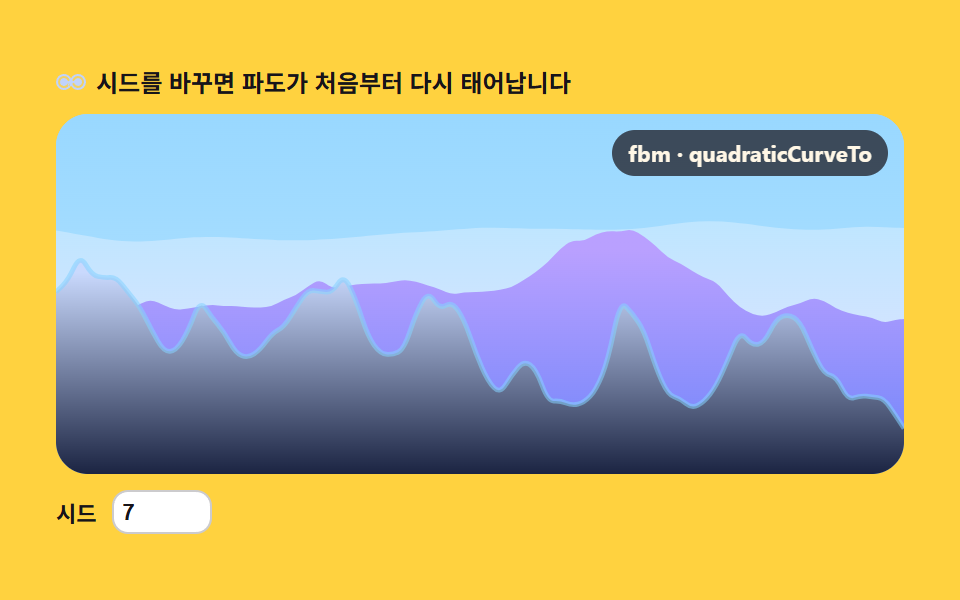
横位置ごとの fbm 値を波高として読み取り、複数層の曲線を quadraticCurveTo で描画。時間でノイズを流すことで波が不規則に上下する海の断面を作ります。
使いどころ海洋・サーフィン・リゾートLPの背景
fbmquadraticCurveTorequestAnimationFrame
<main class="stage">
<div class="ssw" id="ssw">
<p class="ssw__hint">
<svg class="ssw__ico" viewBox="0 0 256 256" aria-hidden="true"><g fill="currentColor"><path d="M232 128a56.06 56.06 0 0 1-56 56c-25.94 0-46.89-16.61-53.81-40h-.38C114.89 167.39 94 184 68 184a56 56 0 0 1 0-112c25.94 0 46.89 16.61 53.81 40h.38C129.11 88.61 150 72 176 72a56.06 56.06 0 0 1 56 56" opacity=".2"/><path d="M176 64c-24.68 0-45.6 13.7-56 34.71C109.6 77.7 88.68 64 64 64a64 64 0 0 0 0 128c24.68 0 45.6-13.7 56-34.71c10.4 21 31.32 34.71 56 34.71a64 64 0 0 0 0-128m-71.16 96.4a8 8 0 0 1-9.24-6.53a47.65 47.65 0 0 0-1.6-6.66a8 8 0 1 1 15.24-4.9a63.6 63.6 0 0 1 2.14 8.86a8 8 0 0 1-6.54 9.23M64 176a48 48 0 0 1 0-96a47.75 47.75 0 0 1 44.53 30.63a8 8 0 0 1-14.93 5.75A31.75 31.75 0 0 0 64 96a32 32 0 0 0 0 64a31.75 31.75 0 0 0 29.6-19.38a8 8 0 1 1 14.93 5.75A47.75 47.75 0 0 1 64 176m112 0a47.75 47.75 0 0 1-44.53-30.63a8 8 0 0 1 14.93-5.75A31.75 31.75 0 0 0 176 160a32 32 0 0 0 0-64a31.75 31.75 0 0 0-29.6 19.38a8 8 0 1 1-14.93-5.75A47.75 47.75 0 0 1 176 80a48 48 0 0 1 0 96"/></g></svg>
<span>シードを変えると波が最初から生まれ直されます</span>
</p>
<div class="ssw__field" id="field">
<canvas class="ssw__cv" id="cv"></canvas>
<b class="ssw__badge" aria-hidden="true">fbm · quadraticCurveTo</b>
</div>
<div class="ssw__bar">
<label class="ssw__dial">シード
<input type="number" id="seed" min="1" max="9999" step="1" value="7" aria-label="波高シード">
</label>
</div>
</div>
</main>@use "../../../../site/static/demo-tokens" as *;
// 바다 파고 — 움직임은 전부 캔버스 rAF 루프 안에 있다. CSS 는 무대·판·다이얼만 맡는다.
// @keyframes 를 두지 않는다 — CSS 애니메이션이 0개라야 렌더러가 시계를 고정하지 않고 실시간 24장을 찍는다.
// 하늘·수평선(far)·중경(mid)·근경(near)·포말 다섯 단계를 커스텀 프로퍼티로 내려보내고,
// JS 가 그 색으로 그라디언트를 만들어 파도 겹을 채운다.
$terrain-sky: mix($subject-sky, $stage-paper, 42%);
$terrain-lilac: $subject-lilac;
$terrain-blue: mix($subject-blue, $stage-paper, 30%);
$duration: $dur-loop;
$easing: $ease-out;
$color: $terrain-blue;
@include stage($stage-yellow);
.ssw {
--sky-top: #{mix($subject-sky, $stage-paper, 70%)}; // 하늘 위 — 거의 흰 파스텔
--sky-bottom: #{mix($subject-sky, $stage-paper, 50%)}; // 하늘 아래(수평선 근처) — 옅은 하늘색
--far-top: #{mix($subject-sky, $stage-paper, 46%)}; // 수평선 겹 — 가장 밝고 옅다
--far-bottom: #{mix($terrain-lilac, $stage-paper, 30%)};
--mid-top: #{$terrain-lilac}; // 중경 겹 — 라일락, 한 단계 진하다
--mid-bottom: #{mix($subject-lilac, $subject-blue, 45%)};
--near-top: #{mix($subject-blue, $stage-paper, 26%)}; // 근경 겹 — 가장 진하고 채도 높다
--near-bottom:#{mix($subject-blue, $subject-ink, 18%)};
--foam: #{mix($subject-sky, $stage-paper, 84%)}; // 근경 마루 위 포말 하이라이트
display: flex; flex-direction: column; gap: $sp-2;
width: 100%; max-width: 424px;
}
.ssw__hint {
display: flex; align-items: center; gap: $sp-1; margin: 0;
font-weight: 700; font-size: clamp(10px, 2.8vw, 12px); line-height: 1.35;
color: $subject-ink;
}
.ssw__ico { width: 16px; height: 16px; flex: 0 0 auto; color: $terrain-blue; }
.ssw__field {
position: relative; height: 180px;
border-radius: $r-card; overflow: hidden;
background: $terrain-sky;
box-shadow: inset 0 0 0 1px rgba($subject-ink, .1);
}
.ssw__cv { display: block; width: 100%; height: 100%; }
// 알고리즘 이름을 화면에 적어 둔다 — 01(값 노이즈 라인)과 같은 계열이지만
// quadraticCurveTo 로 곡선을 잇는 길임을 바로 알 수 있게
.ssw__badge {
position: absolute; right: $sp-2; top: $sp-2;
padding: $sp-1 $sp-2; border-radius: $r-pill;
background: rgba($subject-ink, .72);
color: $subject-cream; font-weight: 700; font-size: 11px;
}
.ssw__bar { display: flex; align-items: center; gap: $sp-3; flex-wrap: wrap; }
.ssw__dial {
display: flex; align-items: center; gap: $sp-2;
font-weight: 700; font-size: 11px; color: $subject-ink;
}
.ssw__dial input[type="number"] {
width: $sp-10; margin: 0; padding: $sp-1;
border-radius: $r-sm; border: 1px solid rgba($subject-ink, .22);
background: $stage-paper; color: $subject-ink; font-weight: 700; font-size: 11px;
}
@media (max-width: 340px) {
.ssw { gap: $sp-1; }
.ssw__field { height: 100px; }
.ssw__badge { font-size: 10px; padding: 0 $sp-1; }
.ssw__bar { gap: $sp-2; }
.ssw__dial { gap: $sp-1; }
.ssw__dial input[type="number"] { width: $sp-8; }
.ssw__hint { font-size: 10px; }
}
// reduce — 루프가 아예 안 돌므로 끄고 말고 할 애니메이션이 없다.
@media (prefers-reduced-motion: reduce) {
.ssw.is-still .ssw__field { cursor: default !important; }
}html, body {
margin: 0;
overflow: hidden;
}
.stage {
box-sizing: border-box;
min-height: 100vh;
display: grid;
place-items: center;
margin: 0;
background: #ffd23f;
font-family: -apple-system, "Segoe UI", "Noto Sans KR", sans-serif;
padding: clamp(8px, 4vw, 24px);
}
.ssw {
--sky-top: rgb(60.1960784314%, 84.9019607843%, 100%);
--sky-bottom: rgb(71.568627451%, 89.2156862745%, 100%);
--far-top: rgb(73.8431372549%, 90.0784313725%, 100%);
--far-bottom: rgb(91.7647058824%, 88.8235294118%, 100%);
--mid-top: #b9a0ff;
--mid-bottom: rgb(42.7843137255%, 51.7450980392%, 98.0588235294%);
--near-top: rgb(78.7921568627%, 85.1137254902%, 99.0823529412%);
--near-bottom:rgb(10.7137254902%, 14.1254901961%, 25.7254901961%);
--foam: rgb(52.2352941176%, 81.8823529412%, 100%);
display: flex;
flex-direction: column;
gap: 8px;
width: 100%;
max-width: 424px;
}
.ssw__hint {
display: flex;
align-items: center;
gap: 4px;
margin: 0;
font-weight: 700;
font-size: clamp(10px, 2.8vw, 12px);
line-height: 1.35;
color: #17141a;
}
.ssw__ico {
width: 16px;
height: 16px;
flex: 0 0 auto;
color: rgb(75.5294117647%, 82.8235294118%, 98.9411764706%);
}
.ssw__field {
position: relative;
height: 180px;
border-radius: 16px;
overflow: hidden;
background: rgb(76.1176470588%, 90.9411764706%, 100%);
box-shadow: inset 0 0 0 1px rgba(23, 20, 26, 0.1);
}
.ssw__cv {
display: block;
width: 100%;
height: 100%;
}
.ssw__badge {
position: absolute;
right: 8px;
top: 8px;
padding: 4px 8px;
border-radius: 999px;
background: rgba(23, 20, 26, 0.72);
color: #fff7e6;
font-weight: 700;
font-size: 11px;
}
.ssw__bar {
display: flex;
align-items: center;
gap: 12px;
flex-wrap: wrap;
}
.ssw__dial {
display: flex;
align-items: center;
gap: 8px;
font-weight: 700;
font-size: 11px;
color: #17141a;
}
.ssw__dial input[type=number] {
width: 40px;
margin: 0;
padding: 4px;
border-radius: 8px;
border: 1px solid rgba(23, 20, 26, 0.22);
background: #ffffff;
color: #17141a;
font-weight: 700;
font-size: 11px;
}
@media (max-width: 340px) {
.ssw {
gap: 4px;
}
.ssw__field {
height: 100px;
}
.ssw__badge {
font-size: 10px;
padding: 0 4px;
}
.ssw__bar {
gap: 8px;
}
.ssw__dial {
gap: 4px;
}
.ssw__dial input[type=number] {
width: 32px;
}
.ssw__hint {
font-size: 10px;
}
}
@media (prefers-reduced-motion: reduce) {
.ssw.is-still .ssw__field {
cursor: default !important;
}
}// 바다 파고 — 1차원 값 노이즈를 옥타브(fbm)로 겹쳐 가로 위치마다 파고(높이)를 읽고,
// 그 높이 점들을 quadraticCurveTo(각 점 사이 중점을 앵커로) 로 이어 부드러운 파도 단면 곡선을 그린다.
// 라인 기반 항목이라 매 프레임 fbm 을 새 노이즈로 다시 뽑지 않는다 — 옥타브마다 자기 위상(phase)을
// 시간에 흘려 "노이즈 샘플링 창"을 옆으로 팬(pan)한다. 겹마다 스케일·흐름 속도를 달리해
// 수평선 쪽(원경)은 느리고 잔잔하게, 앞쪽(근경)은 빠르고 거칠게 출렁이도록 만든다.
var root = document.getElementById('ssw');
var field = document.getElementById('field');
var cv = document.getElementById('cv');
var ctx = cv.getContext('2d');
var seedIn = document.getElementById('seed');
// 결정적 난수 — mulberry32. 같은 시드면 같은 수열을 돌려준다
function mulberry32(a) {
return function () {
a |= 0; a = (a + 0x6D2B79F5) | 0;
var t = Math.imul(a ^ (a >>> 15), 1 | a);
t = (t + Math.imul(t ^ (t >>> 7), 61 | t)) ^ t;
return ((t ^ (t >>> 14)) >>> 0) / 4294967296;
};
}
var PERM = new Uint8Array(512);
var VAL = new Float32Array(256);
// シード → PERM(순서표)·VAL(격자점 난수값) 재생성 — シード UI 가 이걸 다시 부른다
function buildTables(seed) {
var rng = mulberry32(seed >>> 0);
var p = [], i, j, t;
for (i = 0; i < 256; i++) p[i] = i;
for (i = 255; i > 0; i--) { j = (rng() * (i + 1)) | 0; t = p[i]; p[i] = p[j]; p[j] = t; }
for (i = 0; i < 512; i++) PERM[i] = p[i & 255];
for (i = 0; i < 256; i++) VAL[i] = rng();
}
function fade(t) { return t * t * (3 - 2 * t); } // 스무스스텝 — 격자 경계에서 각이 안 지게
// 1차원 값 노이즈 — 격자점마다 난수를 하나 두고 그 사이를 fade 로 부드럽게 잇는다
function vnoise1(x) {
var xi = Math.floor(x);
var xf = x - xi;
var a = VAL[PERM[xi & 255]], b = VAL[PERM[(xi + 1) & 255]];
return a + (b - a) * fade(xf);
}
// fbm — 옥타브마다 주파수 2배·진폭 절반. 옥타브마다 위상을 따로 흘려보내
// (i+1) 배로 밀기 때문에 고주파 옥타브일수록 더 빨리 밀린다 — 파도 결이 부위별로 다시 인다
function fbm1(x, sec, flow, oct) {
var sum = 0, amp = 0.5, norm = 0, f = 1;
for (var i = 0; i < oct; i++) {
var phase = sec * flow * (i + 1);
sum += vnoise1(x * f + phase) * amp;
norm += amp;
amp *= 0.5;
f *= 2;
}
return sum / norm;
}
// 파고 세 겹 — 수평선(far)·중경(mid)·근경(near). 스케일이 클수록 잔물결이 잘고, flow 가 클수록 빨리 출렁인다
var FAR = { scale: 0.006, flow: 2.6, offset: 5.3, oct: 3, baseR: 0.38, ampR: 0.12 };
var MID = { scale: 0.015, flow: 5.2, offset: 97.1, oct: 4, baseR: 0.60, ampR: 0.22 };
var NEAR = { scale: 0.033, flow: 8.4, offset: 241.7, oct: 5, baseR: 0.86, ampR: 0.42 };
var reduce = window.matchMedia('(prefers-reduced-motion: reduce)').matches;
var W = 0, H = 0, dpr = 1;
var raf = 0;
var css = getComputedStyle(root);
function tok(name) { return css.getPropertyValue(name).trim(); }
var C_SKY_TOP = tok('--sky-top'), C_SKY_BOTTOM = tok('--sky-bottom');
var C_FAR_TOP = tok('--far-top'), C_FAR_BOTTOM = tok('--far-bottom');
var C_MID_TOP = tok('--mid-top'), C_MID_BOTTOM = tok('--mid-bottom');
var C_NEAR_TOP = tok('--near-top'), C_NEAR_BOTTOM = tok('--near-bottom');
var C_FOAM = tok('--foam');
function fit() {
var r = field.getBoundingClientRect();
dpr = window.devicePixelRatio || 1;
W = r.width; H = r.height;
cv.width = Math.round(W * dpr);
cv.height = Math.round(H * dpr);
ctx.setTransform(dpr, 0, 0, dpr, 0, 0);
}
// 겹 하나의 파고 y 좌표 — fbm 값(0~1 로 대략 몰림)을 대비를 편 뒤 base 위아래로 흔든다
function swellY(x, sec, cfg) {
var n = fbm1(x * cfg.scale + cfg.offset, sec, cfg.flow, cfg.oct);
n = n * 2 - 0.5; // 값 노이즈는 가운데로 몰린다 — 대비를 한 번 펴 준다
return cfg.base - n * cfg.amp;
}
// 점들을 노이즈 샘플링 창을 팬(pan)해 가며 뽑고 quadraticCurveTo(중점을 앵커로) 로 이어
// 부드러운 파도 단면을 그린 뒤 캔버스 바닥까지 채운다. 근경 위에는 옅은 포말 하이라이트를 덧긋는다.
function drawSwell(sec, cfg, topColor, bottomColor, foam) {
var step = 6;
var pts = [];
for (var x = 0; x <= W; x += step) pts.push([x, swellY(x, sec, cfg)]);
var lastX = pts[pts.length - 1][0];
if (lastX < W) pts.push([W, swellY(W, sec, cfg)]);
ctx.beginPath();
ctx.moveTo(0, H);
ctx.lineTo(pts[0][0], pts[0][1]);
var i;
for (i = 0; i < pts.length - 1; i++) {
var xc = (pts[i][0] + pts[i + 1][0]) / 2;
var yc = (pts[i][1] + pts[i + 1][1]) / 2;
ctx.quadraticCurveTo(pts[i][0], pts[i][1], xc, yc);
}
var last = pts[pts.length - 1];
ctx.quadraticCurveTo(last[0], last[1], last[0], last[1]);
ctx.lineTo(W, H);
ctx.closePath();
var g = ctx.createLinearGradient(0, cfg.base - cfg.amp, 0, H);
g.addColorStop(0, topColor);
g.addColorStop(1, bottomColor);
ctx.fillStyle = g;
ctx.fill();
if (foam) {
// 마루가 빛을 받는 자리 — 같은 곡선을 다시 그려 얇게 밝히는데, 골(n 이 낮은 자리)은 옅어지게 한다
ctx.beginPath();
ctx.moveTo(pts[0][0], pts[0][1]);
for (i = 0; i < pts.length - 1; i++) {
var fxc = (pts[i][0] + pts[i + 1][0]) / 2;
var fyc = (pts[i][1] + pts[i + 1][1]) / 2;
ctx.quadraticCurveTo(pts[i][0], pts[i][1], fxc, fyc);
}
ctx.quadraticCurveTo(last[0], last[1], last[0], last[1]);
ctx.lineWidth = 2.4;
ctx.strokeStyle = foam;
ctx.globalAlpha = 0.55;
ctx.stroke();
ctx.globalAlpha = 1;
}
}
function paint(sec) {
ctx.clearRect(0, 0, W, H);
var sky = ctx.createLinearGradient(0, 0, 0, H);
sky.addColorStop(0, C_SKY_TOP);
sky.addColorStop(1, C_SKY_BOTTOM);
ctx.fillStyle = sky;
ctx.fillRect(0, 0, W, H);
FAR.base = H * FAR.baseR; FAR.amp = H * FAR.ampR;
MID.base = H * MID.baseR; MID.amp = H * MID.ampR;
NEAR.base = H * NEAR.baseR; NEAR.amp = H * NEAR.ampR;
drawSwell(sec, FAR, C_FAR_TOP, C_FAR_BOTTOM, null);
drawSwell(sec, MID, C_MID_TOP, C_MID_BOTTOM, null);
drawSwell(sec, NEAR, C_NEAR_TOP, C_NEAR_BOTTOM, C_FOAM);
}
function frame(now) {
paint(now / 1000);
raf = requestAnimationFrame(frame);
}
function onSeed() {
var v = Math.max(1, Math.min(9999, Math.floor(Number(seedIn.value)) || 1));
buildTables(v);
if (reduce) paint(0);
}
seedIn.addEventListener('input', onSeed);
seedIn.addEventListener('change', onSeed);
window.addEventListener('resize', function () { fit(); if (reduce) paint(0); });
buildTables(Number(seedIn.value) || 7);
fit();
if (reduce) {
// reduce — 루프를 시작하지 않고 시드가 정한 파도 한 장만 그린다(빈 화면이 아니다)
root.classList.add('is-still');
paint(0);
} else {
raf = requestAnimationFrame(frame);
}// SeaSwell — vanilla 판(run/309/demo/04-terrain-sea-swell/index.html) 의 React 포트.
// 가로 위치마다 1차원 값 노이즈 fbm 값을 파고(높이)로 읽고, 그 점들을
// quadraticCurveTo(각 점 사이 중점을 앵커로) 로 이어 세 겹의 파도 단면 곡선을 그린다.
// 옥타브마다 자기 위상(phase)을 시간에 흘려 "노이즈 샘플링 창"을 옆으로 팬(pan)한다.
// 움직임은 캔버스 rAF 루프가 전부 그리므로 @keyframes 가 없다 — props 는 CSS 변수로 내려간다.
import { useEffect, useRef, useState } from "react";
import type { CSSProperties } from "react";
import styles from "./SeaSwell.module.scss";
export type SeaSwellProps = {
duration?: string;
easing?: string;
color?: string;
};
type Vars = CSSProperties & { "--duration"?: string; "--easing"?: string; "--color"?: string };
type Box<T> = { current: T };
// React 이벤트 제네릭이 없는 환경이라 필요한 것만 로컬로 선언한다
type InputEvt = { target: { value: string } };
// 파도 세 겹 — 수평선(far)·중경(mid)·근경(near). 스케일이 클수록 잔물결이 잘고, flow 가 클수록 빨리 출렁인다
type Layer = { scale: number; flow: number; offset: number; oct: number; baseR: number; ampR: number };
const LAYERS: Layer[] = [
{ scale: 0.006, flow: 2.6, offset: 5.3, oct: 3, baseR: 0.38, ampR: 0.12 },
{ scale: 0.015, flow: 5.2, offset: 97.1, oct: 4, baseR: 0.60, ampR: 0.22 },
{ scale: 0.033, flow: 8.4, offset: 241.7, oct: 5, baseR: 0.86, ampR: 0.42 },
];
const FIELD_LABEL = "바다 파고 실험판";
// 결정적 난수 — mulberry32. 같은 시드면 같은 수열을 돌려준다
function mulberry32(a: number): () => number {
return function () {
a |= 0; a = (a + 0x6D2B79F5) | 0;
let t = Math.imul(a ^ (a >>> 15), 1 | a);
t = (t + Math.imul(t ^ (t >>> 7), 61 | t)) ^ t;
return ((t ^ (t >>> 14)) >>> 0) / 4294967296;
};
}
function fade(t: number): number {
return t * t * (3 - 2 * t); // 스무스스텝 — 격자 경계에서 각이 안 지게
}
// ── 1차원 값 노이즈 — 격자점마다 난수를 하나 두고 그 사이를 fade 로 부드럽게 잇는다 ───────────
class SeaNoise {
perm: Uint8Array;
val: Float32Array;
constructor(seed: number) {
const rng = mulberry32(seed >>> 0);
const p: number[] = [];
for (let i = 0; i < 256; i++) p[i] = i;
for (let i = 255; i > 0; i--) {
const j = (rng() * (i + 1)) | 0;
const t = p[i]; p[i] = p[j]; p[j] = t;
}
this.perm = new Uint8Array(512);
for (let i = 0; i < 512; i++) this.perm[i] = p[i & 255];
this.val = new Float32Array(256);
for (let i = 0; i < 256; i++) this.val[i] = rng();
}
at(x: number): number {
const xi = Math.floor(x);
const xf = x - xi;
const a = this.val[this.perm[xi & 255]];
const b = this.val[this.perm[(xi + 1) & 255]];
return a + (b - a) * fade(xf);
}
}
// fbm — 같은 노이즈를 주파수 2배·진폭 절반으로 겹쳐 쌓는다. 옥타브마다 위상을 따로 흘려보낸다
function fbm1(n: SeaNoise, x: number, sec: number, flow: number, oct: number): number {
let sum = 0, amp = 0.5, norm = 0, f = 1;
for (let i = 0; i < oct; i++) {
const phase = sec * flow * (i + 1);
sum += n.at(x * f + phase) * amp;
norm += amp;
amp *= 0.5;
f *= 2;
}
return sum / norm;
}
// 겹 하나의 파고 y 좌표 — fbm 값(0~1 로 대략 몰림)을 대비를 편 뒤 base 위아래로 흔든다
function swellY(n: SeaNoise, x: number, sec: number, cfg: Layer, H: number): number {
let v = fbm1(n, x * cfg.scale + cfg.offset, sec, cfg.flow, cfg.oct);
v = v * 2 - 0.5;
return cfg.baseR * H - v * cfg.ampR * H;
}
export default function SeaSwell({
duration = "2s", // vanilla $duration: $dur-loop
easing = "ease-out", // vanilla $easing: $ease-out
color = "#8fb7fb", // vanilla $color: $terrain-blue
}: SeaSwellProps) {
const rootRef = useRef<HTMLDivElement | null>(null);
const fieldRef = useRef<HTMLDivElement | null>(null);
const cvRef = useRef<HTMLCanvasElement | null>(null);
const ctxRef = useRef<CanvasRenderingContext2D | null>(null);
const noiseRef = useRef<SeaNoise | null>(null);
const colorsRef = useRef({}) as Box<{ [k: string]: string }>;
const sizeRef = useRef({ w: 0, h: 0 }) as Box<{ w: number; h: number }>;
const rafRef = useRef(0) as Box<number>;
const [seed, setSeed] = useState(7);
const [still, setStill] = useState(false);
const vars: Vars = { "--duration": duration, "--easing": easing, "--color": color };
function reduced(): boolean {
return window.matchMedia("(prefers-reduced-motion: reduce)").matches;
}
// 토큰 색을 한 번만 읽어 둔다 — 프레임마다 getComputedStyle 를 부르지 않게
function readColors(): void {
const root = rootRef.current;
if (!root) return;
const css = getComputedStyle(root);
const keys = [
"sky-top", "sky-bottom",
"far-top", "far-bottom",
"mid-top", "mid-bottom",
"near-top", "near-bottom",
"foam",
];
const out: { [k: string]: string } = {};
for (const k of keys) out[k] = css.getPropertyValue("--" + k).trim();
colorsRef.current = out;
}
// 고DPI 대응 — 배킹 스토어는 devicePixelRatio 배, 그리기 좌표계는 CSS 픽셀 그대로
function fit(): void {
const field = fieldRef.current;
const cv = cvRef.current;
if (!field || !cv) return;
const r = field.getBoundingClientRect();
const dpr = window.devicePixelRatio || 1;
sizeRef.current.w = r.width;
sizeRef.current.h = r.height;
cv.width = Math.round(r.width * dpr);
cv.height = Math.round(r.height * dpr);
const ctx = ctxRef.current;
if (ctx) ctx.setTransform(dpr, 0, 0, dpr, 0, 0);
}
// 점들을 노이즈 샘플링 창을 팬(pan)해 가며 뽑고 quadraticCurveTo(중점을 앵커로) 로 이어
// 부드러운 파도 단면을 그린 뒤 캔버스 바닥까지 채운다. 근경 위에는 옅은 포말 하이라이트를 덧긋는다.
function drawSwell(sec: number, cfg: Layer, W: number, H: number, top: string, bottom: string, foam: string | null): void {
const ctx = ctxRef.current, n = noiseRef.current;
if (!ctx || !n) return;
const step = 6;
const pts: number[][] = [];
for (let x = 0; x <= W; x += step) pts.push([x, swellY(n, x, sec, cfg, H)]);
if (pts[pts.length - 1][0] < W) pts.push([W, swellY(n, W, sec, cfg, H)]);
const last = pts[pts.length - 1];
ctx.beginPath();
ctx.moveTo(0, H);
ctx.lineTo(pts[0][0], pts[0][1]);
let i: number;
for (i = 0; i < pts.length - 1; i++) {
const xc = (pts[i][0] + pts[i + 1][0]) / 2;
const yc = (pts[i][1] + pts[i + 1][1]) / 2;
ctx.quadraticCurveTo(pts[i][0], pts[i][1], xc, yc);
}
ctx.lineTo(W, H);
ctx.closePath();
const g = ctx.createLinearGradient(0, (cfg.baseR - cfg.ampR) * H, 0, H);
g.addColorStop(0, top);
g.addColorStop(1, bottom);
ctx.fillStyle = g;
ctx.fill();
if (foam) {
// 마루가 빛을 받는 자리 — 같은 곡선을 다시 그려 얇게 밝힌다
ctx.beginPath();
ctx.moveTo(pts[0][0], pts[0][1]);
for (i = 0; i < pts.length - 1; i++) {
const fxc = (pts[i][0] + pts[i + 1][0]) / 2;
const fyc = (pts[i][1] + pts[i + 1][1]) / 2;
ctx.quadraticCurveTo(pts[i][0], pts[i][1], fxc, fyc);
}
ctx.lineWidth = 2.4;
ctx.strokeStyle = foam;
ctx.globalAlpha = 0.55;
ctx.stroke();
ctx.globalAlpha = 1;
}
}
function paint(sec: number): void {
const ctx = ctxRef.current;
if (!ctx) return;
const W = sizeRef.current.w, H = sizeRef.current.h;
const c = colorsRef.current;
ctx.clearRect(0, 0, W, H);
const sky = ctx.createLinearGradient(0, 0, 0, H);
sky.addColorStop(0, c["sky-top"]);
sky.addColorStop(1, c["sky-bottom"]);
ctx.fillStyle = sky;
ctx.fillRect(0, 0, W, H);
drawSwell(sec, LAYERS[0], W, H, c["far-top"], c["far-bottom"], null);
drawSwell(sec, LAYERS[1], W, H, c["mid-top"], c["mid-bottom"], null);
drawSwell(sec, LAYERS[2], W, H, c["near-top"], c["near-bottom"], c["foam"]);
}
function frame(now: number): void {
paint(now / 1000);
rafRef.current = requestAnimationFrame(frame);
}
function onSeedInput(e: InputEvt): void {
const v = Math.max(1, Math.min(9999, Math.floor(Number(e.target.value)) || 1));
noiseRef.current = new SeaNoise(v); // 시드 → 테이블 갈아끼우기
setSeed(v);
if (reduced()) paint(0); // 정적 경로에서도 시드를 바꾸면 즉시 다시 그린다
}
function onResize(): void {
fit();
if (reduced()) paint(0);
}
useEffect(() => {
const cv = cvRef.current;
if (!cv) return;
ctxRef.current = cv.getContext("2d");
if (!ctxRef.current) return;
noiseRef.current = new SeaNoise(seed);
readColors();
fit();
window.addEventListener("resize", onResize);
if (reduced()) {
// reduce — 루프를 시작하지 않고 시드가 정한 파도 한 장만 그린다
setStill(true);
paint(0);
} else {
rafRef.current = requestAnimationFrame(frame);
}
return () => {
window.removeEventListener("resize", onResize);
cancelAnimationFrame(rafRef.current);
};
// eslint-disable-next-line react-hooks/exhaustive-deps
}, []);
const cls = [styles.root, still ? styles.isStill : ""].filter(Boolean).join(" ");
return (
<main className={styles.stage}>
<div className={cls} ref={rootRef} style={vars}>
<p className={styles.hint}>
<svg className={styles.ico} viewBox="0 0 256 256" aria-hidden="true"><g fill="currentColor"><path d="M232 128a56.06 56.06 0 0 1-56 56c-25.94 0-46.89-16.61-53.81-40h-.38C114.89 167.39 94 184 68 184a56 56 0 0 1 0-112c25.94 0 46.89 16.61 53.81 40h.38C129.11 88.61 150 72 176 72a56.06 56.06 0 0 1 56 56" opacity=".2"/><path d="M176 64c-24.68 0-45.6 13.7-56 34.71C109.6 77.7 88.68 64 64 64a64 64 0 0 0 0 128c24.68 0 45.6-13.7 56-34.71c10.4 21 31.32 34.71 56 34.71a64 64 0 0 0 0-128m-71.16 96.4a8 8 0 0 1-9.24-6.53a47.65 47.65 0 0 0-1.6-6.66a8 8 0 1 1 15.24-4.9a63.6 63.6 0 0 1 2.14 8.86a8 8 0 0 1-6.54 9.23M64 176a48 48 0 0 1 0-96a47.75 47.75 0 0 1 44.53 30.63a8 8 0 0 1-14.93 5.75A31.75 31.75 0 0 0 64 96a32 32 0 0 0 0 64a31.75 31.75 0 0 0 29.6-19.38a8 8 0 1 1 14.93 5.75A47.75 47.75 0 0 1 64 176m112 0a47.75 47.75 0 0 1-44.53-30.63a8 8 0 0 1 14.93-5.75A31.75 31.75 0 0 0 176 160a32 32 0 0 0 0-64a31.75 31.75 0 0 0-29.6 19.38a8 8 0 1 1-14.93-5.75A47.75 47.75 0 0 1 176 80a48 48 0 0 1 0 96"/></g></svg>
<span>시드를 바꾸면 파도가 처음부터 다시 태어납니다</span>
</p>
<div className={styles.field} ref={fieldRef} role="application" aria-label={FIELD_LABEL}>
<canvas className={styles.cv} ref={cvRef}></canvas>
<b className={styles.badge} aria-hidden="true">fbm · quadraticCurveTo</b>
</div>
<div className={styles.bar}>
<label className={styles.dial}>시드
<input type="number" min={1} max={9999} step={1} value={seed} aria-label="파고 시드" onChange={onSeedInput} />
</label>
</div>
</div>
</main>
);
}04 海のうねり — ノイズ波高断面 — 計測 累積面積 29.956% · 動いたフレーム 23/23GODRICH オリジナル · SCSS と React は zip に同梱 · パーリンノイズ地形9選 — ライブラリなし、計算だけで
このデモが属する記事
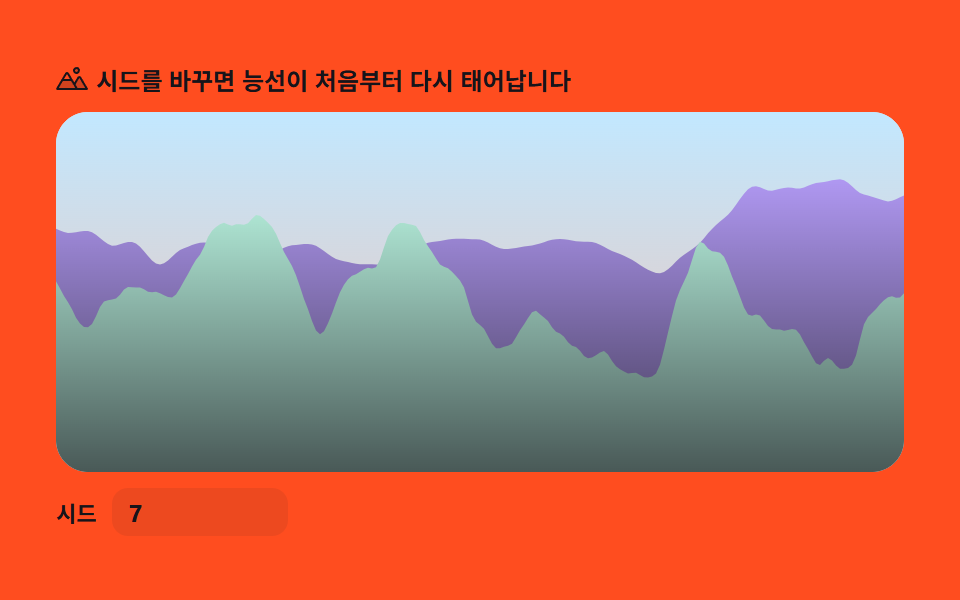 パーリンノイズ地形9選 — ライブラリなし、計算だけでパーリンノイズとは、隣り合う値がなめらかにつながる乱数のことで、山・雲・海・星空といった自然の形を数式だけで描き出す元になる素材です。この9種をノイズ用ライブラリを一切使わずCanvas 2Dに直接実装しました。実測では08の河川侵食が累積 この記事のデモをすべて見る