03重力と風の場
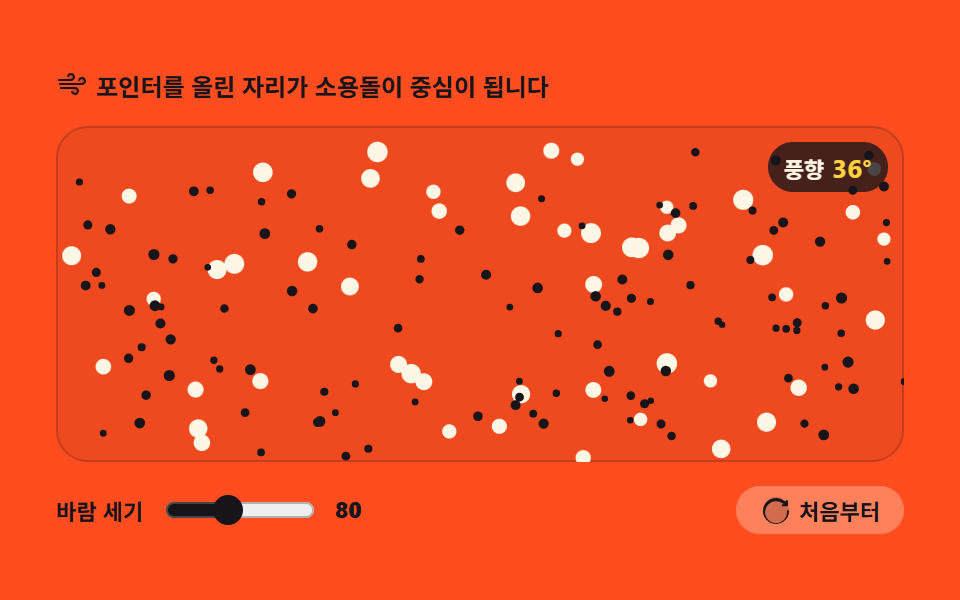
画面全体が時間で向きを変える風の場なので、粒は流れのように運ばれ、ポインタを重ねるとその場所が渦の中心になります。力を足す順番がそのまま動きになります。
使いどころセクション背景の流れる霧
Math.sinMath.costranslate
<main class="stage">
<div class="pw" id="pw">
  <p class="pw__hint">
    <svg class="pw__ico" viewBox="0 0 256 256" aria-hidden="true"><g fill="currentColor"><path d="M120 96a24 24 0 1 1 24-24a24 24 0 0 1-24 24m88-16a24 24 0 1 0 24 24a24 24 0 0 0-24-24m-56 80a24 24 0 1 0 24 24a24 24 0 0 0-24-24" opacity=".2"/><path d="M184 184a32 32 0 0 1-32 32c-13.7 0-26.95-8.93-31.5-21.22a8 8 0 0 1 15-5.56C137.74 195.27 145 200 152 200a16 16 0 0 0 0-32H40a8 8 0 0 1 0-16h112a32 32 0 0 1 32 32m-64-80a32 32 0 0 0 0-64c-13.7 0-26.95 8.93-31.5 21.22a8 8 0 0 0 15 5.56C105.74 60.73 113 56 120 56a16 16 0 0 1 0 32H24a8 8 0 0 0 0 16Zm88-32c-13.7 0-26.95 8.93-31.5 21.22a8 8 0 0 0 15 5.56C193.74 92.73 201 88 208 88a16 16 0 0 1 0 32H32a8 8 0 0 0 0 16h176a32 32 0 0 0 0-64"/></g></svg>
    <span>ポインタを置いた場所が渦の中心になります</span>
  </p>
  <div class="pw__field" id="field" role="application" aria-label="重力と風の場の実験台" tabindex="0">
    <canvas class="pw__cv" id="cv"></canvas>
    <b class="pw__live" aria-hidden="true"><span class="pw__liveUnit">風向</span><span class="pw__liveNum" id="windDeg">0°</span></b>
  </div>
  <div class="pw__bar">
    <label class="pw__dial">風の強さ
      <input type="range" id="gust" min="40" max="140" step="10" value="80" aria-label="風の強さ">
      <b class="pw__val" id="gustVal">80</b>
    </label>
    <button class="pw__reset" id="reset" type="button">
      <svg class="pw__ico" viewBox="0 0 256 256" aria-hidden="true"><g fill="currentColor"><path d="M232 128a104 104 0 1 1-104-104a104 104 0 0 1 104 104" opacity=".2"/><path d="M232 136a104 104 0 1 1-38.17-80.55L208 60v-4a8 8 0 0 1 16 0v34a8 8 0 0 1-8 8h-34a8 8 0 0 1 0-16h7.6l-8.89-7.4A88 88 0 1 0 216 136a8 8 0 0 1 16 0Z"/></g></svg>
      <span>最初から</span>
    </button>
  </div>
</div>
</main>
@use "../../../../site/static/demo-tokens" as *;
// 중력과 바람의 필드 — 움직임은 캔버스 rAF 루프가 전부 그린다. CSS 는 무대·판·컨트롤만 맡는다.
// 바람의 흐름과 소용돌이 링 전부가 캔버스 안에 있으므로 @keyframes 미리보기가 없다 —
// 렌더러는 CSS 애니메이션이 0개면 실시간으로 24장을 찍는다(도구/demo.py 렌더(), 287·291 선례).
// reduce 에서는 JS 가 루프를 시작하지 않고 흐름이 자리 잡은 한 장만 그린다(.is-still).
$color: $stage-ink; // 주황 무대 위 강조 — 어두운 잉크 계열만 3:1 을 넘는다
@include stage($stage-orange);
.pw { display: flex; flex-direction: column; gap: $sp-3; width: 100%; max-width: 424px; }
.pw__hint {
display: flex; align-items: center; gap: $sp-1; margin: 0;
font-weight: 700; font-size: clamp(10px, 2.8vw, 12px); color: $subject-ink;
}
.pw__ico { width: 16px; height: 16px; flex: 0 0 auto; color: $stage-ink; }
.pw__field {
position: relative; height: 168px; border-radius: $r-card; overflow: hidden;
background: rgba($subject-ink, .07);
box-shadow: inset 0 0 0 1px rgba($subject-ink, .2);
}
.pw__field:focus-visible { outline: 2px solid $stage-ink; outline-offset: 2px; }
.pw__cv { display: block; width: 100%; height: 100%; }
// 풍향 — 사인과 코사인 합성 각도가 이 숫자로 드러난다. 판을 보지 않아도 장이 돌고 있음을 알 수 있다
.pw__live {
position: absolute; right: $sp-2; top: $sp-2;
display: flex; align-items: baseline; gap: $sp-1;
padding: $sp-1 $sp-2; border-radius: $r-pill;
background: rgba($stage-ink, .78);
color: $subject-cream; font-weight: 700; font-size: 11px;
pointer-events: none;
}
.pw__liveNum { font-size: 13px; color: $stage-yellow; }
.pw__bar { display: flex; align-items: center; gap: $sp-3; }
.pw__dial {
display: flex; align-items: center; gap: $sp-2;
font-weight: 700; font-size: 11px; color: $subject-ink;
}
.pw__dial input { width: 76px; accent-color: $color; }
.pw__val { color: $stage-ink; font-size: 11px; }
.pw__reset {
display: flex; align-items: center; gap: $sp-1; margin-left: auto;
padding: $sp-1 $sp-3; border: 0; border-radius: $r-pill;
background: rgba($subject-cream, .30); color: $subject-ink;
font-weight: 700; font-size: 11px; font-family: inherit; cursor: pointer;
}
.pw__reset:hover { background: rgba($subject-cream, .42); }
.pw__reset:focus-visible { outline: 2px solid $stage-ink; outline-offset: 2px; }
@media (max-width: 340px) {
.pw { gap: $sp-2; }
.pw__field { height: 96px; }
.pw__dial input { width: 44px; }
.pw__live { font-size: 10px; }
}
// reduce — 루프가 없으니 소용돌이도 일어나지 않는다. 라벨은 마지막 상태의 값 그대로 둔다.
@media (prefers-reduced-motion: reduce) {
.pw.is-still .pw__live { opacity: .85 !important; }
}html, body {
margin: 0;
overflow: hidden;
}
.stage {
box-sizing: border-box;
min-height: 100vh;
display: grid;
place-items: center;
margin: 0;
background: #ff4d1f;
font-family: -apple-system, "Segoe UI", "Noto Sans KR", sans-serif;
padding: clamp(8px, 4vw, 24px);
}
.pw {
display: flex;
flex-direction: column;
gap: 12px;
width: 100%;
max-width: 424px;
}
.pw__hint {
display: flex;
align-items: center;
gap: 4px;
margin: 0;
font-weight: 700;
font-size: clamp(10px, 2.8vw, 12px);
color: #17141a;
}
.pw__ico {
width: 16px;
height: 16px;
flex: 0 0 auto;
color: #17141a;
}
.pw__field {
position: relative;
height: 168px;
border-radius: 16px;
overflow: hidden;
background: rgba(23, 20, 26, 0.07);
box-shadow: inset 0 0 0 1px rgba(23, 20, 26, 0.2);
}
.pw__field:focus-visible {
outline: 2px solid #17141a;
outline-offset: 2px;
}
.pw__cv {
display: block;
width: 100%;
height: 100%;
}
.pw__live {
position: absolute;
right: 8px;
top: 8px;
display: flex;
align-items: baseline;
gap: 4px;
padding: 4px 8px;
border-radius: 999px;
background: rgba(23, 20, 26, 0.78);
color: #fff7e6;
font-weight: 700;
font-size: 11px;
pointer-events: none;
}
.pw__liveNum {
font-size: 13px;
color: #ffd23f;
}
.pw__bar {
display: flex;
align-items: center;
gap: 12px;
}
.pw__dial {
display: flex;
align-items: center;
gap: 8px;
font-weight: 700;
font-size: 11px;
color: #17141a;
}
.pw__dial input {
width: 76px;
accent-color: #17141a;
}
.pw__val {
color: #17141a;
font-size: 11px;
}
.pw__reset {
display: flex;
align-items: center;
gap: 4px;
margin-left: auto;
padding: 4px 12px;
border: 0;
border-radius: 999px;
background: rgba(255, 247, 230, 0.3);
color: #17141a;
font-weight: 700;
font-size: 11px;
font-family: inherit;
cursor: pointer;
}
.pw__reset:hover {
background: rgba(255, 247, 230, 0.42);
}
.pw__reset:focus-visible {
outline: 2px solid #17141a;
outline-offset: 2px;
}
@media (max-width: 340px) {
.pw {
gap: 8px;
}
.pw__field {
height: 96px;
}
.pw__dial input {
width: 44px;
}
.pw__live {
font-size: 10px;
}
}
@media (prefers-reduced-motion: reduce) {
.pw.is-still .pw__live {
opacity: 0.85 !important;
}
}// 중력과 바람의 필드 — 판 전체가 시간에 따라 방향을 바꾸는 바람장이다.
// 파티클은 매번 힘을 쌓는 게 아니라 장이 정한 목표 속도로 부드럽게 steer 된다.
// 포인터를 올리면 그 자리가 소용돌이 중심 — 접선 힘으로 돌리고 살짝 빨아들여 궤도에 올린다.
var root = document.getElementById('pw');
var field = document.getElementById('field');
var cv = document.getElementById('cv');
var ctx = cv.getContext('2d');
var gustIn = document.getElementById('gust');
var gustVal = document.getElementById('gustVal');
var windOut = document.getElementById('windDeg');
var resetBtn = document.getElementById('reset');
var N = 170; // 잉크 점 120 + 크림 유령 50
var GHOSTS = 50;
var R = 78; // 소용돌이 半径 — 같은 크기의 링으로 화면에도 보인다
var reduce = window.matchMedia('(prefers-reduced-motion: reduce)').matches;
var W = 0, H = 0, dpr = 1;
var pool = new Array(N);
var t = 0;
var strength = 80;
var px = 0, py = 0, inside = false;
var pulseT = 0; // 키보드로 일으킨 한가운데 소용돌이의 남은 시간
// 고DPI 대응 — 배킹 스토어를 devicePixelRatio 배로 키우고 좌표계는 CSS 픽셀 그대로 쓴다
function fit() {
var r = field.getBoundingClientRect();
dpr = window.devicePixelRatio || 1;
W = r.width; H = r.height;
cv.width = Math.round(W * dpr);
cv.height = Math.round(H * dpr);
ctx.setTransform(dpr, 0, 0, dpr, 0, 0);
}
function scatter() {
for (var i = 0; i < N; i++) {
pool[i] = {
x: Math.random() * W,
y: Math.random() * H,
vx: 0, vy: 0,
r: i < GHOSTS ? 3.2 + Math.random() * 2 : 1.6 + Math.random() * 1.2,
ghost: i < GHOSTS
};
}
}
// 소용돌이 — 중심에 가까울수록 세게. 접선(수직) 방향 힘과 살짝의 안쪽 당김으로 궤도를 만든다
function swirl(p, sx, sy, dt, scale) {
var dx = p.x - sx, dy = p.y - sy;
var d2 = dx * dx + dy * dy;
if (d2 >= R * R || d2 < 4) return;
var d = Math.sqrt(d2);
var fall = 1 - d / R;
var inv = 1 / d;
p.vx += (-dy * inv * 760 - dx * inv * 260) * fall * scale * dt;
p.vy += ( dx * inv * 760 - dy * inv * 260) * fall * scale * dt;
}
function step(dt) {
t += dt;
// 사인과 코사인을 합성한 기준 風向 — 판 전체의 바람이 천천히 돌아간다
var base = Math.sin(t * 0.2) * 1.15 + Math.cos(t * 0.34) * 0.5;
var steer = Math.min(1, 2.6 * dt);
var sx = inside ? px : W / 2;
var sy = inside ? py : H / 2;
var live = inside || pulseT > 0;
var scale = (!inside && pulseT > 0) ? pulseT : 1;
if (pulseT > 0) pulseT -= dt;
for (var i = 0; i < N; i++) {
var p = pool[i];
// 자리마다 물결 — 같은 순간에도 판 위의 곳마다 바람 방향이 다르다
var ang = base + Math.sin(p.x * 0.012 + t * 0.6) * 0.85 + Math.cos(p.y * 0.016 - t * 0.45) * 0.6;
var spd = (p.ghost ? 0.55 : 1) * strength;
p.vx += (Math.cos(ang) * spd - p.vx) * steer;
p.vy += (Math.sin(ang) * spd * 0.62 - p.vy) * steer;
if (live) swirl(p, sx, sy, dt, scale);
p.x += p.vx * dt;
p.y += p.vy * dt;
// 흐름이 판 밖으로 새면 반대편에서 다시 들어온다
if (p.x < -10) p.x = W + 10;
else if (p.x > W + 10) p.x = -10;
if (p.y < -10) p.y = H + 10;
else if (p.y > H + 10) p.y = -10;
}
var deg = ((base * 180 / Math.PI) % 360 + 360) % 360;
windOut.textContent = String(Math.round(deg)) + '°';
}
function draw() {
ctx.clearRect(0, 0, W, H);
// 크림 유령 — 크고 느린 안개 알갱이. 반투명으로 죽이면 대비가 3:1 아래로 내려가니 불투명 그대로 크게 둔다
ctx.fillStyle = '#fff7e6';
for (var i = 0; i < GHOSTS; i++) {
var g = pool[i];
ctx.beginPath();
ctx.arc(g.x, g.y, g.r, 0, Math.PI * 2);
ctx.fill();
}
// 잉크 점 — 한 경로에 몰아 넣고 한 번에 채운다
ctx.fillStyle = '#17141a';
ctx.beginPath();
for (var j = GHOSTS; j < N; j++) {
var p = pool[j];
ctx.moveTo(p.x + p.r, p.y);
ctx.arc(p.x, p.y, p.r, 0, Math.PI * 2);
}
ctx.fill();
// 소용돌이 半径 링 — translate 로 원점을 옮겨 그리고 restore 로 되돌린다
if (inside || pulseT > 0) {
var cx = inside ? px : W / 2;
var cy = inside ? py : H / 2;
ctx.save();
ctx.translate(cx, cy);
ctx.strokeStyle = 'rgba(255,247,230,.9)';
ctx.lineWidth = 1.5;
ctx.setLineDash([4, 6]);
ctx.beginPath();
ctx.arc(0, 0, R, 0, Math.PI * 2);
ctx.stroke();
ctx.setLineDash([]);
ctx.fillStyle = '#fff7e6';
ctx.beginPath();
ctx.arc(0, 0, 2.5, 0, Math.PI * 2);
ctx.fill();
ctx.restore();
}
}
var lastT = 0;
function frame(now) {
var dt = lastT ? Math.min((now - lastT) / 1000, 0.05) : 0.016;
lastT = now;
step(dt);
draw();
requestAnimationFrame(frame);
}
function setPointer(e) {
var r = cv.getBoundingClientRect();
px = e.clientX - r.left;
py = e.clientY - r.top;
}
function restart() {
t = 0;
pulseT = 0;
scatter();
if (reduce) draw();
}
gustIn.addEventListener('input', function () {
strength = Number(gustIn.value);
gustVal.textContent = String(strength);
if (reduce) draw();
});
resetBtn.addEventListener('click', restart);
field.addEventListener('pointermove', function (e) { setPointer(e); inside = true; });
field.addEventListener('pointerdown', function (e) { setPointer(e); inside = true; });
field.addEventListener('pointerleave', function () { inside = false; });
field.addEventListener('pointercancel', function () { inside = false; });
field.addEventListener('keydown', function (e) {
if (e.key === 'Enter' || e.key === ' ') {
e.preventDefault();
pulseT = 1.1; // 한가운데에 소용돌이를 일으킨 뒤 서서히 잦아들게 한다
if (reduce) draw();
}
});
window.addEventListener('resize', function () {
fit();
for (var i = 0; i < N; i++) {
var p = pool[i];
if (p.x > W) p.x = W - 2;
if (p.y > H) p.y = H - 2;
}
draw();
});
fit();
restart();
if (reduce) {
// reduce — 루프를 돌리지 않는다. 바람이 2秒 남짓 흐른 뒤의 한 장만 남긴다.
for (var warm = 0; warm < 120; warm++) step(1 / 60);
root.classList.add('is-still');
draw();
} else {
requestAnimationFrame(frame);
}// WindField — vanilla 판(run/012/demo/03-particle-wind-field/index.html) 의 React 포트.
// 판 전체가 시간에 따라 방향을 바꾸는 바람장이다 — 파티클은 매번 힘을 쌓는 게 아니라 장이 정한 목표 속도로 부드럽게 steer 된다.
// 포인터를 올리면 그 자리가 소용돌이 중심 — 접선 힘으로 돌리고 살짝 빨아들여 궤도에 올린다.
// 움직임은 캔버스 rAF 루프가 전부 그리므로 @keyframes 미리보기가 없다 — props 는 CSS 변수로 무대 격식에만 내려간다.
import { useEffect, useRef, useState } from "react";
import type { CSSProperties } from "react";
import styles from "./WindField.module.scss";
export type WindFieldProps = {
duration?: string;
easing?: string;
color?: string;
};
type Vars = CSSProperties & { "--duration"?: string; "--easing"?: string; "--color"?: string };
// useRef 는 T | null 을 돌려준다. 처음부터 값이 있고 절대 비지 않는 상자는 이렇게 좁혀 쓴다
type Box<T> = { current: T };
// React 이벤트 제네릭이 없는 환경이라 필요한 것만 로컬로 선언한다
type PointerEvt = { clientX: number; clientY: number; pointerId?: number; preventDefault(): void };
type KeyEvt = { key: string; preventDefault(): void };
type InputEvt = { target: { value: string } };
type Dot = { x: number; y: number; vx: number; vy: number; r: number; ghost: boolean };
type WindState = { t: number; strength: number; px: number; py: number; inside: boolean; pulseT: number };
const N = 170; // 잉크 점 120 + 크림 유령 50
const GHOSTS = 50;
const R = 78; // 소용돌이 반경 — 같은 크기의 링으로 화면에도 보인다
const FIELD_LABEL = "중력과 바람의 필드 실험판";
export default function WindField({
duration = "2s", // vanilla $duration: $dur-loop
easing = "cubic-bezier(.2, .8, .2, 1)", // vanilla $easing: $ease-spring
color = "#17141a", // vanilla $color: $stage-ink
}: WindFieldProps) {
const fieldRef = useRef<HTMLDivElement | null>(null);
const cvRef = useRef<HTMLCanvasElement | null>(null);
const windRef = useRef<HTMLSpanElement | null>(null);
const ctxRef = useRef<CanvasRenderingContext2D | null>(null);
const sizeRef = useRef({ w: 0, h: 0 }) as Box<{ w: number; h: number }>;
const poolRef = useRef<Dot[]>([]) as Box<Dot[]>;
const stRef = useRef<WindState>({ t: 0, strength: 80, px: 0, py: 0, inside: false, pulseT: 0 }) as Box<WindState>;
const lastRef = useRef(0) as Box<number>;
const rafRef = useRef(0) as Box<number>;
const [gust, setGust] = useState(80);
const [still, setStill] = useState(false);
const vars: Vars = { "--duration": duration, "--easing": easing, "--color": color };
function reduced(): boolean {
return window.matchMedia("(prefers-reduced-motion: reduce)").matches;
}
// 고DPI 대응 — 배킹 스토어를 devicePixelRatio 배로 키우고 좌표계는 CSS 픽셀 그대로 쓴다
function fit(): void {
const field = fieldRef.current;
const cv = cvRef.current;
const ctx = ctxRef.current;
if (!field || !cv || !ctx) return;
const r = field.getBoundingClientRect();
const dpr = window.devicePixelRatio || 1;
sizeRef.current.w = r.width;
sizeRef.current.h = r.height;
cv.width = Math.round(r.width * dpr);
cv.height = Math.round(r.height * dpr);
ctx.setTransform(dpr, 0, 0, dpr, 0, 0);
}
function scatter(): void {
const W = sizeRef.current.w, H = sizeRef.current.h;
const pool = poolRef.current;
for (let i = 0; i < N; i++) {
pool[i] = {
x: Math.random() * W,
y: Math.random() * H,
vx: 0, vy: 0,
r: i < GHOSTS ? 3.2 + Math.random() * 2 : 1.6 + Math.random() * 1.2,
ghost: i < GHOSTS
};
}
}
// 소용돌이 — 중심에 가까울수록 세게. 접선(수직) 방향 힘과 살짝의 안쪽 당김으로 궤도를 만든다
function swirl(p: Dot, sx: number, sy: number, dt: number, scale: number): void {
const dx = p.x - sx, dy = p.y - sy;
const d2 = dx * dx + dy * dy;
if (d2 >= R * R || d2 < 4) return;
const d = Math.sqrt(d2);
const fall = 1 - d / R;
const inv = 1 / d;
p.vx += (-dy * inv * 760 - dx * inv * 260) * fall * scale * dt;
p.vy += ( dx * inv * 760 - dy * inv * 260) * fall * scale * dt;
}
function step(dt: number): void {
const s = stRef.current;
const W = sizeRef.current.w, H = sizeRef.current.h;
s.t += dt;
// 사인과 코사인을 합성한 기준 풍향 — 판 전체의 바람이 천천히 돌아간다
const base = Math.sin(s.t * 0.2) * 1.15 + Math.cos(s.t * 0.34) * 0.5;
const steer = Math.min(1, 2.6 * dt);
const sx = s.inside ? s.px : W / 2;
const sy = s.inside ? s.py : H / 2;
const live = s.inside || s.pulseT > 0;
const scale = (!s.inside && s.pulseT > 0) ? s.pulseT : 1;
if (s.pulseT > 0) s.pulseT -= dt;
const pool = poolRef.current;
for (let i = 0; i < N; i++) {
const p = pool[i];
if (!p) continue;
// 자리마다 물결 — 같은 순간에도 판 위의 곳마다 바람 방향이 다르다
const ang = base + Math.sin(p.x * 0.012 + s.t * 0.6) * 0.85 + Math.cos(p.y * 0.016 - s.t * 0.45) * 0.6;
const spd = (p.ghost ? 0.55 : 1) * s.strength;
p.vx += (Math.cos(ang) * spd - p.vx) * steer;
p.vy += (Math.sin(ang) * spd * 0.62 - p.vy) * steer;
if (live) swirl(p, sx, sy, dt, scale);
p.x += p.vx * dt;
p.y += p.vy * dt;
// 흐름이 판 밖으로 새면 반대편에서 다시 들어온다
if (p.x < -10) p.x = W + 10;
else if (p.x > W + 10) p.x = -10;
if (p.y < -10) p.y = H + 10;
else if (p.y > H + 10) p.y = -10;
}
const deg = ((base * 180 / Math.PI) % 360 + 360) % 360;
if (windRef.current) windRef.current.textContent = String(Math.round(deg)) + "°";
}
function draw(): void {
const ctx = ctxRef.current;
if (!ctx) return;
const W = sizeRef.current.w, H = sizeRef.current.h;
ctx.clearRect(0, 0, W, H);
const pool = poolRef.current;
// 크림 유령 — 크고 느린 안개 알갱이. 반투명으로 죽이면 대비가 3:1 아래로 내려가니 불투명 그대로 크게 둔다
ctx.fillStyle = "#fff7e6";
for (let i = 0; i < GHOSTS; i++) {
const g = pool[i];
if (!g) continue;
ctx.beginPath();
ctx.arc(g.x, g.y, g.r, 0, Math.PI * 2);
ctx.fill();
}
// 잉크 점 — 한 경로에 몰아 넣고 한 번에 채운다
ctx.fillStyle = "#17141a";
ctx.beginPath();
for (let j = GHOSTS; j < N; j++) {
const p = pool[j];
if (!p) continue;
ctx.moveTo(p.x + p.r, p.y);
ctx.arc(p.x, p.y, p.r, 0, Math.PI * 2);
}
ctx.fill();
// 소용돌이 반경 링 — translate 로 원점을 옮겨 그리고 restore 로 되돌린다
const s = stRef.current;
if (s.inside || s.pulseT > 0) {
const cx = s.inside ? s.px : W / 2;
const cy = s.inside ? s.py : H / 2;
ctx.save();
ctx.translate(cx, cy);
ctx.strokeStyle = "rgba(255,247,230,.9)";
ctx.lineWidth = 1.5;
ctx.setLineDash([4, 6]);
ctx.beginPath();
ctx.arc(0, 0, R, 0, Math.PI * 2);
ctx.stroke();
ctx.setLineDash([]);
ctx.fillStyle = "#fff7e6";
ctx.beginPath();
ctx.arc(0, 0, 2.5, 0, Math.PI * 2);
ctx.fill();
ctx.restore();
}
}
function frame(now: number): void {
const dt = lastRef.current ? Math.min((now - lastRef.current) / 1000, 0.05) : 0.016;
lastRef.current = now;
step(dt);
draw();
rafRef.current = requestAnimationFrame(frame);
}
function setPointer(event: PointerEvt): void {
const cv = cvRef.current;
if (!cv) return;
const r = cv.getBoundingClientRect();
stRef.current.px = event.clientX - r.left;
stRef.current.py = event.clientY - r.top;
}
function restart(): void {
const s = stRef.current;
s.t = 0;
s.pulseT = 0;
scatter();
if (reduced()) draw();
}
function onResize(): void {
fit();
const W = sizeRef.current.w, H = sizeRef.current.h;
const pool = poolRef.current;
for (let i = 0; i < N; i++) {
const p = pool[i];
if (!p) continue;
if (p.x > W) p.x = W - 2;
if (p.y > H) p.y = H - 2;
}
draw();
}
useEffect(() => {
const cv = cvRef.current;
if (!cv) return;
ctxRef.current = cv.getContext("2d");
if (!ctxRef.current) return;
fit();
restart();
window.addEventListener("resize", onResize);
if (reduced()) {
// reduce — 루프를 돌리지 않는다. 바람이 2초 남짓 흐른 뒤의 한 장만 남긴다.
for (let warm = 0; warm < 120; warm++) step(1 / 60);
setStill(true);
draw();
} else {
lastRef.current = 0;
rafRef.current = requestAnimationFrame(frame);
}
return () => {
window.removeEventListener("resize", onResize);
cancelAnimationFrame(rafRef.current);
};
}, []);
function onGustInput(event: InputEvt): void {
const v = Number(event.target.value);
stRef.current.strength = v;
setGust(v);
if (reduced()) draw();
}
function onFieldKey(event: KeyEvt): void {
if (event.key === "Enter" || event.key === " ") {
event.preventDefault();
stRef.current.pulseT = 1.1; // 한가운데에 소용돌이를 일으킨 뒤 서서히 잦아들게 한다
if (reduced()) draw();
}
}
const cls = [styles.root, still ? styles.isStill : ""].filter(Boolean).join(" ");
return (
<main className={styles.stage}>
<div className={cls} style={vars}>
<p className={styles.hint}>
<svg className={styles.ico} viewBox="0 0 256 256" aria-hidden="true"><g fill="currentColor"><path d="M120 96a24 24 0 1 1 24-24a24 24 0 0 1-24 24m88-16a24 24 0 1 0 24 24a24 24 0 0 0-24-24m-56 80a24 24 0 1 0 24 24a24 24 0 0 0-24-24" opacity=".2"/><path d="M184 184a32 32 0 0 1-32 32c-13.7 0-26.95-8.93-31.5-21.22a8 8 0 0 1 15-5.56C137.74 195.27 145 200 152 200a16 16 0 0 0 0-32H40a8 8 0 0 1 0-16h112a32 32 0 0 1 32 32m-64-80a32 32 0 0 0 0-64c-13.7 0-26.95 8.93-31.5 21.22a8 8 0 0 0 15 5.56C105.74 60.73 113 56 120 56a16 16 0 0 1 0 32H24a8 8 0 0 0 0 16Zm88-32c-13.7 0-26.95 8.93-31.5 21.22a8 8 0 0 0 15 5.56C193.74 92.73 201 88 208 88a16 16 0 0 1 0 32H32a8 8 0 0 0 0 16h176a32 32 0 0 0 0-64"/></g></svg>
<span>포인터를 올린 자리가 소용돌이 중심이 됩니다</span>
</p>
<div
className={styles.field}
ref={fieldRef}
role="application"
aria-label={FIELD_LABEL}
tabIndex={0}
onPointerDown={(event: PointerEvt) => { setPointer(event); stRef.current.inside = true; }}
onPointerMove={(event: PointerEvt) => { setPointer(event); stRef.current.inside = true; }}
onPointerLeave={() => { stRef.current.inside = false; }}
onPointerCancel={() => { stRef.current.inside = false; }}
onKeyDown={onFieldKey}
>
<canvas className={styles.cv} ref={cvRef}></canvas>
<b className={styles.live} aria-hidden="true"><span className={styles.liveUnit}>풍향</span><span className={styles.liveNum} ref={windRef}>0°</span></b>
</div>
<div className={styles.bar}>
<label className={styles.dial}>바람 세기
<input type="range" min={40} max={140} step={10} value={gust} aria-label="바람 세기" onChange={onGustInput} />
<b className={styles.val}>{gust}</b>
</label>
<button className={styles.reset} type="button" onClick={restart}>
<svg className={styles.ico} viewBox="0 0 256 256" aria-hidden="true"><g fill="currentColor"><path d="M232 128a104 104 0 1 1-104-104a104 104 0 0 1 104 104" opacity=".2"/><path d="M232 136a104 104 0 1 1-38.17-80.55L208 60v-4a8 8 0 0 1 16 0v34a8 8 0 0 1-8 8h-34a8 8 0 0 1 0-16h7.6l-8.89-7.4A88 88 0 1 0 216 136a8 8 0 0 1 16 0Z"/></g></svg>
<span>처음부터</span>
</button>
</div>
</div>
</main>
);
}03 重力と風の場 — 計測 累積面積 31.642% · 動いたフレーム 23/23GODRICH オリジナル · SCSS と React は zip に同梱 · パーティクル アニメーション canvas 9種 — ライブラリなしの作り方
このデモが属する記事
 パーティクル アニメーション canvas 9種 — ライブラリなしの作り方パーティクル アニメーション canvas とは、小さな粒の一つひとつに位置・速度・寿命を持たせ、一枚の canvas の上で動かす映像のことです。九種類のエンジンをライブラリなし、canvas タグひとつで作りました。下のグリッドで今動い この記事のデモをすべて見る