03ノイズシェーダーの再現
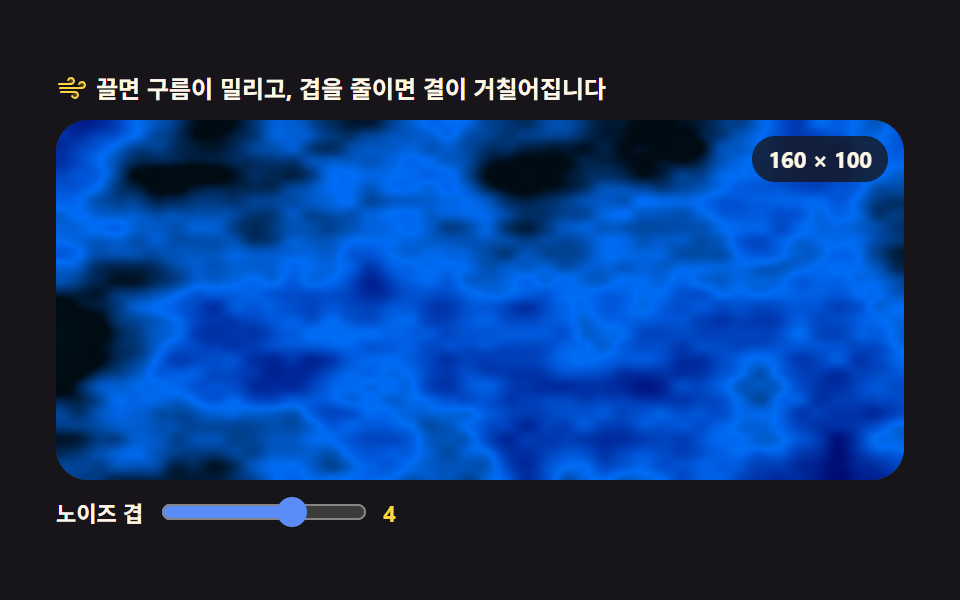
160×100 の小さな ImageData に値ノイズを四層重ねて画素を直接書き込み、そのバッファを拡大して画面を埋めます。シェーダーなしでシェーダーらしく見えるのは、解像度をわざと落としているからです。
使いどころセクションの間を埋める流れる雲の背景
createImageDataimageSmoothingEnableddrawImage
<main class="stage">
<div class="ns" id="ns">
<p class="ns__hint">
<svg class="ns__ico" viewBox="0 0 256 256" aria-hidden="true"><g fill="currentColor"><path d="M120 96a24 24 0 1 1 24-24a24 24 0 0 1-24 24m88-16a24 24 0 1 0 24 24a24 24 0 0 0-24-24m-56 80a24 24 0 1 0 24 24a24 24 0 0 0-24-24" opacity=".2"/><path d="M184 184a32 32 0 0 1-32 32c-13.7 0-26.95-8.93-31.5-21.22a8 8 0 0 1 15-5.56C137.74 195.27 145 200 152 200a16 16 0 0 0 0-32H40a8 8 0 0 1 0-16h112a32 32 0 0 1 32 32m-64-80a32 32 0 0 0 0-64c-13.7 0-26.95 8.93-31.5 21.22a8 8 0 0 0 15 5.56C105.74 60.73 113 56 120 56a16 16 0 0 1 0 32H24a8 8 0 0 0 0 16Zm88-32c-13.7 0-26.95 8.93-31.5 21.22a8 8 0 0 0 15 5.56C193.74 92.73 201 88 208 88a16 16 0 0 1 0 32H32a8 8 0 0 0 0 16h176a32 32 0 0 0 0-64"/></g></svg>
<span>ドラッグすると雲が流れ、層を減らすと粒が粗くなります</span>
</p>
<div class="ns__field" id="field" role="application" aria-label="ノイズの実験台" tabindex="0">
<canvas class="ns__cv" id="cv"></canvas>
<b class="ns__badge" aria-hidden="true">160 × 100</b>
</div>
<div class="ns__bar">
<label class="ns__dial">ノイズの層
<input type="range" id="oct" min="2" max="5" step="1" value="4" aria-label="ノイズの層">
<b class="ns__val" id="octVal">4</b>
</label>
</div>
</div>
</main>@use "../../../../site/static/demo-tokens" as *;
// 노이즈 쉐이더 재현 — 움직임은 전부 캔버스 rAF 루프 안에 있다. CSS 는 무대·판·다이얼만 맡는다.
// @keyframes 를 두지 않는다 — CSS 애니메이션이 0개라야 렌더러가 시계를 고정하지 않고 실시간 24장을 찍는다.
// 구름 색은 토큰 네 단계를 커스텀 프로퍼티로 내려보내고, JS 가 그걸 256칸 표로 펴서 픽셀에 꽂는다.
$duration: $dur-loop;
$easing: $ease-spring;
$color: $subject-blue;
@include stage($stage-ink);
.ns {
--n0: #{$stage-ink};
--n1: #{mix($color, $stage-ink, 44%)};
--n2: #{$color};
--n3: #{mix($subject-cream, $color, 68%)};
display: flex; flex-direction: column; gap: $sp-2;
width: 100%; max-width: 424px;
}
.ns__hint {
display: flex; align-items: center; gap: $sp-1; margin: 0;
font-weight: 700; font-size: clamp(10px, 2.8vw, 12px); line-height: 1.35;
color: $subject-cream;
}
.ns__ico { width: 16px; height: 16px; flex: 0 0 auto; color: $stage-yellow; }
.ns__field {
position: relative; height: 180px;
border-radius: $r-card; overflow: hidden;
background: $stage-ink;
box-shadow: inset 0 0 0 1px rgba($subject-cream, .14);
cursor: grab; touch-action: none;
}
.ns__field:active { cursor: grabbing; }
.ns__field:focus-visible { outline: 2px solid $stage-yellow; outline-offset: 2px; }
.ns__cv { display: block; width: 100%; height: 100%; }
// 버퍼 해상도를 화면에 적어 둔다 — 소스의 NW·NH 와 같은 값이고, 이 데모의 요점이다
.ns__badge {
position: absolute; right: $sp-2; top: $sp-2;
padding: $sp-1 $sp-2; border-radius: $r-pill;
background: rgba($subject-ink, .78);
color: $subject-cream; font-weight: 700; font-size: 11px;
}
.ns__bar { display: flex; align-items: center; gap: $sp-3; }
.ns__dial {
display: flex; align-items: center; gap: $sp-2;
font-weight: 700; font-size: 11px; color: $subject-cream;
}
.ns__dial input { width: 104px; margin: 0; accent-color: $subject-blue-light; }
.ns__val { color: $stage-yellow; font-size: 11px; font-weight: 700; }
@media (max-width: 340px) {
.ns { gap: $sp-1; }
.ns__field { height: 100px; }
.ns__badge { font-size: 10px; padding: 0 $sp-1; }
.ns__dial { gap: $sp-1; }
.ns__dial input { width: 60px; }
.ns__hint { font-size: 10px; }
}
// reduce — 루프가 아예 안 돌므로 끄고 말고 할 애니메이션이 없다.
// 구름이 멈춰 선 한 장이 그대로 남으므로 끌 수 있다는 커서 신호만 거둔다.
@media (prefers-reduced-motion: reduce) {
.ns.is-still .ns__field { cursor: default !important; }
.ns.is-still .ns__field:active { cursor: default !important; }
}html, body {
margin: 0;
overflow: hidden;
}
.stage {
box-sizing: border-box;
min-height: 100vh;
display: grid;
place-items: center;
margin: 0;
background: #17141a;
font-family: -apple-system, "Segoe UI", "Noto Sans KR", sans-serif;
padding: clamp(8px, 4vw, 24px);
}
.ns {
--n0: #17141a;
--n1: rgb(13.1607843137%, 23.2%, 48.1568627451%);
--n2: #2f6df6;
--n3: rgb(73.8980392157%, 79.5450980392%, 92.2039215686%);
display: flex;
flex-direction: column;
gap: 8px;
width: 100%;
max-width: 424px;
}
.ns__hint {
display: flex;
align-items: center;
gap: 4px;
margin: 0;
font-weight: 700;
font-size: clamp(10px, 2.8vw, 12px);
line-height: 1.35;
color: #fff7e6;
}
.ns__ico {
width: 16px;
height: 16px;
flex: 0 0 auto;
color: #ffd23f;
}
.ns__field {
position: relative;
height: 180px;
border-radius: 16px;
overflow: hidden;
background: #17141a;
box-shadow: inset 0 0 0 1px rgba(255, 247, 230, 0.14);
cursor: grab;
touch-action: none;
}
.ns__field:active {
cursor: grabbing;
}
.ns__field:focus-visible {
outline: 2px solid #ffd23f;
outline-offset: 2px;
}
.ns__cv {
display: block;
width: 100%;
height: 100%;
}
.ns__badge {
position: absolute;
right: 8px;
top: 8px;
padding: 4px 8px;
border-radius: 999px;
background: rgba(23, 20, 26, 0.78);
color: #fff7e6;
font-weight: 700;
font-size: 11px;
}
.ns__bar {
display: flex;
align-items: center;
gap: 12px;
}
.ns__dial {
display: flex;
align-items: center;
gap: 8px;
font-weight: 700;
font-size: 11px;
color: #fff7e6;
}
.ns__dial input {
width: 104px;
margin: 0;
accent-color: #5b8cf8;
}
.ns__val {
color: #ffd23f;
font-size: 11px;
font-weight: 700;
}
@media (max-width: 340px) {
.ns {
gap: 4px;
}
.ns__field {
height: 100px;
}
.ns__badge {
font-size: 10px;
padding: 0 4px;
}
.ns__dial {
gap: 4px;
}
.ns__dial input {
width: 60px;
}
.ns__hint {
font-size: 10px;
}
}
@media (prefers-reduced-motion: reduce) {
.ns.is-still .ns__field {
cursor: default !important;
}
.ns.is-still .ns__field:active {
cursor: default !important;
}
}// 노이즈 쉐이더 재현 — 셰이더가 아니라 160x100 짜리 ImageData 에 값 노이즈를 픽셀 단위로 써 넣고,
// 그 작은 버퍼를 imageSmoothingEnabled 로 늘려 480x300 을 채운다.
// 셰이더처럼 보이는 까닭은 계산이 대단해서가 아니라 **해상도를 일부러 낮췄기** 때문이다 —
// 16,000 픽셀만 계산하고 나머지는 브라우저의 확대 보간이 메운다.
var root = document.getElementById('ns');
var field = document.getElementById('field');
var cv = document.getElementById('cv');
var ctx = cv.getContext('2d');
var octIn = document.getElementById('oct');
var octOut = document.getElementById('octVal');
var NW = 160, NH = 100; // 노이즈 버퍼 해상도 — 화면이 커져도 이 값은 그대로다
var small = document.createElement('canvas');
small.width = NW; small.height = NH;
var sctx = small.getContext('2d');
var buf = sctx.createImageData(NW, NH); // 한 번만 만들어 두고 프레임마다 같은 배열을 덮어쓴다
var px = buf.data;
// ── 값 노이즈 — 격자 꼭짓점마다 난수를 하나 두고 그 사이를 부드럽게 잇는다 ───────────
// 그라디언트 노이즈(펄린)보다 단순하고, 네 겹만 쌓아도 구름으로 읽힌다.
var PERM = new Uint8Array(512);
var VAL = new Float32Array(256);
(function seed() {
var p = [], i, j, t;
for (i = 0; i < 256; i++) p[i] = i;
for (i = 255; i > 0; i--) { j = (Math.random() * (i + 1)) | 0; t = p[i]; p[i] = p[j]; p[j] = t; }
for (i = 0; i < 512; i++) PERM[i] = p[i & 255];
for (i = 0; i < 256; i++) VAL[i] = Math.random();
})();
function fade(t) { return t * t * (3 - 2 * t); } // 스무스스텝 — 격자 경계에서 각이 안 지게
function vnoise(x, y, z) {
var xi = Math.floor(x), yi = Math.floor(y), zi = Math.floor(z);
var xf = x - xi, yf = y - yi, zf = z - zi;
xi &= 255; yi &= 255; zi &= 255;
var u = fade(xf), v = fade(yf), w = fade(zf);
var a = PERM[xi] + yi, b = PERM[xi + 1] + yi;
var aa = PERM[a] + zi, ab = PERM[a + 1] + zi;
var ba = PERM[b] + zi, bb = PERM[b + 1] + zi;
var c000 = VAL[PERM[aa]], c100 = VAL[PERM[ba]];
var c010 = VAL[PERM[ab]], c110 = VAL[PERM[bb]];
var c001 = VAL[PERM[aa + 1]], c101 = VAL[PERM[ba + 1]];
var c011 = VAL[PERM[ab + 1]], c111 = VAL[PERM[bb + 1]];
var x00 = c000 + (c100 - c000) * u, x10 = c010 + (c110 - c010) * u;
var x01 = c001 + (c101 - c001) * u, x11 = c011 + (c111 - c011) * u;
var y0 = x00 + (x10 - x00) * v, y1 = x01 + (x11 - x01) * v;
return y0 + (y1 - y0) * w;
}
// fbm — 같은 노이즈를 주파수 2배·진폭 절반으로 겹쳐 쌓는다. 겹 수가 곧 결의 고움이다
function fbm(x, y, z, oct) {
var sum = 0, amp = 0.5, norm = 0, f = 1;
for (var i = 0; i < oct; i++) {
sum += vnoise(x * f, y * f, z * f) * amp;
norm += amp;
amp *= 0.5;
f *= 2;
}
return sum / norm;
}
// ── 색 — 토큰 네 단계를 256칸 표로 펴 두고 노이즈 값으로 찾아 쓴다 ─────────────────
var css = getComputedStyle(root);
function rgbOf(name) {
var v = css.getPropertyValue(name).trim().replace('#', '');
if (v.length === 3) v = v.charAt(0) + v.charAt(0) + v.charAt(1) + v.charAt(1) + v.charAt(2) + v.charAt(2);
return [parseInt(v.slice(0, 2), 16), parseInt(v.slice(2, 4), 16), parseInt(v.slice(4, 6), 16)];
}
var STOPS = [rgbOf('--n0'), rgbOf('--n1'), rgbOf('--n2'), rgbOf('--n3')];
var LUT = new Uint8Array(256 * 3);
for (var q = 0; q < 256; q++) {
var t = q / 255 * (STOPS.length - 1);
var k = Math.min(STOPS.length - 2, Math.floor(t));
var f2 = t - k;
for (var c = 0; c < 3; c++) LUT[q * 3 + c] = STOPS[k][c] + (STOPS[k + 1][c] - STOPS[k][c]) * f2;
}
var SCALE = 0.034; // 격자 간격 — 작을수록 구름 덩어리가 커진다. 0.05 에서는 결이
// 스틸컷에서 거칠게 보였다(실측) — 낮춰 덩어리를 키운다
var FLOW = 0.24; // 시간축이 흐르는 속도. 시간은 노이즈의 셋째 차원이다
var reduce = window.matchMedia('(prefers-reduced-motion: reduce)').matches;
var W = 0, H = 0, dpr = 1;
var octaves = 4;
var panX = 0, panY = 0, aimX = 0, aimY = 0;
var raf = 0;
function fit() {
var r = field.getBoundingClientRect();
dpr = window.devicePixelRatio || 1;
W = r.width; H = r.height;
cv.width = Math.round(W * dpr);
cv.height = Math.round(H * dpr);
ctx.setTransform(dpr, 0, 0, dpr, 0, 0);
}
function paint(sec) {
panX += (aimX - panX) * 0.14;
panY += (aimY - panY) * 0.14;
var z = sec * FLOW;
var i = 0;
for (var y = 0; y < NH; y++) {
var ny = (y + panY) * SCALE;
for (var x = 0; x < NW; x++) {
var n = fbm((x + panX) * SCALE, ny, z, octaves);
n = n * 1.5 - 0.25; // 값 노이즈는 가운데로 몰린다 — 대비를 한 번 펴 준다
if (n < 0) n = 0; else if (n > 1) n = 1;
var q2 = (n * 255) | 0;
px[i] = LUT[q2 * 3];
px[i + 1] = LUT[q2 * 3 + 1];
px[i + 2] = LUT[q2 * 3 + 2];
px[i + 3] = 255;
i += 4;
}
}
sctx.putImageData(buf, 0, 0);
// 확대 보간을 켜 둔 채로 늘린다 — 이 한 줄이 픽셀 덩어리를 구름으로 바꾼다
ctx.imageSmoothingEnabled = true;
ctx.imageSmoothingQuality = 'high';
ctx.drawImage(small, 0, 0, NW, NH, 0, 0, W, H);
}
function frame(now) {
paint(now / 1000);
raf = requestAnimationFrame(frame);
}
function setOct(v) {
octaves = Number(v);
octOut.textContent = String(octaves);
if (reduce) paint(0);
}
octIn.addEventListener('input', function () { setOct(octIn.value); });
field.addEventListener('pointermove', function (e) {
var r = field.getBoundingClientRect();
aimX = ((e.clientX - r.left) / r.width - 0.5) * 190;
aimY = ((e.clientY - r.top) / r.height - 0.5) * 120;
if (reduce) paint(0);
});
field.addEventListener('pointerleave', function () { aimX = 0; aimY = 0; });
field.addEventListener('keydown', function (e) {
var d = { ArrowLeft: [-24, 0], ArrowRight: [24, 0], ArrowUp: [0, -24], ArrowDown: [0, 24] }[e.key];
if (!d) return;
e.preventDefault();
aimX = Math.max(-190, Math.min(190, aimX + d[0]));
aimY = Math.max(-120, Math.min(120, aimY + d[1]));
if (reduce) paint(0);
});
window.addEventListener('resize', function () { fit(); if (reduce) paint(0); });
fit();
setOct(octIn.value);
if (reduce) {
// reduce — 루프를 시작하지 않고 구름이 멈춰 선 한 장만 그린다(빈 화면이 아니다)
root.classList.add('is-still');
panX = 0; panY = 0;
paint(0);
} else {
raf = requestAnimationFrame(frame);
}// NoiseShader2D — vanilla 판(run/077/demo/03-fx-noise-shader-2d/index.html) 의 React 포트.
// 160x100 짜리 ImageData 에 값 노이즈 4옥타브(fbm) 를 픽셀 단위로 써 넣고
// imageSmoothingEnabled 를 켠 채 drawImage 로 늘려 화면을 채운다.
// 움직임은 캔버스 rAF 루프가 전부 그리므로 @keyframes 가 없다 — props 는 CSS 변수로 내려간다.
import { useEffect, useRef, useState } from "react";
import type { CSSProperties } from "react";
import styles from "./NoiseShader2D.module.scss";
export type NoiseShader2DProps = {
duration?: string;
easing?: string;
color?: string;
};
type Vars = CSSProperties & { "--duration"?: string; "--easing"?: string; "--color"?: string };
type Box<T> = { current: T };
// React 이벤트 제네릭이 없는 환경이라 필요한 것만 로컬로 선언한다
type KeyEvt = { key: string; preventDefault(): void };
type PtrEvt = { clientX: number; clientY: number };
type InputEvt = { target: { value: string } };
const NW = 160, NH = 100; // 노이즈 버퍼 해상도 — 화면이 커져도 이 값은 그대로다
const SCALE = 0.034; // 격자 간격 — 작을수록 구름 덩어리가 커진다
const FLOW = 0.24; // 시간축이 흐르는 속도. 시간은 노이즈의 셋째 차원이다
const FIELD_LABEL = "노이즈 실험판";
function fade(t: number): number {
return t * t * (3 - 2 * t); // 스무스스텝 — 격자 경계에서 각이 안 지게
}
// ── 값 노이즈 — 격자 꼭짓점마다 난수를 하나 두고 그 사이를 부드럽게 잇는다 ───────────
// 그라디언트 노이즈(펄린)보다 단순하고, 네 겹만 쌓아도 구름으로 읽힌다.
class ValueNoise {
perm: Uint8Array;
val: Float32Array;
constructor() {
const p: number[] = [];
for (let i = 0; i < 256; i++) p[i] = i;
for (let i = 255; i > 0; i--) {
const j = (Math.random() * (i + 1)) | 0;
const t = p[i]; p[i] = p[j]; p[j] = t;
}
this.perm = new Uint8Array(512);
for (let i = 0; i < 512; i++) this.perm[i] = p[i & 255];
this.val = new Float32Array(256);
for (let i = 0; i < 256; i++) this.val[i] = Math.random();
}
at(x: number, y: number, z: number): number {
const xi = Math.floor(x), yi = Math.floor(y), zi = Math.floor(z);
const xf = x - xi, yf = y - yi, zf = z - zi;
const X = xi & 255, Y = yi & 255, Z = zi & 255;
const u = fade(xf), v = fade(yf), w = fade(zf);
const a = this.perm[X] + Y, b = this.perm[X + 1] + Y;
const aa = this.perm[a] + Z, ab = this.perm[a + 1] + Z;
const ba = this.perm[b] + Z, bb = this.perm[b + 1] + Z;
const c000 = this.val[this.perm[aa]], c100 = this.val[this.perm[ba]];
const c010 = this.val[this.perm[ab]], c110 = this.val[this.perm[bb]];
const c001 = this.val[this.perm[aa + 1]], c101 = this.val[this.perm[ba + 1]];
const c011 = this.val[this.perm[ab + 1]], c111 = this.val[this.perm[bb + 1]];
const x00 = c000 + (c100 - c000) * u, x10 = c010 + (c110 - c010) * u;
const x01 = c001 + (c101 - c001) * u, x11 = c011 + (c111 - c011) * u;
const y0 = x00 + (x10 - x00) * v, y1 = x01 + (x11 - x01) * v;
return y0 + (y1 - y0) * w;
}
}
// fbm — 같은 노이즈를 주파수 2배·진폭 절반으로 겹쳐 쌓는다. 겹 수이 곧 결의 고움이다
function fbm(n: ValueNoise, x: number, y: number, z: number, oct: number): number {
let sum = 0, amp = 0.5, norm = 0, f = 1;
for (let i = 0; i < oct; i++) {
sum += n.at(x * f, y * f, z * f) * amp;
norm += amp;
amp *= 0.5;
f *= 2;
}
return sum / norm;
}
// 토큰 네 단계를 256칸 표로 편다 — 프레임마다 색을 다시 섞지 않게 하기 위해서다
function buildLut(stops: number[][]): Uint8Array {
const lut = new Uint8Array(256 * 3);
for (let q = 0; q < 256; q++) {
const t = q / 255 * (stops.length - 1);
const k = Math.min(stops.length - 2, Math.floor(t));
const f = t - k;
for (let c = 0; c < 3; c++) lut[q * 3 + c] = stops[k][c] + (stops[k + 1][c] - stops[k][c]) * f;
}
return lut;
}
export default function NoiseShader2D({
duration = "2s", // vanilla $duration: $dur-loop
easing = "cubic-bezier(.2, .8, .2, 1)", // vanilla $easing: $ease-spring
color = "#2f6df6", // vanilla $color: $subject-blue
}: NoiseShader2DProps) {
const rootRef = useRef<HTMLDivElement | null>(null);
const fieldRef = useRef<HTMLDivElement | null>(null);
const cvRef = useRef<HTMLCanvasElement | null>(null);
const ctxRef = useRef<CanvasRenderingContext2D | null>(null);
const smallRef = useRef<HTMLCanvasElement | null>(null);
const sctxRef = useRef<CanvasRenderingContext2D | null>(null);
const bufRef = useRef<ImageData | null>(null);
const noiseRef = useRef<ValueNoise | null>(null);
const lutRef = useRef<Uint8Array | null>(null);
const sizeRef = useRef({ w: 0, h: 0 }) as Box<{ w: number; h: number }>;
const panRef = useRef({ x: 0, y: 0, ax: 0, ay: 0 }) as Box<{ x: number; y: number; ax: number; ay: number }>;
const octRef = useRef(4) as Box<number>;
const rafRef = useRef(0) as Box<number>;
const [oct, setOct] = useState(4);
const [still, setStill] = useState(false);
const vars: Vars = { "--duration": duration, "--easing": easing, "--color": color };
function reduced(): boolean {
return window.matchMedia("(prefers-reduced-motion: reduce)").matches;
}
function hex3to6(v: string): string {
if (v.length === 3) return v.charAt(0) + v.charAt(0) + v.charAt(1) + v.charAt(1) + v.charAt(2) + v.charAt(2);
return v;
}
function stops(): number[][] {
const root = rootRef.current;
if (!root) return [[0, 0, 0], [255, 255, 255]];
const one = (n: string) => {
const v = hex3to6(getComputedStyle(root).getPropertyValue(n).trim().replace("#", ""));
return [parseInt(v.slice(0, 2), 16), parseInt(v.slice(2, 4), 16), parseInt(v.slice(4, 6), 16)];
};
return [one("--n0"), one("--n1"), one("--n2"), one("--n3")];
}
// 고DPI 대응 — 배킹 스토어는 devicePixelRatio 배, 그리기 좌표계는 CSS 픽셀 그대로
function fit(): void {
const field = fieldRef.current;
const cv = cvRef.current;
if (!field || !cv) return;
const r = field.getBoundingClientRect();
const dpr = window.devicePixelRatio || 1;
sizeRef.current.w = r.width;
sizeRef.current.h = r.height;
cv.width = Math.round(r.width * dpr);
cv.height = Math.round(r.height * dpr);
const ctx = ctxRef.current;
if (ctx) ctx.setTransform(dpr, 0, 0, dpr, 0, 0);
}
function paint(sec: number): void {
const ctx = ctxRef.current, sctx = sctxRef.current, n = noiseRef.current;
const buf = bufRef.current, lut = lutRef.current;
if (!ctx || !sctx || !n || !buf || !lut) return;
const W = sizeRef.current.w, H = sizeRef.current.h;
const pan = panRef.current;
pan.x += (pan.ax - pan.x) * 0.14;
pan.y += (pan.ay - pan.y) * 0.14;
const z = sec * FLOW;
const px = buf.data;
let i = 0;
for (let y = 0; y < NH; y++) {
const ny = (y + pan.y) * SCALE;
for (let x = 0; x < NW; x++) {
let v = fbm(n, (x + pan.x) * SCALE, ny, z, octRef.current);
v = v * 1.5 - 0.25; // 값 노이즈는 가운데로 몰린다 — 대비를 한 번 펴 준다
if (v < 0) v = 0; else if (v > 1) v = 1;
const q = (v * 255) | 0;
px[i] = lut[q * 3];
px[i + 1] = lut[q * 3 + 1];
px[i + 2] = lut[q * 3 + 2];
px[i + 3] = 255;
i += 4;
}
}
sctx.putImageData(buf, 0, 0);
// 확대 보간을 켜 둔 채로 늘린다 — 이 한 줄이 픽셀 덩어리를 구름으로 바꾼다
ctx.imageSmoothingEnabled = true;
ctx.imageSmoothingQuality = "high";
ctx.drawImage(sctx.canvas, 0, 0, NW, NH, 0, 0, W, H);
}
function frame(now: number): void {
paint(now / 1000);
rafRef.current = requestAnimationFrame(frame);
}
function setOctValue(v: number): void {
octRef.current = v;
setOct(v);
if (reduced()) paint(0);
}
function onInput(e: InputEvt): void {
setOctValue(Number(e.target.value));
}
function onMove(e: PtrEvt): void {
const field = fieldRef.current;
if (!field) return;
const r = field.getBoundingClientRect();
const pan = panRef.current;
pan.ax = ((e.clientX - r.left) / r.width - 0.5) * 190;
pan.ay = ((e.clientY - r.top) / r.height - 0.5) * 120;
if (reduced()) paint(0);
}
function onLeave(): void {
panRef.current.ax = 0;
panRef.current.ay = 0;
}
function onKey(e: KeyEvt): void {
const pan = panRef.current;
const map: Record<string, number[]> = {
ArrowLeft: [-24, 0], ArrowRight: [24, 0], ArrowUp: [0, -24], ArrowDown: [0, 24],
};
const d = map[e.key];
if (!d) return;
e.preventDefault();
pan.ax = Math.max(-190, Math.min(190, pan.ax + d[0]));
pan.ay = Math.max(-120, Math.min(120, pan.ay + d[1]));
if (reduced()) paint(0);
}
function onResize(): void {
fit();
if (reduced()) paint(0);
}
useEffect(() => {
const cv = cvRef.current;
if (!cv) return;
ctxRef.current = cv.getContext("2d");
if (!ctxRef.current) return;
const small = document.createElement("canvas");
small.width = NW;
small.height = NH;
smallRef.current = small;
sctxRef.current = small.getContext("2d");
if (!sctxRef.current) return;
bufRef.current = sctxRef.current.createImageData(NW, NH); // 한 번만 만들어 두고 프레임마다 같은 배열을 덮어쓴다
noiseRef.current = new ValueNoise();
lutRef.current = buildLut(stops());
fit();
window.addEventListener("resize", onResize);
if (reduced()) {
// reduce — 루프를 시작하지 않고 구름이 멈춰 선 한 장만 그린다
setStill(true);
panRef.current.x = 0;
panRef.current.y = 0;
paint(0);
} else {
rafRef.current = requestAnimationFrame(frame);
}
return () => {
window.removeEventListener("resize", onResize);
cancelAnimationFrame(rafRef.current);
};
}, []);
const cls = [styles.root, still ? styles.isStill : ""].filter(Boolean).join(" ");
return (
<main className={styles.stage}>
<div className={cls} ref={rootRef} style={vars}>
<p className={styles.hint}>
<svg className={styles.ico} viewBox="0 0 256 256" aria-hidden="true"><g fill="currentColor"><path d="M120 96a24 24 0 1 1 24-24a24 24 0 0 1-24 24m88-16a24 24 0 1 0 24 24a24 24 0 0 0-24-24m-56 80a24 24 0 1 0 24 24a24 24 0 0 0-24-24" opacity=".2"/><path d="M184 184a32 32 0 0 1-32 32c-13.7 0-26.95-8.93-31.5-21.22a8 8 0 0 1 15-5.56C137.74 195.27 145 200 152 200a16 16 0 0 0 0-32H40a8 8 0 0 1 0-16h112a32 32 0 0 1 32 32m-64-80a32 32 0 0 0 0-64c-13.7 0-26.95 8.93-31.5 21.22a8 8 0 0 0 15 5.56C105.74 60.73 113 56 120 56a16 16 0 0 1 0 32H24a8 8 0 0 0 0 16Zm88-32c-13.7 0-26.95 8.93-31.5 21.22a8 8 0 0 0 15 5.56C193.74 92.73 201 88 208 88a16 16 0 0 1 0 32H32a8 8 0 0 0 0 16h176a32 32 0 0 0 0-64"/></g></svg>
<span>끌면 구름이 밀리고, 겹을 줄이면 결이 거칠어집니다</span>
</p>
<div
className={styles.field}
ref={fieldRef}
role="application"
aria-label={FIELD_LABEL}
tabIndex={0}
onPointerMove={onMove}
onPointerLeave={onLeave}
onKeyDown={onKey}
>
<canvas className={styles.cv} ref={cvRef}></canvas>
<b className={styles.badge} aria-hidden="true">160 × 100</b>
</div>
<div className={styles.bar}>
<label className={styles.dial}>노이즈 겹
<input type="range" min={2} max={5} step={1} value={oct} aria-label="노이즈 겹" onChange={onInput} />
<b className={styles.val}>{oct}</b>
</label>
</div>
</div>
</main>
);
}03 ノイズシェーダーの再現 — 計測 累積面積 44.889% · 動いたフレーム 23/23GODRICH オリジナル · SCSS と React は zip に同梱 · html5 canvas アニメーション9種 — 水滴とブラックホール
このデモが属する記事
 html5 canvas アニメーション9種 — 水滴とブラックホールhtml5 canvas アニメーションとは、写真のレタッチなしで画素そのものを動かす特殊効果です。水滴が下の文字を膨らませ、ブラックホールが画面全体を飲み込む。この9種を Three.js なし、canvas ひとつで作りました。下の格子 この記事のデモをすべて見る