07流体の波紋の表面
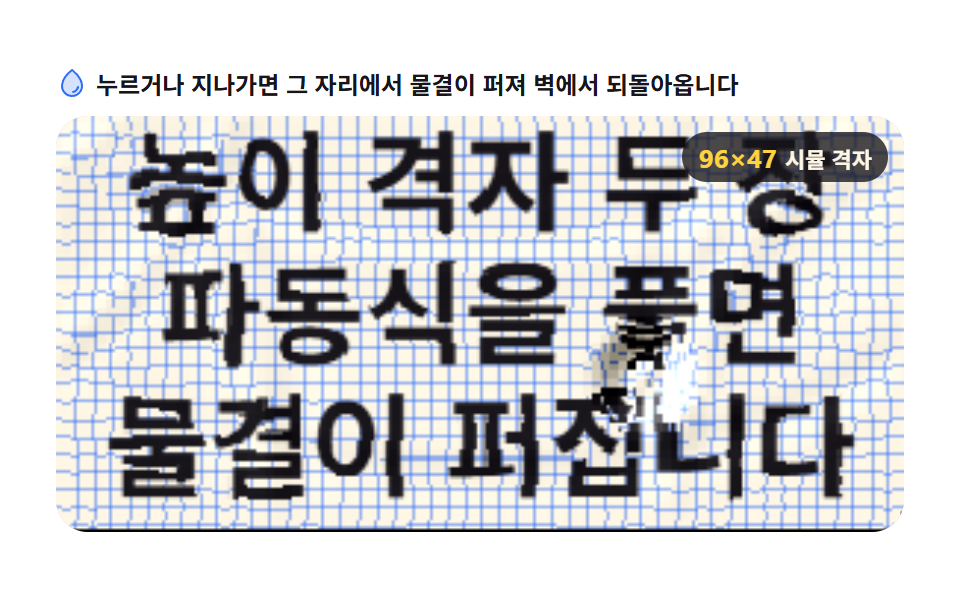
高さの格子を二枚交互に使って波動式を解き、隣のマスとの高さの差を屈折角に変えて下の絵の画素を引き寄せます。押した場所から丸い波紋が広がり、壁に当たると返ってきます。
使いどころ触れると反応するバナーの水面
Float32ArraygetImageDataputImageData
<main class="stage">
<div class="fs" id="fs">
  <p class="fs__hint">
    <svg class="fs__ico" viewBox="0 0 256 256" aria-hidden="true"><g fill="currentColor"><path d="M208 144a80 80 0 0 1-160 0c0-72 80-128 80-128s80 56 80 128" opacity=".2"/><path d="M174 47.75a254.2 254.2 0 0 0-41.45-38.3a8 8 0 0 0-9.18 0A254.2 254.2 0 0 0 82 47.75C54.51 79.32 40 112.6 40 144a88 88 0 0 0 176 0c0-31.4-14.51-64.68-42-96.25M128 216a72.08 72.08 0 0 1-72-72c0-57.23 55.47-105 72-118c16.53 13 72 60.75 72 118a72.08 72.08 0 0 1-72 72m55.89-62.66a57.6 57.6 0 0 1-46.56 46.55a9 9 0 0 1-1.33.11a8 8 0 0 1-1.32-15.89c16.57-2.79 30.63-16.85 33.44-33.45a8 8 0 0 1 15.78 2.68Z"/></g></svg>
    <span>押すか、なぞるとその場から波紋が広がり、壁に当たると戻ってきます</span>
  </p>
  <div class="fs__field" id="field" role="application" aria-label="波紋の実験台" tabindex="0">
    <canvas class="fs__cv" id="cv"></canvas>
    <b class="fs__badge" aria-hidden="true"><span class="fs__badgeNum" id="gridVal">96×47</span><span class="fs__badgeUnit">計算格子</span></b>
  </div>
</div>
</main>
@use "../../../../site/static/demo-tokens" as *;
// 유체 물결 표면 — 움직임은 전부 캔버스 rAF 루프 안에 있다. CSS 는 무대·판·배지만 맡는다.
// @keyframes 를 두지 않는다 — CSS 애니메이션이 0개여야 렌더러가 실시간으로 24장을 찍는다(01·05 항목과 같은 방식).
// 캔버스가 쓰는 색은 커스텀 프로퍼티로 내려보낸다 — 값은 토큰 한 곳에만 둔다.
$duration: $dur-loop;
$easing: $ease-spring;
$color: $subject-blue;
@include stage($stage-paper);
.fs {
--paper: #{$subject-cream};
--ink: #{$subject-ink};
--line: #{$color};
display: flex; flex-direction: column; gap: $sp-2;
width: 100%; max-width: 424px;
}
.fs__hint {
display: flex; align-items: center; gap: $sp-1; margin: 0;
font-weight: 700; font-size: clamp(10px, 2.8vw, 12px); line-height: 1.35;
color: $subject-ink;
}
.fs__ico { width: 16px; height: 16px; flex: 0 0 auto; color: $color; }
.fs__field {
position: relative; height: 208px;
border-radius: $r-card; overflow: hidden;
background: $subject-cream;
box-shadow: inset 0 0 0 1px rgba($subject-ink, .16);
cursor: crosshair; touch-action: none;
}
.fs__field:focus-visible { outline: 2px solid $color; outline-offset: 2px; }
.fs__cv { display: block; width: 100%; height: 100%; }
// 시뮬 격자 크기를 화면에도 적어 둔다 — JS 의 COLS·ROWS 와 같은 값으로 fit() 이 갱신한다
.fs__badge {
position: absolute; right: $sp-2; top: $sp-2;
display: flex; align-items: baseline; gap: $sp-1;
padding: $sp-1 $sp-2; border-radius: $r-pill;
background: rgba($subject-ink, .78);
color: $subject-cream; font-weight: 700; font-size: 11px;
}
.fs__badgeNum { font-size: 13px; color: $stage-yellow; }
.fs__badgeUnit { font-weight: 700; }
@media (max-width: 340px) {
.fs { gap: $sp-1; }
.fs__field { height: 124px; }
.fs__badge { font-size: 10px; padding: 0 $sp-1; }
.fs__badgeNum { font-size: 11px; }
}
// reduce — 루프가 아예 안 돈다. 물결이 살아 있는 정적 한 장이 남으므로
// 끌 수 있다는 신호(커서)만 거둔다.
@media (prefers-reduced-motion: reduce) {
.fs.is-still .fs__field { cursor: default !important; }
.fs.is-still .fs__badge { opacity: .92 !important; }
}html, body {
margin: 0;
overflow: hidden;
}
.stage {
box-sizing: border-box;
min-height: 100vh;
display: grid;
place-items: center;
margin: 0;
background: #ffffff;
font-family: -apple-system, "Segoe UI", "Noto Sans KR", sans-serif;
padding: clamp(8px, 4vw, 24px);
}
.fs {
--paper: #fff7e6;
--ink: #17141a;
--line: #2f6df6;
display: flex;
flex-direction: column;
gap: 8px;
width: 100%;
max-width: 424px;
}
.fs__hint {
display: flex;
align-items: center;
gap: 4px;
margin: 0;
font-weight: 700;
font-size: clamp(10px, 2.8vw, 12px);
line-height: 1.35;
color: #17141a;
}
.fs__ico {
width: 16px;
height: 16px;
flex: 0 0 auto;
color: #2f6df6;
}
.fs__field {
position: relative;
height: 208px;
border-radius: 16px;
overflow: hidden;
background: #fff7e6;
box-shadow: inset 0 0 0 1px rgba(23, 20, 26, 0.16);
cursor: crosshair;
touch-action: none;
}
.fs__field:focus-visible {
outline: 2px solid #2f6df6;
outline-offset: 2px;
}
.fs__cv {
display: block;
width: 100%;
height: 100%;
}
.fs__badge {
position: absolute;
right: 8px;
top: 8px;
display: flex;
align-items: baseline;
gap: 4px;
padding: 4px 8px;
border-radius: 999px;
background: rgba(23, 20, 26, 0.78);
color: #fff7e6;
font-weight: 700;
font-size: 11px;
}
.fs__badgeNum {
font-size: 13px;
color: #ffd23f;
}
.fs__badgeUnit {
font-weight: 700;
}
@media (max-width: 340px) {
.fs {
gap: 4px;
}
.fs__field {
height: 124px;
}
.fs__badge {
font-size: 10px;
padding: 0 4px;
}
.fs__badgeNum {
font-size: 11px;
}
}
@media (prefers-reduced-motion: reduce) {
.fs.is-still .fs__field {
cursor: default !important;
}
.fs.is-still .fs__badge {
opacity: 0.92 !important;
}
}// 유체 물결 표면 — 高さの格子を二枚(curr·prev)을 번갈아 쓰며 파동 방정식을 푼다.
// next = (이웃 네 칸의 합) × 0.5 − prev, 다시 감쇠를 곱한다. 포인터를 누르거나 지나가면
// 그 자리 높이를 올려 동그란 물결이 퍼지고, 가장자리 칸을 0 으로 고정해 둔 벽에서 반사된다.
// 화면은 밑그림(격자+글자)의 ImageData 를 떠 두고, 이웃 칸의 높이差를 굴절 오프셋으로 바꿔
// 원본 픽셀을 당겨 온다 — 그림을 다시 그리는 게 아니라 어디서 읽을지만 바꾼다(01 렌즈와 같은 뿌리).
var root = document.getElementById('fs');
var field = document.getElementById('field');
var cv = document.getElementById('cv');
var gridVal = document.getElementById('gridVal');
var ctx = cv.getContext('2d');
var css = getComputedStyle(root);
function v(name) { return css.getPropertyValue(name).trim(); }
var PAPER = v('--paper'), INK = v('--ink'), LINE = v('--line');
var LINES = ['高さの格子を二枚', '波動式を解くと', '波紋が広がります'];
var FONT = '-apple-system, "Segoe UI", "Noto Sans KR", sans-serif';
var COLS = 96; // 計算格子 가로 칸 수 — 세로 칸 수는 판 폭에 맞춰 정사각 칸이 되게 잡는다.
// 칸이 직사각이면 물결이 타원으로 퍼져 물로 안 읽힌다
var DAMP = 0.986; // 감쇠 — 1 에 가까울수록 물결이 오래 살아 벽 반사가 몇 번씩 보인다
var REFR = 4; // 굴절 계수 — 높이 기울기 1 이 렌더 픽셀을 몇 칸 당기는가
var SPEC = 26; // 경면광 계수 — 기울기를 밝기 요철로도 보게 한다. 색이 고른 데서는 이 요철이 굴절의 증거다
var SUBSTEPS = 2; // 프레임마다 푸는 걸음 수 — 2 걸음이면 물결이 약 0.8초 만에 판을 건넌다
var DROP_EVERY = 0.9; // 자동 물방울 간격(초)
var TOUR = 8.1; // 낙하 위치가 리사주로 한 바퀴 도는 초(물방울 9개)
var STEP = 3; // 시뮬 한 칸이 렌더 버퍼에서 차지하는 픽셀 — 렌더 해상도를 낮춰 픽셀 루프를 가볍게 한다
var reduce = window.matchMedia('(prefers-reduced-motion: reduce)').matches;
var W = 0, H = 0, dpr = 1, ROWS = 0;
var curr = null, prev = null, swap = null; // Float32Array 高さの格子を二枚(+교환용)
var bgd = null; // 밑그림을 떠 둔 픽셀
var buf = null, bctx = null, out = null; // 굴절 결과를 담는 렌더 버퍼(시뮬 칸의 3배 해상도)
var RW = 0, RH = 0;
var auto = true, tx = 0, ty = 0, lastDrop = -1, nowSec = 0, raf = 0;
function fit() {
var r = field.getBoundingClientRect();
dpr = window.devicePixelRatio || 1;
W = r.width; H = r.height;
cv.width = Math.round(W * dpr);
cv.height = Math.round(H * dpr);
ctx.setTransform(dpr, 0, 0, dpr, 0, 0);
ROWS = Math.max(24, Math.round(COLS * H / W));
var n = COLS * ROWS;
curr = new Float32Array(n);
prev = new Float32Array(n);
tx = W * 0.5; ty = H * 0.5;
RW = COLS * STEP; RH = ROWS * STEP;
// 밑그림 — 크림 바탕 + 격자 + 잉크 글자. 가늘고 곧은 것이 굴절을 가장 잘 드러낸다
var bgc = document.createElement('canvas');
bgc.width = RW; bgc.height = RH;
var g = bgc.getContext('2d');
g.fillStyle = PAPER;
g.fillRect(0, 0, RW, RH);
g.strokeStyle = LINE;
g.globalAlpha = 0.5;
g.lineWidth = 1;
g.beginPath();
for (var x = STEP * 2; x < RW; x += STEP * 2) { g.moveTo(x + 0.5, 0); g.lineTo(x + 0.5, RH); }
for (var y = STEP * 2; y < RH; y += STEP * 2) { g.moveTo(0, y + 0.5); g.lineTo(RW, y + 0.5); }
g.stroke();
g.globalAlpha = 1;
// 글자 크기 역산 — 100px 로 재 본 뒤 가장 긴 줄이 판 폭의 88% 를 차지하게 한다(01 과 같은 방식)
g.font = '700 100px ' + FONT;
var widest = 1;
for (var k = 0; k < LINES.length; k++) widest = Math.max(widest, g.measureText(LINES[k]).width);
var size = Math.max(11, Math.round(100 * (RW * 0.88) / widest));
var rowH = Math.round(size * 1.18);
var rows = Math.max(3, Math.round(RH / rowH));
var top = (RH - (rows - 1) * rowH) * 0.5;
g.fillStyle = INK;
g.textAlign = 'center';
g.textBaseline = 'middle';
g.font = '700 ' + size + 'px ' + FONT;
for (var i = 0; i < rows; i++) g.fillText(LINES[i % LINES.length], RW * 0.5, top + i * rowH);
bgd = g.getImageData(0, 0, RW, RH).data;
buf = document.createElement('canvas');
buf.width = RW; buf.height = RH;
bctx = buf.getContext('2d');
out = bctx.createImageData(RW, RH);
gridVal.textContent = COLS + '×' + ROWS;
}
// 파동식 — 이웃 네 칸 평균의 두 배에서 직전 값을 빼면 다음 높이다. 두 장을 교환하며 푼다
function sim(steps) {
for (var s = 0; s < steps; s++) {
for (var y = 1; y < ROWS - 1; y++) {
var row = y * COLS;
for (var x = 1; x < COLS - 1; x++) {
var i = row + x;
prev[i] = ((curr[i - 1] + curr[i + 1] + curr[i - COLS] + curr[i + COLS]) * 0.5 - prev[i]) * DAMP;
}
}
swap = prev; prev = curr; curr = swap;
}
}
// 물방울 낙하 — 중심이 강하고 가장자리가 0 인 코사인 낙차로 높이를 올린다
function disturb(px, py, rad, str) {
var gx = px / W * COLS, gy = py / H * ROWS;
var x0 = Math.max(1, Math.floor(gx - rad)), x1 = Math.min(COLS - 2, Math.ceil(gx + rad));
var y0 = Math.max(1, Math.floor(gy - rad)), y1 = Math.min(ROWS - 2, Math.ceil(gy + rad));
for (var y = y0; y <= y1; y++) {
for (var x = x0; x <= x1; x++) {
var dx = x - gx, dy = y - gy;
var d = Math.sqrt(dx * dx + dy * dy);
if (d > rad) continue;
curr[y * COLS + x] += str * Math.cos(d / rad * Math.PI / 2);
}
}
}
// 굴절 렌더 — 각 렌더 픽셀에서 시뮬 칸 좌표의 높이를 네 방향으로 샘플해 기울기를 만들고,
// 그 기울기만큼 밑그림의 읽을 자리를 당겨 온다. 밝기 요철(경면광)을 함께 얹는다
function render() {
var o = out.data, b = bgd;
var kx = COLS / RW, ky = ROWS / RH;
for (var y = 0; y < RH; y++) {
var cy = Math.round(y * ky);
var rc = cy * COLS;
var ru = Math.max(0, cy - 1) * COLS;
var rd = Math.min(ROWS - 1, cy + 1) * COLS;
for (var x = 0; x < RW; x++) {
var cx = Math.round(x * kx);
var cl = Math.max(0, cx - 1), cr = Math.min(COLS - 1, cx + 1);
var hL = curr[rc + cl], hR = curr[rc + cr];
var hU = curr[ru + cx], hD = curr[rd + cx];
var sxp = x + (hL - hR) * REFR;
var syp = y + (hU - hD) * REFR;
if (sxp < 0) sxp = 0; else if (sxp > RW - 1.001) sxp = RW - 1.001;
if (syp < 0) syp = 0; else if (syp > RH - 1.001) syp = RH - 1.001;
var j = ((syp | 0) * RW + (sxp | 0)) * 4;
var i = (y * RW + x) * 4;
var spec = (hL - hR + hU - hD) * SPEC;
o[i] = b[j] + spec;
o[i + 1] = b[j + 1] + spec;
o[i + 2] = b[j + 2] + spec;
o[i + 3] = 255;
}
}
bctx.putImageData(out, 0, 0);
ctx.drawImage(buf, 0, 0, W, H);
}
function frame(now) {
nowSec = now / 1000;
if (auto) {
var k = Math.floor(nowSec / DROP_EVERY);
if (k !== lastDrop) {
lastDrop = k;
var th = (k * DROP_EVERY / TOUR % 1) * Math.PI * 2; // 낙하 위치가 리사주로 옮겨 다닌다
tx = W * (0.5 + Math.sin(th) * 0.3);
ty = H * (0.5 + Math.sin(th * 2 + 1.2) * 0.24);
disturb(tx, ty, 3, 4.5);
}
}
sim(SUBSTEPS);
render();
raf = requestAnimationFrame(frame);
}
// 정지판 — 루프 없이 파동을 몰아 전진해, 퍼져 가는 물결이 살아 있는 한 장을 담는다
function still() {
disturb(W * 0.52, H * 0.4, 3.4, 6);
sim(30);
disturb(W * 0.28, H * 0.66, 2.8, 4.5);
sim(20);
render();
}
function localXY(e) {
var r = field.getBoundingClientRect();
return [e.clientX - r.left, e.clientY - r.top];
}
field.addEventListener('pointermove', function (e) {
var p = localXY(e);
auto = false;
disturb(p[0], p[1], 2.2, 2.2); // 지나가는 자국 — 누름보다 얕게
});
field.addEventListener('pointerdown', function (e) {
var p = localXY(e);
auto = false;
tx = p[0]; ty = p[1];
disturb(p[0], p[1], 3.2, 5.5); // 누름 — 동그란 파문의 씨
field.setPointerCapture(e.pointerId);
});
field.addEventListener('pointerup', function (e) { field.releasePointerCapture(e.pointerId); });
field.addEventListener('pointerleave', function () {
auto = true;
lastDrop = Math.floor(nowSec / DROP_EVERY); // 떠나면 다음 간격 뒤 자율 낙하로 돌아간다
});
field.addEventListener('keydown', function (e) {
var d = { ArrowLeft: [-14, 0], ArrowRight: [14, 0], ArrowUp: [0, -14], ArrowDown: [0, 14] }[e.key];
if (e.key === 'Enter' || e.key === ' ') {
e.preventDefault();
auto = false;
disturb(tx, ty, 3.4, 6);
if (reduce) { sim(26); render(); }
return;
}
if (!d) { if (e.key === 'Escape') auto = true; return; }
e.preventDefault();
auto = false;
tx = Math.max(0, Math.min(W, tx + d[0]));
ty = Math.max(0, Math.min(H, ty + d[1]));
if (reduce) { disturb(tx, ty, 1.8, 1.8); sim(20); render(); }
});
window.addEventListener('resize', function () { fit(); if (reduce) still(); });
fit();
if (reduce) {
// reduce — 루프를 시작하지 않고 물결이 살아 있는 정적 한 장만 그린다(빈 화면이 아니다)
root.classList.add('is-still');
still();
} else {
raf = requestAnimationFrame(frame);
}// FluidSurface — vanilla 판(run/077/demo/07-fx-fluid-surface/index.html) 의 React 포트.
// 높이 격자 두 장(curr·prev)을 번갈아 쓰며 파동 방정식을 풀고, 이웃 칸의 높이差를
// 굴절 오프셋으로 바꿔 밑그림의 픽셀을 끌어온다.
// 움직임은 캔버스 rAF 루프가 전부 그리므로 @keyframes 가 없다 — props 는 CSS 변수로 내려간다.
import { useEffect, useRef } from "react";
import type { CSSProperties } from "react";
import styles from "./FluidSurface.module.scss";
export type FluidSurfaceProps = {
duration?: string;
easing?: string;
color?: string;
};
type Vars = CSSProperties & { "--duration"?: string; "--easing"?: string; "--color"?: string };
// useRef 는 T | null 을 돌려준다. 처음부터 값이 있고 절대 비지 않는 상자는 이렇게 좁혀 쓴다
type Box<T> = { current: T };
// React 이벤트 제네릭이 없는 환경이라 필요한 것만 로컬로 선언한다
type KeyEvt = { key: string; preventDefault(): void };
type PtrEvt = { clientX: number; clientY: number; pointerId: number };
const LINES = ["높이 격자 두 장", "파동식을 풀면", "물결이 퍼집니다"];
const FONT = '-apple-system, "Segoe UI", "Noto Sans KR", sans-serif';
const FIELD_LABEL = "물결 실험판";
const COLS = 96; // 시뮬 격자 가로 칸 수 — 세로 칸 수는 판 폭에 맞춰 정사각 칸이 되게 잡는다
const DAMP = 0.986; // 감쇠 — 1 에 가까울수록 물결이 오래 살아 벽 반사가 몇 번씩 보인다
const REFR = 4; // 굴절 계수 — 높이 기울기 1 이 렌더 픽셀을 몇 칸 당기는가
const SPEC = 26; // 경면광 계수 — 기울기를 밝기 요철로도 보게 한다
const SUBSTEPS = 2; // 프레임마다 푸는 걸음 수
const DROP_EVERY = 0.9; // 자동 물방울 간격(초)
const TOUR = 8.1; // 낙하 위치가 리사주로 한 바퀴 도는 초
const STEP = 3; // 시뮬 한 칸이 렌더 버퍼에서 차지하는 픽셀
type Sim = { curr: Float32Array; prev: Float32Array; rows: number };
type Bufs = { bgd: Uint8ClampedArray | null; buf: HTMLCanvasElement | null; bctx: CanvasRenderingContext2D | null; out: ImageData | null; rw: number; rh: number };
type Size = { w: number; h: number; dpr: number };
type Aim = { tx: number; ty: number; auto: boolean; lastDrop: number; nowSec: number };
export default function FluidSurface({
duration = "2s", // vanilla $duration: $dur-loop
easing = "cubic-bezier(.2, .8, .2, 1)", // vanilla $easing: $ease-spring
color = "#2f6df6", // vanilla $color: $subject-blue
}: FluidSurfaceProps) {
const rootRef = useRef<HTMLDivElement | null>(null);
const fieldRef = useRef<HTMLDivElement | null>(null);
const cvRef = useRef<HTMLCanvasElement | null>(null);
const gridValRef = useRef<HTMLElement | null>(null);
const ctxRef = useRef<CanvasRenderingContext2D | null>(null);
const simRef = useRef({ curr: new Float32Array(0), prev: new Float32Array(0), rows: 0 }) as Box<Sim>;
const bufRef = useRef({ bgd: null, buf: null, bctx: null, out: null, rw: 0, rh: 0 }) as Box<Bufs>;
const sizeRef = useRef({ w: 0, h: 0, dpr: 1 }) as Box<Size>;
const aimRef = useRef({ tx: 0, ty: 0, auto: true, lastDrop: -1, nowSec: 0 }) as Box<Aim>;
const rafRef = useRef(0) as Box<number>;
const vars: Vars = { "--duration": duration, "--easing": easing, "--color": color };
function reduced(): boolean {
return window.matchMedia("(prefers-reduced-motion: reduce)").matches;
}
function fit(): void {
const field = fieldRef.current;
const cv = cvRef.current;
const ctx = ctxRef.current;
if (!field || !cv || !ctx) return;
const r = field.getBoundingClientRect();
const dpr = window.devicePixelRatio || 1;
const s = sizeRef.current;
s.w = r.width; s.h = r.height; s.dpr = dpr;
cv.width = Math.round(r.width * dpr);
cv.height = Math.round(r.height * dpr);
ctx.setTransform(dpr, 0, 0, dpr, 0, 0);
const rows = Math.max(24, Math.round(COLS * r.height / r.width));
const n = COLS * rows;
simRef.current.curr = new Float32Array(n);
simRef.current.prev = new Float32Array(n);
simRef.current.rows = rows;
const a = aimRef.current;
a.tx = r.width * 0.5; a.ty = r.height * 0.5;
const rw = COLS * STEP, rh = rows * STEP;
// 밑그림 — 크림 바탕 + 격자 + 잉크 글자. 가늘고 곧은 것이 굴절을 가장 잘 드러낸다
const bgc = document.createElement("canvas");
bgc.width = rw; bgc.height = rh;
const g = bgc.getContext("2d");
if (!g) return;
const cssv = (nm: string) => getComputedStyle(rootRef.current as HTMLDivElement).getPropertyValue(nm).trim();
g.fillStyle = cssv("--paper");
g.fillRect(0, 0, rw, rh);
g.strokeStyle = cssv("--line");
g.globalAlpha = 0.5;
g.lineWidth = 1;
g.beginPath();
for (let x = STEP * 2; x < rw; x += STEP * 2) { g.moveTo(x + 0.5, 0); g.lineTo(x + 0.5, rh); }
for (let y = STEP * 2; y < rh; y += STEP * 2) { g.moveTo(0, y + 0.5); g.lineTo(rw, y + 0.5); }
g.stroke();
g.globalAlpha = 1;
// 글자 크기 역산 — 100px 로 재 본 뒤 가장 긴 줄이 판 폭의 88% 를 차지하게 한다
g.font = "700 100px " + FONT;
let widest = 1;
for (const t of LINES) widest = Math.max(widest, g.measureText(t).width);
const size = Math.max(11, Math.round(100 * (rw * 0.88) / widest));
const rowH = Math.round(size * 1.18);
const rowsN = Math.max(3, Math.round(rh / rowH));
const top = (rh - (rowsN - 1) * rowH) * 0.5;
g.fillStyle = cssv("--ink");
g.textAlign = "center";
g.textBaseline = "middle";
g.font = "700 " + size + "px " + FONT;
for (let i = 0; i < rowsN; i++) g.fillText(LINES[i % LINES.length], rw * 0.5, top + i * rowH);
const buf = document.createElement("canvas");
buf.width = rw; buf.height = rh;
const bctx = buf.getContext("2d");
if (!bctx) return;
bufRef.current = { bgd: g.getImageData(0, 0, rw, rh).data, buf, bctx, out: bctx.createImageData(rw, rh), rw, rh };
if (gridValRef.current) gridValRef.current.textContent = COLS + "×" + rows;
}
// 파동식 — 이웃 네 칸 평균의 두 배에서 직전 값을 빼면 다음 높이다. 두 장을 교환하며 푼다
function sim(steps: number): void {
const sm = simRef.current;
if (!sm.curr.length) return;
for (let s = 0; s < steps; s++) {
for (let y = 1; y < sm.rows - 1; y++) {
const row = y * COLS;
for (let x = 1; x < COLS - 1; x++) {
const i = row + x;
sm.prev[i] = ((sm.curr[i - 1] + sm.curr[i + 1] + sm.curr[i - COLS] + sm.curr[i + COLS]) * 0.5 - sm.prev[i]) * DAMP;
}
}
const swap = sm.prev; sm.prev = sm.curr; sm.curr = swap;
}
}
// 물방울 낙하 — 중심이 강하고 가장자리가 0 인 코사인 낙차로 높이를 올린다
function disturb(px: number, py: number, rad: number, str: number): void {
const sm = simRef.current;
const s = sizeRef.current;
if (!sm.curr.length || !s.w) return;
const gx = px / s.w * COLS, gy = py / s.h * sm.rows;
const x0 = Math.max(1, Math.floor(gx - rad)), x1 = Math.min(COLS - 2, Math.ceil(gx + rad));
const y0 = Math.max(1, Math.floor(gy - rad)), y1 = Math.min(sm.rows - 2, Math.ceil(gy + rad));
for (let y = y0; y <= y1; y++) {
for (let x = x0; x <= x1; x++) {
const dx = x - gx, dy = y - gy;
const d = Math.sqrt(dx * dx + dy * dy);
if (d > rad) continue;
sm.curr[y * COLS + x] += str * Math.cos(d / rad * Math.PI / 2);
}
}
}
// 굴절 렌더 — 높이 기울기만큼 밑그림의 읽을 자리를 당겨 온다. 밝기 요철(경면광)을 함께 얹는다
function render(): void {
const ctx = ctxRef.current;
const sm = simRef.current;
const bf = bufRef.current;
const s = sizeRef.current;
if (!ctx || !bf.bgd || !bf.buf || !bf.bctx || !bf.out || !bf.rw) return;
const o = bf.out.data, b = bf.bgd;
const rw = bf.rw, rh = bf.rh, rows = sm.rows;
const kx = COLS / rw, ky = rows / rh;
for (let y = 0; y < rh; y++) {
const cy = Math.round(y * ky);
const rc = cy * COLS;
const ru = Math.max(0, cy - 1) * COLS;
const rd = Math.min(rows - 1, cy + 1) * COLS;
for (let x = 0; x < rw; x++) {
const cx = Math.round(x * kx);
const cl = Math.max(0, cx - 1), cr = Math.min(COLS - 1, cx + 1);
const hL = sm.curr[rc + cl], hR = sm.curr[rc + cr];
const hU = sm.curr[ru + cx], hD = sm.curr[rd + cx];
let sxp = x + (hL - hR) * REFR;
let syp = y + (hU - hD) * REFR;
if (sxp < 0) sxp = 0; else if (sxp > rw - 1.001) sxp = rw - 1.001;
if (syp < 0) syp = 0; else if (syp > rh - 1.001) syp = rh - 1.001;
const j = ((syp | 0) * rw + (sxp | 0)) * 4;
const i = (y * rw + x) * 4;
const spec = (hL - hR + hU - hD) * SPEC;
o[i] = b[j] + spec;
o[i + 1] = b[j + 1] + spec;
o[i + 2] = b[j + 2] + spec;
o[i + 3] = 255;
}
}
bf.bctx.putImageData(bf.out, 0, 0);
ctx.drawImage(bf.buf, 0, 0, s.w, s.h);
}
function frame(now: number): void {
const s = sizeRef.current;
const a = aimRef.current;
a.nowSec = now / 1000;
if (a.auto) {
const k = Math.floor(a.nowSec / DROP_EVERY);
if (k !== a.lastDrop) {
a.lastDrop = k;
const th = (k * DROP_EVERY / TOUR % 1) * Math.PI * 2;
a.tx = s.w * (0.5 + Math.sin(th) * 0.3);
a.ty = s.h * (0.5 + Math.sin(th * 2 + 1.2) * 0.24);
disturb(a.tx, a.ty, 3, 4.5);
}
}
sim(SUBSTEPS);
render();
rafRef.current = requestAnimationFrame(frame);
}
// 정지판 — 루프 없이 파동을 몰아 전진해, 퍼져 가는 물결이 살아 있는 한 장을 담는다
function still(): void {
const s = sizeRef.current;
disturb(s.w * 0.52, s.h * 0.4, 3.4, 6);
sim(30);
disturb(s.w * 0.28, s.h * 0.66, 2.8, 4.5);
sim(20);
render();
}
function localXY(e: PtrEvt): number[] {
const field = fieldRef.current;
if (!field) return [0, 0];
const r = field.getBoundingClientRect();
return [e.clientX - r.left, e.clientY - r.top];
}
function onMove(e: PtrEvt): void {
const p = localXY(e);
aimRef.current.auto = false;
disturb(p[0], p[1], 2.2, 2.2);
}
function onDown(e: PtrEvt): void {
const p = localXY(e);
const a = aimRef.current;
a.auto = false;
a.tx = p[0]; a.ty = p[1];
disturb(p[0], p[1], 3.2, 5.5);
const field = fieldRef.current;
if (field && typeof field.setPointerCapture === "function") {
try { field.setPointerCapture(e.pointerId); } catch { /* 캡처 실패는 치명적이지 않다 */ }
}
}
function onUp(e: PtrEvt): void {
const field = fieldRef.current;
if (field && typeof field.releasePointerCapture === "function") {
try { field.releasePointerCapture(e.pointerId); } catch { /* 이미 풀려 있을 수 있다 */ }
}
}
function onLeave(): void {
const a = aimRef.current;
a.auto = true;
a.lastDrop = Math.floor(a.nowSec / DROP_EVERY);
}
function onKey(e: KeyEvt): void {
const s = sizeRef.current;
const a = aimRef.current;
const map: Record<string, number[]> = {
ArrowLeft: [-14, 0], ArrowRight: [14, 0], ArrowUp: [0, -14], ArrowDown: [0, 14],
};
if (e.key === "Enter" || e.key === " ") {
e.preventDefault();
a.auto = false;
disturb(a.tx, a.ty, 3.4, 6);
if (reduced()) { sim(26); render(); }
return;
}
const dd = map[e.key];
if (!dd) { if (e.key === "Escape") a.auto = true; return; }
e.preventDefault();
a.auto = false;
a.tx = Math.max(0, Math.min(s.w, a.tx + dd[0]));
a.ty = Math.max(0, Math.min(s.h, a.ty + dd[1]));
if (reduced()) { disturb(a.tx, a.ty, 1.8, 1.8); sim(20); render(); }
}
function onResize(): void {
fit();
if (reduced()) still();
}
useEffect(() => {
const cv = cvRef.current;
if (!cv) return;
ctxRef.current = cv.getContext("2d");
if (!ctxRef.current) return;
fit();
if (reduced()) {
// reduce — 루프를 시작하지 않고 물결이 살아 있는 정적 한 장만 그린다
rootRef.current?.classList.add("is-still");
still();
} else {
rafRef.current = requestAnimationFrame(frame);
}
window.addEventListener("resize", onResize);
return () => {
window.removeEventListener("resize", onResize);
cancelAnimationFrame(rafRef.current);
};
}, []);
return (
<main className={styles.stage}>
<div className={styles.root} ref={rootRef} style={vars}>
<p className={styles.hint}>
<svg className={styles.ico} viewBox="0 0 256 256" aria-hidden="true"><g fill="currentColor"><path d="M208 144a80 80 0 0 1-160 0c0-72 80-128 80-128s80 56 80 128" opacity=".2"/><path d="M174 47.75a254.2 254.2 0 0 0-41.45-38.3a8 8 0 0 0-9.18 0A254.2 254.2 0 0 0 82 47.75C54.51 79.32 40 112.6 40 144a88 88 0 0 0 176 0c0-31.4-14.51-64.68-42-96.25M128 216a72.08 72.08 0 0 1-72-72c0-57.23 55.47-105 72-118c16.53 13 72 60.75 72 118a72.08 72.08 0 0 1-72 72m55.89-62.66a57.6 57.6 0 0 1-46.56 46.55a9 9 0 0 1-1.33.11a8 8 0 0 1-1.32-15.89c16.57-2.79 30.63-16.85 33.44-33.45a8 8 0 0 1 15.78 2.68Z"/></g></svg>
<span>누르거나 지나가면 그 자리에서 물결이 퍼져 벽에서 되돌아옵니다</span>
</p>
<div
className={styles.field}
ref={fieldRef}
role="application"
aria-label={FIELD_LABEL}
tabIndex={0}
onPointerMove={onMove}
onPointerDown={onDown}
onPointerUp={onUp}
onPointerLeave={onLeave}
onKeyDown={onKey}
>
<canvas className={styles.cv} ref={cvRef}></canvas>
<b className={styles.badge} aria-hidden="true"><span className={styles.badgeNum} ref={gridValRef}>96×47</span><span className={styles.badgeUnit}>시뮬 격자</span></b>
</div>
</div>
</main>
);
}07 流体の波紋の表面 — 計測 累積面積 57.639% · 動いたフレーム 23/23GODRICH オリジナル · SCSS と React は zip に同梱 · html5 canvas アニメーション9種 — 水滴とブラックホール
このデモが属する記事
 html5 canvas アニメーション9種 — 水滴とブラックホールhtml5 canvas アニメーションとは、写真のレタッチなしで画素そのものを動かす特殊効果です。水滴が下の文字を膨らませ、ブラックホールが画面全体を飲み込む。この9種を Three.js なし、canvas ひとつで作りました。下の格子 この記事のデモをすべて見る